front GMC CANYON 2018 Owner's Manual
[x] Cancel search | Manufacturer: GMC, Model Year: 2018, Model line: CANYON, Model: GMC CANYON 2018Pages: 417, PDF Size: 5.47 MB
Page 8 of 417

GMC Canyon/Canyon Denali Owner Manual (GMNA-Localizing-U.S./Canada-
11354423) - 2018 - crc - 10/12/17
In Brief 7
1.Air Vents 0196.
2. Turn Signal Lever. See Turn
and Lane-Change Signals
0 146.
Driver Information Center (DIC)
(Base Level) Controls (If
Equipped).
See Driver Information Center
(DIC) (Base Level) 0129 or
Driver Information Center (DIC)
(Uplevel) 0131.
3. Instrument Cluster (Uplevel)
0112 orInstrument Cluster
(Base Level) 0115.
4. Windshield Wiper/Washer
0106.
5. Light Sensor. See Automatic
Headlamp System 0145.
Vehicle Alarm System Indicator
(If Equipped). See Vehicle
Alarm System 035.
6. Infotainment 0151.
7. Climate Control Systems 0192
(If Equipped).
Automatic Climate Control
System 0194 (If Equipped). 8.
Heated and Ventilated Front
Seats 048 (If Equipped).
9. Power Outlets 0108 (If
Equipped).
10. Shift Lever. SeeAutomatic Transmission
0 225 orManual Transmission
0 230.
11. Auxiliary Jack 0166.
USB Port 0160.
12. Hazard Warning Flashers
0146.
Traction Control/Electronic
Stability Control 0241.
Cargo Lamp 0148.
Lane Departure Warning
(LDW) 0250 (If Equipped).
Hill Descent Control (HDC)
0 243 (If Equipped).
Tow/Haul Mode 0230 (If
Equipped).
13. Steering Wheel Controls 0105
(If Equipped). Driver Information Center (DIC)
(Uplevel) Controls (If
Equipped).
See
Driver Information Center
(DIC) (Base Level) 0129 or
Driver Information Center (DIC)
(Uplevel) 0131.
14. Horn 0106.
15. Steering Wheel Adjustment
0105 (Out of View).
16. Cruise Control 0244.
Forward Collision Alert (FCA)
System 0249 (If Equipped).
17. Transfer Case Knob (If Equipped). See Four-Wheel
Drive 0232.
18. Hood Release. See Hood
0 274.
19. Parking Brake 0240.
20. Data Link Connector (DLC) (Out of View). See Malfunction
Indicator Lamp (Check Engine
Light) 0120.
21. Exterior Lamp Controls 0143.
Fog Lamps 0147 (If
Equipped).
Page 11 of 417
GMC Canyon/Canyon Denali Owner Manual (GMNA-Localizing-U.S./Canada-
11354423) - 2018 - crc - 10/12/17
10 In Brief
Using the window switch, press to
open or pull to close the window.
The windows may be temporarily
disabled if they are used repeatedly
within a short time.
Seat Adjustment
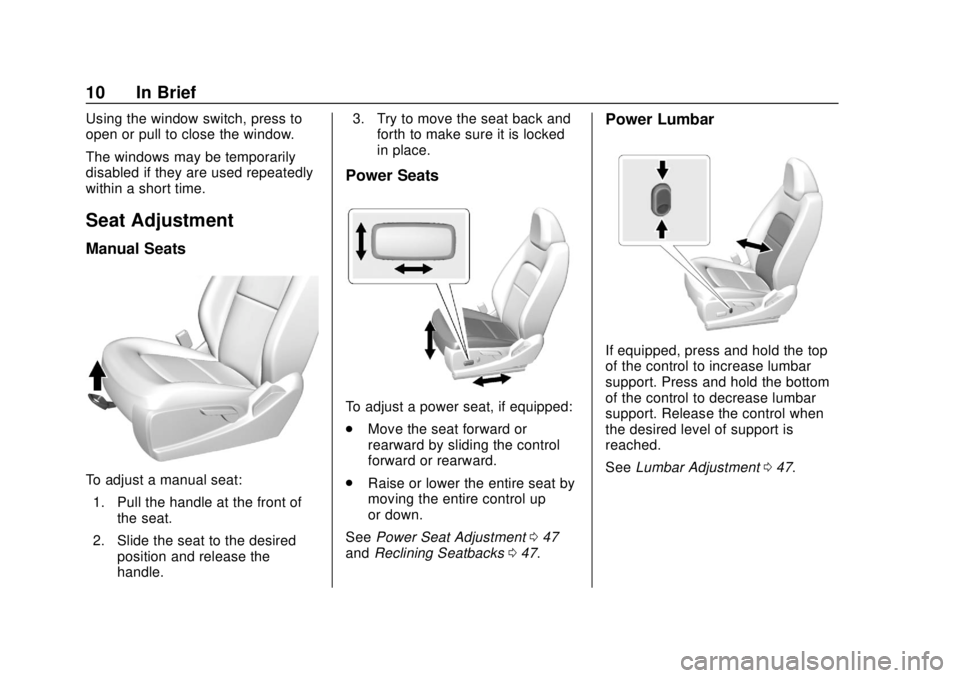
Manual Seats
To adjust a manual seat:1. Pull the handle at the front of the seat.
2. Slide the seat to the desired position and release the
handle. 3. Try to move the seat back and
forth to make sure it is locked
in place.
Power Seats
To adjust a power seat, if equipped:
.Move the seat forward or
rearward by sliding the control
forward or rearward.
. Raise or lower the entire seat by
moving the entire control up
or down.
See Power Seat Adjustment 047
and Reclining Seatbacks 047.
Power Lumbar
If equipped, press and hold the top
of the control to increase lumbar
support. Press and hold the bottom
of the control to decrease lumbar
support. Release the control when
the desired level of support is
reached.
See Lumbar Adjustment 047.
Page 12 of 417
GMC Canyon/Canyon Denali Owner Manual (GMNA-Localizing-U.S./Canada-
11354423) - 2018 - crc - 10/12/17
In Brief 11
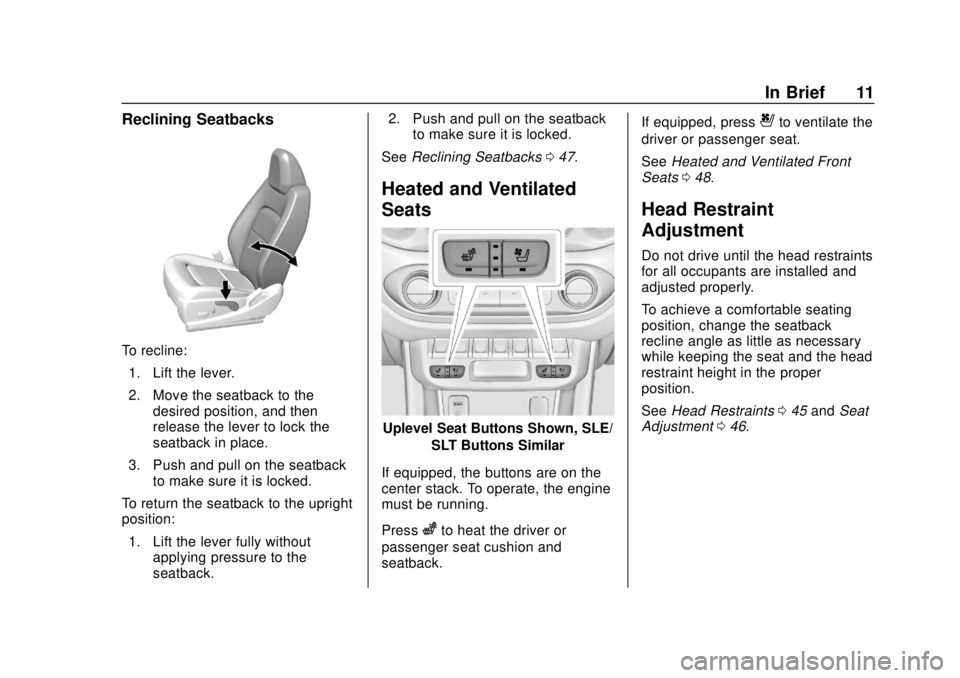
Reclining Seatbacks
To recline:1. Lift the lever.
2. Move the seatback to the desired position, and then
release the lever to lock the
seatback in place.
3. Push and pull on the seatback to make sure it is locked.
To return the seatback to the upright
position:
1. Lift the lever fully without applying pressure to the
seatback. 2. Push and pull on the seatback
to make sure it is locked.
See Reclining Seatbacks 047.
Heated and Ventilated
Seats
Uplevel Seat Buttons Shown, SLE/
SLT Buttons Similar
If equipped, the buttons are on the
center stack. To operate, the engine
must be running.
Press
zto heat the driver or
passenger seat cushion and
seatback. If equipped, press
{to ventilate the
driver or passenger seat.
See Heated and Ventilated Front
Seats 048.
Head Restraint
Adjustment
Do not drive until the head restraints
for all occupants are installed and
adjusted properly.
To achieve a comfortable seating
position, change the seatback
recline angle as little as necessary
while keeping the seat and the head
restraint height in the proper
position.
See Head Restraints 045 and Seat
Adjustment 046.
Page 13 of 417
GMC Canyon/Canyon Denali Owner Manual (GMNA-Localizing-U.S./Canada-
11354423) - 2018 - crc - 10/12/17
12 In Brief
Seat Belts
Refer to the following sections for
important information on how to use
seat belts properly:
.Seat Belts 052.
. How to Wear Seat Belts Properly
053.
. Lap-Shoulder Belt 054.
. Lower Anchors and Tethers for
Children (LATCH System) 078.
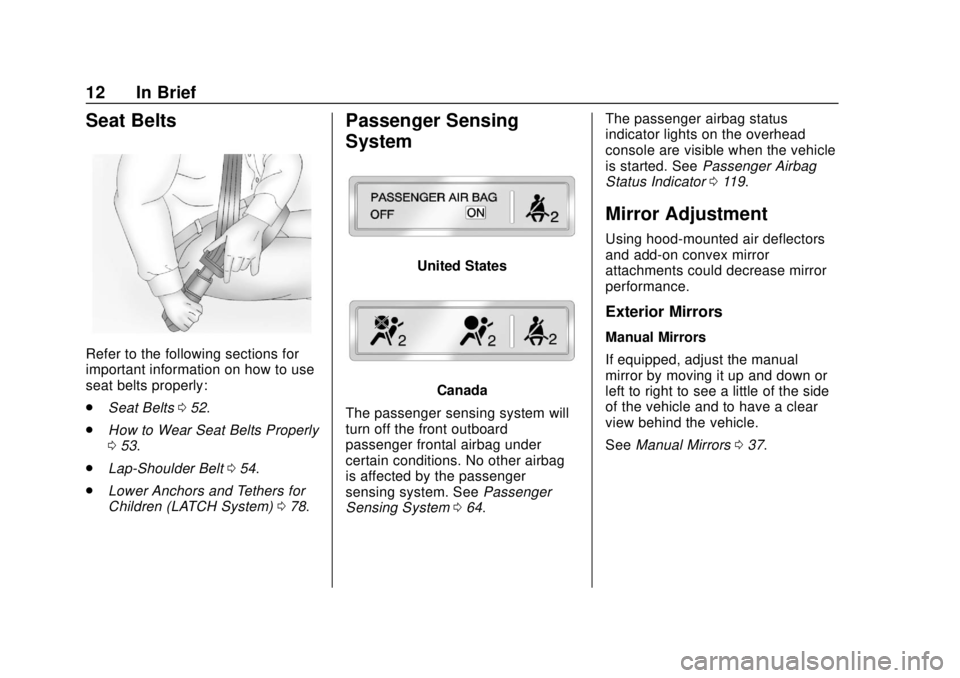
Passenger Sensing
System
United States
Canada
The passenger sensing system will
turn off the front outboard
passenger frontal airbag under
certain conditions. No other airbag
is affected by the passenger
sensing system. See Passenger
Sensing System 064. The passenger airbag status
indicator lights on the overhead
console are visible when the vehicle
is started. See
Passenger Airbag
Status Indicator 0119.
Mirror Adjustment
Using hood-mounted air deflectors
and add-on convex mirror
attachments could decrease mirror
performance.
Exterior Mirrors
Manual Mirrors
If equipped, adjust the manual
mirror by moving it up and down or
left to right to see a little of the side
of the vehicle and to have a clear
view behind the vehicle.
See Manual Mirrors 037.
Page 15 of 417
GMC Canyon/Canyon Denali Owner Manual (GMNA-Localizing-U.S./Canada-
11354423) - 2018 - crc - 10/12/17
14 In Brief
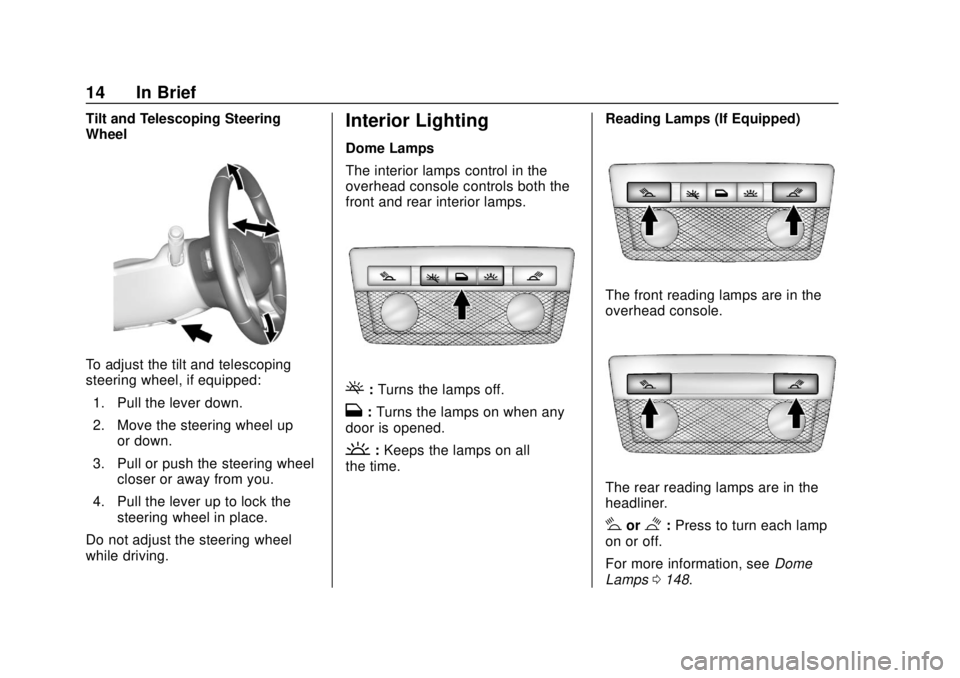
Tilt and Telescoping Steering
Wheel
To adjust the tilt and telescoping
steering wheel, if equipped:1. Pull the lever down.
2. Move the steering wheel up or down.
3. Pull or push the steering wheel closer or away from you.
4. Pull the lever up to lock the steering wheel in place.
Do not adjust the steering wheel
while driving.
Interior Lighting
Dome Lamps
The interior lamps control in the
overhead console controls both the
front and rear interior lamps.
(: Turns the lamps off.
H: Turns the lamps on when any
door is opened.
': Keeps the lamps on all
the time. Reading Lamps (If Equipped)
The front reading lamps are in the
overhead console.
The rear reading lamps are in the
headliner.
#or$:
Press to turn each lamp
on or off.
For more information, see Dome
Lamps 0148.
Page 16 of 417
GMC Canyon/Canyon Denali Owner Manual (GMNA-Localizing-U.S./Canada-
11354423) - 2018 - crc - 10/12/17
In Brief 15
Exterior Lighting
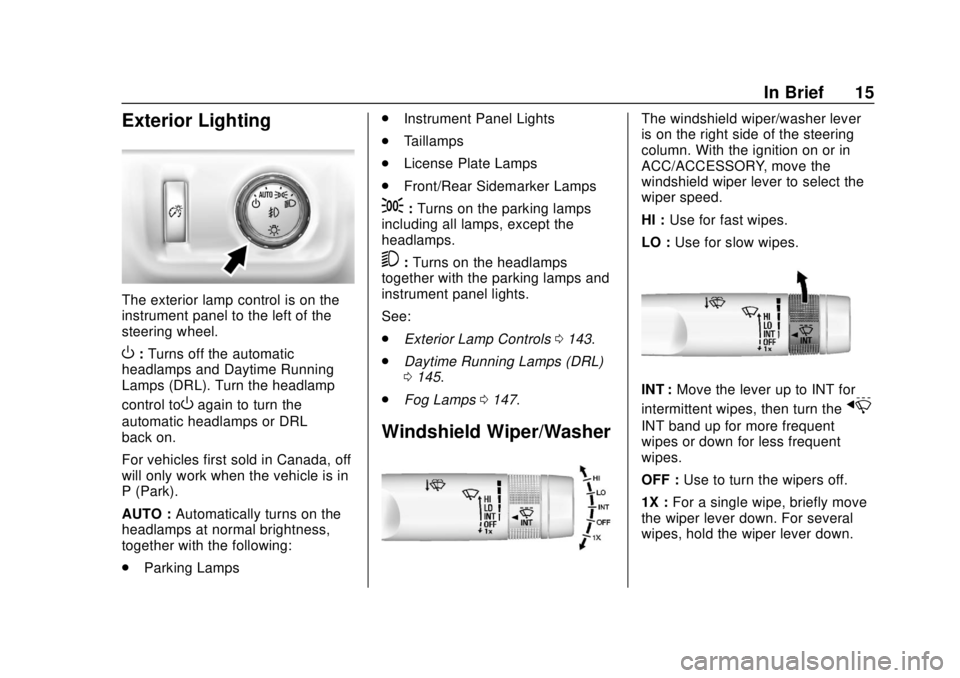
The exterior lamp control is on the
instrument panel to the left of the
steering wheel.
O:Turns off the automatic
headlamps and Daytime Running
Lamps (DRL). Turn the headlamp
control to
Oagain to turn the
automatic headlamps or DRL
back on.
For vehicles first sold in Canada, off
will only work when the vehicle is in
P (Park).
AUTO : Automatically turns on the
headlamps at normal brightness,
together with the following:
. Parking Lamps .
Instrument Panel Lights
. Taillamps
. License Plate Lamps
. Front/Rear Sidemarker Lamps
;:Turns on the parking lamps
including all lamps, except the
headlamps.
5: Turns on the headlamps
together with the parking lamps and
instrument panel lights.
See:
. Exterior Lamp Controls 0143.
. Daytime Running Lamps (DRL)
0145.
. Fog Lamps 0147.
Windshield Wiper/Washer
The windshield wiper/washer lever
is on the right side of the steering
column. With the ignition on or in
ACC/ACCESSORY, move the
windshield wiper lever to select the
wiper speed.
HI : Use for fast wipes.
LO : Use for slow wipes.
INT : Move the lever up to INT for
intermittent wipes, then turn the
x
INT band up for more frequent
wipes or down for less frequent
wipes.
OFF : Use to turn the wipers off.
1X : For a single wipe, briefly move
the wiper lever down. For several
wipes, hold the wiper lever down.
Page 23 of 417
GMC Canyon/Canyon Denali Owner Manual (GMNA-Localizing-U.S./Canada-
11354423) - 2018 - crc - 10/12/17
22 In Brief
Driver Information Center
(DIC) (Uplevel)
The DIC display is in the instrument
cluster. It shows the status of many
vehicle systems.
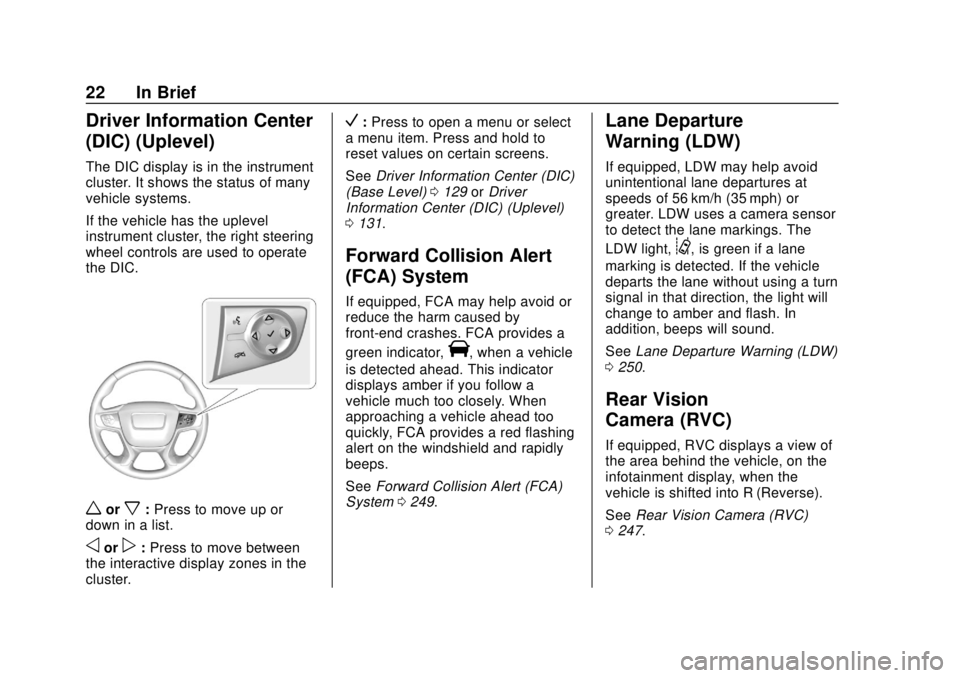
If the vehicle has the uplevel
instrument cluster, the right steering
wheel controls are used to operate
the DIC.
worx:Press to move up or
down in a list.
oorp: Press to move between
the interactive display zones in the
cluster.
V: Press to open a menu or select
a menu item. Press and hold to
reset values on certain screens.
See Driver Information Center (DIC)
(Base Level) 0129 orDriver
Information Center (DIC) (Uplevel)
0 131.
Forward Collision Alert
(FCA) System
If equipped, FCA may help avoid or
reduce the harm caused by
front-end crashes. FCA provides a
green indicator,
V, when a vehicle
is detected ahead. This indicator
displays amber if you follow a
vehicle much too closely. When
approaching a vehicle ahead too
quickly, FCA provides a red flashing
alert on the windshield and rapidly
beeps.
See Forward Collision Alert (FCA)
System 0249.
Lane Departure
Warning (LDW)
If equipped, LDW may help avoid
unintentional lane departures at
speeds of 56 km/h (35 mph) or
greater. LDW uses a camera sensor
to detect the lane markings. The
LDW light,
@, is green if a lane
marking is detected. If the vehicle
departs the lane without using a turn
signal in that direction, the light will
change to amber and flash. In
addition, beeps will sound.
See Lane Departure Warning (LDW)
0 250.
Rear Vision
Camera (RVC)
If equipped, RVC displays a view of
the area behind the vehicle, on the
infotainment display, when the
vehicle is shifted into R (Reverse).
See Rear Vision Camera (RVC)
0 247.
Page 32 of 417
GMC Canyon/Canyon Denali Owner Manual (GMNA-Localizing-U.S./Canada-
11354423) - 2018 - crc - 10/12/17
Keys, Doors, and Windows 31
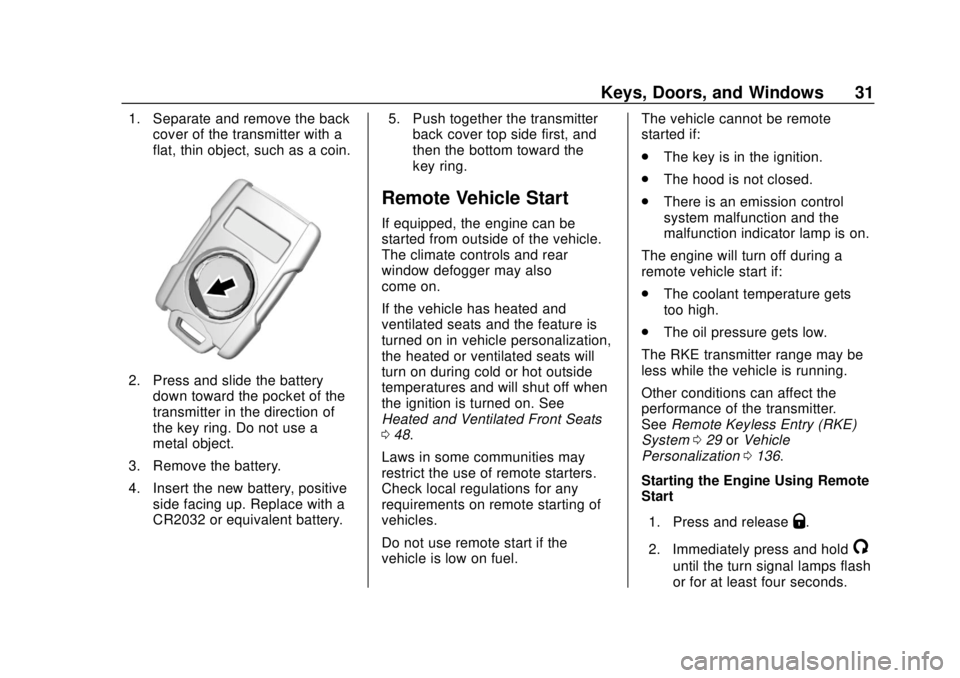
1. Separate and remove the backcover of the transmitter with a
flat, thin object, such as a coin.
2. Press and slide the battery
down toward the pocket of the
transmitter in the direction of
the key ring. Do not use a
metal object.
3. Remove the battery.
4. Insert the new battery, positive side facing up. Replace with a
CR2032 or equivalent battery. 5. Push together the transmitter
back cover top side first, and
then the bottom toward the
key ring.
Remote Vehicle Start
If equipped, the engine can be
started from outside of the vehicle.
The climate controls and rear
window defogger may also
come on.
If the vehicle has heated and
ventilated seats and the feature is
turned on in vehicle personalization,
the heated or ventilated seats will
turn on during cold or hot outside
temperatures and will shut off when
the ignition is turned on. See
Heated and Ventilated Front Seats
048.
Laws in some communities may
restrict the use of remote starters.
Check local regulations for any
requirements on remote starting of
vehicles.
Do not use remote start if the
vehicle is low on fuel. The vehicle cannot be remote
started if:
.
The key is in the ignition.
. The hood is not closed.
. There is an emission control
system malfunction and the
malfunction indicator lamp is on.
The engine will turn off during a
remote vehicle start if:
. The coolant temperature gets
too high.
. The oil pressure gets low.
The RKE transmitter range may be
less while the vehicle is running.
Other conditions can affect the
performance of the transmitter.
See Remote Keyless Entry (RKE)
System 029 orVehicle
Personalization 0136.
Starting the Engine Using Remote
Start
1. Press and release
Q.
2. Immediately press and hold
/
until the turn signal lamps flash
or for at least four seconds.
Page 42 of 417
GMC Canyon/Canyon Denali Owner Manual (GMNA-Localizing-U.S./Canada-
11354423) - 2018 - crc - 10/12/17
Keys, Doors, and Windows 41
The vehicle aerodynamics are
designed to improve fuel economy
performance. This may result in a
pulsing sound when either rear
window is down and the front
windows are up. To reduce the
sound, open either a front window
or the sunroof, if equipped.
Power Windows
{Warning
Children could be seriously
injured or killed if caught in the
path of a closing window. Never
leave keys in a vehicle with
children. When there are children
in the rear seat, use the window
lockout button to prevent
operation of the windows. See
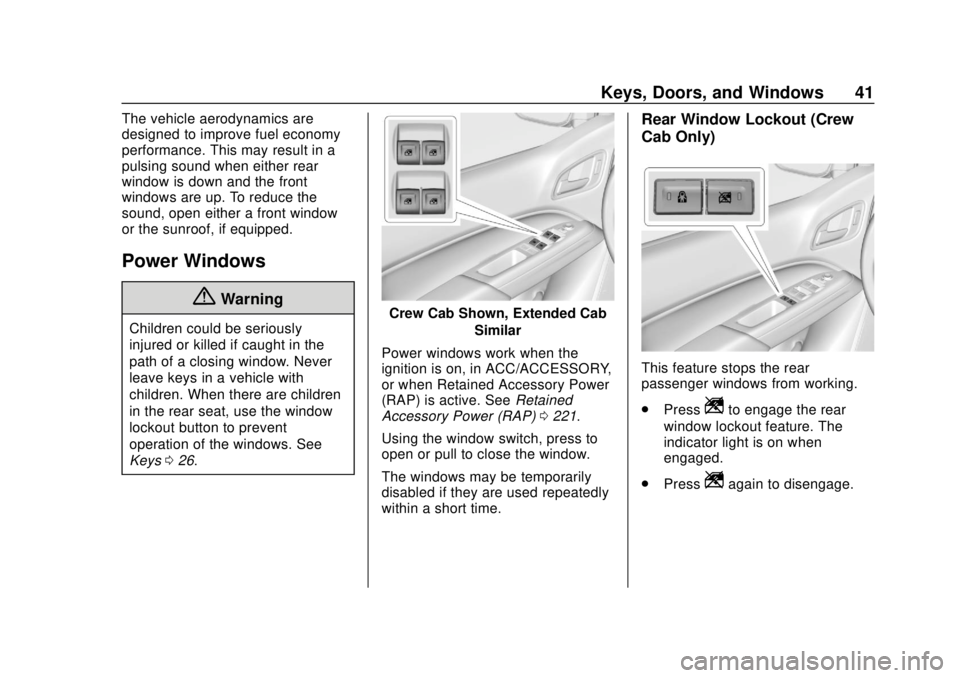
Keys026.Crew Cab Shown, Extended Cab
Similar
Power windows work when the
ignition is on, in ACC/ACCESSORY,
or when Retained Accessory Power
(RAP) is active. See Retained
Accessory Power (RAP) 0221.
Using the window switch, press to
open or pull to close the window.
The windows may be temporarily
disabled if they are used repeatedly
within a short time.
Rear Window Lockout (Crew
Cab Only)
This feature stops the rear
passenger windows from working.
. Press
Zto engage the rear
window lockout feature. The
indicator light is on when
engaged.
. Press
Zagain to disengage.
Page 45 of 417
GMC Canyon/Canyon Denali Owner Manual (GMNA-Localizing-U.S./Canada-
11354423) - 2018 - crc - 10/12/17
44 Seats and Restraints
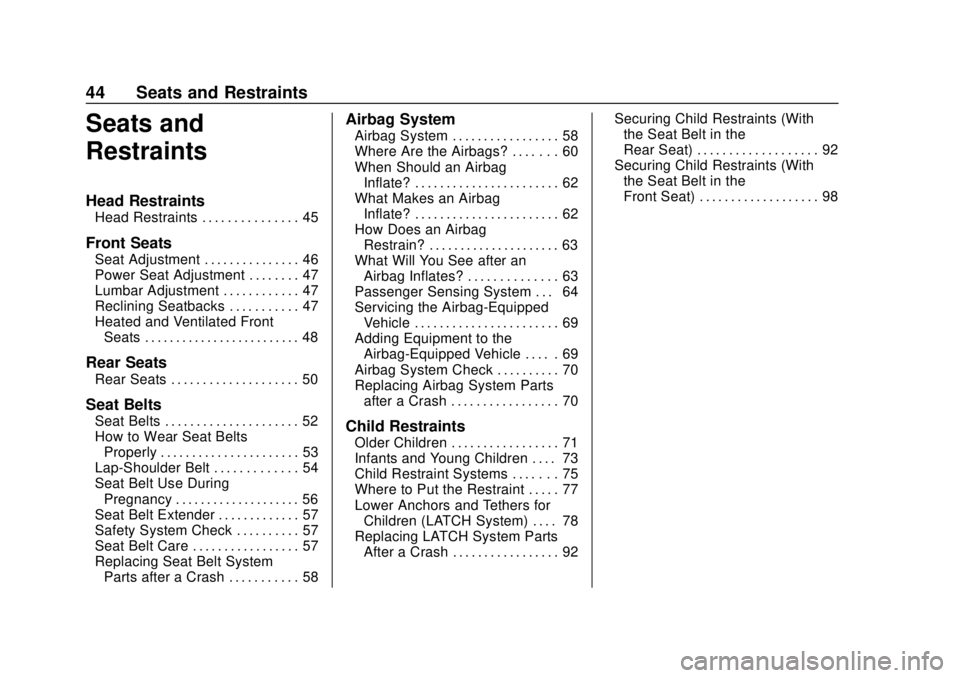
Seats and
Restraints
Head Restraints
Head Restraints . . . . . . . . . . . . . . . 45
Front Seats
Seat Adjustment . . . . . . . . . . . . . . . 46
Power Seat Adjustment . . . . . . . . 47
Lumbar Adjustment . . . . . . . . . . . . 47
Reclining Seatbacks . . . . . . . . . . . 47
Heated and Ventilated FrontSeats . . . . . . . . . . . . . . . . . . . . . . . . . 48
Rear Seats
Rear Seats . . . . . . . . . . . . . . . . . . . . 50
Seat Belts
Seat Belts . . . . . . . . . . . . . . . . . . . . . 52
How to Wear Seat BeltsProperly . . . . . . . . . . . . . . . . . . . . . . 53
Lap-Shoulder Belt . . . . . . . . . . . . . 54
Seat Belt Use During Pregnancy . . . . . . . . . . . . . . . . . . . . 56
Seat Belt Extender . . . . . . . . . . . . . 57
Safety System Check . . . . . . . . . . 57
Seat Belt Care . . . . . . . . . . . . . . . . . 57
Replacing Seat Belt System Parts after a Crash . . . . . . . . . . . 58
Airbag System
Airbag System . . . . . . . . . . . . . . . . . 58
Where Are the Airbags? . . . . . . . 60
When Should an AirbagInflate? . . . . . . . . . . . . . . . . . . . . . . . 62
What Makes an Airbag
Inflate? . . . . . . . . . . . . . . . . . . . . . . . 62
How Does an Airbag Restrain? . . . . . . . . . . . . . . . . . . . . . 63
What Will You See after an Airbag Inflates? . . . . . . . . . . . . . . 63
Passenger Sensing System . . . 64
Servicing the Airbag-Equipped Vehicle . . . . . . . . . . . . . . . . . . . . . . . 69
Adding Equipment to the Airbag-Equipped Vehicle . . . . . 69
Airbag System Check . . . . . . . . . . 70
Replacing Airbag System Parts after a Crash . . . . . . . . . . . . . . . . . 70
Child Restraints
Older Children . . . . . . . . . . . . . . . . . 71
Infants and Young Children . . . . 73
Child Restraint Systems . . . . . . . 75
Where to Put the Restraint . . . . . 77
Lower Anchors and Tethers forChildren (LATCH System) . . . . 78
Replacing LATCH System Parts After a Crash . . . . . . . . . . . . . . . . . 92 Securing Child Restraints (With
the Seat Belt in the
Rear Seat) . . . . . . . . . . . . . . . . . . . 92
Securing Child Restraints (With the Seat Belt in the
Front Seat) . . . . . . . . . . . . . . . . . . . 98