steering GMC CANYON 2021 Workshop Manual
[x] Cancel search | Manufacturer: GMC, Model Year: 2021, Model line: CANYON, Model: GMC CANYON 2021Pages: 359, PDF Size: 7.37 MB
Page 214 of 359
GMC Canyon/Canyon Denali Owner Manual (GMNA-Localizing-U.S./Canada-
14430430) - 2021 - CRC - 9/9/20
Driving and Operating 213
Cleaning the System
If the FCA system does not seem to operate
properly, this may correct the issue:
.Clean the outside of the windshield in
front of the rearview mirror.
.Clean the entire front of the vehicle.
.Clean the headlamps.
Lane Departure Warning (LDW)
If equipped, LDW may help avoid crashes
due to unintentional lane departures. It may
provide an alert if the vehicle is crossing a
lane marking without using a turn signal in
that direction. LDW uses a camera sensor to
detect the lane markings at speeds of
56 km/h (35 mph) or greater. The LDW light
will not alert if the turn signal is active in
the direction of lane departure, or if LDW
detects that you are accelerating, braking or
actively steering.
{Warning
The LDW system does not steer the
vehicle. The LDW system may not:
.Provide enough time to avoid a crash.(Continued)
Warning (Continued)
.Detect lane markings under poor
weather or visibility conditions. This
can occur if the windshield or
headlamps are blocked by dirt, snow,
or ice; if they are not in proper
condition; or if the sun shines directly
into the camera.
.Detect road edges.
.Detect lanes on winding or hilly roads.
If LDW only detects lane markings on one
side of the road, it will only warn you
when departing the lane on the side
where it has detected a lane marking.
Always keep your attention on the road
and maintain proper vehicle position
within the lane, or vehicle damage,
injury, or death could occur. Always keep
the windshield, headlamps, and camera
sensors clean and in good repair. Do not
use LDW in bad weather conditions.
How the System Works
The LDW camera sensor is on the windshield
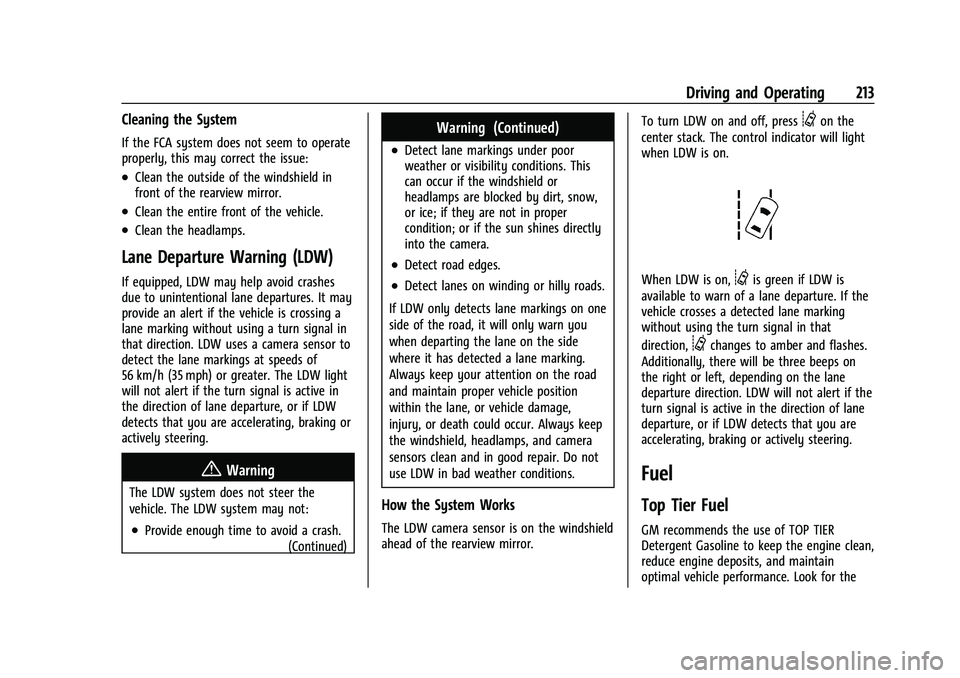
ahead of the rearview mirror. To turn LDW on and off, press
@on the
center stack. The control indicator will light
when LDW is on.
When LDW is on,@is green if LDW is
available to warn of a lane departure. If the
vehicle crosses a detected lane marking
without using the turn signal in that
direction,
@changes to amber and flashes.
Additionally, there will be three beeps on
the right or left, depending on the lane
departure direction. LDW will not alert if the
turn signal is active in the direction of lane
departure, or if LDW detects that you are
accelerating, braking or actively steering.
Fuel
Top Tier Fuel
GM recommends the use of TOP TIER
Detergent Gasoline to keep the engine clean,
reduce engine deposits, and maintain
optimal vehicle performance. Look for the
Page 219 of 359
GMC Canyon/Canyon Denali Owner Manual (GMNA-Localizing-U.S./Canada-
14430430) - 2021 - CRC - 9/9/20
218 Driving and Operating
that extend out from the back of the vehicle
do not move further back when a trailer is
towed.
{Warning
To prevent serious injury or death from
carbon monoxide (CO), when towing a
trailer:
.Do not drive with the liftgate, trunk/
hatch, or rear-most window open.
.Fully open the air outlets on or under
the instrument panel.
.Adjust the climate control system to a
setting that brings in only outside air.
See“Climate Control Systems” in the
Index.
For more information about carbon
monoxide, see Engine Exhaust 0192.
Towing a trailer requires experience. The
combination of the vehicle and trailer is
longer and not as responsive as the vehicle
itself. Get used to the handling and braking
of the combination by driving on a level
road surface before driving on public roads.
The trailer structure, the tires, and the
brakes must all be rated to carry the
intended cargo. Inadequate trailer equipment can cause the combination to
operate in an unexpected or unsafe manner.
Before driving, inspect all trailer hitch parts
and attachments, safety chains, electrical
connectors, lamps, tires, and mirrors. See
Towing Equipment
0224. If the trailer has
electric brakes, start the combination
moving and then manually apply the trailer
brake controller to check the trailer brakes
work. During the trip, occasionally check
that the cargo and trailer are secure and
that the lamps and any trailer brakes are
working.Towing with a Stability Control System
When towing, the stability control system
might be heard. The system reacts to
vehicle movement caused by the trailer,
which mainly occurs during cornering. This is
normal when towing heavier trailers.
Following Distance
Stay at least twice as far behind the vehicle
ahead as you would when driving without a
trailer. This can help to avoid heavy braking
and sudden turns.
Passing
More passing distance is needed when
towing a trailer. The combination of the
vehicle and trailer will not accelerate as
quickly and is much longer than the vehicle
alone. It is necessary to go much farther
beyond the passed vehicle before returning
to the lane. Pass on level roadways. Avoid
passing on hills if possible.
Backing Up
Hold the bottom of the steering wheel with
one hand. To move the trailer to the left,
move that hand to the left. To move the
trailer to the right, move that hand to the
right. Always back up slowly and, if possible,
have someone guide you.
Making Turns
Caution
Turn more slowly and make wider arcs
when towing a trailer to prevent damage
to your vehicle. Making very sharp turns
could cause the trailer to contact the
vehicle.
Page 229 of 359
GMC Canyon/Canyon Denali Owner Manual (GMNA-Localizing-U.S./Canada-
14430430) - 2021 - CRC - 9/9/20
228 Driving and Operating
Warning (Continued)
injury, death, or property damage. Only
use the ITBC system with electric or
electric over hydraulic trailer brake
systems.
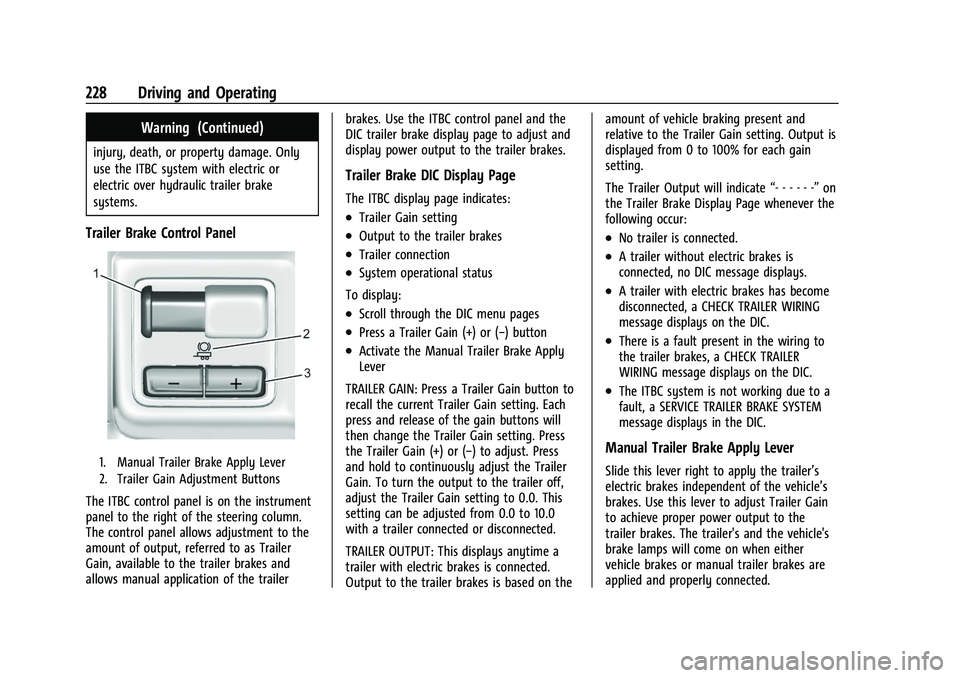
Trailer Brake Control Panel
1. Manual Trailer Brake Apply Lever
2. Trailer Gain Adjustment Buttons
The ITBC control panel is on the instrument
panel to the right of the steering column.
The control panel allows adjustment to the
amount of output, referred to as Trailer
Gain, available to the trailer brakes and
allows manual application of the trailerbrakes. Use the ITBC control panel and the
DIC trailer brake display page to adjust and
display power output to the trailer brakes.
Trailer Brake DIC Display Page
The ITBC display page indicates:
.Trailer Gain setting
.Output to the trailer brakes
.Trailer connection
.System operational status
To display:
.Scroll through the DIC menu pages
.Press a Trailer Gain (+) or (−) button
.Activate the Manual Trailer Brake Apply
Lever
TRAILER GAIN: Press a Trailer Gain button to
recall the current Trailer Gain setting. Each
press and release of the gain buttons will
then change the Trailer Gain setting. Press
the Trailer Gain (+) or (−) to adjust. Press
and hold to continuously adjust the Trailer
Gain. To turn the output to the trailer off,
adjust the Trailer Gain setting to 0.0. This
setting can be adjusted from 0.0 to 10.0
with a trailer connected or disconnected.
TRAILER OUTPUT: This displays anytime a
trailer with electric brakes is connected.
Output to the trailer brakes is based on the amount of vehicle braking present and
relative to the Trailer Gain setting. Output is
displayed from 0 to 100% for each gain
setting.
The Trailer Output will indicate
“- - - - - -”on
the Trailer Brake Display Page whenever the
following occur:
.No trailer is connected.
.A trailer without electric brakes is
connected, no DIC message displays.
.A trailer with electric brakes has become
disconnected, a CHECK TRAILER WIRING
message displays on the DIC.
.There is a fault present in the wiring to
the trailer brakes, a CHECK TRAILER
WIRING message displays on the DIC.
.The ITBC system is not working due to a
fault, a SERVICE TRAILER BRAKE SYSTEM
message displays in the DIC.
Manual Trailer Brake Apply Lever
Slide this lever right to apply the trailer’s
electric brakes independent of the vehicle’s
brakes. Use this lever to adjust Trailer Gain
to achieve proper power output to the
trailer brakes. The trailer's and the vehicle's
brake lamps will come on when either
vehicle brakes or manual trailer brakes are
applied and properly connected.
Page 264 of 359
GMC Canyon/Canyon Denali Owner Manual (GMNA-Localizing-U.S./Canada-
14430430) - 2021 - CRC - 9/9/20
Vehicle Care 263
FusesUsage
F43 Not used
F44 –
F45 Vaccuum pump
F46 Engine control module 2 F47 Mid park phase lock/ Active fuel
management/Engine oil
and canister purge
solenoid(s)/Oxygen
sensor
F48 Fog lamps
F49 –
F50 Trailer parking lamps F51 Horn
F52 –
F53 –
F54 –
F55 –
F56 Washer pump F57 –
F58 – Fuses
Usage
F59 –
F60 Mirrors defogger F61 –
F62 Canister vent solenoid
F63 –
F64 Trailer reverse lamp F65 Left trailer stoplamp/ Turn signal lamps
F66 Right trailer stoplamp/ Turn signal lamps
F67 Electric power steering
F68 –
F69 Battery regulated voltage control
F70 –
F71 –
F72 –
F73 –
F74 Generator F75 – Relays
Usage
K1 Air conditioning clutch
K2 Starter
K3 –
K4 Wipers speed K5 Wipers control
K6 Cargo lamp/Bed lighting K7 Powertrain
K8 –
K9 –
K10 –
K11 Center high-mounted stoplamp
K12 –
K13 Vacuum pump
K14 Trailer parking lamps K15 Run/Crank
K16 –
K17 Rear window defogger
Page 266 of 359
GMC Canyon/Canyon Denali Owner Manual (GMNA-Localizing-U.S./Canada-
14430430) - 2021 - CRC - 9/9/20
Vehicle Care 265
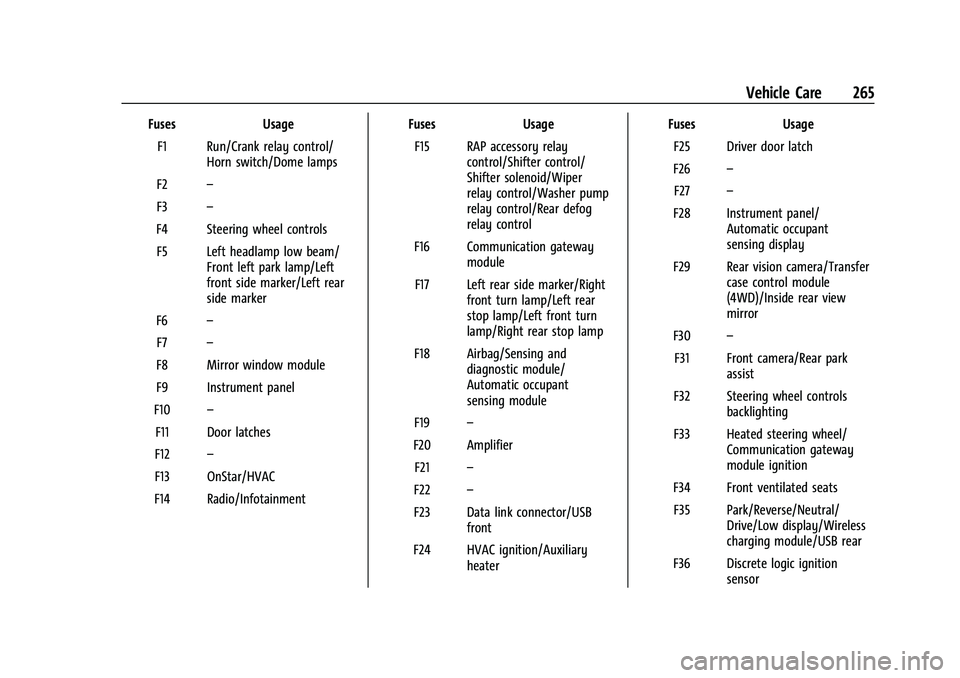
FusesUsage
F1 Run/Crank relay control/ Horn switch/Dome lamps
F2 –
F3 –
F4 Steering wheel controls F5 Left headlamp low beam/ Front left park lamp/Left
front side marker/Left rear
side marker
F6 –
F7 –
F8 Mirror window module
F9 Instrument panel
F10 –
F11 Door latches
F12 –
F13 OnStar/HVAC
F14 Radio/Infotainment Fuses
Usage
F15 RAP accessory relay control/Shifter control/
Shifter solenoid/Wiper
relay control/Washer pump
relay control/Rear defog
relay control
F16 Communication gateway module
F17 Left rear side marker/Right front turn lamp/Left rear
stop lamp/Left front turn
lamp/Right rear stop lamp
F18 Airbag/Sensing and diagnostic module/
Automatic occupant
sensing module
F19 –
F20 Amplifier F21 –
F22 –
F23 Data link connector/USB front
F24 HVAC ignition/Auxiliary heater Fuses
Usage
F25 Driver door latch
F26 –
F27 –
F28 Instrument panel/ Automatic occupant
sensing display
F29 Rear vision camera/Transfer case control module
(4WD)/Inside rear view
mirror
F30 –
F31 Front camera/Rear park assist
F32 Steering wheel controls backlighting
F33 Heated steering wheel/ Communication gateway
module ignition
F34 Front ventilated seats F35 Park/Reverse/Neutral/ Drive/Low display/Wireless
charging module/USB rear
F36 Discrete logic ignition sensor
Page 283 of 359
GMC Canyon/Canyon Denali Owner Manual (GMNA-Localizing-U.S./Canada-
14430430) - 2021 - CRC - 9/9/20
282 Vehicle Care
Used Replacement Wheels
{Warning
Replacing a wheel with a used one is
dangerous. How it has been used or how
far it has been driven may be unknown.
It could fail suddenly and cause a crash.
When replacing wheels, use a new GM
original equipment wheel.
Tire Chains
{Warning
If the vehicle has 255/55R20, 255/65R17
AT, 265/60R18, or 265/65R17 size tires, do
not use tire chains. There is not enough
clearance. Tire chains used on a vehicle
without the proper amount of clearance
can cause damage to the brakes,
suspension, or other vehicle parts. The
area damaged by the tire chains could
cause loss of control and a crash.
Use another type of traction device only
if its manufacturer recommends it for use
on the vehicle and tire size combination
and road conditions. Follow that(Continued)
Warning (Continued)
manufacturer's instructions. To avoid
vehicle damage, drive slow and readjust
or remove the traction device if it
contacts the vehicle. Do not spin the
wheels.
If traction devices are used, install them
on the rear tires.
Caution
If the vehicle has a tire size other than
255/55R20, 255/65R17 AT, 265/60R18,
or 265/65R17, use tire chains only where
legal and only when necessary. Use
chains that are the proper size for the
tires. Install them on the tires of the rear
axle. Do not use chains on the tires of
the front axle. Tighten them as tightly as
possible with the ends securely fastened.
Drive slowly and follow the chain
manufacturer's instructions. If the chains
contact the vehicle, stop and retighten
them. If the contact continues, slow
down until it stops. Driving too fast or
spinning the wheels with chains on will
damage the vehicle.
If a Tire Goes Flat
It is unusual for a tire to blowout while
driving, especially if the tires are maintained
properly. If air goes out of a tire, it is much
more likely to leak out slowly. But if there
ever is a blowout, here are a few tips about
what to expect and what to do:
If a front tire fails, the flat tire creates a
drag that pulls the vehicle toward that side.
Take your foot off the accelerator pedal and
grip the steering wheel firmly. Steer to
maintain lane position, and then gently
brake to a stop, well off the road,
if possible.
A rear blowout, particularly on a curve, acts
much like a skid and may require the same
correction as used in a skid. Stop pressing
the accelerator pedal and steer to straighten
the vehicle. It may be very bumpy and
noisy. Gently brake to a stop, well off the
road, if possible.
{Warning
Driving on a flat tire will cause
permanent damage to the tire.
Re-inflating a tire after it has been driven
on while severely underinflated or flat
(Continued)
Page 299 of 359
GMC Canyon/Canyon Denali Owner Manual (GMNA-Localizing-U.S./Canada-
14430430) - 2021 - CRC - 9/9/20
298 Vehicle Care
Two-wheel-drive vehicles should not be
towed with all four wheels on the ground.
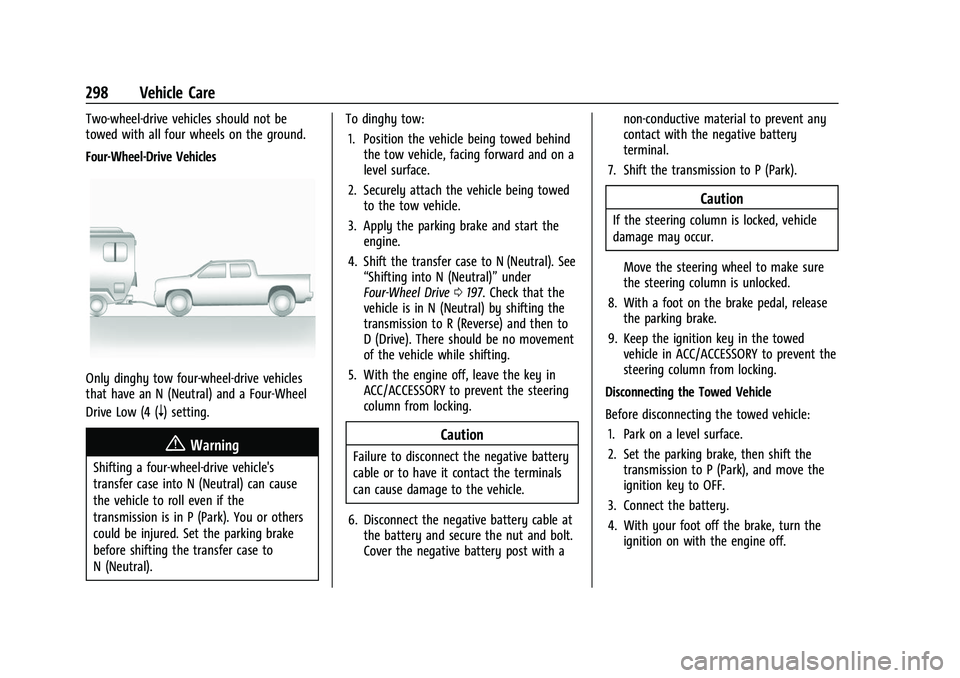
Four-Wheel-Drive Vehicles
Only dinghy tow four-wheel-drive vehicles
that have an N (Neutral) and a Four-Wheel
Drive Low (4 (
n) setting.
{Warning
Shifting a four-wheel-drive vehicle's
transfer case into N (Neutral) can cause
the vehicle to roll even if the
transmission is in P (Park). You or others
could be injured. Set the parking brake
before shifting the transfer case to
N (Neutral).To dinghy tow:
1. Position the vehicle being towed behind the tow vehicle, facing forward and on a
level surface.
2. Securely attach the vehicle being towed to the tow vehicle.
3. Apply the parking brake and start the engine.
4. Shift the transfer case to N (Neutral). See “Shifting into N (Neutral)” under
Four-Wheel Drive 0197. Check that the
vehicle is in N (Neutral) by shifting the
transmission to R (Reverse) and then to
D (Drive). There should be no movement
of the vehicle while shifting.
5. With the engine off, leave the key in ACC/ACCESSORY to prevent the steering
column from locking.
Caution
Failure to disconnect the negative battery
cable or to have it contact the terminals
can cause damage to the vehicle.
6. Disconnect the negative battery cable at the battery and secure the nut and bolt.
Cover the negative battery post with a non-conductive material to prevent any
contact with the negative battery
terminal.
7. Shift the transmission to P (Park).
Caution
If the steering column is locked, vehicle
damage may occur.
Move the steering wheel to make sure
the steering column is unlocked.
8. With a foot on the brake pedal, release the parking brake.
9. Keep the ignition key in the towed vehicle in ACC/ACCESSORY to prevent the
steering column from locking.
Disconnecting the Towed Vehicle
Before disconnecting the towed vehicle: 1. Park on a level surface.
2. Set the parking brake, then shift the transmission to P (Park), and move the
ignition key to OFF.
3. Connect the battery.
4. With your foot off the brake, turn the ignition on with the engine off.
Page 305 of 359
GMC Canyon/Canyon Denali Owner Manual (GMNA-Localizing-U.S./Canada-
14430430) - 2021 - CRC - 9/9/20
304 Vehicle Care
Steering, Suspension, and Chassis
Components
Visually inspect steering, suspension, and
chassis components for damaged, loose,
or missing parts or signs of wear at least
once a year.
Inspect power steering for proper
attachment, connections, binding, leaks,
cracks, chafing, etc.
Visually check constant velocity joint boots
and axle seals for leaks.
Body Component Lubrication
Lubricate all key lock cylinders, hood hinges,
liftgate hinges, steel fuel door hinge, and
power assist step hinges, unless the
components are plastic. Applying silicone
grease on weatherstrips with a clean cloth
will make them last longer, seal better, and
not stick or squeak
Underbody Maintenance
At least twice a year, spring and fall, use
plain water to flush any corrosive materials
from the underbody. Take care to
thoroughly clean any areas where mud and
other debris can collect.Do not directly power wash the transfer
case and/or front/rear axle output seals.
High pressure water can overcome the seals
and contaminate the fluid. Contaminated
fluid will decrease the life of the transfer
case and/or axles and should be replaced.
Sheet Metal Damage
If the vehicle is damaged and requires sheet
metal repair or replacement, make sure the
body repair shop applies anti-corrosion
material to parts repaired or replaced to
restore corrosion protection.
Original manufacturer replacement parts will
provide the corrosion protection while
maintaining the vehicle warranty.
Finish Damage
Quickly repair minor chips and scratches
with touch-up materials available from your
dealer to avoid corrosion. Larger areas of
finish damage can be corrected in your
dealer's body and paint shop.
Chemical Paint Spotting
Airborne pollutants can fall upon and attack
painted vehicle surfaces causing blotchy,
ring-shaped discolorations, and small,irregular dark spots etched into the paint
surface. Refer to
“Finish Care”previously in
this section.
Interior Care
To prevent dirt particle abrasions, regularly
clean the vehicle's interior. Immediately
remove any soils. Newspapers or dark
garments can transfer color to the vehicle’s
interior.
Use a soft bristle brush to remove dust from
knobs and crevices on the instrument
cluster. Using a mild soap solution,
immediately remove hand lotions,
sunscreen, and insect repellent from all
interior surfaces or permanent damage may
result.
Use cleaners specifically designed for the
surfaces being cleaned to prevent
permanent damage. Apply all cleaners
directly to the cleaning cloth. Do not spray
cleaners on any switches or controls.
Remove cleaners quickly.
Before using cleaners, read and follow all
safety instructions on the label. While
cleaning the interior, open the doors and
windows to get proper ventilation.
Page 312 of 359
GMC Canyon/Canyon Denali Owner Manual (GMNA-Localizing-U.S./Canada-
14430430) - 2021 - CRC - 9/9/20
Service and Maintenance 311
last service. Reset the oil life system when
the oil is changed. SeeEngine Oil Life
System 0242.
Extended Idle Use
When the vehicle is used in a way that
requires extended idle time, one hour of use
shall be deemed the same as 33 miles. See
Driver Information Center (DIC) (Base Level)
094 or
Driver Information Center (DIC) (Uplevel)
0 96 for hourmeter.
Passenger Compartment Air Filter
The passenger compartment air filter
removes dust, pollen, and other airborne
irritants from outside air that is pulled into
the vehicle. The filter should be replaced as
part of routine scheduled maintenance.
Inspect the passenger compartment air filter
every 36 000 km (22,500 mi) or two years,
whichever comes first. Replace if necessary.
More frequent replacement may be needed
if the vehicle is driven in areas with heavy
traffic, areas with poor air quality, or areas
with high dust levels. Replacement may also
be needed if there is a reduction in air flow,
excessive window fogging, or odors.
Air Conditioning Desiccant (Replace Every
Seven Years)
The air conditioning system requires
maintenance every seven years. This service
requires replacement of the desiccant to
help the longevity and efficient operation of
the air conditioning system. This service can
be complex. See your dealer.
Tire Rotation and Required Services
Every 12 000 km (7,500 mi)
Rotate the tires, if recommended for the
vehicle, and perform the following services.
See Tire Rotation 0277.
.Check engine oil level and oil
life percentage. If needed, change engine
oil and filter, and reset oil life system.
See Engine Oil 0240 and
Engine Oil Life System 0242.
.Check engine coolant level. See Cooling
System 0245.
.Check windshield washer fluid level. See
Washer Fluid 0249.
.Check tire inflation pressures, including
the spare. See Tire Pressure0272.
.Inspect tire wear. See Tire Inspection
0 276.
.Visually check for fluid leaks.
.Inspect engine air cleaner filter. See
Engine Air Cleaner/Filter 0243.
.Inspect brake system. See Exterior Care
0 300.
.Visually inspect steering, suspension, and
chassis components for damage, including
cracks or tears in the rubber boots, loose
or missing parts, or signs of wear at least
once a year. See Exterior Care0300.
Page 313 of 359
GMC Canyon/Canyon Denali Owner Manual (GMNA-Localizing-U.S./Canada-
14430430) - 2021 - CRC - 9/9/20
312 Service and Maintenance
.Inspect power steering for proper
attachment, connections, binding, leaks,
cracks, chafing, etc.
.Visually inspect halfshafts and driveshafts
for excessive wear, lubricant leaks, and/or
damage including: tube dents or cracks,
constant velocity joint or universal joint
looseness, cracked or missing boots, loose
or missing boot clamps, center bearing
excessive looseness, loose or missing
fasteners, and axle seal leaks.
.Check restraint system components. See
Safety System Check033.
.Visually inspect fuel system for damage
or leaks.
.Visually inspect exhaust system and
nearby heat shields for loose or damaged
parts.
.Lubricate body components. See Exterior
Care 0300.
.Check starter switch. See Starter Switch
Check 0253.
.Check automatic transmission shift lock
control function. See Automatic
Transmission Shift Lock Control Function
Check 0253.
.Check ignition transmission lock. See
Ignition Transmission Lock Check 0253.
.Check parking brake and automatic
transmission park mechanism. See Park
Brake and P (Park) Mechanism Check
0 253.
.Check accelerator pedal for damage, high
effort, or binding. Replace if needed.
.Visually inspect gas strut for signs of
wear, cracks, or other damage. Check the
hold open ability of the strut. If the hold
open is low, service the gas strut. See Gas
Strut(s) 0254.
.Verify spare tire key lock operation and
lubricate as needed. See Tire Changing
0 284.
.Visually inspect the spare tire to ensure
that it is tightly stowed under the vehicle.
Push, pull, and try to turn the tire. If the
spare tire moves, tighten as necessary.
See Tire Changing 0284.