change GMC CANYON 2021 Owner's Manual
[x] Cancel search | Manufacturer: GMC, Model Year: 2021, Model line: CANYON, Model: GMC CANYON 2021Pages: 359, PDF Size: 7.37 MB
Page 2 of 359
GMC Canyon/Canyon Denali Owner Manual (GMNA-Localizing-U.S./Canada-
14430430) - 2021 - CRC - 2/18/21
Contents
Introduction . . . . . . . . . . . . . . . . . . . . . . . . . . . . . . 1
Keys, Doors, and Windows . . . . . . . . . . . . . . . 6
Seats and Restraints . . . . . . . . . . . . . . . . . . . . . 21
Storage . . . . . . . . . . . . . . . . . . . . . . . . . . . . . . . . . . 73
Instruments and Controls . . . . . . . . . . . . . . . . 75
Lighting . . . . . . . . . . . . . . . . . . . . . . . . . . . . . . . . 102
Infotainment System . . . . . . . . . . . . . . . . . . . 109
Climate Controls . . . . . . . . . . . . . . . . . . . . . . . . 164
Driving and Operating . . . . . . . . . . . . . . . . . . 170
Vehicle Care . . . . . . . . . . . . . . . . . . . . . . . . . . . . 233
Service and Maintenance . . . . . . . . . . . . . . 309
Technical Data . . . . . . . . . . . . . . . . . . . . . . . . . . 323
Customer Information . . . . . . . . . . . . . . . . . . 327
Reporting Safety Defects . . . . . . . . . . . . . . . 335
OnStar . . . . . . . . . . . . . . . . . . . . . . . . . . . . . . . . . 339
Connected Services . . . . . . . . . . . . . . . . . . . . . 344
Index . . . . . . . . . . . . . . . . . . . . . . . . . . 347
Introduction
The names, logos, emblems, slogans, vehicle
model names, and vehicle body designs
appearing in this manual including, but not
limited to, GM, the GM logo, GMC, the GMC
Truck Emblem, CANYON, and DENALI are
trademarks and/or service marks of General
Motors LLC, its subsidiaries, affiliates,
or licensors.
For vehicles first sold in Canada, substitute
the name“General Motors of Canada
Company” for GMC wherever it appears in
this manual.
This manual describes features that may or
may not be on the vehicle because of
optional equipment that was not purchased
on the vehicle, model variants, country
specifications, features/applications that may not be available in your region, or changes
subsequent to the printing of this owner’s
manual.
If this vehicle has the Duramax diesel
engine, see the Duramax diesel supplement
for additional and specific information on
this engine.
Refer to the purchase documentation
relating to your specific vehicle to confirm
the features.
Keep this manual in the vehicle for quick
reference.
Litho in U.S.A.
Part No. 84426904 C Third Printing©2021 General Motors LLC. All Rights Reserved.
Page 4 of 359
GMC Canyon/Canyon Denali Owner Manual (GMNA-Localizing-U.S./Canada-
14430430) - 2021 - CRC - 9/9/20
Introduction 3
9:Dispose of Used Components Properly
P:Do Not Apply High Pressure Water
B:Engine Coolant Temperature
g: First Responder
_:Flame/Fire Prohibited
H: Flammable
[:Forward Collision Alert
R:Fuse Block Cover Lock Location
+:Fuses
_:High Voltage
j:ISOFIX/LATCH System Child Restraints
Q:Keep Fuse Block Covers Properly
Installed
|: Lane Change Alert
@:Lane Departure Warning
A:Lane Keep Assist
*: Malfunction Indicator Lamp
::Oil Pressure
X:Park Assist
~:Pedestrian Ahead Indicator
O:Power
7:Rear Cross Traffic Alert
I:Registered Technician
/:Remote Vehicle Start
h:Risk of Electrical Fire
>:Seat Belt Reminders
I:Side Blind Zone Alert
7:Tire Pressure Monitor
d:Traction Control/StabiliTrak/Electronic
Stability Control (ESC)
a: Under Pressure
V: Vehicle Ahead Indicator
Page 6 of 359
GMC Canyon/Canyon Denali Owner Manual (GMNA-Localizing-U.S./Canada-
14430430) - 2021 - CRC - 9/9/20
Introduction 5
1.Air Vents 0169.
2. Trailer Brake Control Panel (If Equipped) (Out of View). See “Integrated Trailer
Brake Control System” underTowing
Equipment 0224.
3. Turn Signal Lever. See Turn and
Lane-Change Signals 0105.
Driver Information Center (DIC) (Base
Level) Controls (If Equipped). See Driver
Information Center (DIC) (Base Level)
0 94 or
Driver Information Center (DIC) (Uplevel)
0 96.
4. Instrument Cluster 081.
5. Windshield Wiper/Washer 077.
6. Light Sensor. See Automatic Headlamp
System 0103.
Vehicle Alarm System Indicator (If
Equipped). See Vehicle Alarm System
0 14.
7. Infotainment Controls. See Overview
0 110.
8. Climate Control Systems 0164 (If
Equipped).
Automatic Climate Control System 0166
(If Equipped). 9.
Heated and Ventilated Front Seats 025
(If Equipped).
10. Power Outlets 078 (If Equipped).
11. Shift Lever. See Automatic Transmission
0 192 or
Manual Mode 0195.
12. Auxiliary Jack. See the infotainment manual.
USB Port. See the infotainment manual.
13. Hazard Warning Flashers 0104.
Traction Control/Electronic Stability
Control 0204.
Exterior Cargo Lamps 0105.
Lane Departure Warning (LDW) 0213 (If
Equipped).
Hill Descent Control (HDC) 0205 (If
Equipped).
Tow/Haul Mode 0196 (If Equipped).
14. Steering Wheel Controls 076 (If
Equipped).
Driver Information Center (DIC) (Uplevel)
Controls (If Equipped). See Driver
Information Center (DIC) (Base Level)
0 94 or
Driver Information Center (DIC) (Uplevel)
0 96.
15. Horn 077. 16.
Steering Wheel Adjustment 076 (Out
of View).
17. Cruise Control 0206.
18. Transfer Case Knob (If Equipped). See Four-Wheel Drive 0197.
19. Hood Release. See Hood0236.
20. Parking Brake 0203.
21. Data Link Connector (DLC) (Out of View). SeeMalfunction Indicator Lamp (Check
Engine Light) 087.
22. Exterior Lamp Controls 0102.
Fog Lamps 0105 (If Equipped).
23. Instrument Panel Illumination Control
0106.
Page 8 of 359
GMC Canyon/Canyon Denali Owner Manual (GMNA-Localizing-U.S./Canada-
14430430) - 2021 - CRC - 9/9/20
Keys, Doors, and Windows 7
{Warning
If the key is unintentionally rotated while
the vehicle is running, the ignition could
be moved out of the RUN position. This
could be caused by heavy items hanging
from the key ring, or by large or long
items attached to the key ring that could
be contacted by the driver or steering
wheel. If the ignition moves out of the
RUN position, the engine will shut off,
braking and steering power assist may be
impacted, and airbags may not deploy.
To reduce the risk of unintentional
rotation of the ignition key, do not
change the way the ignition key and
Remote Keyless Entry (RKE) transmitter,
if equipped, are connected to the
provided key rings.
The ignition key and key rings, and RKE
transmitter, if equipped, are designed to
work together as a system to reduce the
risk of unintentionally moving the key out
of the RUN position. The ignition key has a
small hole to allow attachment of the
provided key ring. It is important that any replacement ignition keys have a small hole.
See your dealer if a replacement key is
required.
The combination and size of the rings that
came with your keys were specifically
selected for your vehicle. The rings are
connected to the key like two links of a
chain to reduce the risk of unintentionally
moving the key out of the RUN position. Do
not add any additional items to the ring
attached to the ignition key. Attach
additional items only to the second ring,
and limit added items to a few essential
keys or small, light items no larger than an
RKE transmitter.
Interference from radio-frequency
identification (RFID) tags may prevent the
key from starting the vehicle. Keep RFID
tags away from the key when starting the
vehicle.
The key is used for the ignition and all door
locks.
Programming Keys
Follow these procedures to program up to
eight keys to the vehicle.
Programming with Two Recognized Keys
To program a new key:
1. Insert the original, already programmed key in the ignition and turn the
ignition on.
Page 26 of 359
GMC Canyon/Canyon Denali Owner Manual (GMNA-Localizing-U.S./Canada-
14430430) - 2021 - CRC - 9/9/20
Seats and Restraints 25
Heated and Ventilated Front
Seats
{Warning
If temperature change or pain to the skin
cannot be felt, the seat heater may cause
burns. To reduce the risk of burns, use
care when using the seat heater,
especially for long periods of time. Do
not place anything on the seat that
insulates against heat, such as a blanket,
cushion, cover, or similar item. This may
cause the seat heater to overheat. An
overheated seat heater may cause a burn
or may damage the seat.
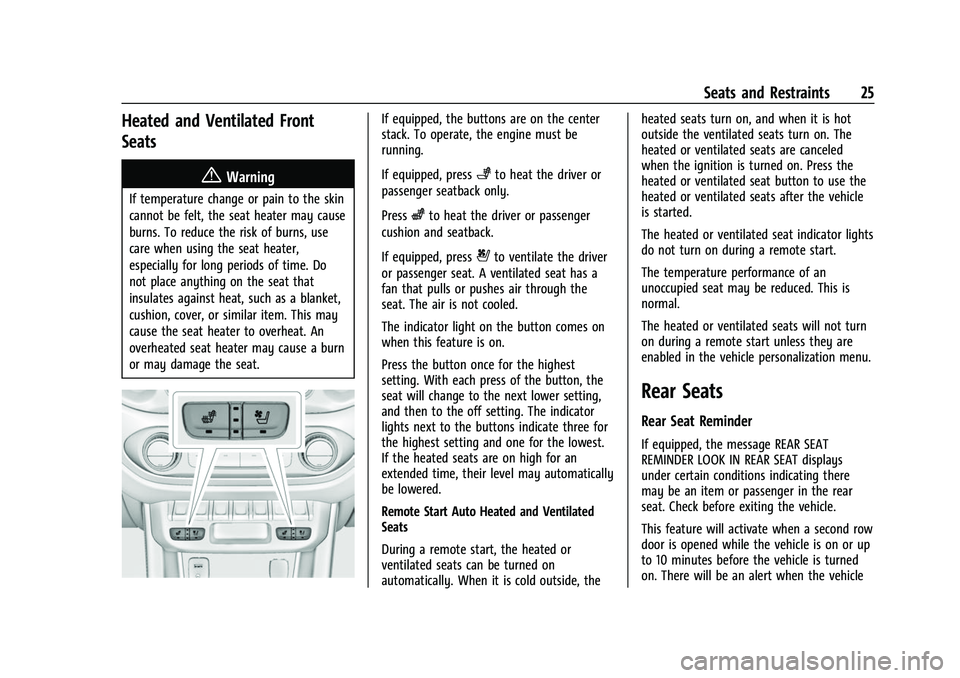
If equipped, the buttons are on the center
stack. To operate, the engine must be
running.
If equipped, press
+to heat the driver or
passenger seatback only.
Press
zto heat the driver or passenger
cushion and seatback.
If equipped, press
{to ventilate the driver
or passenger seat. A ventilated seat has a
fan that pulls or pushes air through the
seat. The air is not cooled.
The indicator light on the button comes on
when this feature is on.
Press the button once for the highest
setting. With each press of the button, the
seat will change to the next lower setting,
and then to the off setting. The indicator
lights next to the buttons indicate three for
the highest setting and one for the lowest.
If the heated seats are on high for an
extended time, their level may automatically
be lowered.
Remote Start Auto Heated and Ventilated
Seats
During a remote start, the heated or
ventilated seats can be turned on
automatically. When it is cold outside, the heated seats turn on, and when it is hot
outside the ventilated seats turn on. The
heated or ventilated seats are canceled
when the ignition is turned on. Press the
heated or ventilated seat button to use the
heated or ventilated seats after the vehicle
is started.
The heated or ventilated seat indicator lights
do not turn on during a remote start.
The temperature performance of an
unoccupied seat may be reduced. This is
normal.
The heated or ventilated seats will not turn
on during a remote start unless they are
enabled in the vehicle personalization menu.
Rear Seats
Rear Seat Reminder
If equipped, the message REAR SEAT
REMINDER LOOK IN REAR SEAT displays
under certain conditions indicating there
may be an item or passenger in the rear
seat. Check before exiting the vehicle.
This feature will activate when a second row
door is opened while the vehicle is on or up
to 10 minutes before the vehicle is turned
on. There will be an alert when the vehicle
Page 44 of 359
GMC Canyon/Canyon Denali Owner Manual (GMNA-Localizing-U.S./Canada-
14430430) - 2021 - CRC - 9/9/20
Seats and Restraints 43
Warning (Continued)
system. Be sure to follow proper service
procedures, and make sure the person
performing work for you is qualified to
do so.
Adding Equipment to the
Airbag-Equipped Vehicle
{Warning
If a snow plow or similar equipment is
installed on the vehicle, the airbag
system may not function properly. An
airbag could inflate when it is not
supposed to inflate. People riding in the
vehicle could be injured, and the vehicle
and/or snow plow could be damaged. Do
not install a snow plow or similar
equipment on the vehicle.
Adding accessories that change the vehicle's
frame, bumper system, height, front end,
or side sheet metal may keep the airbag
system from working properly.
The operation of the airbag system can also
be affected by changing any parts of the
front seats, seat belts, airbag sensing and diagnostic module, steering wheel,
instrument panel, inner door seals including
the speakers, any of the airbag modules,
ceiling or pillar garnish trim, overhead
console, front sensors, side impact sensors,
or airbag wiring.
Your dealer and the service manual have
information about the location of the airbag
sensors, sensing and diagnostic module, and
airbag wiring.
In addition, the vehicle has a passenger
sensing system for the front outboard
passenger position, which includes sensors
that are part of the passenger seat. The
passenger sensing system may not operate
properly if the original seat trim is replaced
with non-GM covers, upholstery, or trim; or
with GM covers, upholstery, or trim
designed for a different vehicle. Any object,
such as an aftermarket seat heater or a
comfort-enhancing pad or device, installed
under or on top of the seat fabric, could
also interfere with the operation of the
passenger sensing system. This could either
prevent proper deployment of the passenger
airbag(s) or prevent the passenger sensing
system from properly turning off the
passenger airbag(s). See
Passenger Sensing
System 039. If the vehicle has rollover roof-rail airbags,
see
Different Size Tires and Wheels 0279 for
additional important information.
If the vehicle must be modified because you
have a disability and have questions about
whether the modifications will affect the
vehicle's airbag system, or if you have
questions about whether the airbag system
will be affected if the vehicle is modified for
any other reason, call Customer Assistance.
See Customer Assistance Offices 0329.Airbag System Check
The airbag system does not need regularly
scheduled maintenance or replacement.
Make sure the airbag readiness light is
working. See Airbag Readiness Light 086.
Caution
If an airbag covering is damaged, opened,
or broken, the airbag may not work
properly. Do not open or break the airbag
coverings. If there are any opened or
broken airbag coverings, have the airbag
covering and/or airbag module replaced.
For the location of the airbags, see Where
Are the Airbags? 036. See your dealer
for service.
Page 46 of 359
GMC Canyon/Canyon Denali Owner Manual (GMNA-Localizing-U.S./Canada-
14430430) - 2021 - CRC - 9/9/20
Seats and Restraints 45
According to accident statistics, children are
safer when properly restrained in a rear
seating position.
In a crash, children who are not buckled up
can strike other people who are buckled up,
or can be thrown out of the vehicle. Older
children need to use seat belts properly.
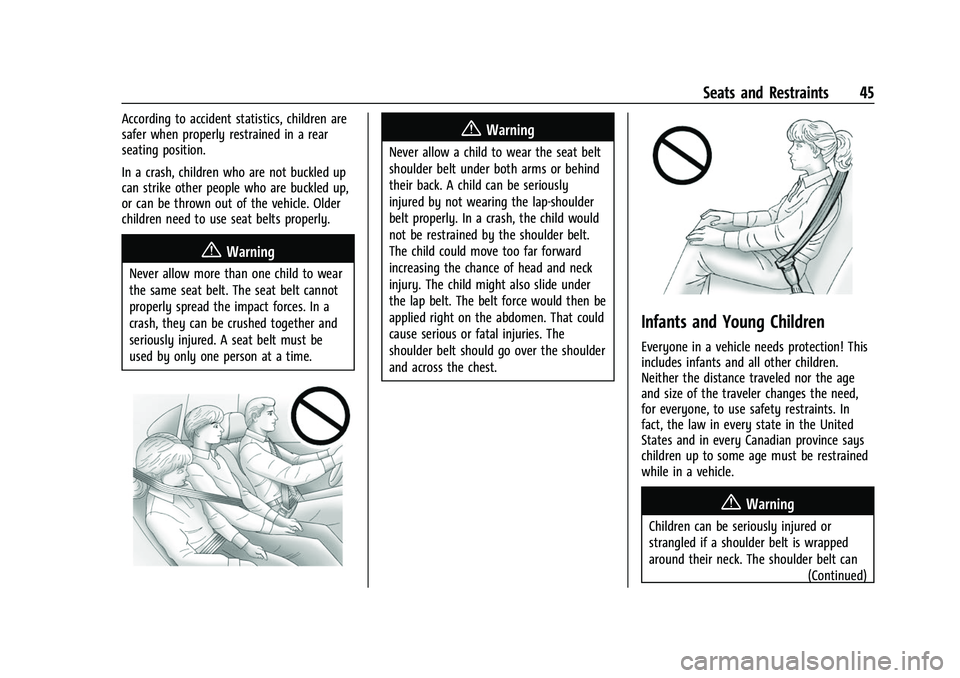
{Warning
Never allow more than one child to wear
the same seat belt. The seat belt cannot
properly spread the impact forces. In a
crash, they can be crushed together and
seriously injured. A seat belt must be
used by only one person at a time.
{Warning
Never allow a child to wear the seat belt
shoulder belt under both arms or behind
their back. A child can be seriously
injured by not wearing the lap-shoulder
belt properly. In a crash, the child would
not be restrained by the shoulder belt.
The child could move too far forward
increasing the chance of head and neck
injury. The child might also slide under
the lap belt. The belt force would then be
applied right on the abdomen. That could
cause serious or fatal injuries. The
shoulder belt should go over the shoulder
and across the chest.
Infants and Young Children
Everyone in a vehicle needs protection! This
includes infants and all other children.
Neither the distance traveled nor the age
and size of the traveler changes the need,
for everyone, to use safety restraints. In
fact, the law in every state in the United
States and in every Canadian province says
children up to some age must be restrained
while in a vehicle.
{Warning
Children can be seriously injured or
strangled if a shoulder belt is wrapped
around their neck. The shoulder belt can(Continued)
Page 83 of 359
GMC Canyon/Canyon Denali Owner Manual (GMNA-Localizing-U.S./Canada-
14430430) - 2021 - CRC - 9/9/20
82 Instruments and Controls
Uplevel English Shown, Metric Similar
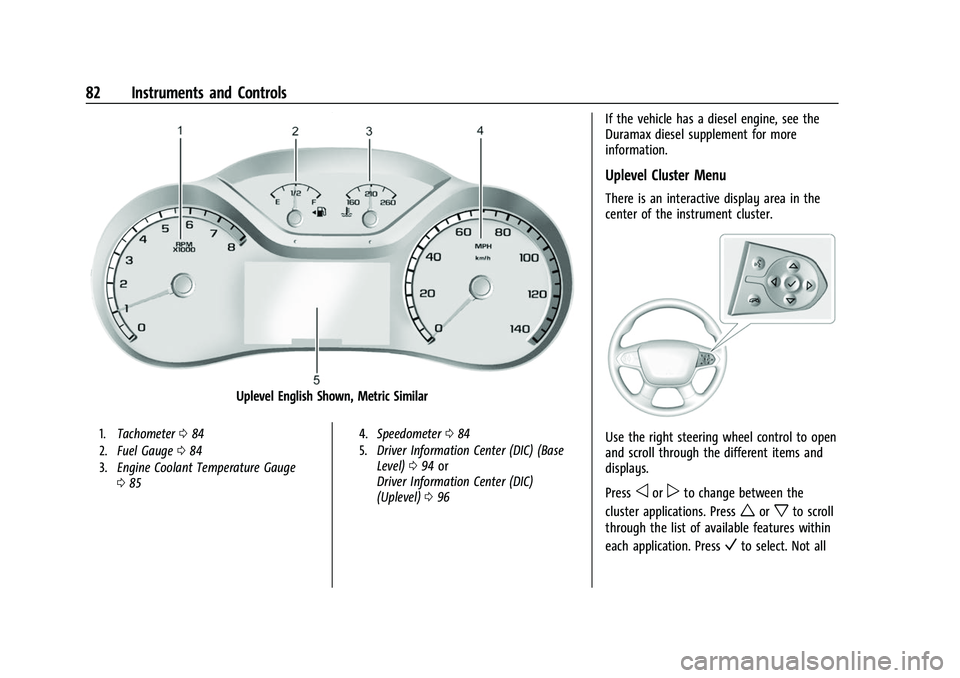
1.Tachometer 084
2. Fuel Gauge 084
3. Engine Coolant Temperature Gauge
085 4.
Speedometer 084
5. Driver Information Center (DIC) (Base
Level) 094 or
Driver Information Center (DIC)
(Uplevel) 096
If the vehicle has a diesel engine, see the
Duramax diesel supplement for more
information.
Uplevel Cluster Menu
There is an interactive display area in the
center of the instrument cluster.
Use the right steering wheel control to open
and scroll through the different items and
displays.
Press
oorpto change between the
cluster applications. Press
worxto scroll
through the list of available features within
each application. Press
Vto select. Not all
Page 84 of 359
GMC Canyon/Canyon Denali Owner Manual (GMNA-Localizing-U.S./Canada-
14430430) - 2021 - CRC - 9/9/20
Instruments and Controls 83
applications will be available on all vehicles.
Some may be temporarily restricted when
the vehicle is off or in ACC/ACCESSORY.
.Home Page
.Info App. This is where the selected Driver
Information Center (DIC) displays can be
viewed. See“Driver Information Center
(DIC) (Uplevel)” in the Index.
.Audio
.Phone
.Navigation
.Options
Home
Information displayed here can be
customized from the Options menu.
Speedometer :Displays how fast the vehicle
is moving in either kilometers per hour
(km/h) or miles per hour (mph).
Speed Sign : Shows sign information, which
comes from a roadway database in the
onboard navigation, if equipped.
Time : Displays the current time.
Fuel Range : Displays the approximate
distance the vehicle can be driven without
refueling. The fuel range estimate is based
on an average of the vehicle’s fuel economy over recent driving history and the amount
of fuel remaining in the fuel tank. Fuel
range cannot be reset.
Audio
Pressworxto scroll through radio
stations or move to the next or previous
track of a CD/USB/Bluetooth device that is
connected to the vehicle. Press
Vto enter
the Audio menu to browse for music, select
from favorites, or change the audio source.
Phone
In the Phone menu, if there is no active
phone call, view recent calls, scroll through
contacts, select from the favorites, or change
the phone source. If there is an active call,
mute the phone or switch to handset
operation.
Navigation
In the Navigation menu, if there is no active
route, you can resume the last route and
turn the voice prompts on or off. If there is
an active route, press
Vto cancel route
guidance or turn the voice prompts on
or off.
Options
Pressworxto scroll through items in
the Options menu. Press
Vto select the
item. Press
oto exit the item.
Units : Choose US or Metric units. A selected
mark will be displayed next to the
selected item.
Info Page Options : Select the items to be
displayed in the Info app. A selected mark
will be displayed next to the selected item.
Home Page Options : Select the available
elements to display. Not all elements will be
available on all vehicles: Speedometer, Speed
Sign, Time, and Fuel Range.
Speed Warning : Allows the driver to set a
speed that they do not want to exceed.
Press
worxto adjust the value. PressV
to set the speed. Once the speed is set, this
feature can be turned off by pressing
V
while viewing this page. If the selected
speed limit is exceeded, a pop-up warning is
displayed with a chime.
Software Information : Displays open source
software information.
Page 89 of 359
GMC Canyon/Canyon Denali Owner Manual (GMNA-Localizing-U.S./Canada-
14430430) - 2021 - CRC - 9/9/20
88 Instruments and Controls
If the light is flashing :A malfunction has
been detected that could damage the
emission control system and increase vehicle
emissions. Diagnosis and service may be
required.
To help prevent damage, reduce vehicle
speed and avoid hard accelerations and
uphill grades. If towing a trailer, reduce the
amount of cargo being hauled as soon as
possible.
If the light continues to flash, find a safe
place to park. Turn the vehicle off and wait
at least 10 seconds before restarting the
engine. If the light is still flashing, follow
the previous guidelines and see your dealer
for service as soon as possible.
If the light is on steady : A malfunction has
been detected. Diagnosis and service may be
required.
Check the following:
.If fuel has been added to the vehicle
using the capless funnel adapter, make
sure that it has been removed. See
“Filling the Tank with a Portable Gas Can”
under Filling the Tank 0215. The
diagnostic system can detect if the
adapter has been left installed in the
vehicle, allowing fuel to evaporate into the atmosphere. A few driving trips with
the adapter removed may turn off the
light.
.Poor fuel quality can cause inefficient
engine operation and poor driveability,
which may go away once the engine is
warmed up. If this occurs, change the fuel
brand. It may require at least one full
tank of the proper fuel to turn the light
off. See
Recommended Fuel 0214.
If the light remains on, see your dealer.
Emissions Inspection and Maintenance
Programs
If the vehicle requires an Emissions
Inspection/Maintenance test, the test
equipment will likely connect to the
vehicle's Data Link Connector (DLC).
The DLC is under the instrument panel to
the left of the steering wheel. Connecting
devices that are not used to perform an
Emissions Inspection/Maintenance test or to service the vehicle may affect vehicle
operation. See
Add-On Electrical Equipment
0 232. See your dealer if assistance is
needed.
The vehicle may not pass inspection if:
.The light is on when the engine is
running.
.The light does not come on when the
ignition is on while the engine is off.
.Critical emission control systems have not
been completely diagnosed. If this
happens, the vehicle would not be ready
for inspection and might require
several days of routine driving before the
system is ready for inspection. This can
happen if the 12-volt battery has recently
been replaced or run down, or if the
vehicle has been recently serviced.
See your dealer if the vehicle will not pass
or cannot be made ready for the test.