brake GMC CANYON 2023 Owners Manual
[x] Cancel search | Manufacturer: GMC, Model Year: 2023, Model line: CANYON, Model: GMC CANYON 2023Pages: 371, PDF Size: 7.41 MB
Page 249 of 371
GMC Canyon/Canyon Denali Owner Manual (GMNA-Localizing-U.S./Canada/
Mexico-16510661) - 2023 - CRC - 11/29/22
248 Driving and Operating
Brakes
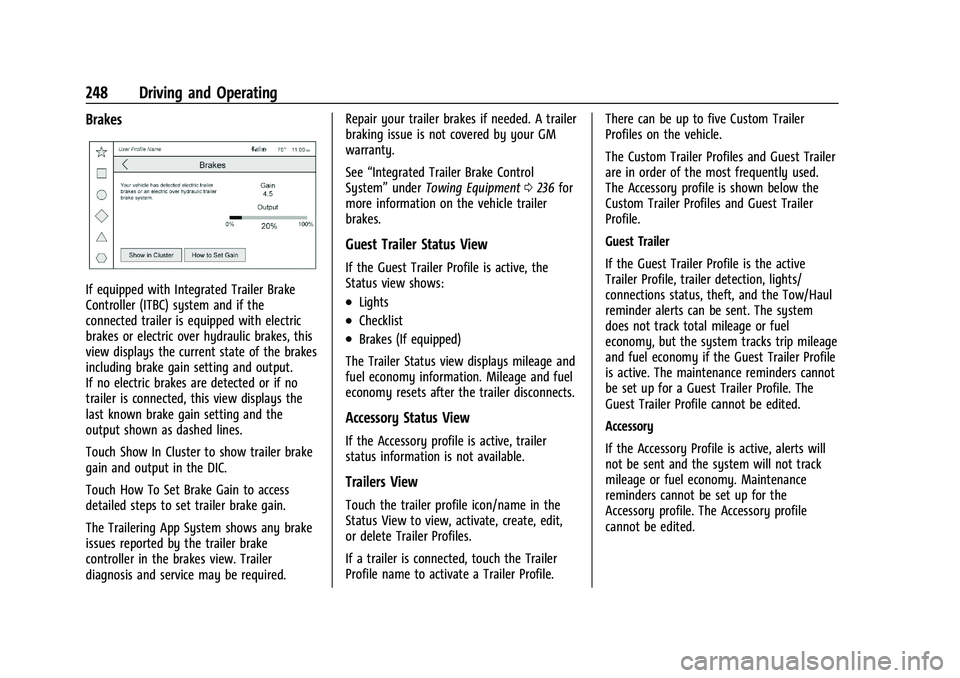
If equipped with Integrated Trailer Brake
Controller (ITBC) system and if the
connected trailer is equipped with electric
brakes or electric over hydraulic brakes, this
view displays the current state of the brakes
including brake gain setting and output.
If no electric brakes are detected or if no
trailer is connected, this view displays the
last known brake gain setting and the
output shown as dashed lines.
Touch Show In Cluster to show trailer brake
gain and output in the DIC.
Touch How To Set Brake Gain to access
detailed steps to set trailer brake gain.
The Trailering App System shows any brake
issues reported by the trailer brake
controller in the brakes view. Trailer
diagnosis and service may be required.Repair your trailer brakes if needed. A trailer
braking issue is not covered by your GM
warranty.
See
“Integrated Trailer Brake Control
System” underTowing Equipment 0236 for
more information on the vehicle trailer
brakes.
Guest Trailer Status View
If the Guest Trailer Profile is active, the
Status view shows:
.Lights
.Checklist
.Brakes (If equipped)
The Trailer Status view displays mileage and
fuel economy information. Mileage and fuel
economy resets after the trailer disconnects.
Accessory Status View
If the Accessory profile is active, trailer
status information is not available.
Trailers View
Touch the trailer profile icon/name in the
Status View to view, activate, create, edit,
or delete Trailer Profiles.
If a trailer is connected, touch the Trailer
Profile name to activate a Trailer Profile. There can be up to five Custom Trailer
Profiles on the vehicle.
The Custom Trailer Profiles and Guest Trailer
are in order of the most frequently used.
The Accessory profile is shown below the
Custom Trailer Profiles and Guest Trailer
Profile.
Guest Trailer
If the Guest Trailer Profile is the active
Trailer Profile, trailer detection, lights/
connections status, theft, and the Tow/Haul
reminder alerts can be sent. The system
does not track total mileage or fuel
economy, but the system tracks trip mileage
and fuel economy if the Guest Trailer Profile
is active. The maintenance reminders cannot
be set up for a Guest Trailer Profile. The
Guest Trailer Profile cannot be edited.
Accessory
If the Accessory Profile is active, alerts will
not be sent and the system will not track
mileage or fuel economy. Maintenance
reminders cannot be set up for the
Accessory profile. The Accessory profile
cannot be edited.
Page 250 of 371
GMC Canyon/Canyon Denali Owner Manual (GMNA-Localizing-U.S./Canada/
Mexico-16510661) - 2023 - CRC - 11/29/22
Driving and Operating 249
Trailer Brake Gain Memory
The system can store the brake gain setting
of a Trailer Profile or a Guest Trailer Profile.
When a Trailer Profile or Guest Trailer Profile
is selected, and a brake gain setting is set
for that Trailer Profile, the system will recall
the stored brake gain value.
If a Trailer Profile is already active and the
brake gain setting has been set for that
Trailer Profile, the system will recall the
brake gain value whenever the vehicle is
turned on.
If there is an error in setting the brake gain
for a Trailer Profile, a pop-up displays. If the
Guest Trailer Profile is active or there is no
trailer connected, the pop-up does not
appear.
Trailer brake gain should be set for a specific
trailering condition and must be adjusted
anytime vehicle loading, trailer loading,
or road surface conditions change.Editing a Trailer Profile
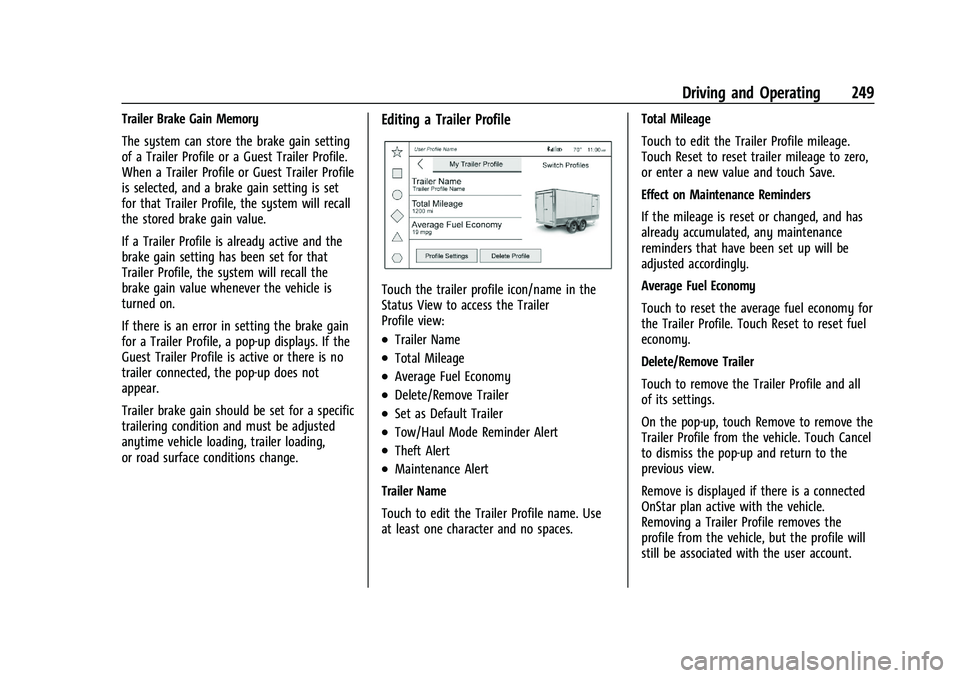
Touch the trailer profile icon/name in the
Status View to access the Trailer
Profile view:
.Trailer Name
.Total Mileage
.Average Fuel Economy
.Delete/Remove Trailer
.Set as Default Trailer
.Tow/Haul Mode Reminder Alert
.Theft Alert
.Maintenance Alert
Trailer Name
Touch to edit the Trailer Profile name. Use
at least one character and no spaces. Total Mileage
Touch to edit the Trailer Profile mileage.
Touch Reset to reset trailer mileage to zero,
or enter a new value and touch Save.
Effect on Maintenance Reminders
If the mileage is reset or changed, and has
already accumulated, any maintenance
reminders that have been set up will be
adjusted accordingly.
Average Fuel Economy
Touch to reset the average fuel economy for
the Trailer Profile. Touch Reset to reset fuel
economy.
Delete/Remove Trailer
Touch to remove the Trailer Profile and all
of its settings.
On the pop-up, touch Remove to remove the
Trailer Profile from the vehicle. Touch Cancel
to dismiss the pop-up and return to the
previous view.
Remove is displayed if there is a connected
OnStar plan active with the vehicle.
Removing a Trailer Profile removes the
profile from the vehicle, but the profile will
still be associated with the user account.
Page 253 of 371
GMC Canyon/Canyon Denali Owner Manual (GMNA-Localizing-U.S./Canada/
Mexico-16510661) - 2023 - CRC - 11/29/22
252 Vehicle Care
Vehicle Care
General Information
General Information . . . . . . . . . . . . . . . . . . . 253
California Perchlorate MaterialsRequirements . . . . . . . . . . . . . . . . . . . . . . . . 253
Accessories and Modifications . . . . . . . . . 253
Vehicle Checks
Doing Your Own Service Work . . . . . . . . 254
Hood . . . . . . . . . . . . . . . . . . . . . . . . . . . . . . . . . . 254
Engine Compartment Overview . . . . . . . . 256
Engine Oil . . . . . . . . . . . . . . . . . . . . . . . . . . . . . 257
Engine Oil Life System . . . . . . . . . . . . . . . . 259
Automatic Transmission Fluid . . . . . . . . . 260
Engine Air Filter Life System . . . . . . . . . . 260
Engine Air Cleaner/Filter . . . . . . . . . . . . . . . 261
Cooling System . . . . . . . . . . . . . . . . . . . . . . . 262
Engine Overheating . . . . . . . . . . . . . . . . . . . 264
Engine Fan . . . . . . . . . . . . . . . . . . . . . . . . . . . . 265
Washer Fluid . . . . . . . . . . . . . . . . . . . . . . . . . . 266
Brakes . . . . . . . . . . . . . . . . . . . . . . . . . . . . . . . . 266
Brake Pad Life System . . . . . . . . . . . . . . . . . 267
Brake Fluid . . . . . . . . . . . . . . . . . . . . . . . . . . . . 268
Battery - North America . . . . . . . . . . . . . . . 269
Four-Wheel Drive . . . . . . . . . . . . . . . . . . . . . . 270
Front Axle . . . . . . . . . . . . . . . . . . . . . . . . . . . . . 270
Rear Axle . . . . . . . . . . . . . . . . . . . . . . . . . . . . . . 271
Park Brake and P (Park) Mechanism Check . . . . . . . . . . . . . . . . . . . . . . . . . . . . . . . . 271 Wiper Blade Replacement . . . . . . . . . . . . . . 271
Windshield Replacement . . . . . . . . . . . . . . . 272
Gas Strut(s) . . . . . . . . . . . . . . . . . . . . . . . . . . . . 272
Headlamp Aiming
Front Headlamp Aiming . . . . . . . . . . . . . . . 273
Bulb Replacement
Bulb Replacement . . . . . . . . . . . . . . . . . . . . . 273
Halogen Bulbs . . . . . . . . . . . . . . . . . . . . . . . . . 273
LED Lighting . . . . . . . . . . . . . . . . . . . . . . . . . . . 273
Taillamps, Turn Signal, Stoplamps, and
Back-Up Lamps . . . . . . . . . . . . . . . . . . . . . . 274
Center High-Mounted Stoplamp (CHMSL) and Cargo Lamp . . . . . . . . . . . . 275
Electrical System
Electrical System Overload . . . . . . . . . . . . 276
Fuses and Circuit Breakers . . . . . . . . . . . . . 277
Engine Compartment Fuse Block . . . . . . . 277
Instrument Panel Fuse Block . . . . . . . . . . . 281
Wheels and Tires
Tires . . . . . . . . . . . . . . . . . . . . . . . . . . . . . . . . . . 284
Winter Tires . . . . . . . . . . . . . . . . . . . . . . . . . . . 284
All-Terrain Tires . . . . . . . . . . . . . . . . . . . . . . . . 285
Tire Sidewall Labeling . . . . . . . . . . . . . . . . . 285
Tire Designations . . . . . . . . . . . . . . . . . . . . . . 287
Tire Terminology and Definitions . . . . . . 288
Tire Pressure . . . . . . . . . . . . . . . . . . . . . . . . . . 290
Tire Pressure Monitor System . . . . . . . . . 291
Tire Pressure Monitor Operation . . . . . . 292 Tire Inspection . . . . . . . . . . . . . . . . . . . . . . . . 296
Tire Rotation . . . . . . . . . . . . . . . . . . . . . . . . . . 296
When It Is Time for New Tires . . . . . . . . 297
Buying New Tires . . . . . . . . . . . . . . . . . . . . . 298
Different Size Tires and Wheels . . . . . . . 299
Uniform Tire Quality Grading . . . . . . . . . 300
Wheel Alignment and Tire Balance . . . . 301
Wheel Replacement . . . . . . . . . . . . . . . . . . . 301
Tire Chains . . . . . . . . . . . . . . . . . . . . . . . . . . . . 302
If a Tire Goes Flat . . . . . . . . . . . . . . . . . . . . . 302
Tire Changing . . . . . . . . . . . . . . . . . . . . . . . . . 303
Full-Size Spare Tire . . . . . . . . . . . . . . . . . . . . . 311
Jump Starting
Jump Starting - North America . . . . . . . . . 312
Towing the Vehicle
Transporting a Disabled Vehicle . . . . . . . 314
Recreational Vehicle Towing . . . . . . . . . . . 316
Appearance Care
Exterior Care . . . . . . . . . . . . . . . . . . . . . . . . . . . 319
Interior Care . . . . . . . . . . . . . . . . . . . . . . . . . . . 323
Floor Mats . . . . . . . . . . . . . . . . . . . . . . . . . . . . 326
Page 254 of 371
GMC Canyon/Canyon Denali Owner Manual (GMNA-Localizing-U.S./Canada/
Mexico-16510661) - 2023 - CRC - 11/29/22
Vehicle Care 253
General Information
For service and parts needs, visit your
dealer. You will receive genuine GM parts
and GM-trained and supported service
people.
Genuine GM parts have one of these marks:
California Perchlorate Materials
Requirements
Certain types of automotive applications,
such as airbag initiators, seat belt
pretensioners, and lithium batteries
contained in electronic keys, may contain
perchlorate materials. Perchlorate Material–
special handling may apply. See
www.dtsc.ca.gov/hazardouswaste/
perchlorate.
Accessories and Modifications
Adding non-dealer accessories or making
modifications to the vehicle can affect
vehicle performance and safety, including
such things as airbags, braking, stability,
ride and handling, emissions systems,
aerodynamics, durability, Driver Assistance
Systems, and electronic systems like antilock
brakes, traction control, and stability control.
These accessories or modifications could
even cause malfunction or damage not
covered by the vehicle warranty. Damage to suspension components caused
by modifying vehicle height outside of
factory settings will not be covered by the
vehicle warranty.
Damage to vehicle components resulting
from modifications or the installation or use
of non-GM certified parts, including control
module or software modifications, is not
covered under the terms of the vehicle
warranty and may affect remaining
warranty coverage for affected parts.
GM Accessories are designed to complement
and function with other systems on the
vehicle. See your dealer to accessorize the
vehicle using genuine GM Accessories
installed by a dealer technician.
Also, see
Adding Equipment to the
Airbag-Equipped Vehicle 049.
Page 258 of 371
GMC Canyon/Canyon Denali Owner Manual (GMNA-Localizing-U.S./Canada/
Mexico-16510661) - 2023 - CRC - 11/29/22
Vehicle Care 257
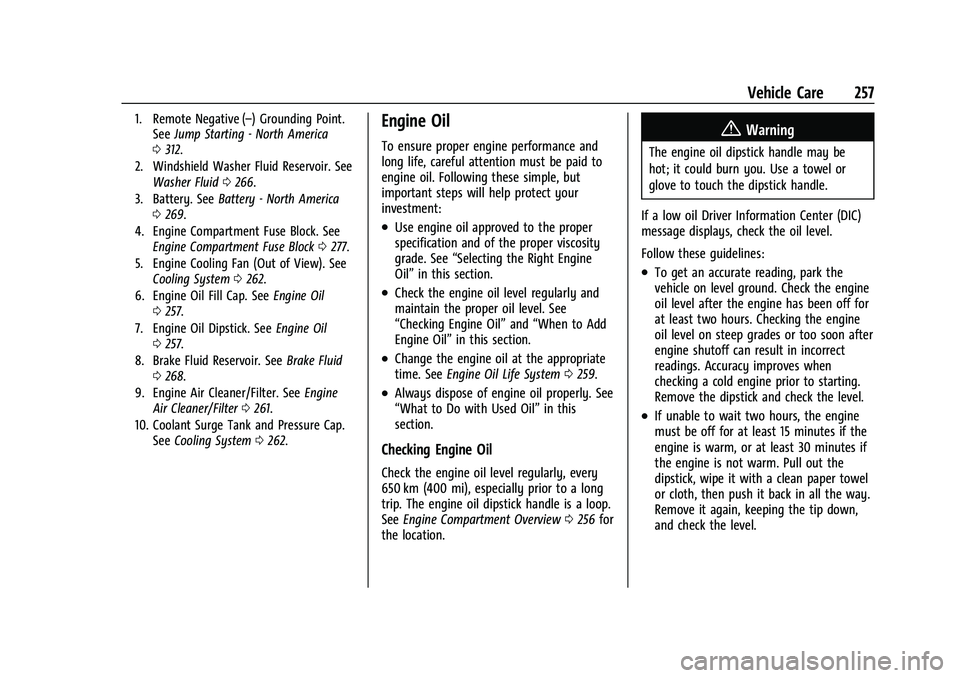
1. Remote Negative (–) Grounding Point.See Jump Starting - North America
0 312.
2. Windshield Washer Fluid Reservoir. See Washer Fluid 0266.
3. Battery. See Battery - North America
0 269.
4. Engine Compartment Fuse Block. See Engine Compartment Fuse Block 0277.
5. Engine Cooling Fan (Out of View). See Cooling System 0262.
6. Engine Oil Fill Cap. See Engine Oil
0 257.
7. Engine Oil Dipstick. See Engine Oil
0 257.
8. Brake Fluid Reservoir. See Brake Fluid
0 268.
9. Engine Air Cleaner/Filter. See Engine
Air Cleaner/Filter 0261.
10. Coolant Surge Tank and Pressure Cap. See Cooling System 0262.Engine Oil
To ensure proper engine performance and
long life, careful attention must be paid to
engine oil. Following these simple, but
important steps will help protect your
investment:
.Use engine oil approved to the proper
specification and of the proper viscosity
grade. See “Selecting the Right Engine
Oil” in this section.
.Check the engine oil level regularly and
maintain the proper oil level. See
“Checking Engine Oil” and“When to Add
Engine Oil” in this section.
.Change the engine oil at the appropriate
time. SeeEngine Oil Life System 0259.
.Always dispose of engine oil properly. See
“What to Do with Used Oil” in this
section.
Checking Engine Oil
Check the engine oil level regularly, every
650 km (400 mi), especially prior to a long
trip. The engine oil dipstick handle is a loop.
See Engine Compartment Overview 0256 for
the location.
{Warning
The engine oil dipstick handle may be
hot; it could burn you. Use a towel or
glove to touch the dipstick handle.
If a low oil Driver Information Center (DIC)
message displays, check the oil level.
Follow these guidelines:
.To get an accurate reading, park the
vehicle on level ground. Check the engine
oil level after the engine has been off for
at least two hours. Checking the engine
oil level on steep grades or too soon after
engine shutoff can result in incorrect
readings. Accuracy improves when
checking a cold engine prior to starting.
Remove the dipstick and check the level.
.If unable to wait two hours, the engine
must be off for at least 15 minutes if the
engine is warm, or at least 30 minutes if
the engine is not warm. Pull out the
dipstick, wipe it with a clean paper towel
or cloth, then push it back in all the way.
Remove it again, keeping the tip down,
and check the level.
Page 267 of 371
GMC Canyon/Canyon Denali Owner Manual (GMNA-Localizing-U.S./Canada/
Mexico-16510661) - 2023 - CRC - 11/29/22
266 Vehicle Care
If the vehicle has electric cooling fan(s), the
fans may be heard spinning at low speed
during most everyday driving. The fans may
turn off if no cooling is required. Under
heavy vehicle loading, trailer towing, high
outside temperatures, or operation of the air
conditioning system, the fans may change
to high speed and an increase in fan noise
may be heard. This is normal and indicates
that the cooling system is functioning
properly. The fans will change to low speed
when additional cooling is no longer
required.
The electric engine cooling fans may run
after the engine has been turned. off. This is
normal and no service is required.
Washer Fluid
What to Use
Use a washer fluid designed for the climate
your vehicle operates in. For example,
vehicles that operate in climates where
temperatures fall below freezing should use
a washer fluid that provides sufficient
protection against freezing.
Adding Washer Fluid
When washer fluid is low, a message
displays on the Driver Information Center
(DIC). Always read the manufacturer's
instructions before adding fluid.
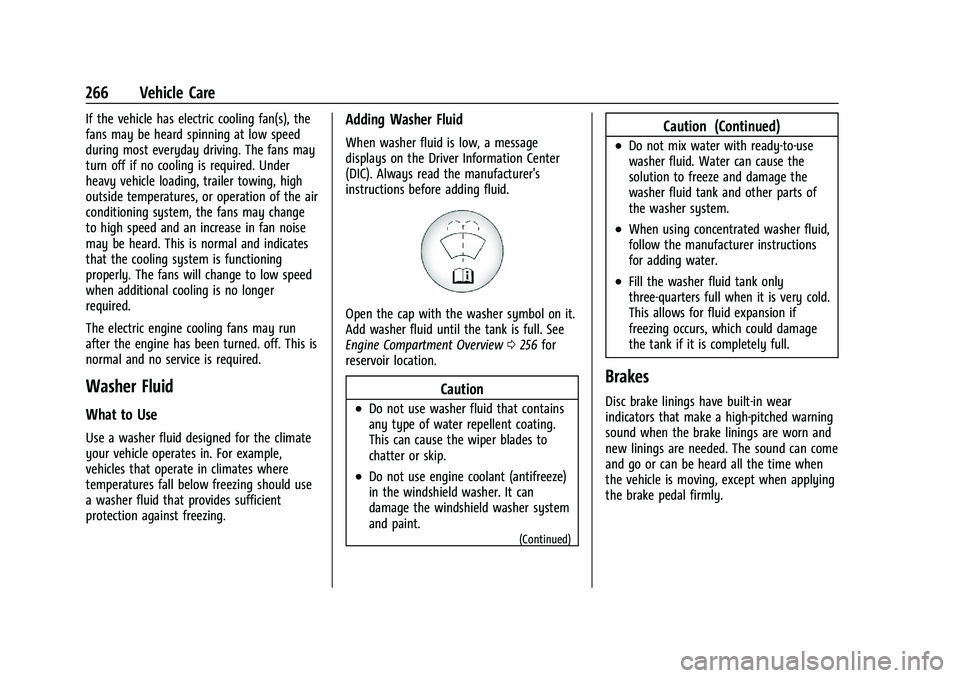
Open the cap with the washer symbol on it.
Add washer fluid until the tank is full. See
Engine Compartment Overview0256 for
reservoir location.
Caution
.Do not use washer fluid that contains
any type of water repellent coating.
This can cause the wiper blades to
chatter or skip.
.Do not use engine coolant (antifreeze)
in the windshield washer. It can
damage the windshield washer system
and paint.
(Continued)
Caution (Continued)
.Do not mix water with ready-to-use
washer fluid. Water can cause the
solution to freeze and damage the
washer fluid tank and other parts of
the washer system.
.When using concentrated washer fluid,
follow the manufacturer instructions
for adding water.
.Fill the washer fluid tank only
three-quarters full when it is very cold.
This allows for fluid expansion if
freezing occurs, which could damage
the tank if it is completely full.
Brakes
Disc brake linings have built-in wear
indicators that make a high-pitched warning
sound when the brake linings are worn and
new linings are needed. The sound can come
and go or can be heard all the time when
the vehicle is moving, except when applying
the brake pedal firmly.
Page 268 of 371
GMC Canyon/Canyon Denali Owner Manual (GMNA-Localizing-U.S./Canada/
Mexico-16510661) - 2023 - CRC - 11/29/22
Vehicle Care 267
{Warning
The brake wear warning sound means
that soon the brakes will not work well.
That could lead to a crash. When the
brake wear warning sound is heard, have
the vehicle serviced.
Caution
Continuing to drive with worn-out brake
linings could result in costly brake
repairs.
Some driving conditions or climates can
cause a brake squeal when the brakes are
first applied, clearing up following several
applications. This does not mean something
is wrong with the brakes.
Properly torqued wheel nuts are necessary
to help prevent brake pulsation. When tires
are rotated, inspect brake linings for wear
and evenly tighten wheel nuts in the proper
sequence to torque specifications. See
Capacities and Specifications 0336.
Brake pads should be replaced as complete
axle sets.
Brake Pedal Travel
See your dealer if the brake pedal does not
return to normal height, or if there is a
rapid increase in pedal travel. This could be
a sign that brake service may be required.
Replacing Brake System Parts
Always replace brake system parts with
new, approved replacement parts. If this is
not done, the brakes may not work
properly. The braking performance can
change in many ways if the wrong brake
parts are installed or if parts are improperly
installed.
Brake Pad Life System
When to Change Brake Pads
This vehicle has a system that estimates the
remaining life of the front and rear brake
pads. Brake pad life is displayed in the
Driver Information Center (DIC), along with
a percentage for each axle. The system must
be reset every time the brake pads are
changed.
When the system has determined that the
brake pads need to be replaced, a message
will display, which may include mileage
remaining. Brake pads should always be replaced as
complete axle sets.
How to Reset the Brake Pad Life System
The system will automatically detect when
significantly worn brake pads are replaced.
When the ignition is turned on after new
pads and wear sensors are installed, a
message will display. Follow the prompts to
reset the system.
The brake pad life system can also be
manually reset:
1. Display Brake Pad Life on the DIC. See Driver Information Center (DIC) (Base
Level) 098 or
Driver Information Center (DIC) (Uplevel)
0 100.
2. Press the thumbwheel or the trip odometer reset stem if the vehicle does
not have DIC buttons. Select front or rear
pads as appropriate.
3. Select YES on the confirmation message, or press the trip odometer reset stem on
a base level DIC. Repeat for pads on the
other axle if they were also replaced.
Page 269 of 371
GMC Canyon/Canyon Denali Owner Manual (GMNA-Localizing-U.S./Canada/
Mexico-16510661) - 2023 - CRC - 11/29/22
268 Vehicle Care
How to Disable the Brake Pad Life
System
The brake pad life system can be turned off.
This may be necessary if aftermarket brake
pads without wear sensors are installed.
When the system is turned off, the front
and rear brake pad life percentages will not
display. However, the built-in wear
indicators that make a high-pitched warning
sound when the brake pads are worn can
still determine when the pads should be
replaced. SeeBrakes0266.
To turn off the brake pad life system: 1. Display Brake Pad Life on the DIC. See Driver Information Center (DIC) (Base
Level) 098 or
Driver Information Center (DIC) (Uplevel)
0 100.
2. Select DISABLE.
To turn the brake pad life system back on,
follow the above steps but select ENABLE in
Step 2.
Brake Fluid
The brake master cylinder reservoir is filled
with GM approved DOT 4 brake fluid as
indicated on the reservoir cap. See Engine
Compartment Overview 0256 for the
location of the reservoir.
Checking Brake Fluid
With the vehicle in P (Park) on a level
surface, the brake fluid level should be
between the minimum and maximum marks
on the brake fluid reservoir.
There are only two reasons why the brake
fluid level in the reservoir may go down:
.Normal brake lining wear. When new
linings are installed, the fluid level goes
back up.
.A fluid leak in the brake hydraulic system.
Have the brake hydraulic system fixed.
With a leak, the brakes will not
work well. Always clean the brake fluid reservoir cap
and the area around the cap before
removing it.
Do not top off the brake fluid. Adding fluid
does not correct a leak. If fluid is added
when the linings are worn, there will be too
much fluid when new brake linings are
installed. Add or remove fluid, as necessary,
only when work is done on the brake
hydraulic system.
{Warning
If too much brake fluid is added, it can
spill on the engine and burn, if the
engine is hot enough. You or others could
be burned, and the vehicle could be
damaged. Add brake fluid only when
work is done on the brake hydraulic
system.
When the brake fluid falls to a low level,
the brake warning light comes on. See Brake
System Warning Light 091.
Brake fluid absorbs water over time which
degrades the effectiveness of the brake fluid.
Replace brake fluid at the specified intervals
to prevent increased stopping distance. See
Maintenance Schedule 0328.
Page 270 of 371
GMC Canyon/Canyon Denali Owner Manual (GMNA-Localizing-U.S./Canada/
Mexico-16510661) - 2023 - CRC - 11/29/22
Vehicle Care 269
What to Add
Use only GM approved DOT 4 brake fluid
from a clean, sealed container. See
Recommended Fluids and Lubricants0332.
{Warning
The wrong or contaminated brake fluid
could result in damage to the brake
system. This could result in the loss of
braking leading to a possible injury.
Always use the proper GM approved
brake fluid.
Caution
If brake fluid is spilled on the vehicle's
painted surfaces, the paint finish can be
damaged. Immediately wash off any
painted surface.
Battery - North America
The original equipment battery is
maintenance free. Do not remove the cap
and do not add fluid. The vehicle has an Absorbed Glass Mat
(AGM) 12-volt battery. Installation of a
standard 12-volt battery will result in
reduced 12-volt battery life.
Some 12-volt battery chargers have an AGM
battery setting. If available, use the AGM
setting on the charger to limit charge
voltage to 14.8 volts.
Refer to the replacement number shown on
the original battery label when a new
battery is needed. See
Engine Compartment
Overview 0256 for battery location.
{Warning
Do not use a match or flame near a
vehicle's battery. If you need more light,
use a flashlight.
Do not smoke near a vehicle's battery.
When working around a vehicle’s battery,
shield your eyes with protective glasses.
Keep children away from vehicle
batteries.
{Warning
Batteries have acid that can burn you and
gas that can explode. You can be hurt
badly if you are not careful.
Follow instructions carefully when
working around a battery.
Battery posts, terminals and related
accessories contain lead and lead
compounds which can cause cancer and
reproductive harm. Wash hands after
handling.
{Warning
WARNING: Battery posts, terminals and
related accessories can expose you to
chemicals including lead and lead
compounds, which are known to the
State of California to cause cancer and
birth defects or other reproductive harm.
Wash hands after handling. For more
information go to
www.P65Warnings.ca.gov.
See California Proposition 65 Warning 01.
Page 272 of 371
GMC Canyon/Canyon Denali Owner Manual (GMNA-Localizing-U.S./Canada/
Mexico-16510661) - 2023 - CRC - 11/29/22
Vehicle Care 271
Rear Axle
When to Check Lubricant
It is not necessary to regularly check the
rear axle fluid unless a leak is suspected or
an unusual noise is heard. A fluid loss could
indicate a problem. Have it inspected and
repaired. This service can be complex. See
your dealer.
Do not directly power wash the transfer
case and/or front/rear axle output seals.
High pressure water can overcome the seals
and contaminate the fluid. Contaminated
fluid will decrease the life of the transfer
case and/or drive axles and should be
replaced.
Park Brake and P (Park)
Mechanism Check
{Warning
When you are doing this check, the
vehicle could begin to move. You or
others could be injured and property
could be damaged. Make sure there is
room in front of the vehicle in case it(Continued)
Warning (Continued)
begins to roll. Be ready to apply the
regular brake at once should the vehicle
begin to move.
Park on a fairly steep hill, with the vehicle
facing downhill. Keeping your foot on the
regular brake, set the parking brake.
.To check the parking brake's holding
ability: With the engine running and the
transmission in N (Neutral), slowly remove
foot pressure from the regular brake
pedal. Do this until the vehicle is held by
the parking brake only.
.To check the P (Park) mechanism's holding
ability: With the engine running, shift to
P (Park). Then release the parking brake
followed by the regular brake.
Contact your dealer if service is required.
Wiper Blade Replacement
Windshield wiper blades should be inspected
for wear or cracking. Replacement blades come in different types
and are removed in different ways. For
proper windshield wiper blade length and
type, see
Maintenance Replacement Parts
0 333.
Caution
Allowing the wiper arm to touch the
windshield when no wiper blade is
installed could damage the windshield.
Any damage that occurs would not be
covered by the vehicle warranty. Do not
allow the wiper arm to touch the
windshield.
To replace the windshield wiper blade: 1. Pull the windshield wiper assembly away from the windshield.