seats GMC ENVOY 1998 User Guide
[x] Cancel search | Manufacturer: GMC, Model Year: 1998, Model line: ENVOY, Model: GMC ENVOY 1998Pages: 386, PDF Size: 20.33 MB
Page 106 of 386

To reset the trip computer, press the MODE and
US/MET buttons simultaneously for at least two
seconds.
All functions will be displayed for half a
second once the system
is reset. Reset can only be
performed in the AVG
ECON, FUEL USED and
AVG SPEED modes. All three modes are
reset simultaneously.
Sunglasses Storage Compartment
The console has a sunglasses storage compartment.
Center Floor Console
Your vehicle has a console between the two front
bucket seats.
To open the console, pull up on the console cover.
The console has two cupholders and
a storage tray,
including
a change holder, for the front seat passenger
and driver
to use.
2-45
I
ProCarManuals.com
Page 139 of 386
Ventilation Tips
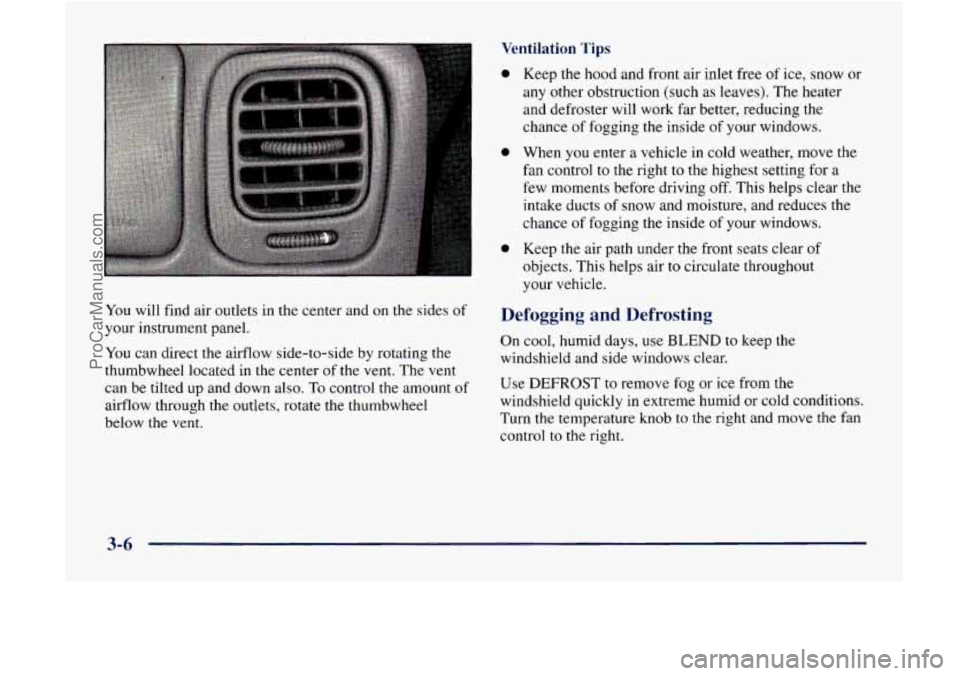
You will find air outlets in the center and on the sides of
your instrument panel.
You can direct the airflow side-to-side by rotating the
thumbwheel located in the center of the vent. The vent
can be tilted up and down also.
To control the amount of
airflow through the outlets, rotate the thumbwheel
below the vent.
0
e
0
Keep the hood and front air inlet free of ice, snow or
any other obstruction (such as leaves). The heater
and defroster will work far better, reducing the
chance
of fogging the inside of your windows.
When
you enter a vehicle in cold weather, move the
fan control to the right
to the highest setting for a
few moments before driving off. This helps clear the
intake ducts
of snow and moisture, and reduces the
chance of fogging the inside of your windows.
Keep the air path under the front seats clear
of
objects. This helps air to circulate throughout
your vehicle.
Defogging and Defrosting
On cool, humid days, use BLEND to keep the
windshield and side windows clear.
Use DEFROST
to remove fog or ice from the
windshield quickly in extreme humid or cold conditions.
Turn the temperature knob to the right and move the fan
control
to the right.
3-6
ProCarManuals.com
Page 200 of 386
Using heavier suspension components to get added
durability might not change your weight ratings. Ask
your dealer to help you load your vehicle the right way.
-
NOTICE:
Your warranty does not cover parts or
components that fail because of overloading.
If you put things inside your vehicle -- like suitcases,
tools, packages, or anything else
-- they will go as fast
as the vehicle goes. If you have to stop or turn quickly,
or if there is a crash, they’ll keep going.
A CAUmmdN:
Things you put inside your vehicle can strike and
injure people in a sudden stop or turn, or in
a crash.
0 Put things in the cargo area of your vehicle.
0 Never stack heavier things, like suitcases,
Try to spread the weight evenly.
inside the vehicle
so that some of them are
above the tops of the seats.
0 Don’t leave an unsecured child restraint in
your vehicle.
0 When you carry something inside the
vehicle, secure
it whenever you can.
0 Don’t leave a seat folded down unless you
need to.
There’s also important loading information for off-road
driving in this manual. See “Loading Your Vehicle for
Off-Road Driving” in the Index.
4-41
ProCarManuals.com
Page 300 of 386
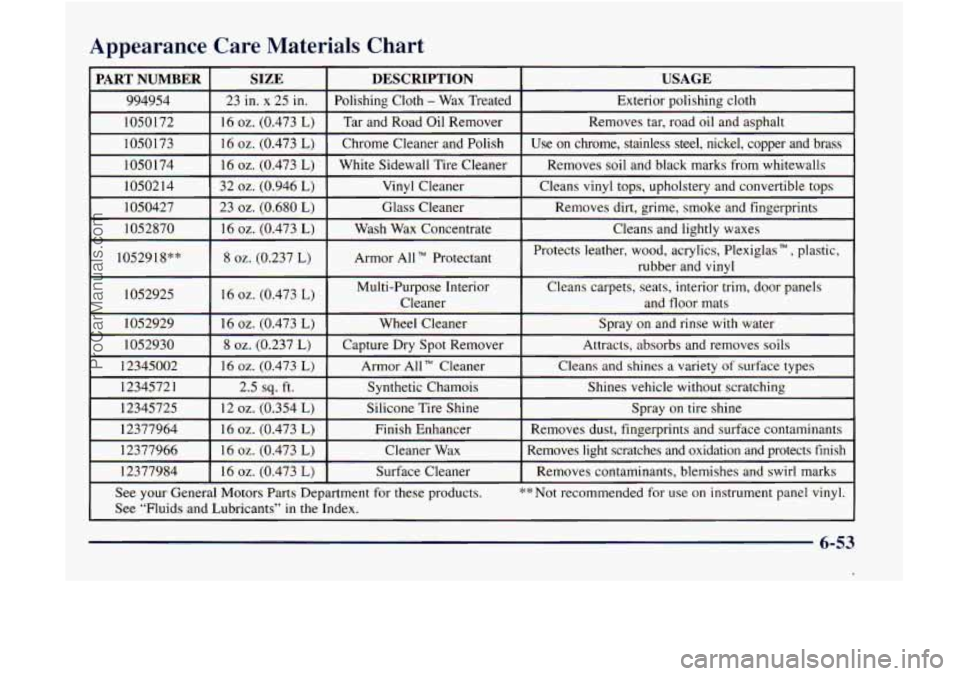
Appearance Care Materials Chart
PART NUMBER USAGE DESCRIPTION SIZE
994954 Exterior polishing cloth
Polishing Cloth - Wax
Treated
23 in. x 25 in.
1050172
Cleans
and lightly waxes Wash
Wax Concentrate
16 oz. (0.473 L) 1052870 Removes dirt,
grime, smoke
and fingerprints
Glass Cleaner
23 oz. (0.680 L) 1050427 Cleans
vinyl tops, upholstery and convertible tops
Vinyl
Cleaner
32
oz. (0.946 L) 1050214 Removes
soil and black marks from whitewalls
White Sidewall Tire Cleaner
16
oz. (0.473 L) 1050174 Use on chrome, stainless steel, nickel, copper and brass
Chrome
Cleaner and Polish
16 oz. (0.473 L) 1050173 Removes
tar, road
oil and asphalt
Tar and Road Oil Remover
16 oz. (0.473 L)
- ~~
1052918** Armor All TM Protectant 8 oz. (0.237 L) Protects leather, wood, acrylics, Plexiglas TM, plastic,
rubber and
vinyl
1052925
Attracts, absorbs and removes
soils Capture Dry Spot Remover 8 oz. (0.237 L) 1052930 Spray
on and rinse
with water
Wheel Cleaner
16 oz. (0.473 L) 1052929 16
oz. (0.473 L) Multi-Purpose
Interior
Cleans carpets, seats, interior trim, door panels
Cleaner and floor mats
12345002
16 oz. (0.473 L)
See your General Motors Parts Department for these products. **Not recommended for use on instrument panel vinyl.
Removes contaminants, blemishes and swirl marks
Surface Cleaner
16 oz. (0.473 L) 12377984 Removes light scratches and oxidation and protects finish
Cleaner
Wax 16
oz. (0.473 L) 12377966 Removes dust, fingerprints
and surface contaminants
Finish Enhancer
16
oz. (0.473 L) 12377964 Spray
on tire shine
Silicone Tire Shine
12
oz. (0.354 L) 12345725 Shines vehicle
without scratching
Synthetic Chamois
2.5
sq. ft.
1234572 1
Cleans and shines a variety of surface types
Armor All Cleaner
See “Fluids and Lubricants” in the Index.
--
6-53
ProCarManuals.com
Page 304 of 386

FuseKircuit Usage
Breaker
2
3
4
8
9
10
11
12 Cigarette
Lighter, Data
Link Connector
Cruise Control Module and
Switch, Body Control Module,
Heated Seats
Gages, Body Control Module,
Instrument Panel Cluster
Interior Lights
Not Used
Power Outside Mirror, Power
Lock Relay
Courtesy Lamps, Battery
Run-Down Protection
Not Used
Turn Signal
Cluster, Engine Control Module
Parking Lamps, Power Window
Switch, Body Control Module,
Ashtray Lamp
FuseKircuit
Breaker
13
14
15
16
17
18
19
20
21
22
23
24
Usage
Auxiliary Power
Power Locks Motor
4WD Switch, Engine Controls (VCM, PCM, Transmission)
Air Bag
Front Wiper
Not Used
Radio Battery
Amplifier
HVAC
I (Automatic), HVAC
Sensors (Automatic)
Anti-Lock Brakes
Rear Wiper
Radio, Ignition
6-57
ProCarManuals.com
Page 378 of 386

GloveBox .................................... 2-42
Gross Axle Weight Rating ........................ 4-40
Gross Vehicle Weight Rating ...................... 4-40
Guide en Franpis
11 .. .................................
GVWR ....................................... 4-40
Halogen Bulbs
................................ 6-32
Hazard Warning Flashers
.......................... 5-2
Head Restraints
................................. 1-5
Headlamps .................................... 2-36
Bulb Replacement
............................ 6-32
HighLow Beam Changer
...................... 2-3 1
On Reminder ................................ 2-37
Hearing Impaired. Customer Assistance
.............. 8-4
Heated Front Seats
............................... 1-3
Heated Outside Rearview Mirror ................... 2-42
High Intensity Discharge Lighting
.................. 6-3 1
Highway Hypnosis .............................. 4-34
Hill and Mountain Roads
......................... 4-34
Hitches. Trailer
................................. 4-46
Hood
.......................................... 6-8
Horn ......................................... 2-29
Hydroplaning
.................................. 4-30
Heating
........................................ 3-5
Ignition Positions
.................................... 2-14
Transmission Lock Check
...................... 7-42
Ignition Transmission Lock Check
................. 7-42
Illuminated Entry
............................... 2-39
Inflation. Tire
............................. 6-37. 7-39 Inflator
. Accessory .............................. 2-50
Inspections
Brakesystem
................................ 7-44
Engine Cooling Systetn
........................ 7-43
Exhaust Systems
............................. 7-43
Front Drive Axle Boot Seal
..................... 7-43
Steering
.................................... 7-43
Suspension
.................................. 7-43
Throttle System
.............................. 7-44
Transfer
Case ................................ 7-44
Instrument Panel
............................... 2-58
Cleaning
.................................... 6-48
Cluster
..................................... 2-60
FuseBlock
.................................. 6-56
Interior Lamps ................................. 2-39
Jacking Equipment
............................. 5-24
Jump Starting
................................... 5-3
Key
in the Ignition ............................. 2-11
Key Lock Cylinders Service
...................... 7-40
Keyless Entry System
............................ 2-6
Keys
.......................................... 2-2
Labels
Certification/Tire
............................. 4-40
Fuse
.................................. 6.56. 6.58
Safety Belt
.................................. 1-53
Service Parts Identification ..................... 6-54
Vehicle Identification Number
................... 6-54
ProCarManuals.com
Page 382 of 386

Power ....................................... 1-2
Rear ........................................ 1-6
Reclining Front
............................... 1-4
Seats and Restraint Systems
........................ I - 1
SecondGear ................................... 2-19
Security Warning Light
.......................... 2-70
Service
4WD Light ............................. 2-7 I
Service and Appearance Care ...................... 6- I
Service and Owner Publications .............. 8- 1 1. 8- 12
Service Engine Soon Light ....................... 2-67
Service Parts Identificatmn Label
.................. 6-54
Service Work, Doing Your Own
.................... 6-2
Servicing
Your Air Bag-Equipped Vehicle ........... 1-27
Sheet Metal Darnage
............................ 6-5 1
Shifting ....................................... 2-18
Out of Park
.................................. 2-23
Signaling Turns
................................ 2-3 I
SIR .......................................... 1-20
Skidding
...................................... 4-13
Specifications and Capacities
................. 6-60, 6-6 1
Speedometer ................................... 2-61
Stains, Cleaning ................................ 6-47
Starter Switch Check
............................ 7-4 1
Starting Your Engine ............................ 2- 15
Steam
........................................ 5-12
Steering
In Emergencies ............................... 4- 10
Power ....................................... 4-9
Steering Wheel
. Tilt ............................. 2-30
Storage Compartments ........................... 2-42
Into Piirk .................................... 2-21
Speech Impaired. Customer Assistance ............... 8-4 Storage.
Vehicle
................................ 6-31
Storing
a Flat or Spare Tire and Tools ............... 5-29
Stuck:
In Sand. Mud. Ice or Snow .................. 5-32
Sun Visors .................................... 2-50
Sunglasses Storage
.............................. 2-45
Sunroof
....................................... 2-52
Supplemental Inflatable Restraint
.................. 1-20
Symbols. Vehicle .................................. v
Tachometer .................................. 2-61
Taillamp Bulb Replacement
....................... 6-34
Tape Player Care
.......................... 3-247-39
Theft
......................................... 2-10
Thermostat
.................................... 6-25
Third Gear
.................................... 2-19
Tilt Steering Wheel
............................. 2-30
Time. Setting
................................... 3-8
Tire Chains
.................................... 6-44
Tire Inflation Check
............................. 7-39
Ti res
Alignment and Balance
........................ 6-43
Buyin! New
................................. 6-40
Chang~ng a
Flat .............................. 5-21
Cleaning
.................................... 6-51
Inflation ............................... 6-37. 7-39
Inspection and Rotation
........................ 6-38
Pressure
.................................... 6-37
Temperature
................................. 6-42
Traction
.................................... 6-42
Treadwear
................................... 6-42
THEFTLOCK
TM ................................ 3-21
9-9
.
ProCarManuals.com