door lock GMC ENVOY 2005 Owner's Guide
[x] Cancel search | Manufacturer: GMC, Model Year: 2005, Model line: ENVOY, Model: GMC ENVOY 2005Pages: 502, PDF Size: 2.77 MB
Page 127 of 502

Assist Handles
A handle above each door can be used when getting
out of your vehicle.
Luggage Carrier
{CAUTION:
If you try to carry something on top of your
vehicle that is longer or wider than the luggage
carrier — like paneling, plywood, a mattress
and so forth — the wind can catch it as you
drive along. This can cause you to lose
control. What you are carrying could be
violently torn off, and this could cause you or
other drivers to have a collision, and of course
damage your vehicle. You may be able to carry
something like this inside. But, never carry
something longer or wider than the luggage
carrier on top of your vehicle.
A luggage carrier allows you to load things on top of
your vehicle. The luggage carrier has side rails attached
to the roof, sliding crossrails (if equipped) and placesto use for tying things down. These let you load some
other things on top of your vehicle, as long as they
are not wider or longer than the luggage carrier.
To slide the crossrails to where you want them, pull up
on the lever on each side of the crossrail. This will
release the crossrail and allow you to slide it. When the
crossrail is where you want it, press down on the
levers to lock it into place.
Notice:Loading cargo on the luggage carrier that
weighs more than 220 lbs (100 kg) or hangs over the
rear or sides of the vehicle may damage your
vehicle. Load cargo so that it rests on the slats as
far forward as possible and against the side
rails, making sure to fasten it securely.
Don’t exceed the maximum vehicle capacity when
loading your vehicle. For more information on vehicle
capacity and loading, seeLoading Your Vehicle on
page 4-44.
To prevent damage or loss of cargo as you’re driving,
check now and then to make sure the luggage carrier is
locked and cargo is still securely fastened.
When the luggage carrier is not in use, place the
crossrails at the following positions for wind noise
reduction. Place one crossrail at the rear most point of
the vehicle and the other crossrail above the opening
of the rear door.
2-55
Page 132 of 502

Sunroof
The vehicle may be equipped with a power sliding
sunroof. To open or close the sunroof, the ignition must
be on or Retained Accessory Power (RAP) must be
active. SeeRetained Accessory Power (RAP) on
page 2-19.
Press and release the
back of the control in the
overhead console to
open the sunroof. Press
the front of the control
to close the sunroof.
Once the sunroof is closed, press the forward side of
the control to open the sunroof to the vent position.
The sunroof has a sunshade which can be pulled
forward to block sun rays. If it is in the closed position, it
will open when the sunroof is opened.
Vehicle Personalization
Memory Seat
If your vehicle has this
feature, the controls for the
memory function are
located on the driver’s door.
These buttons are used to program and recall memory
settings for the driver’s seating position, both outside
mirror positions and the adjustable pedals, if equipped.
The settings for these features can be saved for up
to two drivers.
To store the memory settings, do the following:
1. Adjust the driver’s seat, including the seatback
recliner and lumbar, both of the outside mirrors
and the adjustable pedals, if equipped, to the
desired position.
2-60
Page 150 of 502
Headlamps on Reminder
A reminder tone will sound when your headlamps or
parking lamps are manually turned on, the driver’s door
is open and your ignition is in LOCK or ACCESSORY.
To turn the tone off, turn the knob all the way
counterclockwise. In the automatic mode, the headlamps
turn off once the ignition key is in LOCK.
Daytime Running Lamps (DRL)
Daytime Running Lamps (DRL) can make it easier for
others to see the front of your vehicle during the
day. DRL can be helpful in many different driving
conditions, but they can be especially helpful in the short
periods after dawn and before sunset. Fully functional
daytime running lamps are required on all vehicles
rst sold in Canada.
The DRL system will make your headlamps come
on at reduced brightness when the following conditions
are met:
The ignition is on.
The exterior lamps knob is in automatic
headlamp mode.
The light sensor detects daytime light.
The transmission is not in PARK (P).
When the DRL are on, only your headlamps will be on.
The taillamps, sidemarker and other lamps won’t be
on. The instrument panel won’t be lit up either.
When it begins to get dark, the headlamps will
automatically switch from DRL to the regular headlamps.
Automatic Headlamp System
When it is dark enough outside, your Automatic
Headlamp System will turn on your headlamps at the
normal brightness along with other lamps such as
the taillamps, sidemarker, parking lamps and the
instrument panel lights. The radio lights will also be on.
Your vehicle is equipped with a light sensor on the
top of the instrument panel. Be sure it is not covered or
the system will be on whenever the ignition is on.
The system may also turn on your lights when driving
through a parking garage, heavy overcast weather
or a tunnel. This is normal.
3-16
Page 152 of 502
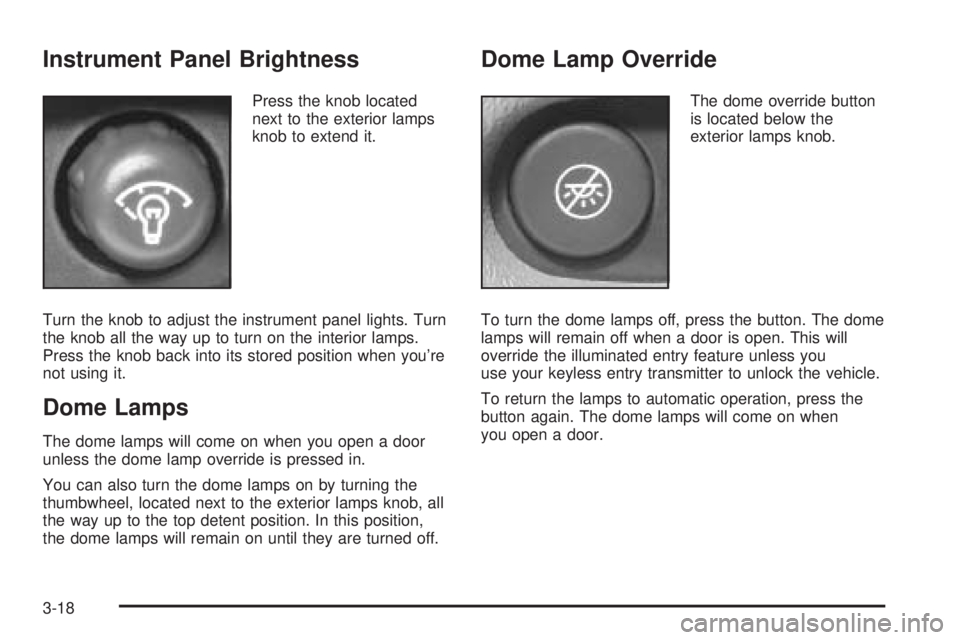
Instrument Panel Brightness
Press the knob located
next to the exterior lamps
knob to extend it.
Turn the knob to adjust the instrument panel lights. Turn
the knob all the way up to turn on the interior lamps.
Press the knob back into its stored position when you’re
not using it.
Dome Lamps
The dome lamps will come on when you open a door
unless the dome lamp override is pressed in.
You can also turn the dome lamps on by turning the
thumbwheel, located next to the exterior lamps knob, all
the way up to the top detent position. In this position,
the dome lamps will remain on until they are turned off.
Dome Lamp Override
The dome override button
is located below the
exterior lamps knob.
To turn the dome lamps off, press the button. The dome
lamps will remain off when a door is open. This will
override the illuminated entry feature unless you
use your keyless entry transmitter to unlock the vehicle.
To return the lamps to automatic operation, press the
button again. The dome lamps will come on when
you open a door.
3-18
Page 153 of 502

Entry Lighting
Your vehicle is equipped with entry lighting.
When a door is opened, the dome lamps will come on if
the dome override button is in the “out” position.
When all the doors are closed, the lamps will stay on for
a short period of time and will then turn off automatically.
If you use your keyless entry transmitter to unlock the
vehicle, the interior lights will come on for a short
time whether or not the dome override is on.
Exit Lighting
With exit lighting, the interior lamps will come on when
you remove the key from the ignition to help you
see while exiting the vehicle. With the dome override
button in the “out” position, these lights will stay on for a
short period of time and then will go out.
Reading Lamps
The reading lamps are located in the console for front
passengers and on the headliner for rear passengers.
Press the lens on the lamps to turn the reading lamps on
and press the lens again to turn the lamps off.
Battery Run-Down Protection
This feature shuts off the dome, courtesy and vanity
if they are left on for more than 20 minutes when the
ignition is off. This will keep your battery from
running down.
If the battery run-down protection shuts off the interior
lamps, it may be necessary to do one of the following to
return to normal operation:
Shut off all lamps and close all doors.
Turn the ignition key to RUN.
This feature will also turn off the parking lamps and
headlamps under most circumstances, if they are left on.
If you would like to turn them back on, turn the exterior
lamps knob.
Accessory Power Outlets
Your vehicle may have accessory power outlets. With
the accessory power outlets, you can plug in auxiliary
electrical equipment such as a cellular telephone or
CB radio.
The rst two outlets are located below the cigarette lighter
and the rear wiper switch on the instrument panel. The
third outlet is located on the rear of the center console.
3-19
Page 165 of 502

Press the buttons at the bottom of the audio control
panel to adjust the fan speed, mode and temperature for
the rear passengers. The selections will be shown on
the display.
S9T(Fan):Press the rear fan control button with
the arrow pointing right to turn the rear climate
control on. Toggle this button to adjust the air ow
speed. To turn the rear system off, toggle the left arrow
until the display turns off.
z\y(Mode):Press this button to change the
direction of airow (panel, bi-level or oor) to the rear
seat area.
STEMPT(Temperature):Press this button to
increase and decrease the temperature setting.
Climate Controls Personalization
If your vehicle is equipped with the Driver Information
Center (DIC), you can store and recall the climate control
settings for temperature, air delivery mode and fan speed
for two different drivers. The personal choice settings
recalled are determined by the transmitter used to enter
the vehicle. After the button with the unlock symbol on a
remote keyless entry transmitter is pressed, the climate
control will adjust to the last settings of the identied
driver. The settings can also be changed by pressing one
of the memory buttons (1 or 2) located on the driver’s
door. When adjustments are made, the new settings are
automatically saved for the driver. Envoy XL
3-31
Page 194 of 502

Lock Doors
Press the customization button until LOCK DOORS: IN
GEAR appears in the display. To select your
preference for automatic locking, press the select button
while LOCK DOORS: IN GEAR is displayed on the
DIC. Pressing the select button will scroll through the
following choices:
LOCK DOORS: IN GEAR (default):The doors will lock
when the vehicle is shifted out of PARK (P).
LOCK DOORS: WITH SPEED:The doors will lock
when the vehicle speed is above 8 mph (13 km/h) for
three seconds.
For more information on automatic door locks, see
Programmable Automatic Door Locks on page 2-9.
Unlock Doors
Press the customization button until UNLOCK DOORS:
IN PARK appears in the display. To select your
preference for automatic unlocking, press the select
button while UNLOCK DOORS: IN PARK is displayed
on the DIC. Pressing the select button will scroll through
the following choices:
UNLOCK DOORS: IN PARK (default):All of the doors
will unlock when the vehicle is shifted into PARK (P).UNLOCK DRIVER: IN PARK:The driver’s door will be
unlocked when the vehicle is shifted into PARK (P).
UNLOCK DOORS: KEY OUT:All of the doors
will unlock when the key is taken out of the ignition.
UNLOCK DOORS: MANUALLY:The doors will not be
unlocked automatically.
Choose one of the available options and press the
customization button while it is displayed on the DIC to
select it and move on to the next feature. For more
information on automatic door locks, seeProgrammable
Automatic Door Locks on page 2-9.
Lock Feedback
Press the customization button until LOCK FEEDBACK:
LAMPS appears in the display. To select your
preference for the feedback you receive when locking
the vehicle with the remote keyless entry transmitter,
press the select button while LOCK FEEDBACK:
LAMPS is displayed on the DIC. Pressing the select
button will scroll through the following choices:
LOCK FEEDBACK: LAMPS (default):The parking
lamps will ash each time you press the button with the
lock symbol on the remote keyless entry transmitter.
3-60
Page 319 of 502

Tire and Loading Information Label
A vehicle specic Tire and Loading Information label is
attached to the center pillar (B-pillar). With the driver’s
door open, you will nd the label attached below the door
lock post (striker). The tire and loading information label
shows the number of occupant seating positions (A), and
the maximum vehicle capacity weight (B) in kilograms
and pounds.The Tire and Loading Information label also shows the
size of the original equipment tires (C) and the
recommended cold tire ination pressures (D). For more
information on tires and ination seeTires on page 5-54
andInation - Tire Pressure on page 5-61.
There is also important loading information on the
vehicle Certication/Tire label. It tells you the Gross
Vehicle Weight Rating (GVWR) and the Gross
Axle Weight Rating (GAWR) for the front and rear axle.
See “Certication/Tire Label” later in this section.
Label Example
4-45
Page 349 of 502

Filling Your Tank
{CAUTION:
Fuel vapor burns violently and a fuel re can
cause bad injuries. To help avoid injuries to
you and others, read and follow all the
instructions on the pump island. Turn off your
engine when you are refueling. Do not smoke
if you are near fuel or refueling your vehicle.
Keep sparks, ames and smoking materials
away from fuel. Do not leave the fuel pump
unattended when refueling your vehicle — this
is against the law in some places. Keep
children away from the fuel pump; never let
children pump fuel.The tethered fuel cap is located behind a hinged fuel
door on the driver’s side of the vehicle.
To remove the fuel cap, turn it slowly to the left
(counterclockwise).
While refueling, hang the tethered fuel cap from the
hook on the fuel door.
5-7
Page 453 of 502
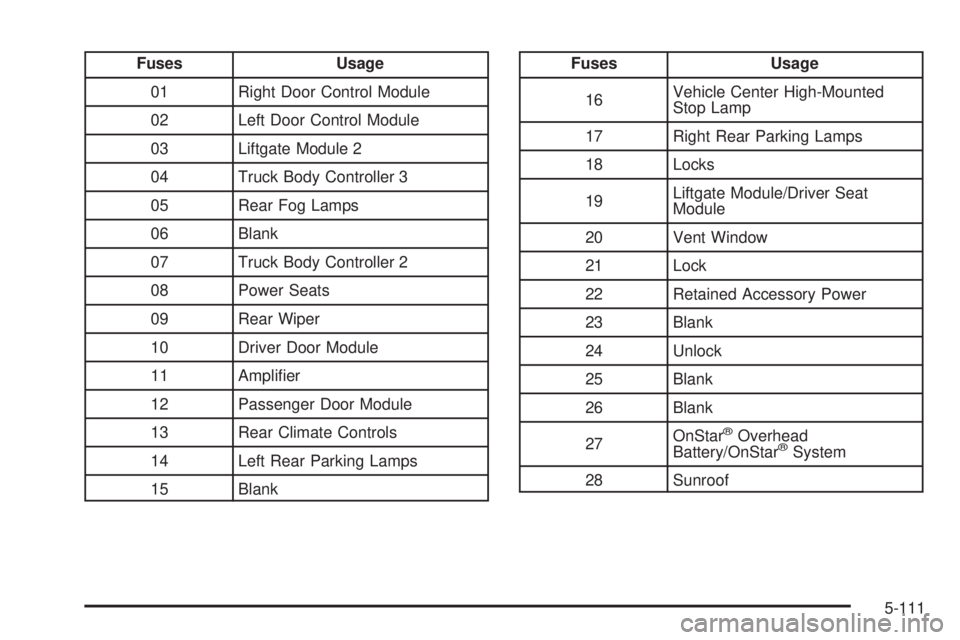
Fuses Usage
01 Right Door Control Module
02 Left Door Control Module
03 Liftgate Module 2
04 Truck Body Controller 3
05 Rear Fog Lamps
06 Blank
07 Truck Body Controller 2
08 Power Seats
09 Rear Wiper
10 Driver Door Module
11 Amplier
12 Passenger Door Module
13 Rear Climate Controls
14 Left Rear Parking Lamps
15 BlankFuses Usage
16Vehicle Center High-Mounted
Stop Lamp
17 Right Rear Parking Lamps
18 Locks
19Liftgate Module/Driver Seat
Module
20 Vent Window
21 Lock
22 Retained Accessory Power
23 Blank
24 Unlock
25 Blank
26 Blank
27OnStar
®Overhead
Battery/OnStar®System
28 Sunroof
5-111