light GMC ENVOY 2006 Owner's Guide
[x] Cancel search | Manufacturer: GMC, Model Year: 2006, Model line: ENVOY, Model: GMC ENVOY 2006Pages: 524, PDF Size: 3.36 MB
Page 109 of 524
If the service Four-Wheel Drive Warning Light on the
instrument panel cluster stays on, you should take your
vehicle to your dealer for service. SeeService
Four-Wheel Drive Warning Light on page 3-48for
further information.
Shifting Into Four-Wheel High or Automatic
Four-Wheel Drive
Turn the knob to Four-Wheel High or Automatic
Four-Wheel Drive. This can be done at any speed
unless you are shifting out of Four-Wheel Low. The
indicator light will ash while shifting. It will remain on
when the shift is complete.
Shifting Into Two-Wheel High
Turn the knob to Two-Wheel High. This can be done at
any speed unless you are shifting out of Four-Wheel Low.
Shifting Into Four-Wheel Low
To shift to Four-Wheel Low, the vehicle’s engine must
be running and the vehicle must be stopped or
moving less than 2 mph (3.2 km/h) with the transmission
in NEUTRAL (N). The preferred method for shifting
into Four-Wheel Low is to have your vehicle moving 1 or
2 mph (1.6 to 3.2 km/h). Turn the knob to Four-Wheel
Low. You must wait for the Four-Wheel Low indicator
light to stop ashing and stay on before shifting
the transmission into gear.If you turn the knob to Four-Wheel Low when your
vehicle is in gear and/or moving, the Four-Wheel Low
indicator light will ash for 30 seconds and not complete
the shift unless your vehicle is moving less than
2 mph (3.2 km/h) and the transmission is in
NEUTRAL (N). After 30 seconds, the transfer case will
return to the setting last chosen.
Shifting Out of Four-Wheel Low
To shift from Four-Wheel Low to Four-Wheel High, Auto
Four-Wheel Drive, or Two-Wheel High, your vehicle
must be stopped or moving less than 2 mph (3.2 km/h)
with the transmission in NEUTRAL (N) and the
engine running. The preferred method for shifting out of
Four-Wheel Low is to have your vehicle moving
1 or 2 mph (1.6 to 3.2 km/h). Turn the knob to
Four-Wheel High, Auto Four-Wheel Drive, or Two-Wheel
High. You must wait for the Four-Wheel High, Auto
Four-Wheel Drive, or Two-Wheel High indicator light to
stop ashing and stay off before shifting your
transmission into gear.
If the knob is turned to Four Wheel-High, Auto
Four-Wheel Drive, or Two-Wheel High when your
vehicle is in gear and/or moving, the Four-Wheel High,
Auto Four-Wheel Drive, or Two-Wheel High indicator
light will ash for 30 seconds. It will not complete
the shift unless your vehicle is moving less than 2 mph
(3.2 km/h) with the transmission in NEUTRAL (N).
2-29
Page 110 of 524

Shifting into NEUTRAL
Before shifting the transfer case to NEUTRAL, rst
make sure the vehicle is parked so that it will not roll.
1. Set the parking brake.
2. Start the vehicle.
3. Put the transmission in NEUTRAL (N).
4. Shift the transfer case to Two-Wheel High.
5. Turn the transfer case knob all of the way past
Four-Wheel Low and hold it there for a minimum
of 10 seconds. The neutral indicator light will
come on.
6. With the engine running, shift the transmission to
REVERSE (R) for one second, then shift the
transmission to DRIVE (D) for one second, to
ensure that the transfer case is in NEUTRAL.
7. Turn the engine off, by turning the key to
ACCESSORY.
8. Place the transmission shift lever in PARK (P).
9. Turn the ignition to LOCK.
Shifting Out of NEUTRAL
To shift the transfer case out of NEUTRAL, do the
following:
1. Set the parking brake and apply the regular
brake pedal.
2. Turn the ignition to RUN with the engine off.
3. Put the transmission in NEUTRAL (N).
4. Turn the transfer case knob to the desired position
(Two-Wheel High, Four-Wheel High, or Auto
Four-Wheel Drive).
5. After the transfer case has shifted out of NEUTRAL,
the indicator light will go out.
6. Release the parking brake.
7. Start the engine and shift the transmission to the
desired position.
2-30
Page 111 of 524
Parking Brake
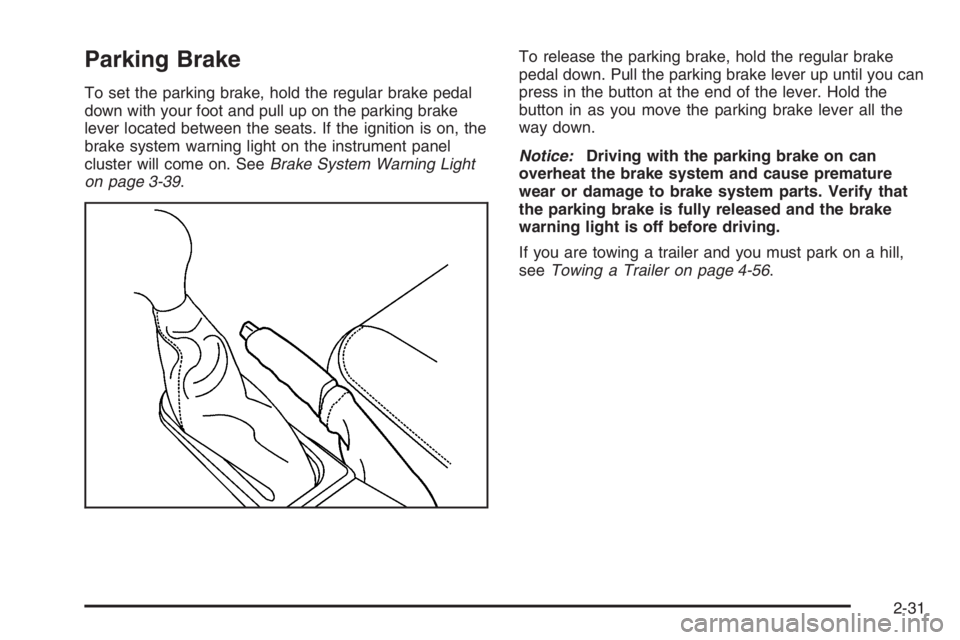
To set the parking brake, hold the regular brake pedal
down with your foot and pull up on the parking brake
lever located between the seats. If the ignition is on, the
brake system warning light on the instrument panel
cluster will come on. SeeBrake System Warning Light
on page 3-39.To release the parking brake, hold the regular brake
pedal down. Pull the parking brake lever up until you can
press in the button at the end of the lever. Hold the
button in as you move the parking brake lever all the
way down.
Notice:Driving with the parking brake on can
overheat the brake system and cause premature
wear or damage to brake system parts. Verify that
the parking brake is fully released and the brake
warning light is off before driving.
If you are towing a trailer and you must park on a hill,
seeTowing a Trailer on page 4-56.
2-31
Page 119 of 524

Automatic Dimming Rearview Mirror
with OnStar
®and Compass
Your vehicle may have an automatic-dimming rearview
mirror with a compass and the OnStar®system.
There are three additional buttons for the OnStar
®
system. See your dealer for more information on the
system and how to subscribe to OnStar®. SeeOnStar®
System on page 2-49for more information about the
services OnStar®provides.
Mirror Operation
When turned on, this mirror automatically dims to the
proper level to minimize glare from any headlamps
behind you after dark.
O(On/Off):This is the on/off button for the automatic
dimming feature and compass. Press the far left
button, located below the mirror face, for up to
three seconds to turn the feature on and off. A light on
the mirror will be lit while the feature is turned on.
Compass Operation
Press the on/off button once to turn the compass
on or off.
There is a compass display in the window in the upper
right corner of the mirror face. The compass displays
a maximum of two characters. For example, “NE”
is displayed for north-east.
Compass Calibration
Press and hold the on/off button down for nine seconds
to activate the compass calibration mode. CAL will
be displayed in the compass window on the mirror.
The compass can be calibrated by driving the vehicle in
circles at 5 mph (8 km/h) or less until the display
reads a direction.
Compass Variance
Compass variance is the difference between earth’s
magnetic north and true geographic north. The mirror is
set to zone eight upon leaving the factory. It will be
necessary to adjust the compass to compensate for
compass variance if you live outside zone eight. Under
certain circumstances, such as during a long distance
cross-country trip, it will be necessary to adjust for
compass variance. If not adjusted to account for compass
variance, your compass could give false readings.
2-39
Page 120 of 524

To adjust for compass variance, do the following:
1. Find your current location and variance zone
number on the map.
2. Press and hold the on/off button for six seconds.
Release the button when ZONE is displayed. The
number shown is the current zone number.
3. Scroll through the zone numbers that appear in the
compass/temperature window on the mirror by
pressing the on/off button. Once you nd your
zone number, release the button. After about
four seconds, the mirror will return to the compass
display, and the new zone number will be set.Automatic Dimming Rearview Mirror
with OnStar
®, Compass and
Temperature Display
Your vehicle may have this feature. When on, an
automatic dimming mirror automatically dims to the
proper level to minimize glare from lights behind
you after dark.
The mirror also includes a dual display in the upper
right corner of the mirror face. The compass reading and
the outside temperature will both appear in the display
at the same time.
P(On/Off):This is the on/off button.
2-40
Page 121 of 524

Temperature and Compass Display
Press the on/off button, located to the far left, briey to
turn the compass/temperature display on or off.
If the display reads CAL, you will need to calibrate the
compass. For more information on calibration,
see below.
To adjust between Fahrenheit and Celsius do the
following:
1. Press and hold the on/off button for approximately
four seconds until either a ashing F or C appears.
2. Press the button again to change the display to the
desired unit of measurement. After approximately
four seconds of inactivity, the new unit will be locked
in and the compass/temperature display will return.
If an abnormal temperature reading is displayed for an
extended period of time, please consult your dealer.
Under certain circumstances, a delay in updating
the temperature is normal.
Automatic Dimming Mirror Operation
The automatic dimming mirror function is turned
on automatically each time the ignition is started. To
operate the automatic dimming mirror, do the following:
1. Make sure the green indicator light, located to the left
of the on/off button, is lit. If it’s not, press and hold the
on/off button for approximately six seconds until the
green light comes on, indicating that the mirror is in
automatic dimming mode.
2. Turn off the automatic dimming mirror function by
pressing and holding the on/off button for
approximately six seconds, until the green indicator
light turns off.
Compass Variance
The mirror is set in zone eight upon leaving the factory. It
will be necessary to adjust the compass to compensate
for compass variance if you live outside of zone eight.
Under certain circumstances, as during a long distance
cross-country trip, it will be necessary to adjust for
compass variance. Compass variance is the difference
between earth’s magnetic north and true geographic
north. If not adjusted to account for compass variance,
your compass could give false readings.
2-41
Page 123 of 524
Cleaning the Mirror
When cleaning the mirror, use a paper towel or similar
material dampened with glass cleaner. Do not spray
glass cleaner directly on the mirror as that may cause
the liquid cleaner to enter the mirror housing.
Automatic Dimming Rearview Mirror
with Compass
Your vehicle may have an automatic-dimming rearview
mirror with a compass.
Mirror Operation
When turned on, this mirror automatically dims to the
proper level to minimize glare from any headlamps
behind you after dark.
O(On/Off): This is the on/off button for the automatic
dimming feature and compass. Press the far left button,
located below the mirror face, for up to three seconds
to turn the feature on and off. A light on the mirror will be
lit while the feature is turned on.
Compass Operation
Press the on/off button once to turn the compass
on or off.
There is a compass display in the window in the upper
right corner of the mirror face. The compass displays
a maximum of two characters. For example, “NE”
is displayed for north-east.
Compass Calibration
Press and hold the on/off button down for nine seconds
to activate the compass calibration mode. CAL will
be displayed in the compass window on the mirror.
The compass can be calibrated by driving the vehicle in
circles at 5 mph (8 km/h) or less until the display
reads a direction.
Compass Variance
Compass variance is the difference between earth’s
magnetic north and true geographic north. The mirror is
set to zone eight upon leaving the factory. It will be
necessary to adjust the compass to compensate for
compass variance if you live outside zone eight. Under
certain circumstances, such as during a long distance
cross-country trip, it will be necessary to adjust for
compass variance. If not adjusted to account for compass
variance, your compass could give false readings.
2-43
Page 124 of 524

To adjust for compass variance, do the following:
1. Find your current location and variance zone
number on the map.
2. Press and hold the on/off button for six seconds.
Release the button when ZONE is displayed. The
number shown is the current zone number.
3. Scroll through the zone numbers that appear in the
compass/temperature window on the mirror by
pressing the on/off button. Once you nd your
zone number, release the button. After about
four seconds, the mirror will return to the compass
display, and the new zone number will be set.Automatic Dimming Rearview Mirror
with Compass and Temperature
Display
If the vehicle is equipped with an automatic mirror, it
will, when on, automatically dim to the proper level
to minimize glare from lights behind you after dark.
The mirror also includes a display in the upper
right corner of the mirror face. The compass reading
and the outside temperature will both appear in
the display at the same time. The dual display can be
turned on or off by briey pressing either the TEMP
or the COMP button.
2-44
Page 125 of 524

Temperature Display
The temperature can be displayed by pressing the
TEMP button. Pressing the TEMP button once briey,
will toggle the temperature reading on and off. To
alternate the temperature reading between Fahrenheit
and Celsius, press and hold the TEMP button for
approximately four seconds until the display blinks
F and C. Press and release the TEMP button to toggle
between the Fahrenheit and Celsius readings. After
approximately four seconds of inactivity, the display will
stop blinking and display the last selection made.
If an abnormal reading is displayed, for an extended
period of time, please consult your dealer. Under certain
circumstances, a delay in updating the temperature is
normal.
Automatic Dimming Mirror Operation
The time period you need to press and hold the TEMP
button to turn the automatic dimming feature on or off is
approximately eight seconds. The indicator light to the left
of the TEMP button will still turn on or off to show you
when the automatic dimming feature is activated. Once
the mirror is turned off, it will remain off until it is turned
back on, or until the vehicle is restarted.
Compass Operation
Press the COMP button once briey to turn the compass
on or off.
When the ignition and the compass feature are on, the
compass will show two character boxes for approximately
two seconds. After two seconds, the mirror will display
the compass heading.
Compass Calibration
The compass may need calibration if one of the
following occurs:
If CAL is displayed while driving in the vehicle.
After approximately ve seconds, the display does
not show a compass heading (N for North, for
example), there may be a strong magnetic eld
interfering with the compass. Such interference may
be caused by a magnetic antenna mount, magnetic
note pad holder or a similar magnetic item.
The compass does not display the correct heading
and the compass zone variance is set correctly.
2-45
Page 131 of 524
Universal Home Remote
System
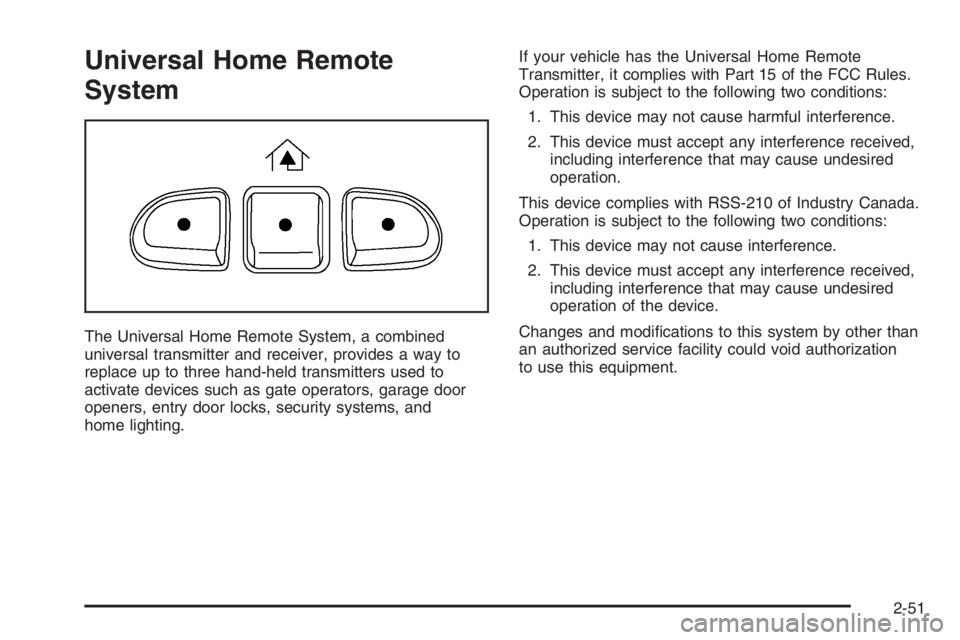
The Universal Home Remote System, a combined
universal transmitter and receiver, provides a way to
replace up to three hand-held transmitters used to
activate devices such as gate operators, garage door
openers, entry door locks, security systems, and
home lighting.If your vehicle has the Universal Home Remote
Transmitter, it complies with Part 15 of the FCC Rules.
Operation is subject to the following two conditions:
1. This device may not cause harmful interference.
2. This device must accept any interference received,
including interference that may cause undesired
operation.
This device complies with RSS-210 of Industry Canada.
Operation is subject to the following two conditions:
1. This device may not cause interference.
2. This device must accept any interference received,
including interference that may cause undesired
operation of the device.
Changes and modications to this system by other than
an authorized service facility could void authorization
to use this equipment.
2-51