ECO GMC ENVOY DENALI 2007 Owners Manual
[x] Cancel search | Manufacturer: GMC, Model Year: 2007, Model line: ENVOY DENALI, Model: GMC ENVOY DENALI 2007Pages: 562, PDF Size: 2.87 MB
Page 12 of 562
Memory Seat, Mirrors, and Pedals
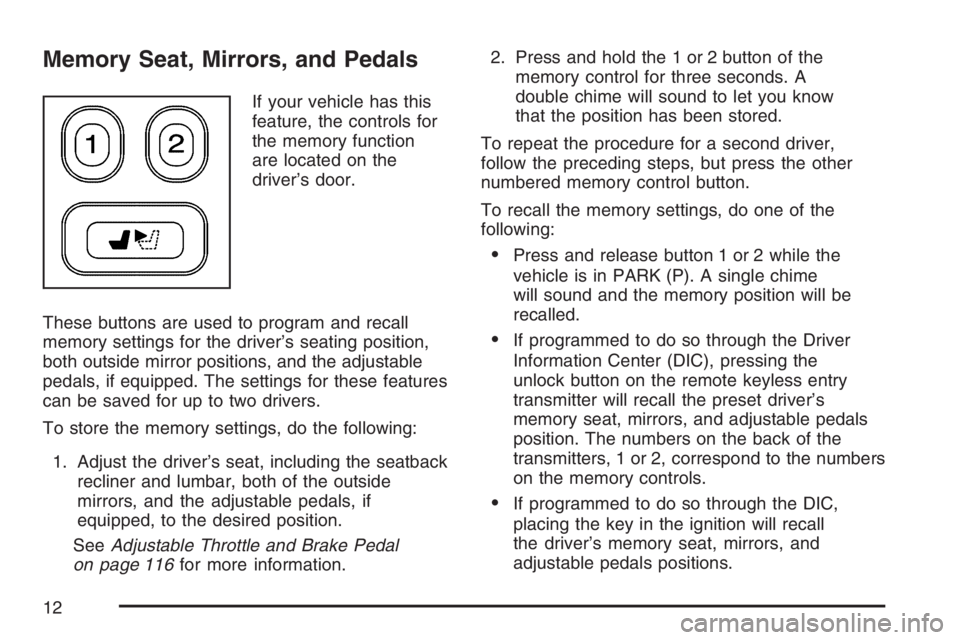
If your vehicle has this
feature, the controls for
the memory function
are located on the
driver’s door.
These buttons are used to program and recall
memory settings for the driver’s seating position,
both outside mirror positions, and the adjustable
pedals, if equipped. The settings for these features
can be saved for up to two drivers.
To store the memory settings, do the following:
1. Adjust the driver’s seat, including the seatback
recliner and lumbar, both of the outside
mirrors, and the adjustable pedals, if
equipped, to the desired position.
SeeAdjustable Throttle and Brake Pedal
on page 116for more information.2. Press and hold the 1 or 2 button of the
memory control for three seconds. A
double chime will sound to let you know
that the position has been stored.
To repeat the procedure for a second driver,
follow the preceding steps, but press the other
numbered memory control button.
To recall the memory settings, do one of the
following:
Press and release button 1 or 2 while the
vehicle is in PARK (P). A single chime
will sound and the memory position will be
recalled.
If programmed to do so through the Driver
Information Center (DIC), pressing the
unlock button on the remote keyless entry
transmitter will recall the preset driver’s
memory seat, mirrors, and adjustable pedals
position. The numbers on the back of the
transmitters, 1 or 2, correspond to the numbers
on the memory controls.
If programmed to do so through the DIC,
placing the key in the ignition will recall
the driver’s memory seat, mirrors, and
adjustable pedals positions.
12
Page 13 of 562
See “Seat Recall” underDIC Vehicle
Customization on page 229for more information.
To stop recall movement of the memory seat
feature at any time, press one of the memory
buttons or power seat controls.
Easy Exit Seat
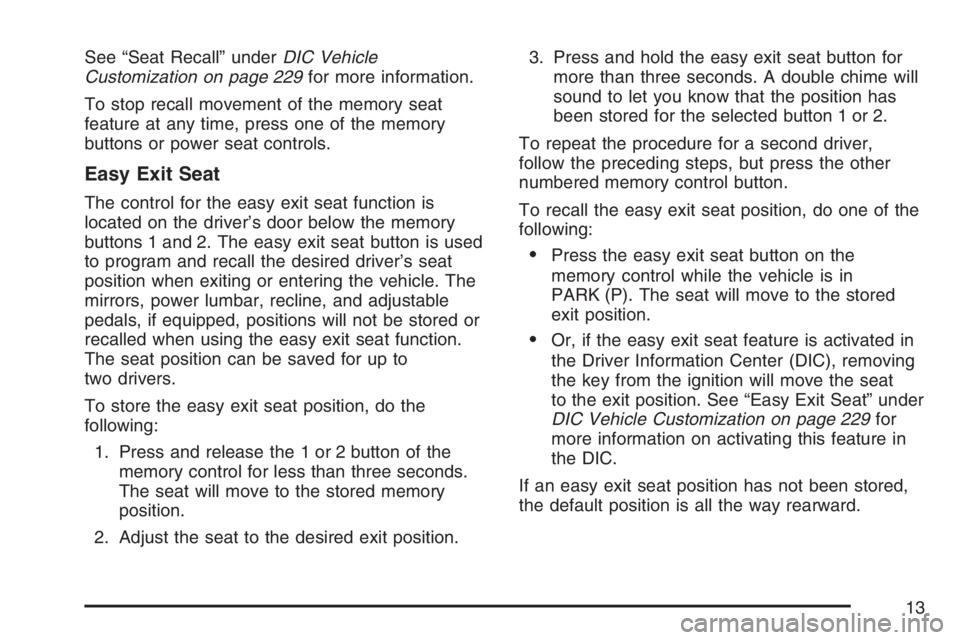
The control for the easy exit seat function is
located on the driver’s door below the memory
buttons 1 and 2. The easy exit seat button is used
to program and recall the desired driver’s seat
position when exiting or entering the vehicle. The
mirrors, power lumbar, recline, and adjustable
pedals, if equipped, positions will not be stored or
recalled when using the easy exit seat function.
The seat position can be saved for up to
two drivers.
To store the easy exit seat position, do the
following:
1. Press and release the 1 or 2 button of the
memory control for less than three seconds.
The seat will move to the stored memory
position.
2. Adjust the seat to the desired exit position.3. Press and hold the easy exit seat button for
more than three seconds. A double chime will
sound to let you know that the position has
been stored for the selected button 1 or 2.
To repeat the procedure for a second driver,
follow the preceding steps, but press the other
numbered memory control button.
To recall the easy exit seat position, do one of the
following:
Press the easy exit seat button on the
memory control while the vehicle is in
PARK (P). The seat will move to the stored
exit position.
Or, if the easy exit seat feature is activated in
the Driver Information Center (DIC), removing
the key from the ignition will move the seat
to the exit position. See “Easy Exit Seat” under
DIC Vehicle Customization on page 229for
more information on activating this feature in
the DIC.
If an easy exit seat position has not been stored,
the default position is all the way rearward.
13
Page 18 of 562
Rear Seats
Rear Seat Operation
Your vehicle has ip and fold second row seats
which provide additional cargo space.
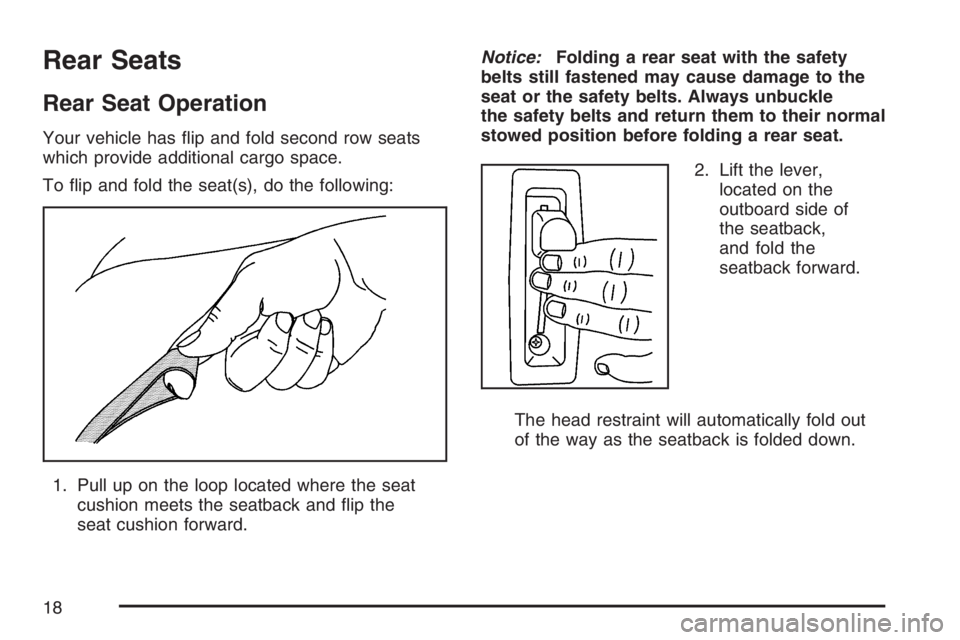
To ip and fold the seat(s), do the following:
1. Pull up on the loop located where the seat
cushion meets the seatback and ip the
seat cushion forward.Notice:Folding a rear seat with the safety
belts still fastened may cause damage to the
seat or the safety belts. Always unbuckle
the safety belts and return them to their normal
stowed position before folding a rear seat.
2. Lift the lever,
located on the
outboard side of
the seatback,
and fold the
seatback forward.
The head restraint will automatically fold out
of the way as the seatback is folded down.
18
Page 46 of 562
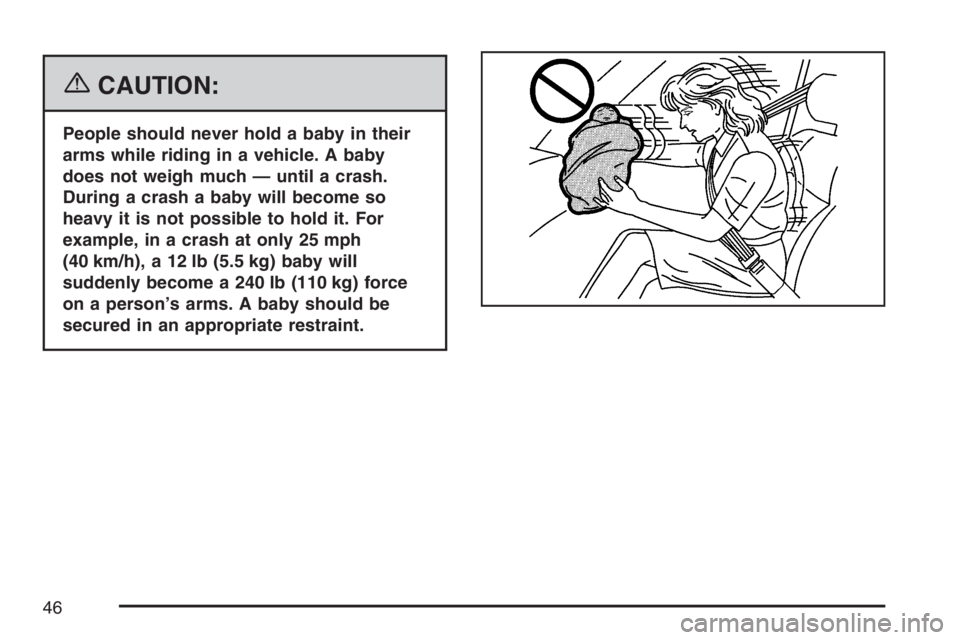
{CAUTION:
People should never hold a baby in their
arms while riding in a vehicle. A baby
does not weigh much — until a crash.
During a crash a baby will become so
heavy it is not possible to hold it. For
example, in a crash at only 25 mph
(40 km/h), a 12 lb (5.5 kg) baby will
suddenly become a 240 lb (110 kg) force
on a person’s arms. A baby should be
secured in an appropriate restraint.
46
Page 54 of 562
Where to Put the Restraint
Accident statistics show that children are safer if
they are restrained in the rear rather than the front
seat. We recommend that child restraints be
secured in a rear seat, including an infant riding
in a rear-facing infant seat, a child riding in a
forward-facing child seat and an older child riding
in a booster seat.
If your vehicle has a rear seat that will
accommodate a rear-facing child restraint, a label
on your sun visor says, “Never put a rear-facing
child seat in the front.” This is because the risk
to the rear-facing child is so great, if the
airbag deploys.
{CAUTION:
A child in a rear-facing child restraint can
be seriously injured or killed if the right
front passenger’s airbag inates.
CAUTION: (Continued)
CAUTION: (Continued)
This is because the back of the
rear-facing child restraint would be very
close to the inating airbag.
Even though the passenger sensing
system is designed to turn off the
passenger’s frontal airbag if the system
detects a rear-facing child restraint, no
system is fail-safe, and no one can
guarantee that an airbag will not deploy
under some unusual circumstance, even
though it is turned off. We recommend
that rear-facing child restraints be secured
in the rear seat, even if the airbag is off.
If you need to secure a forward-facing
child restraint in the right front seat,
always move the front passenger seat as
far back as it will go. It is better to secure
the child restraint in a rear seat.
54
Page 55 of 562
If your vehicle does not have a rear seat that
will accommodate a rear-facing child restraint,
never put a child in a rear-facing child restraint
in the right front passenger seat unless the
passenger airbag status indicator shows off and
the airbag is off. Here is why:
{CAUTION:
A child in a rear-facing child restraint can
be seriously injured or killed if the right
front passenger’s airbag inates. This is
because the back of the rear-facing child
restraint would be very close to the
inating airbag.Be sure the airbag is off
before using a rear-facing child restraint
in the right front seat position.
CAUTION: (Continued)
CAUTION: (Continued)
Even though the passenger sensing
system is designed to turn off the
passenger’s frontal airbag if the system
detects a rear-facing child restraint, no
system is fail-safe, and no one can
guarantee that an airbag will not deploy
under some unusual circumstance, even
though it is turned off. We recommend
that rear-facing child restraints be
transported in vehicles with a rear seat
that will accommodate a rear-facing child
restraint, whenever possible.
If you need to secure a forward-facing
child restraint in the right front seat,
always move the front passenger seat as
far back as it will go. It is better to secure
the child restraint in a rear seat.
Wherever you install a child restraint, be sure to
secure the child restraint properly.
55
Page 58 of 562
Some child restraints that have a top tether are
designed for use with or without the top tether
being attached. Others require the top tether
always to be attached. In Canada, the law requires
that forward-facing child restraints have a top
tether, and that the tether be attached. In
the United States, some child restraints also have
a top tether. Be sure to read and follow the
instructions for your child restraint.
If the child restraint does not have a top tether,
one can be obtained, in kit form, for many
child restraints. Ask the child restraint
manufacturer whether or not a kit is available.Lower Anchor and Top Tether Anchor
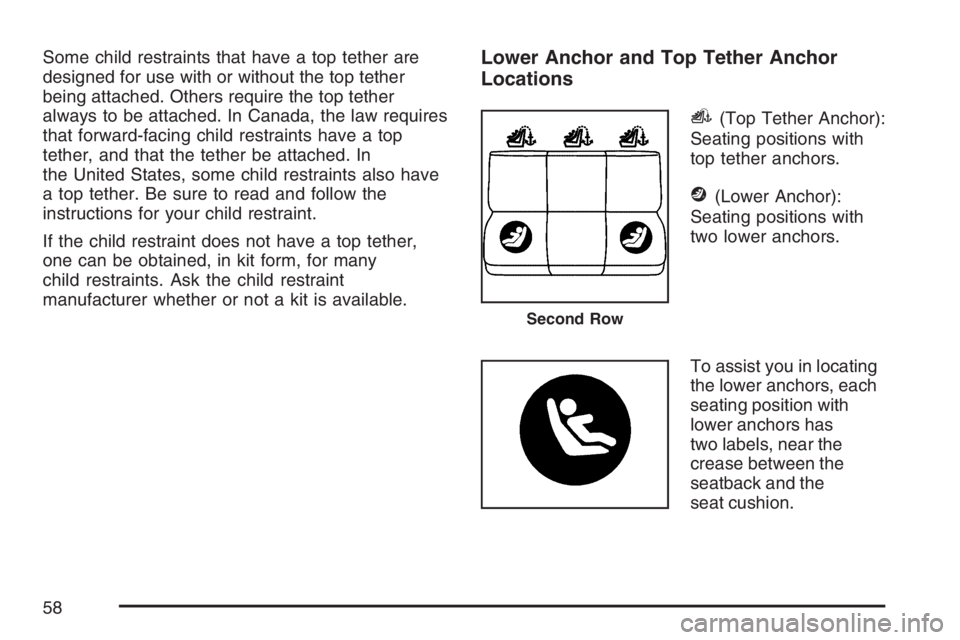
Locations
i(Top Tether Anchor):
Seating positions with
top tether anchors.
j(Lower Anchor):
Seating positions with
two lower anchors.
To assist you in locating
the lower anchors, each
seating position with
lower anchors has
two labels, near the
crease between the
seatback and the
seat cushion.
Second Row
58
Page 62 of 562
1.3. Put the child restraint on the seat.
1.4. Attach and tighten the lower
attachments on the child restraint
to the lower anchors.
2. If the child restraint manufacturer recommends
that the top tether be attached, attach and
tighten the top tether to the top tether anchor,
if equipped. Refer to the child restraint
instructions and the following steps:
2.1. Find the top tether anchor.
2.2. Route and tighten the top tether
according to your child restraint
instructions and the following
instructions. If your vehicle has a cargo
shade, route the top tether between
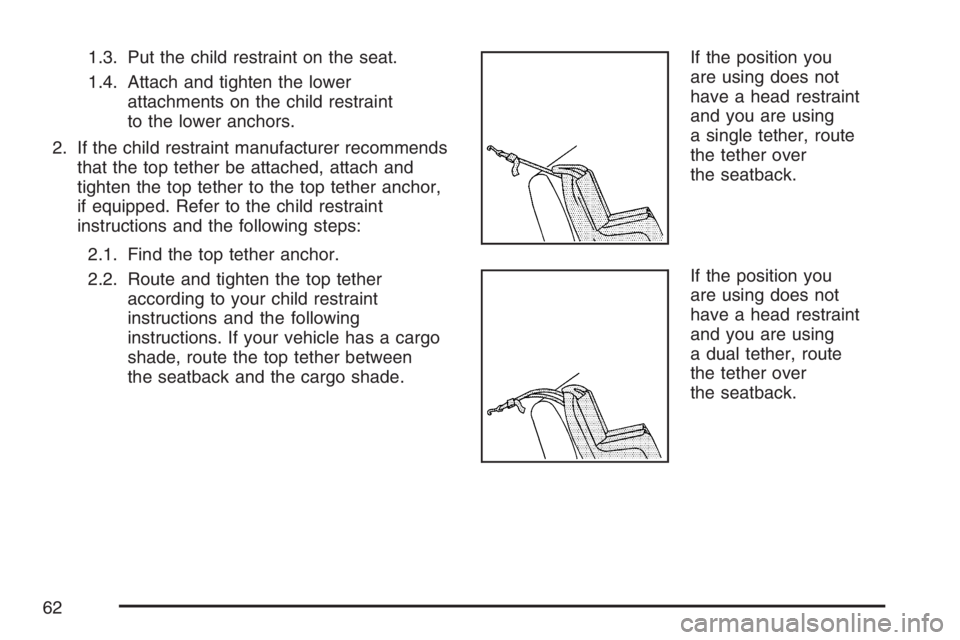
the seatback and the cargo shade.If the position you
are using does not
have a head restraint
and you are using
a single tether, route
the tether over
the seatback.
If the position you
are using does not
have a head restraint
and you are using
a dual tether, route
the tether over
the seatback.
62
Page 65 of 562
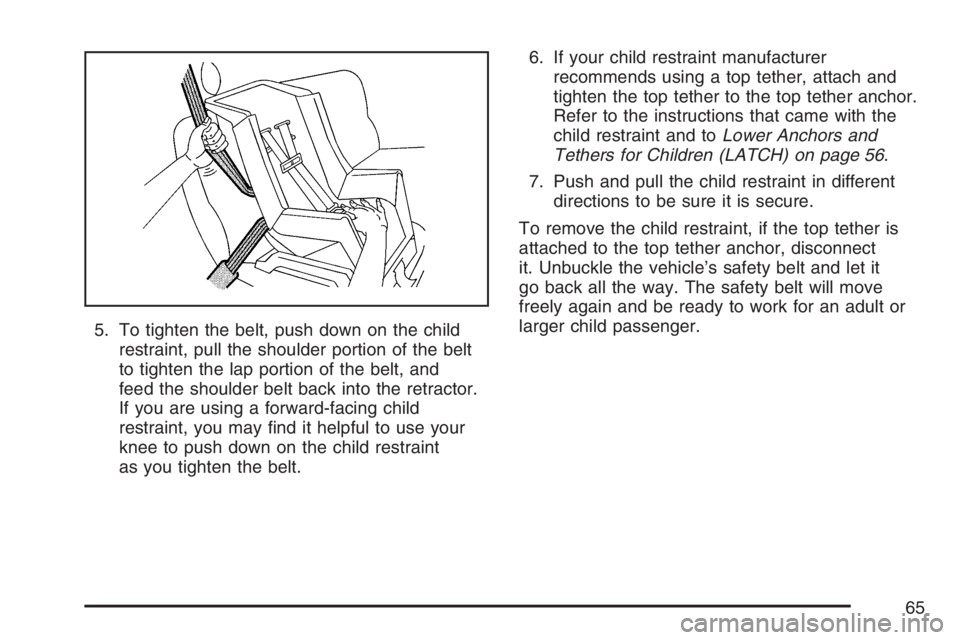
5. To tighten the belt, push down on the child
restraint, pull the shoulder portion of the belt
to tighten the lap portion of the belt, and
feed the shoulder belt back into the retractor.
If you are using a forward-facing child
restraint, you may nd it helpful to use your
knee to push down on the child restraint
as you tighten the belt.6. If your child restraint manufacturer
recommends using a top tether, attach and
tighten the top tether to the top tether anchor.
Refer to the instructions that came with the
child restraint and toLower Anchors and
Tethers for Children (LATCH) on page 56.
7. Push and pull the child restraint in different
directions to be sure it is secure.
To remove the child restraint, if the top tether is
attached to the top tether anchor, disconnect
it. Unbuckle the vehicle’s safety belt and let it
go back all the way. The safety belt will move
freely again and be ready to work for an adult or
larger child passenger.
65
Page 67 of 562
A label on your sun visor says, “Never put a
rear-facing child seat in the front.” This is because
the risk to the rear-facing child is so great, if the
airbag deploys.
{CAUTION:
A child in a rear-facing child restraint
can be seriously injured or killed if the
right front passenger’s airbag inates.
This is because the back of the rear-facing
child restraint would be very close to the
inating airbag.
Even though the passenger sensing
system is designed to turn off the right
front passenger’s frontal airbag if the
system detects a rear-facing child restraint,
CAUTION: (Continued)
CAUTION: (Continued)
no system is fail-safe, and no one can
guarantee that an airbag will not deploy
under some unusual circumstance, even
though it is turned off. We recommend
that rear-facing child restraints be secured
in the rear seat, even if the airbag is off.
If you need to secure a forward-facing
child restraint in the right front seat,
always move the front passenger seat as
far back as it will go. It is better to secure
the child restraint in a rear seat.
If you need to secure a forward-facing child
restraint in the right front seat position, move the
seat as far back as it will go before securing
the forward-facing child restraint. SeeManual
Seats on page 8orPower Seats on page 9.
67