mirror GMC ENVOY XUV 2005 User Guide
[x] Cancel search | Manufacturer: GMC, Model Year: 2005, Model line: ENVOY XUV, Model: GMC ENVOY XUV 2005Pages: 474, PDF Size: 2.67 MB
Page 112 of 474
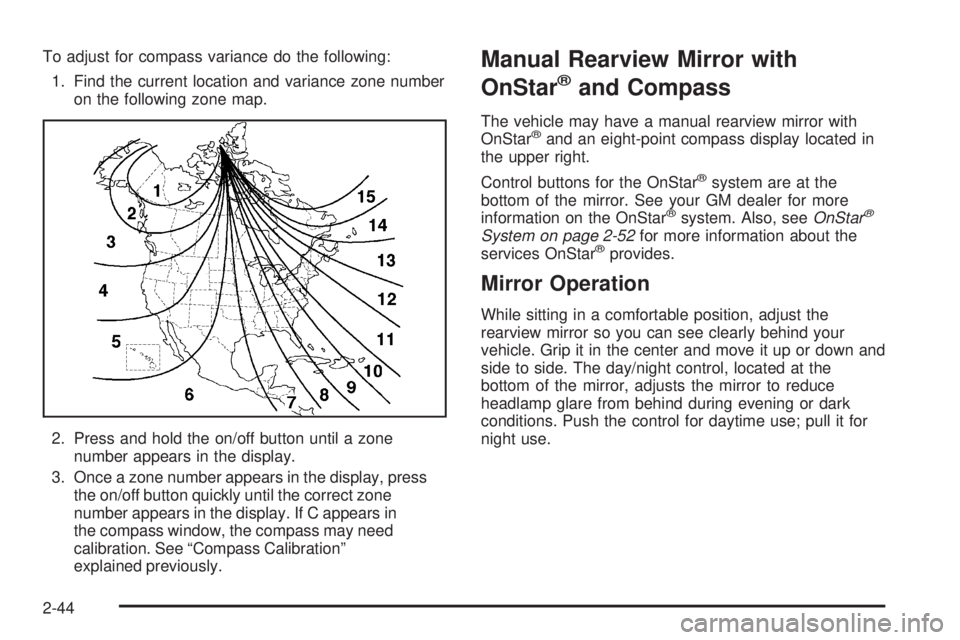
To adjust for compass variance do the following:
1. Find the current location and variance zone number
on the following zone map.
2. Press and hold the on/off button until a zone
number appears in the display.
3. Once a zone number appears in the display, press
the on/off button quickly until the correct zone
number appears in the display. If C appears in
the compass window, the compass may need
calibration. See “Compass Calibration”
explained previously.Manual Rearview Mirror with
OnStar
®and Compass
The vehicle may have a manual rearview mirror with
OnStar®and an eight-point compass display located in
the upper right.
Control buttons for the OnStar
®system are at the
bottom of the mirror. See your GM dealer for more
information on the OnStar
®system. Also, seeOnStar®
System on page 2-52for more information about the
services OnStar®provides.
Mirror Operation
While sitting in a comfortable position, adjust the
rearview mirror so you can see clearly behind your
vehicle. Grip it in the center and move it up or down and
side to side. The day/night control, located at the
bottom of the mirror, adjusts the mirror to reduce
headlamp glare from behind during evening or dark
conditions. Push the control for daytime use; pull it for
night use.
2-44
Page 113 of 474

Compass Display
O
(On/Off):Press this button to turn the compass on
or off. The compass display, can show a maximum
of two characters. For example, NE is displayed
for north-east.
When the ignition and the compass/temperature
feature are on, character boxes will appear for about
two seconds. After two seconds, the mirror will display
the direction the vehicle is facing.
Compass Calibration
When on, the compass automatically calibrates as the
vehicle is driven. If, after two seconds, the display
does not show a compass direction, (N for North,
for example), there may be a strong magnetic eld
interfering with the compass. Such interference may be
caused by a magnetic antenna mount, magnetic
note pad holder, or a similar magnetic item. If the
letter C should ever appear in the compass window,
the compass may need calibration.Press and hold the on/off button for nine seconds to
activate the compass calibration mode. CAL will
be displayed in the compass window on the mirror.
The mirror can be calibrated by driving the vehicle in
circles at 5 mph (8 km/h) or less until the display shows
a direction.
Compass Variance
Compass variance is the difference between earth’s
magnetic north and true geographic north. The mirror is
set to zone eight upon leaving the factory. It will be
necessary to adjust the compass to compensate
for compass variance if you live outside zone eight.
Under certain conditions, such as during a long-distance,
cross-country trip, it will be necessary to adjust for
compass variance. If not adjusted to account for
compass variance, the compass could give false
readings.
2-45
Page 114 of 474
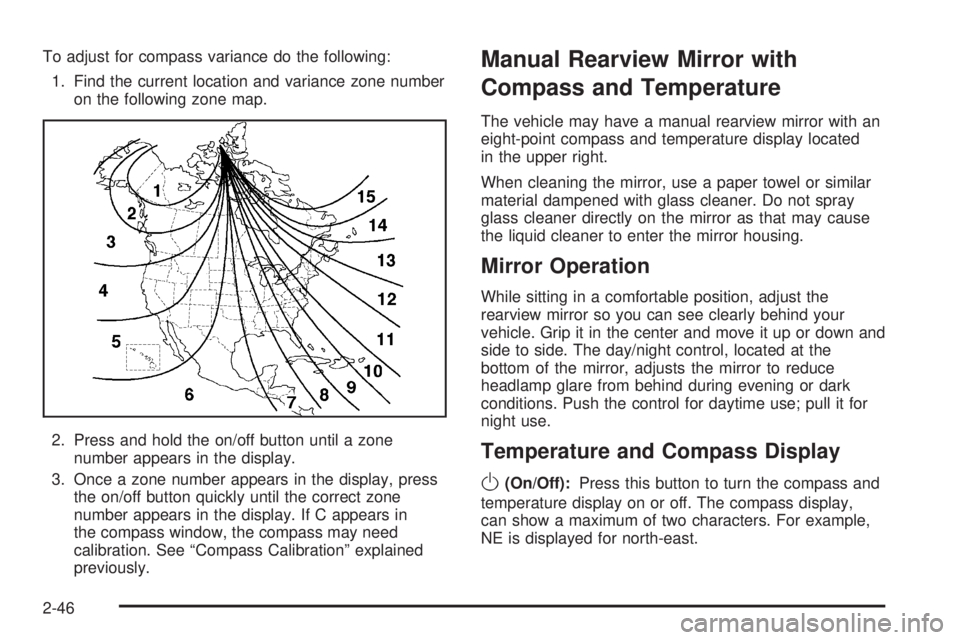
To adjust for compass variance do the following:
1. Find the current location and variance zone number
on the following zone map.
2. Press and hold the on/off button until a zone
number appears in the display.
3. Once a zone number appears in the display, press
the on/off button quickly until the correct zone
number appears in the display. If C appears in
the compass window, the compass may need
calibration. See “Compass Calibration” explained
previously.Manual Rearview Mirror with
Compass and Temperature
The vehicle may have a manual rearview mirror with an
eight-point compass and temperature display located
in the upper right.
When cleaning the mirror, use a paper towel or similar
material dampened with glass cleaner. Do not spray
glass cleaner directly on the mirror as that may cause
the liquid cleaner to enter the mirror housing.
Mirror Operation
While sitting in a comfortable position, adjust the
rearview mirror so you can see clearly behind your
vehicle. Grip it in the center and move it up or down and
side to side. The day/night control, located at the
bottom of the mirror, adjusts the mirror to reduce
headlamp glare from behind during evening or dark
conditions. Push the control for daytime use; pull it for
night use.
Temperature and Compass Display
O
(On/Off):Press this button to turn the compass and
temperature display on or off. The compass display,
can show a maximum of two characters. For example,
NE is displayed for north-east.
2-46
Page 115 of 474

When the ignition and the compass/temperature
feature are on, character boxes will appear for about
two seconds. After two seconds, the mirror will display
the direction the vehicle is facing and the outside
temperature.
To set the temperature in Fahrenheit or Celsius,
do the following:
1. Press and hold the on/off button until either a
ashing F or C appears.
2. Press the button again to change the display to
the desired unit of measurement. After about
four seconds of inactivity, the new unit will be locked
in and the compass/temperature display will return.
Compass Calibration
When on, the compass automatically calibrates as the
vehicle is driven. If, after two seconds, the display
does not show a compass direction, (N for North,
for example), there may be a strong magnetic eld
interfering with the compass. Such interference may be
caused by a magnetic antenna mount, magnetic
note pad holder, or a similar magnetic item. If the
letter C should ever appear in the compass window,
the compass may need calibration.Press and hold the on/off button for nine seconds to
activate the compass calibration mode. CAL will
be displayed in the compass window on the mirror.
The mirror can be calibrated by driving the vehicle in
circles at 5 mph (8 km/h) or less until the display shows
a direction.
Compass Variance
Compass variance is the difference between earth’s
magnetic north and true geographic north. The mirror
is set to zone eight upon leaving the factory. It will
be necessary to adjust the compass to compensate
for compass variance if you live outside zone eight.
Under certain conditions, such as during a long-distance,
cross-country trip, it will be necessary to adjust for
compass variance. If not adjusted to account for
compass variance, the compass could give false
readings.
2-47
Page 116 of 474
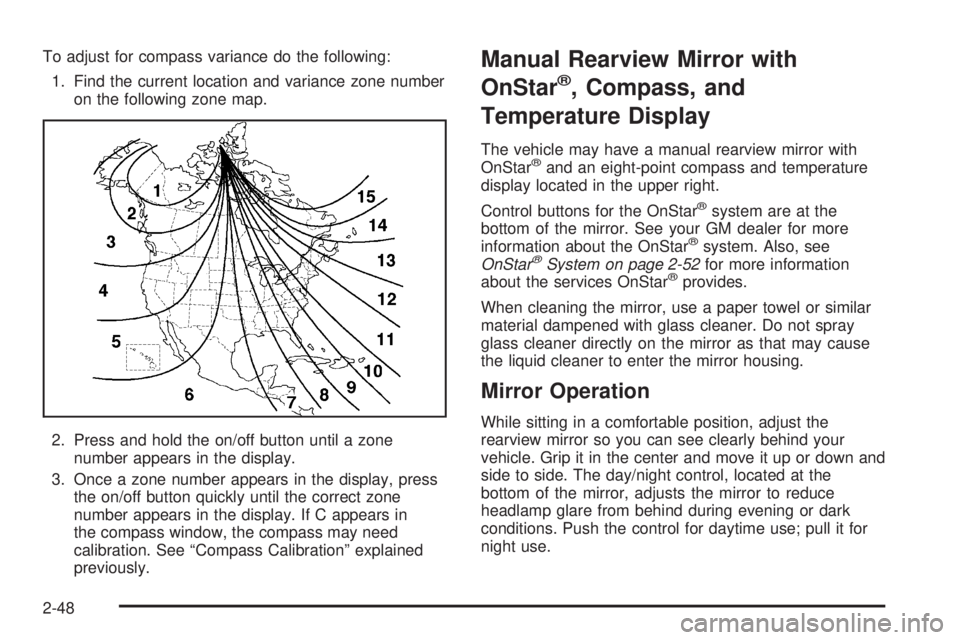
To adjust for compass variance do the following:
1. Find the current location and variance zone number
on the following zone map.
2. Press and hold the on/off button until a zone
number appears in the display.
3. Once a zone number appears in the display, press
the on/off button quickly until the correct zone
number appears in the display. If C appears in
the compass window, the compass may need
calibration. See “Compass Calibration” explained
previously.Manual Rearview Mirror with
OnStar
®, Compass, and
Temperature Display
The vehicle may have a manual rearview mirror with
OnStar®and an eight-point compass and temperature
display located in the upper right.
Control buttons for the OnStar
®system are at the
bottom of the mirror. See your GM dealer for more
information about the OnStar
®system. Also, see
OnStar®System on page 2-52for more information
about the services OnStar®provides.
When cleaning the mirror, use a paper towel or similar
material dampened with glass cleaner. Do not spray
glass cleaner directly on the mirror as that may cause
the liquid cleaner to enter the mirror housing.
Mirror Operation
While sitting in a comfortable position, adjust the
rearview mirror so you can see clearly behind your
vehicle. Grip it in the center and move it up or down and
side to side. The day/night control, located at the
bottom of the mirror, adjusts the mirror to reduce
headlamp glare from behind during evening or dark
conditions. Push the control for daytime use; pull it for
night use.
2-48
Page 117 of 474

Temperature and Compass Display
O
(On/Off):Press this button to turn the compass and
temperature display on or off. The compass display,
can show a maximum of two characters. For example,
NE is displayed for north-east.
When the ignition and the compass/temperature
feature are on, character boxes will appear for about
two seconds. After two seconds, the mirror will
display the direction the vehicle is facing and the
outside temperature.
To set the temperature in Fahrenheit or Celsius,
do the following:
1. Press and hold the on/off button until either a
ashing F or C appears.
2. Press the button again to change the display to the
desired unit of measurement. After about four
seconds of inactivity, the new unit will be locked in
and the compass/temperature display will return.
Compass Calibration
When on, the compass automatically calibrates as the
vehicle is driven. If, after two seconds, the display
does not show a compass direction, N for North,
for example, there may be a strong magnetic eld
interfering with the compass. Such interference may becaused by a magnetic antenna mount, magnetic note
pad holder, or a similar magnetic item. If the letter C
should ever appear in the compass window,
the compass may need calibration.
Press and hold the on/off button for nine seconds to
activate the compass calibration mode. CAL will
be displayed in the compass window on the mirror.
The mirror can be calibrated by driving the vehicle in
circles at 5 mph (8 km/h) or less until the display shows
a direction.
Compass Variance
Compass variance is the difference between earth’s
magnetic north and true geographic north. The mirror
is set to zone eight upon leaving the factory. It will
be necessary to adjust the compass to compensate
for compass variance if you live outside zone eight.
Under certain conditions, such as during a long-distance,
cross-country trip, it will be necessary to adjust for
compass variance. If not adjusted to account for
compass variance, the compass could give false
readings.
2-49
Page 118 of 474

To adjust for compass variance do the following:
1. Find the current location and variance zone number
on the following zone map.
2. Press and hold the on/off button until a zone
number appears in the display.
3. Once a zone number appears in the display, press
the on/off button quickly until the correct zone
number appears in the display. If C appears in
the compass window, the compass may need
calibration. See “Compass Calibration” explained
previously.Outside Manual Mirrors
If the vehicle has the manual outside mirrors, adjust
each outside mirror so that a little of the vehicle and the
area behind it can be seen while sitting in a comfortable,
driving position.
Both mirrors can be manually folded inward by pulling
them towards the vehicle. Push the mirrors away
from the vehicle, to the normal position, before driving.
Outside Power Mirrors
The vehicle may have this feature.
The control is located on
the driver’s door.
Turn the knob counterclockwise or clockwise to
adjust the driver’s or passenger’s mirror so that
you can see a little of the side of your vehicle.
2-50
Page 119 of 474
After adjusting the position of the mirrors, turn the
knob to the center position so that the mirrors
cannot move.
If the travel position in any direction of the mirror is
reached, it will enter a ratcheting mode. This action is
harmless. It is a warning that the mirror can go no
further. To stop this action, back the mirror up by moving
the knob in the opposite direction.
Outside Curb View Assist Mirror
If the vehicle has this feature, the passenger’s outside
mirror will adjust to a preset tilt position while the vehicle
is in REVERSE (R) gear. Curb view assist may be
useful when you are parallel parking. The mirror
will return to normal position when the vehicle is shifted
out of REVERSE (R) gear. Automatic mirror movement
in either direction will follow a short delay.
You may be able to turn this feature on or off through
the Driver Information Center (DIC). SeeDIC Vehicle
Customization on page 3-57.
Outside Convex Mirror
{CAUTION:
A convex mirror can make things (like other
vehicles) look farther away than they really are.
If you cut too sharply into the right or left lane,
you could hit a vehicle. Check your inside
mirror or glance over your shoulder before
changing lanes.
The passenger’s outside mirror is convex. A convex
mirror’s surface is curved so more can be seen from the
driver’s seat.
Outside Heated Mirrors
If the vehicle has this feature, when the rear window
defogger is turned on, the outside driver’s and
passenger’s rearview mirrors also heat to help clear
them of ice, snow, and condensation. SeeDual Climate
Control System on page 3-20orDual Automatic
Climate Control System on page 3-23for more
information.
2-51
Page 131 of 474

Vehicle Personalization
Memory Seat
If your vehicle has this
feature, the controls for
the memory function
are located on the
driver’s door.
These buttons are used to program and recall memory
settings for the driver’s seating position, both outside
mirror positions and the adjustable pedals, if equipped.
The settings for these features can be saved for up
to two drivers.To store the memory settings, do the following:
1. Adjust the driver’s seat, including the seatback
recliner and lumbar, both of the outside mirrors
and the adjustable pedals, if equipped, to the
desired position.
2. Press and hold the 1 or 2 button of the memory
control for three seconds. A double chime will
sound to let you know that the position has
been stored.
To repeat the procedure for a second driver,
follow the preceding steps, but press the other
numbered memory control button.
To recall the memory settings, press and release
button 1 or 2 while the vehicle is in PARK (P).
A single chime will sound and the memory position
will be recalled.
To stop recall movement of the memory seat feature at
any time, press one of the memory buttons or power
seat controls.
2-63
Page 132 of 474

Easy Exit Seat
The control for the easy exit seat function is located on
the driver’s door below the memory buttons 1 and 2.
The easy exit seat button is used to program and recall
the desired driver’s seat position when exiting/entering
the vehicle. The mirrors, power lumbar, recline and
adjustable pedals, if equipped, positions will not be
stored or recalled when using the easy exit seat function.
The seat position can be saved for up to two drivers.
To store the easy exit seat position, do the following:
1. Press and release the 1 or 2 button of the memory
control for three seconds. The seat will move to the
stored memory position.
2. Adjust the seat to the desired exit position.
3. Press and hold the easy exit seat button for
three seconds. A double chime will sound to
let you know that the position has been stored
for the selected button 1 or 2.
To repeat the procedure for a second driver, follow the
preceding steps, but press the other numbered
memory control button.To recall the easy exit seat position, do one of the
following:Press the easy exit seat button on the memory
control while the vehicle is in PARK (P). The seat
will move to the stored exit position.
Or, if the easy exit seat feature is activated in the
Driver Information Center (DIC), removing the key
from the ignition will move the seat to the exit
position. See “Easy Exit Seat” underDIC Vehicle
Customization on page 3-57for more information
on activating this feature in the DIC.
If an easy exit seat position has not been stored,
the default position is all the way rearward.
2-64