turn signal GMC SAVANA 1998 Owners Manual
[x] Cancel search | Manufacturer: GMC, Model Year: 1998, Model line: SAVANA, Model: GMC SAVANA 1998Pages: 388, PDF Size: 20.04 MB
Page 7 of 388
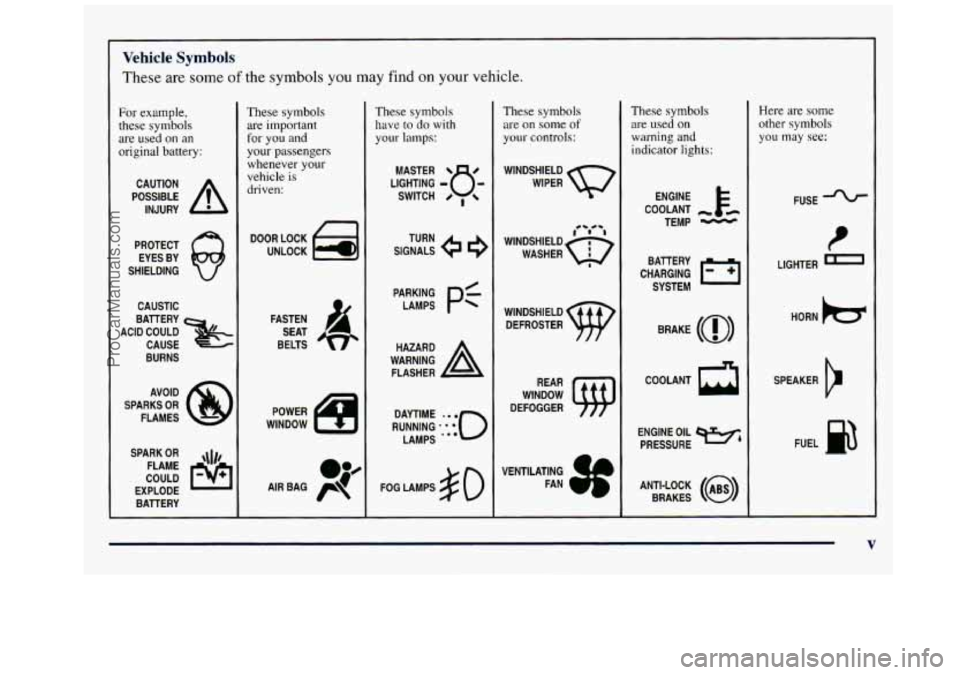
Vehicle Symbols
These are some of the symbols you may find on your vehicle.
For example,
these symbols
are used on
an
original battery:
POSSIBLE A
CAUTION
INJURY
PROTECT EYES BY
SHIELDING
CAUSTIC
BAlTERY
CAUSE
BURNS
ACID COULD
&
AVOID
SPARKS
OR
FLAMES
SPARK
OR ,\I/,
COULD FLAME
EXPLODE BATTERY
These symbols are important
for you and
your passengers whenever your
vehicle is
driven:
DOOR LOCK
UNLOCK
FASTEN SEAT
BELTS
These symbols have
to do with
your lamps:
SIGNALS e e
TURN
FOG LAMPS
$0
These symbols
are on some
of
your controls:
WINDSHIELD
WIPER
WINDSHIELD DEFROSTER
WINDOW
DEFOGGER
VENTILATING FAN
These symbols are used
on
warning and
indicator
lights:
COOLANT -
TEMP -
CHARGING l=l
BATTERY
SYSTEM
BRAKE
(0)
COOLANT a
ENGINE OIL e,
PRESSURE
ANTI-LOCK
(@)
BRAKES
Here are some
other symbols
you may
see:
FUSE -%-
P
LIGHTER m
HORN )cr
SPEAKER
b
FUEL p3
V
ProCarManuals.com
Page 73 of 388
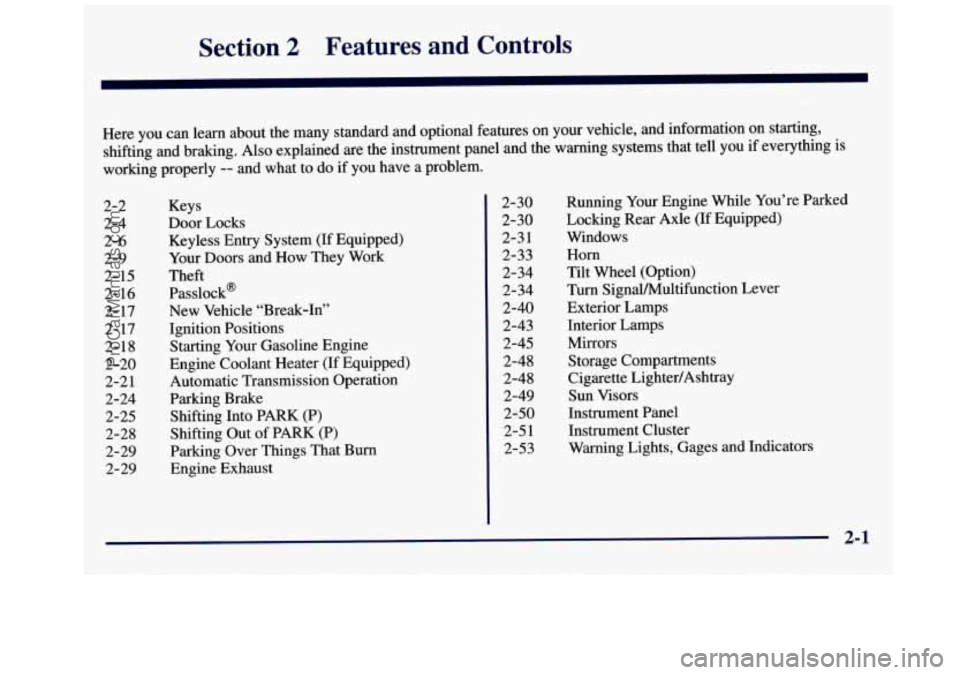
Section 2 Features and Controls
Here you can learn about the many standard and optional features on your vehicle, and information on starting,
shifting and braking. Also explained are the instrument panel and the warning systems that tell you if everything is
working properly
-- and what to do if you have a problem.
2-2
2-4 2-6
2-9
2- 15
2- 16
2- 17
2- 17
2- 18
2-20 2-2
1
2-24 2-25
2-28 2-29
2-29 Keys
Door Locks
Keyless Entry System
(If Equipped)
Your Doors and How They Work
Theft Passlock’
New Vehicle “Break-In’,
Ignition Positions
Starting Your Gasoline Engine
Engine Coolant Heater (If Equipped)
Automatic Transmission Operation
Parking Brake Shifting Into PARK (P)
Shifting Out of PARK (P)
Parking Over Things That Burn
Engine Exhaust 2-30
2-30
2-3 1
2-33
2-34
2-34
2-40 2-43
2-45
2-48 2-48
2-49
2-50
2-5 1
2-53 Running
Your Engine While You’re Parked
Locking Rear Axle (If Equipped)
Windows
Horn
Tilt Wheel (Option)
Turn SignalMultifunction Lever
Exterior
Lamps
Interior Lamps Mirrors Storage Compartments
Cigarette LightedAshtray
Sun Visors
Instrument Panel
Instrument Cluster
Warning Lights, Gages and Indicators
2-1
ProCarManuals.com
Page 106 of 388
Tilt Wheel (Option)
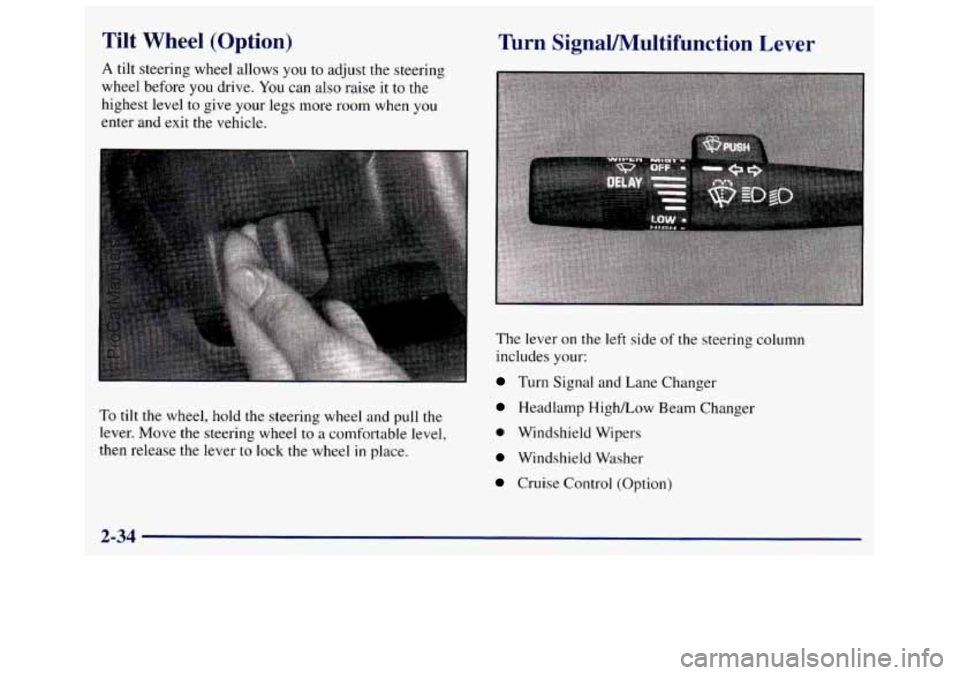
A tilt steering wheel allows you to adjust the steering
wheel before
you drive. You can also raise it to the
highest level to give your legs more room when you
enter and exit the vehicle.
To tilt the wheel, hold the steering wheel and pull the
lever. Move the steering wheel to a comfortable level,
then release the lever
to lock the wheel in place.
Turn SignaUMultifunction Lever
The lever on the left side of the steering column
includes your:
Turn Signal and Lane Changer
Headlamp HighLow Beam Changer
0 Windshield Wipers
Windshield Washer
Cruise Control (Option)
2-34
ProCarManuals.com
Page 107 of 388
Turn Signal and Lane Change Signals
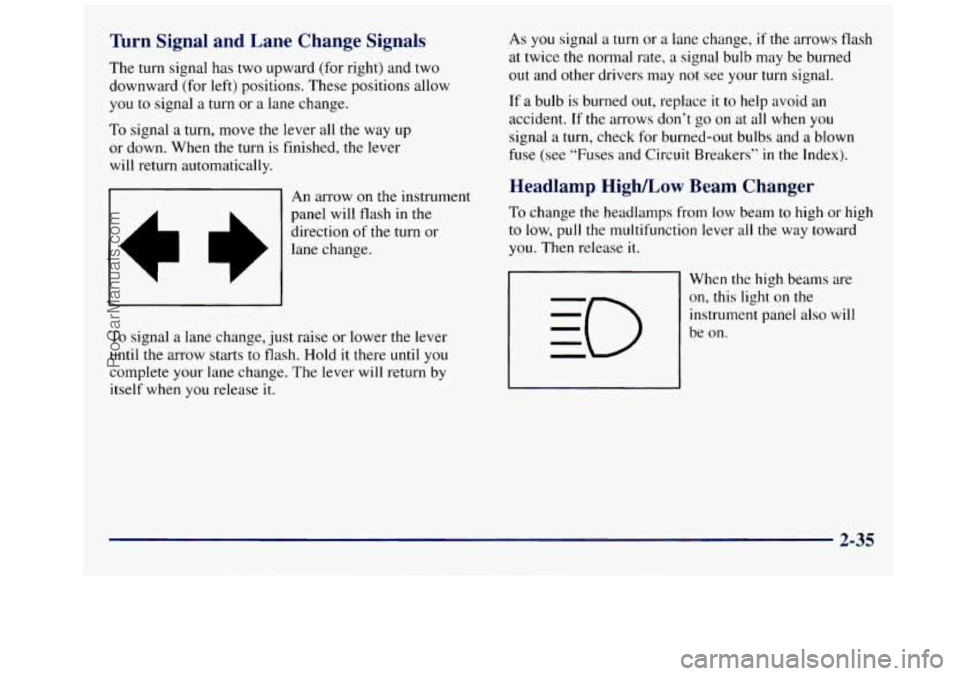
The turn signal has two upward (for right) and two
downward (for left) positions. These positions allow
you to signal a turn or a lane change.
To signal a turn, move the lever all the way up
or down. When the turn is finished, the lever
will return automatically.
&I An arrow on the instrument
II
panel will flash in the
direction
of the turn or
lane change.
I I
To signal a lane change, just raise or lower the lever
until the arrow starts to flash. Hold it there
until you
complete your lane change. The lever will return by
itself when you release it. As you signal
a turn or a
lane change, if the arrows flash
at twice the normal rate, a signal bulb may be burned
out and other drivers may not see your turn signal.
If a bulb is burned out, replace
it to help avoid an
accident. If the arrows don’t
go on at all when you
signal a turn, check for burned-out bulbs and a blown
fuse (see “Fuses and Circuit Breakers”
in the Index).
Headlamp High/Low Beam Changer
To change the headlamps from low beam to high or high
to low, pull the multifunction lever all the way toward
you. Then release it.
When the high beams are
on, this light on the
instrument panel also will
be
on.
2-35
ProCarManuals.com
Page 113 of 388
Rotate the knob to the left to OFF to turn off your lamps
and lights.
Rotate the thumbwheel next to the switch knob up to
adjust instrument panel lights. Rotate the thumbwheel
up to the first notch to return the radio display and
gearshift indicator Vacuum Fluorescence (VF) display
to full intensity when the headlamps or parking lamps
are on.
Rotate the thumbwheel up to the second notch
to
activate the interior dome lamps.
You can switch your headlamps from high
to low beam
by pulling on the turn signal/high beam lever.
A circuit breaker protects your headlamps. If you have
an electrical overload, your headlamps will flicker on
and off. Have your headlamp wiring checked right away
if this happens.
Headlamps On Reminder
A tone will sound when your headlamps are turned on
and your ignition is in OFF, LOCK or ACCESSORY. If
you need to use your headlamps when the ignition
switch
is in OFF, LOCK or ACCESSORY, the tone can
be turned
off by turning the thumbwheel next to the
parking lamp/headlamp switch all the way down.
Daytime Running Lamps
Daytime Running Lamps (DRL) can make it easier for
others to see the front
of your vehicle during the day.
DRL can be helpful in many different driving
conditions, but they can be especially helpful in the
short periods after dawn and before sunset.
2-41
ProCarManuals.com
Page 122 of 388
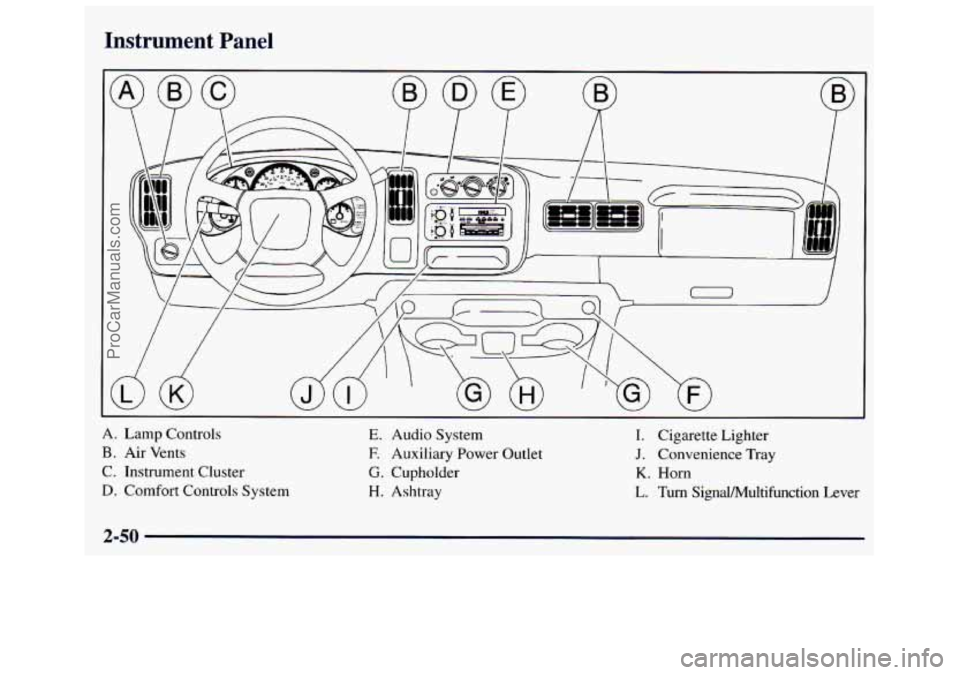
Instrument Panel
A. Lamp Controls
B. Air Vents
C. Instrument Cluster
D. Comfort Controls System
E. Audio System
E Auxiliary Power Outlet
G. Cupholder
H. Ashtray I. Cigarette
Lighter
J. Convenience Tray
K. Horn
L. Turn Signal/Multifunction Lever
2-50
ProCarManuals.com
Page 125 of 388
Electronic Road-Speed Governor
(Gasoline Engines) (Option)
This optional system automatically controls vehicle top
speed. The system controller receives
a signal from the
vehicle speed sensor and reduces power when the
vehicle speed reaches the maximum
65 mph (105 kdh)
governed speed.
Warning Lights, Gages
and Indicators
This part describes the warning lights and gages that
may be on your vehicle. The pictures will help you
locate them.
Warning lights and gages can signal that something is
wrong before it becomes serious enough to cause an
expensive repair or replacement. Paying attention to
your warning lights and gages could also save you or
others from injury.
Warning lights come on when there may be or is a
problem with one of your vehicle’s functions. As you
will see in the details
on the next few pages, some
warning lights come
on briefly when you start the
engine just to let you know they’re working.
If you are
familiar
with this section, you should not be alarmed
when this happens. Gages
can indicate when there may be or is
a problem
with one of your vehicle’s functions. Often gages and
warning lights work together to let you know when
there’s
a problem with your vehicle.
When one of the warning lights comes on and
stays on
when you are driving, or when one of the gages shows
there may be a problem, check the section that tells you
what to do about it. Please follow this manual’s advice.
Waiting to do repairs can be costly
-- and even
dangerous.
So please get to know your warning lights
and gages. They’re
a big help.
Safety Belt Reminder Light
When the key is turned to RUN or START, a tone will
come on for about eight seconds to remind people to
fasten their safety belts, unless the driver’s safety belt is
already buckled.
The safety belt light will
also come on and stay on
for about
20 seconds, then it
will flash for about
5 5 seconds.
If the driver’s belt is already buckled, neither the tone
nor the light will come on.
2-53
ProCarManuals.com
Page 159 of 388
If you enter the wrong code eight times, INOP will
appear on the display. You will have to wait an hour
with
the ignition on before you can try again. When you
try again, you will only have three chances to enter the
correct code before INOP appears.
If
you lose or forget your code, contact your dealer.
Disabline the Theft-Deterrent Feature
Enter your secret code as follows; pause no more than
15 seconds between steps: If
the code entered is incorrect, SEC will appear on the
display. The radio will remain secured until the correct
code is entered.
When battery power is removed and later applied to a
secured radio, the radio won’t turn on and LOC will
appear
on the display.
To unlock a secured radio, see “Unlocking the
Theft-Deterrent Feature After a Power
Loss” earlier
in this section.
1.
2.
3.
4.
5.
6.
7.
Turn the ignition to ACCESSORY or RUN.
Turn the radio off.
Press the
1 and 4 buttons together. Hold them down
until
SEC shows on the display.
Press
MN and 000 will appear on the display.
Press
MN again to make the last two digits agree
with your code.
Press
HR to make the first one or two digits agree
with your code.
Press AM-FM after you have confirmed that the
code matches
the secret code you have written down.
The display will show ---, indicating that the radio is
no longer secured.
Understanding Radio Reception
AM
The range for most AM stations is greater than for FM,
especially at night. The longer range, however, can
cause stations to interfere with each other.
AM can pick
up noise from things like storms and power
lines. Try
reducing the treble
to reduce this noise if you ever get it.
FM Stereo
FM stereo will give you the best sound, but FM signals
will reach only about
10 to 40 miles (16 to 65 km). Tall
buildings or hills can interfere with FM signals, causing
the sound to come and go.
3-23
ProCarManuals.com
Page 162 of 388
If your vehicle is equipped with the AM-FM Stereo with
Cassette Tape Player and Automatic Tone Control:
1. Turn the ignition to
RUN or ACC.
2. Turn the radio off.
3. Press and hold the TAPE AUX button for five
seconds. The tape symbol on the display will flash
for two seconds.
4. Insert the scrubbing action cleaning cassette while
the tape symbol is flashing.
5. Eject the cleaning cassette after the manufacturer’s
recommended cleaning time.
When the cleaning cassette has been ejected,
the cut tape
detection feature is active again.
You may also choose a non-scrubbing action, wet-type
cleaner which uses a cassette with a fabric belt
to clean
the tape head. This type of cleaning cassette will not
eject
on its own. A non-scrubbing action cleaner may
not clean as thoroughly as the scrubbing type cleaner.
The
use of a non-scrubbing action, dry-type cleaning
cassette is not recommended. After
you clean
the player, press and hold EJECT for
five seconds to reset the CLN indicator.
The radio will
display
--- to show the indicator was reset.
Cassettes are subject
to wear and the sound quality
may degrade over time. Always make sure the cassette
tape is in good condition before
you have your tape
player serviced.
Care of Your Compact Discs
Handle discs carefully. Store them in their original cases
or other protective cases and away from direct sunlight
and dust. If the surface
of a disc is soiled, dampen a
clean, soft cloth
in a mild, neutral detergent solution and
clean
it, wiping from the center to the edge.
Be sure never to touch the signal surface when handling
discs. Pick up discs by grasping the outer edges or the
edge of the hole and the outer edge.
Care of Your Compact Disc Player
The use of CD lens cleaner discs is not advised, due to
the risk of contaminating the lens of the CD optics with
lubricants internal to the CD mechanism.
3-26
ProCarManuals.com
Page 176 of 388
0 Do not get too close to the vehicle you want to
pass while you’re awaiting an opportunity. For one
thing, following too closely reduces your area
of
vision, especially if you’re following a larger
vehicle. Also,
you won’t have adequate space if the
vehicle ahead suddenly slows or stops. Keep back a
reasonable distance.
When it looks like a chance to pass is coming up,
start
to accelerate but stay in the right lane and don’t
get too close. Time your move
so you will be
increasing speed as the time comes
to move into the
other lane. If the way is clear to pass,
you will have a
“running start” that more than makes up for the
distance you would lose by dropping back. And if
something happens
to cause you to cancel your pass,
you need only slow down and drop back again and
wait for another opportunity.
0 If other cars are lined up to pass a slow vehicle, wait
your turn. But take care that someone isn’t trying
to
pass you as you pull out to pass the slow vehicle.
Remember to glance over your shoulder and check
the blind spot.
0 Check your mirrors, glance over your shoulder and
start your left lane change signal before moving out
0
0
0
of the right lane to pass. When you are far enough
ahead of the passed vehicle
to see its front in your
inside mirror, activate your right lane change signal
and move back into the right lane. (Remember that
your right outside mirror is convex. The vehicle you
just passed may seem
to be farther away from you
than it really is.)
Try
not to pass more than one vehicle at a time
on two-lane roads. Reconsider before passing the
next vehicle.
Don’t overtake
a slowly moving vehicle too rapidly.
Even though the brake lamps
are not flashing, it may
be slowing down or starting to turn.
If you’re being passed, make it easy for the
following driver to get ahead of you. Perhaps you
can ease a little
to the right.
Loss of Control
Let’s review what driving experts say about what
happens when the three control systems (brakes, steering
and acceleration) don’t have enough friction where the
tires meet
the road to do what the driver has asked.
In any emergency, don’t give up. Keep trying to steer and
constantly seek
an escape route or area of less danger.
4-12
ProCarManuals.com