lock GMC SAVANA 2003 Service Manual
[x] Cancel search | Manufacturer: GMC, Model Year: 2003, Model line: SAVANA, Model: GMC SAVANA 2003Pages: 392, PDF Size: 2.34 MB
Page 136 of 392
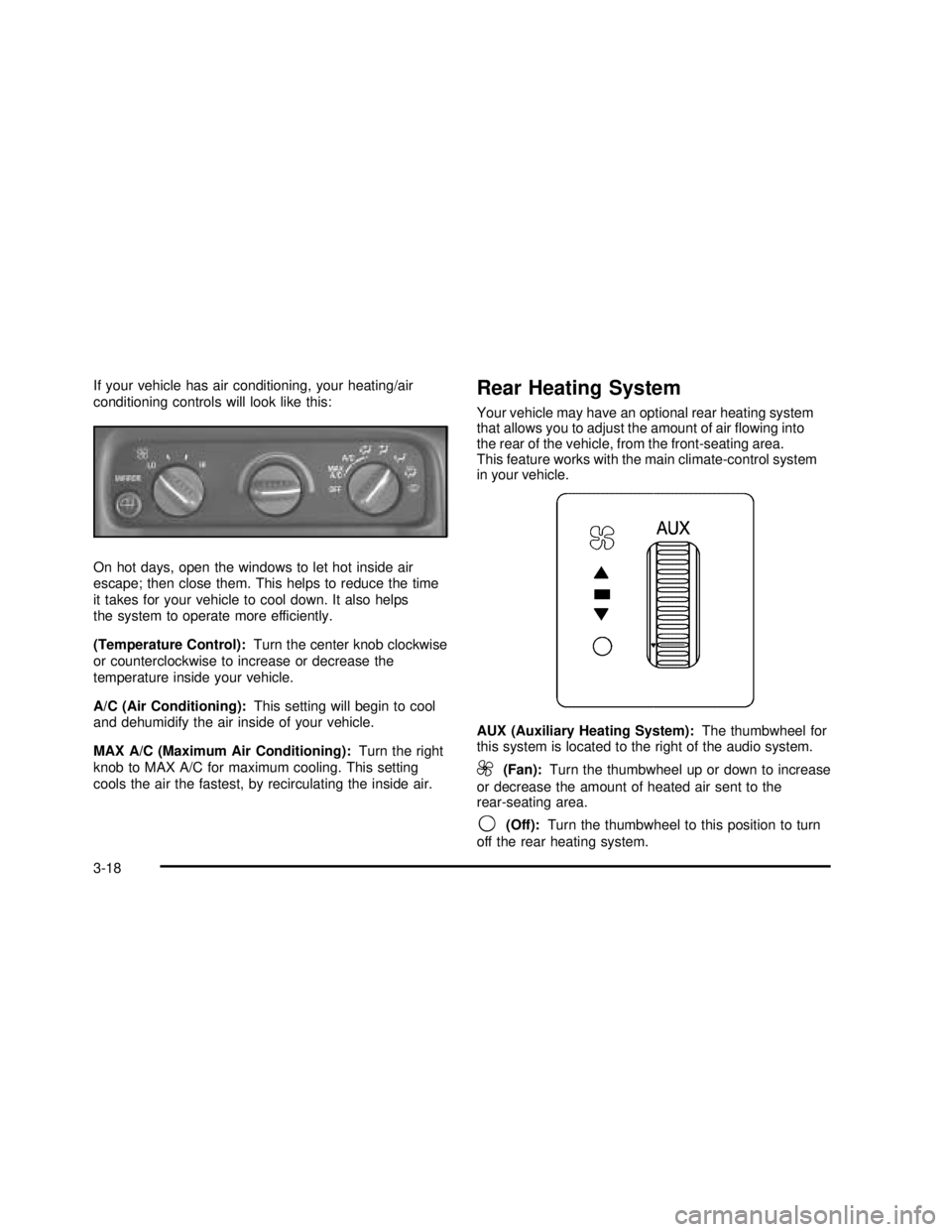
If your vehicle has air conditioning, your heating/air
conditioning controls will look like this:
On hot days, open the windows to let hot inside air
escape; then close them. This helps to reduce the time
it takes for your vehicle to cool down. It also helps
the system to operate more efficiently.
(Temperature Control):Turn the center knob clockwise
or counterclockwise to increase or decrease the
temperature inside your vehicle.
A/C (Air Conditioning):This setting will begin to cool
and dehumidify the air inside of your vehicle.
MAX A/C (Maximum Air Conditioning):Turn the right
knob to MAX A/C for maximum cooling. This setting
cools the air the fastest, by recirculating the inside air.Rear Heating System
Your vehicle may have an optional rear heating system
that allows you to adjust the amount of airflowing into
the rear of the vehicle, from the front-seating area.
This feature works with the main climate-control system
in your vehicle.
AUX (Auxiliary Heating System):The thumbwheel for
this system is located to the right of the audio system.
9(Fan):Turn the thumbwheel up or down to increase
or decrease the amount of heated air sent to the
rear-seating area.
9(Off):Turn the thumbwheel to this position to turn
off the rear heating system.
3-18
2003 - Savana OM
Page 138 of 392

Directing the Airflow
Turn the center knob clockwise or counterclockwise
to change the direction of the airflow in the
rear-seating area.
To change the current mode, select one of the following:
D(Vent):Use this mode to direct air to the upper
outlets, with a little air directed to thefloor outlets.
2(Floor):Use this mode to direct most of the air to
thefloor outlets.
Selecting the Fan Speed
9
(Fan):Turn the left knob clockwise or
counterclockwise to HIGH, MED (Medium) or LOW to
increase or decrease the fan speed in the rear-seating
area. Turn the knob to OFF to turn off the fan.
Setting the Temperature
To increase or decrease the temperature for the rear
of the vehicle, use the right knob located on the
climate-control panel.
The air-conditioning system on the main climate-control
panel must be turned on to direct cooled air to the rear of
the vehicle. If it is not on, then the temperature in the rear
of the vehicle will remain at cabin temperature.
Be sure to keep the area under the front seats clear of
any objects so that the air inside of your vehicle can
circulate effectively.
For information on how to use the main climate-control
system, seeClimate Control System on page 3-17
listed previously in this section. For information
on ventilation, see“Outlet Adjustment”listed later
in this section.
3-20
2003 - Savana OM
Page 140 of 392
Rear Window Defogger
Press this button to turn the rear window defogger on or
off. Be sure to clear as much snow from the window
as possible.
The rear window defogger uses a warming grid to
remove fog or frost from the rear window and will only
work when the ignition is RUN.
The rear window defogger will turn off several minutes
after the button is pressed. If turned on again, the
defogger will run for several more minutes before turning
off. The defogger can also be turned off by pressing
the button again or by turning off the engine.
Notice:Don’t use a razor blade or something else
sharp on the inside of the rear window. If you
do, you could cut or damage the defogger and the
repairs would not be covered by your warranty.
Do not attach a temporary vehicle license, tape,
a decal or anything similar to the defogger grid.
Outlet Adjustment
Use the outlets located
near the center and on the
sides of the instrument
panel to change the
direction of airflow.
Operation Tips
•Clear away any ice, snow or leaves from the air
inlets at the base of the windshield that may
block theflow of air into your vehicle.
•Use of non-GM approved hood deflectors may
adversely affect the performance of the system.
•Keep the path under the front seats clear of objects
to help circulate the air inside of your vehicle more
effectively.
3-22
2003 - Savana OM
Page 150 of 392

Anti-Lock Brake System
Warning Light
With the anti-lock brake
system, this light will come
on when you start your
engine and may stay on
for several seconds.
That’s normal.
If the light stays on, or comes on when you’re driving,
your vehicle needs service. If the regular brake system
warning light isn’t on, you still have brakes, but you don’t
have anti-lock brakes. If the regular brake system
warning light is also on, you don’t have anti-lock brakes
and there’s a problem with your regular brakes. See
“Brake System Warning Light”earlier in this section.
The anti-lock brake system warning light should come
on briefly when you turn the ignition key to RUN. If
the light doesn’t come on then, have itfixed so it will be
ready to warn you if there is a problem.
Engine Coolant Temperature Gage
This gage shows the engine coolant temperature. If the
gage pointer moves into the red area your engine is
too hot!
It means that your engine coolant has overheated.
If you have been operating your vehicle under normal
operating conditions, you should pull off the road,
stop your vehicle, and turn off the engine as soon
as possible.
SeeEngine Overheating on page 5-26.
United StatesCanada
3-32
2003 - Savana OM
Page 156 of 392

Security Light
The light will stay on until the engine starts. If the light
flashes, the Passlock®System has entered a tamper
mode. If the vehicle fails to start, seePasslock®
on page 2-20.
If the light comes on continuously while driving and
stays on, there may be a problem with the Passlock
®
System. Your vehicle will not be protected by Passlock®,
and you should see your GM dealer.
Cruise Control Light
The cruise light comes on whenever you set your
cruise control. See“Cruise Control”under
Turn Signal/Multifunction Lever on page 3-6. United States
CanadaUnited StatesCanada
3-38
2003 - Savana OM
Page 162 of 392

Adjusting the Speakers (Balance/Fade)
AUDIO:To adjust the balance between the right
and the left speakers, press and release the AUDIO
button until BAL appears on the display. Then press and
hold the up or the down arrow to move the sound
toward the right or the left speakers.
To adjust the fade between the front and the rear
speakers, press and release the AUDIO button until
FAD appears on the display. Then press and hold the
up or the down arrow to move the sound toward
the front or the rear speakers.
To adjust balance or fade to the middle position, select
BAL or FAD. Then press and hold AUDIO for more
than two seconds until you hear a beep. L and a zero
or F and a zero will appear on the display.
To adjust both tone controls and both speaker controls
to the middle position,first end out of audio mode
either by pressing another button, causing the radio to
perform that function, or by waitingfive seconds for
the display to return to time of day. Then press and hold
AUDIO for more than two seconds until you hear a
beep. CEN will appear on the display.
Radio Messages
CAL (Calibration):Your audio system has been
calibrated for your vehicle from the factory. If CAL
appears on the display it means that your radio has not
been configured properly for your vehicle and must
be returned to the dealership for service.
LOC (Locked):This message is displayed when the
THEFTLOCK
®system has locked up. You must
return to the dealership for service.
3-44
2003 - Savana OM
Page 165 of 392

Adjusting the Speakers (Balance/Fade)
AUDIO:To adjust the balance between the right
and the left speakers, press and release the AUDIO
button until BAL appears on the display. Then press and
hold the up or the down arrow to move the sound
toward the right or the left speakers.
To adjust the fade between the front and rear speakers,
press and release the AUDIO button until FAD appears
on the display. Then press and hold the up or the down
arrow to move the sound toward the front or the rear
speakers.
To adjust balance or fade to the middle position, select
BAL or FAD. Then press and hold AUDIO for more than
two seconds until you hear a beep. L and a zero or F and
a zero will appear on the display.
To adjust both tone controls and both speaker controls
to the middle position,first end out of audio mode by
pressing another button, causing the radio to perform that
function, or by waitingfive seconds for the display to
return to time of day. Then press and hold AUDIO
for more than two seconds until you hear a beep.
CEN will appear on the display.
Radio Messages
CAL (Calibration):Your audio system has been
calibrated for your vehicle from the factory. If CAL
appears on the display it means that your radio has not
been configured properly for your vehicle and must
be returned to the dealership for service.
LOC (Locked):This message is displayed when the
THEFTLOCK
®system has locked up. You must
return to the dealership for service.
Playing a Compact Disc
Insert a disc partway into the slot, label side up.
The player will pull it in. The disc should begin playing.
The display will show CD. If you want to insert a
compact disc with the ignition off,first press RCL or
the eject button.
If an error appears on the display, see“Compact Disc
Messages”later in this section.
1 PREV (Previous):Press this pushbutton to go to the
previous track if the current track has been playing
for less than eight seconds. If pressed when the current
track has been playing for more than eight seconds,
it will go to the beginning of the current track. The track
number will appear on the display. If you hold the
pushbutton or press it more than once, the player will
continue moving back through the disc.
3-47
2003 - Savana OM
Page 173 of 392

Radio Messages
CAL ERR (Calibration Error):This message is
displayed when the radio has not been calibrated
properly for the vehicle. You must return to the
dealership for service.
LOCKED:This message is displayed when the
THEFTLOCK
®system has locked up. You must return
to the dealership for service.
Playing a Cassette Tape
Your tape player is built to work best with tapes that are
up to 30 to 45 minutes long on each side. Tapes longer
than that are so thin they may not work well in this player.
The longer side with the tape visible should face to the
right. If the ignition is on, but the radio is off, the tape can
be inserted and will begin playing. A tape symbol is
shown on the display whenever a tape is inserted. If you
hear nothing but a garbled sound, the tape may not be in
squarely. Press the eject symbol to remove the tape and
start over.
While the tape is playing, use the VOL, AUDIO and
SEEK controls just as you do for the radio. The display
will show TAPE and an arrow showing which side of
the tape is playing.If you want to insert a tape while the ignition is off,first
press the eject symbol or DISP.
If an error appears on the display, see“Cassette Tape
Messages”later in this section.
1 PREV (Previous):Your tape must have at least three
seconds of silence between each selection for previous
to work. Press this pushbutton to go to the previous
selection on the tape if the current selection has been
playing for less than three seconds. If pressed when the
current selection has been playing from 3 to 13 seconds,
it will go to the beginning of the previous selection or
the beginning of the current selection, depending upon
the position on the tape. If pressed when the current
selection has been playing for more than 13 seconds,
it will go to the beginning of the current selection.
SEEK and a negative number will appear on the display
while the cassette player is in the previous mode.
Pressing this pushbutton multiple times will increase the
number of selections to be searched back, up to -9.
2 NEXT:Your tape must have at least three seconds
of silence between each selection for next to work.
Press this pushbutton to go to the next selection on
the tape. If you press the pushbutton more than once,
the player will continue moving forward through the tape.
SEEK and a positive number will appear on the display.
3-55
2003 - Savana OM
Page 175 of 392

Cassette Tape Messages
CHK TAPE (Check Tape):If CHK TAPE appears on
the radio display, the tape won’t play because of one of
the following errors.
•The tape is tight and the player can’t turn the tape
hubs. Remove the tape. Hold the tape with the
open end down and try to turn the right hub
counterclockwise with a pencil. Turn the tape over
and repeat. If the hubs do not turn easily, your
tape may be damaged and should not be used in
the player. Try a new tape to make sure your player
is working properly.
•The tape is broken. Try a new tape.
•The tape is wrapped around the tape head.
Attempt to get the cassette out. Try a new tape.
CLEAN:If this message appears on the display, the
cassette tape player needs to be cleaned. It will still play
tapes, but you should clean it as soon as possible to
prevent damage to the tapes and player. SeeCare
of Your Cassette Tape Player on page 3-74.
If any error occurs repeatedly or if an error can’tbe
corrected, contact your dealer.
CD Adapter Kits
It is possible to use a portable CD player adapter kit
with your cassette tape player after activating the bypass
feature on your tape player.
To activate the bypass feature, perform the
following steps:
1. Turn the ignition on.
2. Turn the radio off.
3. Press and hold the TAPE DISC button forfive
seconds. The radio will display READY and the
tape symbol on the display willflash, indicating the
feature is active.
4. Insert the adapter into the cassette tape slot.
It will power up the radio and begin playing.
The override feature will remain active until the eject
symbol is pressed.
3-57
2003 - Savana OM
Page 191 of 392

P.SET PROG (Preset Program):The front passengers
must be listening to something different for each of
these functions to work:
•Press this button to scan through the preset radio
stations set on the pushbuttons on the main radio.
The radio will go to a preset station stored on
your pushbuttons, play for a few seconds, then go
on to the next preset station. Press this button
again to stop scanning presets.
•When a cassette tape is playing, press this button
to go to the other side of the tape.
•When a CD is playing, press this button to selec
t a disc.
TAPE CD:Press this button to switch between playing
a cassette tape or a CD when listening to the radio.
The inactive tape or compact disc will remain safely
inside the radio for future listening.
Theft-Deterrent Feature
(Non-RDS Radios)
THEFTLOCK®is designed to discourage theft of your
radio. The feature works automatically by learning
a portion of the Vehicle Identification Number (VIN).
If the radio is moved to a different vehicle, it will
not operate and LOC will be displayed.
With THEFTLOCK
®activated, your radio will not
operate if stolen.
Theft-Deterrent Feature
(RDS Radios)
THEFTLOCK®is designed to discourage theft of your
radio. The feature works automatically by learning
a portion of the Vehicle Identification Number (VIN).
If the radio is moved to a different vehicle, it will
not operate and LOCKED will be displayed.
When the radio and vehicle are turned off, the blinking
red light indicates that THEFTLOCK
®is armed.
With THEFTLOCK
®activated, your radio will not
operate if stolen.
3-73
2003 - Savana OM