tow GMC SAVANA 2007 Owner's Guide
[x] Cancel search | Manufacturer: GMC, Model Year: 2007, Model line: SAVANA, Model: GMC SAVANA 2007Pages: 452, PDF Size: 2.68 MB
Page 180 of 452
If the Light Is Flashing
The following may prevent more serious damage
to your vehicle:
•Reducing vehicle speed
•Avoiding hard accelerations
•Avoiding steep uphill grades
•If you are towing a trailer, reduce the amount of
cargo being hauled as soon as it is possible
If the light stops flashing and remains on steady,
see “If the Light Is On Steady” following.
If the light continues to flash, when it is safe to do
so, stop the vehicle. Find a safe place to park
your vehicle. Turn the key off, wait at least
10 seconds and restart the engine. If the light
remains on steady, see “If the Light Is On Steady”
following. If the light is still flashing, follow the
previous steps, and see your dealer for service as
soon as possible.
If the Light Is On Steady
You may be able to correct the emission system
malfunction by considering the following:
Did you recently put fuel into your vehicle?
If so, reinstall the fuel cap, making sure to fully
install the cap. SeeFilling the Tank on page 292.
The diagnostic system can determine if the
fuel cap has been left off or improperly installed.
A loose or missing fuel cap will allow fuel to
evaporate into the atmosphere. A few driving trips
with the cap properly installed should turn the
light off.
Did you just drive through a deep puddle of
water?
If so, your electrical system may be wet. The
condition will usually be corrected when the
electrical system dries out. A few driving trips
should turn the light off.
180
Page 185 of 452
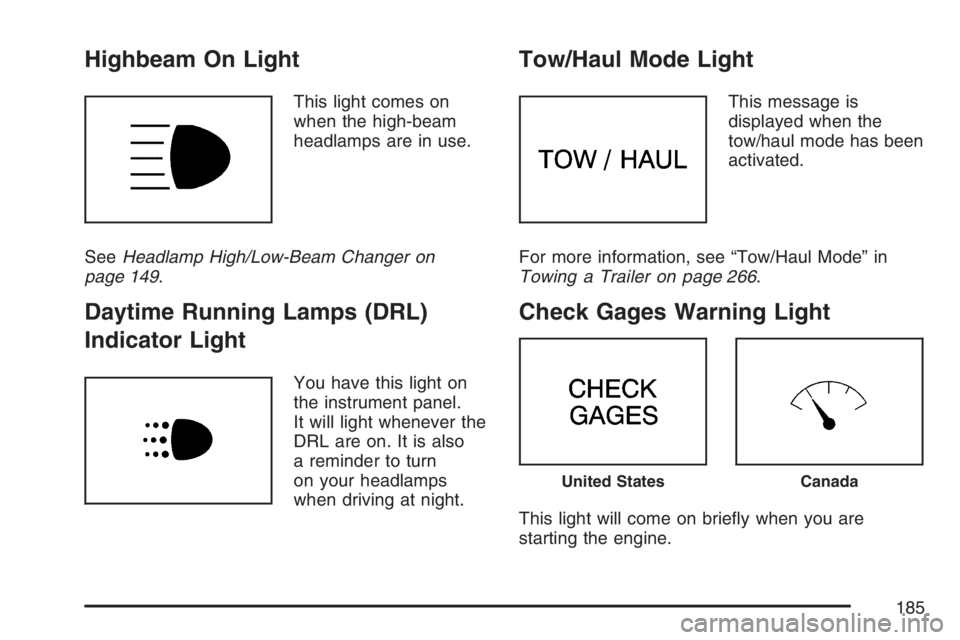
Highbeam On Light
This light comes on
when the high-beam
headlamps are in use.
SeeHeadlamp High/Low-Beam Changer on
page 149.
Daytime Running Lamps (DRL)
Indicator Light
You have this light on
the instrument panel.
It will light whenever the
DRL are on. It is also
a reminder to turn
on your headlamps
when driving at night.
Tow/Haul Mode Light
This message is
displayed when the
tow/haul mode has been
activated.
For more information, see “Tow/Haul Mode” in
Towing a Trailer on page 266.
Check Gages Warning Light
This light will come on briefly when you are
starting the engine.
United StatesCanada
185
Page 191 of 452
Setting the Tone (Bass/Treble)
AUDIO:To adjust the bass and the treble, press
and release AUDIO until BAS (bass) or TRE
(treble) appears on the display. Then press and
hold the up or the down arrow to increase or
to decrease. If a station is weak or has static,
decrease the treble.
To adjust bass or treble to the middle position,
select BAS or TRE. Then press and hold AUDIO
for more than two seconds until you hear a
beep. B and a zero or T and a zero appears on
the display.
To adjust both tone controls and both speaker
controls to the middle position, first end out
of audio mode by pressing another button, causing
the radio to perform that function, or by waiting
five seconds for the display to return to time
of day. Then press and hold AUDIO for more than
two seconds until you hear a beep. CEN (center)
appears on the display.
Adjusting the Speakers (Balance/Fade)
AUDIO:To adjust the balance between the right
and the left speakers, press and release the AUDIO
button until BAL (balance) appears on the display.
Then press and hold the up or the down arrow to
move the sound toward the right or the left
speakers.
To adjust the fade between the front and the rear
speakers, press and release AUDIO until FAD
(fade) appears on the display. Then press and hold
the up or the down arrow to move the sound toward
the front or the rear speakers.
The fade feature may not be available on all radio
systems.
To adjust balance or fade to the middle position,
select BAL or FAD. Then press and hold AUDIO for
more than two seconds until you hear a beep.
B and a zero or F and a zero appears on the
display.
To adjust both tone controls and both speaker
controls to the middle position, first end out of audio
mode by pressing another button, causing the radio
to perform that function, or by waiting five seconds
for the display to return to time of day. Then press
and hold AUDIO for more than two seconds until
you hear a beep. CEN appears on the display.
191
Page 194 of 452
Setting the Tone (Bass/Treble)
AUDIO:To adjust the bass or the treble, press
and release the AUDIO button until BAS (bass) or
TRE (treble) appears on the display. Then
press and hold the up or the down arrow to
increase or to decrease. If a station is weak or
has static, decrease the treble.
To adjust bass or treble to the middle position,
select BAS or TRE. Then press and hold the
AUDIO button for more than two seconds until you
hear a beep. B and a zero or T and a zero
appears on the display.
To adjust both tone controls and both speaker
controls to the middle position, first end out
of audio mode by pressing another button, causing
the radio to perform that function, or by waiting
five seconds for the display to return to the time of
day. Then press and hold the AUDIO button for
more than two seconds until you hear a beep.
CEN (center) appears on the display.
Adjusting the Speakers (Balance/Fade)
AUDIO:To adjust the balance between the right
and the left speakers, press and release the AUDIO
button until BAL (balance) appears on the display.
Then press and hold the up or the down arrow to
move the sound toward the right or the left
speakers.
To adjust the fade between the front and the rear
speakers, press and release the AUDIO button until
FAD (fade) appears on the display. Then press and
hold the up or the down arrow to move the sound
toward the front or the rear speakers.
The fade feature may not be available on all radio
systems.
To adjust balance or fade to the middle position,
select BAL or FAD. Then press and hold AUDIO for
more than two seconds until you hear a beep. B and
a zero or F and a zero appears on the display.
To adjust both tone controls and both speaker
controls to the middle position, first end out of audio
mode by pressing another button, causing the radio
to perform that function, or by waiting five seconds
for the display to return to the time of day. Then
press and hold the AUDIO button for more than
two seconds until you hear a beep. CEN appears on
the display.
194
Page 202 of 452
Adjusting the Speakers (Balance/Fade)
AUDIO:To adjust the balance between the
right and the left speakers, push and release the
AUDIO knob until BAL appears on the display.
Turn the knob to move the sound toward the right
or the left speakers.
To adjust the fade between the front and the rear
speakers, push and release the AUDIO knob
until FADE appears on the display. Turn the knob
to move the sound toward the front or the rear
speakers.
The fade feature may not be available on all radio
systems.
To adjust the balance and fade to the middle
position, push the AUDIO knob, then push it again
and hold it until the radio produces one beep. The
balance and fade adjusts to the middle position and
the display shows the speaker balance.
To adjust all tone and speaker controls to the
middle position, push and hold the AUDIO knob
when no tone or speaker control is displayed.
ALL CENTERED appears on the display, you will
hear a beep, and the display level adjusts to the
middle position.
Finding a Program Type (PTY)
Station (RDS)
To select and find a desired PTY perform the
following:
1. Press the TYPE button to activate program
type select mode. TYPE and a PTY appears
on the display.
2. Turn the TYPE knob or press and release the
TYPE button to select a PTY.
3. Once the desired PTY is displayed, press and
release either the TYPE or the SEEK arrows
to select and to take you to the PTY’s first
station.
4. To go to another station within that PTY and
the PTY is displayed, press either the TYPE
or the SEEK arrows once. If the PTY is
not displayed, go back to Step 1.
5. Press either the TYPE or the SEEK arrows to
exit program type select mode.
If the radio cannot find the desired program type,
NONE appears on the display and the radio
returns to the last station you were listening to.
202
Page 214 of 452
Adjusting the Speakers (Balance/Fade)
AUDIO:To adjust the balance between the
right and the left speakers, push and release the
AUDIO knob until BAL appears on the display.
Turn the knob to move the sound toward the right
or the left speakers.
To adjust the fade between the front and rear
speakers, push and release the AUDIO knob until
FAD appears on the display. Turn the knob to
move the sound toward the front or the rear
speakers.
The fade feature may not be available on all radio
systems.
To adjust the balance or fade to the middle
position, push and hold the AUDIO knob while
BAL or FAD is displayed. The radio produces
one beep and adjusts the display level to
the middle position.
To adjust all tone and speaker controls to the
middle position, push and hold the AUDIO knob
while no tone or speaker controls are displayed.
ALL CENTERED appears on the display and
you will hear a beep.
Radio Data System (RDS)
The audio system has a Radio Data System
(RDS). RDS features are available for use only on
FM stations that broadcast RDS information.
With RDS, the radio can do the following:
•Seek to stations broadcasting the selected
type of programming
•Receive announcements concerning local and
national emergencies
•Display messages from radio stations
This system relies upon receiving specific
information from these stations and only works
when the information is available. In rare cases, a
radio station may broadcast incorrect information
that causes the radio features to work improperly.
If this happens, contact the radio station.
While the radio is tuned to an RDS station, the
station name or call letters appear on the display
instead of the frequency. RDS stations may
also provide the time of day, a program type (PTY)
for current programming, and the name of the
program being broadcast.
214
Page 227 of 452
Your Driving, the Road, and Your Vehicle.... 228
Defensive Driving...................................... 228
Drunken Driving........................................ 229
Control of a Vehicle.................................. 232
Braking...................................................... 232
Anti-Lock Brake System (ABS).................. 233
Braking in Emergencies............................. 235
Locking Rear Axle..................................... 235
StabiliTrak
®System................................... 235
All-Wheel Drive (AWD) System.................. 238
Steering.................................................... 239
Off-Road Recovery.................................... 241
Passing..................................................... 241
Loss of Control.......................................... 243
Driving at Night......................................... 244
Driving in Rain and on Wet Roads............ 245City Driving............................................... 248
Freeway Driving........................................ 249
Before Leaving on a Long Trip.................. 250
Highway Hypnosis..................................... 251
Hill and Mountain Roads........................... 252
Winter Driving........................................... 254
If Your Vehicle is Stuck in Sand,
Mud, Ice, or Snow ................................. 258
Rocking Your Vehicle to Get It Out........... 258
Loading Your Vehicle................................ 259
Towing........................................................ 264
Towing Your Vehicle ................................. 264
Recreational Vehicle Towing...................... 264
Towing a Trailer........................................ 266
Section 4 Driving Your Vehicle
227
Page 258 of 452
If Your Vehicle is Stuck in Sand,
Mud, Ice, or Snow
In order to free your vehicle when it is stuck,
you will need to spin the wheels, but you do not
want to spin your wheels too fast. The method
known as rocking can help you get out when you
are stuck, but you must use caution.
{CAUTION:
If you let your vehicle’s tires spin at high
speed, they can explode, and you or others
could be injured. And, the transmission or
other parts of the vehicle can overheat.
That could cause an engine compartment
re or other damage. When you are stuck,
spin the wheels as little as possible. Do not
spin the wheels above 35 mph (55 km/h) as
shown on the speedometer.Notice:Spinning the wheels can destroy
parts of your vehicle as well as the tires. If
you spin the wheels too fast while shifting the
transmission back and forth, you can destroy
the transmission.
For information about using tire chains on your
vehicle, seeTire Chains on page 359.
Rocking Your Vehicle to Get It Out
First, turn the steering wheel left and right.
That will clear the area around the front wheels.
Then shift back and forth between REVERSE (R)
and a forward gear, spinning the wheels as
little as possible. Release the accelerator pedal
while you shift, and press lightly on the accelerator
pedal when the transmission is in gear. By
slowly spinning the wheels in the forward and
reverse directions, you will cause a rocking motion
that may free your vehicle. If that does not get
your vehicle out after a few tries, it may need to be
towed out. If your vehicle does need to be
towed out, seeTowing Your Vehicle on page 264.
258
Page 260 of 452
The Tire and Loading Information label also shows
the size of the original equipment tires (C) and
the recommended cold tire inflation pressures (D).
For more information on tires and inflation see
Tires on page 340andInation - Tire Pressure on
page 348.
There is also important loading information on the
vehicle Certification/Tire label. It tells you the
Gross Vehicle Weight Rating (GVWR) and
the Gross Axle Weight Rating (GAWR) for the
front and rear axle. See “Certification/Tire Label”
later in this section.
Steps for Determining Correct Load Limit
1. Locate the statement “The combined
weight of occupants and cargo should never
exceed XXX kg or XXX lbs” on your
vehicle’s placard.
2. Determine the combined weight of the driver
and passengers that will be riding in your
vehicle.
3. Subtract the combined weight of the driver
and passengers from XXX kg or XXX lbs.4. The resulting figure equals the available
amount of cargo and luggage load capacity.
For example, if the “XXX” amount equals
1400 lbs and there will be five 150 lb
passengers in your vehicle, the amount of
available cargo and luggage load capacity is
650 lbs (1400−750 (5 x 150) = 650 lbs).
5. Determine the combined weight of luggage
and cargo being loaded on the vehicle. That
weight may not safely exceed the available
cargo and luggage load capacity calculated
in Step 4.
6. If your vehicle will be towing a trailer, the load
from your trailer will be transferred to your
vehicle. Consult this manual to determine how
this reduces the available cargo and luggage
load capacity of your vehicle. SeeTowing
a Trailer on page 266for important information
on towing a trailer, towing safety rules and
trailering tips.
260
Page 264 of 452
Towing
Towing Your Vehicle
Consult your dealer or a professional towing
service if you need to have your disabled vehicle
towed. SeeRoadside Assistance Program on
page 424.
If you want to tow your vehicle behind another
vehicle for recreational purposes (such as behind
a motorhome), see “Recreational Vehicle
Towing” following.
Recreational Vehicle Towing
Recreational vehicle towing means towing your
vehicle behind another vehicle — such as behind
a motorhome. The two most common types of
recreational vehicle towing are known as “dinghy”
(towing your vehicle with all four wheels on the
ground) and “dolly” (towing your vehicle with
two wheels on the ground and two wheels up on a
device known as a “dolly”).With the proper preparation and equipment, many
vehicles can be towed in these ways. See “Dinghy
Towing” and “Dolly Towing” following.
Here are some important things to consider before
you do recreational vehicle towing:
•What’s the towing capacity of the towing
vehicle? Be sure you read the tow vehicle
manufacturer’s recommendations.
•How far will you tow? Some vehicles have
restrictions on how far and how long they
can tow.
•Do you have the proper towing equipment?
See your dealer or trailering professional
for additional advice and equipment
recommendations.
•Is your vehicle ready to be towed? Just as
you would prepare your vehicle for a long
trip, you’ll want to make sure your vehicle is
prepared to be towed.
264