fuel GMC SAVANA 2021 User Guide
[x] Cancel search | Manufacturer: GMC, Model Year: 2021, Model line: SAVANA, Model: GMC SAVANA 2021Pages: 292, PDF Size: 6.38 MB
Page 83 of 292
GMC Savana Owner Manual (GMNA-Localizing-U.S./Canada-14583543) -
2021 - crc - 7/10/20
82 Instruments and Controls
DIC Buttons
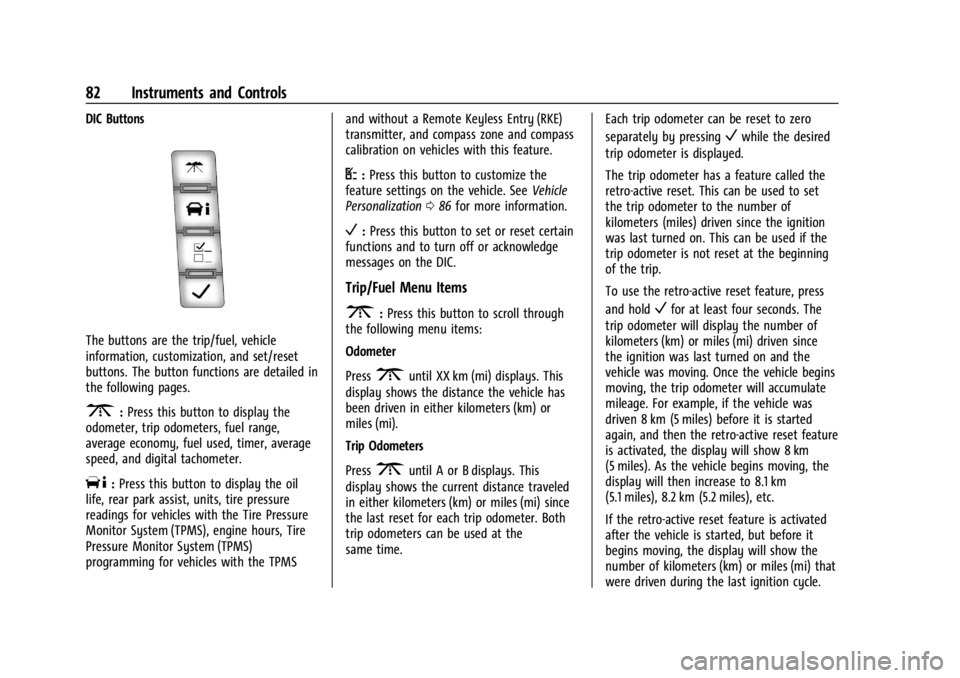
The buttons are the trip/fuel, vehicle
information, customization, and set/reset
buttons. The button functions are detailed in
the following pages.
3:Press this button to display the
odometer, trip odometers, fuel range,
average economy, fuel used, timer, average
speed, and digital tachometer.
T: Press this button to display the oil
life, rear park assist, units, tire pressure
readings for vehicles with the Tire Pressure
Monitor System (TPMS), engine hours, Tire
Pressure Monitor System (TPMS)
programming for vehicles with the TPMS and without a Remote Keyless Entry (RKE)
transmitter, and compass zone and compass
calibration on vehicles with this feature.
U:
Press this button to customize the
feature settings on the vehicle. See Vehicle
Personalization 086 for more information.
V:Press this button to set or reset certain
functions and to turn off or acknowledge
messages on the DIC.
Trip/Fuel Menu Items
3: Press this button to scroll through
the following menu items:
Odometer
Press
3until XX km (mi) displays. This
display shows the distance the vehicle has
been driven in either kilometers (km) or
miles (mi).
Trip Odometers
Press
3until A or B displays. This
display shows the current distance traveled
in either kilometers (km) or miles (mi) since
the last reset for each trip odometer. Both
trip odometers can be used at the
same time. Each trip odometer can be reset to zero
separately by pressing
Vwhile the desired
trip odometer is displayed.
The trip odometer has a feature called the
retro-active reset. This can be used to set
the trip odometer to the number of
kilometers (miles) driven since the ignition
was last turned on. This can be used if the
trip odometer is not reset at the beginning
of the trip.
To use the retro-active reset feature, press
and hold
Vfor at least four seconds. The
trip odometer will display the number of
kilometers (km) or miles (mi) driven since
the ignition was last turned on and the
vehicle was moving. Once the vehicle begins
moving, the trip odometer will accumulate
mileage. For example, if the vehicle was
driven 8 km (5 miles) before it is started
again, and then the retro-active reset feature
is activated, the display will show 8 km
(5 miles). As the vehicle begins moving, the
display will then increase to 8.1 km
(5.1 miles), 8.2 km (5.2 miles), etc.
If the retro-active reset feature is activated
after the vehicle is started, but before it
begins moving, the display will show the
number of kilometers (km) or miles (mi) that
were driven during the last ignition cycle.
Page 84 of 292
GMC Savana Owner Manual (GMNA-Localizing-U.S./Canada-14583543) -
2021 - crc - 7/10/20
Instruments and Controls 83
Fuel Range
Press
3until FUEL RANGE displays. This
display shows the approximate number of
remaining kilometers (km) or miles (mi) the
vehicle can be driven without refueling.
The fuel range estimate is based on an
average of the fuel economy over recent
driving history and the amount of fuel
remaining in the fuel tank. This estimate
will change if driving conditions change. For
example, if driving in traffic and making
frequent stops, this display may read one
number, but if the vehicle is driven on a
freeway, the number may change even
though the same amount of fuel is in the
fuel tank. This is because different driving
conditions produce different fuel economies.
Generally, freeway driving produces better
fuel economy than city driving.
If the vehicle is low on fuel, the FUEL LEVEL
LOW message will be displayed.
Average Economy
Press
3until AVG ECONOMY displays.
This display shows the approximate average
liters per 100 kilometers (L/100 km) or miles
per gallon (mpg). This number is calculated
based on the number of L/100 km (mpg) recorded since the last time this menu item
was reset. To reset AVG ECONOMY, press
and hold
V. The display will return to zero.
Fuel Used
Press
3until FUEL USED displays. This
display shows the number of liters (L) or
gallons (gal) of fuel used since the last reset
of this menu item. To reset the fuel used
information, press and hold
Vwhile FUEL
USED is displayed.
Timer
Press
3until TIMER displays. This
display can be used as a timer.
To start the timer, press
Vwhile TIMER is
displayed. The display will show the amount
of time that has passed since the timer was
last reset, not including time the ignition is
off. Time will continue to be counted as
long as the ignition is on, even if another
display is being shown on the DIC. The
timer will record up to 99 hours, 59 minutes
and 59 seconds (99:59:59) after which the
display will return to zero.
To stop the timer, press
Vbriefly while
TIMER is displayed. To reset the timer to zero, press and hold
V
while TIMER is displayed.
Average Speed
Press
3until AVERAGE SPEED displays.
This display shows the average speed of the
vehicle in kilometers per hour (km/h) or
miles per hour (mph). This average is
calculated based on the various vehicle
speeds recorded since the last reset of this
value. To reset the value, press and hold
V.
The display will return to zero.
Digital Tachometer
Press
3until Tachometer ##00 RPM
displays. This display shows the engine
speed in revolutions per minute (RPM).
Blank Display
This display shows no information.
Vehicle Information Menu Items
T: Press this button to scroll through the
following menu items:
Oil Life
Press
Tuntil OIL LIFE REMAINING displays.
This display shows an estimate of the oil's
remaining useful life. If you see 99% OIL LIFE
REMAINING on the display, that means 99%
Page 126 of 292
GMC Savana Owner Manual (GMNA-Localizing-U.S./Canada-14583543) -
2021 - crc - 7/10/20
Driving and Operating 125
Driving and Operating
Driving Information
Driving for Better Fuel Economy . . . . . . . 126
Distracted Driving . . . . . . . . . . . . . . . . . . . . . 126
Defensive Driving . . . . . . . . . . . . . . . . . . . . . . 126
Impaired Driving . . . . . . . . . . . . . . . . . . . . . . . 127
Control of a Vehicle . . . . . . . . . . . . . . . . . . . . 127
Braking . . . . . . . . . . . . . . . . . . . . . . . . . . . . . . . . 127
Steering . . . . . . . . . . . . . . . . . . . . . . . . . . . . . . . 127
Off-Road Recovery . . . . . . . . . . . . . . . . . . . . . 128
Loss of Control . . . . . . . . . . . . . . . . . . . . . . . . 128
Driving on Wet Roads . . . . . . . . . . . . . . . . . 129
Hill and Mountain Roads . . . . . . . . . . . . . . 129
Winter Driving . . . . . . . . . . . . . . . . . . . . . . . . . 130
If the Vehicle Is Stuck . . . . . . . . . . . . . . . . . . 131
Vehicle Load Limits . . . . . . . . . . . . . . . . . . . . . 131
Starting and Operating
New Vehicle Break-In . . . . . . . . . . . . . . . . . . 134
Ignition Positions . . . . . . . . . . . . . . . . . . . . . . 135
Starting the Engine . . . . . . . . . . . . . . . . . . . . 136
Fast Idle System . . . . . . . . . . . . . . . . . . . . . . . 138
Retained Accessory Power (RAP) . . . . . . . 138
Engine Coolant Heater . . . . . . . . . . . . . . . . . 138
Shifting Into Park . . . . . . . . . . . . . . . . . . . . . 140
Shifting out of Park . . . . . . . . . . . . . . . . . . . 140
Parking over Things That Burn . . . . . . . . . 141
Engine Exhaust
Engine Exhaust . . . . . . . . . . . . . . . . . . . . . . . . 141
Running the Vehicle While Parked . . . . . 141
Automatic Transmission
Automatic Transmission . . . . . . . . . . . . . . . 142
Manual Mode . . . . . . . . . . . . . . . . . . . . . . . . . 144
Tow/Haul Mode . . . . . . . . . . . . . . . . . . . . . . . 145
Brakes
Antilock Brake System (ABS) . . . . . . . . . . . 145
Parking Brake . . . . . . . . . . . . . . . . . . . . . . . . . 146
Brake Assist . . . . . . . . . . . . . . . . . . . . . . . . . . . 146
Hill Start Assist (HSA) . . . . . . . . . . . . . . . . . 146
Ride Control Systems
Traction Control/Electronic StabilityControl . . . . . . . . . . . . . . . . . . . . . . . . . . . . . . 147
Locking Rear Axle . . . . . . . . . . . . . . . . . . . . . . 148
Cruise Control
Cruise Control . . . . . . . . . . . . . . . . . . . . . . . . . 149
Driver Assistance Systems
Driver Assistance Systems . . . . . . . . . . . . . 150
Rear Vision Camera (RVC) . . . . . . . . . . . . . . 152
Park Assist . . . . . . . . . . . . . . . . . . . . . . . . . . . . . 153
Forward Collision Alert (FCA) System . . . . . . . . . . . . . . . . . . . . . . . . . . . . . . 154
Side Blind Zone Alert (SBZA) . . . . . . . . . . . 155
Lane Departure Warning (LDW) . . . . . . . . 157
Fuel
Top Tier Fuel . . . . . . . . . . . . . . . . . . . . . . . . . . . 157
Recommended Fuel . . . . . . . . . . . . . . . . . . . . 158
Prohibited Fuels . . . . . . . . . . . . . . . . . . . . . . . 158
Fuels in Foreign Countries . . . . . . . . . . . . . 158
Fuel Additives . . . . . . . . . . . . . . . . . . . . . . . . . 158
Filling the Tank . . . . . . . . . . . . . . . . . . . . . . . . 158
Filling a Portable Fuel Container . . . . . . . 160
Trailer Towing
General Towing Information . . . . . . . . . . . 160
Driving Characteristics and Towing Tips . . . . . . . . . . . . . . . . . . . . . . . . . 160
Trailer Towing . . . . . . . . . . . . . . . . . . . . . . . . . 164
Towing Equipment . . . . . . . . . . . . . . . . . . . . . 172
Trailer Sway Control (TSC) . . . . . . . . . . . . . 175
Conversions and Add-Ons
Add-On Electrical Equipment . . . . . . . . . . . 176
Page 127 of 292
GMC Savana Owner Manual (GMNA-Localizing-U.S./Canada-14583543) -
2021 - crc - 7/10/20
126 Driving and Operating
Driving Information
Driving for Better Fuel Economy
Driving habits can affect fuel mileage. Here
are some driving tips to get the best fuel
economy possible:
.Set the climate controls to the desired
temperature after the engine is started,
or turn them off when not required.
.Avoid fast starts and accelerate smoothly.
.Brake gradually and avoid abrupt stops.
.Avoid idling the engine for long periods
of time.
.When road and weather conditions are
appropriate, use cruise control.
.Always follow posted speed limits or
drive more slowly when conditions
require.
.Keep vehicle tires properly inflated.
.Combine several trips into a single trip.
.Replace the vehicle's tires with the same
TPC Spec number molded into the tire's
sidewall near the size.
.Follow recommended scheduled
maintenance.
Distracted Driving
Distraction comes in many forms and can
take your focus from the task of driving.
Exercise good judgment and do not let other
activities divert your attention away from
the road. Many local governments have
enacted laws regarding driver distraction.
Become familiar with the local laws in
your area.
To avoid distracted driving, keep your eyes
on the road, keep your hands on the
steering wheel, and focus your attention on
driving.
.Do not use a phone in demanding driving
situations. Use a hands-free method to
place or receive necessary phone calls.
.Watch the road. Do not read, take notes,
or look up information on phones or
other electronic devices.
.Designate a front seat passenger to
handle potential distractions.
.Become familiar with vehicle features
before driving, such as programming
favorite radio stations and adjusting
climate control and seat settings. Program
all trip information into any navigation
device prior to driving.
.Wait until the vehicle is parked to
retrieve items that have fallen to the
floor.
.Stop or park the vehicle to tend to
children.
.Keep pets in an appropriate carrier or
restraint.
.Avoid stressful conversations while
driving, whether with a passenger or on a
cell phone.
{Warning
Taking your eyes off the road too long or
too often could cause a crash resulting in
injury or death. Focus your attention on
driving.
Refer to the infotainment section for more
information on using that system and the
navigation system, if equipped, including
pairing and using a cell phone.
Defensive Driving
Defensive driving means “always expect the
unexpected.” The first step in driving
defensively is to wear the seat belt. See
Seat Belts 028.
Page 132 of 292

GMC Savana Owner Manual (GMNA-Localizing-U.S./Canada-14583543) -
2021 - crc - 7/10/20
Driving and Operating 131
Warning (Continued)
.Fully open the air outlets on or under
the instrument panel.
.Adjust the climate control system to
circulate the air inside the vehicle and
set the fan speed to the highest
setting. See“Climate Control Systems.”
For more information about CO, see
Engine Exhaust 0141.
To save fuel, run the engine for short
periods to warm the vehicle and then shut
the engine off and partially close the
window. Moving about to keep warm also
helps.
If it takes time for help to arrive, when
running the engine, push the accelerator
pedal slightly so the engine runs faster than
the idle speed. This keeps the battery
charged to restart the vehicle and to signal
for help with the headlamps. Do this as
little as possible, to save fuel.
If the Vehicle Is Stuck
Slowly and cautiously spin the wheels to
free the vehicle when stuck in sand, mud,
ice, or snow. If stuck too severely for the traction system
to free the vehicle, turn the traction system
off and use the rocking method. See
Traction Control/Electronic Stability Control
0
147.
{Warning
If the vehicle's tires spin at high speed,
they can explode, and you or others
could be injured. The vehicle can
overheat, causing an engine compartment
fire or other damage. Spin the wheels as
little as possible and avoid going above
56 km/h (35 mph).
Rocking the Vehicle to Get it Out
Turn the steering wheel left and right to
clear the area around the front wheels. Turn
off any traction system. Shift back and forth
between R (Reverse) and a low forward gear,
spinning the wheels as little as possible. To
prevent transmission wear, wait until the
wheels stop spinning before shifting gears.
Release the accelerator pedal while shifting,
and press lightly on the accelerator pedal
when the transmission is in gear. Slowly
spinning the wheels in the forward and
reverse directions causes a rocking motion
that could free the vehicle. If that does not get the vehicle out after a few tries, it
might need to be towed out. If the vehicle
does need to be towed out, see
Towing the
Vehicle 0239.
Vehicle Load Limits
It is very important to know how much
weight the vehicle can carry. This
weight is called the vehicle capacity
weight and includes the weight of all
occupants, cargo, and all
nonfactory-installed options. Two labels
on the vehicle may show how much
weight it was designed to carry, the
Tire and Loading Information label and
the Certification/Tire label.
{Warning
Do not load the vehicle any heavier
than the Gross Vehicle Weight Rating
(GVWR), or either the maximum
front or rear Gross Axle Weight
Rating (GAWR). This can cause
systems to break and change the
way the vehicle handles. This could
cause loss of control and a crash.
(Continued)
Page 135 of 292
GMC Savana Owner Manual (GMNA-Localizing-U.S./Canada-14583543) -
2021 - crc - 7/10/20
134 Driving and Operating
Certification/Tire Label
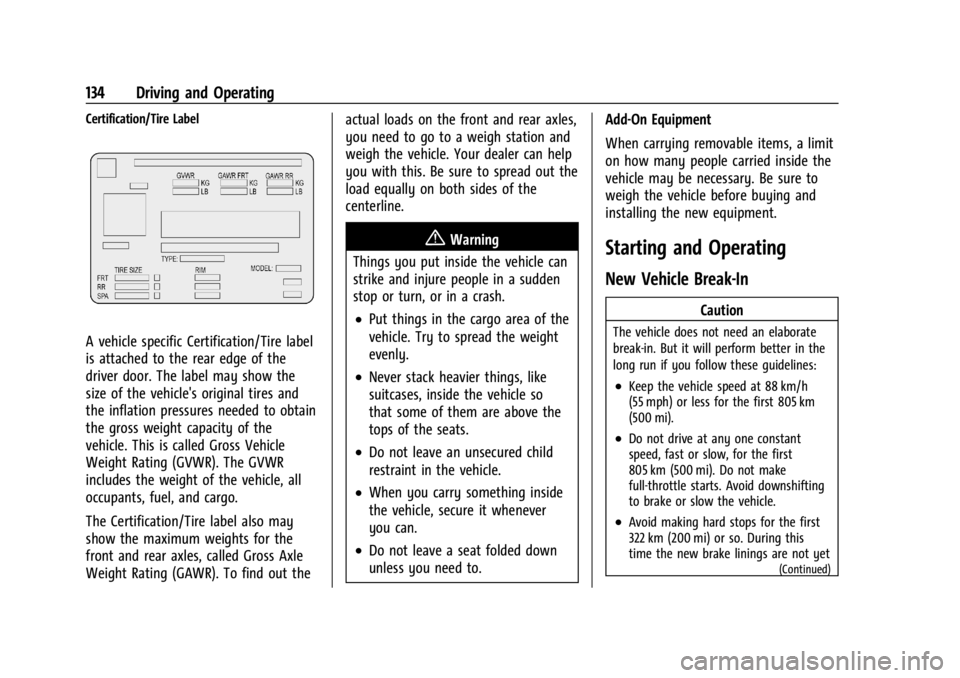
A vehicle specific Certification/Tire label
is attached to the rear edge of the
driver door. The label may show the
size of the vehicle's original tires and
the inflation pressures needed to obtain
the gross weight capacity of the
vehicle. This is called Gross Vehicle
Weight Rating (GVWR). The GVWR
includes the weight of the vehicle, all
occupants, fuel, and cargo.
The Certification/Tire label also may
show the maximum weights for the
front and rear axles, called Gross Axle
Weight Rating (GAWR). To find out theactual loads on the front and rear axles,
you need to go to a weigh station and
weigh the vehicle. Your dealer can help
you with this. Be sure to spread out the
load equally on both sides of the
centerline.
{Warning
Things you put inside the vehicle can
strike and injure people in a sudden
stop or turn, or in a crash.
.Put things in the cargo area of the
vehicle. Try to spread the weight
evenly.
.Never stack heavier things, like
suitcases, inside the vehicle so
that some of them are above the
tops of the seats.
.Do not leave an unsecured child
restraint in the vehicle.
.When you carry something inside
the vehicle, secure it whenever
you can.
.Do not leave a seat folded down
unless you need to. Add-On Equipment
When carrying removable items, a limit
on how many people carried inside the
vehicle may be necessary. Be sure to
weigh the vehicle before buying and
installing the new equipment.
Starting and Operating
New Vehicle Break-In
Caution
The vehicle does not need an elaborate
break-in. But it will perform better in the
long run if you follow these guidelines:
.Keep the vehicle speed at 88 km/h
(55 mph) or less for the first 805 km
(500 mi).
.Do not drive at any one constant
speed, fast or slow, for the first
805 km (500 mi). Do not make
full-throttle starts. Avoid downshifting
to brake or slow the vehicle.
.Avoid making hard stops for the first
322 km (200 mi) or so. During this
time the new brake linings are not yet
(Continued)
Page 138 of 292
GMC Savana Owner Manual (GMNA-Localizing-U.S./Canada-14583543) -
2021 - crc - 7/10/20
Driving and Operating 137
Move the shift lever to P (Park) or
N (Neutral). The engine will not start in any
other position. To restart the engine when
the vehicle is already moving, use
N (Neutral) only.
Caution
If you add electrical parts or accessories,
you could change the way the engine
operates. Any resulting damage would
not be covered by the vehicle warranty.
SeeAdd-On Electrical Equipment 0176.
Caution
Do not try to shift to P (Park) if the
vehicle is moving. If you do, you could
damage the transmission. Shift to P (Park)
only when the vehicle is stopped.
Caution
If the steering wheel is turned until it
reaches the end of its travel, and is held
in that position while starting the vehicle,
damage may occur to the hydraulic
power steering system and there may be
loss of power steering assist. Starting Procedure
1. With your foot off the accelerator pedal, turn the ignition key to START. When
the engine starts, let go of the key. The
idle speed will go down as your engine
gets warm. Do not race the engine
immediately after starting it. Operate
the engine and transmission gently to
allow the oil to warm up and lubricate
all moving parts.
When the low fuel warning light is on
and the FUEL LEVEL LOW message is
displayed in the Driver Information
Center (DIC), the Computer-Controlled
Cranking System is disabled to prevent
possible vehicle component damage.
When this happens, hold the ignition
switch in the START position to continue
engine cranking.
Caution
Cranking the engine for long periods of
time, by returning the ignition to the
START position immediately after
cranking has ended, can overheat and
damage the cranking motor, and drain
(Continued)
Caution (Continued)
the battery. Wait at least 15 seconds
between each try, to let the cranking
motor cool down.
2. If the engine does not start after five to 10 seconds, especially in very cold
weather (below −18 °C or 0 °F), it could
be flooded with too much gasoline. Try
pushing the accelerator pedal all the way
to the floor and holding it there as you
hold the key in START for up to
15 seconds. Wait at least 15 seconds
between each try, to allow the cranking
motor to cool down. When the engine
starts, let go of the key and accelerator.
If the vehicle starts briefly but then
stops again, do the same thing. This
clears the extra gasoline from the
engine. Do not race the engine
immediately after starting it. Operate
the engine and transmission gently until
the oil warms up and lubricates all
moving parts.
Page 139 of 292
GMC Savana Owner Manual (GMNA-Localizing-U.S./Canada-14583543) -
2021 - crc - 7/10/20
138 Driving and Operating
Fast Idle System
If equipped, this feature is available only
with cruise control. The manual fast idle
switch is operated using the cruise control
buttons on the left side of the steering
wheel.
This system can be used to increase engine
idle speed whenever the following
conditions are met:
.The parking brake is set.
.The brake pedal is not pressed.
.The vehicle must not be moving and the
accelerator must not be pressed.
To control the fast idle:
.To enable the Fast Idle System, press and
release the cruise control on/off button
and ensure that the switch indicator light
is lit.
.Press and release the cruise control SET-
button. Engine speed will be held at
approximately 1200 rpm.
When the fast idle is active, the Driver
Information Center (DIC) will display FAST
IDLE ON.
One of the following actions will turn off
the fast idle:
.Pressing the brake.
.Selecting the cruise control cancel button.
.Releasing the parking brake.
.Moving the transmission shift lever out of
P (Park) or N (Neutral).
.Selecting the cruise control on/off button
when it was previously on.
.Pressing the cruise control SET- button a
second time.
.Pressing the accelerator more than
one-quarter of the way down.
.Turning the ignition off.
Retained Accessory Power (RAP)
When the ignition is turned from on to off,
the following features (if equipped) will
continue to function for up to 10 minutes,
or until the driver door is opened. These
features will also work when the ignition is
in RUN or ACC/ACCESSORY:
.Infotainment System
.Power Windows (during RAP this
functionality will be lost when any door
is opened)
.Sunroof (during RAP this functionality will
be lost when any door is opened)
.Auxiliary Power Outlet
.Audio System
.OnStar System
Engine Coolant Heater
If the vehicle has a diesel engine, see the
Duramax diesel supplement.
{Warning
Do not plug in the engine block heater
while the vehicle is parked in a garage or
under a carport. Property damage or
personal injury may result. Always park
the vehicle in a clear open area away
from buildings or structures.
The engine coolant heater can provide easier
starting and better fuel economy during
engine warm-up in cold weather conditions
at or below −18 °C (0 °F). Vehicles with an
engine coolant heater should be plugged in
at least four hours before starting.
An internal thermostat in the plug end of
the cord may exist which will prevent
engine coolant heater operation at
temperatures above −18 °C (0 °F).
To Use the Engine Coolant Heater
1. Turn off the engine.
Page 144 of 292
GMC Savana Owner Manual (GMNA-Localizing-U.S./Canada-14583543) -
2021 - crc - 7/10/20
Driving and Operating 143
Caution
Shifting out of P (Park) or N (Neutral) with
the engine running at high speed may
damage the transmission. The repairs
would not be covered by the vehicle
warranty. Be sure the engine is not
running at high speed when shifting the
vehicle.
Caution
A transmission hot message may display
if the automatic transmission fluid is too
hot. Driving under this condition can
damage the vehicle. Stop and idle the
engine to cool the automatic
transmission fluid. This message clears
when the transmission fluid has cooled
sufficiently.
D : This position is for normal driving.
It provides the best fuel economy. If you
need more power for passing, and you are:
.Going less than about 55 km/h (35 mph),
push the accelerator pedal about
halfway down.
.Going about 55 km/h (35 mph) or more,
push the accelerator all the way down. By doing this, the vehicle shifts down to
the next gear and has more power.
D (Drive) can be used when towing a trailer,
carrying a heavy load, or driving on steep
hills. You might want to shift the
transmission to a lower gear selection if the
transmission shifts too often.
Downshifting the transmission in slippery
road conditions could result in skidding. See
“Skidding” underLoss of Control 0128.
The vehicle has a shift stabilization feature
that adjusts the transmission shifting to the
current driving conditions in order to reduce
rapid upshifts and downshifts. This shift
stabilization feature is designed to
determine, before making an upshift, if the
engine is able to maintain vehicle speed by
analyzing things such as vehicle speed,
throttle position, and vehicle load. If the
shift stabilization feature determines that a
current vehicle speed cannot be maintained,
the transmission does not upshift and
instead holds the current gear. In some
cases, this could appear to be a delayed
shift, however the transmission is operating
normally.
The transmission uses adaptive shift
controls. Adaptive shift controls continually
compare key shift parameters to pre-programmed ideal shifts stored in the
transmission’s computer. The transmission
constantly makes adjustments to improve
vehicle performance according to how the
vehicle is being used, such as with a heavy
load or when the temperature changes.
During this adaptive shift control process,
shifting might feel different as the
transmission determines the best settings.
The shift quality of a new vehicle may not
be ideal because the adaptive shift control
process may not have determined the best
settings for a particular shift or condition.
Shift quality will improve with continued
driving.
When temperatures are very cold, the
transmission's gear shifting could be
delayed, providing more stable shifts until
the engine warms up. Shifts could be more
noticeable with a cold transmission. This
difference in shifting is normal.
M :
This position lets drivers select the
range of gears appropriate for current
driving conditions. If the vehicle has this
feature, see “Range Selection Mode” under
Manual Mode 0144.
1 : This position reduces vehicle speed
without using the brakes. You can use it for
major/severe downgrades where the vehicle
Page 158 of 292
GMC Savana Owner Manual (GMNA-Localizing-U.S./Canada-14583543) -
2021 - crc - 7/10/20
Driving and Operating 157
Lane Departure Warning (LDW)
If equipped, LDW may help avoid crashes
due to unintentional lane departures. LDW
uses a camera sensor to detect the lane
markings at speeds of 56 km/h (35 mph) or
greater. It may provide an alert if the
vehicle is crossing a lane without using a
turn signal in that direction. LDW light will
not alert if the turn signal is active in the
direction of lane departure, or if LDW
detects that you are accelerating, braking or
actively steering.
{Warning
The LDW system does not steer the
vehicle. The LDW system may not:
.Provide enough time to avoid a crash.
.Detect lane markings under poor
weather or visibility conditions. This
can occur if the windshield or
headlamps are blocked by dirt, snow,
or ice; if they are not in proper
condition; or if the sun shines directly
into the camera.
.Detect road edges.
.Detect lanes on winding or hilly roads.(Continued)
Warning (Continued)
If LDW only detects lane markings on one
side of the road, it will only warn you
when departing the lane on the side
where it has detected a lane marking.
Always keep your attention on the road
and maintain proper vehicle position
within the lane, or vehicle damage,
injury, or death could occur. Always keep
the windshield, headlamps, and camera
sensors clean and in good repair. Do not
use LDW in bad weather conditions.
How the System Works
LDW utilizes a camera sensor installed on
the windshield ahead of the rearview mirror
to detect lane markings.
To turn LDW on and off, press
@on the
center stack. The control indicator will light
when LDW is on. When LDW is on,
@is
green if LDW is available to warn of a lane
departure. If the vehicle crosses a detected
lane marking without using the turn signal
in that direction,
@changes to amber and
flashes. Additionally, there will be three
beeps on the right or left, depending on the
lane departure direction. LDW will not alert if the turn signal is active in the direction of
lane departure, or if LDW detects that you
are accelerating, braking or actively steering.
Fuel
Top Tier Fuel
GM recommends the use of TOP TIER
Detergent Gasoline to keep the engine clean,
reduce engine deposits, and maintain
optimal vehicle performance. Look for the
TOP TIER Logo or see www.toptiergas.com
for a list of TOP TIER Detergent Gasoline
marketers and applicable countries.