ECU GMC SIERRA 1500 2011 Repair Manual
[x] Cancel search | Manufacturer: GMC, Model Year: 2011, Model line: SIERRA 1500, Model: GMC SIERRA 1500 2011Pages: 594, PDF Size: 7.88 MB
Page 449 of 594
Black plate (25,1)GMC Sierra Owner Manual - 2011
Vehicle Care 10-25
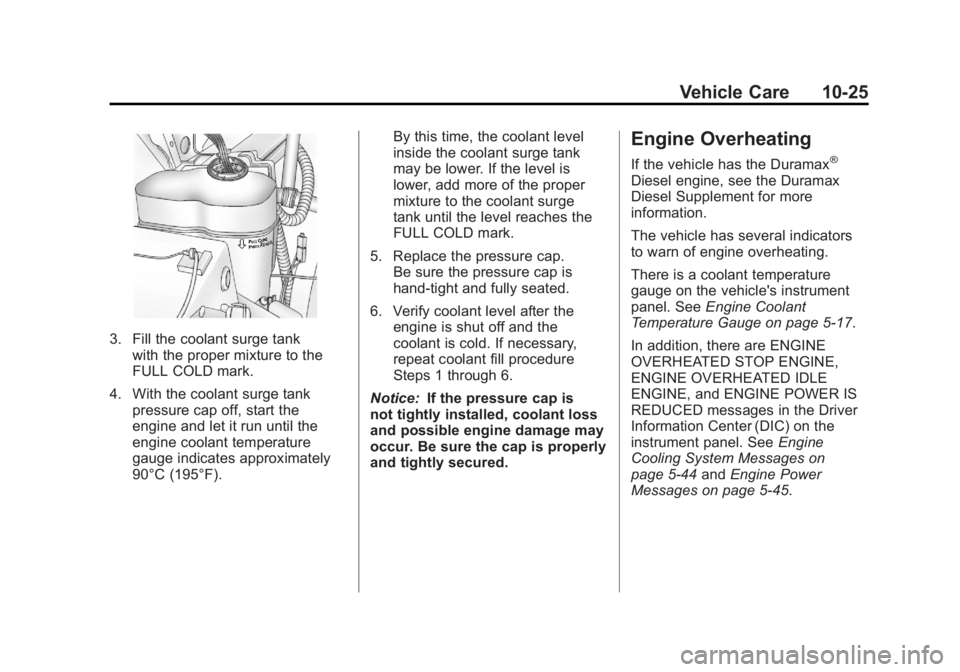
3. Fill the coolant surge tankwith the proper mixture to the
FULL COLD mark.
4. With the coolant surge tank pressure cap off, start the
engine and let it run until the
engine coolant temperature
gauge indicates approximately
90°C (195°F). By this time, the coolant level
inside the coolant surge tank
may be lower. If the level is
lower, add more of the proper
mixture to the coolant surge
tank until the level reaches the
FULL COLD mark.
5. Replace the pressure cap. Be sure the pressure cap is
hand-tight and fully seated.
6. Verify coolant level after the engine is shut off and the
coolant is cold. If necessary,
repeat coolant fill procedure
Steps 1 through 6.
Notice: If the pressure cap is
not tightly installed, coolant loss
and possible engine damage may
occur. Be sure the cap is properly
and tightly secured.
Engine Overheating
If the vehicle has the Duramax®
Diesel engine, see the Duramax
Diesel Supplement for more
information.
The vehicle has several indicators
to warn of engine overheating.
There is a coolant temperature
gauge on the vehicle's instrument
panel. See Engine Coolant
Temperature Gauge on page 5‑17.
In addition, there are ENGINE
OVERHEATED STOP ENGINE,
ENGINE OVERHEATED IDLE
ENGINE, and ENGINE POWER IS
REDUCED messages in the Driver
Information Center (DIC) on the
instrument panel. See Engine
Cooling System Messages on
page 5‑44 andEngine Power
Messages on page 5‑45.
Page 469 of 594
Black plate (45,1)GMC Sierra Owner Manual - 2011
Vehicle Care 10-45
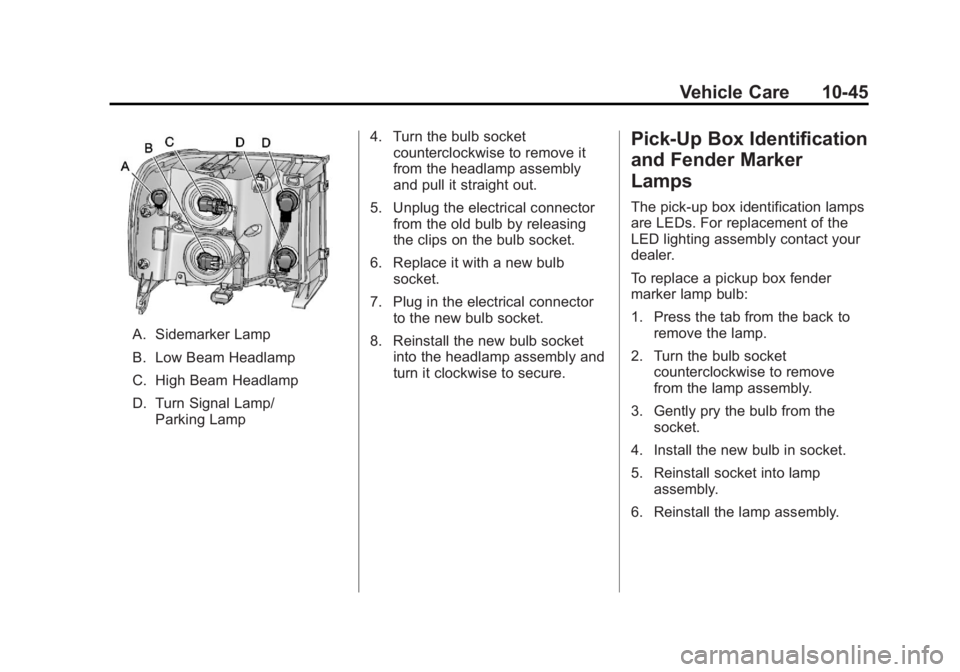
A. Sidemarker Lamp
B. Low Beam Headlamp
C. High Beam Headlamp
D. Turn Signal Lamp/Parking Lamp 4. Turn the bulb socket
counterclockwise to remove it
from the headlamp assembly
and pull it straight out.
5. Unplug the electrical connector from the old bulb by releasing
the clips on the bulb socket.
6. Replace it with a new bulb socket.
7. Plug in the electrical connector to the new bulb socket.
8. Reinstall the new bulb socket into the headlamp assembly and
turn it clockwise to secure.
Pick-Up Box Identification
and Fender Marker
Lamps
The pick-up box identification lamps
are LEDs. For replacement of the
LED lighting assembly contact your
dealer.
To replace a pickup box fender
marker lamp bulb:
1. Press the tab from the back to
remove the lamp.
2. Turn the bulb socket counterclockwise to remove
from the lamp assembly.
3. Gently pry the bulb from the socket.
4. Install the new bulb in socket.
5. Reinstall socket into lamp assembly.
6. Reinstall the lamp assembly.
Page 499 of 594
Black plate (75,1)GMC Sierra Owner Manual - 2011
Vehicle Care 10-75
{WARNING
Rust or dirt on a wheel, or on
the parts to which it is fastened,
can make wheel nuts become
loose after time. The wheel could
come off and cause an accident.
When changing a wheel, remove
any rust or dirt from places where
the wheel attaches to the vehicle.
In an emergency, use a cloth or a
paper towel to do this; but be sure
to use a scraper or wire brush
later, if needed, to get all the rust
or dirt off. SeeIf a Tire Goes Flat
on page 10‑84.
Lightly coat the center of the
wheel hub with wheel bearing
grease after a wheel change or
tire rotation to prevent corrosion
or rust build-up. Do not get
grease on the flat wheel
mounting surface or on
the wheel nuts or bolts.
If your vehicle has a Tire
Pressure Monitor System
(TPMS), reset the TPMS
sensors after rotating the tires.
See Tire Pressure Monitor
Operation on page 10‑69. Make sure the spare tire, if your
vehicle has one, is stored
securely. Push, pull, and then
try to rotate or turn the tire.
If it moves, tighten the cable.
See
“Storing a Flat or Spare
Tire and Tools” underTire
Changing on page 10‑86.
Dual Tire Rotation
When the vehicle is new,
or whenever a wheel, wheel
bolt or wheel nut is replaced,
check the wheel nut torque
after 160, 1 600 and 10 000 km
(100, 1,000 and 6,000 miles) of
driving. For proper torque and
wheel nut tightening information,
see “Removing the Spare Tire and
Tools” underTire Changing on
page 10‑86.
Page 507 of 594
Black plate (83,1)GMC Sierra Owner Manual - 2011
Vehicle Care 10-83
Tire Chains
{WARNING
If the vehicle has dual wheels
or P265/65R18, P275/55R20,
LT265/70R17, LT265/70R18,
LT265/60R20, P285/50R20,
P285/45R22 or 285/45R22 size
tires, do not use tire chains.
They can damage the vehicle
because there is not enough
clearance. Tire chains used on
a vehicle without the proper
amount of clearance can
cause damage to the brakes,
suspension, or other vehicle
parts. The area damaged by the
tire chains could cause you to
lose control of the vehicle and
you or others may be injured in
a crash.(Continued)
WARNING (Continued)
Use another type of traction
device only if its manufacturer
recommends it for use on the
vehicle and tire size combination
and road conditions. Follow
that manufacturer's instructions.
To help avoid damage to the
vehicle, drive slowly, readjust,
or remove the device if it is
contacting the vehicle, and do
not spin the vehicle's wheels.
If you do find traction devices that
will fit, install them on the rear
tires. Notice:
If the vehicle does not
have dual wheels and has a
tire size other than P265/65R18,
P275/55R20, LT265/70R17, LT265/
70R18, LT265/60R20, P285/50R20,
P285/45R22, or 285/45R22, use
tire chains only where legal and
only when you must. Use chains
that are the proper size for the
tires. Install them on the tires
of the rear axle. Do not use
chains on the tires of the front
axle. Tighten them as tightly as
possible with the ends securely
fastened. Drive slowly and
follow the chain manufacturer's
instructions. If you can hear the
chains contacting the vehicle,
stop and retighten them. If the
contact continues, slow down
until it stops. Driving too fast or
spinning the wheels with chains
on will damage the vehicle.
Page 515 of 594
Black plate (91,1)GMC Sierra Owner Manual - 2011
Vehicle Care 10-91
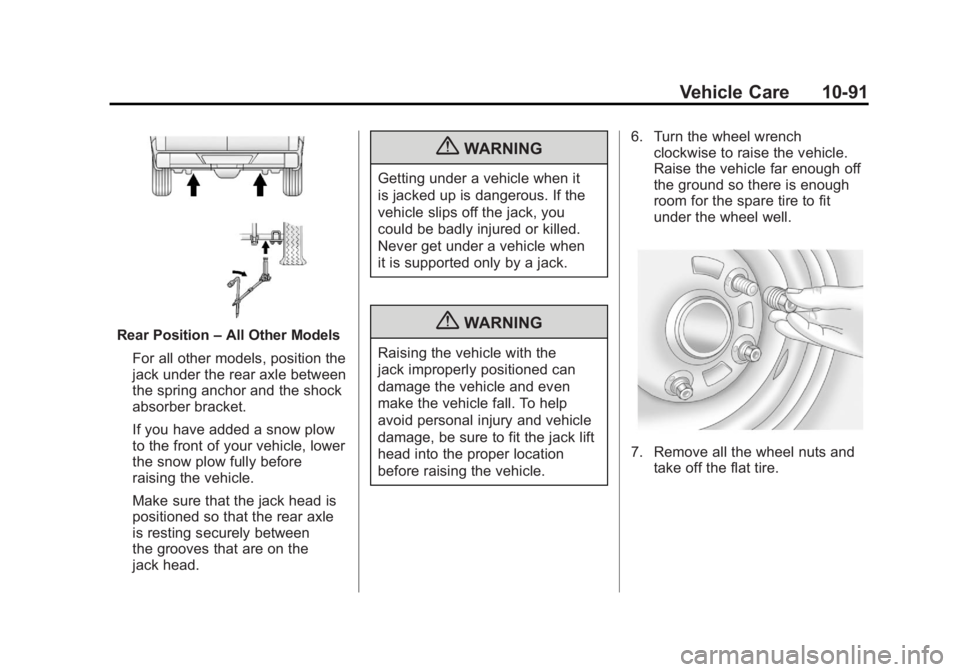
Rear Position–All Other Models
For all other models, position the
jack under the rear axle between
the spring anchor and the shock
absorber bracket.
If you have added a snow plow
to the front of your vehicle, lower
the snow plow fully before
raising the vehicle.
Make sure that the jack head is
positioned so that the rear axle
is resting securely between
the grooves that are on the
jack head.
{WARNING
Getting under a vehicle when it
is jacked up is dangerous. If the
vehicle slips off the jack, you
could be badly injured or killed.
Never get under a vehicle when
it is supported only by a jack.
{WARNING
Raising the vehicle with the
jack improperly positioned can
damage the vehicle and even
make the vehicle fall. To help
avoid personal injury and vehicle
damage, be sure to fit the jack lift
head into the proper location
before raising the vehicle. 6. Turn the wheel wrench
clockwise to raise the vehicle.
Raise the vehicle far enough off
the ground so there is enough
room for the spare tire to fit
under the wheel well.
7. Remove all the wheel nuts andtake off the flat tire.
Page 520 of 594
Black plate (96,1)GMC Sierra Owner Manual - 2011
10-96 Vehicle Care
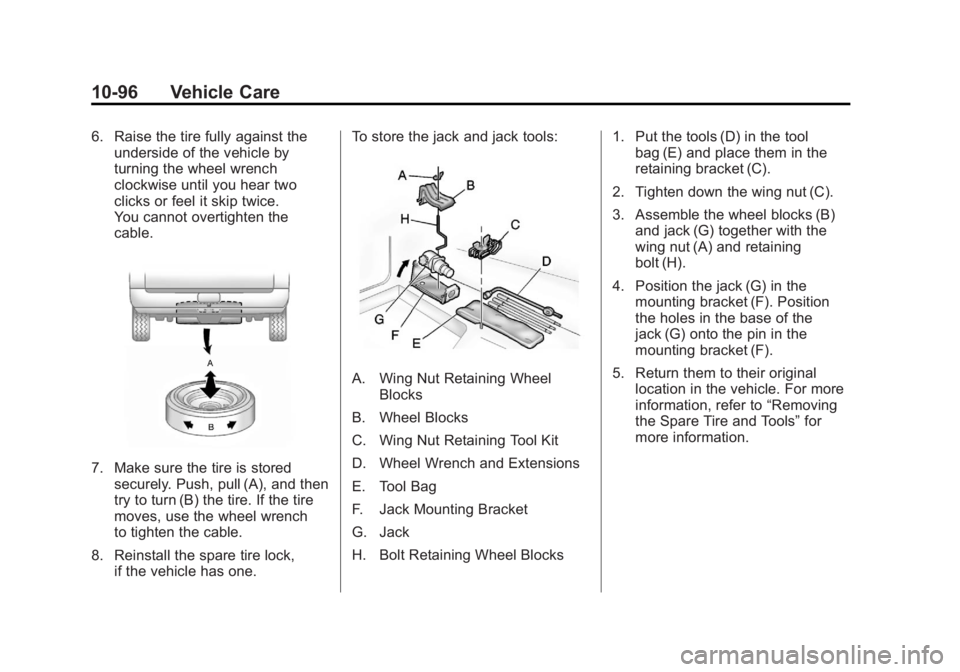
6. Raise the tire fully against theunderside of the vehicle by
turning the wheel wrench
clockwise until you hear two
clicks or feel it skip twice.
You cannot overtighten the
cable.
7. Make sure the tire is stored
securely. Push, pull (A), and then
try to turn (B) the tire. If the tire
moves, use the wheel wrench
to tighten the cable.
8. Reinstall the spare tire lock, if the vehicle has one. To store the jack and jack tools:
A. Wing Nut Retaining Wheel
Blocks
B. Wheel Blocks
C. Wing Nut Retaining Tool Kit
D. Wheel Wrench and Extensions
E. Tool Bag
F. Jack Mounting Bracket
G. Jack
H. Bolt Retaining Wheel Blocks 1. Put the tools (D) in the tool
bag (E) and place them in the
retaining bracket (C).
2. Tighten down the wing nut (C).
3. Assemble the wheel blocks (B) and jack (G) together with the
wing nut (A) and retaining
bolt (H).
4. Position the jack (G) in the mounting bracket (F). Position
the holes in the base of the
jack (G) onto the pin in the
mounting bracket (F).
5. Return them to their original location in the vehicle. For more
information, refer to “Removing
the Spare Tire and Tools” for
more information.
Page 528 of 594
Black plate (104,1)GMC Sierra Owner Manual - 2011
10-104 Vehicle Care
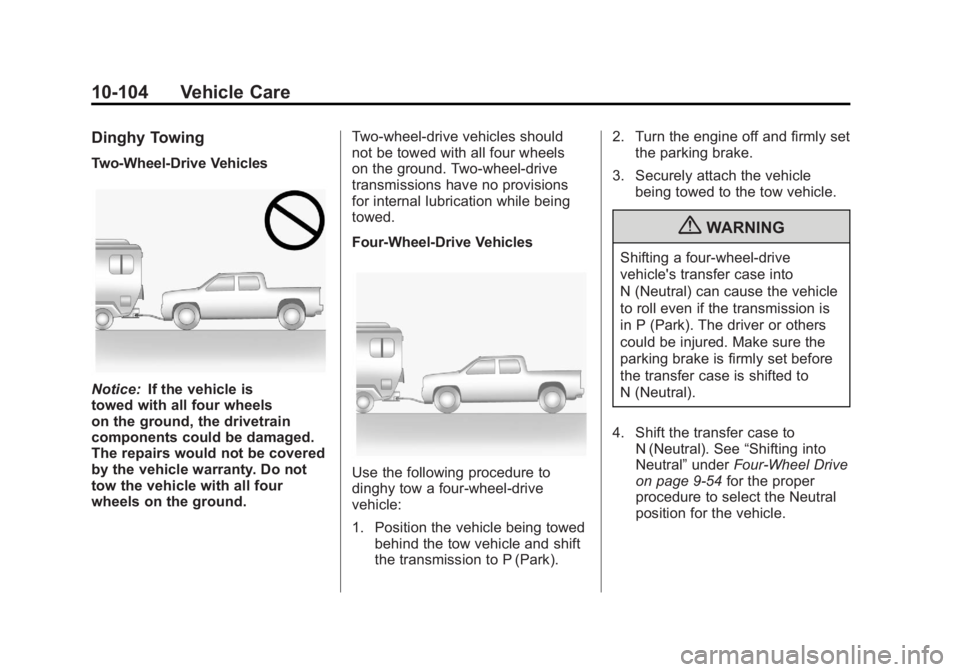
Dinghy Towing
Two-Wheel-Drive Vehicles
Notice:If the vehicle is
towed with all four wheels
on the ground, the drivetrain
components could be damaged.
The repairs would not be covered
by the vehicle warranty. Do not
tow the vehicle with all four
wheels on the ground. Two-wheel-drive vehicles should
not be towed with all four wheels
on the ground. Two-wheel-drive
transmissions have no provisions
for internal lubrication while being
towed.
Four-Wheel-Drive Vehicles
Use the following procedure to
dinghy tow a four-wheel-drive
vehicle:
1. Position the vehicle being towed
behind the tow vehicle and shift
the transmission to P (Park). 2. Turn the engine off and firmly set
the parking brake.
3. Securely attach the vehicle being towed to the tow vehicle.
{WARNING
Shifting a four-wheel-drive
vehicle's transfer case into
N (Neutral) can cause the vehicle
to roll even if the transmission is
in P (Park). The driver or others
could be injured. Make sure the
parking brake is firmly set before
the transfer case is shifted to
N (Neutral).
4. Shift the transfer case to N (Neutral). See “Shifting into
Neutral” underFour-Wheel Drive
on page 9‑54 for the proper
procedure to select the Neutral
position for the vehicle.
Page 530 of 594
Black plate (106,1)GMC Sierra Owner Manual - 2011
10-106 Vehicle Care
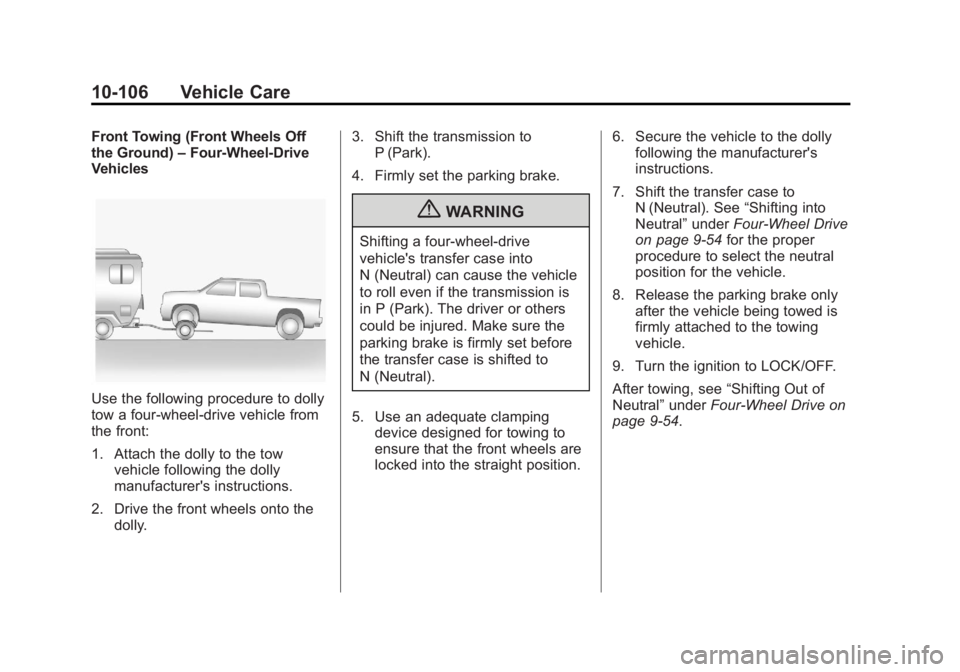
Front Towing (Front Wheels Off
the Ground)–Four-Wheel-Drive
Vehicles
Use the following procedure to dolly
tow a four-wheel-drive vehicle from
the front:
1. Attach the dolly to the tow
vehicle following the dolly
manufacturer's instructions.
2. Drive the front wheels onto the dolly. 3. Shift the transmission to
P (Park).
4. Firmly set the parking brake.
{WARNING
Shifting a four-wheel-drive
vehicle's transfer case into
N (Neutral) can cause the vehicle
to roll even if the transmission is
in P (Park). The driver or others
could be injured. Make sure the
parking brake is firmly set before
the transfer case is shifted to
N (Neutral).
5. Use an adequate clamping device designed for towing to
ensure that the front wheels are
locked into the straight position. 6. Secure the vehicle to the dolly
following the manufacturer's
instructions.
7. Shift the transfer case to N (Neutral). See “Shifting into
Neutral” underFour-Wheel Drive
on page 9‑54 for the proper
procedure to select the neutral
position for the vehicle.
8. Release the parking brake only after the vehicle being towed is
firmly attached to the towing
vehicle.
9. Turn the ignition to LOCK/OFF.
After towing, see “Shifting Out of
Neutral” underFour-Wheel Drive on
page 9‑54.
Page 531 of 594
Black plate (107,1)GMC Sierra Owner Manual - 2011
Vehicle Care 10-107
Rear Towing (Rear Wheels
Off the Ground)
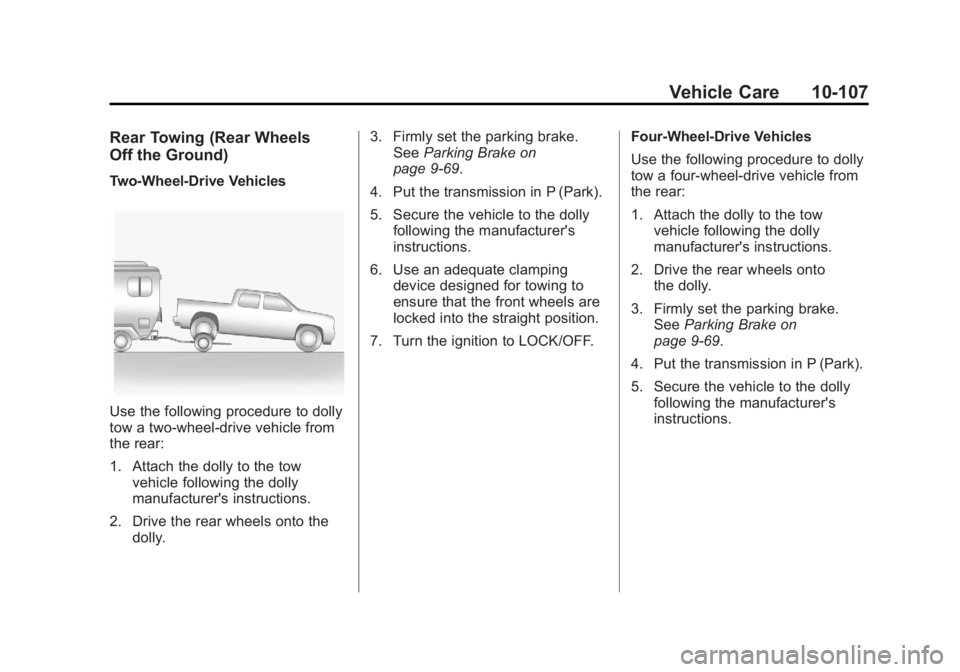
Two‐Wheel‐Drive Vehicles
Use the following procedure to dolly
tow a two-wheel-drive vehicle from
the rear:
1. Attach the dolly to the towvehicle following the dolly
manufacturer's instructions.
2. Drive the rear wheels onto the dolly. 3. Firmly set the parking brake.
See Parking Brake on
page 9‑69.
4. Put the transmission in P (Park).
5. Secure the vehicle to the dolly following the manufacturer's
instructions.
6. Use an adequate clamping device designed for towing to
ensure that the front wheels are
locked into the straight position.
7. Turn the ignition to LOCK/OFF. Four‐Wheel‐Drive Vehicles
Use the following procedure to dolly
tow a four-wheel-drive vehicle from
the rear:
1. Attach the dolly to the tow
vehicle following the dolly
manufacturer's instructions.
2. Drive the rear wheels onto the dolly.
3. Firmly set the parking brake. See Parking Brake on
page 9‑69.
4. Put the transmission in P (Park).
5. Secure the vehicle to the dolly following the manufacturer's
instructions.
Page 569 of 594
Black plate (9,1)GMC Sierra Owner Manual - 2011
Customer Information 13-9
Services Provided
.Emergency Fuel Delivery:
Delivery of enough fuel for the
vehicle to get to the nearest
service station.
.Lock‐Out Service:Service to
unlock the vehicle if you are
locked out. A remote unlock
may be available if you have
OnStar
®. For security reasons,
the driver must present
identification before this
service is given.
.Emergency Tow From a Public
Road or Highway: Tow to the
nearest GMC dealer for warranty
service, or if the vehicle was in
a crash and cannot be driven.
Assistance is also given when
the vehicle is stuck in the sand,
mud, or snow.
.Flat Tire Change: Service to
change a flat tire with the spare
tire. The spare tire, if equipped,
must be in good condition and properly inflated. It is the owner's
responsibility for the repair or
replacement of the tire if it is not
covered by the warranty.
.Battery Jump Start:
Service to
jump start a dead battery.
.Trip Routing Service: Detailed
maps of North America when
requested either with the
most direct route or the most
scenic route. Additional travel
information is also available.
Allow three weeks for delivery.
.Trip Interruption Benefits
and Assistance: If your
trip is interrupted due
to a warranty failure,
incidental expenses may
be reimbursed during the
5 years/(160 000 km)
100,000 miles Powertrain
warranty period. Items
considered are hotel, meals,
and rental car.
Services Not Included in
Roadside Assistance
.Impound towing caused by
violation of any laws.
.Legal fines.
.Mounting, dismounting,
or changing of snow tires,
chains, or other traction devices.
.Towing or services for vehicles
driven on a non-public road or
highway.
Services Specific to
Canadian‐Purchased Vehicles
.Fuel Delivery: Reimbursement
is approximately $5 Canadian.
Diesel fuel delivery may be
restricted. Propane and other
fuels are not provided through
this service.
.Lock-Out Service: Vehicle
registration is required.
.Trip Routing Service: Limit of
six requests per year.