wheel GMC SIERRA 1500 2012 Owners Manual
[x] Cancel search | Manufacturer: GMC, Model Year: 2012, Model line: SIERRA 1500, Model: GMC SIERRA 1500 2012Pages: 556, PDF Size: 7.88 MB
Page 373 of 556
Black plate (97,1)GMC Sierra Owner Manual - 2012 - CRC - 11/15/11
Driving and Operating 9-97
.Red: Battery Feed*
.Dark Blue: Trailer Brake*
*The fuses for these two circuits are
installed in the underhood electrical
center, but the wires are not
connected. They should be
connected by your dealer or a
qualified service center. The fuse
and wire for the ITBC is factory
installed and connected if the
vehicle is equipped with an ITBC.
The fuse for the battery feed is not
required if the vehicle has an
auxiliary battery. If the vehicle does
not have an auxiliary battery, have
your dealer or authorized service
center install the required fuse.
If charging a remote (non-vehicle)
battery, press the Tow/Haul Mode
button, if equipped, located at
the end of the shift lever. This will
boost the vehicle system voltage
and properly charge the battery.
If the trailer is too light for Tow/
Haul Mode, or the vehicle is not
equipped with Tow/Haul, turn on the headlamps as a second way to
boost the vehicle system and
charge the battery.
Camper/Fifth-Wheel Trailer Wiring
Package
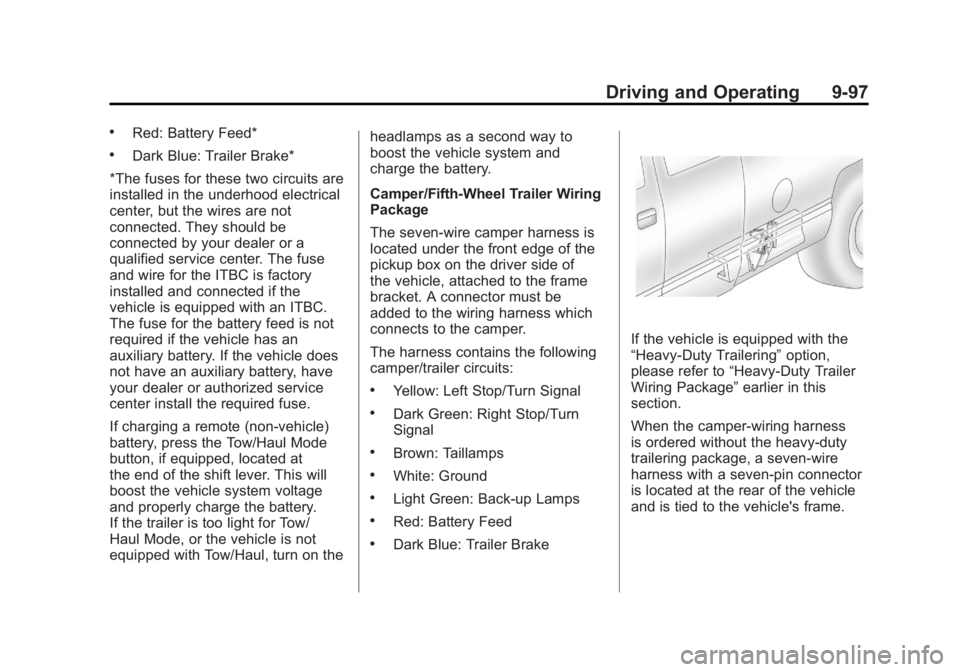
The seven-wire camper harness is
located under the front edge of the
pickup box on the driver side of
the vehicle, attached to the frame
bracket. A connector must be
added to the wiring harness which
connects to the camper.
The harness contains the following
camper/trailer circuits:
.Yellow: Left Stop/Turn Signal
.Dark Green: Right Stop/Turn
Signal
.Brown: Taillamps
.White: Ground
.Light Green: Back-up Lamps
.Red: Battery Feed
.Dark Blue: Trailer Brake
If the vehicle is equipped with the
“Heavy-Duty Trailering”
option,
please refer to “Heavy-Duty Trailer
Wiring Package” earlier in this
section.
When the camper-wiring harness
is ordered without the heavy-duty
trailering package, a seven-wire
harness with a seven-pin connector
is located at the rear of the vehicle
and is tied to the vehicle's frame.
Page 375 of 556
Black plate (99,1)GMC Sierra Owner Manual - 2012 - CRC - 11/15/11
Driving and Operating 9-99
.When pulling a heavy trailer
or a large or heavy load in
stop-and-go traffic.
.When pulling a heavy trailer or
a large or heavy load in busy
parking lots where improved low
speed control of the vehicle is
desired.
Operating the vehicle in Tow/Haul
when lightly loaded or with no
trailer at all will not cause damage.
However, there is no benefit to the
selection of Tow/Haul when the
vehicle is unloaded. Such a
selection when unloaded may
result in unpleasant engine and
transmission driving characteristics
and reduced fuel economy. Tow/
Haul is recommended only when
pulling a heavy trailer or a large or
heavy load.
Integrated Trailer Brake
Control System
The vehicle may have an Integrated
Trailer Brake Control (ITBC) system
for electric trailer brakes.
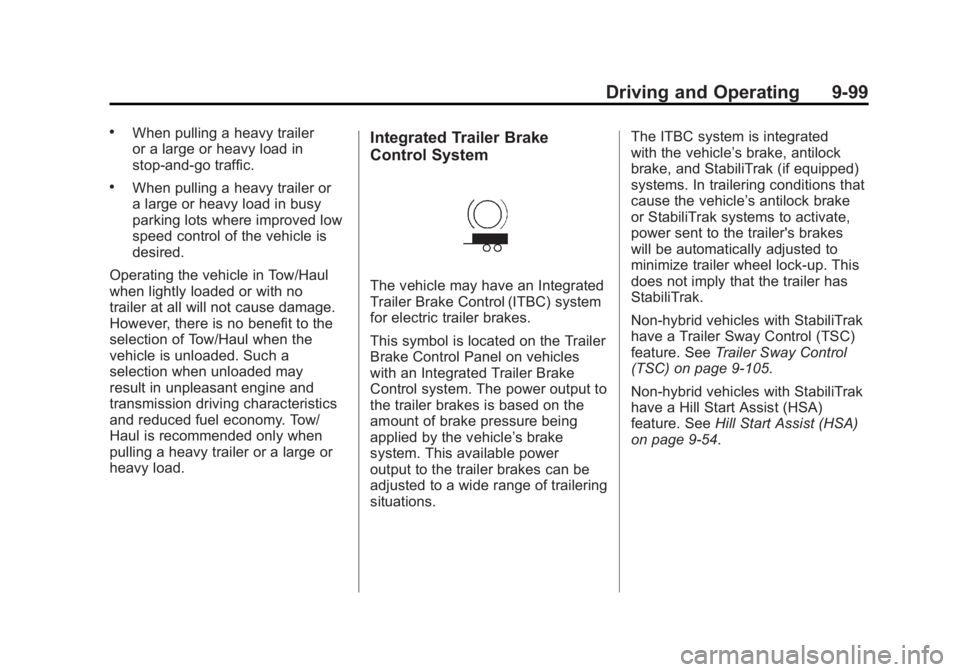
This symbol is located on the Trailer
Brake Control Panel on vehicles
with an Integrated Trailer Brake
Control system. The power output to
the trailer brakes is based on the
amount of brake pressure being
applied by the vehicle’s brake
system. This available power
output to the trailer brakes can be
adjusted to a wide range of trailering
situations. The ITBC system is integrated
with the vehicle’s brake, antilock
brake, and StabiliTrak (if equipped)
systems. In trailering conditions that
cause the vehicle’s antilock brake
or StabiliTrak systems to activate,
power sent to the trailer's brakes
will be automatically adjusted to
minimize trailer wheel lock-up. This
does not imply that the trailer has
StabiliTrak.
Non-hybrid vehicles with StabiliTrak
have a Trailer Sway Control (TSC)
feature. See
Trailer Sway Control
(TSC) on page 9‑105.
Non-hybrid vehicles with StabiliTrak
have a Hill Start Assist (HSA)
feature. See Hill Start Assist (HSA)
on page 9‑54.
Page 379 of 556
Black plate (103,1)GMC Sierra Owner Manual - 2012 - CRC - 11/15/11
Driving and Operating 9-103
Trailer Gain Adjustment Procedure
Trailer Gain should be set for a
specific trailering condition and
must be adjusted any time vehicle
loading, trailer loading, or road
surface conditions change.
Setting the Trailer Gain properly is
needed for the best trailer stopping
performance. A trailer that is
over-gained may result in locked
trailer brakes. A trailer that is
under-gained may result in not
enough trailer braking. Both of these
conditions may result in poorer
stopping and stability of the vehicle
and trailer.
Use the following procedure to
correctly adjust Trailer Gain for each
towing condition:
1. Make sure the trailer brakes arein proper working condition.
2. Connect a properly loaded trailer to the vehicle and make all
necessary mechanical and electrical connections. See
Vehicle Load Limits on
page 9‑16
for more information.
3. After the electrical connection is made to a trailer equipped with
electric brakes:
.A TRAILER CONNECTED
message will be briefly
displayed on the DIC.
.The Trailer Brake Display
Page will appear on the
DIC showing TRAILER
GAIN and TRAILER
OUTPUT.
.In the Trailer Output display
on the DIC, “- - - - - -”will
disappear if there is no
error present. Connecting
a trailer without electric
brakes will not clear the
six dashed lines.
4. Adjust the Trailer Gain by using the gain adjustment (+ / -)
buttons on the Trailer Brake
Control Panel. 5. Drive the vehicle with the trailer
attached on a level road surface
representative of the towing
condition and free of traffic at
about 32 to 40 km/h (20 to
25 mph) and fully apply the
Manual Trailer Brake Apply
Lever.
Adjusting trailer gain at speeds
lower than 32 to 40 km/h
(20 to 25 mph) may result in
an incorrect gain setting.
6. Adjust the Trailer Gain to just below the point of trailer wheel
lock-up, indicated by trailer
wheel squeal or tire smoke when
a trailer wheel locks.
Trailer wheel lock-up may not
occur if towing a heavily loaded
trailer. In this case, adjust the
Trailer Gain to the highest
allowable setting for the towing
condition.
Page 380 of 556
Black plate (104,1)GMC Sierra Owner Manual - 2012 - CRC - 11/15/11
9-104 Driving and Operating
7. Re-adjust Trailer Gain any timevehicle loading, trailer loading or
road surface conditions change
or if trailer wheel lock-up is
noticed at any time while towing.
Other ITBC-Related DIC Messages
In addition to displaying TRAILER
GAIN and TRAILER OUTPUT
through the DIC, trailer connection
and ITBC system status are
displayed on the DIC.
TRAILER CONNECTED: This
message will be briefly displayed
when a trailer with electric brakes is
first connected to the vehicle. This
message will automatically turn off
in about 10 seconds. The driver can
also acknowledge this message
before it automatically turns off.
CHECK TRAILER WIRING: This
message will be displayed if:
1. The ITBC system first determines connection to a
trailer with electric brakes and
then the trailer harness becomes
disconnected from the vehicle. If the disconnect occurs while
the vehicle is stationary, this
message will automatically turn
off in about 30 seconds. This
message will also turn off if
the driver acknowledges this
message or if the trailer harness
is re-connected.
If the disconnect occurs while
the vehicle is moving, this
message will continue until
the ignition is turned off. This
message will also turn off if
the driver acknowledges this
message or if the trailer harness
is re-connected.
2. There is an electrical fault in the wiring to the electric trailer
brakes. This message will
continue as long as there is
an electrical fault in the trailer
wiring. This message will
also turn off if the driver
acknowledges this message. To determine if the electrical fault
is on the vehicle side or trailer
side of the trailer wiring harness
connection, do the following:
1. Disconnect the trailer wiring
harness from the vehicle.
2. Turn the ignition off.
3. Wait 10 seconds, then turn the ignition back to RUN.
4. If the CHECK TRAILER WIRING message re-appears, the
electrical fault is on the
vehicle side.
If the CHECK TRAILER WIRING
message only re-appears when
connecting the trailer wiring
harness to the vehicle, the
electrical fault is on the
trailer side.
SERVICE TRAILER BRAKE
SYSTEM: This message will be
displayed when there is a problem
with the ITBC system. If this
message persists over multiple
ignition cycles, there is a problem
with the ITBC system. Take the
Page 383 of 556
Black plate (107,1)GMC Sierra Owner Manual - 2012 - CRC - 11/15/11
Driving and Operating 9-107
.The snow plow manufacturer
or installer can assist you in
determining the amount of rear
ballast required, to help make
sure the snowplow/vehicle
combination does not exceed
the GVW rating, the front and
rear axle ratings, and the front
and rear weight distribution ratio.
.The total vehicle must not
exceed the GVW rating.
Front axle reserve capacity is the
difference between the Gross Axle
Weight Rating (GAWR) and the front
axle weight of the vehicle with full
fuel and passengers. Basically, it is
the amount of weight that can be
added to the front axle before
reaching the front GAWR.
The front axle reserve capacity
for the vehicle can be found
in the lower right corner of the
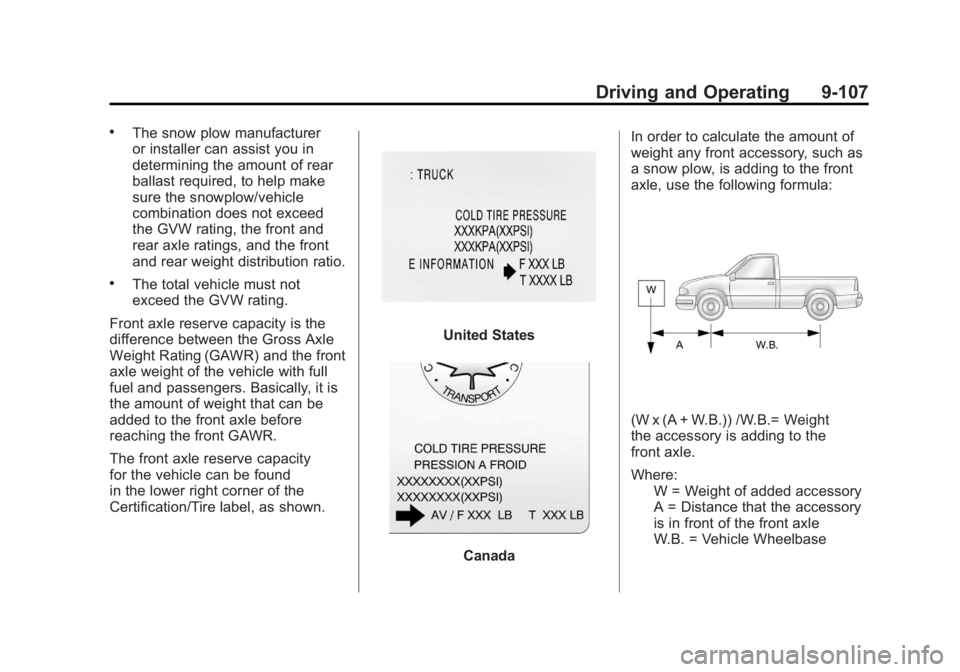
Certification/Tire label, as shown.
United States
Canada In order to calculate the amount of
weight any front accessory, such as
a snow plow, is adding to the front
axle, use the following formula:
(W x (A + W.B.)) /W.B.= Weight
the accessory is adding to the
front axle.
Where:
W = Weight of added accessory
A = Distance that the accessory
is in front of the front axle
W.B. = Vehicle Wheelbase
Page 384 of 556
Black plate (108,1)GMC Sierra Owner Manual - 2012 - CRC - 11/15/11
9-108 Driving and Operating
For example, adding a 318 kg
(700 lb) snow plow actually adds
more than 318 kg (700 lb) to the
front axle. Using the formula, if the
snow plow is 122 cm (4 ft) in front of
the front axle and the wheel base is
305 cm (10 ft), then:W = 318 kg (700 lb)
A = 122 cm (4 ft)
W.B. = 305 cm (10 ft)
(W x (A + W.B.))/W.B. =
(318 x (122 + 305))/305 = 445 kg
(980 lbs)
So, if the front axle reserve capacity
is more than 445 kg (980 lbs), the
snow plow could be added without
exceeding the front GAWR.
Heavier equipment can be added
on the front of the vehicle if it is
compensated for by carrying fewer
passengers, less cargo, or by
positioning cargo toward the rear.
This has the effect of reducing the
load on the front. However, the front
GAWR, rear GAWR, and the Gross
Vehicle Weight Rating (GVWR) must
never be exceeded.{WARNING
On some vehicles that have
certain front mounted equipment,
such as a snow plow, it may be
possible to load the front axle to
the front gross axle weight rating
(GAWR) but not have enough
weight on the rear axle to have
proper braking performance. If
the brakes cannot work properly,
you could have a crash. To help
the brakes work properly when
a snow plow is installed,
always follow the snow plow
manufacturer or installer's
recommendation for rear ballast
to ensure a proper front and rear
weight distribution ratio, even
though the actual front weight
may be less than the front
GAWR, and the total vehicle
weight is less than the gross
vehicle weight rating (GVWR).
Maintaining a proper front and (Continued)
WARNING (Continued)
rear weight distribution ratio is
necessary to provide proper
braking performance.
Total vehicle reserve capacity is the
difference between the GVWR and
the weight of the truck with full fuel
and passengers. It is the amount
of weight that can be added to the
vehicle before reaching the GVWR.
Keep in mind that reserve capacity
numbers are intended as a guide
when selecting the amount of
equipment or cargo the truck can
carry. If unsure of the vehicle's front,
rear, or total weight, go to a weigh
station and weigh the vehicle. Your
dealer can also help with this.
The total vehicle reserve capacity
for the vehicle can be found
in the lower right corner of the
Certification/Tire label as shown
previously.
Page 387 of 556
Black plate (1,1)GMC Sierra Owner Manual - 2012 - CRC - 11/15/11
Vehicle Care 10-1
Vehicle Care
General Information
General Information . . . . . . . . . . 10-2
California Proposition65 Warning . . . . . . . . . . . . . . . . . 10-3
California Perchlorate Materials Requirements . . . . 10-3
Accessories and Modifications . . . . . . . . . . . . . . . 10-3
Vehicle Checks
Doing Your OwnService Work . . . . . . . . . . . . . . . 10-4
Hood . . . . . . . . . . . . . . . . . . . . . . . . 10-5
Engine Compartment Overview . . . . . . . . . . . . . . . . . . . 10-6
Engine Oil . . . . . . . . . . . . . . . . . . . 10-7
Engine Oil Life System . . . . . 10-10
Automatic Transmission Fluid (4-Speed Transmission) . . . 10-11
Automatic Transmission Fluid (6-Speed
Transmission) . . . . . . . . . . . . . 10-14
Engine Air Cleaner/Filter . . . . 10-17
Cooling System . . . . . . . . . . . . 10-18
Engine Coolant . . . . . . . . . . . . . 10-19
Engine Overheating . . . . . . . . 10-22 Overheated Engine
Protection
Operating Mode . . . . . . . . . . . 10-24
Engine Fan . . . . . . . . . . . . . . . . . 10-24
Power Steering Fluid . . . . . . . 10-25
Washer Fluid . . . . . . . . . . . . . . . 10-26
Brakes . . . . . . . . . . . . . . . . . . . . . 10-27
Brake Fluid . . . . . . . . . . . . . . . . . 10-28
Battery . . . . . . . . . . . . . . . . . . . . . 10-30
Four-Wheel Drive . . . . . . . . . . . 10-30
Front Axle . . . . . . . . . . . . . . . . . . 10-31
Rear Axle . . . . . . . . . . . . . . . . . . 10-32
Noise Control System . . . . . . 10-34
Starter Switch Check . . . . . . . 10-35
Automatic Transmission Shift Lock Control Function
Check . . . . . . . . . . . . . . . . . . . . . 10-35
Ignition Transmission Lock Check . . . . . . . . . . . . . . . . . . . . . 10-35
Park Brake and P (Park) Mechanism Check . . . . . . . . 10-36
Wiper Blade Replacement . . . . . . . . . . . . . . 10-36
Glass Replacement . . . . . . . . 10-37
Headlamp Aiming
Headlamp Aiming . . . . . . . . . . 10-37
Bulb Replacement
Bulb Replacement . . . . . . . . . . 10-39
Halogen Bulbs . . . . . . . . . . . . . . 10-39
Headlamps, Front Turn Signal, Sidemarker, and
Parking Lamps . . . . . . . . . . . . 10-39
Pick-Up Box Identification and Fender Marker
Lamps . . . . . . . . . . . . . . . . . . . . 10-40
Taillamps (Chassis Cab Models) . . . . . . . . . . . . . . . . . . . 10-40
Taillamps, Turn Signal, Stoplamps, and Back-Up
Lamps . . . . . . . . . . . . . . . . . . . . 10-41
Center High-Mounted Stoplamp (CHMSL) and
Cargo Lamp . . . . . . . . . . . . . . 10-42
License Plate Lamp . . . . . . . . 10-42
Replacement Bulbs . . . . . . . . . 10-43
Electrical System
Electrical System Overload . . . . . . . . . . . . . . . . . . 10-43
Fuses and Circuit Breakers . . . . . . . . . . . . . . . . . . 10-44
Engine Compartment Fuse Block . . . . . . . . . . . . . . . . . . . . . 10-44
Instrument Panel Fuse Block . . . . . . . . . . . . . . . . . . . . . 10-48
Page 388 of 556
Black plate (2,1)GMC Sierra Owner Manual - 2012 - CRC - 11/15/11
10-2 Vehicle Care
Wheels and Tires
Tires . . . . . . . . . . . . . . . . . . . . . . . . 10-50
Tire Sidewall Labeling . . . . . . 10-52
Tire Designations . . . . . . . . . . . 10-54
Tire Terminology andDefinitions . . . . . . . . . . . . . . . . 10-55
Tire Pressure . . . . . . . . . . . . . . . 10-58
Tire Pressure for High-Speed Operation . . . . . . . . . . . . . . . . . 10-60
Tire Pressure Monitor System . . . . . . . . . . . . . . . . . . . 10-60
Tire Pressure Monitor Operation . . . . . . . . . . . . . . . . . 10-62
Tire Inspection . . . . . . . . . . . . . . 10-65
Tire Rotation . . . . . . . . . . . . . . . 10-65
Dual Tire Rotation . . . . . . . . . . 10-67
When It Is Time for New Tires . . . . . . . . . . . . . . . . . . . . . . 10-68
Buying New Tires . . . . . . . . . . . 10-68
Different Size Tires and Wheels . . . . . . . . . . . . . . . . . . . 10-70 Uniform Tire Quality
Grading . . . . . . . . . . . . . . . . . . . 10-70
Wheel Alignment and Tire Balance . . . . . . . . . . . . . . . . . . . 10-72
Wheel Replacement . . . . . . . . 10-72
Tire Chains . . . . . . . . . . . . . . . . . 10-74
If a Tire Goes Flat . . . . . . . . . . 10-75
Tire Changing . . . . . . . . . . . . . . 10-76
Full-Size Spare Tire . . . . . . . . 10-87
Jump Starting
Jump Starting . . . . . . . . . . . . . . 10-88
Towing
Towing the Vehicle . . . . . . . . . 10-93
Recreational Vehicle
Towing . . . . . . . . . . . . . . . . . . . . 10-93
Appearance Care
Exterior Care . . . . . . . . . . . . . . . 10-98
Interior Care . . . . . . . . . . . . . . . 10-101
Floor Mats . . . . . . . . . . . . . . . . 10-104
General Information
For service and parts needs,
visit your dealer. You will receive
genuine GM parts and GM-trained
and supported service people.
Genuine GM parts have one of
these marks:
Page 391 of 556
Black plate (5,1)GMC Sierra Owner Manual - 2012 - CRC - 11/15/11
Vehicle Care 10-5
Hood
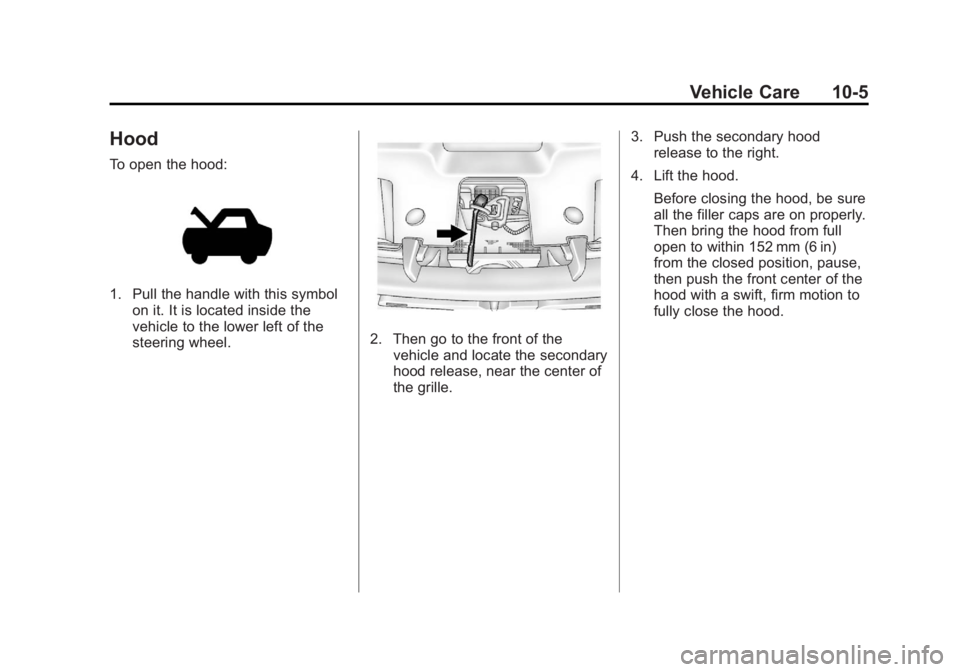
To open the hood:
1. Pull the handle with this symbolon it. It is located inside the
vehicle to the lower left of the
steering wheel.
2. Then go to the front of thevehicle and locate the secondary
hood release, near the center of
the grille. 3. Push the secondary hood
release to the right.
4. Lift the hood. Before closing the hood, be sure
all the filler caps are on properly.
Then bring the hood from full
open to within 152 mm (6 in)
from the closed position, pause,
then push the front center of the
hood with a swift, firm motion to
fully close the hood.
Page 413 of 556
Black plate (27,1)GMC Sierra Owner Manual - 2012 - CRC - 11/15/11
Vehicle Care 10-27
Brakes
This vehicle has front disc brakes
and could have rear drum brakes or
rear disc brakes.
Disc brake pads have built-in wear
indicators that make a high-pitched
warning sound when the brake pads
are worn and new pads are needed.
The sound can come and go or be
heard all the time the vehicle is
moving, except when applying the
brake pedal firmly.
{WARNING
The brake wear warning sound
means that soon the brakes will
not work well. That could lead to
a crash. When the brake wear
warning sound is heard, have the
vehicle serviced.
Notice: Continuing to drive with
worn-out brake pads could result
in costly brake repair. Some driving conditions or climates
can cause a brake squeal when the
brakes are first applied or lightly
applied. This does not mean
something is wrong with the brakes.
Properly torqued wheel nuts are
necessary to help prevent brake
pulsation. When tires are rotated,
inspect brake pads for wear and
evenly tighten wheel nuts in the
proper sequence to torque
specifications in
Capacities and
Specifications on page 12‑2.
If the vehicle has rear drum brakes,
they do not have wear indicators,
but if a rear brake rubbing noise is
heard, have the rear brake linings
inspected immediately. Rear brake
drums should be removed and
inspected each time the tires are
removed for rotation or changing.
Drum brakes have an inspection
hole to inspect lining wear during
scheduled maintenance. When the
front brake pads are replaced, have
the rear brakes inspected, too. Brake linings should always be
replaced as complete axle sets.
Brake Pedal Travel
See your dealer if the brake pedal
does not return to normal height,
or if there is a rapid increase in
pedal travel. This could be a sign
that brake service might be
required.
Brake Adjustment
Every time the brakes are applied,
with or without the vehicle moving,
the brakes adjust for wear.
Replacing Brake System Parts
The braking system on a vehicle is
complex. Its many parts have to be
of top quality and work well together
if the vehicle is to have really good
braking. The vehicle was designed
and tested with top-quality brake
parts. When parts of the braking
system are replaced, be sure to get
new, approved replacement parts.