brake light GMC SIERRA 1500 2012 User Guide
[x] Cancel search | Manufacturer: GMC, Model Year: 2012, Model line: SIERRA 1500, Model: GMC SIERRA 1500 2012Pages: 556, PDF Size: 7.88 MB
Page 183 of 556
Black plate (45,1)GMC Sierra Owner Manual - 2012 - CRC - 11/15/11
Instruments and Controls 5-45
STABILITRAK OFF may also
display when the stability control
has been automatically disabled.
There are several conditions that
can cause this message to appear.
.One condition is overheating,
which could occur if StabiliTrak
activates continuously for an
extended period of time.
.The message also displays if the
brake system warning light is on.
SeeBrake System Warning
Light on page 5‑25.
.The message could display if the
stability system takes longer
than usual to complete its
diagnostic checks due to driving
conditions.
.The message displays if an
engine or vehicle related
problem has been detected and
the vehicle needs service. See
your dealer. The message turns off as soon as
the conditions that caused the
message to be displayed are no
longer present.
Airbag System Messages
SERVICE AIR BAG
This message displays if there is a
problem with the airbag system.
Have your dealer inspect the
system for problems. See
Airbag
Readiness Light on page 5‑18 and
Airbag System on page 3‑21 for
more information.
Anti-theft Alarm System
Messages
SERVICE THEFT DETERRENT
SYSTEM
This message displays when there
is a problem with the theft-deterrent
system. The vehicle may or may not
restart so you may want to take the
vehicle to your dealer before turning off the engine. See
Immobilizer
Operation on page 2‑13 for more
information.
Starting the Vehicle
Messages
FAST IDLE ON
If your vehicle has this feature, this
message displays when the fast idle
feature is on. See Fast Idle System
on page 9‑29 for more information.
Tire Messages
SERVICE TIRE MONITOR
SYSTEM
If the vehicle has the Tire Pressure
Monitor System (TPMS), this
message displays if a part on the
system is not working properly.
The tire pressure light also flashes
and then remains on during the
same ignition cycle. See Tire
Pressure Light on page 5‑27.
Page 284 of 556
Black plate (8,1)GMC Sierra Owner Manual - 2012 - CRC - 11/15/11
9-8 Driving and Operating
.Use headlamps even during the
day to make the vehicle more
visible.
{WARNING
Driving to the top of a hill at high
speed can cause an accident.
There could be a drop-off,
embankment, cliff, or even
another vehicle. You could be
seriously injured or killed. As you
near the top of a hill, slow down
and stay alert.
.Never go downhill forward
or backward with either the
transmission or transfer case in
N (Neutral). The brakes could
overheat and you could lose
control.
{WARNING
If the vehicle has the two‐speed
automatic transfer case, shifting
the transfer case to N (Neutral)
can cause your vehicle to roll
even if the transmission is in
P (Park). This is because the
N (Neutral) position on the
transfer case overrides the
transmission. You or someone
else could be injured. If leaving
the vehicle, set the parking brake
and shift the transmission to
P (Park). Shift the transfer case to
any position but N (Neutral).
.When driving down a hill, keep
the vehicle headed straight
down. Use a low gear because
the engine will work with the
brakes to slow the vehicle and
help keep the vehicle under
control.
{WARNING
Heavy braking when going down
a hill can cause your brakes to
overheat and fade. This could
cause loss of control and you or
others could be injured or killed.
Apply the brakes lightly when
descending a hill and use a low
gear to keep vehicle speed under
control.
If the vehicle stalls on a hill:
1. Apply the brakes to stop the vehicle, and then apply the
parking brake.
2. Shift into P (Park) for an automatic transmission
or 1 (First) for a manual
transmission and then restart
the engine.
.If driving uphill when the
vehicle stalls, shift to
R (Reverse), release the
parking brake, and back
straight down.
Page 287 of 556
Black plate (11,1)GMC Sierra Owner Manual - 2012 - CRC - 11/15/11
Driving and Operating 9-11
After operation in mud or sand,
have the brake linings cleaned and
checked. These substances can
cause glazing and uneven braking.
Check the body structure, steering,
suspension, wheels, tires, and
exhaust system for damage and
check the fuel lines and cooling
system for any leakage.
More frequent maintenance
service is required. Refer to the
Maintenance Schedule for more
information.
Driving on Wet Roads
Rain and wet roads can reduce
vehicle traction and affect your
ability to stop and accelerate.
Always drive slower in these types
of driving conditions and avoid
driving through large puddles and
deep‐standing or flowing water.
{WARNING
Wet brakes can cause crashes.
They might not work as well in a
quick stop and could cause
pulling to one side. You could
lose control of the vehicle.
After driving through a large
puddle of water or a car/vehicle
wash, lightly apply the brake
pedal until the brakes work
normally.
Flowing or rushing water creates
strong forces. Driving through
flowing water could cause the
vehicle to be carried away. If this
happens, you and other vehicle
occupants could drown. Do not
ignore police warnings and be
very cautious about trying to drive
through flowing water.
Hydroplaning
Hydroplaning is dangerous. Water
can build up under the vehicle's
tires so they actually ride on the
water. This can happen if the road
is wet enough and you are going
fast enough. When the vehicle is
hydroplaning, it has little or no
contact with the road.
There is no hard and fast rule about
hydroplaning. The best advice is to
slow down when the road is wet.
Other Rainy Weather Tips
Besides slowing down, other wet
weather driving tips include:
.Allow extra following distance.
.Pass with caution.
.Keep windshield wiping
equipment in good shape.
.Keep the windshield washer fluid
reservoir filled.
Page 311 of 556
Black plate (35,1)GMC Sierra Owner Manual - 2012 - CRC - 11/15/11
Driving and Operating 9-35
Automatic
Transmission
If the vehicle is a hybrid, see the
hybrid supplement for more
information.
Vehicles with an automatic
transmission have an electronic
shift position indicator within the
instrument panel cluster. This
display comes on when the ignition
key is turned to the ON/RUN
position.
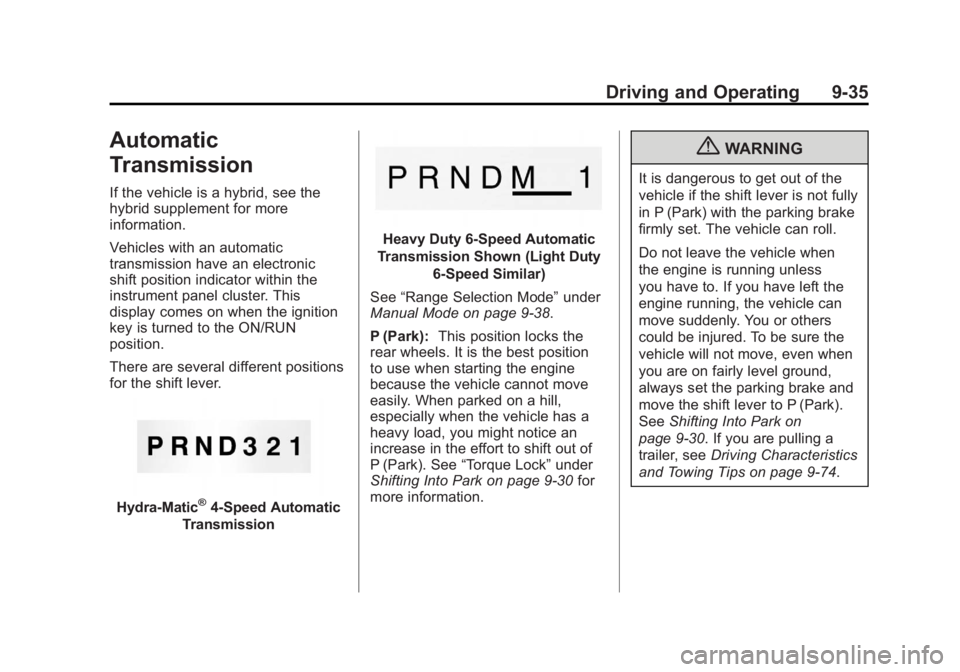
There are several different positions
for the shift lever.
Hydra-Matic®4-Speed Automatic
Transmission
Heavy Duty 6-Speed Automatic
Transmission Shown (Light Duty 6‐Speed Similar)
See “Range Selection Mode” under
Manual Mode on page 9‑38.
P (Park): This position locks the
rear wheels. It is the best position
to use when starting the engine
because the vehicle cannot move
easily. When parked on a hill,
especially when the vehicle has a
heavy load, you might notice an
increase in the effort to shift out of
P (Park). See “Torque Lock” under
Shifting Into Park on page 9‑30 for
more information.
{WARNING
It is dangerous to get out of the
vehicle if the shift lever is not fully
in P (Park) with the parking brake
firmly set. The vehicle can roll.
Do not leave the vehicle when
the engine is running unless
you have to. If you have left the
engine running, the vehicle can
move suddenly. You or others
could be injured. To be sure the
vehicle will not move, even when
you are on fairly level ground,
always set the parking brake and
move the shift lever to P (Park).
See Shifting Into Park on
page 9‑30. If you are pulling a
trailer, see Driving Characteristics
and Towing Tips on page 9‑74.
Page 315 of 556
Black plate (39,1)GMC Sierra Owner Manual - 2012 - CRC - 11/15/11
Driving and Operating 9-39
the plus/minus button located on the
steering column lever is used to
change to the gear.
Grade Braking is not available when
Range Selection Mode is active.
SeeTow/Haul Mode on page 9‑39.
While using Range Selection Mode,
Cruise Control and the Tow/Haul
Mode can be used.
If the vehicle has an exhaust
brake, it can also be used, but will
not automatically downshift the
transmission. See Exhaust Brake in
the Duramax Diesel supplement.
Notice: Spinning the tires
or holding the vehicle in one
place on a hill using only the
accelerator pedal may damage
the transmission. The repair will
not be covered by the vehicle
warranty. If you are stuck, do not
spin the tires. When stopping on
a hill, use the brakes to hold the
vehicle in place.Low Traction Mode
If your vehicle has the Allison
Transmission, or the Hydra-Matic
6-Speed Automatic Transmission, it
has a Low Traction Mode that can
assist in vehicle acceleration when
road conditions are slippery, such
as with ice or snow. While the
vehicle is at a stop, select the
second gear range using Range
Selection Mode. This will limit
torque to the wheels after it detects
wheel slip, preventing the tires from
spinning.
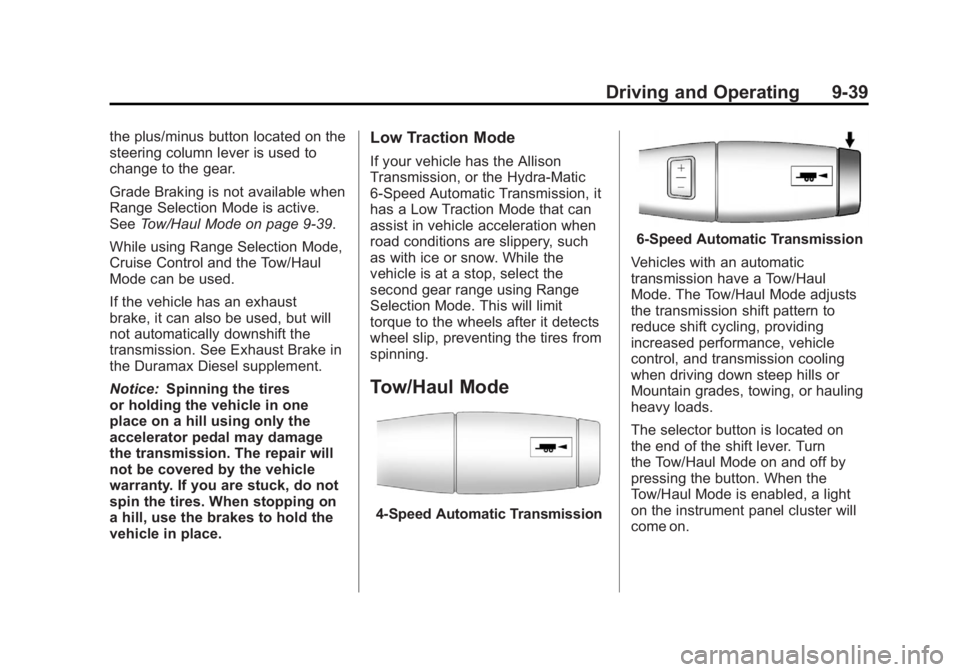
Tow/Haul Mode
4-Speed Automatic Transmission
6-Speed Automatic Transmission
Vehicles with an automatic
transmission have a Tow/Haul
Mode. The Tow/Haul Mode adjusts
the transmission shift pattern to
reduce shift cycling, providing
increased performance, vehicle
control, and transmission cooling
when driving down steep hills or
Mountain grades, towing, or hauling
heavy loads.
The selector button is located on
the end of the shift lever. Turn
the Tow/Haul Mode on and off by
pressing the button. When the
Tow/Haul Mode is enabled, a light
on the instrument panel cluster will
come on.
Page 316 of 556
Black plate (40,1)GMC Sierra Owner Manual - 2012 - CRC - 11/15/11
9-40 Driving and Operating
SeeTow/Haul Mode Light on
page 5‑26 andHill and Mountain
Roads on page 9‑12 for more
information.
Also see “Tow/Haul Mode” under
Towing Equipment on page 9‑94 for
more information.
Grade Braking (6-Speed
Automatic Transmission)
The Grade Braking shift modes can
be activated by pressing the button
on the end of the shift control lever.
While in Range Selection Mode,
Grade Braking is deactivated
allowing the driver to select a
desired range of gears.
Grade Braking is only active while
the Tow/Haul Mode is selected and
you are not in the Range Selection
Mode. See “Tow/Haul Mode” listed
previously and Manual Mode on
page 9‑38 for more information on the Range Selection Mode. Grade
Braking assists in maintaining
desired vehicle speeds when driving
on downhill grades by automatically
implementing a shift schedule that
utilizes the engine and transmission
to slow the vehicle. This reduces
wear on the braking system and
increases control of the vehicle.
Grade Braking monitors vehicle
speed, acceleration, engine torque
and brake pedal usage. Using this
information, it detects when the
truck is on a downhill grade and the
driver desires to slow the vehicle by
pressing the brake.
This feature is active when the
exhaust brake is enabled (if
equipped).
Also see
Towing Equipment on
page 9‑94 for more information.
Drive Systems
Four-Wheel Drive
If the vehicle has Four-Wheel Drive,
you can send the engine's driving
power to all four wheels for extra
traction. To get the most satisfaction
out of Four-Wheel Drive, you must
be familiar with its operation.
Read the following before using
Four-Wheel Drive. See the
appropriate text for the transfer
case in the vehicle.
Notice:Driving on clean, dry
pavement in Four-Wheel Drive
High or Four-Wheel Drive Low for
an extended period of time may
cause premature wear on the
vehicle's powertrain. Do not
drive on clean, dry pavement
in Four-Wheel Drive High or
Four-Wheel Drive Low for
extended periods of time.
Page 320 of 556
Black plate (44,1)GMC Sierra Owner Manual - 2012 - CRC - 11/15/11
9-44 Driving and Operating
.Shifting from Two-Wheel Drive
High to Four-Wheel Drive High
while the vehicle is in motion
may require that moderate force
be applied to the shift lever for a
few seconds before Four-Wheel
Drive High can be engaged,
especially in cold weather.
.In extremely cold weather, it may
be necessary to slow or stop the
vehicle to shift into Four-Wheel
Drive High.
.While in Four-Wheel Drive High,
the vehicle can be driven at any
posted legal speed limit.
Shifting In or Out of Four-Wheel
Drive Low
Notice: Shifting the transfer
case into Four-Wheel-Drive Low
while moving at speeds faster
than 5 km/h (3 mph) may cause
premature wear to the transfer
case, and may cause the gears
to grind. To avoid causing
premature wear, and grinding the
gears, do not shift the transfer case into Four-Wheel-Drive Low
while the vehicle is moving faster
than 5 km/h (3 mph).
.Shifting into Four-Wheel Drive
Low should be done, if possible,
with the vehicle at a slight roll,
5 km/h (3 mph) or less.
.Shift the transmission into
N (Neutral).
{WARNING
Shifting the transfer case to
N (Neutral) can cause the vehicle
to roll even if the transmission is
in P (Park). You or someone else
could be seriously injured. Be
sure to set the parking brake
before placing the transfer case in
N (Neutral). See
Parking Brake on
page 9‑54.
.Shifting into Four-Wheel Drive
Low with the vehicle at a stop
may be more difficult. You may
be unable to complete the shift
to Four-Wheel Drive Low, and the transfer case will end up in
N (Neutral). This is normal, and
is a function of the gear teeth
aligning in the transfer case.
When this happens, make
sure the engine is on, shift
the transmission momentarily
to D (Drive) and back to
N (Neutral), and then complete
the transfer case shift.
.Shift the transfer case shift lever
in one continuous motion into
the Four-Wheel Drive Low
position.
.When in Four-Wheel Drive
Low do not drive faster than
72 km/h (45 mph). This will
reduce wear and extend the life
of your transfer case.
Shifting In or Out of Neutral
1. With the vehicle running and the engine at an idle, set the parking
brake.
2. Place the transmission into N (Neutral).
Page 324 of 556
Black plate (48,1)GMC Sierra Owner Manual - 2012 - CRC - 11/15/11
9-48 Driving and Operating
Shifting into Neutral
To shift the transfer case to
N (Neutral) do the following:
1. Make sure the vehicle is parkedso that it will not roll.
2. Set the parking brake and press and hold the regular brake
pedal. See Parking Brake on
page 9‑54 for more information.
3. Start the vehicle or turn the ignition to ON/RUN.
4. Shift the transmission to N (Neutral).
5. Shift the transfer case to Two-Wheel Drive High.
6. Turn the transfer case dial clockwise to N (Neutral) until it
stops and hold it there until the
Neutral light starts blinking. This
will take at least 10 seconds.
Then slowly release the dial to
the four low position. The
N (Neutral) light will come on
when the transfer case shift to
N (Neutral) is complete. 7. If the engine is running, verify
that the transfer case is in
N (Neutral) by shifting the
transmission to R (Reverse) for
one second, then shift the
transmission to D (Drive) for
one second.
8. Turn the ignition to ACC/ ACCESSORY, which will turn the
engine off.
9. Place the transmission shift lever in P (Park).
10. Release the parking brake prior to moving the vehicle.
11. Turn the ignition to LOCK/OFF.
Shifting Out of Neutral
To shift the transfer case out of
N (Neutral) do the following:
1. Set the parking brake and apply the regular brake pedal.
2. Turn the ignition to ON/RUN with the engine off, and shift the
transmission to N (Neutral).
3. Turn the transfer case dial to Two-Wheel Drive High. After the transfer case has
shifted out of N (Neutral), the
N (Neutral) light will go out.
4. Release the parking brake prior to moving the vehicle.
Notice: Shifting the transmission
into gear before the requested
mode indicator light has stopped
flashing could damage the
transfer case. To help avoid
damaging the vehicle, always wait
for the mode indicator lights to
stop flashing before shifting the
transmission into gear.
5. Start the engine and shift the transmission to the desired
position.
Excessively shifting the transfer
case into or out of the different
modes may cause the transfer case
to enter the shift protection mode.
This will protect the transfer case
from possible damage and will only
allow the transfer case to respond
to one shift per 10 seconds. The
transfer case may stay in this mode
for up to three minutes.
Page 326 of 556
Black plate (50,1)GMC Sierra Owner Manual - 2012 - CRC - 11/15/11
9-50 Driving and Operating
If the vehicle has StabiliTrak®,
shifting into Four-Wheel Drive Low
will turn Traction Control and
StabiliTrak off. See StabiliTrak
®
System on page 9‑55.
{WARNING
Shifting the transfer case to
N (Neutral) can cause the vehicle
to roll even if the transmission is
in P (Park). You or someone else
could be seriously injured. Be
sure to set the parking brake
before placing the transfer case in
N (Neutral). SeeParking Brake on
page 9‑54.
N (Neutral): Shift the vehicle's
transfer case to N (Neutral) only
when towing the vehicle. See
Recreational Vehicle Towing on
page 10‑93 orTowing the Vehicle
on page 10‑93 for more information. If the SERVICE 4 WHEEL DRIVE
message stays on, you should
take the vehicle to your dealer for
service. See
“SERVICE 4 WHEEL
DRIVE” underTransmission
Messages on page 5‑46.
Shifting Into Four-Wheel Drive
High or AUTO (Automatic
Four-Wheel Drive)
Turn the knob to the Four-Wheel
Drive High or AUTO position. This
can be done at any speed, except
when shifting from Four-Wheel
Drive Low. The indicator light will
flash while shifting. It will remain on
when the shift is completed.
Shifting Into Two-Wheel
Drive High
Turn the knob to the Two-Wheel
Drive High position. This can be
done at any speed, except when
shifting from Four-Wheel Drive Low.
The indicator light will flash while
shifting. It will remain on when the
shift is completed. Shifting Into Four-Wheel
Drive Low
When Four-Wheel Drive Low is
engaged, vehicle speed should
be kept below 72 km/h (45 mph).
Extended high-speed operation in
Four-Wheel Drive Low may damage
or shorten the life of the drivetrain.
To shift to the Four-Wheel Drive
Low position, the ignition must be in
ON/RUN and the vehicle must be
stopped or moving less than 5 km/h
(3 mph) with the transmission in
N (Neutral). The preferred method
for shifting into Four-Wheel Drive
Low is to have the vehicle moving
1.6 to 3.2 km/h (1 to 2 mph). Turn the
knob to the Four-Wheel Drive Low
position. You must wait for the
Four-Wheel Drive Low indicator
light to stop flashing and remain on
before shifting the transmission
into gear.
Page 328 of 556
Black plate (52,1)GMC Sierra Owner Manual - 2012 - CRC - 11/15/11
9-52 Driving and Operating
Shifting into Neutral
To shift the transfer case to
N (Neutral) do the following:
1. Make sure the vehicle is parkedso that it will not roll.
2. Set the parking brake and apply the regular brake pedal. See
Parking Brake on page 9‑54 for
more information.
3. Start the vehicle or turn the ignition in ON/RUN.
4. Put the transmission in N (Neutral).
5. Shift the transfer case to Two-Wheel Drive High.
6. Turn the transfer case dial clockwise to N (Neutral) until it
stops and hold it there until
the N (Neutral) light starts
blinking. This will take at least
10 seconds. Then slowly release
the dial to the four low position.
The N (Neutral) light will come
on when the transfer case shift
to N (Neutral) is complete. 7. If the engine is running, make
sure that the transfer case is in
N (Neutral) by shifting the
transmission to R (Reverse) for
one second, then shift the
transmission to D (Drive) for
one second.
8. Turn the ignition to ACC/ ACCESSORY, which will turn
the engine off.
9. Place the transmission shift lever in P (Park).
10. Release the parking brake prior to moving the vehicle.
11. Turn the ignition to LOCK/OFF.
Shifting Out of Neutral
To shift out of N (Neutral) do the
following:
1. Set the parking brake and apply the regular brake pedal.
2. Turn the ignition to ON/RUN with the engine off, and shift the
transmission to N (Neutral). 3. Turn the transfer case dial
to Two-Wheel Drive High,
Four-Wheel Drive High,
or AUTO.
After the transfer case has
shifted out of N (Neutral), the
N (Neutral) light will go out.
4. Release the parking brake prior to moving the vehicle.
Notice: Shifting the transmission
into gear before the requested
mode indicator light has stopped
flashing could damage the
transfer case. To help avoid
damaging the vehicle, always wait
for the mode indicator lights to
stop flashing before shifting the
transmission into gear.
5. Start the engine and shift the transmission to the desired
position.