transmission oil GMC SIERRA 1500 2012 Owners Manual
[x] Cancel search | Manufacturer: GMC, Model Year: 2012, Model line: SIERRA 1500, Model: GMC SIERRA 1500 2012Pages: 556, PDF Size: 7.88 MB
Page 7 of 556
Black plate (1,1)GMC Sierra Owner Manual - 2012 - CRC - 11/15/11
In Brief 1-1
In Brief
Instrument Panel
Instrument Panel (Base/UplevelVersion) . . . . . . . . . . . . . . . . . . . . . 1-2
Instrument Panel (Premium Version) . . . . . . . . . . . . . . . . . . . . . 1-6
Initial Drive Information
Initial Drive Information . . . . . . . . 1-8
Remote Keyless Entry (RKE)System . . . . . . . . . . . . . . . . . . . . . . 1-8
Remote Vehicle Start . . . . . . . . . 1-9
Door Locks . . . . . . . . . . . . . . . . . . . 1-9
Windows . . . . . . . . . . . . . . . . . . . . . 1-10
Seat Adjustment . . . . . . . . . . . . . 1-11
Memory Features . . . . . . . . . . . . 1-14
Heated and Ventilated Seats . . . . . . . . . . . . . . . . . . . . . . . 1-15
Head Restraint Adjustment . . . . . . . . . . . . . . . . . 1-15 Safety Belts . . . . . . . . . . . . . . . . . . 1-16
Passenger Sensing
System . . . . . . . . . . . . . . . . . . . . . 1-16
Mirror Adjustment . . . . . . . . . . . . 1-16
Steering Wheel Adjustment . . . . . . . . . . . . . . . . . 1-19
Throttle and Brake Pedal Adjustment . . . . . . . . . . . . . . . . . 1-19
Interior Lighting . . . . . . . . . . . . . . 1-20
Exterior Lighting . . . . . . . . . . . . . 1-21
Windshield Wiper/Washer . . . . 1-21
Climate Controls . . . . . . . . . . . . . 1-22
Transmission . . . . . . . . . . . . . . . . 1-24
Four-Wheel Drive . . . . . . . . . . . . 1-25
Vehicle Features
Radio(s) . . . . . . . . . . . . . . . . . . . . . 1-27
Satellite Radio . . . . . . . . . . . . . . . 1-28
Portable Audio Devices . . . . . . 1-28
Bluetooth
®. . . . . . . . . . . . . . . . . . . 1-29
Steering Wheel Controls . . . . . 1-29
Cruise Control . . . . . . . . . . . . . . . 1-30 Navigation System . . . . . . . . . . . 1-30
Driver Information
Center (DIC) . . . . . . . . . . . . . . . 1-30
Rear Vision Camera (RVC) . . . . . . . . . . . . . 1-31
Ultrasonic Parking Assist . . . . 1-31
Power Outlets . . . . . . . . . . . . . . . 1-32
Universal Remote System . . . 1-32
Sunroof . . . . . . . . . . . . . . . . . . . . . . 1-33
Performance and Maintenance
StabiliTrak®System . . . . . . . . . 1-35
Tire Pressure Monitor . . . . . . . . 1-35
Engine Oil Life System . . . . . . 1-35
Fuel E85 (85% Ethanol) . . . . . 1-36
Driving for Better Fuel Economy . . . . . . . . . . . . . . . . . . . 1-36
Roadside Assistance Program . . . . . . . . . . . . . . . . . . . . 1-36
OnStar
®. . . . . . . . . . . . . . . . . . . . . 1-37
Page 37 of 556
Black plate (31,1)GMC Sierra Owner Manual - 2012 - CRC - 11/15/11
In Brief 1-31
3:Press to display the
odometer, trip odometer, fuel range,
average economy, fuel used, timer,
instantaneous economy and Active
Fuel Management™ indicator,
and transmission temperature.
The compass and outside air
temperature will also be shown in
the display. The temperature will be
shown in °C or °F depending on the
units selected.
T: Press to display the oil life,
units, tire pressure readings for
vehicles with the Tire Pressure
Monitor System (TPMS), trailer
brake gain and output information
for vehicles with the Integrated
Trailer Brake Control (ITBC) system,
engine hours, compass zone
setting, and compass recalibration.
U: Press to customize the feature
settings on your vehicle. See
Vehicle Personalization (With DIC
Buttons) on page 5‑48 for more
information.
V: Press to set or reset certain
functions and to turn off or
acknowledge messages on the DIC.
For more information, see Driver
Information Center (DIC) on
page 5‑30.
Vehicle Customization
Some vehicle features can be
programmed by using the DIC
buttons next to the steering wheel.
These features include:
.Language
.Door Lock and Unlock Settings
.RKE Lock and Unlock Feedback
.Lighting
.Chime Volume
.Memory Features
See Vehicle Personalization (With
DIC Buttons) on page 5‑48.
Rear Vision
Camera (RVC)
If available, the RVC displays a
view of the area behind the vehicle
when the vehicle is shifted into
R (Reverse). This is displayed on
the inside rearview mirror or the
navigation screen, if equipped.
To clean the camera lens, located
in the bezel of the tailgate handle,
rinse it with water and wipe it with a
soft cloth.
For more information, see Rear
Vision Camera (RVC) on page 9‑62.
Ultrasonic Parking Assist
If available, the Ultrasonic Rear
Parking Assist (URPA) system uses
sensors on the rear bumper to
assist with parking and avoiding
objects while in R (Reverse).
It operates at speeds less than
8 km/h (5 mph). URPA uses audible
beeps to provide distance and
system information.
Page 169 of 556
Black plate (31,1)GMC Sierra Owner Manual - 2012 - CRC - 11/15/11
Instruments and Controls 5-31
DIC Buttons
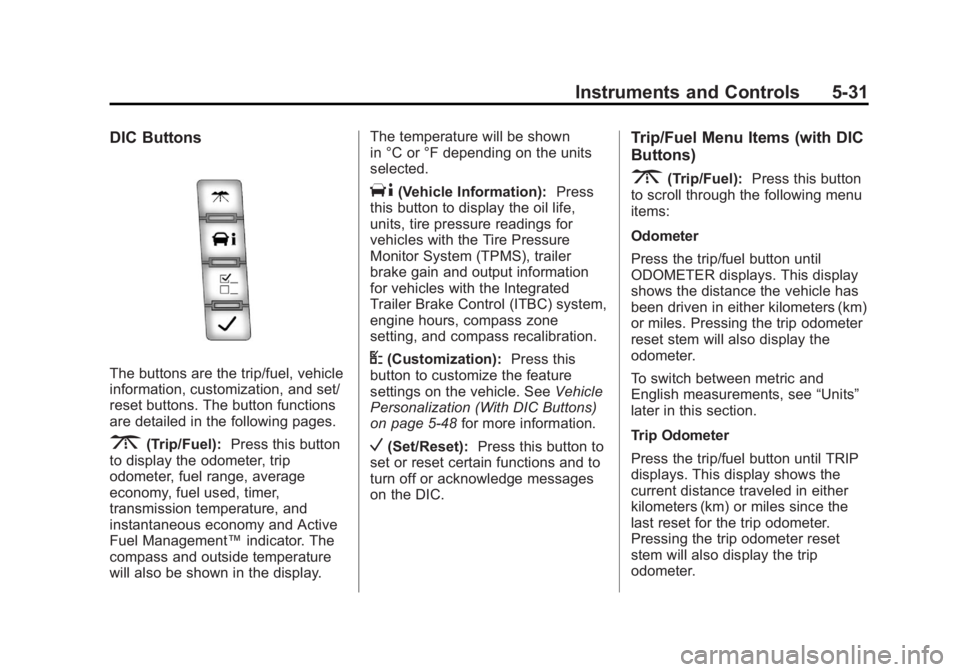
The buttons are the trip/fuel, vehicle
information, customization, and set/
reset buttons. The button functions
are detailed in the following pages.
3(Trip/Fuel):Press this button
to display the odometer, trip
odometer, fuel range, average
economy, fuel used, timer,
transmission temperature, and
instantaneous economy and Active
Fuel Management™ indicator. The
compass and outside temperature
will also be shown in the display. The temperature will be shown
in °C or °F depending on the units
selected.
T(Vehicle Information):
Press
this button to display the oil life,
units, tire pressure readings for
vehicles with the Tire Pressure
Monitor System (TPMS), trailer
brake gain and output information
for vehicles with the Integrated
Trailer Brake Control (ITBC) system,
engine hours, compass zone
setting, and compass recalibration.
U(Customization): Press this
button to customize the feature
settings on the vehicle. See Vehicle
Personalization (With DIC Buttons)
on page 5‑48 for more information.
V(Set/Reset):Press this button to
set or reset certain functions and to
turn off or acknowledge messages
on the DIC.
Trip/Fuel Menu Items (with DIC
Buttons)
3(Trip/Fuel): Press this button
to scroll through the following menu
items:
Odometer
Press the trip/fuel button until
ODOMETER displays. This display
shows the distance the vehicle has
been driven in either kilometers (km)
or miles. Pressing the trip odometer
reset stem will also display the
odometer.
To switch between metric and
English measurements, see “Units”
later in this section.
Trip Odometer
Press the trip/fuel button until TRIP
displays. This display shows the
current distance traveled in either
kilometers (km) or miles since the
last reset for the trip odometer.
Pressing the trip odometer reset
stem will also display the trip
odometer.
Page 304 of 556
Black plate (28,1)GMC Sierra Owner Manual - 2012 - CRC - 11/15/11
9-28 Driving and Operating
Starting Procedure
1. With your foot off the acceleratorpedal, turn the ignition key to
START. When the engine starts,
let go of the key. The idle speed
will go down as your engine gets
warm. Do not race the engine
immediately after starting it.
Operate the engine and
transmission gently to allow the
oil to warm up and lubricate all
moving parts.
The vehicle has a
Computer-Controlled Cranking
System. This feature assists in
starting the engine and protects
components. If the ignition key is
turned to the START position,
and then released when the
engine begins cranking, the
engine will continue cranking
for a few seconds or until the
vehicle starts. If the engine does
not start and the key is held in
START for many seconds,
cranking will be stopped after
15 seconds to prevent cranking
motor damage. To prevent gear damage, this system also
prevents cranking if the engine
is already running. Engine
cranking can be stopped by
turning the ignition switch
to the ACC/ACCESSORY or
LOCK/OFF position.
When the Low Fuel warning
lamp is on and the FUEL LEVEL
LOW message is displayed in
the Driver Information Center
(DIC), the Computer-Controlled
Cranking System is disabled
to prevent possible vehicle
component damage. When
this happens, hold the ignition
switch in the START position to
continue engine cranking.
Notice: Cranking the engine for
long periods of time, by returning
the key to the START position
immediately after cranking has
ended, can overheat and damage
the cranking motor, and drain the
battery. Wait at least 15 seconds
between each try, to let the
cranking motor cool down. 2. If the engine does not start after
5-10 seconds, especially in very
cold weather (below −18°C
or 0°F), it could be flooded with
too much gasoline. Try pushing
the accelerator pedal all the way
to the floor and holding it there
as you hold the key in START
for up to 15 seconds. Wait at
least 15 seconds between each
try, to allow the cranking motor
to cool down. When the engine
starts, let go of the key and
accelerator. If the vehicle starts
briefly but then stops again,
do the same thing. This clears
the extra gasoline from the
engine. Do not race the engine
immediately after starting it.
Operate the engine and
transmission gently until the oil
warms up and lubricates all
moving parts.
Page 352 of 556
Black plate (76,1)GMC Sierra Owner Manual - 2012 - CRC - 11/15/11
9-76 Driving and Operating
Backing Up
Hold the bottom of the steering
wheel with one hand. To move the
trailer to the left, move that hand to
the left. To move the trailer to the
right, move your hand to the right.
Always back up slowly and,
if possible, have someone
guide you.
Making Turns
Notice:Making very sharp turns
while trailering could cause the
trailer to come in contact with the
vehicle. The vehicle could be
damaged. Avoid making very
sharp turns while trailering.
When turning with a trailer, make
wider turns than normal. Do this
so the trailer will not strike soft
shoulders, curbs, road signs, trees,
or other objects. Avoid jerky or
sudden maneuvers. Signal well in
advance. If the trailer turn signal bulbs burn
out, the arrows on the instrument
panel will still flash for turns. It is
important to check occasionally to
be sure the trailer bulbs are still
working.
Driving on Grades
Reduce speed and shift to a
lower gear
beforestarting down a
long or steep downgrade. If the
transmission is not shifted down, the
brakes might get hot and no longer
work well.
Vehicles can tow in D (Drive). Shift
the transmission to a lower gear if
the transmission shifts too often
under heavy loads and/or hilly
conditions.
The Tow/Haul Mode may be used if
the transmission shifts too often.
See Tow/Haul Mode on page 9‑39.
When towing at high altitude on
steep uphill grades, consider the
following: Engine coolant will boil at
a lower temperature than at normal
altitudes. If the engine is turned off immediately after towing at high
altitude on steep uphill grades, the
vehicle may show signs similar to
engine overheating. To avoid this,
let the engine run while parked,
preferably on level ground, with the
automatic transmission in P (Park)
for a few minutes before turning the
engine off. If the overheat warning
comes on, see
Engine Overheating
on page 10‑22.
Parking on Hills
{WARNING
Parking the vehicle on a hill
with the trailer attached can be
dangerous. If something goes
wrong, the rig could start to move.
People can be injured, and both
the vehicle and the trailer can be
damaged. When possible, always
park the rig on a flat surface.
Page 354 of 556
Black plate (78,1)GMC Sierra Owner Manual - 2012 - CRC - 11/15/11
9-78 Driving and Operating
Maintenance when Trailer
Towing
The vehicle needs service more
often when pulling a trailer. See
Maintenance Schedule on
page 11‑3. Things that are
especially important in trailer
operation are automatic
transmission fluid, engine oil,
axle lubricant, belts, cooling
system, and brake system.
It is a good idea to inspect these
before and during the trip.
Check periodically to see that all
hitch nuts and bolts are tight.
Trailer Towing
If the vehicle has a diesel engine,
see the Duramax diesel supplement
for more information.
If the vehicle is a hybrid, see the
hybrid supplement for more
information.
Do not tow a trailer during break-in.
SeeNew Vehicle Break-In on
page 9‑25 for more information.{WARNING
The driver can lose control when
pulling a trailer if the correct
equipment is not used or the
vehicle is not driven properly.
For example, if the trailer is too
heavy, the brakes may not work
well or even at all. The driver and
passengers could be seriously
injured. The vehicle may also be
damaged; the resulting repairs
would not be covered by the
vehicle warranty. Pull a trailer
only if all the steps in this section
have been followed. Ask your
dealer for advice and information
about towing a trailer with the
vehicle.
Page 387 of 556
Black plate (1,1)GMC Sierra Owner Manual - 2012 - CRC - 11/15/11
Vehicle Care 10-1
Vehicle Care
General Information
General Information . . . . . . . . . . 10-2
California Proposition65 Warning . . . . . . . . . . . . . . . . . 10-3
California Perchlorate Materials Requirements . . . . 10-3
Accessories and Modifications . . . . . . . . . . . . . . . 10-3
Vehicle Checks
Doing Your OwnService Work . . . . . . . . . . . . . . . 10-4
Hood . . . . . . . . . . . . . . . . . . . . . . . . 10-5
Engine Compartment Overview . . . . . . . . . . . . . . . . . . . 10-6
Engine Oil . . . . . . . . . . . . . . . . . . . 10-7
Engine Oil Life System . . . . . 10-10
Automatic Transmission Fluid (4-Speed Transmission) . . . 10-11
Automatic Transmission Fluid (6-Speed
Transmission) . . . . . . . . . . . . . 10-14
Engine Air Cleaner/Filter . . . . 10-17
Cooling System . . . . . . . . . . . . 10-18
Engine Coolant . . . . . . . . . . . . . 10-19
Engine Overheating . . . . . . . . 10-22 Overheated Engine
Protection
Operating Mode . . . . . . . . . . . 10-24
Engine Fan . . . . . . . . . . . . . . . . . 10-24
Power Steering Fluid . . . . . . . 10-25
Washer Fluid . . . . . . . . . . . . . . . 10-26
Brakes . . . . . . . . . . . . . . . . . . . . . 10-27
Brake Fluid . . . . . . . . . . . . . . . . . 10-28
Battery . . . . . . . . . . . . . . . . . . . . . 10-30
Four-Wheel Drive . . . . . . . . . . . 10-30
Front Axle . . . . . . . . . . . . . . . . . . 10-31
Rear Axle . . . . . . . . . . . . . . . . . . 10-32
Noise Control System . . . . . . 10-34
Starter Switch Check . . . . . . . 10-35
Automatic Transmission Shift Lock Control Function
Check . . . . . . . . . . . . . . . . . . . . . 10-35
Ignition Transmission Lock Check . . . . . . . . . . . . . . . . . . . . . 10-35
Park Brake and P (Park) Mechanism Check . . . . . . . . 10-36
Wiper Blade Replacement . . . . . . . . . . . . . . 10-36
Glass Replacement . . . . . . . . 10-37
Headlamp Aiming
Headlamp Aiming . . . . . . . . . . 10-37
Bulb Replacement
Bulb Replacement . . . . . . . . . . 10-39
Halogen Bulbs . . . . . . . . . . . . . . 10-39
Headlamps, Front Turn Signal, Sidemarker, and
Parking Lamps . . . . . . . . . . . . 10-39
Pick-Up Box Identification and Fender Marker
Lamps . . . . . . . . . . . . . . . . . . . . 10-40
Taillamps (Chassis Cab Models) . . . . . . . . . . . . . . . . . . . 10-40
Taillamps, Turn Signal, Stoplamps, and Back-Up
Lamps . . . . . . . . . . . . . . . . . . . . 10-41
Center High-Mounted Stoplamp (CHMSL) and
Cargo Lamp . . . . . . . . . . . . . . 10-42
License Plate Lamp . . . . . . . . 10-42
Replacement Bulbs . . . . . . . . . 10-43
Electrical System
Electrical System Overload . . . . . . . . . . . . . . . . . . 10-43
Fuses and Circuit Breakers . . . . . . . . . . . . . . . . . . 10-44
Engine Compartment Fuse Block . . . . . . . . . . . . . . . . . . . . . 10-44
Instrument Panel Fuse Block . . . . . . . . . . . . . . . . . . . . . 10-48
Page 393 of 556
Black plate (7,1)GMC Sierra Owner Manual - 2012 - CRC - 11/15/11
Vehicle Care 10-7
A.Engine Air Cleaner/Filter on
page 10‑17.
B. Coolant Surge Tank and Pressure Cap. See Cooling
System on page 10‑18.
C. Positive (+) Terminal. See Jump
Starting on page 10‑88.
D. Battery on page 10‑30.
E. Remote Negative (−) Terminal (Out of View). See Jump
Starting on page 10‑88.
F. Automatic Transmission Dipstick (Out of View). See
“Checking the Fluid Level”
under Automatic Transmission
Fluid (4-Speed Transmission)
on page 10‑11 orAutomatic
Transmission Fluid (6-Speed
Transmission) on page 10‑14.
G. Engine Oil Fill Cap. See “When
to Add Engine Oil” under
Engine Oil on page 10‑7. H. Engine Oil Dipstick (Out of
View). See “Checking Engine
Oil” under Engine Oil on
page 10‑7.
I. Engine Cooling Fan (Out of View). See Cooling System on
page 10‑18.
J. Power Steering Fluid Reservoir. See Power Steering Fluid on
page 10‑25.
K. Brake Master Cylinder Reservoir. See Brake Fluid on
page 10‑28.
L. Engine Compartment Fuse
Block on page 10‑44.
M. Windshield Washer Fluid Reservoir. See “Adding Washer
Fluid” under Washer Fluid on
page 10‑26.
If the vehicle has a diesel engine
and/or an Allison Transmission, see
the Duramax Diesel Supplement.Engine Oil
For diesel engine vehicles, see
“Engine Oil” in the Duramax Diesel
Supplement.
To ensure proper engine
performance and long life, careful
attention must be paid to engine
oil. Following these simple, but
important steps will help protect
your investment:
.Always use engine oil approved
to the proper specification and of
the proper viscosity grade. See
“Selecting the Right Engine Oil”
in this section.
.Check the engine oil level
regularly and maintain the
proper oil level. See “Checking
Engine Oil” and“When to Add
Engine Oil” in this section.
.Change the engine oil at the
appropriate time. See Engine Oil
Life System on page 10‑10.
.Always dispose of engine oil
properly. See “What to Do with
Used Oil” in this section.
Page 397 of 556
Black plate (11,1)GMC Sierra Owner Manual - 2012 - CRC - 11/15/11
Vehicle Care 10-11
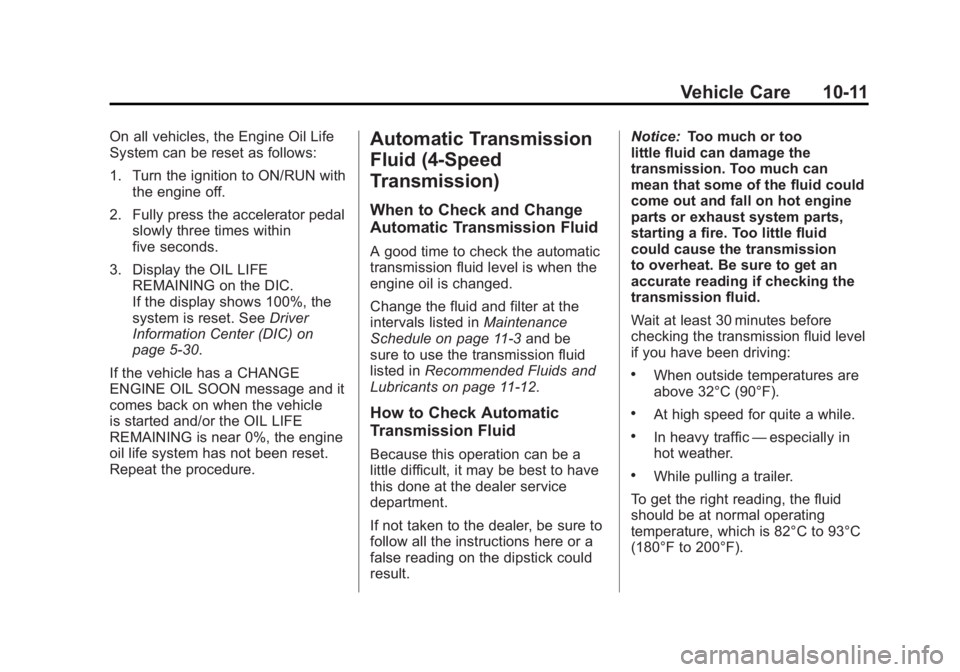
On all vehicles, the Engine Oil Life
System can be reset as follows:
1. Turn the ignition to ON/RUN withthe engine off.
2. Fully press the accelerator pedal slowly three times within
five seconds.
3. Display the OIL LIFE REMAINING on the DIC.
If the display shows 100%, the
system is reset. See Driver
Information Center (DIC) on
page 5‑30.
If the vehicle has a CHANGE
ENGINE OIL SOON message and it
comes back on when the vehicle
is started and/or the OIL LIFE
REMAINING is near 0%, the engine
oil life system has not been reset.
Repeat the procedure.Automatic Transmission
Fluid (4-Speed
Transmission)
When to Check and Change
Automatic Transmission Fluid
A good time to check the automatic
transmission fluid level is when the
engine oil is changed.
Change the fluid and filter at the
intervals listed in Maintenance
Schedule on page 11‑3 and be
sure to use the transmission fluid
listed in Recommended Fluids and
Lubricants on page 11‑12.
How to Check Automatic
Transmission Fluid
Because this operation can be a
little difficult, it may be best to have
this done at the dealer service
department.
If not taken to the dealer, be sure to
follow all the instructions here or a
false reading on the dipstick could
result. Notice:
Too much or too
little fluid can damage the
transmission. Too much can
mean that some of the fluid could
come out and fall on hot engine
parts or exhaust system parts,
starting a fire. Too little fluid
could cause the transmission
to overheat. Be sure to get an
accurate reading if checking the
transmission fluid.
Wait at least 30 minutes before
checking the transmission fluid level
if you have been driving:
.When outside temperatures are
above 32°C (90°F).
.At high speed for quite a while.
.In heavy traffic —especially in
hot weather.
.While pulling a trailer.
To get the right reading, the fluid
should be at normal operating
temperature, which is 82°C to 93°C
(180°F to 200°F).
Page 432 of 556
Black plate (46,1)GMC Sierra Owner Manual - 2012 - CRC - 11/15/11
10-46 Vehicle Care
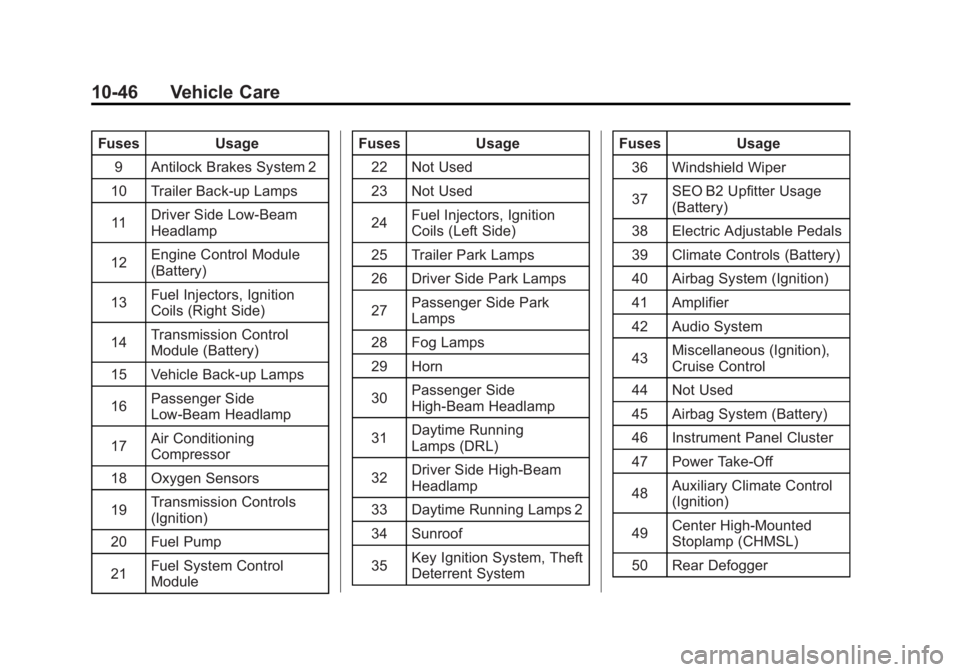
FusesUsage
9 Antilock Brakes System 2
10 Trailer Back-up Lamps
11 Driver Side Low-Beam
Headlamp
12 Engine Control Module
(Battery)
13 Fuel Injectors, Ignition
Coils (Right Side)
14 Transmission Control
Module (Battery)
15 Vehicle Back-up Lamps
16 Passenger Side
Low-Beam Headlamp
17 Air Conditioning
Compressor
18 Oxygen Sensors
19 Transmission Controls
(Ignition)
20 Fuel Pump
21 Fuel System Control
Module Fuses
Usage
22 Not Used
23 Not Used
24 Fuel Injectors, Ignition
Coils (Left Side)
25 Trailer Park Lamps
26 Driver Side Park Lamps
27 Passenger Side Park
Lamps
28 Fog Lamps
29 Horn
30 Passenger Side
High-Beam Headlamp
31 Daytime Running
Lamps (DRL)
32 Driver Side High-Beam
Headlamp
33 Daytime Running Lamps 2
34 Sunroof
35 Key Ignition System, Theft
Deterrent System Fuses
Usage
36 Windshield Wiper
37 SEO B2 Upfitter Usage
(Battery)
38 Electric Adjustable Pedals
39 Climate Controls (Battery)
40 Airbag System (Ignition)
41 Amplifier
42 Audio System
43 Miscellaneous (Ignition),
Cruise Control
44 Not Used
45 Airbag System (Battery)
46 Instrument Panel Cluster
47 Power Take-Off
48 Auxiliary Climate Control
(Ignition)
49 Center High-Mounted
Stoplamp (CHMSL)
50 Rear Defogger