seat adjustment GMC SIERRA 1500 2012 Owners Manual
[x] Cancel search | Manufacturer: GMC, Model Year: 2012, Model line: SIERRA 1500, Model: GMC SIERRA 1500 2012Pages: 556, PDF Size: 7.88 MB
Page 7 of 556
Black plate (1,1)GMC Sierra Owner Manual - 2012 - CRC - 11/15/11
In Brief 1-1
In Brief
Instrument Panel
Instrument Panel (Base/UplevelVersion) . . . . . . . . . . . . . . . . . . . . . 1-2
Instrument Panel (Premium Version) . . . . . . . . . . . . . . . . . . . . . 1-6
Initial Drive Information
Initial Drive Information . . . . . . . . 1-8
Remote Keyless Entry (RKE)System . . . . . . . . . . . . . . . . . . . . . . 1-8
Remote Vehicle Start . . . . . . . . . 1-9
Door Locks . . . . . . . . . . . . . . . . . . . 1-9
Windows . . . . . . . . . . . . . . . . . . . . . 1-10
Seat Adjustment . . . . . . . . . . . . . 1-11
Memory Features . . . . . . . . . . . . 1-14
Heated and Ventilated Seats . . . . . . . . . . . . . . . . . . . . . . . 1-15
Head Restraint Adjustment . . . . . . . . . . . . . . . . . 1-15 Safety Belts . . . . . . . . . . . . . . . . . . 1-16
Passenger Sensing
System . . . . . . . . . . . . . . . . . . . . . 1-16
Mirror Adjustment . . . . . . . . . . . . 1-16
Steering Wheel Adjustment . . . . . . . . . . . . . . . . . 1-19
Throttle and Brake Pedal Adjustment . . . . . . . . . . . . . . . . . 1-19
Interior Lighting . . . . . . . . . . . . . . 1-20
Exterior Lighting . . . . . . . . . . . . . 1-21
Windshield Wiper/Washer . . . . 1-21
Climate Controls . . . . . . . . . . . . . 1-22
Transmission . . . . . . . . . . . . . . . . 1-24
Four-Wheel Drive . . . . . . . . . . . . 1-25
Vehicle Features
Radio(s) . . . . . . . . . . . . . . . . . . . . . 1-27
Satellite Radio . . . . . . . . . . . . . . . 1-28
Portable Audio Devices . . . . . . 1-28
Bluetooth
®. . . . . . . . . . . . . . . . . . . 1-29
Steering Wheel Controls . . . . . 1-29
Cruise Control . . . . . . . . . . . . . . . 1-30 Navigation System . . . . . . . . . . . 1-30
Driver Information
Center (DIC) . . . . . . . . . . . . . . . 1-30
Rear Vision Camera (RVC) . . . . . . . . . . . . . 1-31
Ultrasonic Parking Assist . . . . 1-31
Power Outlets . . . . . . . . . . . . . . . 1-32
Universal Remote System . . . 1-32
Sunroof . . . . . . . . . . . . . . . . . . . . . . 1-33
Performance and Maintenance
StabiliTrak®System . . . . . . . . . 1-35
Tire Pressure Monitor . . . . . . . . 1-35
Engine Oil Life System . . . . . . 1-35
Fuel E85 (85% Ethanol) . . . . . 1-36
Driving for Better Fuel Economy . . . . . . . . . . . . . . . . . . . 1-36
Roadside Assistance Program . . . . . . . . . . . . . . . . . . . . 1-36
OnStar
®. . . . . . . . . . . . . . . . . . . . . 1-37
Page 17 of 556
Black plate (11,1)GMC Sierra Owner Manual - 2012 - CRC - 11/15/11
In Brief 1-11
is in ON/RUN or ACC/
ACCESSORY, or Retained
Accessory Power (RAP). See
Retained Accessory Power (RAP)
on page 9‑29.
Press the switch to lower the
window. Pull the switch up to
raise it.
For more information, see:
.Windows on page 2‑19.
.Power Windows on page 2‑20.
Power Sliding Rear Window
If equipped, the power sliding rear
window works when the ignition has
been turned to ACC/ACCESSORY
or ON/RUN, or when Retained
Accessory Power (RAP) is active.
SeeRetained Accessory Power
(RAP) on page 9‑29
.Push the switch to open the
window.
.Pull the switch to close the
window.
The power sliding rear window
cannot be operated manually.
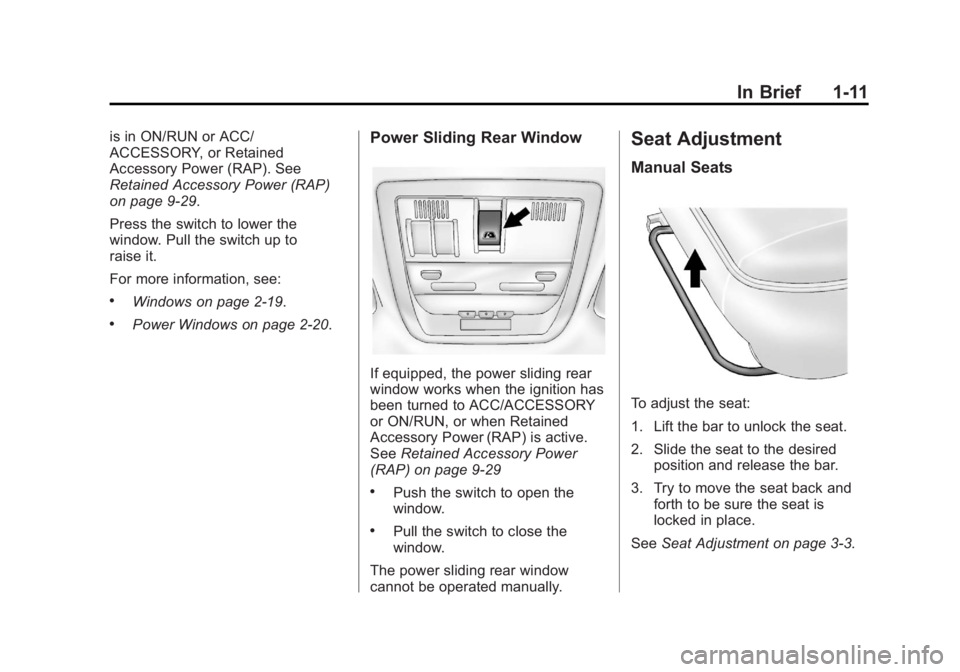
Seat Adjustment
Manual Seats
To adjust the seat:
1. Lift the bar to unlock the seat.
2. Slide the seat to the desired position and release the bar.
3. Try to move the seat back and forth to be sure the seat is
locked in place.
See Seat Adjustment on page 3‑3.
Page 18 of 556
Black plate (12,1)GMC Sierra Owner Manual - 2012 - CRC - 11/15/11
1-12 In Brief
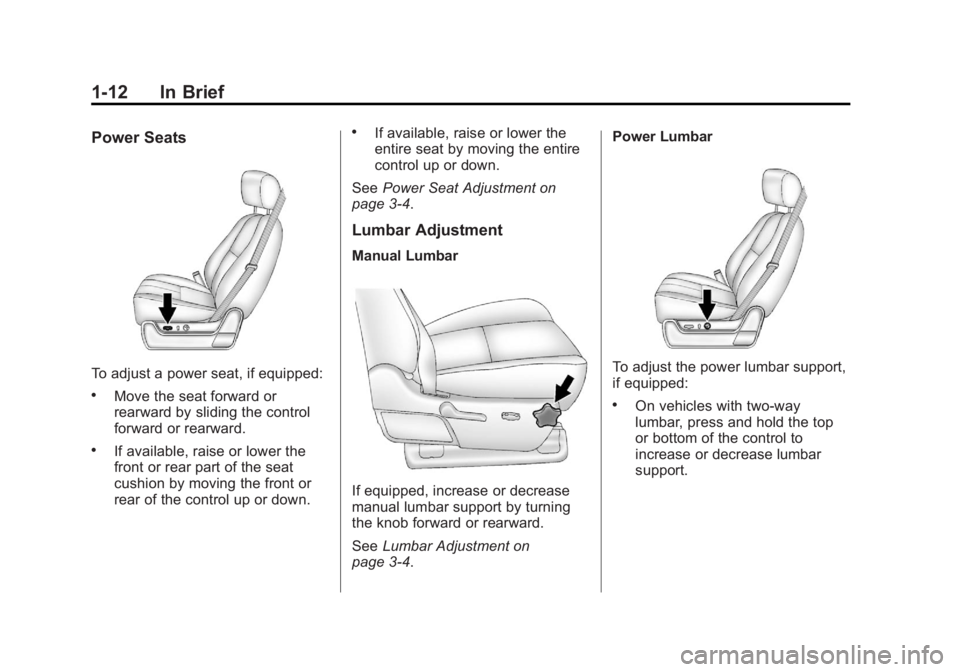
Power Seats
To adjust a power seat, if equipped:
.Move the seat forward or
rearward by sliding the control
forward or rearward.
.If available, raise or lower the
front or rear part of the seat
cushion by moving the front or
rear of the control up or down.
.If available, raise or lower the
entire seat by moving the entire
control up or down.
See Power Seat Adjustment on
page 3‑4.
Lumbar Adjustment
Manual Lumbar
If equipped, increase or decrease
manual lumbar support by turning
the knob forward or rearward.
See Lumbar Adjustment on
page 3‑4. Power Lumbar
To adjust the power lumbar support,
if equipped:
.On vehicles with two-way
lumbar, press and hold the top
or bottom of the control to
increase or decrease lumbar
support.
Page 19 of 556
Black plate (13,1)GMC Sierra Owner Manual - 2012 - CRC - 11/15/11
In Brief 1-13
.On vehicles with four-way
lumbar, press and hold the front
or rear of the control to increase
or decrease lumbar support. To
raise or lower the height of the
support, press and hold the top
or bottom of the control.
See Lumbar Adjustment on
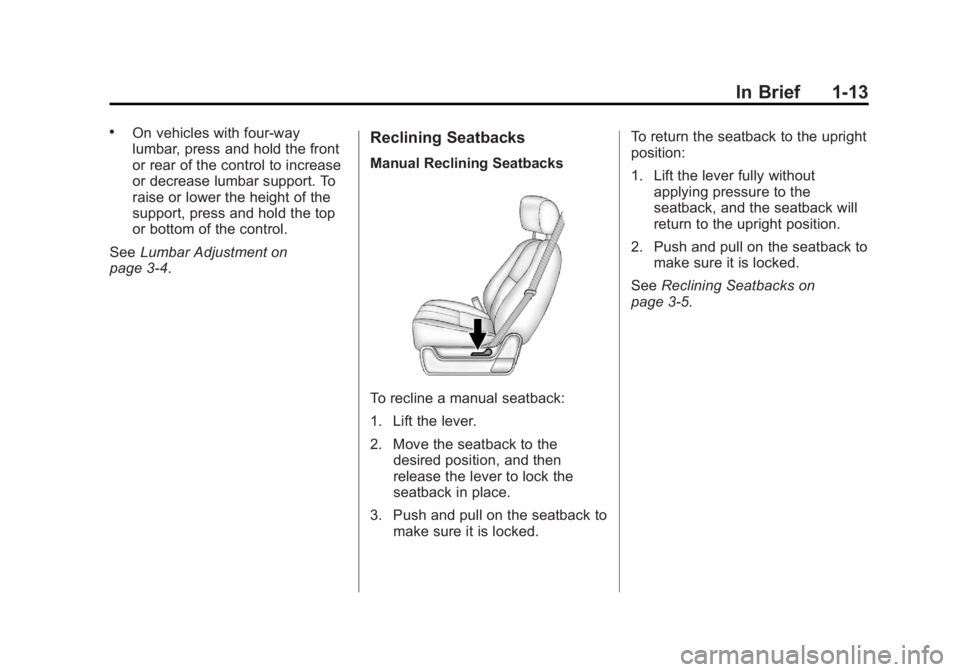
page 3‑4.Reclining Seatbacks
Manual Reclining Seatbacks
To recline a manual seatback:
1. Lift the lever.
2. Move the seatback to the desired position, and then
release the lever to lock the
seatback in place.
3. Push and pull on the seatback to make sure it is locked. To return the seatback to the upright
position:
1. Lift the lever fully without
applying pressure to the
seatback, and the seatback will
return to the upright position.
2. Push and pull on the seatback to make sure it is locked.
See Reclining Seatbacks on
page 3‑5.
Page 21 of 556
Black plate (15,1)GMC Sierra Owner Manual - 2012 - CRC - 11/15/11
In Brief 1-15
SeeMemory Seats on page 3‑7 and
Vehicle Personalization (With DIC
Buttons) on page 5‑48.
Easy Exit Driver Seat
This feature can move the seat
rearward to allow extra room to exit
the vehicle.
B: Press to recall the easy exit
seat position. The vehicle must be
in P (Park).
See Memory Seats on page 3‑7 and
Vehicle Personalization (With DIC
Buttons) on page 5‑48.
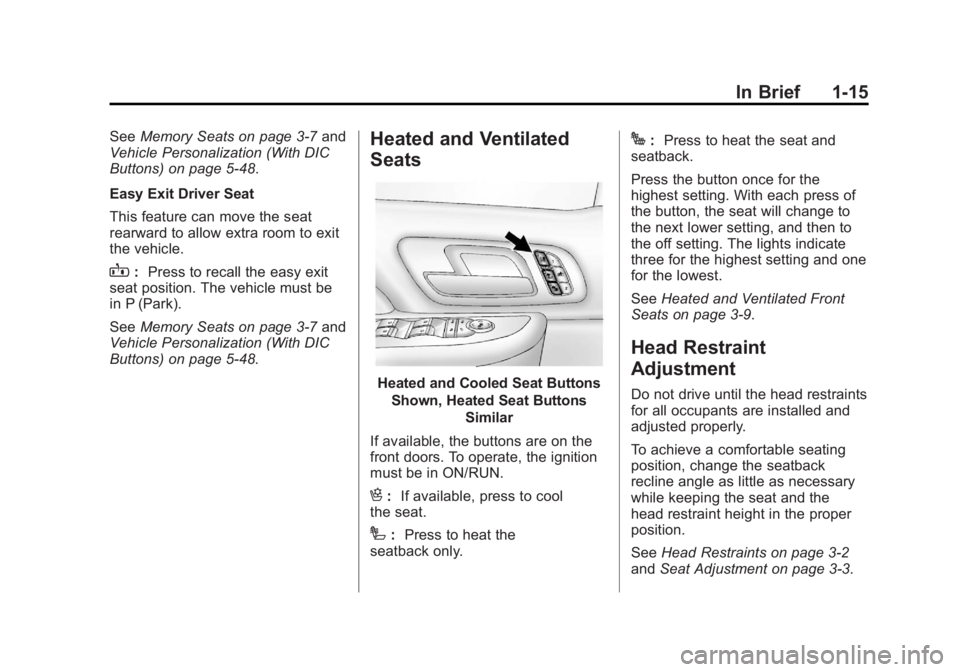
Heated and Ventilated
Seats
Heated and Cooled Seat Buttons
Shown, Heated Seat Buttons Similar
If available, the buttons are on the
front doors. To operate, the ignition
must be in ON/RUN.
H: If available, press to cool
the seat.
I: Press to heat the
seatback only.
J: Press to heat the seat and
seatback.
Press the button once for the
highest setting. With each press of
the button, the seat will change to
the next lower setting, and then to
the off setting. The lights indicate
three for the highest setting and one
for the lowest.
See Heated and Ventilated Front
Seats on page 3‑9.
Head Restraint
Adjustment
Do not drive until the head restraints
for all occupants are installed and
adjusted properly.
To achieve a comfortable seating
position, change the seatback
recline angle as little as necessary
while keeping the seat and the
head restraint height in the proper
position.
See Head Restraints on page 3‑2
and Seat Adjustment on page 3‑3.
Page 69 of 556
Black plate (1,1)GMC Sierra Owner Manual - 2012 - CRC - 11/15/11
Seats and Restraints 3-1
Seats and
Restraints
Head Restraints
Head Restraints . . . . . . . . . . . . . . . 3-2
Front Seats
Seat Adjustment . . . . . . . . . . . . . . 3-3
Center Seat . . . . . . . . . . . . . . . . . . . 3-4
Power Seat Adjustment . . . . . . . 3-4
Lumbar Adjustment . . . . . . . . . . . 3-4
Reclining Seatbacks . . . . . . . . . . 3-5
Memory Seats . . . . . . . . . . . . . . . . 3-7
Heated and Ventilated FrontSeats . . . . . . . . . . . . . . . . . . . . . . . . 3-9
Rear Seats
Rear Seats (Extended CabFull Bench) . . . . . . . . . . . . . . . . . 3-10
Rear Seats (All Split Bench and Hybrid Full Bench) . . . . . 3-11
Safety Belts
Safety Belts . . . . . . . . . . . . . . . . . . 3-12
How to Wear Safety BeltsProperly . . . . . . . . . . . . . . . . . . . . 3-13
Lap-Shoulder Belt . . . . . . . . . . . 3-14 Safety Belt Use During
Pregnancy . . . . . . . . . . . . . . . . . . 3-19
Lap Belt (Crew and Extended Cab) . . . . . . . . . . . . . 3-19
Safety Belt Extender . . . . . . . . . 3-20
Safety System Check . . . . . . . . 3-20
Safety Belt Care . . . . . . . . . . . . . 3-20
Replacing Safety Belt System
Parts after a Crash . . . . . . . . . 3-21
Airbag System
Airbag System . . . . . . . . . . . . . . . 3-21
Where Are the Airbags? . . . . . 3-23
When Should an AirbagInflate? . . . . . . . . . . . . . . . . . . . . . 3-25
What Makes an Airbag Inflate? . . . . . . . . . . . . . . . . . . . . . 3-27
How Does an Airbag Restrain? . . . . . . . . . . . . . . . . . . . 3-27
What Will You See after an Airbag Inflates? . . . . . . . . . . . . 3-27
Airbag On-Off Switch . . . . . . . . 3-29
Passenger Sensing System . . . . . . . . . . . . . . . . . . . . . 3-32
Servicing the Airbag-Equipped Vehicle . . . . . . . . . . . . . . . . . . . . . 3-36 Adding Equipment to the
Airbag-Equipped Vehicle . . . 3-37
Airbag System Check . . . . . . . . 3-38
Replacing Airbag System Parts after a Crash . . . . . . . . . 3-38
Child Restraints
Older Children . . . . . . . . . . . . . . . 3-39
Infants and Young
Children . . . . . . . . . . . . . . . . . . . . 3-41
Child Restraint Systems . . . . . 3-44
Where to Put the Restraint . . . 3-45
Lower Anchors and Tethers for Children (LATCH
System) . . . . . . . . . . . . . . . . . . . . 3-47
Replacing LATCH System Parts After a Crash . . . . . . . . . 3-55
Securing Child Restraints (Rear Seat Position) . . . . . . . . 3-55
Securing Child Restraints (Center Front Seat
Position) . . . . . . . . . . . . . . . . . . . 3-58
Securing Child Restraints (Right Front Seat
Position) . . . . . . . . . . . . . . . . . . . 3-58
Page 71 of 556
Black plate (3,1)GMC Sierra Owner Manual - 2012 - CRC - 11/15/11
Seats and Restraints 3-3
Rear Seats
The rear seat has adjustable
headrests in the outboard seating
positions.
The height of the headrest can be
adjusted. Pull the headrest up to
raise it. To lower the headrest, push
down on the headrest.
Rear outboard headrests are not
designed to be removed.
Front Seats
Seat Adjustment
{WARNING
You can lose control of the
vehicle if you try to adjust a driver
seat while the vehicle is moving.
The sudden movement could
startle and confuse you, or make
you push a pedal when you do
not want to. Adjust the driver seat
only when the vehicle is not
moving.
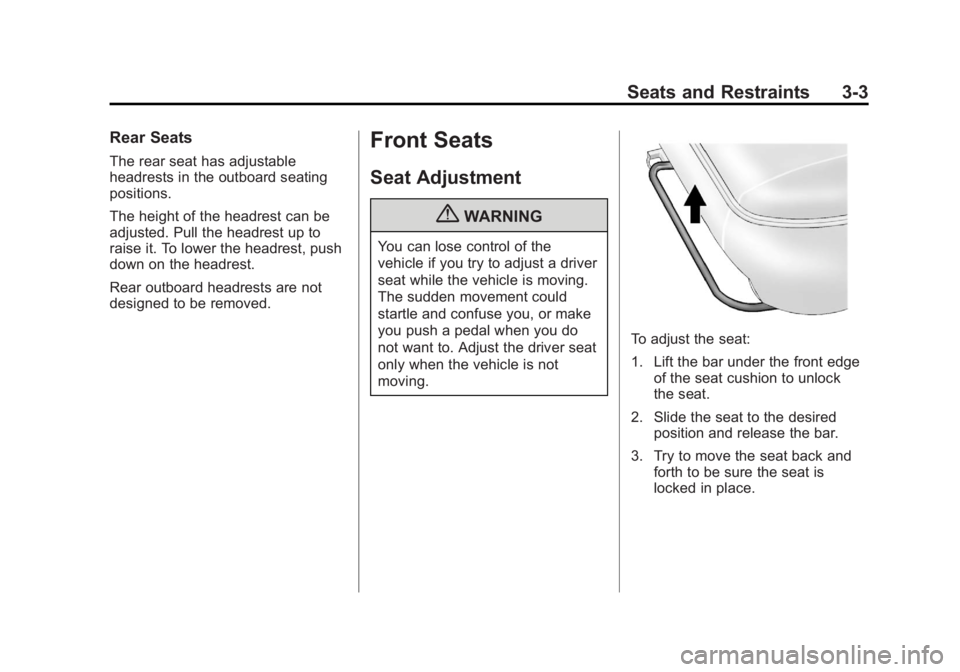
To adjust the seat:
1. Lift the bar under the front edgeof the seat cushion to unlock
the seat.
2. Slide the seat to the desired position and release the bar.
3. Try to move the seat back and forth to be sure the seat is
locked in place.
Page 72 of 556
Black plate (4,1)GMC Sierra Owner Manual - 2012 - CRC - 11/15/11
3-4 Seats and Restraints
Center Seat
If equipped, the center front
seatback doubles as an armrest and
cupholder/storage area for the driver
and passenger when the center
front seat is not used. Do not use it
as a seating position when the
seatback is folded down.
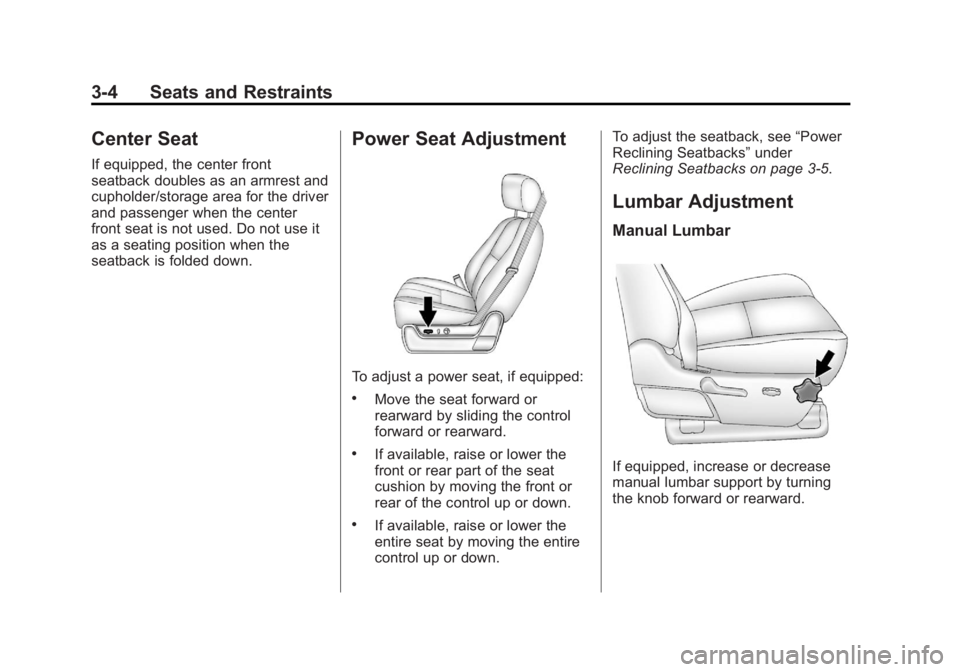
Power Seat Adjustment
To adjust a power seat, if equipped:
.Move the seat forward or
rearward by sliding the control
forward or rearward.
.If available, raise or lower the
front or rear part of the seat
cushion by moving the front or
rear of the control up or down.
.If available, raise or lower the
entire seat by moving the entire
control up or down.To adjust the seatback, see
“Power
Reclining Seatbacks” under
Reclining Seatbacks on page 3‑5.
Lumbar Adjustment
Manual Lumbar
If equipped, increase or decrease
manual lumbar support by turning
the knob forward or rearward.
Page 84 of 556
Black plate (16,1)GMC Sierra Owner Manual - 2012 - CRC - 11/15/11
3-16 Seats and Restraints
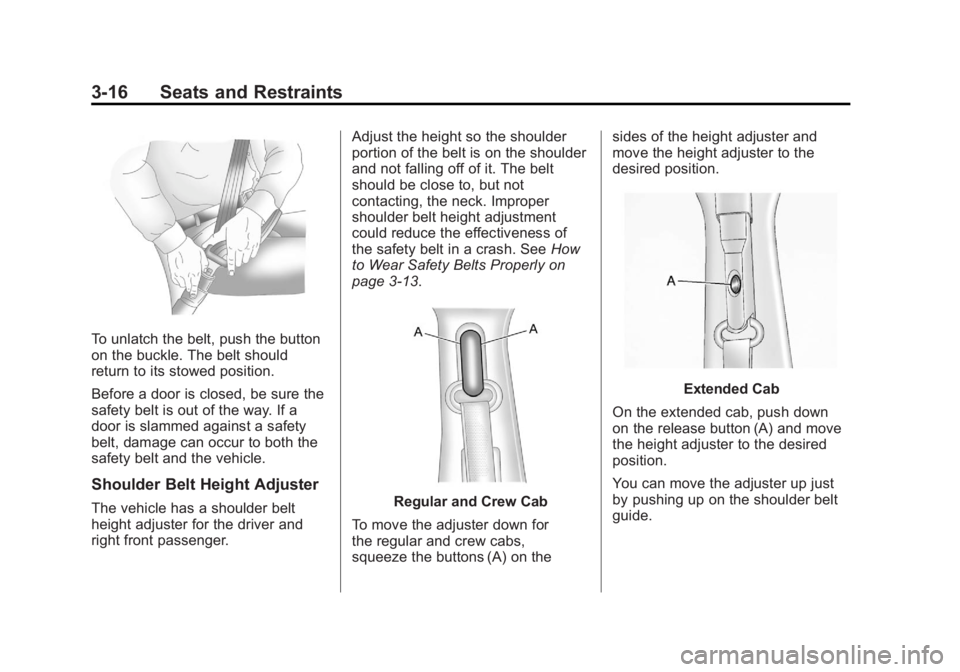
To unlatch the belt, push the button
on the buckle. The belt should
return to its stowed position.
Before a door is closed, be sure the
safety belt is out of the way. If a
door is slammed against a safety
belt, damage can occur to both the
safety belt and the vehicle.
Shoulder Belt Height Adjuster
The vehicle has a shoulder belt
height adjuster for the driver and
right front passenger.Adjust the height so the shoulder
portion of the belt is on the shoulder
and not falling off of it. The belt
should be close to, but not
contacting, the neck. Improper
shoulder belt height adjustment
could reduce the effectiveness of
the safety belt in a crash. See
How
to Wear Safety Belts Properly on
page 3‑13.Regular and Crew Cab
To move the adjuster down for
the regular and crew cabs,
squeeze the buttons (A) on the sides of the height adjuster and
move the height adjuster to the
desired position.
Extended Cab
On the extended cab, push down
on the release button (A) and move
the height adjuster to the desired
position.
You can move the adjuster up just
by pushing up on the shoulder belt
guide.
Page 301 of 556
Black plate (25,1)GMC Sierra Owner Manual - 2012 - CRC - 11/15/11
Driving and Operating 9-25
Starting and
Operating
New Vehicle Break-In
Notice:The vehicle does not
need an elaborate break-in. But it
will perform better in the long run
if you follow these guidelines:
.Keep the vehicle speed at
88 km/h (55 mph) or less for
the first 805 km (500 miles).
.Do not drive at any one
constant speed, fast or
slow, for the first 805 km
(500 miles). Do not make
full-throttle starts. Avoid
downshifting to brake or
slow the vehicle.
.Avoid making hard stops for
the first 322 km (200 miles) or
so. During this time the new
brake linings are not yet
broken in. Hard stops with
new linings can mean
premature wear and earlier replacement. Follow this
breaking-in guideline every
time you get new brake
linings.
.Do not tow a trailer during
break-in. See
Trailer Towing
on page 9‑78 for the trailer
towing capabilities of the
vehicle and more
information.
Following break‐in, engine
speed and load can be gradually
increased.
Adjustable Throttle and
Brake Pedal
On vehicles with this feature, you
can change the position of the
throttle and brake pedals.
No adjustment to the pedals can
be made when the vehicle is in
R (Reverse) or while using cruise
control.
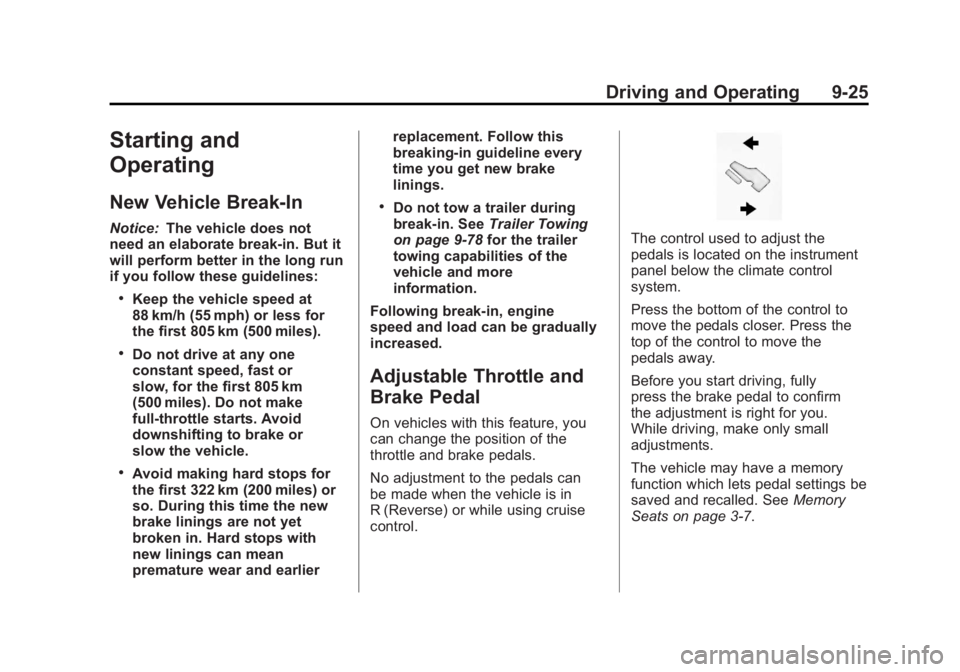
The control used to adjust the
pedals is located on the instrument
panel below the climate control
system.
Press the bottom of the control to
move the pedals closer. Press the
top of the control to move the
pedals away.
Before you start driving, fully
press the brake pedal to confirm
the adjustment is right for you.
While driving, make only small
adjustments.
The vehicle may have a memory
function which lets pedal settings be
saved and recalled. See Memory
Seats on page 3‑7.