display GMC SIERRA 2003 Workshop Manual
[x] Cancel search | Manufacturer: GMC, Model Year: 2003, Model line: SIERRA, Model: GMC SIERRA 2003Pages: 408, PDF Size: 2.58 MB
Page 195 of 408

6 RDM (Random):Press this button to hear the tracks
in random, rather than sequential, order. RDM ALL
will appear on the radio display, which will randomly play
all of the loaded CDs. Press and hold this button until
you hear a beep and the radio will display RDM
ONE, which will randomly play the tracks on the current
CD. Press this button again to turn off random play,
RDM OFF will appear on the radio display.
qSEEKr:Press the right or the left SEEK arrow to
go to the next or to the previous track on the CD.
BAND:Press BAND to listen to the radio when a CD is
playing.
TAPE DISC:Press this button if you have a CD loaded
in the changer and the radio is turned on, to play a
CD. Press this button to switch between playing a tape
and the CD changer if all are loaded.
Compact Disc Changer Errors
CHK CD (Check):If this message appears on the
display, it could be for one of the following reasons:
•You are driving on a very rough road. The CD
should play when the road gets smoother.
•A CD is upside down.
•It is dirty, scratched or wet.
•It is very humid. If so, wait about an hour and try
again.
•The CD player is very hot.
If any error occurs repeatedly or if an error cannot be
corrected, contact your dealership.
Theft-Deterrent Feature
THEFTLOCK®is designed to discourage theft of your
radio. The feature works automatically by learning
a portion of the Vehicle Identification Number (VIN).
If the radio is moved to a different vehicle, it will
not operate and LOCKED will be displayed.
When the radio and vehicle are turned off, the blinking
red light indicates that THEFTLOCK
®is armed.
With THEFTLOCK
®activated, your radio will not operate
if stolen.
3-75
2003 - Sierra Denali
Page 196 of 408

Audio Steering Wheel Controls
You can control certain radio functions using the buttons
on your steering wheel.
g(OnStar/Voice Recognition):If your vehicle has
OnStar®, you can press this button to interact with
the OnStar®system. See the OnStar®manual provided
with your vehicle for more information.
IF your vehicle does not have OnStar
®, pressing this
button will mute the audio system.
PROG (Program):Press this button to play a station
you have programmed on the radio preset pushbuttons
on the selected band. If a cassette tape is playing,
press this button to play the other side of the tape. If a
CD is playing, press this button to go to the next
available CD.
QSOURCER:Press this button to select AM, FM1,
FM2, or XM1 or XM2, (USA only, if equipped), or a
cassette tape or CD. The cassette or CD must be loaded
to play. Available loaded sources are shown on the
display as a tape or a CD symbol.
QSEEKR:Press the up or the down arrow to seek
to the next or to the previous radio station and stay
there.
QVOLR:Press the up or the down arrow to increase
or to decrease volume.
Understanding Radio Reception
AM
The range for most AM stations is greater than for FM,
especially at night. The longer range, however, can
cause stations to interfere with each other. AM can pick
up noise from things like storms and power lines. Try
reducing the treble to reduce this noise if you ever get it.
FM Stereo
FM stereo will give you the best sound, but FM signals
will reach only about 10 to 40 miles (16 to 65 km).
Tall buildings or hills can interfere with FM signals,
causing the sound to come and go.
3-76
2003 - Sierra Denali
Page 197 of 408

XM™Satellite Radio Service (United
States Only)
XM™Satellite Radio gives you digital radio reception
from coast to coast. Just as with FM, tall buildings
or hills can interfere with satellite radio signals, causing
the sound to come and go. Your radio may display
“NO SIGNAL”to indicate interference.
Care of Your Cassette Tape Player
A tape player that is not cleaned regularly can cause
reduced sound quality, ruined cassettes or a damaged
mechanism. Cassette tapes should be stored in their
cases away from contaminants, direct sunlight and
extreme heat. If they aren’t, they may not operate
properly or may cause failure of the tape player.
Your tape player should be cleaned regularly after every
50 hours of use. Your radio may display CLN to
indicate that you have used your tape player for
50 hours without resetting the tape clean timer. If this
message appears on the display, your cassette
tape player needs to be cleaned. It will still play tapes,
but you should clean it as soon as possible to
prevent damage to your tapes and player. If you notice
a reduction in sound quality, try a known good
cassette to see if the tape or the tape player is at fault.
If this other cassette has no improvement in sound
quality, clean the tape player.For best results, use a scrubbing action, non-abrasive
cleaning cassette with pads which scrub the tape
head as the hubs of the cleaner cassette turn. The
recommended cleaning cassette is available through
your dealership.
The cut tape detection feature of your cassette tape
player may identify the cleaning cassette as a damaged
tape, in error. To prevent the cleaning cassette from
being ejected, use the following steps:
1. Turn the ignition on.
2. Turn the radio off.
3. Press and hold the TAPE AUX button forfive
seconds. The tape symbol on the display will
flash for two seconds.
4. Insert the scrubbing action cleaning cassette.
5. Eject the cleaning cassette after the manufacturer’s
recommended cleaning time.
After the cleaning cassette is ejected, the cut tape
detection feature will be active again.
You may also choose a non-scrubbing action, wet-type
cleaner which uses a cassette with a fabric belt to
clean the tape head. This type of cleaning cassette will
not eject on its own. A non-scrubbing action cleaner
may not clean as thoroughly as the scrubbing type
cleaner. The use of a non-scrubbing action, dry-type
cleaning cassette is not recommended.
3-77
2003 - Sierra Denali
Page 198 of 408

After you clean the player, press and hold the EJECT
button forfive seconds to reset the CLN indicator.
The radio will display --- or CLEANED to show the
indicator was reset.
Cassettes are subject to wear and the sound quality
may degrade over time. Always make sure the cassette
tape is in good condition before you have your tape
player serviced.
Care of Your CDs
Handle discs carefully. Store them in their original cases
or other protective cases and away from direct sunlight
and dust. If the surface of a disc is soiled, dampen
a clean, soft cloth in a mild, neutral detergent solution
and clean it, wiping from the center to the edge.
Be sure never to touch the side without writing when
handling discs. Pick up discs by grasping the outer
edges or the edge of the hole and the outer edge.
Care of Your CD Player
The use of CD lens cleaner discs is not advised, due to
the risk of contaminating the lens of the CD optics
with lubricants internal to the CD mechanism.
Fixed Mast Antenna
Thefixed mast antenna can withstand most car washes
without being damaged. If the mast should ever
become slightly bent, you can straighten it out by hand.
If the mast is badly bent, as it might be by vandals,
you should replace it.
Check occasionally to be sure the mast is still tightened
to the cowl. If tightening is required, tighten by hand,
then with a wrench one quarter turn.
XM™Satellite Radio Antenna
System (United States Only)
Your XM™Satellite Radio antenna is located on the
roof of your vehicle. Keep this antenna clear of
snow and ice build up for clear radio reception.
3-78
2003 - Sierra Denali
Page 206 of 408

Remember: Anti-lock doesn’t change the time you need
to get your foot up to the brake pedal or always
decrease stopping distance. If you get too close to the
vehicle in front of you, you won’t have time to apply
your brakes if that vehicle suddenly slows or stops.
Always leave enough room up ahead to stop, even
though you have anti-lock brakes.
Using Anti-Lock
Don’t pump the brakes. Just hold the brake pedal down
rmly and let anti-lock work for you. You may feel
the brakes vibrate, or you may notice some noise, but
this is normal.
Braking in Emergencies
With anti-lock, you can steer and brake at the same
time. In many emergencies, steering can help you more
than even the very best braking.
Supplemental Brake Assist System
If your vehicle has vacuum assist power brakes, it is also
equipped with a supplemental brake assist system
that supplies additional vacuum to the vacuum brake
booster if engine vacuum is reduced. Under certain
conditions, the supplemental brake assist system may
run briey after starting your vehicle or when you
apply and release the brake pedal and it may continueto run even after you have removed your foot from the
brake pedal. When the supplemental brake assist
system is operating, you may hear a motor running or
feel a slight vibration in the steering wheel or brake
pedal. This indicates that the supplemental brake assist
system is working to supply additional vacuum for
your vacuum assist power brakes. This is a normal
operation of your brake system and does not require that
the brake system be serviced.
Each time you start your vehicle and accelerate to
10 mph, the supplemental brake assist system
will perform a self-diagnostic check of the system and
you may hear or feel the supplemental brake assist
motor run briey. While you are driving your vehicle, the
supplemental brake assist system monitors itself to
ensure that it is operating properly. If there is a problem
with the supplemental brake assist system, the
SERVICE BRAKE BOOSTER message will be displayed
on the Driver Information Center. SeeDIC Warnings
and Messages on page 3-51.
If your supplemental brake assist system runs every
time you apply and release the brake pedal or you notice
that the brake pedal has suddenly become much
harder to push and the vehicle takes longer to stop, you
should have your vehicle serviced as soon as possible.
4-8
2003 - Sierra Denali
Page 277 of 408

How to Reset the CHANGE ENGINE OIL
Message
The GM Oil Life System calculates when to change
your engine oil andfilter based on vehicle use. Anytime
your oil is changed, reset the system so it can
calculate when the next oil change is required. If a
situation occurs where you can change your oil prior to
a CHANGE ENGINE OIL message being turned on,
reset the system.
To reset the CHANGE ENGINE OIL message, see“GM
Oil Life System”underDIC Operation and Displays
on page 3-42for vehicles equipped with the DIC, or do
the following:
1. Turn the ignition key to RUN with the engine off.
2. Fully press and release the accelerator pedal three
times withinfive seconds.
If the OIL LIFE RESET messageflashes for 10 seconds,
the system is reset. If the system will not reset, try the
procedure again. If the system still does not reset,
see your dealer for service.
What to Do with Used Oil
Used engine oil contains certain elements that may be
unhealthy for your skin and could even cause cancer.
Don’t let used oil stay on your skin for very long. Clean
your skin and nails with soap and water, or a good
hand cleaner. Wash or properly dispose of clothing or
rags containing used engine oil. See the manufacturer’s
warnings about the use and disposal of oil products.
Used oil can be a threat to the environment. If you
change your own oil, be sure to drain all the oil from the
filter before disposal. Never dispose of oil by putting it
in the trash, pouring it on the ground, into sewers, or into
streams or bodies of water. Instead, recycle it by
taking it to a place that collects used oil. If you have a
problem properly disposing of your used oil, ask
your dealer, a service station or a local recycling center
for help.
5-17
2003 - Sierra Denali
Page 286 of 408
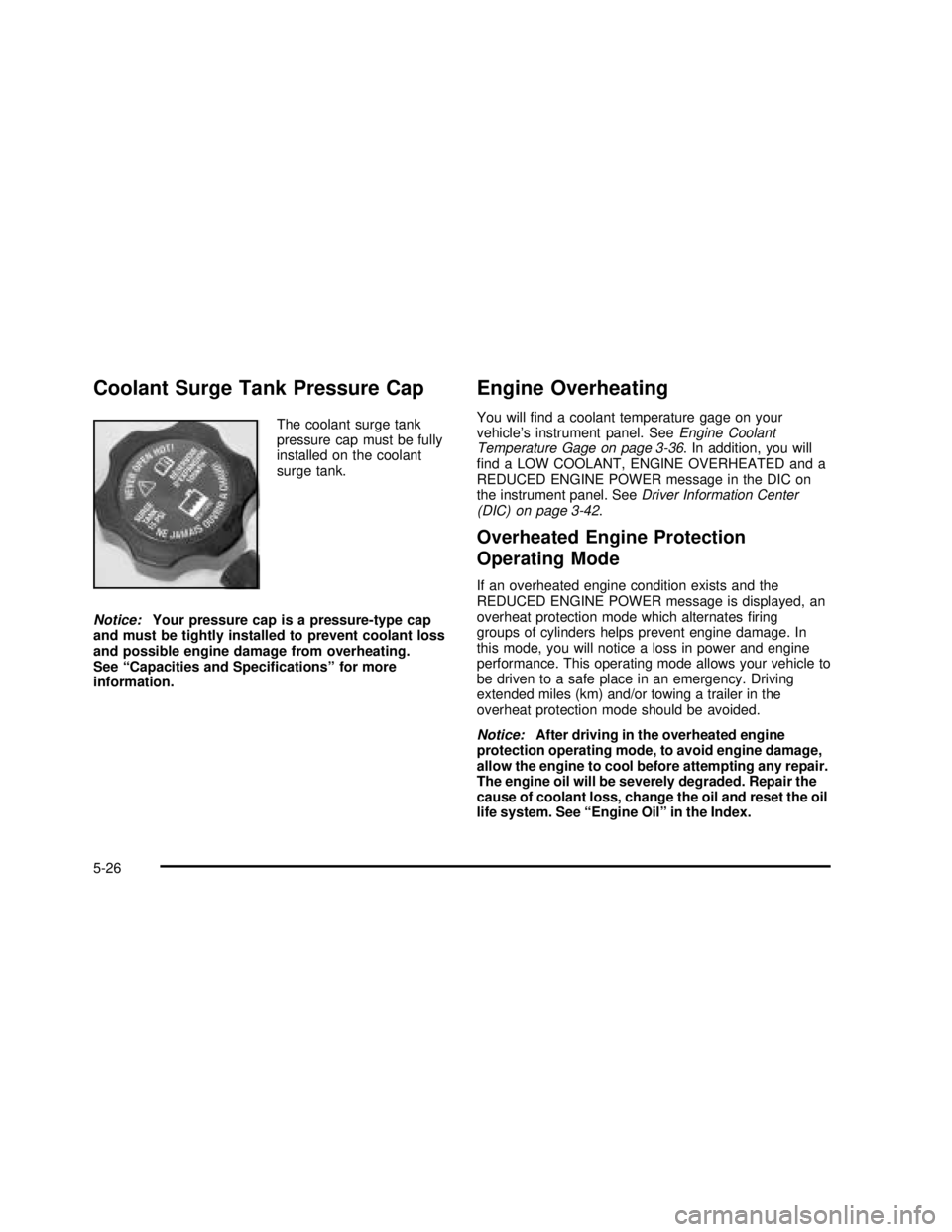
Coolant Surge Tank Pressure Cap
The coolant surge tank
pressure cap must be fully
installed on the coolant
surge tank.
Notice:Your pressure cap is a pressure-type cap
and must be tightly installed to prevent coolant loss
and possible engine damage from overheating.
See“Capacities and Specifications”for more
information.
Engine Overheating
You willfind a coolant temperature gage on your
vehicle’s instrument panel. SeeEngine Coolant
Temperature Gage on page 3-36. In addition, you will
find a LOW COOLANT, ENGINE OVERHEATED and a
REDUCED ENGINE POWER message in the DIC on
the instrument panel. SeeDriver Information Center
(DIC) on page 3-42.
Overheated Engine Protection
Operating Mode
If an overheated engine condition exists and the
REDUCED ENGINE POWER message is displayed, an
overheat protection mode which alternatesfiring
groups of cylinders helps prevent engine damage. In
this mode, you will notice a loss in power and engine
performance. This operating mode allows your vehicle to
be driven to a safe place in an emergency. Driving
extended miles (km) and/or towing a trailer in the
overheat protection mode should be avoided.
Notice:After driving in the overheated engine
protection operating mode, to avoid engine damage,
allow the engine to cool before attempting any repair.
The engine oil will be severely degraded. Repair the
cause of coolant loss, change the oil and reset the oil
life system. See“Engine Oil”in the Index.
5-26
2003 - Sierra Denali
Page 394 of 408

Cleaning the Windshield and Wiper Blades.........5-86
Cleaning Tires................................................5-87
Cleaning Vinyl................................................5-83
Cleaning Wood Panels....................................5-84
Climate Control System
Dual Automatic............................................3-18
Compact Disc Changer Errors..........................3-75
Compact Disc Messages..................................3-70
Compass Calibration.......................................2-30
Compass Variance..........................................2-29
Content Theft-Deterrent....................................2-13
Control of a Vehicle.......................................... 4-5
Coolant
Engine Temperature Gage............................3-36
Heater, Engine............................................2-18
Surge Tank Pressure Cap.............................5-26
Cooling System..............................................5-29
Cruise Control.................................................. 3-8
Cruise Control Light........................................3-40
Cupholder(s)..................................................2-39
Current and Past Model Order Forms................7-10
Customer Assistance Information
Courtesy Transportation
.................................. 7-7
Customer Assistance for Text Telephone (TTY)
Users
....................................................... 7-3
Customer Assistance Offices
........................... 7-4
Customer Satisfaction Procedure
..................... 7-2
GM Mobility Program for Persons with
Disabilities
................................................ 7-5
Reporting Safety Defects to General Motors
...... 7-9Customer Assistance Information (cont.)
Reporting Safety Defects to the Canadian
Government.............................................. 7-9
Reporting Safety Defects to the United States
Government.............................................. 7-8
Roadside Assistance Program......................... 7-5
Service Publications Ordering Information......... 7-9
D
Daytime Running Lamps..................................3-13
Defensive Driving............................................. 4-2
Defogging and Defrosting.................................3-22
Doing Your Own Service Work........................... 5-3
Dome Lamps .................................................3-16
Door
Locks.......................................................... 2-6
Power Door Locks......................................... 2-7
Programmable Automatic Door Locks............... 2-7
Rear Doors.................................................. 2-9
Driver
Position, Safety Belt.....................................1-12
DRIVER DOOR AJAR.....................................3-56
Driver Information Center (DIC).........................3-42
DIC Operation and Displays..........................3-42
DIC Warnings and Messages........................3-51
Driving
At Night.....................................................4-30
City ...........................................................4-35
Defensive..................................................... 4-2
4
2003 - Sierra Denali
Page 395 of 408

Driving (cont.)
Drunken....................................................... 4-2
Freeway.....................................................4-36
Hill and Mountain Roads..............................4-38
In Rain and on Wet Roads...........................4-32
Winter........................................................4-40
Driving Across an Incline..................................4-27
Driving Downhill..............................................4-25
Driving in Mud, Sand, Snow or Ice....................4-28
Driving in Water..............................................4-29
Driving On Grades..........................................4-59
Driving on Off-Road Hills.................................4-23
Driving on Snow or Ice....................................4-40
Driving Through Deep Standing Water...............4-34
Driving Through Flowing Water.........................4-34
Driving Uphill..................................................4-24
Driving with a Trailer.......................................4-58
Dual Automatic Climate Control System.............3-18
E
Easy Exit Seat...............................................2-42
Electrical System
Add-On Equipment......................................5-91
Fuses and Circuit Breakers...........................5-91
Power Windows and Other Power Options......5-91
Windshield Wiper Fuses...............................5-91
Electrochromic Mirror Operation........................2-28
Emissions Inspection and Maintenance
Programs...................................................3-39Engine
Air Cleaner/Filter
.........................................5-18
Battery
.......................................................5-39
Check and Service Engine Soon Light
............3-37
Compartment Overview
................................5-12
Coolant
......................................................5-23
Coolant Heater
............................................2-18
Coolant Temperature Gage
...........................3-36
Cooling System Inspection
............................6-14
Exhaust
.....................................................2-26
Fan Noise
..................................................5-34
Oil
.............................................................5-13
Overheating
................................................5-26
Starting
......................................................2-17
ENGINE COOLANT HOT
.................................3-52
Engine Coolant Level Check
.............................6-10
Engine Hour Meter Display
...............................3-26
Engine Oil Additives
........................................5-16
Engine Oil Level Check
...................................6-10
ENGINE OVERHEATED
..................................3-52
Entry Lighting
.................................................3-15
Environmental Concerns
..................................4-20
Erasing HomeLink
®Buttons
..............................2-38
Exit Lighting
...................................................3-15
Express-Down Windows
...................................2-12
Extender, Safety Belt
.......................................1-28
Exterior Lamps
...............................................3-11
5
2003 - Sierra Denali
Page 399 of 408

M
Maintenance, Normal Replacement Parts..........5-100
Maintenance Schedule
At Each Fuel Fill.........................................6-10
At Least Once a Month................................6-10
At Least Once a Year..................................6-11
At Least Twice a Year..................................6-10
Brake System Inspection..............................6-15
Engine Cooling System Inspection.................6-14
Exhaust System Inspection...........................6-14
Fuel System Inspection................................6-14
How This Section is Organized....................... 6-3
Introduction.................................................. 6-2
Maintenance Requirements............................. 6-2
Part A - Scheduled Maintenance Services......... 6-4
Part B - Owner Checks and Services.............6-10
Part C - Periodic Maintenance Inspections......6-14
PartD-Recommended Fluids and Lubricants....6-15
PartE-Maintenance Record........................6-17
Scheduled Maintenance................................. 6-5
Steering and Suspension Inspection...............6-14
Transfer Case and Front Axle (All-Wheel
Drive) Inspection......................................6-15
Using Your................................................... 6-4
Your Vehicle and the Environment................... 6-2
Maintenance When Trailer Towing.....................4-60Making Turns.................................................4-59
Malfunction Indicator Light................................3-37
Manual Selectable Ride..................................... 4-9
Matching Transmitter(s) to Your Vehicle............... 2-5
Memory Seat.................................................2-41
Message
DIC Warnings and Messages........................3-51
Mexico, Central America and Caribbean Islands/
Countries (Except Puerto Rico and U.S. Virgin
Islands)....................................................... 7-4
Mirrors
Automatic Dimming Rearview with OnStar
®,
Compass and Temperature Display.............2-28
Outside Automatic Dimming Mirror.................2-32
Outside Convex Mirror.................................2-32
Outside Curb View Assist Mirrors...................2-32
Outside Heated Mirrors................................2-32
Outside Power Foldaway Mirrors....................2-31
Outside Power Mirrors..................................2-31
MyGMLink.com
................................................ 7-3
N
Navigation/Radio System
..................................3-70
New Vehicle Break-In
......................................2-15
Normal Maintenance Replacement Parts
...........5-100
9
2003 - Sierra Denali