ESP GMC SIERRA 2007 User Guide
[x] Cancel search | Manufacturer: GMC, Model Year: 2007, Model line: SIERRA, Model: GMC SIERRA 2007Pages: 680, PDF Size: 3.42 MB
Page 139 of 680
When parked on a hill, especially when the vehicle
has a heavy load, you might notice an increase in
the effort to shift out of Park. See Torque Lock
(Automatic Transmission) underShifting Into
Park (P) on page 163for more information.
{CAUTION:
It is dangerous to get out of your vehicle
if the shift lever is not fully in PARK (P)
with the parking brake rmly set. Your
vehicle can roll.
Do not leave your vehicle when the engine
is running unless you have to. If you have
left the engine running, the vehicle can
move suddenly. You or others could be
injured. To be sure your vehicle will not
move, even when you are on fairly level
ground, always set your parking brake
and move the shift lever to PARK (P). See
Shifting Into Park (P) on page 163.Ifyou
are pulling a trailer, seeTowing a Trailer
on page 445.
{CAUTION:
If you have Four-Wheel Drive, your vehicle
will be free to roll — even if your shift lever
is in PARK (P) — if your transfer case is in
NEUTRAL. So, be sure the transfer case is
in a drive gear, Two-Wheel Drive High or
Four-Wheel Drive High or Four-Wheel Drive
Low — not in NEUTRAL. SeeShifting Into
Park (P) on page 163.
REVERSE (R):Use this gear to back up.
Notice:Shifting to REVERSE (R) while your
vehicle is moving forward could damage the
transmission. The repairs would not be covered
by your warranty. Shift to REVERSE (R) only
after your vehicle is stopped.
To rock your vehicle back and forth to get out of
snow, ice, or sand without damaging your
transmission, seeIf Your Vehicle is Stuck in Sand,
Mud, Ice, or Snow on page 422.
139
Page 156 of 680
Shifting Out of NEUTRAL
To shift out of NEUTRAL do the following:
1. Set the parking brake and apply the regular
brake pedal.
2. Shift the transmission to NEUTRAL (N) and
turn the ignition to RUN with the engine off.
3. Turn the transfer case dial to
Two-Wheel-Drive High.
After the transfer case has shifted out of
NEUTRAL the NEUTRAL light will go out.
4. Release the parking brake prior to moving the
vehicle.
Notice:Shifting the transmission into gear
before the requested mode indicator light has
stopped ashing could damage the transfer
case. To help avoid damaging your vehicle,
always wait for the mode indicator lights
to stop ashing before shifting the
transmission into gear.
5. Start the engine and shift the transmission to
the desired position.Excessively shifting the transfer case into or out of
the different modes may cause the transfer
case to enter the shift protection mode. This will
protect the transfer case from possible damage
and will only allow the transfer case to respond to
one shift per 10 seconds. The transfer case
may stay in this mode for up to three minutes.
Automatic Transfer Case
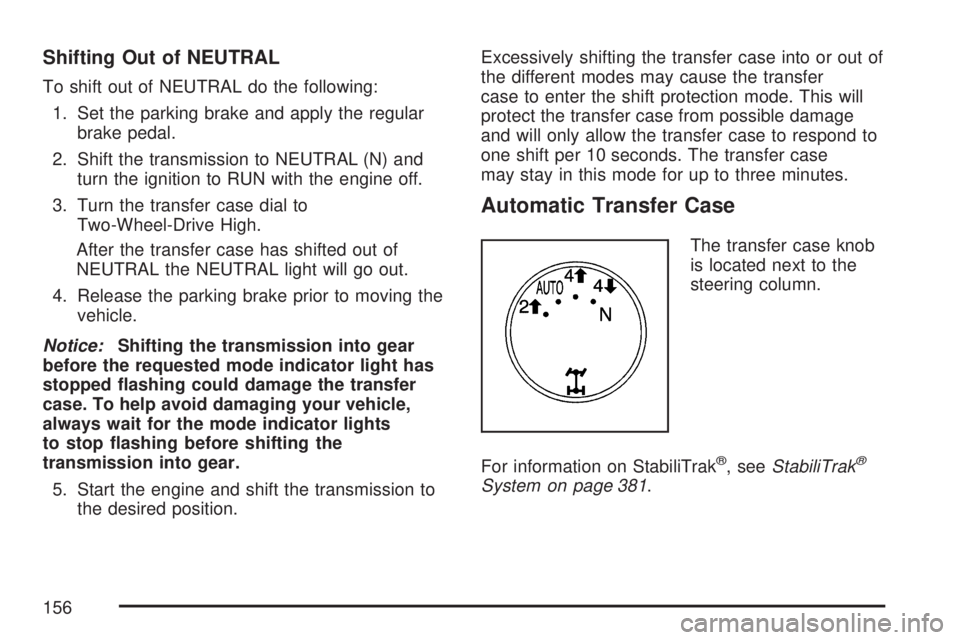
The transfer case knob
is located next to the
steering column.
For information on StabiliTrak
®, seeStabiliTrak®
System on page 381.
156
Page 183 of 680
OnStar®service cannot work unless your vehicle
is in a place where OnStar®has an agreement
with a wireless service provider for service in that
area. OnStar
®service also cannot work unless
you are in a place where the wireless service
provider OnStar
®has hired for that area
has coverage, network capacity and reception
when the service is needed, and technology that
is compatible with the OnStar
®service. Not all
services are available everywhere, particularly in
remote or enclosed areas, or at all times.
OnStar
®service that involves location information
about your vehicle cannot work unless GPS
satellite signals are unobstructed and available in
that place as well.Your vehicle must have a working electrical
system (including adequate battery power) for the
OnStar
®equipment to operate. There are other
problems OnStar®cannot control that may prevent
OnStar®from providing OnStar®service to you
at any particular time or place. Some examples are
damage to important parts of your vehicle in an
accident, hills, tall buildings, tunnels, weather
or wireless phone network congestion.
Your Responsibility
You may need to increase the volume of your
radio to hear the OnStar®advisor. If the light next
to the OnStar®buttons is red, this means that
your system is not functioning properly and should
be checked by your dealer/retailer. If the light
appears clear (no light is appearing), your OnStar
®
subscription has expired. You can always press
the OnStar®button to conrm that your OnStar®
equipment is active.
183
Page 222 of 680
2(Headlamps):Turn the control to this position
to turn on the headlamps together with the
following:
Parking Lamps
Instrument Panel Lights
Taillamps
License Plate Lamps
When the headlamps are turned on while the
vehicle is on, the headlamps turn off automatically
10 minutes after the ignition is turned off. When
the headlamps are turned on while the vehicle
is off, the headlamps will stay on for 10 minutes
before automatically turning off to prevent the
battery from being drained. Turn the headlamp
control to off and then back to the headlamp
on position to make the headlamps stay on for an
additional 10 minutes.
Push the turn signal/multifunction lever toward the
instrument panel to change the headlamps
from low beam to high beam.
Headlamps on Reminder
A reminder chime will sound when the headlamps
or parking lamps are manually turned on and
your ignition is off and a door is open. To disable
the chime, turn the light off.
Daytime Running Lamps (DRL)
Daytime Running Lamps (DRL) can make it easier
for others to see the front of your vehicle during
the day. DRL can be helpful in many different
driving conditions, but they can be especially
helpful in the short periods after dawn and before
sunset. Fully functional DRL are required on all
vehicles rst sold in Canada.
The DRL system will come on when the following
conditions are met:
The engine is running.
The ignition is on.
The exterior lamps control is in AUTO.
The light sensor determines it is daytime.
222
Page 278 of 680
Relearn Remote Key
To access this display, the vehicle must be in
PARK (P). This display allows you to match
Remote Keyless Entry (RKE) transmitters to your
vehicle. To match an RKE transmitter to your
vehicle, do the following:
1. Press the trip odometer reset stem until
RELEARN REMOTE KEY displays.
2. Press and hold the trip odometer reset stem
for three seconds.
The message REMOTE KEY LEARNING
ACTIVE will display.
3. Press and hold the lock and unlock buttons
on the rst transmitter at the same time for
about 15 seconds.
On vehicles with memory recall seats, the rst
transmitter learned will match driver 1 and
the second will match driver 2.
A chime will sound indicating that the
transmitter is matched.
4. To match additional transmitters at this time,
repeat Step 3.
Each vehicle can have a maximum of
eight transmitters matched to it.
5. To exit the programming mode, you must
cycle the key to LOCK.
Language
This display allows you to select the language in
which the DIC messages will appear. To select
a language, do the following:
1. Press the trip odometer reset stem until
ODOMETER displays.
2. While in the ODOMETER display, press
and hold the trip odometer reset stem for
three seconds until the currently set
language displays.
3. Continue to press and hold the trip odometer
reset stem to scroll through all of the available
languages.
The available languages are ENGLISH
(default), FRANCAIS (French), ESPANOL
(Spanish), and NO CHANGE.
4. Once the desired language is displayed,
release the trip odometer reset stem to
set your choice.
278
Page 291 of 680

Press the customization button until the DISPLAY
LANGUAGE screen appears on the DIC display.
Press the set/reset button once to access the
settings for this feature. Then press the
customization button to scroll through the
following settings:
ENGLISH (default):All messages will appear
in English.
FRANCAIS:All messages will appear in French.
ESPANOL:All messages will appear in Spanish.
NO CHANGE:No change will be made to this
feature. The current setting will remain.
Choose one of the available settings and press
the set/reset button while it is displayed on the DIC
to select it.
You can also change the language by pressing
the trip odometer reset stem. See “Language”
under DIC Operation and Displays (Without DIC
Buttons) earlier in this section for more information.AUTO DOOR LOCK
This feature allows you to select when the
vehicle’s doors will automatically lock. See
Programmable Automatic Door Locks on page 119
for more information.
Press the customization button until AUTO DOOR
LOCK appears on the DIC display. Press the
set/reset button once to access the settings for this
feature. Then press the customization button to
scroll through the following settings:
SHIFT OUT OF PARK (default):The doors will
automatically lock when the vehicle is shifted out of
PARK (P).
AT VEHICLE SPEED:The doors will
automatically lock when the vehicle speed is
above 8 mph (13 km/h) for three seconds.
NO CHANGE:No change will be made to this
feature. The current setting will remain.
Choose one of the available settings and press
the set/reset button while it is displayed on the DIC
to select it.
291
Page 370 of 680
AM
The range for most AM stations is greater than for
FM, especially at night. The longer range can cause
station frequencies to interfere with each other. For
better radio reception, most AM radio stations
boosts the power levels during the day, and then
reduce these levels during the night. Static can also
occur when things like storms and power lines
interfere with radio reception. When this happens,
try reducing the treble on your radio.
FM Stereo
FM stereo gives the best sound, but FM signals
only reach about 10 to 40 miles (16 to 65 km). Tall
buildings or hills can interfere with FM signals,
causing the sound to fade in and out.
XM™ Satellite Radio Service
XM™ Satellite Radio Service gives digital radio
reception from coast-to-coast in the 48 contiguous
United States, and in Canada. Just as with FM,
tall buildings or hills can interfere with satellite
radio signals, causing the sound to fade in and out.In addition, traveling or standing under heavy
foliage, bridges, garages, or tunnels could cause
loss of the XM™ signal for a period of time.
The radio might display NO XM SIGNAL to
indicate interference.
Care of Your CDs and DVDs
Handle CDs carefully. Store them in their original
cases or other protective cases and away from
direct sunlight and dust. The CD player scans the
bottom surface of the disc. If the surface of a
CD is damaged, such as cracked, broken,
or scratched, the CD does not play properly or not
at all. If the surface of a CD is soiled, take a
soft, lint free cloth or dampen a clean, soft cloth in
a mild, neutral detergent solution mixed with
water, and clean it. Make sure the wiping process
starts from the center to the edge.
Do not touch the bottom side of a CD while
handling it; this could damage the surface. Pick up
CDs by grasping the outer edges or the edge of
the hole and the outer edge.
370
Page 377 of 680
But the ability to drive is affected well below a
BAC of 0.10 percent. Research shows that
the driving skills of many people are impaired at a
BAC approaching 0.05 percent, and that the
effects are worse at night. All drivers are impaired
at BAC levels above 0.05 percent. Statistics
show that the chance of being in a collision
increases sharply for drivers who have a BAC of
0.05 percent or above. A driver with a BAC level of
0.06 percent has doubled his or her chance of
having a collision. At a BAC level of 0.10 percent,
the chance of this driver having a collision is
12 times greater; at a level of 0.15 percent, the
chance is 25 times greater!
The body takes about an hour to rid itself of the
alcohol in one drink. No amount of coffee or number
of cold showers will speed that up. “I will be careful”
is not the right answer. What if there is an
emergency, a need to take sudden action, as when
a child darts into the street? A person with even a
moderate BAC might not be able to react quickly
enough to avoid the collision.There is something else about drinking and driving
that many people do not know. Medical research
shows that alcohol in a person’s system can make
crash injuries worse, especially injuries to the
brain, spinal cord, or heart. This means that when
anyone who has been drinking — driver or
passenger — is in a crash, that person’s chance
of being killed or permanently disabled is
higher than if the person had not been drinking.
{CAUTION:
Drinking and then driving is very
dangerous. Your reexes, perceptions,
attentiveness, and judgment can be
affected by even a small amount of
alcohol. You can have a serious — or
even fatal — collision if you drive after
drinking. Please do not drink and drive or
ride with a driver who has been drinking.
Ride home in a cab; or if you are with a
group, designate a driver who will not
drink.
377
Page 388 of 680
So here are some tips for passing:
Drive ahead. Look down the road, to the
sides, and to crossroads for situations
that might affect your passing patterns. If you
have any doubt whatsoever about making
a successful pass, wait for a better time.
Watch for traffic signs, pavement markings,
and lines. If you can see a sign up ahead
that might indicate a turn or an intersection,
delay your pass. A broken center line
usually indicates it is all right to pass, providing
the road ahead is clear. Never cross a solid
line on your side of the lane or a double solid
line, even if the road seems empty of
approaching traffic.
Do not get too close to the vehicle you want
to pass while you are awaiting an opportunity.
For one thing, following too closely reduces
your area of vision, especially if you are
following a larger vehicle. Also, you will not
have adequate space if the vehicle ahead
suddenly slows or stops. Keep back a
reasonable distance.
When it looks like a chance to pass is coming
up, start to accelerate but stay in the right
lane and do not get too close. Time your moveso you will be increasing speed as the time
comes to move into the other lane. If the way
is clear to pass, you will have a running
start that more than makes up for the distance
you would lose by dropping back. And if
something happens to cause you to cancel
your pass, you need only slow down and drop
back again and wait for another opportunity.
If other vehicles are lined up to pass a slow
vehicle, wait your turn. But take care that
someone is not trying to pass you as you pull
out to pass the slow vehicle. Remember to
glance over your shoulder and check the
blind spot.
Check your vehicle’s mirrors, glance over your
shoulder, and start your left lane change signal
before moving out of the right lane to pass.
When you are far enough ahead of the passed
vehicle to see its front in your vehicle’s inside
mirror, activate the right lane change signal
and move back into the right lane. Remember
that, if your vehicle’s passenger side outside
mirror is convex, the vehicle you just passed
may seem to be farther away from you than it
really is.
388
Page 389 of 680
Try not to pass more than one vehicle at a time
on two-lane roads. Reconsider before passing
the next vehicle.
Do not overtake a slowly moving vehicle
too rapidly. Even though the brake lamps are
not ashing, it may be slowing down or starting
to turn.
If you are being passed, make it easy for the
following driver to get ahead of you. Perhaps
you can ease a little to the right.
Loss of Control
Let us review what driving experts say
about what happens when the three
control systems — brakes, steering, and
acceleration — do not have enough friction
where the tires meet the road to do what the
driver has asked.
In any emergency, do not give up. Keep trying to
steer and constantly seek an escape route or
area of less danger.
Skidding
In a skid, a driver can lose control of the vehicle.
Defensive drivers avoid most skids by taking
reasonable care suited to existing conditions, and
by not overdriving those conditions. But skids
are always possible.
The three types of skids correspond to your
vehicle’s three control systems. In the braking skid,
your wheels are not rolling. In the steering or
cornering skid, too much speed or steering in a
curve causes tires to slip and lose cornering force.
And in the acceleration skid, too much throttle
causes the driving wheels to spin.
A cornering skid is best handled by easing your
foot off the accelerator pedal.
Remember: StabiliTrak
®helps avoid only the
acceleration skid. SeeStabiliTrak®System
on page 381. If the StabiliTrak®System is off,
then an acceleration skid is also best handled by
easing your foot off the accelerator pedal.
389