center console GMC SIERRA 2014 User Guide
[x] Cancel search | Manufacturer: GMC, Model Year: 2014, Model line: SIERRA, Model: GMC SIERRA 2014Pages: 544, PDF Size: 13.79 MB
Page 200 of 544
Black plate (6,1)GMC Sierra Owner Manual (GMNA-Localizing-U.S./Canada/Mexico-
5853626) - 2014 - 3rd crc - 6/6/14
6-6 Lighting
When the headlamps are changed
to high beam, the fog lamps go off.
When the high-beam headlamps are
turned off, the fog lamps will come
on again.
Some localities have laws that
require the headlamps to be on with
the fog lamps.
Auxiliary
Roof-Mounted Lamp
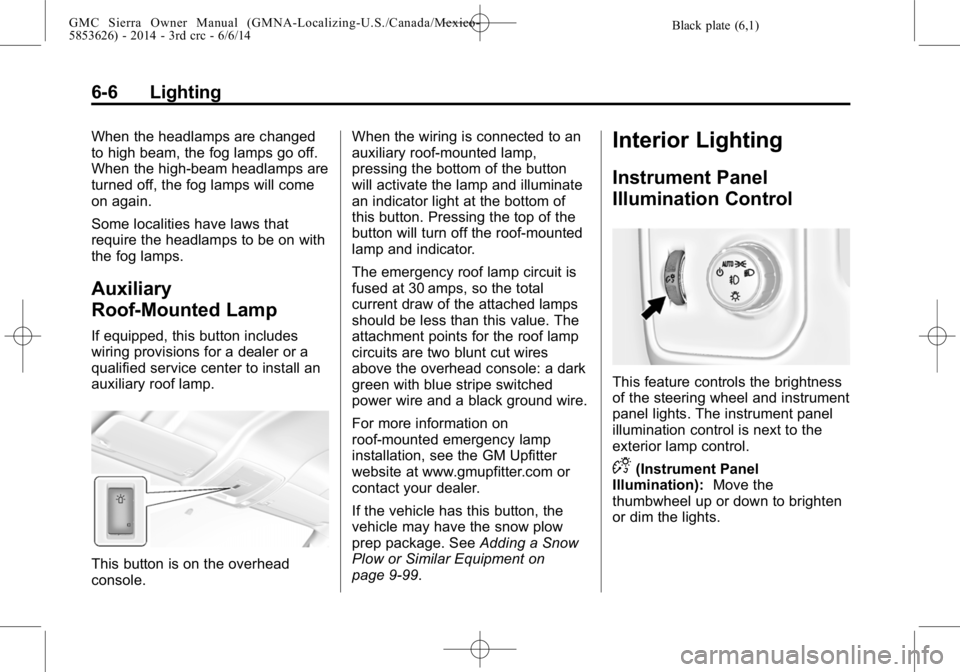
If equipped, this button includes
wiring provisions for a dealer or a
qualified service center to install an
auxiliary roof lamp.
This button is on the overhead
console.When the wiring is connected to an
auxiliary roof-mounted lamp,
pressing the bottom of the button
will activate the lamp and illuminate
an indicator light at the bottom of
this button. Pressing the top of the
button will turn off the roof-mounted
lamp and indicator.
The emergency roof lamp circuit is
fused at 30 amps, so the total
current draw of the attached lamps
should be less than this value. The
attachment points for the roof lamp
circuits are two blunt cut wires
above the overhead console: a dark
green with blue stripe switched
power wire and a black ground wire.
For more information on
roof-mounted emergency lamp
installation, see the GM Upfitter
website at www.gmupfitter.com or
contact your dealer.
If the vehicle has this button, the
vehicle may have the snow plow
prep package. See
Adding a Snow
Plow or Similar Equipment on
page 9-99.
Interior Lighting
Instrument Panel
Illumination Control
This feature controls the brightness
of the steering wheel and instrument
panel lights. The instrument panel
illumination control is next to the
exterior lamp control.
D(Instrument Panel
Illumination): Move the
thumbwheel up or down to brighten
or dim the lights.
Page 223 of 544
Black plate (19,1)GMC Sierra Owner Manual (GMNA-Localizing-U.S./Canada/Mexico-
5853626) - 2014 - 3rd crc - 6/6/14
Infotainment System 7-19
No Folder
When the CD only contains
compressed audio files without any
folders, all files are under the root
folder.
USB Port
Playing from a USB
A USB mass storage device or
Media Transfer Protocol (MTP)
device can be connected to the
USB port.
The USB ports are in the center
console.
USB MP3 Player and USB Drives
.The USB MP3 players and USB
drives connected must comply
with the USB Mass Storage
Class specification (USB MSC).
.Hard disk drives are not
supported.
To play a USB device:
.Connect the USB.
.Press the MEDIA button on the
faceplate until the connected
device is shown.
While the USB source is active,
press the corresponding faceplate
button for the icons on the screen to
operate USB function:
.t(Seek Previous/Fast
Reverse)
.u(Seek Next/Fast Forward)
.j/r(Play/Pause)
.Z(Shuffle)
For information on how to use the
screen icons, see “Playing an
Audio CD.”
USB Menu
Press the MENU knob to display the
USB menu and the following may
display:
Browse : Select to display the files
and folders on the USB device. Tone Settings :
Select to adjust
Bass, Midrange, Treble, Balance,
Fade, and EQ (Equalizer). See
“Tone Settings” under“Playing an
Audio CD.”
Auto Volume : If equipped, see
“Playing an Audio CD.”
EQ (Equalizer): If equipped, this
feature adjusts the equalizer
settings. See “EQ (Equalizer)
Settings” inAM-FM Radio on
page 7-9.Playing from an iPod®
This feature supports the following
iPod models:
.iPod nano®(1st, 2nd, 3rd, and
4th generation)
.iPod with video (5.0 and 5.5
generation).
.iPod classic®(6th generation)
.iPod touch®(1st and 2nd
generation)
Page 224 of 544
Black plate (20,1)GMC Sierra Owner Manual (GMNA-Localizing-U.S./Canada/Mexico-
5853626) - 2014 - 3rd crc - 6/6/14
7-20 Infotainment System
There may be problems with
operation and function in the
following situations:
.When connecting an iPod with a
more recent version of the
firmware installed than is
supported by the infotainment
system.
.When connecting an iPod on
which firmware from other
providers is installed.
To connect and control an iPod:
1. Connect one end of the standard iPod USB cable to the iPod's
dock connector.
2. Connect the other end to a USB port in the center console.
3. Press the MEDIA button to select the source.
iPod music information displays on
the radio’s display and begins
playing through the vehicle’s audio
system. The iPod battery recharges
automatically while the vehicle is on.
When the vehicle is off while an
iPod is connected using the iPod
USB cable, the iPod battery stops
charging and the iPod automatically
turns off.
If the iPod is an unsupported model,
it can still be listened to in the
vehicle by connecting to the
auxiliary input jack using a standard
3.5 mm (1/8 in) stereo cable.
iPod Menu
Press the MENU knob to display the
iPod Menu and the following may
display:
Browse :
Select to display the files
or songs on the iPod. See “Browse
iPod Media” later in this section.
Tone Settings : Select to adjust
Bass, Midrange, Treble, Balance,
Fade, and EQ (Equalizer). See
“Tone Settings” under“Playing an
Audio CD.”
Auto Volume : If equipped, see
“Playing an Audio CD.” EQ (Equalizer) Settings:
If equipped, this feature adjusts the
Equalizer settings. See
“EQ
(Equalizer) Settings” inAM-FM
Radio on page 7-9.
Browse iPod Media
Use the following to browse:
Playlists:
1. Turn the MENU knob to highlight and press to view the playlists
stored on the iPod.
2. Turn the MENU knob to highlight and press to select a playlist
name to view a list of all songs
in the playlist.
3. Turn the MENU knob to highlight and press to select the song
from the list to begin playback.
Artists:
1. Turn the MENU knob to highlight and press to view the artists
stored on the iPod.
Page 225 of 544
Black plate (21,1)GMC Sierra Owner Manual (GMNA-Localizing-U.S./Canada/Mexico-
5853626) - 2014 - 3rd crc - 6/6/14
Infotainment System 7-21
2. Turn the MENU knob to highlightand press to select an artist
name to view a list of all albums
by the artist.
3. Turn the MENU knob to highlight and press to select an album
name to view a list of all songs
on the album.
4. Turn the MENU knob to highlight and press to select the song
from the list to begin playback.
Albums:
1. Turn the MENU knob to highlight and press to view the albums
stored on the iPod.
2. Turn the MENU knob to highlight and press to select an album
name to view a list of all songs
on the album.
3. Turn the MENU knob to highlight and press to select the song
from the list to begin playback. Genres:
1. Turn the MENU knob to highlight
and press to view the genres
stored on the iPod.
2. Turn the MENU knob to highlight and press to select a genre
name to view a list of artists of
that genre.
3. Turn the MENU knob to highlight and press to select to view
albums by that artist.
4. Turn the MENU knob to highlight and press to select an album to
view songs.
5. Turn the MENU knob to highlight and press to select the song
from the list to begin playback.
Songs:
1. Turn the MENU knob to highlight and press to view a list of all
songs stored on the iPod.
2. Turn the MENU knob to highlight and press to select the song
from the list to begin playback.Playing from an iPhone®
or iPad®
This feature supports iPhone 3G,
iPhone 3GS, iPhone 4, and iPad.
Follow the same instructions as
stated earlier for using an iPod.
SD Card Reader
This vehicle has an SD card reader
in the center console. See Center
Console Storage on page 4-3.
1. Plug the SD card into the reader.
2. Press the MEDIA button to select the SD device.
If an SD card has already been
connected, but a different source is
currently active, press the MEDIA
screen button repeatedly to cycle
through all of the available audio
source screens, until the SD card
screen is shown.
Page 226 of 544
Black plate (22,1)GMC Sierra Owner Manual (GMNA-Localizing-U.S./Canada/Mexico-
5853626) - 2014 - 3rd crc - 6/6/14
7-22 Infotainment System
Playing Music from the SD Card
An SD Card is played the same way
a USB device is played. SeeUSB
Port on page 7-19.
Auxiliary Jack
The AUX jack is in the center
console. See Center Console
Storage on page 4-3.
Possible auxiliary audio sources
include:
.Laptop computer
.Audio music player
This jack is not an audio output. Do
not plug headphones into the
auxiliary input jack. Auxiliary
devices should be set up while the
vehicle is in P (Park).
Connect a 3.5 mm (1/8 in) cable
from the auxiliary device to the
auxiliary input jack.
If an auxiliary device has already
been connected, but a different
source is currently active, press the
MEDIA faceplate button repeatedly to scroll through all of the available
audio source screens, until the AUX
source screen is shown.
Playing from the AUX Jack
An auxiliary device is played
through the audio system and
controlled through the device itself.
AUX Menu
Press the MENU knob to display the
AUX menu and the following may
display:
Tone Settings :
Select to adjust
Bass, Midrange, Treble, Balance,
Fade, and EQ (Equalizer). See
“Tone Settings” underAM-FM Radio
on page 7-9.
Auto Volume : If equipped, see
“Playing an Audio CD.”
DSP: If equipped, this feature
adjusts the pre-defined settings.
See “DSP Settings” inAM-FM Radio
on page 7-9. EQ (Equalizer) Settings:
If equipped, this feature adjusts the
pre-defined equalizer settings. See
“EQ (Equalizer) Settings”
inAM-FM
Radio on page 7-9.
Bluetooth Audio
If equipped, music may be played
from a paired Bluetooth device. See
“Pairing” in“Information Controls”
under “Bluetooth” for help pairing a
device.
Volume and song selection may be
controlled using the Infotainment
controls or on the phone/device.
If Bluetooth Audio is selected and
nothing is heard, check the volume
setting on both phone/device and
the Infotainment system.
Page 299 of 544
Black plate (29,1)GMC Sierra Owner Manual (GMNA-Localizing-U.S./Canada/Mexico-
5853626) - 2014 - CRC - 6/6/14
Driving and Operating 9-29
The APOs in the console or center
seat position are powered by RAP.
They will continue to work for up to
10 minutes after the key is turned
from ON/RUN to LOCK/OFF, or until
the driver door is opened.
The APOs on the center stack come
from the factory powered directly
from the vehicle battery, and supply
accessory power at all times,
regardless of ignition key position.
If electronic items are left plugged
into these APOs for long periods of
time with the vehicle off, the vehicle
battery could be drained. The
vehicle may not start if the battery is
allowed to drain for an extended
period of time.
Engine Coolant Heater
The engine heater can provide
easier starting and better fuel
economy during engine warm-up in
cold weather conditions at or below
−18°C (0°F). Vehicles with an
engine heater should be plugged in
at least four hours before starting.An internal thermostat in the
plug-end of the cord may exist,
which will prevent engine coolant
heater operation at temperatures
above
−18°C (0°F).
If the vehicle has a diesel engine,
see the Duramax diesel
supplement.
To Use the Engine Coolant
Heater
1. Turn off the engine.
2. Open the hood and unwrap the electrical cord. The cord is
secured to the driver side fender
with a clip, next to the engine
compartment fuse block.
Carefully remove the wire tie
that bundles the electrical plug.
Do not cut the electrical cord.
3. Plug the cord into a normal, grounded 110-volt AC outlet.
{Warning
Plugging the cord into an
ungrounded outlet could cause an
electrical shock. Also, the wrong
kind of extension cord could
overheat and cause a fire. You
could be seriously injured. Plug
the cord into a properly grounded
three-prong 110-volt AC outlet.
If the cord will not reach, use a
heavy-duty three-prong extension
cord rated for at least 15 amps.
4. Before starting the engine, be sure to unplug and store the
cord as it was before to keep it
away from moving engine parts.
If you do not, it could be
damaged.
The length of time the heater should
remain plugged in depends on
several factors. Ask a dealer in the
area where you will be parking the
vehicle for the best advice on this.
Page 533 of 544

Black plate (3,1)GMC Sierra Owner Manual (GMNA-Localizing-U.S./Canada/Mexico-
5853626) - 2014 - 3rd crc - 6/6/14
INDEX i-3
Cargo Lamp . . . . . . . . . . . . . . . . . . . . 6-7
Cautions, Danger, andWarnings . . . . . . . . . . . . . . . . . . . . . . . . iv
CD Player . . . . . . . . . . . . . . . . . . . . . 7-16
Center Console Storage . . . . . . . . 4-3
Center High-Mounted Stoplamp (CHMSL) and
Cargo Lamp . . . . . . . . . . . . . . . . . 10-41
Center Seat . . . . . . . . . . . . . . . . . . . . 3-3
Chains, Tire . . . . . . . . . . . . . . . . . . 10-75
Charging System Light . . . . . . . . 5-21
Check Engine Light . . . . . . . . . . . . . . . . . . 5-22
IgnitionTransmission Lock . . . . . . . . 10-37
Child Restraints
Infants and YoungChildren . . . . . . . . . . . . . . . . . . . . . 3-40
Lower Anchors and Tethers for Children . . . . . . . . . 3-46
Older Children . . . . . . . . . . . . . . . . 3-38
Securing . . . . . . . . . . . . . . . . 3-58, 3-68
Systems . . . . . . . . . . . . . . . . . . . . . . 3-42
Cleaning Exterior Care . . . . . . . . . . . . . . . 10-96
Interior Care . . . . . . . . . . . . . . . 10-101 Climate Control
Systems . . . . . . . . 8-1, 8-3, 8-1, 8-3
Air
Conditioning . . . . 8-1, 8-3, 8-1, 8-3
Dual Automatic . . . . . . . . . . . . . . . . 8-5
Heating . . . . . . . . . . 8-1, 8-3, 8-1, 8-3
Clock . . . . . . . . . . . . . . . . . . . . . . . . . . . 5-5
Cluster, Instrument . . . . . . . . . . . . 5-10
Collision Damage Repair . . . . . . 13-9
Compartments Storage . . . . . . . . . . . . . . . . . . . . . . . . 4-1
Compass . . . . . . . . . . . . . . . . . . . . . . . 5-5 Messages . . . . . . . . . . . . . . . . . . . . 5-36
Connections OnStar
®. . . . . . . . . . . . . . . . . . . . . . 14-3
Control
Traction and ElectronicStability . . . . . . . . . . . . . . . . . . . . . 9-54
Control of a Vehicle . . . . . . . . . . . . . 9-3
Convex Mirrors . . . . . . . . . . . . . . . . 2-14
Coolant Engine . . . . . . . . . . . . . . . . . . . . . . 10-20
Engine TemperatureGauge . . . . . . . . . . . . . . . . . . . . . . 5-16
Cooling System . . . . . . . . . . . . . . . 10-19
Engine Messages . . . . . . . . . . . . 5-37 Courtesy Transportation
Program . . . . . . . . . . . . . . . . . . . . . . 13-8
Cruise Control . . . . . . . . . . . . . . . . . 9-57 Light . . . . . . . . . . . . . . . . . . . . . . . . . . 5-30
Cupholders . . . . . . . . . . . . . . . . . . . . . 4-2
Customer Assistance . . . . . . . . . . 13-4 Offices . . . . . . . . . . . . . . . . . . . . . . . . 13-3
Text Telephone (TTY)
Users . . . . . . . . . . . . . . . . . . . . . . . 13-4
Customer Information Service Publications
Ordering Information . . . . . . .13-11
Customer Satisfaction Procedure . . . . . . . . . . . . . . . . . . . . 13-1
D
Damage Repair, Collision . . . . . . 13-9
Danger, Warnings, andCautions . . . . . . . . . . . . . . . . . . . . . . . . iv
Data Recorders, Event . . . . . . . 13-14
Daytime Running Lamps (DRL) . . . . . . . . . . . . . . . . . . 6-3
Defensive Driving . . . . . . . . . . . . . . . 9-3
Delayed Locking . . . . . . . . . . . . . . . . 2-9
Diagnostics
OnStar
®. . . . . . . . . . . . . . . . . . . . . . 14-5
Page 542 of 544

Black plate (12,1)GMC Sierra Owner Manual (GMNA-Localizing-U.S./Canada/Mexico-
5853626) - 2014 - 3rd crc - 6/6/14
i-12 INDEX
Storage AreasCenter Console . . . . . . . . . . . . . . . . 4-3
Floor Console . . . . . . . . . . . . . . . . . 4-4
Glove Box . . . . . . . . . . . . . . . . . . . . . 4-2
Instrument Panel . . . . . . . . . . . . . . 4-1
Sunglasses . . . . . . . . . . . . . . . . . . . . 4-3
Storage Compartments . . . . . . . . . 4-1
Stuck Vehicle . . . . . . . . . . . . . . . . . . 9-14
Sun Visors . . . . . . . . . . . . . . . . . . . . . 2-22
Sunglass Storage . . . . . . . . . . . . . . . 4-3
Sunroof . . . . . . . . . . . . . . . . . . . . . . . . 2-23
Switches
Airbag On-Off . . . . . . . . . . . . . . . . . 3-28
Symbols . . . . . . . . . . . . . . . . . . . . . . . . . . iv
System Forward Collision
Alert (FCA) . . . . . . . . . . . . . . . . . . 9-64
Infotainment . . . . . . . . . . . . 7-1, 13-15
Noise Control . . . . . . . . . . . . . . . 10-35
Systems Driver Assistance . . . . . . . . . . . . . 9-60T
Tachometer . . . . . . . . . . . . . . . . . . . . 5-13
Tailgate . . . . . . . . . . . . . . . . . . . . . . . . 2-10
Taillamps . . . . . . . . . . . . . . . . . . . . . 10-40
Bulb Replacement . . . . . . . . . . 10-40
Text Telephone (TTY) Users . . . 13-4
Theft-Deterrent Systems . . . . . . . 2-13 Immobilizer . . . . . . . . . . . . . . . . . . . 2-13
Throttle, Adjustable . . . . . . . . . . . . 9-24
Time . . . . . . . . . . . . . . . . . . . . . . . . . . . . 5-5
Tires All-Terrain . . . . . . . . . . . . . . . . . . 10-53
Buying New Tires . . . . . . . . . . . 10-70
Chains . . . . . . . . . . . . . . . . . . . . . . 10-75
Changing . . . . . . . . . . . . . . . . . . . 10-78
Designations . . . . . . . . . . . . . . . 10-56
Different Size . . . . . . . . . . . . . . . 10-72
Dual Rotation . . . . . . . . . . . . . . . 10-69
Full-Size Spare . . . . . . . . . . . . . 10-88
If a Tire Goes Flat . . . . . . . . . . 10-76
Inflation Monitor System . . . . 10-63
Inspection . . . . . . . . . . . . . . . . . . 10-66
Low Profile . . . . . . . . . . . . . . . . . 10-53
Messages . . . . . . . . . . . . . . . . . . . . 5-42
Pressure Light . . . . . . . . . . . . . . . . 5-28
Pressure Monitor System . . . 10-62 Tires (cont'd)
Rotation . . . . . . . . . . . . . . . . . . . . 10-67
Sidewall Labeling . . . . . . . . . . . 10-54
Terminology and
Definitions . . . . . . . . . . . . . . . . . 10-58
Uniform Tire Quality Grading . . . . . . . . . . . . . . . . . . . 10-72
Wheel Alignment and Tire Balance . . . . . . . . . . . . . . . . . . . 10-74
Wheel Replacement . . . . . . . . 10-74
When It Is Time for New Tires . . . . . . . . . . . . . . . . . . . . . . 10-69
Winter . . . . . . . . . . . . . . . . . . . . . . 10-53
Tow/Haul Mode . . . . . . . . . . . . . . . . 9-38
Tow/Haul Mode Light . . . . . . . . . . 5-26
Towing
Driving Characteristics . . . . . . . . 9-74
Equipment . . . . . . . . . . . . . . . . . . . . 9-89
General Information . . . . . . . . . . 9-74
Recreational Vehicle . . . . . . . . 10-94
Trailer . . . . . . . . . . . . . . . . . . . . . . . . 9-77
Trailer Sway Control (TSC) . . . 9-98
Vehicle . . . . . . . . . . . . . . . . . . . . . 10-93
Traction Control System (TCS)/StabiliTrak
®Light . . . . . . . . . . . . 5-27
Off Light . . . . . . . . . . . . . . . . . . . . . . 5-27