ECO mode GMC SIERRA 2016 Owner's Guide
[x] Cancel search | Manufacturer: GMC, Model Year: 2016, Model line: SIERRA, Model: GMC SIERRA 2016Pages: 509, PDF Size: 6.51 MB
Page 238 of 509
GMC Sierra Owner Manual (GMNA-Localizing-U.S./Canada/Mexico-
9234758) - 2016 - crc - 11/9/15
Infotainment System 237
Pause
.Touch
jto pause.
. Touch
rto resume.
Changing to Next/Previous Song
. Touch
lto change to the
next song.
. Touch
gwithin three seconds
of the playback time to play the
previous file.
Returning to the Beginning of the
Current File
Touch
gafter three seconds of the
playback time.
Scanning Forward or Backward
Touch and hold
gorlduring
playback to rewind or fast forward.
Release the button to resume
playback at normal speed.
Playing a File Randomly
Touch
Zduring playback.
. ON: Plays all files randomly.
. OFF: Returns to normal
playback. Using the iPod Menu
.
Touch Menu during playback.
. Touch the appropriate
play mode.
Browse Music 1. Touch Browse Music.
2. Touch the desired music.
Tone Settings
. Touch Tone Settings. The Tone
Settings menu is displayed. See
“Tone Settings” under“System
Settings” inAM-FM Radio (Base
Radio with Touchscreen) 0195
or AM-FM Radio (Base
Radio) 0193.
Auto Volume
. Touch Auto Volume. The Auto
Volume menu is displayed. See
“Auto Volume” under“System
Settings” inAM-FM Radio (Base
Radio with Touchscreen) 0195
or AM-FM Radio (Base
Radio) 0193.
Pictures and Movies
(Picture System with
Touchscreen)
The infotainment system can view
picture files stored on a USB
storage device and devices that
support Media Transfer
Protocol (MTP).
Picture System Information
.
Supported file extensions: .jpg,
.bmp, .png, .gif.
. Animated GIF files are not
supported.
. Some files may not operate due
to a different recording format or
the condition of the file.
Viewing Pictures 1. Connect the USB device to the USB port.
2. Touch the screen to open to full screen. Touch the screen again
to return to the previous
screen.
Page 248 of 509
GMC Sierra Owner Manual (GMNA-Localizing-U.S./Canada/Mexico-
9234758) - 2016 - crc - 11/9/15
Climate Controls 247
9(Fan Control) :Turn clockwise
or counterclockwise to increase or
decrease the fan speed. Turn the
knob all the way counterclockwise
to turn the fan off.
Air Delivery Mode Controls :
Press
Y,\,[, or-to change
the direction of the airflow. An
indicator light comes on in the
selected mode button.
Y(Vent) : Air is directed to the
instrument panel outlets.
\(Bi-Level) : Air is divided
between the instrument panel and
floor outlets.
[(Floor) : Air is directed to the
floor outlets, with some air directed
to the windshield, side window, and
second row floor outlets.
-(Defog) : This mode clears the
windows of fog or moisture. Air is
directed to the windshield, floor
outlets, and side window vents.
0(Defrost) : Press to clear the
windshield of fog or frost more
quickly. Air is directed to the windshield and the side window
vents. The system automatically
forces outside air into the vehicle.
Do not drive the vehicle until all the
windows are clear.
See
Air Vents 0253.
@(Recirculation) : Press to turn
on recirculation. An indicator light
comes on. Air is recirculated to
quickly cool the inside of the
vehicle. It can also be used to help
reduce outside air and odors that
enter the vehicle.
Page 251 of 509
GMC Sierra Owner Manual (GMNA-Localizing-U.S./Canada/Mexico-
9234758) - 2016 - crc - 11/9/15
250 Climate Controls
Dual Automatic Climate Control System
With this system the heating, cooling, and ventilation in the vehicle can be
controlled.
For an eAssist vehicle, see the Silverado/Sierra eAssist supplement.
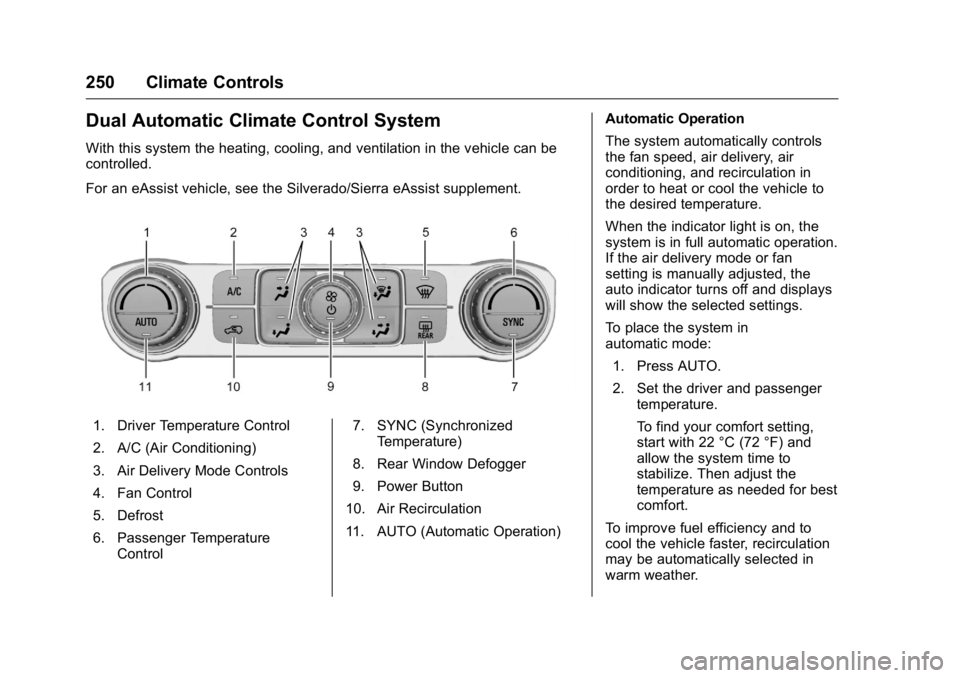
1. Driver Temperature Control
2. A/C (Air Conditioning)
3. Air Delivery Mode Controls
4. Fan Control
5. Defrost
6. Passenger TemperatureControl 7. SYNC (Synchronized
Temperature)
8. Rear Window Defogger
9. Power Button
10. Air Recirculation
11. AUTO (Automatic Operation) Automatic Operation
The system automatically controls
the fan speed, air delivery, air
conditioning, and recirculation in
order to heat or cool the vehicle to
the desired temperature.
When the indicator light is on, the
system is in full automatic operation.
If the air delivery mode or fan
setting is manually adjusted, the
auto indicator turns off and displays
will show the selected settings.
To place the system in
automatic mode:
1. Press AUTO.
2. Set the driver and passenger temperature.
To find your comfort setting,
start with 22 °C (72 °F) and
allow the system time to
stabilize. Then adjust the
temperature as needed for best
comfort.
To improve fuel efficiency and to
cool the vehicle faster, recirculation
may be automatically selected in
warm weather.
Page 252 of 509
GMC Sierra Owner Manual (GMNA-Localizing-U.S./Canada/Mexico-
9234758) - 2016 - crc - 11/9/15
Climate Controls 251
The recirculation light will not come
on when automatically controlled.
Press
@to manually select
recirculation; press it again to select
outside air.
Do not cover the solar sensor on the
top of the instrument panel near the
windshield. This sensor regulates
air temperature based on sun load.
See “Sensors” later in this section.
Manual Operation
O(On/Off) : Press to turn the
climate control system on or off.
Outside air still enters the vehicle,
and is directed to the floor. This
direction can be changed by
pressing the air delivery mode.
9(Fan Control) : Turn clockwise
or counterclockwise to increase or
decrease the fan speed. Press the
knob to turn the fan off.
Press AUTO to return to automatic
operation. Driver and Passenger
Temperature Control :
The
temperature can be adjusted
separately for the driver and
passenger.
Turn the knob clockwise or
counterclockwise to increase or
decrease the driver or passenger
temperature setting.
SYNC (Synchronized
Temperature) : Press to link the
passenger temperature setting to
the driver setting. The SYNC
indicator light will turn on. When the
passenger setting is adjusted, the
SYNC indicator light is off.
The driver side or passenger side
temperature display shows the
temperature setting increasing or
decreasing.
Air Delivery Mode Control :
Press
Y,\,[, or-to change
the direction of the airflow. An
indicator light comes on in the
selected mode button. Changing the mode cancels the
automatic operation and the system
goes into manual mode. Press
AUTO to return to automatic
operation.
Y(Vent) :
Air is directed to the
instrument panel outlets.
\(Bi-Level) : Air is divided
between the instrument panel and
floor outlets. Some air is directed
toward the windshield and side
window outlets.
[(Floor) : Air is directed to the
floor outlets, with some to the
windshield, side window outlets, and
second row floor outlets.
-(Defog) : This mode clears the
windows of fog or moisture. Air is
directed to the windshield, floor
outlets, and side window vents. The
system automatically forces outside
air into the vehicle and the air
conditioning compressor will run,
unless the outside temperature is
close to freezing.
0(Defrost) : Press to clear the
windshield of fog or frost more
quickly. Air is directed to the
Page 257 of 509
GMC Sierra Owner Manual (GMNA-Localizing-U.S./Canada/Mexico-
9234758) - 2016 - crc - 11/9/15
256 Driving and Operating
Driving and
Operating
Driving Information
Distracted Driving . . . . . . . . . . . . 257
Defensive Driving . . . . . . . . . . . . . 258
Drunk Driving . . . . . . . . . . . . . . . . . 258
Control of a Vehicle . . . . . . . . . . . 258
Braking . . . . . . . . . . . . . . . . . . . . . . . 258
Steering . . . . . . . . . . . . . . . . . . . . . . 259
Off-Road Recovery . . . . . . . . . . . 260
Loss of Control . . . . . . . . . . . . . . . 260
Off-Road Driving . . . . . . . . . . . . . 261
Driving on Wet Roads . . . . . . . . 265
Hill and Mountain Roads . . . . . 266
Winter Driving . . . . . . . . . . . . . . . . 267
If the Vehicle Is Stuck . . . . . . . . 268
Vehicle Load Limits . . . . . . . . . . . 269
Truck-Camper LoadingInformation . . . . . . . . . . . . . . . . . . 275
Starting and Operating
New Vehicle Break-In . . . . . . . . . 277
Adjustable Throttle and BrakePedal . . . . . . . . . . . . . . . . . . . . . . . 277
Ignition Positions . . . . . . . . . . . . . 278
Starting the Engine . . . . . . . . . . . 279
Fast Idle System . . . . . . . . . . . . . 280 Retained Accessory
Power (RAP) . . . . . . . . . . . . . . . . 281
Engine Coolant Heater . . . . . . . 281
Shifting Into Park . . . . . . . . . . . . . 283
Shifting out of Park . . . . . . . . . . . 284
Parking over Things That Burn . . . . . . . . . . . . . . . . . . . 285
Active Fuel Management
®. . . . 285
Engine Exhaust
Engine Exhaust . . . . . . . . . . . . . . 285
Running the Vehicle While Parked . . . . . . . . . . . . . . . . . . . . . . 286
Automatic Transmission
Automatic Transmission . . . . . . 286
Manual Mode . . . . . . . . . . . . . . . . . 289
Tow/Haul Mode . . . . . . . . . . . . . . . 292
Drive Systems
Four-Wheel Drive . . . . . . . . . . . . . 293
Brakes
Antilock BrakeSystem (ABS) . . . . . . . . . . . . . . . 300
Parking Brake . . . . . . . . . . . . . . . . 301
Brake Assist . . . . . . . . . . . . . . . . . . 302
Hill Start Assist (HSA) . . . . . . . . 302
Ride Control Systems
Traction Control/Electronic Stability Control . . . . . . . . . . . . . 303 Hill Descent Control (HDC) . . . 305
Locking Rear Axle . . . . . . . . . . . . 305
Cruise Control
Cruise Control . . . . . . . . . . . . . . . . 306
Driver Assistance Systems
Driver Assistance Systems . . . 309
Assistance Systems for
Parking or Backing . . . . . . . . . . 309
Assistance Systems for Driving . . . . . . . . . . . . . . . . . . . . . . 312
Forward Collision Alert (FCA) System . . . . . . . . . . . . . . . . . . . . . . 312
Lane Departure Warning (LDW) (2500/3500
Series) . . . . . . . . . . . . . . . . . . . . . . 314
Lane Keep Assist (LKA) (1500 Series) . . . . . . . . . . . . . . . . . . . . . . 315
Fuel
Fuel . . . . . . . . . . . . . . . . . . . . . . . . . . 317
California FuelRequirements . . . . . . . . . . . . . . . 318
Fuels in Foreign Countries . . . 319
Fuel Additives . . . . . . . . . . . . . . . . 319
E85 or FlexFuel . . . . . . . . . . . . . . 319
Filling the Tank . . . . . . . . . . . . . . . 320
Filling a Portable Fuel Container . . . . . . . . . . . . . . . . . . . 322
Page 260 of 509
GMC Sierra Owner Manual (GMNA-Localizing-U.S./Canada/Mexico-
9234758) - 2016 - crc - 11/9/15
Driving and Operating 259
Steering
Electric Power Steering (1500
Series)
If the vehicle has electric power
steering, it does not have power
steering fluid. Regular maintenance
is not required.
If power steering assist is lost due
to a system malfunction, the vehicle
can be steered, but may require
increased effort. See your dealer if
there is a problem.
If the steering wheel is turned until it
reaches the end of its travel, and is
held in that position for an extended
period of time, power steering assist
may be reduced.
If the steering assist is used for an
extended period of time, power
assist may be reduced.
Normal use of the power steering
assist should return when the
system cools down.
See specific vehicle steering
messages underSteering System
Messages 0159.
Hydraulic Power Steering
(2500/3500 Series)
(2500/3500 Series –All Regular
Cab, Double Cab/Crew Cab
without Digital Steer Assist)
The power steering system may
require maintenance. See Power
Steering Fluid (1500 Series) 0378
or Power Steering Fluid (2500/3500
Series) 0378.
If power steering assist is lost
because the engine stops or the
system malfunctions, the vehicle
can be steered but may require
increased effort. See your dealer.
(2500/3500 Series –Double Cab/
Crew Cab with Digital Steer
Assist)
The vehicle has a Digital Steer
Assist power steering system that
varies the amount of effort required
to steer the vehicle. Less steering
effort is required at slower speeds.
At faster speeds, the steering effort
increases. The system helps the
steering wheel return to center at
low speeds. Pressing the Tow/Haul button adjusts steering effort for
driving conditions described in
Tow/
Haul Mode 0292.
The power steering system may
require maintenance. See Power
Steering Fluid (1500 Series) 0378
or Power Steering Fluid (2500/3500
Series) 0378.
If power steering assist is lost
because the engine stops or the
system malfunctions, the vehicle
can be steered but may require
increased effort. See your dealer.
Caution
If the steering wheel is turned
until it reaches the end of its
travel, and is held in that position
for more than 15 seconds,
damage may occur to the power
steering system and there may be
loss of power steering assist.
Page 286 of 509
GMC Sierra Owner Manual (GMNA-Localizing-U.S./Canada/Mexico-
9234758) - 2016 - crc - 11/9/15
Driving and Operating 285
Parking over Things
That Burn
{Warning
Things that can burn could touch
hot exhaust parts under the
vehicle and ignite. Do not park
over papers, leaves, dry grass,
or other things that can burn.
Active Fuel Management®
Vehicles with a V8 or V6 gasoline
engine may have Active Fuel
Management. This system allows
the engine to operate on either all of
its cylinders, or in V4 mode,
depending on the driving conditions.When less power is required, such
as cruising at a constant vehicle
speed, the system will operate in
the V4 mode, allowing the vehicle to
achieve better fuel economy. When
greater power demands are
required, such as accelerating from
a stop, passing, or merging onto a
freeway, the system will maintain
full-cylinder operation.
If the vehicle has an Active Fuel
Management indicator, see
Driver
Information Center (DIC) (Base
Level) 0148 orDriver Information
Center (DIC) (Uplevel) 0150 for
more information on using this
display.
Engine Exhaust
{Warning
Engine exhaust contains carbon
monoxide (CO), which cannot be
seen or smelled. Exposure to CO
can cause unconsciousness and
even death.
Exhaust may enter the vehicle if:
. The vehicle idles in areas
with poor ventilation
(parking garages, tunnels,
deep snow that may block
underbody airflow or tail
pipes).
. The exhaust smells or
sounds strange or different.
. The exhaust system leaks
due to corrosion or damage.
. The vehicle exhaust system
has been modified,
damaged, or improperly
repaired.
(Continued)
Page 289 of 509
GMC Sierra Owner Manual (GMNA-Localizing-U.S./Canada/Mexico-
9234758) - 2016 - crc - 11/9/15
288 Driving and Operating
Caution
Shifting out of P (Park) or
N (Neutral) with the engine
running at high speed may
damage the transmission. The
repairs would not be covered by
the vehicle warranty. Be sure the
engine is not running at high
speed when shifting the vehicle.
D : This position is for normal
driving. It provides the best fuel
economy. If you need more power
for passing, and you are:
. Going less than about 55 km/h
(35 mph), push the accelerator
pedal about halfway down.
. Going about 55 km/h (35 mph) or
more, push the accelerator all
the way down.
By doing this, the vehicle shifts
down to the next gear and has
more power.
Use D (Drive) and Tow/Haul Mode
when towing a trailer, carrying a
heavy load, driving on steep hills, or driving off-road. Shift the
transmission to a lower gear
selection if the transmission shifts
too often.
Downshifting the transmission in
slippery road conditions could result
in skidding. See
“Skidding”under
Loss of Control 0260.
The vehicle has a shift stabilization
feature that adjusts the transmission
shifting to the current driving
conditions in order to reduce rapid
upshifts and downshifts. This shift
stabilization feature is designed to
determine, before making an
upshift, if the engine is able to
maintain vehicle speed by analyzing
things such as vehicle speed,
throttle position, and vehicle load.
If the shift stabilization feature
determines that a current vehicle
speed cannot be maintained, the
transmission does not upshift and
instead holds the current gear.
In some cases, this could appear to
be a delayed shift, however the
transmission is operating normally. The transmission uses adaptive
shift controls. The adaptive shift
control process continually
compares key shift parameters to
pre-programmed ideal shifts stored
in the transmission’s computer. The
transmission constantly makes
adjustments to improve vehicle
performance according to how the
vehicle is being used, such as with
a heavy load or when the
temperature changes. During this
adaptive shift control process,
shifting might feel different as the
transmission determines the best
settings.
When temperatures are very cold,
the transmission's gear shifting
could be delayed providing more
stable shifts until the engine warms
up. Shifts could be more noticeable
with a cold transmission. This
difference in shifting is normal.
M :
This position allows selection of
a range of gears appropriate for
current driving conditions.
If equipped, see “Range Selection
Mode” underManual Mode 0289.
Page 290 of 509
GMC Sierra Owner Manual (GMNA-Localizing-U.S./Canada/Mexico-
9234758) - 2016 - crc - 11/9/15
Driving and Operating 289
Caution
Spinning the tires or holding the
vehicle in one place on a hill
using only the accelerator pedal
may damage the transmission.
The repair will not be covered by
the vehicle warranty. If you are
stuck, do not spin the tires. When
stopping on a hill, use the brakes
to hold the vehicle in place.
Normal Mode Grade Braking
If equipped with a gasoline engine
and an automatic transmission,
Normal Mode Grade Braking is
enabled when the vehicle is started,
but is not enabled in Range
Selection Mode. It assists in
maintaining desired vehicle speeds
when driving on downhill grades by
using the engine and transmission
to slow the vehicle. The first time
the system engages for each
ignition key cycle, a DIC message
will be displayed. SeeTransmission
Messages 0160. To disable or enable Normal Mode
Grade Braking within the current
ignition key cycle, press and hold
the Tow/Haul button for
five seconds. When the button is
released, the requested mode
change is made. A DIC message
displays. See
Transmission
Messages 0160.
For other forms of grade braking,
see Tow/Haul Mode 0292 and
Cruise Control 0306.
Kickdown Mode
The accelerator pedal provides an
additional downshift after pressing
through the kickdown feature.
It requires extra pedal pressure near
the end of its travel to engage.
Manual Mode
Range Selection Mode
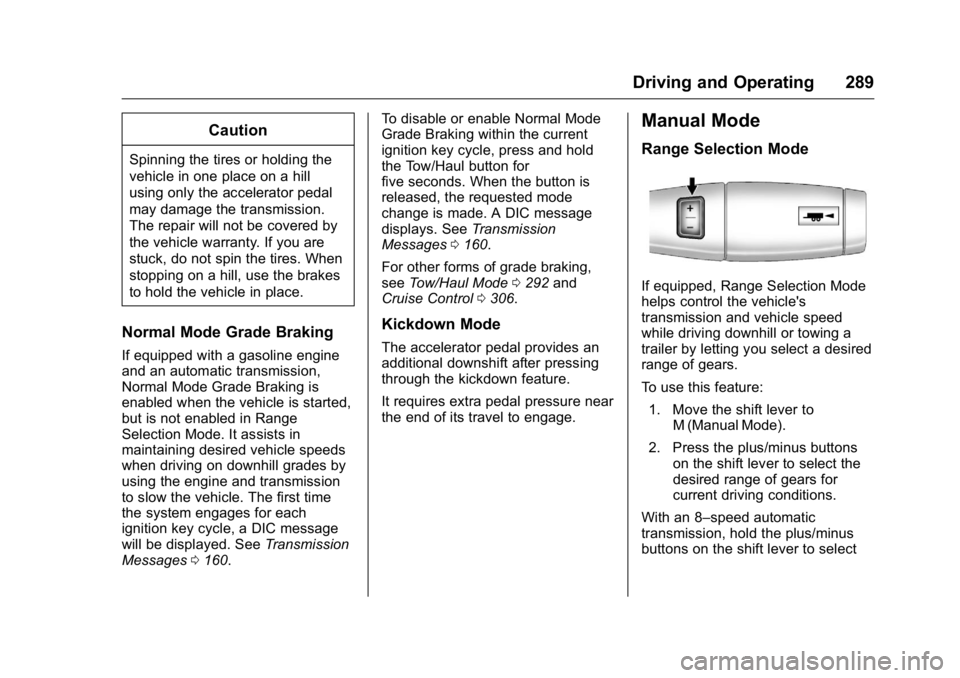
If equipped, Range Selection Mode
helps control the vehicle's
transmission and vehicle speed
while driving downhill or towing a
trailer by letting you select a desired
range of gears.
To use this feature:
1. Move the shift lever to M (Manual Mode).
2. Press the plus/minus buttons on the shift lever to select the
desired range of gears for
current driving conditions.
With an 8–speed automatic
transmission, hold the plus/minus
buttons on the shift lever to select
Page 293 of 509
GMC Sierra Owner Manual (GMNA-Localizing-U.S./Canada/Mexico-
9234758) - 2016 - crc - 11/9/15
292 Driving and Operating
as with ice or snow. While the
vehicle is at a stop, select M2 using
Range Selection Mode. This will
limit torque to the wheels and help
to prevent the tires from spinning.
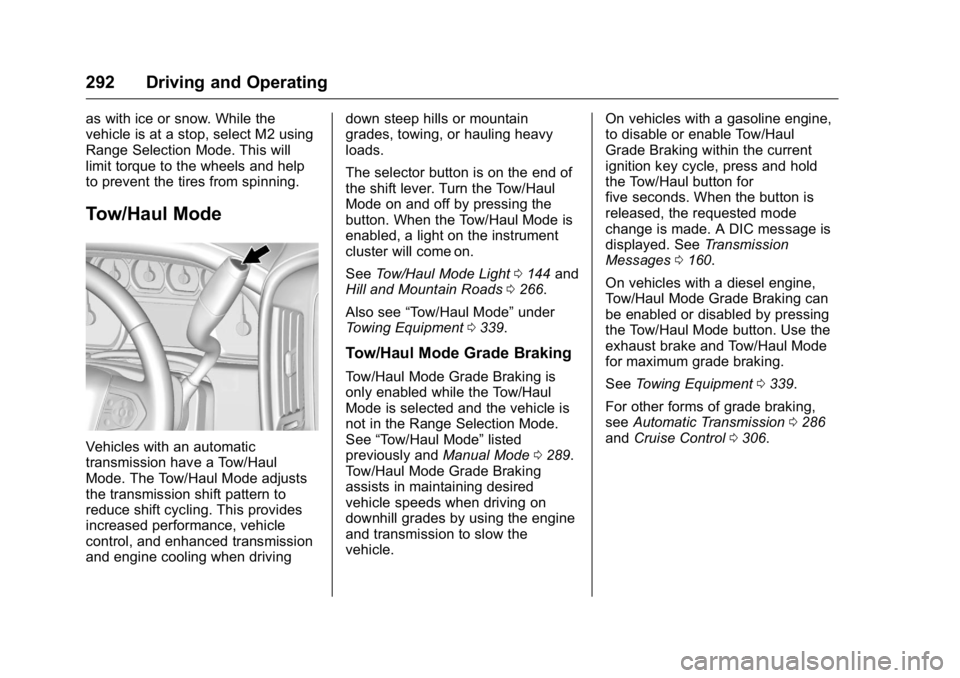
Tow/Haul Mode
Vehicles with an automatic
transmission have a Tow/Haul
Mode. The Tow/Haul Mode adjusts
the transmission shift pattern to
reduce shift cycling. This provides
increased performance, vehicle
control, and enhanced transmission
and engine cooling when drivingdown steep hills or mountain
grades, towing, or hauling heavy
loads.
The selector button is on the end of
the shift lever. Turn the Tow/Haul
Mode on and off by pressing the
button. When the Tow/Haul Mode is
enabled, a light on the instrument
cluster will come on.
See
Tow/Haul Mode Light 0144 and
Hill and Mountain Roads 0266.
Also see “Tow/Haul Mode” under
Towing Equipment 0339.
Tow/Haul Mode Grade Braking
Tow/Haul Mode Grade Braking is
only enabled while the Tow/Haul
Mode is selected and the vehicle is
not in the Range Selection Mode.
See “Tow/Haul Mode” listed
previously and Manual Mode0289.
Tow/Haul Mode Grade Braking
assists in maintaining desired
vehicle speeds when driving on
downhill grades by using the engine
and transmission to slow the
vehicle. On vehicles with a gasoline engine,
to disable or enable Tow/Haul
Grade Braking within the current
ignition key cycle, press and hold
the Tow/Haul button for
five seconds. When the button is
released, the requested mode
change is made. A DIC message is
displayed. See
Transmission
Messages 0160.
On vehicles with a diesel engine,
Tow/Haul Mode Grade Braking can
be enabled or disabled by pressing
the Tow/Haul Mode button. Use the
exhaust brake and Tow/Haul Mode
for maximum grade braking.
See Towing Equipment 0339.
For other forms of grade braking,
see Automatic Transmission 0286
and Cruise Control 0306.