stop start GMC SIERRA 2021 Repair Manual
[x] Cancel search | Manufacturer: GMC, Model Year: 2021, Model line: SIERRA, Model: GMC SIERRA 2021Pages: 461, PDF Size: 11.84 MB
Page 370 of 461
GMC Sierra/Sierra Denali 1500 Owner Manual (GMNA-Localizing-U.S./
Canada/Mexico-14632426) - 2021 - CRC - 11/5/20
Vehicle Care 369
TPMS malfunction indicator is combined
with the low tire pressure telltale. When the
system detects a malfunction, the telltale
will flash for approximately one minute and
then remain continuously illuminated. This
sequence will continue upon subsequent
vehicle start-ups as long as the malfunction
exists.
When the malfunction indicator is
illuminated, the system may not be able to
detect or signal low tire pressure as
intended. TPMS malfunctions may occur for
a variety of reasons, including the
installation of replacement or alternate tires
or wheels on the vehicle that prevent the
TPMS from functioning properly. Always
check the TPMS malfunction telltale after
replacing one or more tires or wheels on
your vehicle to ensure that the replacement
or alternate tires and wheels allow the
TPMS to continue to function properly.
SeeTire Pressure Monitor Operation 0369.
See Radio Frequency Statement 0436.
Tire Pressure Monitor Operation
This vehicle may have a Tire Pressure
Monitor System (TPMS). The TPMS is
designed to warn the driver when a low tire
pressure condition exists. TPMS sensors are mounted onto each tire and wheel
assembly, excluding the spare tire and
wheel assembly. The TPMS sensors monitor
the air pressure in the tires and transmit the
tire pressure readings to a receiver located
in the vehicle.
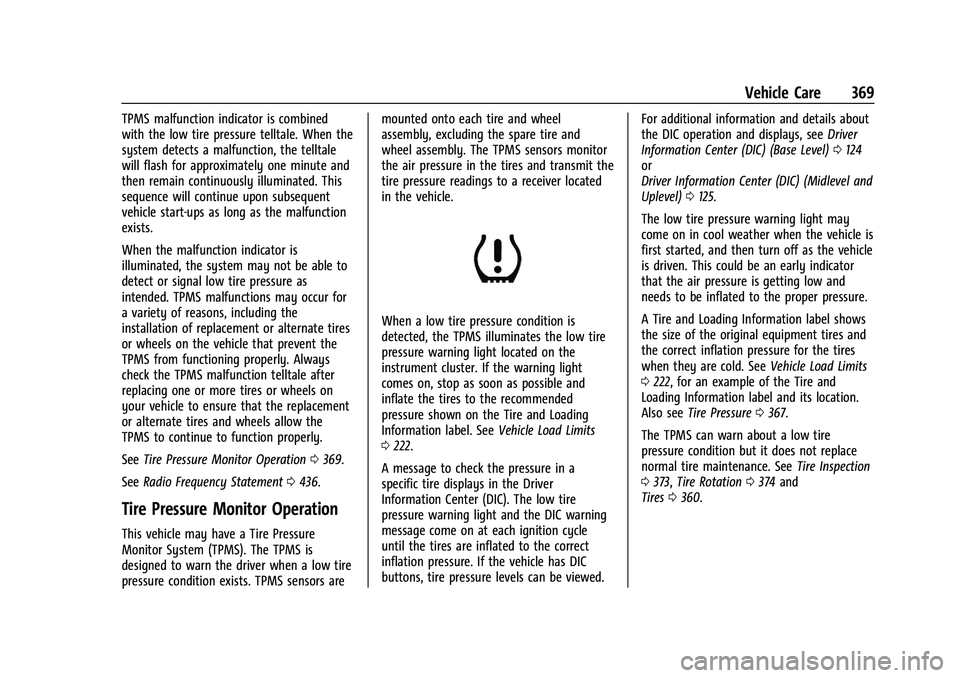
When a low tire pressure condition is
detected, the TPMS illuminates the low tire
pressure warning light located on the
instrument cluster. If the warning light
comes on, stop as soon as possible and
inflate the tires to the recommended
pressure shown on the Tire and Loading
Information label. See
Vehicle Load Limits
0 222.
A message to check the pressure in a
specific tire displays in the Driver
Information Center (DIC). The low tire
pressure warning light and the DIC warning
message come on at each ignition cycle
until the tires are inflated to the correct
inflation pressure. If the vehicle has DIC
buttons, tire pressure levels can be viewed. For additional information and details about
the DIC operation and displays, see
Driver
Information Center (DIC) (Base Level) 0124
or
Driver Information Center (DIC) (Midlevel and
Uplevel) 0125.
The low tire pressure warning light may
come on in cool weather when the vehicle is
first started, and then turn off as the vehicle
is driven. This could be an early indicator
that the air pressure is getting low and
needs to be inflated to the proper pressure.
A Tire and Loading Information label shows
the size of the original equipment tires and
the correct inflation pressure for the tires
when they are cold. See Vehicle Load Limits
0 222, for an example of the Tire and
Loading Information label and its location.
Also see Tire Pressure 0367.
The TPMS can warn about a low tire
pressure condition but it does not replace
normal tire maintenance. See Tire Inspection
0 373, Tire Rotation 0374 and
Tires 0360.
Page 372 of 461
GMC Sierra/Sierra Denali 1500 Owner Manual (GMNA-Localizing-U.S./
Canada/Mexico-14632426) - 2021 - CRC - 11/5/20
Vehicle Care 371
{Warning
Overinflating a tire could cause the tire
to rupture and you or others could be
injured. Do not exceed the maximum
pressure listed on the tire sidewall. See
Tire Sidewall Labeling0362 and
Vehicle Load Limits 0222.
If the tire is overinflated by more than
35 kPa (5 psi), the horn will sound multiple
times and the turn signal lamp will continue
to flash for several seconds after filling
stops. To release and correct the pressure,
while the turn signal lamp is still flashing,
briefly press the center of the valve stem.
When the recommended pressure is reached,
the horn sounds once.
If the turn signal lamp does not flash within
15 seconds after starting to inflate the tire,
the tire fill alert has not been activated or is
not working.
If the hazard warning flashers are on, the
tire fill alert visual feedback will not work
properly. The TPMS will not activate the tire fill alert
properly under the following conditions:.There is interference from an external
device or transmitter.
.The air pressure from the inflation device
is not sufficient to inflate the tire.
.There is a malfunction in the TPMS.
.There is a malfunction in the horn or turn
signal lamps.
.The identification code of the TPMS
sensor is not registered to the system.
.The battery of the TPMS sensor is low.
If the tire fill alert does not operate due to
TPMS interference, move the vehicle about
1 m (3 ft) back or forward and try again.
If the tire fill alert feature is not working,
use a tire pressure gauge.
TPMS Sensor Matching Process
Each TPMS sensor has a unique
identification code. The identification code
needs to be matched to a new tire/wheel
position after rotating the vehicle’s tires or
replacing one or more of the TPMS sensors.
Also, the TPMS sensor matching process
should be performed after replacing a spare
tire with a road tire containing the TPMS
sensor. The malfunction light and the DIC
message should go off at the next ignition cycle. The sensors are matched to the tire/
wheel positions, using a TPMS relearn tool,
in the following order: driver side front tire,
passenger side front tire, passenger side rear
tire, and driver side rear. See your dealer for
service or to purchase a relearn tool.
A TPMS relearn tool can also be purchased.
See Tire Pressure Monitor Sensor Activation
Tool at www.gmtoolsandequipment.com or
call 1-800-GM TOOLS (1-800-468-6657).
There are two minutes to match the first
tire/wheel position, and five minutes overall
to match all four tire/wheel positions. If it
takes longer, the matching process stops
and must be restarted.
The TPMS sensor matching process is:
1. Set the parking brake.
2. Turn the ignition on without starting the vehicle.
3. Uplevel DIC Only: Make sure the Tire Pressure info page option is turned on.
The info pages on the DIC can be turned
on and off through the Options menu.
See Driver Information Center (DIC) (Base
Level) 0124 or
Driver Information Center (DIC) (Midlevel
and Uplevel) 0125.
Page 381 of 461
GMC Sierra/Sierra Denali 1500 Owner Manual (GMNA-Localizing-U.S./
Canada/Mexico-14632426) - 2021 - CRC - 11/5/20
380 Vehicle Care
If a Tire Goes Flat
It is unusual for a tire to blowout while
driving, especially if the tires are maintained
properly. If air goes out of a tire, it is much
more likely to leak out slowly. But if there
ever is a blowout, here are a few tips about
what to expect and what to do:
If a front tire fails, the flat tire creates a
drag that pulls the vehicle toward that side.
Take your foot off the accelerator pedal and
grip the steering wheel firmly. Steer to
maintain lane position, and then gently
brake to a stop, well off the road,
if possible.
A rear blowout, particularly on a curve, acts
much like a skid and may require the same
correction as used in a skid. Stop pressing
the accelerator pedal and steer to straighten
the vehicle. It may be very bumpy and
noisy. Gently brake to a stop, well off the
road, if possible.{Warning
Driving on a flat tire will cause
permanent damage to the tire.
Re-inflating a tire after it has been driven
on while severely underinflated or flat
may cause a blowout and a serious crash.
Never attempt to re-inflate a tire that has
been driven on while severely
underinflated or flat. Have your dealer or
an authorized tire service center repair or
replace the flat tire as soon as possible.
{Warning
Lifting a vehicle and getting under it to
do maintenance or repairs is dangerous
without the appropriate safety equipment
and training. If a jack is provided with
the vehicle, it is designed only for
changing a flat tire. If it is used for
anything else, you or others could be
badly injured or killed if the vehicle slips
off the jack. If a jack is provided with the
vehicle, only use it for changing a
flat tire.If a tire goes flat, avoid further tire and
wheel damage by driving slowly to a level
place, well off the road, if possible. Turn on
the hazard warning flashers. See
Hazard
Warning Flashers 0142.
{Warning
Changing a tire can be dangerous. The
vehicle can slip off the jack and roll over
or fall causing injury or death. Find a
level place to change the tire. To help
prevent the vehicle from moving:
1. Set the parking brake firmly.
2. Shift the vehicle to P (Park).
3. For vehicles with four-wheel drive with an N (Neutral) transfer case
position, be sure the transfer case is
in a drive gear —not in N (Neutral).
4. Turn off the engine and do not restart while the vehicle is raised.
5. Do not allow passengers to remain in the vehicle.
6. Place wheel blocks, if equipped, on both sides of the tire at the opposite
corner of the tire being changed.
Page 392 of 461
GMC Sierra/Sierra Denali 1500 Owner Manual (GMNA-Localizing-U.S./
Canada/Mexico-14632426) - 2021 - CRC - 11/5/20
Vehicle Care 391
Caution (Continued)
would not be covered by the warranty.
Never use four-wheel drive when a
different size spare tire is installed on the
vehicle.
The vehicle may have a different size spare
tire than the road tires originally installed
on the vehicle. This spare tire was developed
for use on this vehicle, so it is all right to
drive on it. If the vehicle has four-wheel
drive and a different size spare tire is
installed, drive only in two-wheel drive.
After installing the spare tire on the vehicle,
stop as soon as possible and check that the
spare is correctly inflated. The spare tire is
made to perform well at speeds up to
112 km/h (70 MPH) at the recommended
inflation pressure, so you can finish
your trip.
Have the damaged or flat road tire repaired
or replaced and installed back onto the
vehicle as soon as possible so the spare tire
will be available in case it is needed again.
Do not mix tires and wheels of difference
sizes, because they will not fit. Keep the
spare tire and its wheel together. If the vehicle has a spare tire that does not
match the original road tires and wheels in
size and type, do not include the spare in
the tire rotation.
Jump Starting
Jump Starting - North America
For more information about the vehicle
battery, see
Battery - North America 0343.
If the vehicle's battery (or batteries) has run
down, you may want to use another vehicle
and some jumper cables to start your
vehicle. Be sure to use the following steps
to do it safely.
{Warning
WARNING: Battery posts, terminals, and
related accessories contain lead and lead
compounds, chemicals known to the
State of California to cause cancer and
birth defects or other reproductive harm.
Batteries also contain other chemicals
known to the State of California to cause
cancer. WASH HANDS AFTER HANDLING.
(Continued)
Warning (Continued)
For more information go to
www.P65Warnings.ca.gov/
passenger-vehicle.
See California Proposition 65 Warning 0322
and the back cover.
{Warning
Batteries can hurt you. They can be
dangerous because:
.They contain acid that can burn you.
.They contain gas that can explode or
ignite.
.They contain enough electricity to
burn you.
If you do not follow these steps exactly,
some or all of these things can hurt you.
Caution
Ignoring these steps could result in costly
damage to the vehicle that would not be
covered by the vehicle warranty. Trying
(Continued)
Page 398 of 461
GMC Sierra/Sierra Denali 1500 Owner Manual (GMNA-Localizing-U.S./
Canada/Mexico-14632426) - 2021 - CRC - 11/5/20
Vehicle Care 397
Keyless Access, keep the RKE transmitter
outside of the vehicle and manually lock
the doors. Access the vehicle by using
the key in the door lock. SeeDoor Locks
0 21.
Disconnecting the Towed Vehicle
Before disconnecting from the tow vehicle: 1. Park on a level surface. Secure the vehicle with wheel blocks.
2. Re-connect the negative (–) battery. See Battery - North America 0343.
3. Turn on the ignition with the engine off. For vehicles with a key, turn the ignition
to ON/RUN with the engine off. If the
vehicle is equipped with Keyless Access,
with your foot off the brake pedal, press
and hold ENGINE START/STOP for
five seconds until the green light comes
on in the button. See Ignition Positions
(Keyless Access) 0230 or
Ignition Positions (Key Access) 0229.
4. Set the parking brake. See Electric
Parking Brake 0247.
5. Disconnect from the tow vehicle.
6. Shift the transmission to N (Neutral). 7. Shift the transfer case to 2m(Two-Wheel
Drive High). When the shift to 2
m
(Two-Wheel Drive High) is complete, the
light in the instrument cluster will stop
flashing and stay lit. See
Four-Wheel-Drive Light 0118.
8. Start the engine. Check that the vehicle is in 2
m(Two-Wheel Drive High) by
starting the engine and shifting the
transmission to D (Drive) and then to
R (Reverse). There should be movement
of the vehicle while shifting.
9. Shift the transmission to P (Park) and turn off the ignition.
10. Release the parking brake and remove the wheel blocks.
11. Reset any lost presets. The outside temperature display will
default to 0 °C (32 °F) but will reset with
normal usage.
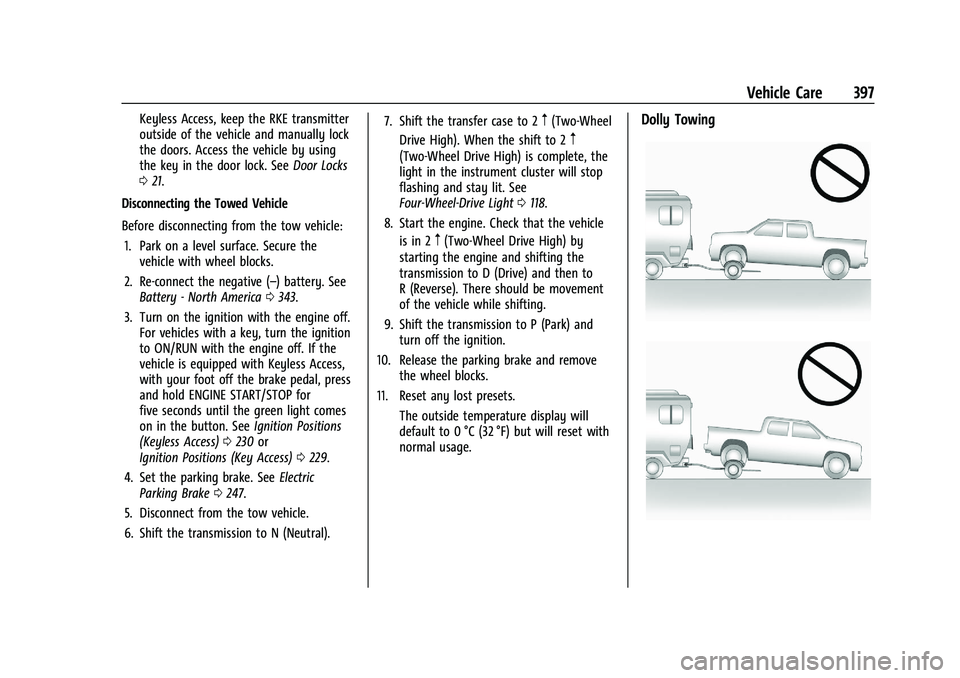
Dolly Towing
Page 447 of 461

GMC Sierra/Sierra Denali 1500 Owner Manual (GMNA-Localizing-U.S./
Canada/Mexico-14632426) - 2021 - CRC - 11/5/20
446 Connected Services
PressQ, then ask the Advisor to download
directions to the vehicle’s navigation system,
if equipped. After the call ends, the
navigation screen will provide prompts to
begin driving directions. Routes that are sent
to the navigation screen can only be
canceled through the navigation system.
See www.onstar.com (U.S.) or www.onstar.ca
(Canada).
Connections
The following services help with staying
connected.
For coverage maps, see www.onstar.com
(U.S.) or www.onstar.ca (Canada).
Ensuring Security
.Change the default passwords for the
Wi-Fi hotspot and myGMC mobile
application. Make these passwords
different from each other and use a
combination of letters and numbers to
increase the security.
.Change the default name of the SSID
(Service Set Identifier). This is your
network’s name that is visible to other
wireless devices. Choose a unique name
and avoid family names or vehicle
descriptions. Wi-Fi Hotspot (If Equipped)
The vehicle may have a built-in Wi-Fi
hotspot that provides access to the Internet
and web content at 4G LTE speed. Up to
seven mobile devices can be connected.
A data plan is required. Use the in-vehicle
controls only when it is safe to do so.
1. To retrieve Wi-Fi hotspot information, press
=to open the OnStar app on the
infotainment display, then select Wi-Fi
Hotspot. On some vehicles, touch Wi-Fi
or Wi-Fi Settings on the screen.
2. The Wi-Fi settings will display the Wi-Fi hotspot name (SSID), password, and on
some vehicles, the connection type (no
Internet connection, 3G, 4G, 4G LTE), and
signal quality (poor, good, excellent). The
LTE icon shows connection to Wi-Fi. It is
possible that the icon may not illuminate
even though the vehicle has an active
connection.
3. To change the SSID or password, press
Qor call 1-888-4ONSTAR to connect
with an Advisor. On some vehicles, the
SSID and password can be changed in
the Wi-Fi Hotspot menu. After initial set-up, your vehicle’s Wi-Fi
hotspot will connect automatically to your
mobile devices. Manage data usage by
turning Wi-Fi on or off on your mobile
device, using the myGMC mobile app, or by
contacting an OnStar Advisor. On some
vehicles, Wi-Fi can also be managed from
the Wi-Fi Hotspot menu.
MyGMC Mobile App (If Available)
Download the myGMC mobile app to
compatible Apple and Android smartphones.
GMC users can access the following services
from a smartphone:
.Remotely start/stop the vehicle,
if factory-equipped.
.Lock/unlock doors, if equipped with
automatic locks.
.Activate the horn and lamps.
.Check the vehicle’s fuel level, oil life,
or tire pressure, if factory-equipped with
the Tire Pressure Monitor System.
.Send destinations to the vehicle.
.Locate the vehicle on a map (U.S.
market only).
.Turn the vehicle's Wi-Fi hotspot on/off,
manage settings, and monitor data
consumption, if equipped.
.Locate a dealer and schedule service.
Page 450 of 461
GMC Sierra/Sierra Denali 1500 Owner Manual (GMNA-Localizing-U.S./Cana-
da/Mexico-14632426) - 2021 - CRC - 11/5/20
Index 449
Assistance Program, Roadside . . . . . . . . . . . . .431
Assistance Systems for Driving . . . . . . . . . . 274
Assistance Systems for Parking andBacking . . . . . . . . . . . . . . . . . . . . . . . . . . . . . . . . 266
Audio Bluetooth . . . . . . . . . . . . . . . . . . . . . . . . . . . . . . 162
Auto Stop
Stop/Start System . . . . . . . . . . . . . . . . . . . . . 233
Automatic Dimming Mirrors . . . . . . . . . . . . . . . . . . . . . . . 37
Door Locks . . . . . . . . . . . . . . . . . . . . . . . . . . . . . . 22
Emergency Braking (AEB) . . . . . . . . . . . . . . 277
Headlamp System . . . . . . . . . . . . . . . . . . . . . 142
Transmission . . . . . . . . . . . . . . . . . . . . . . . . . . . 239
Transmission Fluid . . . . . . . . . . . . . . . . . . . . . 333
Automatic Transmission
Manual Mode . . . . . . . . . . . . . . . . . . . . . . . . . 241
Shift Lock Control Function Check . . . . . . 347
Auxiliary Roof Mounted Lamp . . . . . . . . . . . . . . . . . . . 144
Auxiliary Jack . . . . . . . . . . . . . . . . . . . . . . . . . . . . . 161
Avoiding Untrusted Media Devices . . . . . . . .158
Axle, Front . . . . . . . . . . . . . . . . . . . . . . . . . . . . . . . 346
Axle, Rear . . . . . . . . . . . . . . . . . . . . . . . . . . . . . . . . 346B
Battery
Exterior Lighting Battery Saver . . . . . . . . 147
Load Management . . . . . . . . . . . . . . . . . . . . . 146
Power Protection . . . . . . . . . . . . . . . . . . . . . . 147
Battery - North America . . . . . . . . . . . . .343, 391
Blade Replacement, Wiper . . . . . . . . . . . . . . . 348
Blind Spot Mirrors . . . . . . . . . . . . . . . . . . . . . . . . .37
Bluetooth Overview . . . . . . . . . . . . . . . . . . . . . . . . . . 180, 181
Bluetooth Audio . . . . . . . . . . . . . . . . . . . . . . . . . 162
Brake Electric Boost . . . . . . . . . . . . . . . . . . . . . . . . . . 246
Parking, Electric . . . . . . . . . . . . . . . . . . . . . . . . 247
System Warning Light . . . . . . . . . . . . . . . . . . 117
Brake Pad Life System . . . . . . . . . . . . . . . . . . . 342
Brakes . . . . . . . . . . . . . . . . . . . . . . . . . . . . . . . . . . . .341 Antilock . . . . . . . . . . . . . . . . . . . . . . . . . . . . . . . . 246
Assist . . . . . . . . . . . . . . . . . . . . . . . . . . . . . . . . . . 248
Fluid . . . . . . . . . . . . . . . . . . . . . . . . . . . . . . . . . . . 343
Pad Life System . . . . . . . . . . . . . . . . . . . . . . . 342
Braking . . . . . . . . . . . . . . . . . . . . . . . . . . . . . . . . . . . 213 Automatic Emergency (AEB) . . . . . . . . . . . 277
Braking System
Front Pedestrian (FPB) . . . . . . . . . . . . . . . . . 278
Break-In, New Vehicle . . . . . . . . . . . . . . . . . . . . 228 Bulb Replacement
Center High-Mounted Stoplamp
(CHMSL) and Cargo Lamp . . . . . . . . . . . . 352
Halogen Bulbs . . . . . . . . . . . . . . . . . . . . . . . . . 350
Headlamp Aiming . . . . . . . . . . . . . . . . . . . . . . 350
Headlamps . . . . . . . . . . . . . . . . . . . . . . . . . . . . 350
Headlamps, Front Turn Signal, Sidemarker, and Parking Lamps . . . . . . 350
License Plate Lamps . . . . . . . . . . . . . . . . . . . 352
Taillamps, Turn Signal, Stoplamps, and Back-up Lamps . . . . . . . . . . . . . . . . . . 351
Buying New Tires . . . . . . . . . . . . . . . . . . . . . . . . 376
C
Calibration . . . . . . . . . . . . . . . . . . . . . . . . . . . . . . . 102
California Perchlorate Materials Requirements . . . 322
California Proposition 65 Warning . . . . . . . . . . . . . . . . . . .322, 343, 391, Back Cover
Canadian Vehicle Owners . . . . . . . . . . . . . . . . . . .2
Capacities and Specifications . . . . . . . . . . . . . 424
Carbon Monoxide
Engine Exhaust . . . . . . . . . . . . . . . . . . . . . . . . 238
Tailgate . . . . . . . . . . . . . . . . . . . . . . . . . . . . . . . . . 23
Winter Driving . . . . . . . . . . . . . . . . . . . . . . . . . 220
Cargo Tie-Downs . . . . . . . . . . . . . . . . . . . . . . . . . . . . . . 97
Page 458 of 461
GMC Sierra/Sierra Denali 1500 Owner Manual (GMNA-Localizing-U.S./Cana-
da/Mexico-14632426) - 2021 - CRC - 11/5/20
Index 457
S
Safety Defects ReportingCanadian Government . . . . . . . . . . . . . . . . . 437
General Motors . . . . . . . . . . . . . . . . . . . . . . . . 437
U.S. Government . . . . . . . . . . . . . . . . . . . . . . . 436
Safety Locks . . . . . . . . . . . . . . . . . . . . . . . . . . . . . . .23
Safety System Check . . . . . . . . . . . . . . . . . . . . . 60
Satellite Radio . . . . . . . . . . . . . . . . . . . . . . . . . . . . 157
Scheduling Appointments . . . . . . . . . . . . . . . . 433
Seat Belts . . . . . . . . . . . . . . . . . . . . . . . . . . . . . . . . . 54 Care . . . . . . . . . . . . . . . . . . . . . . . . . . . . . . . . . . . . 60
Extender . . . . . . . . . . . . . . . . . . . . . . . . . . . . . . . . 59
How to Wear Seat Belts Properly . . . . . . . 55
Lap-Shoulder Belt . . . . . . . . . . . . . . . . . . . . . . . 57
Reminders . . . . . . . . . . . . . . . . . . . . . . . . . . . . . . 113
Replacing after a Crash . . . . . . . . . . . . . . . . . 60
Use During Pregnancy . . . . . . . . . . . . . . . . . . 59
Seats Adjustment, Front . . . . . . . . . . . . . . . . . . . . . . 46
Center Seat . . . . . . . . . . . . . . . . . . . . . . . . . . . . . 47
Head Restraints . . . . . . . . . . . . . . . . . . . . . . . . . 45
Heated and Ventilated Front . . . . . . . . . . . . 52
Heated, Rear . . . . . . . . . . . . . . . . . . . . . . . . . . . . 54
Lumbar Adjustment, Front . . . . . . . . . . . . . . 48
Memory . . . . . . . . . . . . . . . . . . . . . . . . . . . . . . . . 49
Power Adjustment, Front . . . . . . . . . . . . . . . 47
Rear . . . . . . . . . . . . . . . . . . . . . . . . . . . . . . . . . . . . 53
Reclining Seatbacks . . . . . . . . . . . . . . . . . . . . . 48 Seats (cont'd)
Underseat Storage . . . . . . . . . . . . . . . . . . . . . . 96
Securing Child Restraints . . . . . . . . . . . . . . 88, 92
Security Light . . . . . . . . . . . . . . . . . . . . . . . . . . . . . . . . . . . 122
OnStar . . . . . . . . . . . . . . . . . . . . . . . . . . . . . . . . . 441
Vehicle . . . . . . . . . . . . . . . . . . . . . . . . . . . . . . . . . . 31
Vehicle Alarm . . . . . . . . . . . . . . . . . . . . . . . . . . . . 31
Service . . . . . . . . . . . . . . . . . . . . . . . . . . . . . . . . . . . 210 Accessories and Modifications . . . . . . . . . 323
Climate Control System . . . . . . . . . . . . . . . . 204
Doing Your Own Work . . . . . . . . . . . . . . . . . 323
Maintenance Records . . . . . . . . . . . . . . . . . . 422
Maintenance, General Information . . . . . 408
Parts Identification . . . . . . . . . . . . . . . . . . . . . 423
Scheduling Appointments . . . . . . . . . . . . . . 433
Service Electric Parking Brake Light . . . . . . . 118
Services Special Application . . . . . . . . . . . . . . . . . . . . . 415
Servicing System . . . . . . . . . . . . . . . . . . . . . . . . . 175
Servicing the Airbag . . . . . . . . . . . . . . . . . . . . . . 69
Settings . . . . . . . . . . . . . . . . . . . . . . . . . . . . . . . . . . 186
Shift Lock Control Function Check, Automatic Transmission . . . . . . . . . . . . . . . . 347
Shifting Into Park . . . . . . . . . . . . . . . . . . . . . . . . . . . . . . 236
Out of Park . . . . . . . . . . . . . . . . . . . . . . . . . . . . 237
Side Blind Zone Alert (SBZA) . . . . . . . . . . . . . 280 Signals, Turn and Lane-Change . . . . . . . . . . . .143
Snow Plow . . . . . . . . . . . . . . . . . . . . . . . . . . . . . . .318
Software Updates . . . . . . . . . . . . . . . . . . . . . . . . . 155
Special Application Services . . . . . . . . . . . . . . .415
Specifications and Capacities . . . . . . . . . . . . . 424
Speedometer . . . . . . . . . . . . . . . . . . . . . . . . . . . . .110
Start Assist, Hill . . . . . . . . . . . . . . . . . . . . . . . . . . 248
Start Vehicle, Remote . . . . . . . . . . . . . . . . . . . . . 20
Starter Switch Check . . . . . . . . . . . . . . . . . . . . . 347
Starting the Engine . . . . . . . . . . . . . . . . . . . . . . 232
Steering . . . . . . . . . . . . . . . . . . . . . . . . . . . . . . . . . .214
Heated Wheel . . . . . . . . . . . . . . . . . . . . . . . . . 100
Wheel Adjustment . . . . . . . . . . . . . . . . . . . . . 100
Wheel Controls . . . . . . . . . . . . . . . . . . . . . . . . 100
Steering Column Lock . . . . . . . . . . . . . . . . . . . . . .32
Steering Wheel Controls . . . . . . . . . . . . . . . . . . 151
Steps Power Assist . . . . . . . . . . . . . . . . . . . . . . . . . . . . 30
Stop/Start System . . . . . . . . . . . . . . . . . . . . . . . 233
Stoplamps and Back-up Lamps Bulb Replacement . . . . . . . . . . . . . . . . . . . . . . 351
Storage Rear . . . . . . . . . . . . . . . . . . . . . . . . . . . . . . . . . . . . 96
Storage Areas Center Console . . . . . . . . . . . . . . . . . . . . . . . . . 96
Floor Console . . . . . . . . . . . . . . . . . . . . . . . . . . . 97
Glove Box . . . . . . . . . . . . . . . . . . . . . . . . . . . . . . 95
Underseat . . . . . . . . . . . . . . . . . . . . . . . . . . . . . . 96