four wheel drive GMC SIERRA 2022 Owners Manual
[x] Cancel search | Manufacturer: GMC, Model Year: 2022, Model line: SIERRA, Model: GMC SIERRA 2022Pages: 474, PDF Size: 15.09 MB
Page 6 of 474
GMC Sierra/Sierra Denali 1500 Owner Manual (GMNA-Localizing-U.S./
Canada/Mexico-15883563) - 2022 - CRC - 11/19/21
Introduction 5
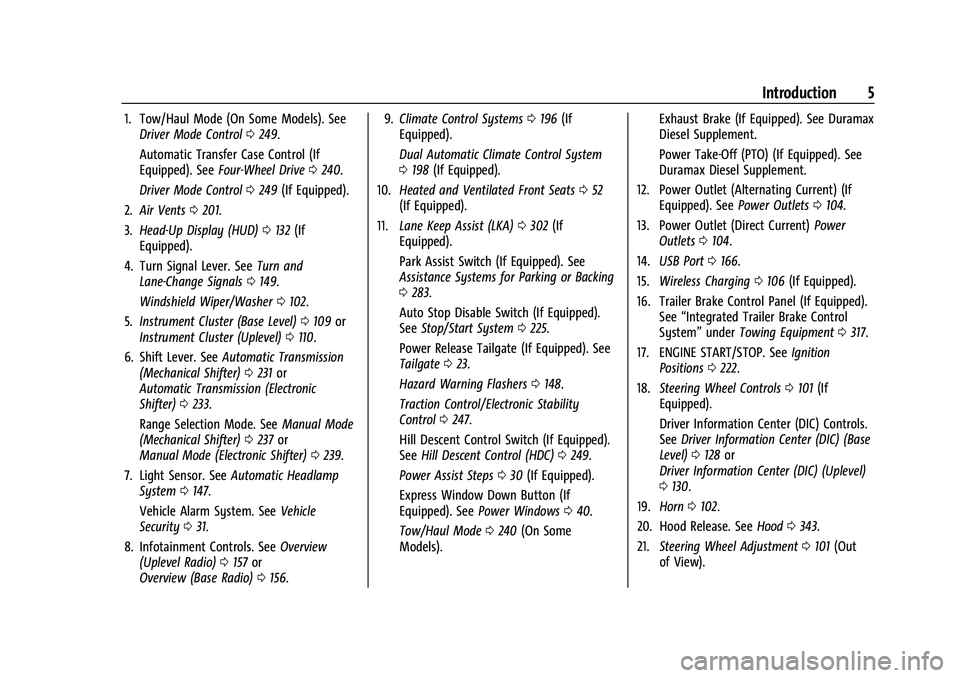
1. Tow/Haul Mode (On Some Models). SeeDriver Mode Control 0249.
Automatic Transfer Case Control (If
Equipped). See Four-Wheel Drive 0240.
Driver Mode Control 0249 (If Equipped).
2. Air Vents 0201.
3. Head-Up Display (HUD) 0132 (If
Equipped).
4. Turn Signal Lever. See Turn and
Lane-Change Signals 0149.
Windshield Wiper/Washer 0102.
5. Instrument Cluster (Base Level) 0109 or
Instrument Cluster (Uplevel) 0110.
6. Shift Lever. See Automatic Transmission
(Mechanical Shifter) 0231 or
Automatic Transmission (Electronic
Shifter) 0233.
Range Selection Mode. See Manual Mode
(Mechanical Shifter) 0237 or
Manual Mode (Electronic Shifter) 0239.
7. Light Sensor. See Automatic Headlamp
System 0147.
Vehicle Alarm System. See Vehicle
Security 031.
8. Infotainment Controls. See Overview
(Uplevel Radio) 0157 or
Overview (Base Radio) 0156. 9.
Climate Control Systems 0196 (If
Equipped).
Dual Automatic Climate Control System
0 198 (If Equipped).
10. Heated and Ventilated Front Seats 052
(If Equipped).
11. Lane Keep Assist (LKA) 0302 (If
Equipped).
Park Assist Switch (If Equipped). See
Assistance Systems for Parking or Backing
0 283.
Auto Stop Disable Switch (If Equipped).
See Stop/Start System 0225.
Power Release Tailgate (If Equipped). See
Tailgate 023.
Hazard Warning Flashers 0148.
Traction Control/Electronic Stability
Control 0247.
Hill Descent Control Switch (If Equipped).
See Hill Descent Control (HDC) 0249.
Power Assist Steps 030 (If Equipped).
Express Window Down Button (If
Equipped). See Power Windows 040.
Tow/Haul Mode 0240 (On Some
Models). Exhaust Brake (If Equipped). See Duramax
Diesel Supplement.
Power Take-Off (PTO) (If Equipped). See
Duramax Diesel Supplement.
12. Power Outlet (Alternating Current) (If Equipped). See Power Outlets0104.
13. Power Outlet (Direct Current) Power
Outlets 0104.
14. USB Port 0166.
15. Wireless Charging 0106 (If Equipped).
16. Trailer Brake Control Panel (If Equipped). See“Integrated Trailer Brake Control
System” underTowing Equipment 0317.
17. ENGINE START/STOP. See Ignition
Positions 0222.
18. Steering Wheel Controls 0101 (If
Equipped).
Driver Information Center (DIC) Controls.
See Driver Information Center (DIC) (Base
Level) 0128 or
Driver Information Center (DIC) (Uplevel)
0 130.
19. Horn 0102.
20. Hood Release. See Hood0343.
21. Steering Wheel Adjustment 0101 (Out
of View).
Page 10 of 474
GMC Sierra/Sierra Denali 1500 Owner Manual (GMNA-Localizing-U.S./
Canada/Mexico-15883563) - 2022 - CRC - 11/19/21
Introduction 9
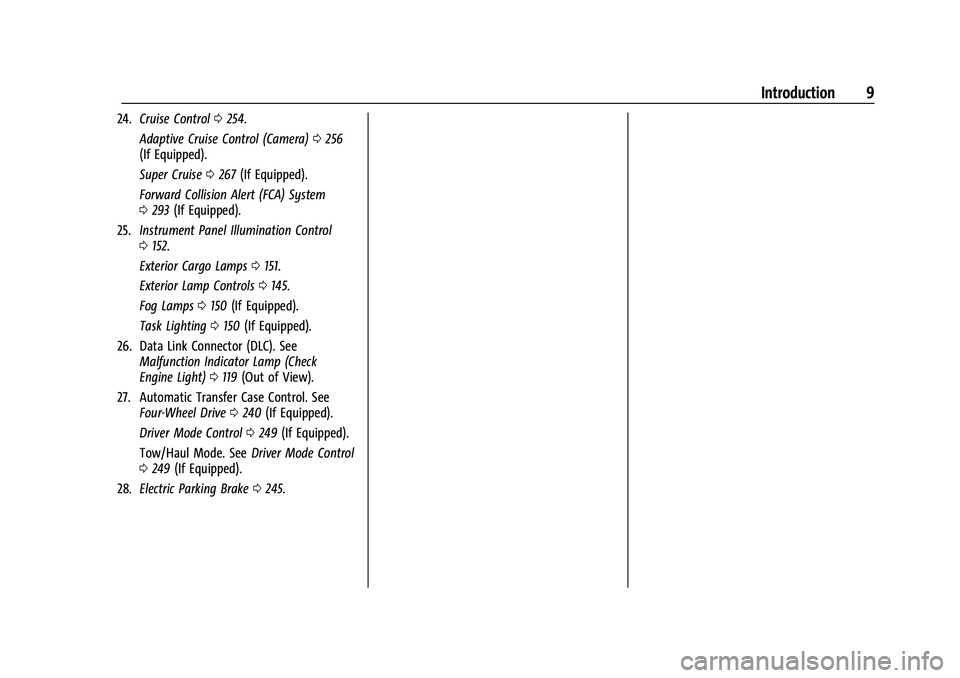
24.Cruise Control 0254.
Adaptive Cruise Control (Camera) 0256
(If Equipped).
Super Cruise 0267 (If Equipped).
Forward Collision Alert (FCA) System
0 293 (If Equipped).
25. Instrument Panel Illumination Control
0152.
Exterior Cargo Lamps 0151.
Exterior Lamp Controls 0145.
Fog Lamps 0150 (If Equipped).
Task Lighting 0150 (If Equipped).
26. Data Link Connector (DLC). See Malfunction Indicator Lamp (Check
Engine Light) 0119 (Out of View).
27. Automatic Transfer Case Control. See Four-Wheel Drive 0240 (If Equipped).
Driver Mode Control 0249 (If Equipped).
Tow/Haul Mode. See Driver Mode Control
0 249 (If Equipped).
28. Electric Parking Brake 0245.
Page 13 of 474

GMC Sierra/Sierra Denali 1500 Owner Manual (GMNA-Localizing-U.S./
Canada/Mexico-15883563) - 2022 - CRC - 11/19/21
12 Introduction
24.Cruise Control 0254.
Adaptive Cruise Control (Camera) 0256
(If Equipped).
Super Cruise 0267 (If Equipped).
Forward Collision Alert (FCA) System
0 293 (If Equipped).
25. Data Link Connector (DLC). See Malfunction Indicator Lamp (Check
Engine Light) 0119 (Out of View).
26. Instrument Panel Illumination Control
0152.
Exterior Cargo Lamps 0151.
Exterior Lamp Controls 0145.
Fog Lamps 0150 (If Equipped).
Task Lighting 0150 (If Equipped).
27. Automatic Transfer Case Control. See Four-Wheel Drive 0240 (If Equipped).
Driver Mode Control 0249 (If Equipped).
Tow/Haul Mode. See Driver Mode Control
0 249 (If Equipped).
28. Electric Parking Brake 0245.
Page 101 of 474
GMC Sierra/Sierra Denali 1500 Owner Manual (GMNA-Localizing-U.S./
Canada/Mexico-15883563) - 2022 - CRC - 11/19/21
100 Instruments and Controls
Instruments and Controls
Controls
Steering Wheel Adjustment . . . . . . . . . . . . 101
Steering Wheel Controls . . . . . . . . . . . . . . . 101
Heated Steering Wheel . . . . . . . . . . . . . . . . 102
Horn . . . . . . . . . . . . . . . . . . . . . . . . . . . . . . . . . . 102
Windshield Wiper/Washer . . . . . . . . . . . . . 102
Compass . . . . . . . . . . . . . . . . . . . . . . . . . . . . . . . 103
Clock . . . . . . . . . . . . . . . . . . . . . . . . . . . . . . . . . . 103
Power Outlets . . . . . . . . . . . . . . . . . . . . . . . . . 104
Wireless Charging . . . . . . . . . . . . . . . . . . . . . 106
Warning Lights, Gauges, and Indicators
Warning Lights, Gauges, andIndicators . . . . . . . . . . . . . . . . . . . . . . . . . . . . 108
Instrument Cluster (Base Level) . . . . . . . . 109
Instrument Cluster (Uplevel) . . . . . . . . . . . 110
Speedometer . . . . . . . . . . . . . . . . . . . . . . . . . . . 113
Odometer . . . . . . . . . . . . . . . . . . . . . . . . . . . . . . 113
Trip Odometer . . . . . . . . . . . . . . . . . . . . . . . . . 113
Tachometer . . . . . . . . . . . . . . . . . . . . . . . . . . . . 113
Fuel Gauge . . . . . . . . . . . . . . . . . . . . . . . . . . . . . 113
Engine Oil Pressure Gauge . . . . . . . . . . . . . 114
Engine Coolant Temperature Gauge . . . . 115
Transmission Temperature Gauge (Uplevel only) . . . . . . . . . . . . . . . . . . . . . . . . 116
Voltmeter Gauge . . . . . . . . . . . . . . . . . . . . . . 116
Seat Belt Reminders . . . . . . . . . . . . . . . . . . . . 117
Airbag Readiness Light . . . . . . . . . . . . . . . . . 118 Passenger Airbag Status Indicator . . . . . . 118
Charging System Light . . . . . . . . . . . . . . . . . 119
Malfunction Indicator Lamp (Check
Engine Light) . . . . . . . . . . . . . . . . . . . . . . . . . 119
Brake System Warning Light . . . . . . . . . . . 121
Electric Parking Brake Light . . . . . . . . . . . . 121
Service Electric Parking Brake Light . . . . . 121
Antilock Brake System (ABS) Warning
Light . . . . . . . . . . . . . . . . . . . . . . . . . . . . . . . . . 122
Four-Wheel-Drive Light . . . . . . . . . . . . . . . . . 122
Tow/Haul Mode Light . . . . . . . . . . . . . . . . . 122
Hill Descent Control Light . . . . . . . . . . . . . . 122
Lane Keep Assist (LKA) Light . . . . . . . . . . . 123
Automatic Emergency Braking (AEB) Disabled Light . . . . . . . . . . . . . . . . . . . . . . . . 123
Vehicle Ahead Indicator . . . . . . . . . . . . . . . . 123
Pedestrian Ahead Indicator . . . . . . . . . . . . 123
Traction Off Light . . . . . . . . . . . . . . . . . . . . . . 124
StabiliTrak OFF Light . . . . . . . . . . . . . . . . . . . 124
Traction Control System (TCS)/ StabiliTrak Light . . . . . . . . . . . . . . . . . . . . . . 124
Engine Coolant Temperature Warning Light . . . . . . . . . . . . . . . . . . . . . . . . . . . . . . . . . 125
Driver Mode Control Light . . . . . . . . . . . . . 125
Tire Pressure Light . . . . . . . . . . . . . . . . . . . . . 126
Engine Oil Pressure Light (Uplevel Cluster) . . . . . . . . . . . . . . . . . . . . . . . . . . . . . . 126
Low Fuel Warning Light . . . . . . . . . . . . . . . 126
Security Light . . . . . . . . . . . . . . . . . . . . . . . . . . 127
High-Beam On Light . . . . . . . . . . . . . . . . . . . 127 Front Fog Lamp Light . . . . . . . . . . . . . . . . . . 127
Lamps On Reminder . . . . . . . . . . . . . . . . . . . 127
Cruise Control Light . . . . . . . . . . . . . . . . . . . . 128
Door Ajar Light . . . . . . . . . . . . . . . . . . . . . . . . 128
Information Displays
Driver Information Center (DIC) (Base
Level) . . . . . . . . . . . . . . . . . . . . . . . . . . . . . . . . 128
Driver Information Center (DIC) (Uplevel) . . . . . . . . . . . . . . . . . . . . . . . . . . . . . 130
Head-Up Display (HUD) . . . . . . . . . . . . . . . . 132
Vehicle Messages
Vehicle Messages . . . . . . . . . . . . . . . . . . . . . . 136
Engine Power Messages . . . . . . . . . . . . . . . 136
Vehicle Speed Messages . . . . . . . . . . . . . . . 137
Vehicle Personalization
Vehicle Personalization . . . . . . . . . . . . . . . . . 137
Universal Remote System
Universal Remote System . . . . . . . . . . . . . . 142
Universal Remote System Programming . . . . . . . . . . . . . . . . . . . . . . . . 142
Universal Remote System Operation . . . . . . . . . . . . . . . . . . . . . . . . . . . . 144
Page 111 of 474
GMC Sierra/Sierra Denali 1500 Owner Manual (GMNA-Localizing-U.S./
Canada/Mexico-15883563) - 2022 - CRC - 11/19/21
110 Instruments and Controls
Instrument Cluster (Uplevel)
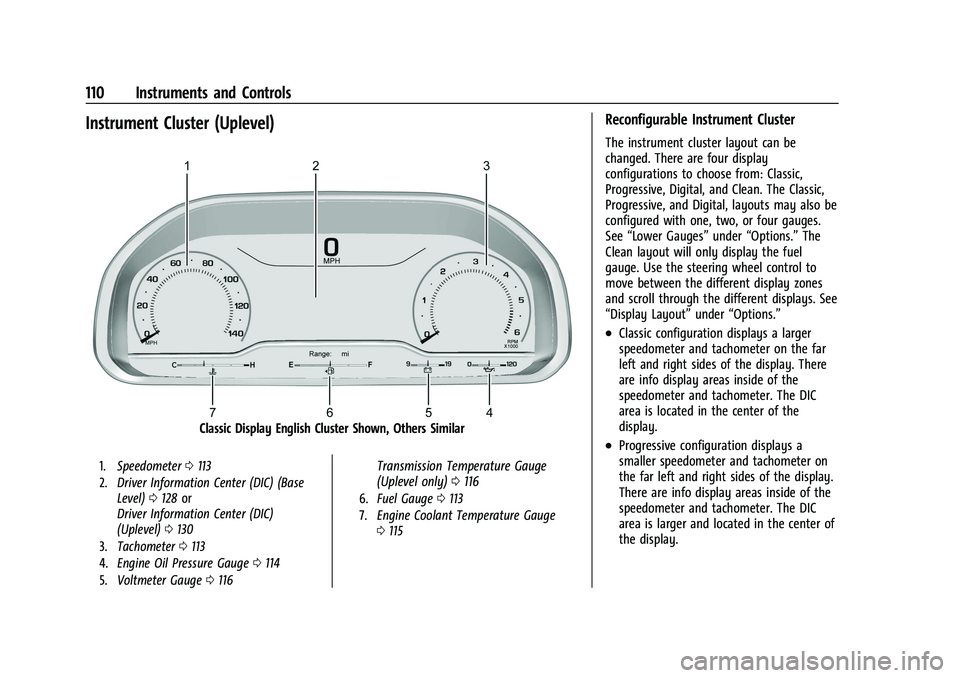
Classic Display English Cluster Shown, Others Similar
1.Speedometer 0113
2. Driver Information Center (DIC) (Base
Level) 0128 or
Driver Information Center (DIC)
(Uplevel) 0130
3. Tachometer 0113
4. Engine Oil Pressure Gauge 0114
5. Voltmeter Gauge 0116Transmission Temperature Gauge
(Uplevel only) 0116
6. Fuel Gauge 0113
7. Engine Coolant Temperature Gauge
0115
Reconfigurable Instrument Cluster
The instrument cluster layout can be
changed. There are four display
configurations to choose from: Classic,
Progressive, Digital, and Clean. The Classic,
Progressive, and Digital, layouts may also be
configured with one, two, or four gauges.
See “Lower Gauges” under“Options.” The
Clean layout will only display the fuel
gauge. Use the steering wheel control to
move between the different display zones
and scroll through the different displays. See
“Display Layout” under“Options.”
.Classic configuration displays a larger
speedometer and tachometer on the far
left and right sides of the display. There
are info display areas inside of the
speedometer and tachometer. The DIC
area is located in the center of the
display.
.Progressive configuration displays a
smaller speedometer and tachometer on
the far left and right sides of the display.
There are info display areas inside of the
speedometer and tachometer. The DIC
area is larger and located in the center of
the display.
Page 112 of 474
GMC Sierra/Sierra Denali 1500 Owner Manual (GMNA-Localizing-U.S./
Canada/Mexico-15883563) - 2022 - CRC - 11/19/21
Instruments and Controls 111
.Digital configuration displays the info
display areas on the far left and right
sides of the display. The DIC area is larger
and located in the center of the display.
.Clean configuration is a simplified display
that has a digital speed in the center. The
DIC area is located on the far right of the
display.
Cluster Menu
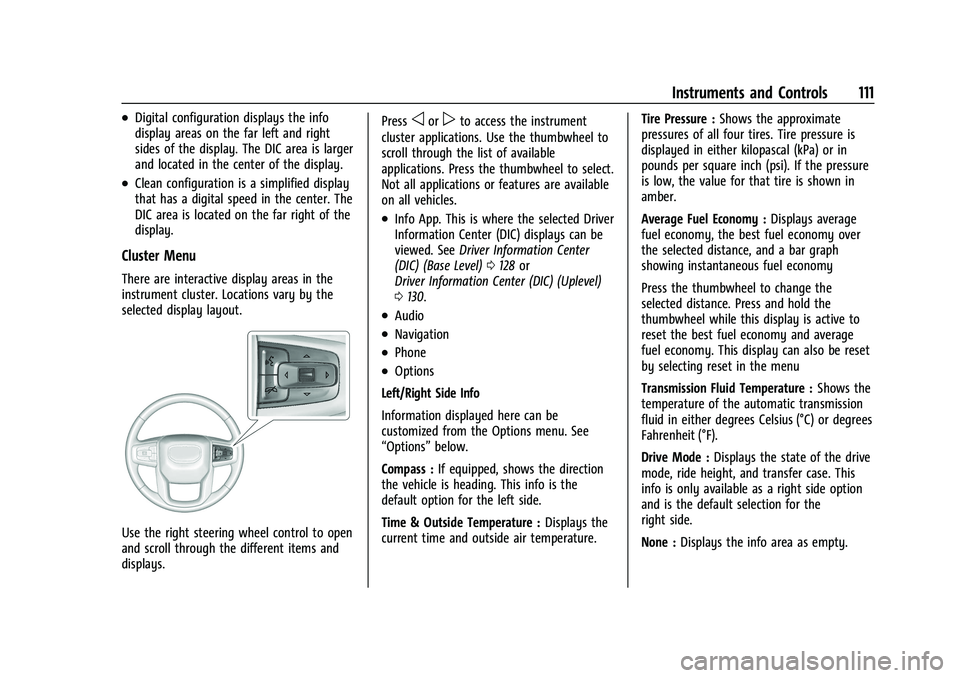
There are interactive display areas in the
instrument cluster. Locations vary by the
selected display layout.
Use the right steering wheel control to open
and scroll through the different items and
displays.Press
oorpto access the instrument
cluster applications. Use the thumbwheel to
scroll through the list of available
applications. Press the thumbwheel to select.
Not all applications or features are available
on all vehicles.
.Info App. This is where the selected Driver
Information Center (DIC) displays can be
viewed. See Driver Information Center
(DIC) (Base Level) 0128 or
Driver Information Center (DIC) (Uplevel)
0 130.
.Audio
.Navigation
.Phone
.Options
Left/Right Side Info
Information displayed here can be
customized from the Options menu. See
“Options” below.
Compass : If equipped, shows the direction
the vehicle is heading. This info is the
default option for the left side.
Time & Outside Temperature : Displays the
current time and outside air temperature. Tire Pressure :
Shows the approximate
pressures of all four tires. Tire pressure is
displayed in either kilopascal (kPa) or in
pounds per square inch (psi). If the pressure
is low, the value for that tire is shown in
amber.
Average Fuel Economy : Displays average
fuel economy, the best fuel economy over
the selected distance, and a bar graph
showing instantaneous fuel economy
Press the thumbwheel to change the
selected distance. Press and hold the
thumbwheel while this display is active to
reset the best fuel economy and average
fuel economy. This display can also be reset
by selecting reset in the menu
Transmission Fluid Temperature : Shows the
temperature of the automatic transmission
fluid in either degrees Celsius (°C) or degrees
Fahrenheit (°F).
Drive Mode : Displays the state of the drive
mode, ride height, and transfer case. This
info is only available as a right side option
and is the default selection for the
right side.
None : Displays the info area as empty.
Page 123 of 474
GMC Sierra/Sierra Denali 1500 Owner Manual (GMNA-Localizing-U.S./
Canada/Mexico-15883563) - 2022 - CRC - 11/19/21
122 Instruments and Controls
A message may also display in the Driver
Information Center (DIC). SeeElectric Parking
Brake 0245.
Antilock Brake System (ABS)
Warning Light
This warning light should come on briefly
when the vehicle is turned on. If the light
does not come on, have it fixed so it will be
ready to warn if there is a problem.
Engagement of the 4WD front axle lock will
disable ABS and illuminate the ABS warning
light. The ABS warning light will turn off
when the front axle lock is disengaged.
If the light comes on while driving, safely
stop as soon as it is possible and turn off
the vehicle. Then turn on the vehicle again
to reset the system.
If the ABS warning light stays on, or comes
on again while driving, the vehicle needs
service. A chime may also sound when the
light stays on. If the ABS warning light is the only light on,
the vehicle has regular brakes, but ABS is
not functioning.
If both the ABS warning light and the brake
system warning light are on, ABS is not
functioning and there is a problem with the
regular brakes. See your dealer for service.
See
Brake System Warning Light 0121.
Four-Wheel-Drive Light
Auto Mode Shown, Other Modes Similar
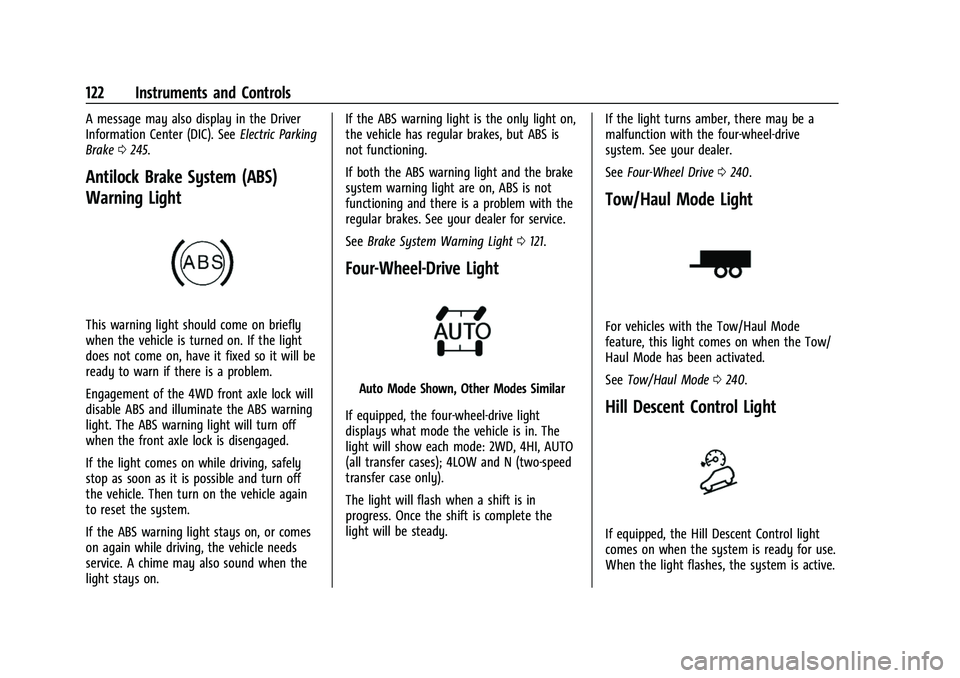
If equipped, the four-wheel-drive light
displays what mode the vehicle is in. The
light will show each mode: 2WD, 4HI, AUTO
(all transfer cases); 4LOW and N (two-speed
transfer case only).
The light will flash when a shift is in
progress. Once the shift is complete the
light will be steady. If the light turns amber, there may be a
malfunction with the four-wheel-drive
system. See your dealer.
See
Four-Wheel Drive 0240.
Tow/Haul Mode Light
For vehicles with the Tow/Haul Mode
feature, this light comes on when the Tow/
Haul Mode has been activated.
See Tow/Haul Mode 0240.
Hill Descent Control Light
If equipped, the Hill Descent Control light
comes on when the system is ready for use.
When the light flashes, the system is active.
Page 132 of 474
GMC Sierra/Sierra Denali 1500 Owner Manual (GMNA-Localizing-U.S./
Canada/Mexico-15883563) - 2022 - CRC - 11/19/21
Instruments and Controls 131
Average Fuel Economy that the vehicle has
at that moment, and changes as driving
conditions change.
The timer shows the time in the current
drive cycle.
All values in the Drive Summary are
automatically reset each time the vehicle is
started.
Trip 1 or Trip 2, Average Fuel Economy, and
Average Speed :Shows the current distance
traveled, in either kilometers (km) or
miles (mi), since the trip odometer was last
reset.
The Average Fuel Economy display shows
the approximate average liters per
100 kilometers (L/100 km), kilometers per
liter (km/L), or miles per gallon (mpg). This
number is calculated based on the value
recorded since the last time this menu item
was reset. This number reflects only the
approximate average fuel economy that the
vehicle has at that moment, and changes as
driving conditions change.
Average Speed shows the average speed of
the vehicle in kilometers per hour (km/h) or
miles per hour (mph). This average is
calculated based on various vehicle speeds
recorded since the last reset of this value. Press the thumbwheel while this display is
active to reset the values.
Timer :
To start the timer, press the
thumbwheel while this display is active. The
display will show the amount of time that
has passed since the timer was last reset. To
stop the timer, press the thumbwheel
briefly while this display is active and the
timer is running.
Press the thumbwheel while this display is
active to reset the timer.
Tire Pressure : Shows the approximate
pressures of all four tires. Tire pressure is
displayed in either kilopascal (kPa) or in
pounds per square inch (psi). If the pressure
is low, the value for that tire is shown in
amber. See Tire Pressure Monitor System
0 385 and Tire Pressure Monitor Operation
0 385.
Fuel Economy : Displays average fuel
economy, the best fuel economy over the
selected distance, and a bar graph showing
instantaneous fuel economy.
Press the thumbwheel to change the
selected distance. Press and hold the
thumbwheel while this display is active to reset the best fuel economy and average
fuel economy. This display can also be reset
by selecting Reset in the menu.
Driver Assistance :
If equipped, shows
information for Adaptive Cruise Control
(ACC), Lane Keep Assist (LKA), Forward
Collision Alert (FCA), and Follow Distance
Indicator(FDI).
Oil Life : Shows an estimate of the
remaining oil life. If REMAINING OIL LIFE
99% is displayed, that means 99% of the
current oil life remains.
When the remaining oil life is low, the
CHANGE ENGINE OIL SOON message will
appear on the display. The oil should be
changed as soon as possible. See Engine Oil
0 348. In addition to the engine oil life
system monitoring the oil life, additional
maintenance is recommended. See
Maintenance Schedule 0425.
The Oil Life display must be reset after each
oil change. It will not reset itself. Do not
reset the Oil Life display at any time other
than when the oil has just been changed.
It cannot be reset accurately until the next
oil change. To reset, see Engine Oil Life
System 0350.
Page 133 of 474
GMC Sierra/Sierra Denali 1500 Owner Manual (GMNA-Localizing-U.S./
Canada/Mexico-15883563) - 2022 - CRC - 11/19/21
132 Instruments and Controls
Brake Pad Life :Displays an estimate of the
remaining life of the front and rear brake
pads. Messages will display based on brake
pad wear and the state of the system. Reset
the Brake Pad Life display after replacing the
brake pads. See Brake Pad Life System
0 359.
Air Filter Life : Shows an estimate of the
remaining engine air filter’s life and the
state of the system. Engine Air Filter Life
95% means 95% of the current air filter life
remains. Messages will display based on the
engine air filter life and the state of the
system. When the REPLACE SOON message
displays, the engine air filter should be
replaced at the earliest convenience.
The Air Filter Life display must be reset after
the engine air filter replacement. To reset,
see Engine Air Filter Life System 0351.
Trailer Brake : On vehicles with the
Integrated Trailer Brake Control (ITBC)
system, the trailer brake display appears in
the DIC.
TRAILER GAIN shows the trailer gain setting.
This setting can be adjusted from 0.0 to 10.0
with either a trailer connected or
disconnected. OUTPUT shows the power output to the
trailer any time a trailer with electric brakes
is connected. Output is displayed as a bar
graph. Dotted lines may appear in the
OUTPUT display if a trailer is not connected.
Off Road :
If equipped, displays vehicle pitch
and roll information, road wheel angle, and
four-wheel drive (4WD) status. If the vehicle
has low traction, a low traction indicator
and the wheels affected will display amber
in the Off-Road page.
Engine Hours (Hourmeter) : Shows the total
number of hours the engine has run. This
display also shows the engine idle hours.
Average Speed : Displays the average
vehicle speed in kilometers per hour (km/h)
or miles per hour (mph). This average is
based on the various vehicle speeds
recorded since the last reset. Reset the
average speed by pressing the thumbwheel
while this display is active to show a
confirmation window to select Yes or No.
Transmission Fluid Temperature : Shows the
temperature of the automatic transmission
fluid in either degrees Celsius (°C) or degrees
Fahrenheit (°F). Coolant Temperature :
Shows the engine
coolant temperature in either degrees
Celsius (°C) or degrees Fahrenheit (°F).
Oil Temperature : Shows the engine oil
temperature in either degrees Celsius (°C) or
degrees Fahrenheit (°F).
Oil Pressure : Shows the current oil pressure
in either kilopascal (kPa) or in pounds per
square inch (psi).
Info Page Options : Scroll to choose which
info pages appear on the DIC. Press the
thumbwheel to select or deselect.
Blank Page : Shows no information.
Head-Up Display (HUD)
{Warning
If the HUD image is too bright or too
high in your field of view, it may take
you more time to see things you need to
see when it is dark outside. Be sure to
keep the HUD image dim and placed low
in your field of view.
If equipped with HUD, some information
about the operation of the vehicle is
projected onto the windshield. The image is
projected through the HUD lens on top of
Page 135 of 474
GMC Sierra/Sierra Denali 1500 Owner Manual (GMNA-Localizing-U.S./
Canada/Mexico-15883563) - 2022 - CRC - 11/19/21
134 Instruments and Controls
The HUD image will automatically dim and
brighten to compensate for outside lighting.
Use
Dto adjust as needed.
The HUD image can temporarily light up
depending on the angle and position of
sunlight on the HUD display. This is normal.
Polarized sunglasses could make the HUD
image harder to see.
Head-Up Display (HUD) Rotation Option
If equipped, this feature under the Options
menu of the instrument cluster allows for
adjusting the angle of the HUD image and
changing or turning off the Speed
Limit Sign.
HUD Rotation: Press the thumbwheel while
Adjust Rotation is highlighted to enter
Adjust Mode. Scroll to adjust the angle of
the HUD display. Press the thumbwheel to
confirm and save the setting. This feature
may only be available in P (Park).
Speed Limit Style Adjustment
If equipped, the speed limit style can be
changed to a speed limit bar or speed limit
sign from the Options menu in the
instrument cluster. Press the thumbwheel
while Speed Limit Style is highlighted to
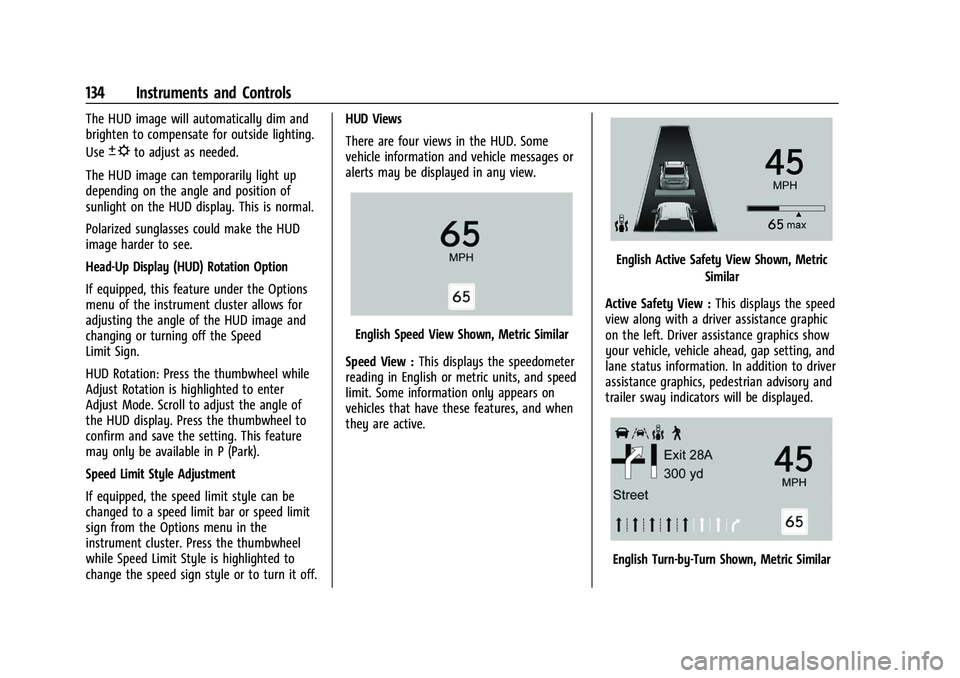
change the speed sign style or to turn it off. HUD Views
There are four views in the HUD. Some
vehicle information and vehicle messages or
alerts may be displayed in any view.
English Speed View Shown, Metric Similar
Speed View : This displays the speedometer
reading in English or metric units, and speed
limit. Some information only appears on
vehicles that have these features, and when
they are active.
English Active Safety View Shown, Metric
Similar
Active Safety View : This displays the speed
view along with a driver assistance graphic
on the left. Driver assistance graphics show
your vehicle, vehicle ahead, gap setting, and
lane status information. In addition to driver
assistance graphics, pedestrian advisory and
trailer sway indicators will be displayed.
English Turn-by-Turn Shown, Metric Similar