climate control GMC SIERRA 2022 Owners Manual
[x] Cancel search | Manufacturer: GMC, Model Year: 2022, Model line: SIERRA, Model: GMC SIERRA 2022Pages: 474, PDF Size: 15.09 MB
Page 2 of 474

GMC Sierra/Sierra Denali 1500 Owner Manual (GMNA-Localizing-U.S./
Canada/Mexico-15883563) - 2022 - CRC - 11/19/21
Contents
Introduction . . . . . . . . . . . . . . . . . . . . . . . . . . . . . . 1
Keys, Doors, and Windows . . . . . . . . . . . . . . 13
Seats and Restraints . . . . . . . . . . . . . . . . . . . . 44
Storage . . . . . . . . . . . . . . . . . . . . . . . . . . . . . . . . . 96
Instruments and Controls . . . . . . . . . . . . . . 100
Lighting . . . . . . . . . . . . . . . . . . . . . . . . . . . . . . . . 145
Infotainment System . . . . . . . . . . . . . . . . . . . 155
Climate Controls . . . . . . . . . . . . . . . . . . . . . . . 196
Driving and Operating . . . . . . . . . . . . . . . . . 204
Vehicle Care . . . . . . . . . . . . . . . . . . . . . . . . . . . . 341
Service and Maintenance . . . . . . . . . . . . . . . 424
Technical Data . . . . . . . . . . . . . . . . . . . . . . . . . 438
Customer Information . . . . . . . . . . . . . . . . . . 442
Reporting Safety Defects . . . . . . . . . . . . . . . 450
OnStar . . . . . . . . . . . . . . . . . . . . . . . . . . . . . . . . . 453
Connected Services . . . . . . . . . . . . . . . . . . . . . 458
Index . . . . . . . . . . . . . . . . . . . . . . . . . . 461
Introduction
The names, logos, emblems, slogans, vehicle
model names, and vehicle body designs
appearing in this manual including, but not
limited to, GM, the GM logo, GMC, the GMC
Truck Emblem, SIERRA, and DENALI are
trademarks and/or service marks of General
Motors LLC, its subsidiaries, affiliates,
or licensors.
For vehicles first sold in Canada, substitute
the name“General Motors of Canada
Company” for GMC Division wherever it
appears in this manual.
This manual describes features that may or
may not be on the vehicle because of
optional equipment that was not purchased
on the vehicle, model variants, country
specifications, features/applications that may
not be available in your region, or changes subsequent to the printing of this owner’s
manual, including changes in standard or
optional content.
If the vehicle has the Duramax diesel
engine, see the Duramax diesel supplement
for additional and specific information on
this engine.
Refer to the purchase documentation
relating to your specific vehicle to confirm
the features.
Keep this manual in the vehicle for quick
reference.
Canadian Vehicle Owners
A French language manual can be obtained
from your dealer, at www.helminc.com,
or from:
Propriétaires Canadiens
On peut obtenir un exemplaire de ce guide
en français auprès du concessionnaire ou à
l'adresse suivante:
Litho in U.S.A.
Part No. 84719636 A First Printing©2021 General Motors LLC. All Rights Reserved.
Page 6 of 474
GMC Sierra/Sierra Denali 1500 Owner Manual (GMNA-Localizing-U.S./
Canada/Mexico-15883563) - 2022 - CRC - 11/19/21
Introduction 5
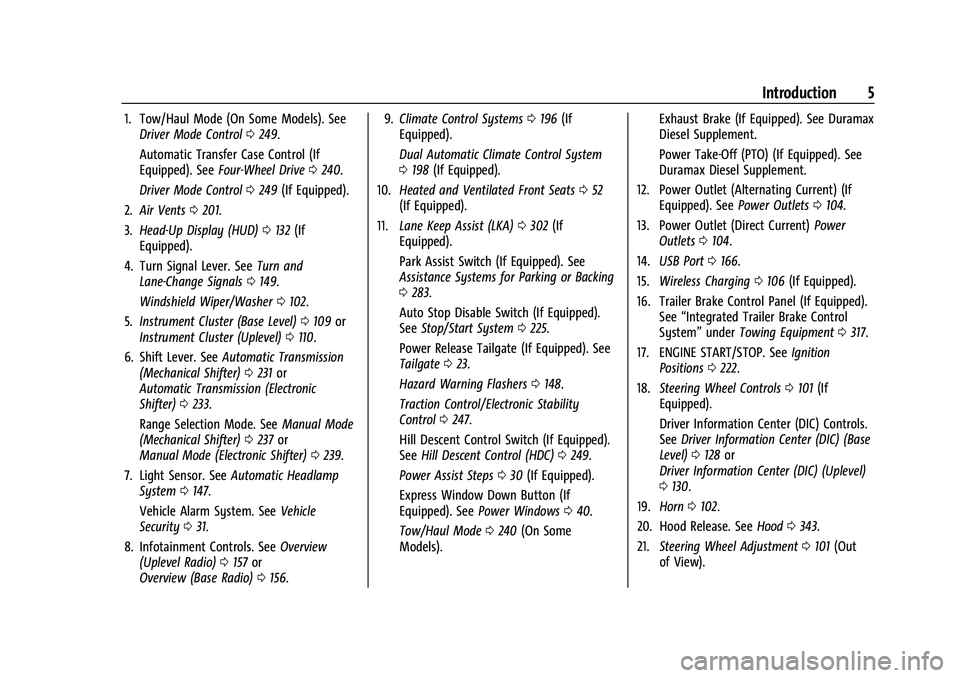
1. Tow/Haul Mode (On Some Models). SeeDriver Mode Control 0249.
Automatic Transfer Case Control (If
Equipped). See Four-Wheel Drive 0240.
Driver Mode Control 0249 (If Equipped).
2. Air Vents 0201.
3. Head-Up Display (HUD) 0132 (If
Equipped).
4. Turn Signal Lever. See Turn and
Lane-Change Signals 0149.
Windshield Wiper/Washer 0102.
5. Instrument Cluster (Base Level) 0109 or
Instrument Cluster (Uplevel) 0110.
6. Shift Lever. See Automatic Transmission
(Mechanical Shifter) 0231 or
Automatic Transmission (Electronic
Shifter) 0233.
Range Selection Mode. See Manual Mode
(Mechanical Shifter) 0237 or
Manual Mode (Electronic Shifter) 0239.
7. Light Sensor. See Automatic Headlamp
System 0147.
Vehicle Alarm System. See Vehicle
Security 031.
8. Infotainment Controls. See Overview
(Uplevel Radio) 0157 or
Overview (Base Radio) 0156. 9.
Climate Control Systems 0196 (If
Equipped).
Dual Automatic Climate Control System
0 198 (If Equipped).
10. Heated and Ventilated Front Seats 052
(If Equipped).
11. Lane Keep Assist (LKA) 0302 (If
Equipped).
Park Assist Switch (If Equipped). See
Assistance Systems for Parking or Backing
0 283.
Auto Stop Disable Switch (If Equipped).
See Stop/Start System 0225.
Power Release Tailgate (If Equipped). See
Tailgate 023.
Hazard Warning Flashers 0148.
Traction Control/Electronic Stability
Control 0247.
Hill Descent Control Switch (If Equipped).
See Hill Descent Control (HDC) 0249.
Power Assist Steps 030 (If Equipped).
Express Window Down Button (If
Equipped). See Power Windows 040.
Tow/Haul Mode 0240 (On Some
Models). Exhaust Brake (If Equipped). See Duramax
Diesel Supplement.
Power Take-Off (PTO) (If Equipped). See
Duramax Diesel Supplement.
12. Power Outlet (Alternating Current) (If Equipped). See Power Outlets0104.
13. Power Outlet (Direct Current) Power
Outlets 0104.
14. USB Port 0166.
15. Wireless Charging 0106 (If Equipped).
16. Trailer Brake Control Panel (If Equipped). See“Integrated Trailer Brake Control
System” underTowing Equipment 0317.
17. ENGINE START/STOP. See Ignition
Positions 0222.
18. Steering Wheel Controls 0101 (If
Equipped).
Driver Information Center (DIC) Controls.
See Driver Information Center (DIC) (Base
Level) 0128 or
Driver Information Center (DIC) (Uplevel)
0 130.
19. Horn 0102.
20. Hood Release. See Hood0343.
21. Steering Wheel Adjustment 0101 (Out
of View).
Page 9 of 474
GMC Sierra/Sierra Denali 1500 Owner Manual (GMNA-Localizing-U.S./
Canada/Mexico-15883563) - 2022 - CRC - 11/19/21
8 Introduction
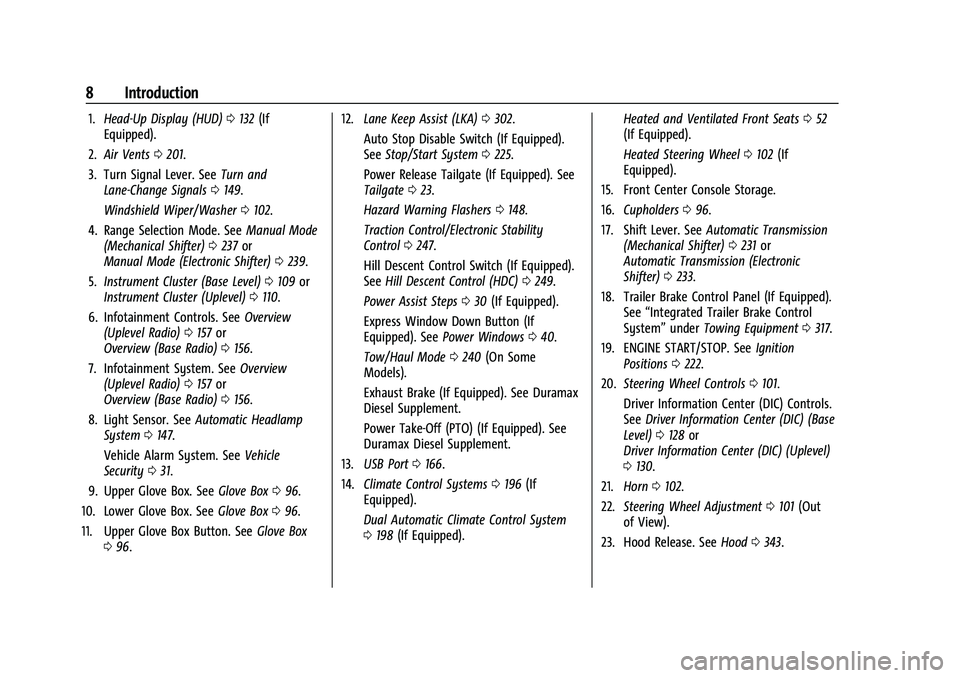
1.Head-Up Display (HUD) 0132 (If
Equipped).
2. Air Vents 0201.
3. Turn Signal Lever. See Turn and
Lane-Change Signals 0149.
Windshield Wiper/Washer 0102.
4. Range Selection Mode. See Manual Mode
(Mechanical Shifter) 0237 or
Manual Mode (Electronic Shifter) 0239.
5. Instrument Cluster (Base Level) 0109 or
Instrument Cluster (Uplevel) 0110.
6. Infotainment Controls. See Overview
(Uplevel Radio) 0157 or
Overview (Base Radio) 0156.
7. Infotainment System. See Overview
(Uplevel Radio) 0157 or
Overview (Base Radio) 0156.
8. Light Sensor. See Automatic Headlamp
System 0147.
Vehicle Alarm System. See Vehicle
Security 031.
9. Upper Glove Box. See Glove Box096.
10. Lower Glove Box. See Glove Box096.
11. Upper Glove Box Button. See Glove Box
0 96. 12.
Lane Keep Assist (LKA) 0302.
Auto Stop Disable Switch (If Equipped).
See Stop/Start System 0225.
Power Release Tailgate (If Equipped). See
Tailgate 023.
Hazard Warning Flashers 0148.
Traction Control/Electronic Stability
Control 0247.
Hill Descent Control Switch (If Equipped).
See Hill Descent Control (HDC) 0249.
Power Assist Steps 030 (If Equipped).
Express Window Down Button (If
Equipped). See Power Windows 040.
Tow/Haul Mode 0240 (On Some
Models).
Exhaust Brake (If Equipped). See Duramax
Diesel Supplement.
Power Take-Off (PTO) (If Equipped). See
Duramax Diesel Supplement.
13. USB Port 0166.
14. Climate Control Systems 0196 (If
Equipped).
Dual Automatic Climate Control System
0 198 (If Equipped). Heated and Ventilated Front Seats
052
(If Equipped).
Heated Steering Wheel 0102 (If
Equipped).
15. Front Center Console Storage.
16. Cupholders 096.
17. Shift Lever. See Automatic Transmission
(Mechanical Shifter) 0231 or
Automatic Transmission (Electronic
Shifter) 0233.
18. Trailer Brake Control Panel (If Equipped). See“Integrated Trailer Brake Control
System” underTowing Equipment 0317.
19. ENGINE START/STOP. See Ignition
Positions 0222.
20. Steering Wheel Controls 0101.
Driver Information Center (DIC) Controls.
See Driver Information Center (DIC) (Base
Level) 0128 or
Driver Information Center (DIC) (Uplevel)
0 130.
21. Horn 0102.
22. Steering Wheel Adjustment 0101 (Out
of View).
23. Hood Release. See Hood0343.
Page 12 of 474
GMC Sierra/Sierra Denali 1500 Owner Manual (GMNA-Localizing-U.S./
Canada/Mexico-15883563) - 2022 - CRC - 11/19/21
Introduction 11
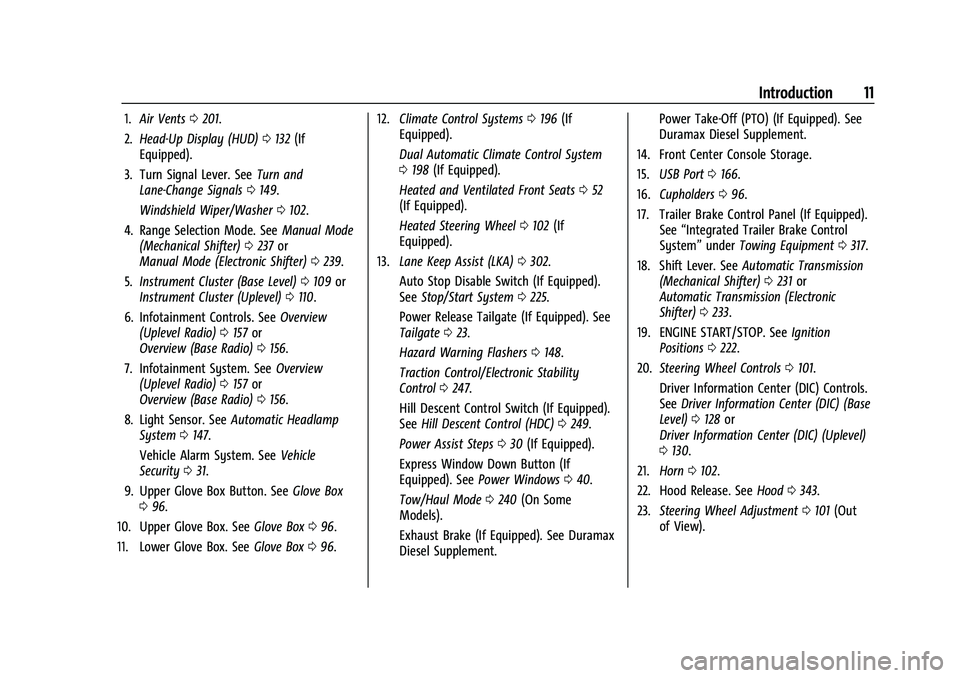
1.Air Vents 0201.
2. Head-Up Display (HUD) 0132 (If
Equipped).
3. Turn Signal Lever. See Turn and
Lane-Change Signals 0149.
Windshield Wiper/Washer 0102.
4. Range Selection Mode. See Manual Mode
(Mechanical Shifter) 0237 or
Manual Mode (Electronic Shifter) 0239.
5. Instrument Cluster (Base Level) 0109 or
Instrument Cluster (Uplevel) 0110.
6. Infotainment Controls. See Overview
(Uplevel Radio) 0157 or
Overview (Base Radio) 0156.
7. Infotainment System. See Overview
(Uplevel Radio) 0157 or
Overview (Base Radio) 0156.
8. Light Sensor. See Automatic Headlamp
System 0147.
Vehicle Alarm System. See Vehicle
Security 031.
9. Upper Glove Box Button. See Glove Box
0 96.
10. Upper Glove Box. See Glove Box096.
11. Lower Glove Box. See Glove Box096. 12.
Climate Control Systems 0196 (If
Equipped).
Dual Automatic Climate Control System
0 198 (If Equipped).
Heated and Ventilated Front Seats 052
(If Equipped).
Heated Steering Wheel 0102 (If
Equipped).
13. Lane Keep Assist (LKA) 0302.
Auto Stop Disable Switch (If Equipped).
See Stop/Start System 0225.
Power Release Tailgate (If Equipped). See
Tailgate 023.
Hazard Warning Flashers 0148.
Traction Control/Electronic Stability
Control 0247.
Hill Descent Control Switch (If Equipped).
See Hill Descent Control (HDC) 0249.
Power Assist Steps 030 (If Equipped).
Express Window Down Button (If
Equipped). See Power Windows 040.
Tow/Haul Mode 0240 (On Some
Models).
Exhaust Brake (If Equipped). See Duramax
Diesel Supplement. Power Take-Off (PTO) (If Equipped). See
Duramax Diesel Supplement.
14. Front Center Console Storage.
15. USB Port 0166.
16. Cupholders 096.
17. Trailer Brake Control Panel (If Equipped). See“Integrated Trailer Brake Control
System” underTowing Equipment 0317.
18. Shift Lever. See Automatic Transmission
(Mechanical Shifter) 0231 or
Automatic Transmission (Electronic
Shifter) 0233.
19. ENGINE START/STOP. See Ignition
Positions 0222.
20. Steering Wheel Controls 0101.
Driver Information Center (DIC) Controls.
See Driver Information Center (DIC) (Base
Level) 0128 or
Driver Information Center (DIC) (Uplevel)
0 130.
21. Horn 0102.
22. Hood Release. See Hood0343.
23. Steering Wheel Adjustment 0101 (Out
of View).
Page 21 of 474
GMC Sierra/Sierra Denali 1500 Owner Manual (GMNA-Localizing-U.S./
Canada/Mexico-15883563) - 2022 - CRC - 11/19/21
20 Keys, Doors, and Windows
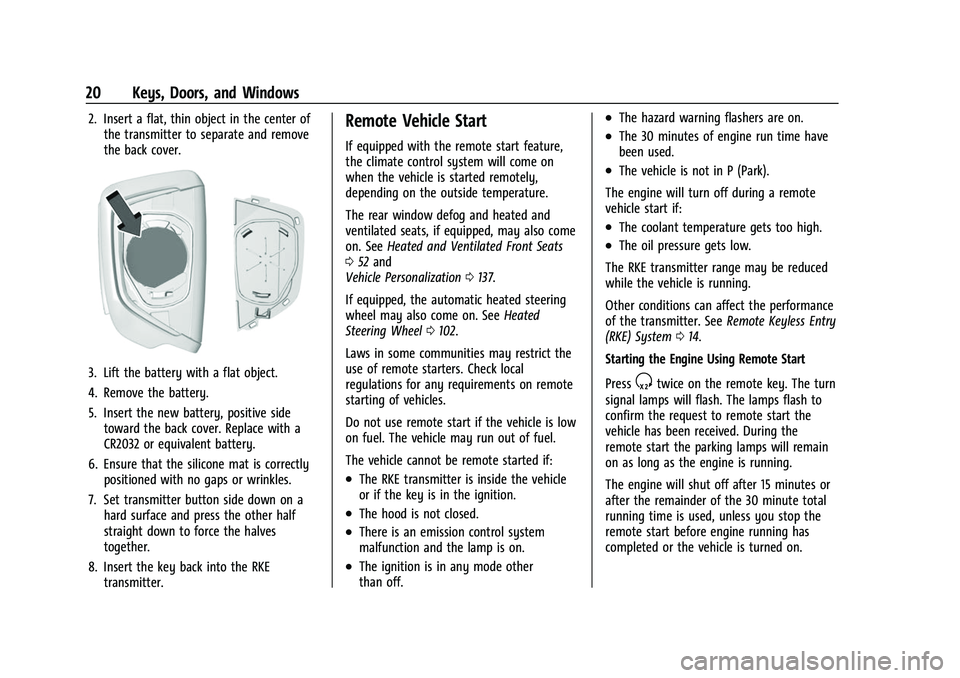
2. Insert a flat, thin object in the center ofthe transmitter to separate and remove
the back cover.
3. Lift the battery with a flat object.
4. Remove the battery.
5. Insert the new battery, positive sidetoward the back cover. Replace with a
CR2032 or equivalent battery.
6. Ensure that the silicone mat is correctly positioned with no gaps or wrinkles.
7. Set transmitter button side down on a hard surface and press the other half
straight down to force the halves
together.
8. Insert the key back into the RKE transmitter.
Remote Vehicle Start
If equipped with the remote start feature,
the climate control system will come on
when the vehicle is started remotely,
depending on the outside temperature.
The rear window defog and heated and
ventilated seats, if equipped, may also come
on. See Heated and Ventilated Front Seats
0 52 and
Vehicle Personalization 0137.
If equipped, the automatic heated steering
wheel may also come on. See Heated
Steering Wheel 0102.
Laws in some communities may restrict the
use of remote starters. Check local
regulations for any requirements on remote
starting of vehicles.
Do not use remote start if the vehicle is low
on fuel. The vehicle may run out of fuel.
The vehicle cannot be remote started if:
.The RKE transmitter is inside the vehicle
or if the key is in the ignition.
.The hood is not closed.
.There is an emission control system
malfunction and the lamp is on.
.The ignition is in any mode other
than off.
.The hazard warning flashers are on.
.The 30 minutes of engine run time have
been used.
.The vehicle is not in P (Park).
The engine will turn off during a remote
vehicle start if:
.The coolant temperature gets too high.
.The oil pressure gets low.
The RKE transmitter range may be reduced
while the vehicle is running.
Other conditions can affect the performance
of the transmitter. See Remote Keyless Entry
(RKE) System 014.
Starting the Engine Using Remote Start
Press
Stwice on the remote key. The turn
signal lamps will flash. The lamps flash to
confirm the request to remote start the
vehicle has been received. During the
remote start the parking lamps will remain
on as long as the engine is running.
The engine will shut off after 15 minutes or
after the remainder of the 30 minute total
running time is used, unless you stop the
remote start before engine running has
completed or the vehicle is turned on.
Page 37 of 474
GMC Sierra/Sierra Denali 1500 Owner Manual (GMNA-Localizing-U.S./
Canada/Mexico-15883563) - 2022 - CRC - 11/19/21
36 Keys, Doors, and Windows
Resetting the Power Folding Mirrors
Reset the power folding mirrors if:
.The mirrors are accidentally obstructed
while folding.
.The mirrors are accidentally manually
folded/unfolded.
.The mirrors will not stay in the unfolded
position.
.The mirrors vibrate at normal driving
speeds.
Fold and unfold the mirrors one time using
the mirror controls to reset them to their
normal position. A noise may be heard
during the resetting of the power folding
mirrors. This sound is normal after a manual
folding operation.
Remote Mirror Folding
If equipped, press and holdQon the RKE
transmitter for approximately one second to
remotely fold the exterior mirrors. Press and
hold
Kon the RKE transmitter for
approximately one second to unfold. See
Remote Keyless Entry (RKE) System
Operation 014.
This feature can be turned on or off. See
Vehicle Personalization 0137.
Heated Mirrors
If equipped with heated mirrors:
1REAR : Press to heat the outside
mirrors.
See “Rear Window Defogger” underDual
Automatic Climate Control System 0198.
Automatic Dimming Mirror
If equipped, the driver outside mirror
automatically adjusts for the glare of the
headlamps from behind. This feature comes
on when the vehicle is started.
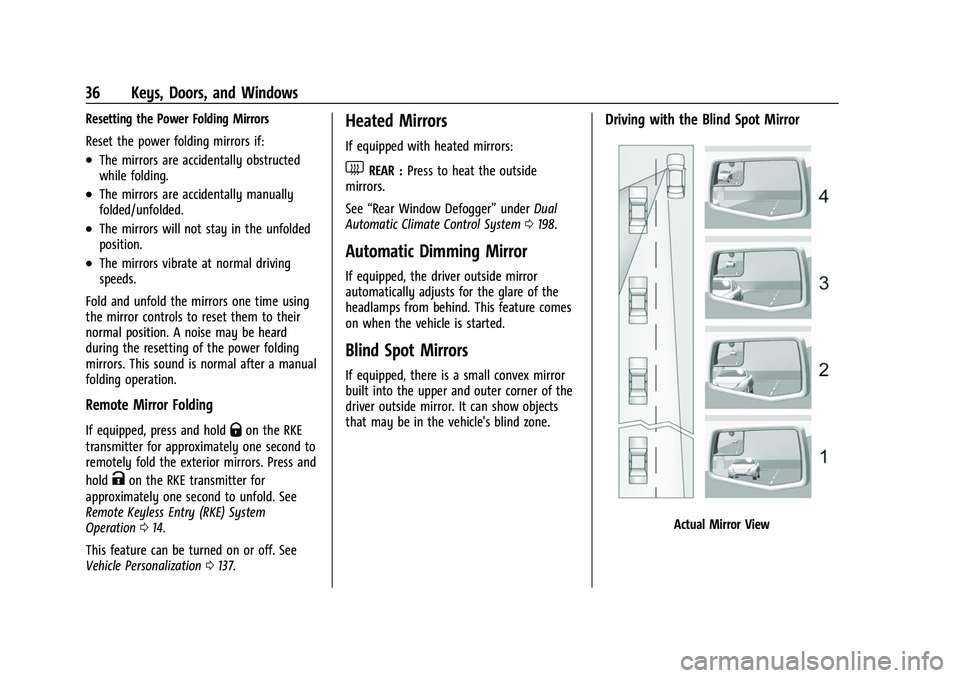
Blind Spot Mirrors
If equipped, there is a small convex mirror
built into the upper and outer corner of the
driver outside mirror. It can show objects
that may be in the vehicle's blind zone.
Driving with the Blind Spot Mirror
Actual Mirror View
Page 55 of 474
GMC Sierra/Sierra Denali 1500 Owner Manual (GMNA-Localizing-U.S./
Canada/Mexico-15883563) - 2022 - CRC - 11/19/21
54 Seats and Restraints
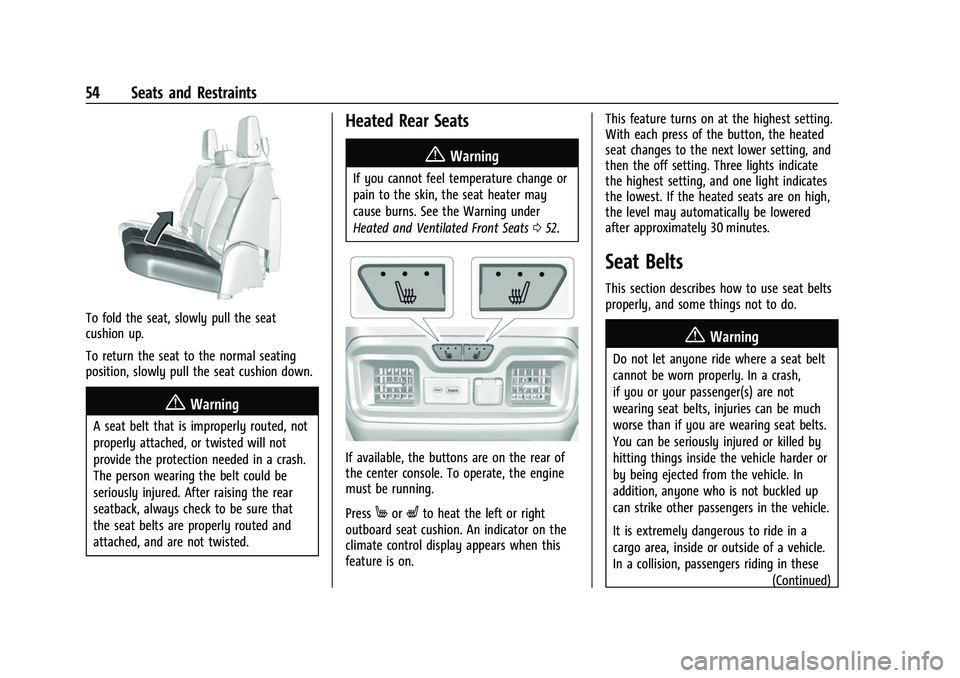
To fold the seat, slowly pull the seat
cushion up.
To return the seat to the normal seating
position, slowly pull the seat cushion down.
{Warning
A seat belt that is improperly routed, not
properly attached, or twisted will not
provide the protection needed in a crash.
The person wearing the belt could be
seriously injured. After raising the rear
seatback, always check to be sure that
the seat belts are properly routed and
attached, and are not twisted.
Heated Rear Seats
{Warning
If you cannot feel temperature change or
pain to the skin, the seat heater may
cause burns. See the Warning under
Heated and Ventilated Front Seats052.
If available, the buttons are on the rear of
the center console. To operate, the engine
must be running.
Press
MorLto heat the left or right
outboard seat cushion. An indicator on the
climate control display appears when this
feature is on. This feature turns on at the highest setting.
With each press of the button, the heated
seat changes to the next lower setting, and
then the off setting. Three lights indicate
the highest setting, and one light indicates
the lowest. If the heated seats are on high,
the level may automatically be lowered
after approximately 30 minutes.
Seat Belts
This section describes how to use seat belts
properly, and some things not to do.
{Warning
Do not let anyone ride where a seat belt
cannot be worn properly. In a crash,
if you or your passenger(s) are not
wearing seat belts, injuries can be much
worse than if you are wearing seat belts.
You can be seriously injured or killed by
hitting things inside the vehicle harder or
by being ejected from the vehicle. In
addition, anyone who is not buckled up
can strike other passengers in the vehicle.
It is extremely dangerous to ride in a
cargo area, inside or outside of a vehicle.
In a collision, passengers riding in these
(Continued)
Page 105 of 474
GMC Sierra/Sierra Denali 1500 Owner Manual (GMNA-Localizing-U.S./
Canada/Mexico-15883563) - 2022 - CRC - 11/19/21
104 Instruments and Controls
Power Outlets
12-Volt Power Outlet
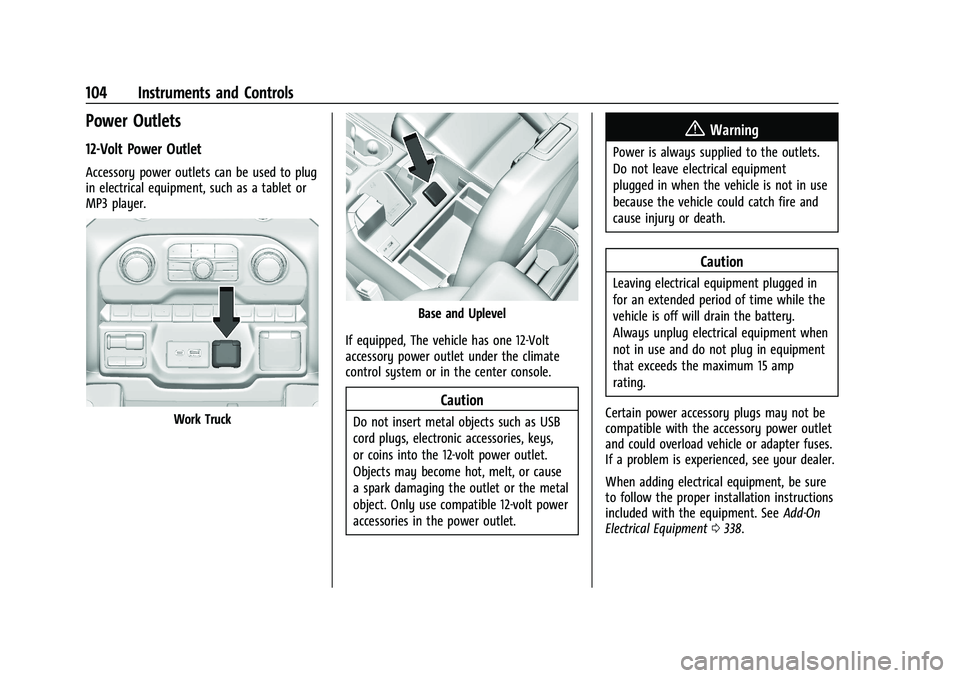
Accessory power outlets can be used to plug
in electrical equipment, such as a tablet or
MP3 player.
Work Truck
Base and Uplevel
If equipped, The vehicle has one 12-Volt
accessory power outlet under the climate
control system or in the center console.
Caution
Do not insert metal objects such as USB
cord plugs, electronic accessories, keys,
or coins into the 12-volt power outlet.
Objects may become hot, melt, or cause
a spark damaging the outlet or the metal
object. Only use compatible 12-volt power
accessories in the power outlet.
{Warning
Power is always supplied to the outlets.
Do not leave electrical equipment
plugged in when the vehicle is not in use
because the vehicle could catch fire and
cause injury or death.
Caution
Leaving electrical equipment plugged in
for an extended period of time while the
vehicle is off will drain the battery.
Always unplug electrical equipment when
not in use and do not plug in equipment
that exceeds the maximum 15 amp
rating.
Certain power accessory plugs may not be
compatible with the accessory power outlet
and could overload vehicle or adapter fuses.
If a problem is experienced, see your dealer.
When adding electrical equipment, be sure
to follow the proper installation instructions
included with the equipment. See Add-On
Electrical Equipment 0338.
Page 138 of 474
GMC Sierra/Sierra Denali 1500 Owner Manual (GMNA-Localizing-U.S./
Canada/Mexico-15883563) - 2022 - CRC - 11/19/21
Instruments and Controls 137
message stays on, or displays repeatedly,
the vehicle should be taken to your dealer
for service as soon as possible.
Under certain operating conditions,
propulsion will be disabled. Try restarting
after the ignition has been off for
two minutes.
Vehicle Speed Messages
SPEED LIMITED TO XXX KM/H (MPH)
This message shows that the vehicle speed
has been limited to the speed displayed. The
limited speed is a protection for various
propulsion and vehicle systems, such as
lubrication, thermal, brakes, suspension,
Teen Driver if equipped, or tires.
(If equipped with a diesel engine, see the
Duramax Diesel supplement.)–For Diesel
Vehicle Personalization
The following are all possible vehicle
personalization features. Depending on the
vehicle, some may not be available.
For System, Apps, and Personal features and
functions, see Settings (Uplevel Radio) 0187
or Settings (Base Radio) 0185. To access the vehicle personalization menu:
1. Touch the Settings icon on the Home Page of the infotainment display.
2. Touch Vehicle to display a list of available options.
3. Touch to select the desired feature setting.
4. Touch
9orRto turn a feature off or on.
The menu may contain the following:
Rear Seat Reminder
This allows for a chime and a message when
the rear door has been opened before or
during operation of the vehicle.
Touch Off or On.
Climate and Air Quality
Touch and the following may display:
.Auto Fan Speed
.Auto Cooled Seats
.Auto Heated Seats
.Auto Defog
.Auto Rear Defog Auto Fan Speed
This setting specifies the amount of airflow
when the climate control fan setting is
Auto Fan.
Touch Low, Medium, or High.
Auto Cooled Seats
This setting automatically turns on and
regulates the ventilated seats when the
cabin temperature is warm. See
Heated and
Ventilated Front Seats 052.
Touch Off or On.
Auto Heated Seats
This setting automatically turns on and
regulates the heated seats when the cabin
temperature is cool. The auto heated seats
can be turned off by using the heated seat
buttons on the center stack. See Heated and
Ventilated Front Seats 052.
If equipped with the auto heated steering
wheel, this feature will turn on when the
auto heated seats turn on.
Touch Off or On.
Auto Defog
This setting automatically directs air to the
windshield to assist in defogging, based on
temperature and humidity conditions.
Page 155 of 474
GMC Sierra/Sierra Denali 1500 Owner Manual (GMNA-Localizing-U.S./
Canada/Mexico-15883563) - 2022 - CRC - 11/19/21
154 Lighting
Battery Load Management
The vehicle has Electric Power Management
(EPM), which estimates the battery's
temperature and state of charge. It then
adjusts the voltage for best performance
and extended life of the battery.
When the battery's state of charge is low,
the voltage is raised slightly to quickly bring
the charge back up. When the state of
charge is high, the voltage is lowered
slightly to prevent overcharging. The
voltmeter gauge or the voltage display on
the Driver Information Center (DIC),
if equipped, may show the voltage moving
up or down. This is normal. If there is a
problem, an alert will be displayed.
The battery can be discharged at idle if the
electrical loads are very high. This is true for
all vehicles. This is because the generator
(alternator) may not be spinning fast
enough at idle to produce all the power that
is needed for very high electrical loads.
A high electrical load occurs when several of
the following are on, such as: headlamps,
high beams, fog lamps, rear window
defogger, climate control fan at high speed,heated seats, engine cooling fans, trailer
loads, and loads plugged into accessory
power outlets.
EPM works to prevent excessive discharge of
the battery. It does this by balancing the
generator's output and the vehicle's
electrical needs. It can increase engine idle
speed to generate more power, whenever
needed. It can temporarily reduce the power
demands of some accessories.
Normally, these actions occur in steps or
levels, without being noticeable. In rare
cases at the highest levels of corrective
action, this action may be noticeable to the
driver. If so, a DIC message might be
displayed and it is recommended that the
driver reduce the electrical loads as much as
possible.
Battery Power Protection
This feature helps prevent the battery from
being drained if the interior courtesy lamps
or reading lamps are accidentally left on.
If any of these lamps are left on, they
automatically turn off after 10 minutes if the
ignition is off. The cargo lamp shuts off
after 20 minutes if the ignition is off.The lamps will not come back on again until
one of the following occurs:
.The ignition is turned on.
.The doors are closed and then re-opened.
Exterior Lighting Battery Saver
The exterior lamps turn off about 10 minutes
after the ignition is turned off, if the parking
lamps or headlamps have been manually
left on. This protects against draining the
battery. To restart the 10-minute timer, turn
the exterior lamp control to the
Oposition
and then back to the
;or2position.
To keep the lamps on for more than
10 minutes, the ignition must be on or in
ACC/ACCESSORY.