brake GMC SIERRA CLASSIC 2007 Manual PDF
[x] Cancel search | Manufacturer: GMC, Model Year: 2007, Model line: SIERRA CLASSIC, Model: GMC SIERRA CLASSIC 2007Pages: 674, PDF Size: 3.5 MB
Page 456 of 674
Maintenance When Trailer Towing
Your vehicle will need service more often when
you’re pulling a trailer. SeeScheduled
Maintenance (Gasoline Engine) on page 617for
more information. Things that are especially
important in trailer operation are automatic
transmission uid (don’t overll), engine oil, axle
lubricant, belt, cooling system and brake system.
Each of these is covered in this manual, and
the Index will help you nd them quickly. If you’re
trailering, it’s a good idea to review these
sections before you start your trip.
Check periodically to see that all hitch nuts and
bolts are tight.
Trailer Wiring Harness
Your vehicle is equipped with one of the following
wiring harnesses for towing a trailer or hauling
a slide-in camper.
Basic Trailer Wiring
All regular, extended cab and crew cab pickups
have an eight-wire trailer towing harness.For vehicles not equipped with heavy duty
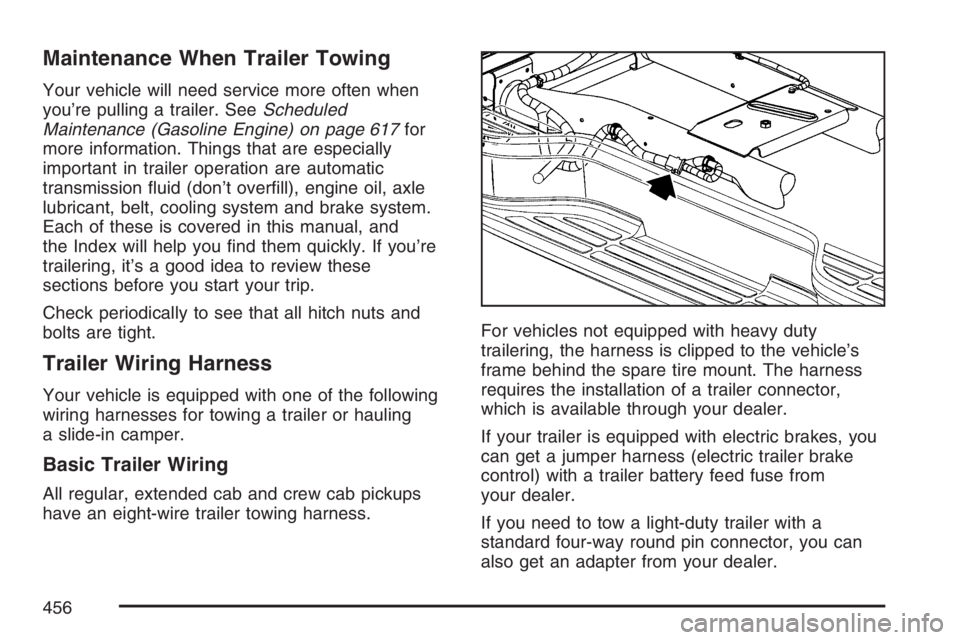
trailering, the harness is clipped to the vehicle’s
frame behind the spare tire mount. The harness
requires the installation of a trailer connector,
which is available through your dealer.
If your trailer is equipped with electric brakes, you
can get a jumper harness (electric trailer brake
control) with a trailer battery feed fuse from
your dealer.
If you need to tow a light-duty trailer with a
standard four-way round pin connector, you can
also get an adapter from your dealer.
456
Page 457 of 674
Heavy-DutyTrailer Wiring Harness
Package
For vehicles equipped with heavy duty trailering,
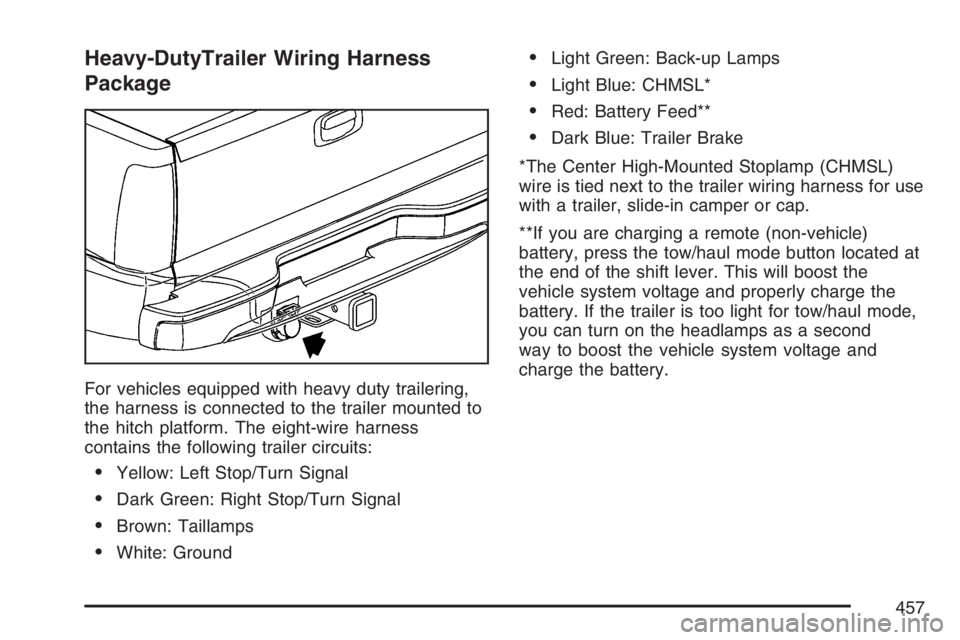
the harness is connected to the trailer mounted to
the hitch platform. The eight-wire harness
contains the following trailer circuits:
Yellow: Left Stop/Turn Signal
Dark Green: Right Stop/Turn Signal
Brown: Taillamps
White: Ground
Light Green: Back-up Lamps
Light Blue: CHMSL*
Red: Battery Feed**
Dark Blue: Trailer Brake
*The Center High-Mounted Stoplamp (CHMSL)
wire is tied next to the trailer wiring harness for use
with a trailer, slide-in camper or cap.
**If you are charging a remote (non-vehicle)
battery, press the tow/haul mode button located at
the end of the shift lever. This will boost the
vehicle system voltage and properly charge the
battery. If the trailer is too light for tow/haul mode,
you can turn on the headlamps as a second
way to boost the vehicle system voltage and
charge the battery.
457
Page 458 of 674
Camper/Fifth-Wheel Trailer Wiring Package
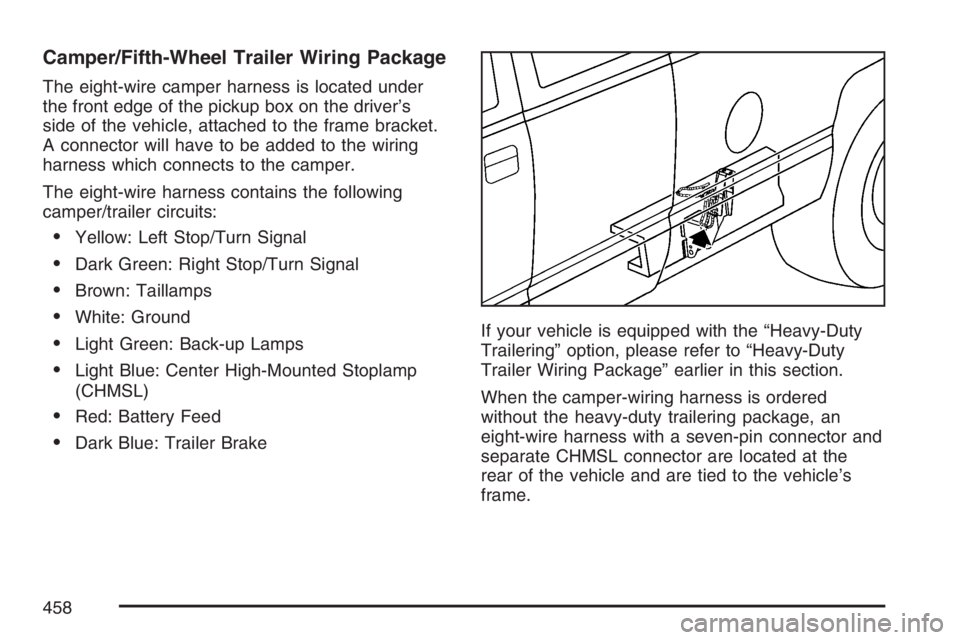
The eight-wire camper harness is located under
the front edge of the pickup box on the driver’s
side of the vehicle, attached to the frame bracket.
A connector will have to be added to the wiring
harness which connects to the camper.
The eight-wire harness contains the following
camper/trailer circuits:
Yellow: Left Stop/Turn Signal
Dark Green: Right Stop/Turn Signal
Brown: Taillamps
White: Ground
Light Green: Back-up Lamps
Light Blue: Center High-Mounted Stoplamp
(CHMSL)
Red: Battery Feed
Dark Blue: Trailer BrakeIf your vehicle is equipped with the “Heavy-Duty
Trailering” option, please refer to “Heavy-Duty
Trailer Wiring Package” earlier in this section.
When the camper-wiring harness is ordered
without the heavy-duty trailering package, an
eight-wire harness with a seven-pin connector and
separate CHMSL connector are located at the
rear of the vehicle and are tied to the vehicle’s
frame.
458
Page 459 of 674
Electric Brake Control Jumper
{CAUTION:
Be sure to use only the correct trailer
brake harness, the one intended for use
on your vehicle. If you use some other
trailer brake harness, even if it seems to
t, your trailer brakes may not work at all.
You could have a crash in which you or
others could be injured. Use only the
trailer brake harness intended for your
vehicle. If it is no longer available to you,
be sure to get a proper replacement from
your dealer.This harness is included with your vehicle as part
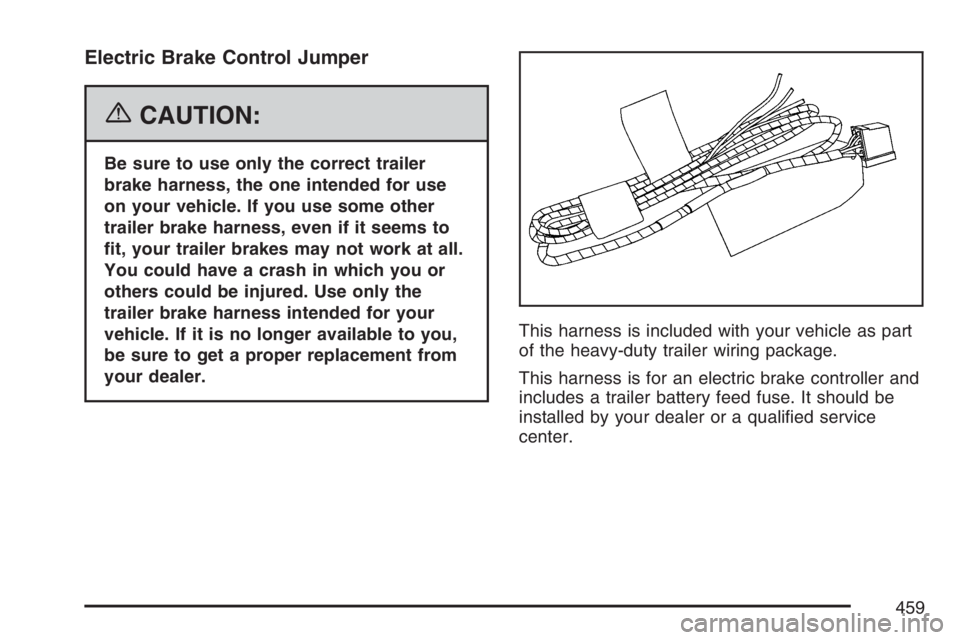
of the heavy-duty trailer wiring package.
This harness is for an electric brake controller and
includes a trailer battery feed fuse. It should be
installed by your dealer or a qualied service
center.
459
Page 460 of 674
Auxiliary Battery
The auxiliary battery provision can be used to
supply electrical power to additional equipment that
you may choose to add, such as a slide-in camper.
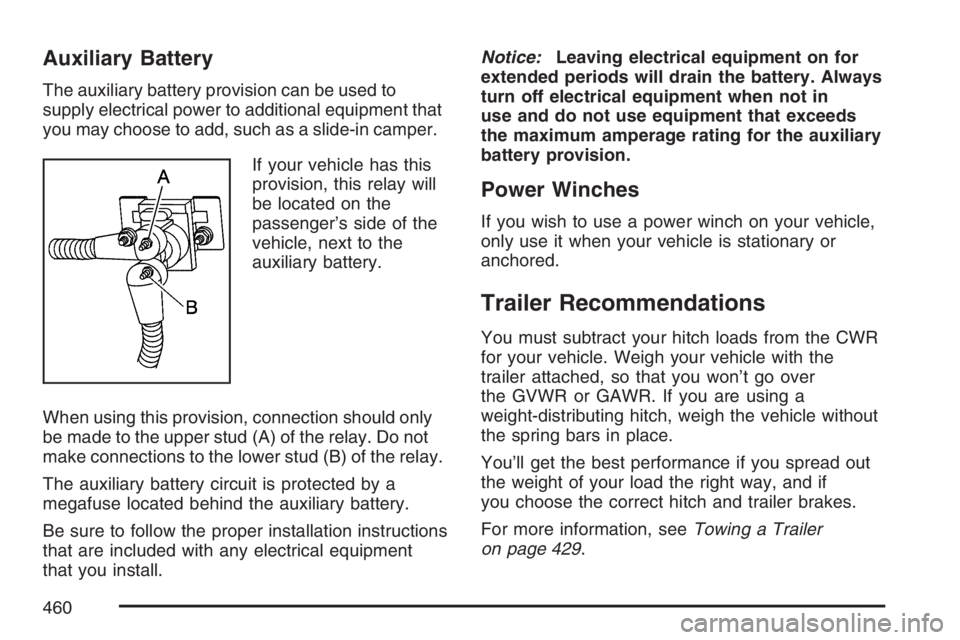
If your vehicle has this
provision, this relay will
be located on the
passenger’s side of the
vehicle, next to the
auxiliary battery.
When using this provision, connection should only
be made to the upper stud (A) of the relay. Do not
make connections to the lower stud (B) of the relay.
The auxiliary battery circuit is protected by a
megafuse located behind the auxiliary battery.
Be sure to follow the proper installation instructions
that are included with any electrical equipment
that you install.Notice:Leaving electrical equipment on for
extended periods will drain the battery. Always
turn off electrical equipment when not in
use and do not use equipment that exceeds
the maximum amperage rating for the auxiliary
battery provision.
Power Winches
If you wish to use a power winch on your vehicle,
only use it when your vehicle is stationary or
anchored.
Trailer Recommendations
You must subtract your hitch loads from the CWR
for your vehicle. Weigh your vehicle with the
trailer attached, so that you won’t go over
the GVWR or GAWR. If you are using a
weight-distributing hitch, weigh the vehicle without
the spring bars in place.
You’ll get the best performance if you spread out
the weight of your load the right way, and if
you choose the correct hitch and trailer brakes.
For more information, seeTowing a Trailer
on page 429.
460
Page 461 of 674
Power Take-Off (PTO)
Before using a Power Take-Off (PTO), if equipped,
refer to the manufacturer’s or installer’s instructions.
To engage a PTO on a vehicle with a manual
transmission do the following:
1. Hold the clutch pedal down.
2. Set the parking brake.
3. Shift the transmission into NEUTRAL.
4. Engage the PTO. Refer to the manufacturer’s
or installer’s for instructions on electrically
engaged PTOs.
5. For mobile operations, shift the transmission
into the gear you want, apply the regular
brakes and release the parking brake.
For stationary operations, leave the parking
brake applied.
6. Release the clutch and regular brakes as you
normally would. When the clutch is released,
the PTO will start.
7. Turn the PTO rotary switch to ON.To engage a PTO on a vehicle with an automatic
transmission do the following:
1. For stationary use shift the transmission into
PARK (P).
2. Turn the PTO rotary switch ON.
3. If the engine speed is below the PTO engage
speed limit, the PTO will start. The blinking
LED on the PTO control switch indicates PTO
engage is requested. When PTO engages the
LED will switch from blinking to a steady light.
To use PTO speed control in Preset Mode (Factory
Setting) do the following:
1. Engage the PTO.
2. Select PARK (P) or NEUTRAL (N) range.
Apply the parking brake if NEUTRAL (N) is
selected. Torque Converter Clutch (TCC)
is not available in NEUTRAL (N) and is
available only in PARK (P) when engine speed
is above 1,100 rpm.
3. Make sure your foot is off the brake pedal
(and off the clutch on vehicles equipped
with a manual transmission).
4. Select the desired engine speed for PTO
operation. Read the following preset mode
information regarding operation.
461
Page 462 of 674
Preset Mode:PTO speed control mode is used
for stationary applications. (PTO will remain
engaged while mobile in the preset mode, however
PTO set and resume speed controls will be
inoperative.) This mode provides a default standby
speed of 800 or 850 rpm (depending on the
engine/transmission combination) and two default
PTO control speeds which follow:
1. PTO Set Speed of 1,250 rpm, or
2. PTO Resume Speed of 1,700 rpm.
Please note that the standby speed (800/850 rpm)
is not to be used as a PTO control speed.
Vehicles not equipped with cruise control will not
have the resume speed capability.
To use PTO speed control in variable mode (while
mobile) do the following:
1. Engage the PTO.
2. Vehicle speed must be greater than 5 mph.
3. Make sure your foot is off the brake pedal
(and off the clutch for vehicles equipped
with a manual transmission).
4. Select the desired engine speed by using the
foot pedal, and select SET on the PTO switch
or the cruise control.To use PTO speed control in variable mode (while
stationary) do the following:
1. Engage the PTO.
2. Vehicle speed must be less than 5 mph.
3. Make sure your foot is off the brake pedal
(and off the clutch for vehicles equipped
with a manual transmission).
4. Select the desired engine speed by using the
foot pedal, and select SET on the PTO switch
or the cruise control.
Variable Mode:PTO speed control mode can be
used for both stationary and mobile applications.
This mode allows PTO to be controlled in a fashion
similar to how cruise control sets vehicle speed.
The operator can set to an rpm (between 800 and
2,200) with the cruise control feature or with the
SET position on the PTO switch. The operator
is then able to increase rpm in increments of 100,
or “tap up” with the resume position on the
cruise control. The operator can also decrease
rpm in increments of 100 with the SET switch on
the PTO or the cruise control.
Vehicles not equipped with cruise control will not
have the “tap up” capability.
462
Page 465 of 674
Service........................................................ 468
Accessories and Modications................... 468
California Proposition 65 Warning.............. 469
Doing Your Own Service Work.................. 469
Adding Equipment to the Outside of
Your Vehicle.......................................... 470
Fuel............................................................. 470
Gasoline Octane........................................ 470
Gasoline Specications.............................. 471
California Fuel........................................... 471
Additives................................................... 472
Fuel E85 (85% Ethanol)............................ 473
Fuels in Foreign Countries........................ 474
Filling the Tank......................................... 474
Filling a Portable Fuel Container............... 477
Checking Things Under the Hood.............. 478
Hood Release........................................... 479
Engine Compartment Overview.................. 480
Engine Oil (Gasoline Engine).................... 486
Engine Oil Life System
(Gasoline Engine).................................. 489
Engine Air Cleaner/Filter
(Gasoline Engines)................................. 491Automatic Transmission Fluid
(Allison Transmission®) .......................... 494
Automatic Transmission Fluid
(Except Allison Transmission
®) ............... 497
Manual Transmission Fluid........................ 500
Hydraulic Clutch........................................ 501
Engine Coolant.......................................... 502
Coolant Surge Tank Pressure Cap............ 505
Engine Overheating................................... 505
Overheated Engine Protection
Operating Mode (V8 Engines Only)........ 508
Cooling System......................................... 508
Engine Fan Noise..................................... 514
Power Steering Fluid ................................. 515
Windshield Washer Fluid........................... 516
Brakes...................................................... 517
Battery...................................................... 520
Jump Starting............................................ 521
Rear Axle.................................................... 527
Four-Wheel Drive........................................ 528
Front Axle................................................... 529
Section 5 Service and Appearance Care
465
Page 468 of 674
Service
Your dealer knows your vehicle best and wants
you to be happy with it. We hope you will go
to your dealer for all your service needs. You will
get genuine GM parts and GM-trained and
supported service people.
We hope you will want to keep your GM vehicle all
GM. Genuine GM parts have one of these marks:
Accessories and Modications
When you add non-GM accessories to your vehicle
they can affect your vehicle’s performance and
safety, including such things as, airbags, braking,
stability, ride and handling, emissions systems,
aerodynamics, durability, and electronic systems
like anti-lock brakes, traction control and stability
control. Some of these accessories may even
cause malfunction or damage not covered by
warranty.
GM Accessories are designed to complement and
function with other systems on your vehicle.
Your GM dealer can accessorize your vehicle
using genuine GM Accessories. When you go to
your GM dealer and ask for GM Accessories,
you will know that GM-trained and supported
service technicians will perform the work using
genuine GM Accessories.
468
Page 478 of 674
Checking Things Under
the Hood
{CAUTION:
An electric fan under the hood can start up
and injure you even when the engine is not
running. Keep hands, clothing, and tools
away from any underhood electric fan.
{CAUTION:
Things that burn can get on hot engine
parts and start a re. These include
liquids like fuel, oil, coolant, brake uid,
windshield washer and other uids, and
plastic or rubber. You or others could be
burned. Be careful not to drop or spill
things that will burn onto a hot engine.
478