lock GMC SIERRA DENALI 2010 Manual PDF
[x] Cancel search | Manufacturer: GMC, Model Year: 2010, Model line: SIERRA DENALI, Model: GMC SIERRA DENALI 2010Pages: 550, PDF Size: 4.17 MB
Page 241 of 550
AUTO DOOR UNLOCK
This feature allows you to select whether or not to turn
off the automatic door unlocking feature. It also allows
you to select which doors and when the doors will
automatically unlock. SeeProgrammable Automatic
Door Locks
on page 3‑11for more information.
Press the customization button until AUTO DOOR
UNLOCK appears on the DIC display. Press the set/
reset button once to access the settings for this feature.
Then press the customization button to scroll through
the following settings:
OFF : None of the doors will automatically unlock.
DRIVER AT KEY OUT : Only the driver's door will
unlock when the key is taken out of the ignition.
DRIVER IN PARK : Only the driver's door will unlock
when the vehicle is shifted into P (Park).
ALL AT KEY OUT : All of the doors will unlock when
the key is taken out of the ignition.
ALL IN PARK (default) : All of the doors will unlock
when the vehicle is shifted into P (Park).
NO CHANGE : No change will be made to this feature.
The current setting will remain.
To select a setting, press the set/reset button while the
desired setting is displayed on the DIC.
REMOTE DOOR LOCK
This feature allows you to select the type of feedback
you will receive when locking the vehicle with the
Remote Keyless Entry (RKE) transmitter. You will not
receive feedback when locking the vehicle with the RKE
transmitter if the doors are open. See Remote Keyless
Entry (RKE) System Operation
on page 3‑4for more
information.
Press the customization button until REMOTE DOOR
LOCK appears on the DIC display. Press the set/reset
button once to access the settings for this feature. Then
press the customization button to scroll through the
following settings:
OFF : There will be no feedback when you press the
lock button on the RKE transmitter.
LIGHTS ONLY : The exterior lamps will flash when you
press the lock button on the RKE transmitter.
HORN ONLY : The horn will sound on the second press
of the lock button on the RKE transmitter.
HORN & LIGHTS (default) : The exterior lamps will
flash when you press the lock button on the RKE
transmitter, and the horn will sound when the lock
button is pressed again within five seconds of the
previous command.
4-69
Page 242 of 550
NO CHANGE :No change will be made to this feature.
The current setting will remain.
To select a setting, press the set/reset button while the
desired setting is displayed on the DIC.
REMOTE DOOR UNLOCK
This feature allows you to select the type of feedback
you will receive when unlocking the vehicle with the
Remote Keyless Entry (RKE) transmitter. You will not
receive feedback when unlocking the vehicle with the
RKE transmitter if the doors are open. See Remote
Keyless Entry (RKE) System Operation
on page 3‑4for more information.
Press the customization button until REMOTE DOOR
UNLOCK appears on the DIC display. Press the set/
reset button once to access the settings for this feature.
Then press the customization button to scroll through
the following settings:
LIGHTS OFF : The exterior lamps will not flash when
you press the unlock button on the RKE transmitter.
LIGHTS ON (default) : The exterior lamps will flash
when you press the unlock button on the RKE
transmitter.
NO CHANGE : No change will be made to this feature.
The current setting will remain.
To select a setting, press the set/reset button while the
desired setting is displayed on the DIC.
DELAY DOOR LOCK
On vehicles with a crew cab, this feature allows you to
select whether or not the locking of the vehicle's doors
will be delayed. When locking the doors with the power
door lock switch and a door is open, this feature will
delay locking the doors until five seconds after the last
door is closed. You will hear three chimes to signal that
the delayed locking feature is in use. The key must be
out of the ignition for this feature to work. You can
temporarily override delayed locking by pressing the
power door lock switch twice. See Delayed Locking
on
page 3‑11for more information.
Press the customization button until DELAY DOOR
LOCK appears on the DIC display. Press the set/reset
button once to access the settings for this feature. Then
press the customization button to scroll through the
following settings:
OFF : There will be no delayed locking of the vehicle's
doors.
ON (default) : The doors will not lock until five seconds
after the last door is closed.
NO CHANGE : No change will be made to this feature.
The current setting will remain.
To select a setting, press the set/reset button while the
desired setting is displayed on the DIC.
4-70
Page 243 of 550
EXIT LIGHTING
This feature allows you to select the amount of time you
want the exterior lamps to remain on when it is dark
enough outside. This happens after the key is turned
from ON/RUN to LOCK/OFF.
Press the customization button until EXIT LIGHTING
appears on the DIC display. Press the set/reset button
once to access the settings for this feature. Then press
the customization button to scroll through the following
settings:
OFF :The exterior lamps will not turn on.
30 SECONDS (default) : The exterior lamps will stay on
for 30 seconds.
1 MINUTE : The exterior lamps will stay on for
one minute.
2 MINUTES : The exterior lamps will stay on for
two minutes.
NO CHANGE : No change will be made to this feature.
The current setting will remain.
To select a setting, press the set/reset button while the
desired setting is displayed on the DIC.
APPROACH LIGHTING
This feature allows you to select whether or not to have
the exterior lights turn on briefly during low light periods
after unlocking the vehicle using the Remote Keyless
Entry (RKE) transmitter.
Press the customization button until APPROACH
LIGHTING appears on the DIC display. Press the
set/reset button once to access the settings for this
feature. Then press the customization button to scroll
through the following settings:
OFF : The exterior lights will not turn on when you
unlock the vehicle with the RKE transmitter.
ON (default) : If it is dark enough outside, the exterior
lights will turn on briefly when you unlock the vehicle
with the RKE transmitter.
The lights will remain on for 20 seconds or until the lock
button on the RKE transmitter is pressed, or the vehicle
is no longer off. See Remote Keyless Entry (RKE)
System Operation
on page 3‑4for more information.
NO CHANGE : No change will be made to this feature.
The current setting will remain.
To select a setting, press the set/reset button while the
desired setting is displayed on the DIC.
4-71
Page 246 of 550
MEMORY SEAT RECALL
If your vehicle has this feature, it allows you to select
your preference for the remote memory seat recall
feature. SeeMemory Features
on page 2‑6for more
information.
Press the customization button until MEMORY SEAT
RECALL appears on the DIC display. Press the
set/reset button once to access the settings for this
feature. Then press the customization button to scroll
through the following settings:
OFF (default) : No remote memory seat recall will
occur.
ON : The driver's seat and, on some vehicles, the
outside mirrors will automatically move to the stored
driving position when the unlock button on the Remote
Keyless Entry (RKE) transmitter is pressed. On some
vehicles with the adjustable throttle and brake pedal
feature, the pedals will also automatically move. See
“Relearn Remote Key” underDIC Operation and
Displays (Using Trip Odometer Reset Stem)
on
page 4‑44or DIC Operation and Displays (Using DIC
Buttons)on page 4‑48for more information on
matching transmitters to driver ID numbers.
NO CHANGE : No change will be made to this feature.
The current setting will remain.
To select a setting, press the set/reset button while the
desired setting is displayed on the DIC.
REMOTE START
If your vehicle has this feature, it allows you to turn the
remote start off or on. The remote start feature allows
you to start the engine from outside of the vehicle using
the Remote Keyless Entry (RKE) transmitter. See
Remote Vehicle Start
on page 3‑7for more
information.
Press the customization button until REMOTE START
appears on the DIC display. Press the set/reset button
once to access the settings for this feature. Then press
the customization button to scroll through the following
settings:
OFF : The remote start feature will be disabled.
ON (default) : The remote start feature will be enabled.
NO CHANGE : No change will be made to this feature.
The current setting will remain.
To select a setting, press the set/reset button while the
desired setting is displayed on the DIC.
4-74
Page 249 of 550
Setting the Clock
AM-FM Radio
To set the time:1. Turn the ignition key to ACC/ACCESSORY or ON/RUN, then press the
Obutton to turn the
radio on.
2. Press the
Hbutton until the hour numbers begin to
flash, then turn the
fknob to increase or decrease
the hour.
3. Press the
Hbutton until the minute numbers begin
to flash, then turn the
fknob to increase or
decrease the minutes.
4. Press the
Hbutton until the 12HR or 24HR time
format begins to flash, then turn the
fknob to
change the time format.
5. Press the
Hbutton again until the clock display
stops flashing to set the currently displayed time,
or wait until the flashing stops after five seconds
and the current time displayed automatically sets.
MP3 Radios with a Single CD or a
Single CD and DVD Player
To set the time and date:
1. Turn the ignition key to ACC/ACCESSORY or ON/RUN, then press the
Obutton to turn the
radio on.
2. Press the
Hbutton to display HR, MIN, MM, DD,
YYYY (hour, minute, month, day, and year).
3. Press the softkey located under any one of the tabs to change that setting.
4. To increase the time or date, do one of the following:
.Press the softkey below the selected tab.
.Press the¨SEEK button.
.Press the\FWD button.
.Turn thefknob clockwise.
5. To decrease the time or date, do one of the following:
.Press the©SEEK button.
.Press thesREV button.
.Turn thefknob counterclockwise.
4-77
Page 250 of 550
To change the time default setting from 12 hour to
24 hour or to change the date default setting from
month/day/year to day/month/year:1. Press the
Hbutton and then the softkey located
below the forward arrow tab. 12H, 24H, the date
MM/DD (month and day), and DD/MM (day and
month) displays.
2. Press the softkey located below the desired option.
3. Press the
Hbutton again to apply the desired
option, or let the screen time out.
MP3 Radio with a Six-Disc CD Player
To set the time and date:
1. Turn the ignition key to ACC/ACCESSORY or ON/RUN, then press the
Obutton to turn the
radio on.
2. Press the MENU button.
3. Press the
Hbutton to display HR, MIN, MM, DD,
YYYY (hour, minute, month, day, and year).
4. Press the softkey located under any one of the tabs to change that setting. 5. To increase the time or date, do one of the
following:
.Press the softkey below the selected tab.
.Press the¨SEEK button.
.Press the\FWD button.
.Turn thefknob clockwise.
6. To decrease the time or date, do one of the following:
.Press the©SEEK button.
.Press thesREV button.
.Turn thefknob counterclockwise.
To change the time default setting from 12 hour to
24 hour or to change the date default setting from
month/day to day/month: 1. Press the MENU button and then the softkey under the
Htab.
2. Press the softkey located below the forward arrow tab. 12H, 24H, the date MM/DD (month and day),
and DD/MM/ (day and month) displays.
3. Press the softkey located below the desired option.
4. Press the MENU button again to apply the desired option, or let the screen time out.
4-78
Page 252 of 550
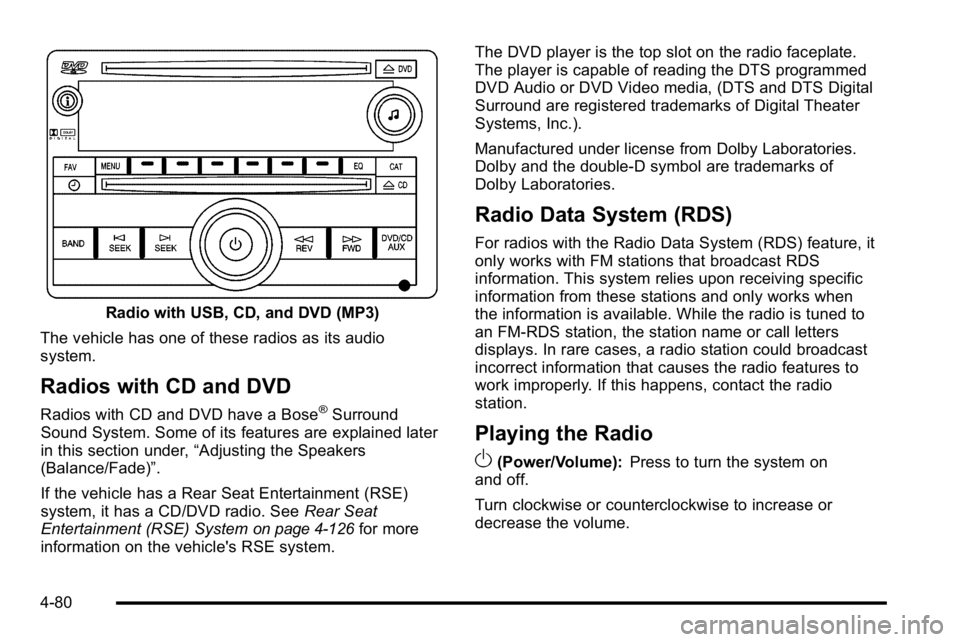
Radio with USB, CD, and DVD (MP3)
The vehicle has one of these radios as its audio
system.
Radios with CD and DVD
Radios with CD and DVD have a Bose®Surround
Sound System. Some of its features are explained later
in this section under, “Adjusting the Speakers
(Balance/Fade)”.
If the vehicle has a Rear Seat Entertainment (RSE)
system, it has a CD/DVD radio. See Rear Seat
Entertainment (RSE) System
on page 4‑126for more
information on the vehicle's RSE system. The DVD player is the top slot on the radio faceplate.
The player is capable of reading the DTS programmed
DVD Audio or DVD Video media, (DTS and DTS Digital
Surround are registered trademarks of Digital Theater
Systems, Inc.).
Manufactured under license from Dolby Laboratories.
Dolby and the double-D symbol are trademarks of
Dolby Laboratories.
Radio Data System (RDS)
For radios with the Radio Data System (RDS) feature, it
only works with FM stations that broadcast RDS
information. This system relies upon receiving specific
information from these stations and only works when
the information is available. While the radio is tuned to
an FM-RDS station, the station name or call letters
displays. In rare cases, a radio station could broadcast
incorrect information that causes the radio features to
work improperly. If this happens, contact the radio
station.
Playing the Radio
O
(Power/Volume):
Press to turn the system on
and off.
Turn clockwise or counterclockwise to increase or
decrease the volume.
4-80
Page 255 of 550
The balance/fade and tone settings that were previously
adjusted, are stored with the favorite stations.
To store a station as a favorite:1. Tune to the desired radio station.
2. Press the FAV button to display the page where the station will be stored.
3. Press and hold one of the six softkeys until a beep sounds. When that softkey is pressed and
released, the station that was set, returns.
4. Repeat the steps for each softkey radio station to store as a favorite.
The number of favorites pages can be setup using the
MENU button. To setup the number of favorites pages: 1. Press the MENU button to display the radio setup menu.
2. Press the softkey located below the FAV 1-6 tab.
3. Select the desired number of favorites pages by pressing the softkey located below the displayed
page numbers.
4. Press the FAV button, or let the menu time out, to return to the original main radio screen showing
the radio station frequency tabs and to begin the
process of programming favorites for the chosen
amount of numbered pages.Setting the Tone (Bass/Treble)
(AM-FM Radio)
Bass/Treble : To adjust the bass or treble, press the
tune knob or the EQ button until the desired tone
control tab displays. Turn the tune knob clockwise or
counterclockwise to increase or decrease the setting.
The display shows the current bass or treble level. If a
station's frequency is weak, or if there is static,
decrease the treble.
Setting the Tone (Bass/Midrange/Treble)
(All Except AM-FM Radio)
BASS/MID/TREB (Bass, Midrange, or Treble) : To
adjust bass, midrange, or treble:
1. Press the
fknob until the tone control tabs
display.
2. Highlight the desired tone control tab by doing one of the following:
.Pressing thefknob.
.Press the softkey under the desired tab.
4-83
Page 256 of 550
3. Adjust the setting by doing one of the following:
.Turn thefknob clockwise or counterclockwise.
.Press the¨SEEK, or©SEEK button.
.Press the\FWD, orsREV button.
If a station's frequency is weak or if there is static,
decrease the treble.
To quickly adjust bass, midrange, or treble to the middle
position, press the softkey positioned under the BASS,
MID, or TREB tab for more than two seconds. A beep
sounds and the level adjusts to the middle position.
To quickly adjust all tone and speaker controls to the
middle position, press the
fknob for more than
two seconds until a beep sounds.
EQ (Equalization) : Press this button to choose bass
and treble equalization settings designed for different
types of music. The choices are pop, rock, country, talk,
jazz, and classical. Selecting MANUAL or changing
bass or treble, returns the EQ to the manual bass and
treble settings.
Unique EQ settings can be saved for each source.
If the radio has a Bose
®audio system, the EQ settings
are either MANUAL or TALK.
Adjusting the Speakers (Balance/Fade)
BAL/FADE (Balance/Fade) : To adjust balance or fade
on radios without a
`button, press thefknob until
the speaker control tabs display. Continue pressing to
highlight the desired tab, or press the softkey under the
desired tab. Turn the
fknob clockwise or
counterclockwise to adjust the highlighted setting,
or adjust the highlighted setting by pressing either
SEEK arrow,
\FWD, orsREV button until the
desired levels are obtained.
To quickly adjust balance or fade to the middle position,
press the softkey positioned under the BAL or FADE tab
for more than two seconds. A beep sounds and the
level adjusts to the middle position.
To quickly adjust all speaker and tone controls to the
middle position, press the
fknob for more than
two seconds.
If the Rear Seat Audio (RSA) is turned on, the radio
disables FADE and mutes the rear speakers.
`(Balance/Fade): To adjust the balance or fade for
radios with a
`button, press this button or the tune
knob until the desired speaker control tab displays. Turn
the tune knob clockwise or counterclockwise to adjust
the setting.
The setting can also be adjusted by pressing the seek
arrows.
4-84
Page 258 of 550
Radio Messages
Calibration Error :The audio system has been
calibrated for the vehicle from the factory. If Calibration
Error displays, it means that the radio has not been
configured properly for the vehicle and it must be
returned to your dealer/retailer for service.
Locked or Loc : One of these messages will display
when the THEFTLOCK
®system has locked up the
radio. Take the vehicle to your dealer/retailer for service.
If any error occurs repeatedly or if an error cannot be
corrected, contact your dealer/retailer.
XM™ Satellite Radio Service
XM is a satellite radio service that is based in the
48 contiguous United States and 10 Canadian
provinces. XM Satellite Radio has a wide variety of
programming and commercial-free music,
coast-to-coast, and in digital-quality sound. A service
fee is required to receive the XM service. For more
information, contact XM at www.xmradio.com or call
1-800-929-2100 in the U.S. and www.xmradio.ca or call
1-877-438-9677 in Canada.
Radio Messages for XM Only
SeeXM Radio Messageson page 4‑114later in this
section for further detail.
Care of the CD and DVD Player
Do not add any label to a CD. It could get caught in the
CD or DVD player. If a CD is recorded on a personal
computer and a description label is needed, try labeling
the top of the recorded CD with a marking pen.
The use of CD lens cleaners for CDs is not advised,
due to the risk of contaminating the lens of the CD
optics with lubricants internal to the CD and DVD player
mechanism.
Notice: If a label is added to a CD, or more than one
CD is inserted into the slot at a time, or an attempt
is made to play scratched or damaged CDs, the CD
player could be damaged. While using the CD
player, use only CDs in good condition without any
label, load one CD at a time, and keep the CD player
and the loading slot free of foreign materials,
liquids, and debris.
If an error displays, see “CD Messages”later in this
section.
4-86