lock GMC SIERRA DENALI 2010 Owners Manual
[x] Cancel search | Manufacturer: GMC, Model Year: 2010, Model line: SIERRA DENALI, Model: GMC SIERRA DENALI 2010Pages: 550, PDF Size: 4.17 MB
Page 407 of 550
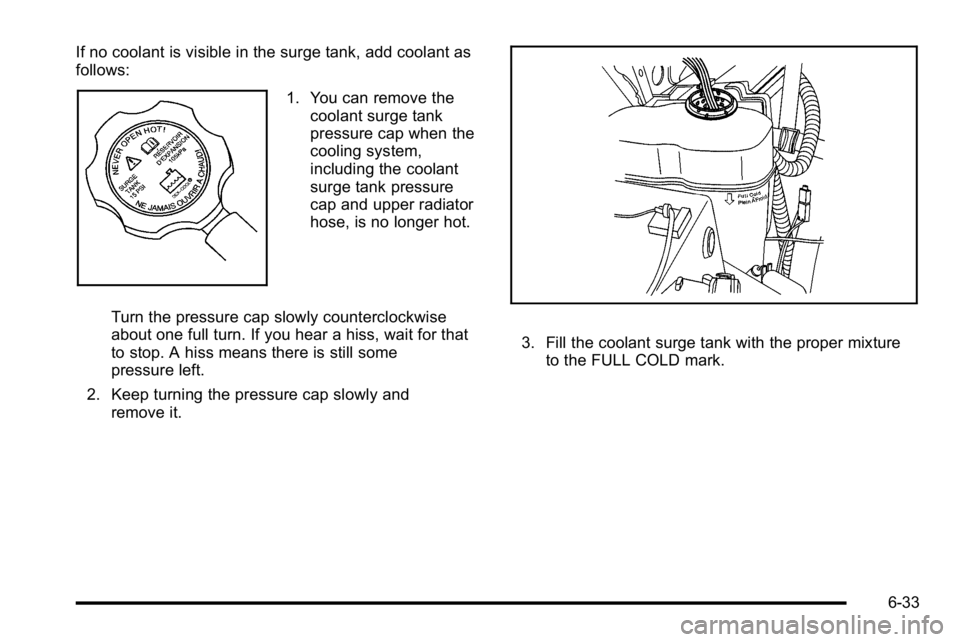
If no coolant is visible in the surge tank, add coolant as
follows:
1. You can remove thecoolant surge tank
pressure cap when the
cooling system,
including the coolant
surge tank pressure
cap and upper radiator
hose, is no longer hot.
Turn the pressure cap slowly counterclockwise
about one full turn. If you hear a hiss, wait for that
to stop. A hiss means there is still some
pressure left.
2. Keep turning the pressure cap slowly and remove it.
3. Fill the coolant surge tank with the proper mixtureto the FULL COLD mark.
6-33
Page 428 of 550

7. Locate the vertical headlamp aiming screws, whichare under the hood near each headlamp assembly.
The adjustment screw can be turned with an
E8 Torx
®socket.
8. Turn the vertical aiming screw until the headlamp beam is aimed to the horizontal tape line. Turn it
clockwise or counterclockwise to raise or lower the
angle of the beam.
9. Make sure that the light from the headlamp is
positioned at the bottom edge of the horizontal
tape line. The lamp on the left (A) shows the
correct headlamp aim. The lamp on the right (B)
shows the incorrect headlamp aim.
10. Repeat Steps 7 through 9 for the opposite headlamp.
6-54
Page 430 of 550

4. Turn the bulb socket counterclockwise to remove itfrom the headlamp assembly and pull it
straight out.
5. Unplug the electrical connector from the old bulb by releasing the clips on the bulb socket. 6. Replace it with a new bulb socket.
7. Plug in the electrical connector to the new bulb
socket.
8. Reinstall the new bulb socket into the headlamp assembly and turn it clockwise to secure.
9. Close the hood.
6-56
Page 431 of 550
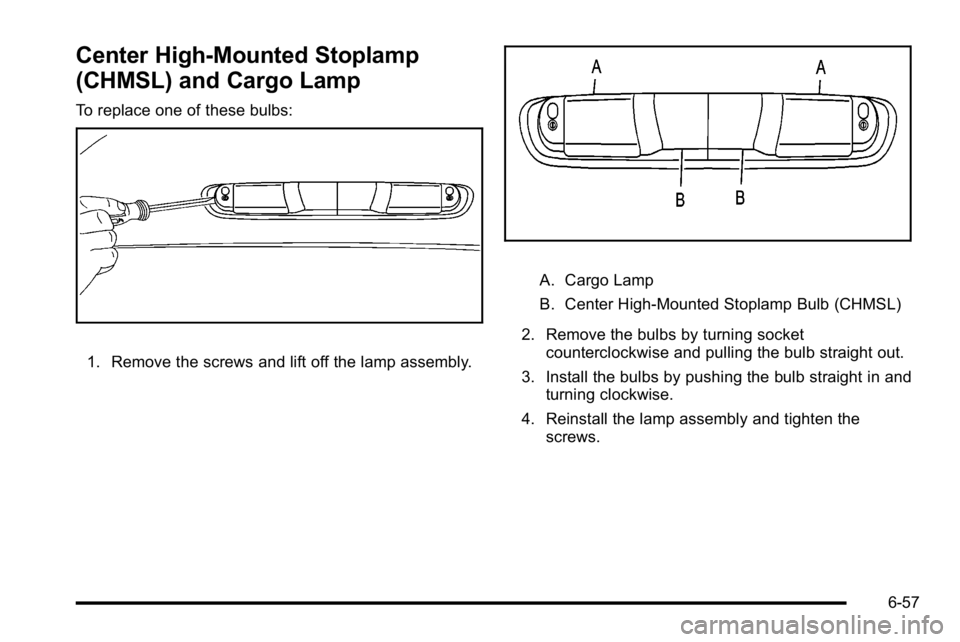
Center High-Mounted Stoplamp
(CHMSL) and Cargo Lamp
To replace one of these bulbs:
1. Remove the screws and lift off the lamp assembly.
A. Cargo Lamp
B. Center High-Mounted Stoplamp Bulb (CHMSL)
2. Remove the bulbs by turning socket counterclockwise and pulling the bulb straight out.
3. Install the bulbs by pushing the bulb straight in and turning clockwise.
4. Reinstall the lamp assembly and tighten the screws.
6-57
Page 433 of 550

4. Press the release tab, if the vehicle has one, andturn the bulb socket counterclockwise to remove it
from the taillamp housing. 5. Pull the old bulb straight out from the socket.
6. Press a new bulb into the socket and turn the
socket clockwise into the taillamp housing until it
clicks.
7. Reinstall the taillamp assembly.
6-59
Page 434 of 550
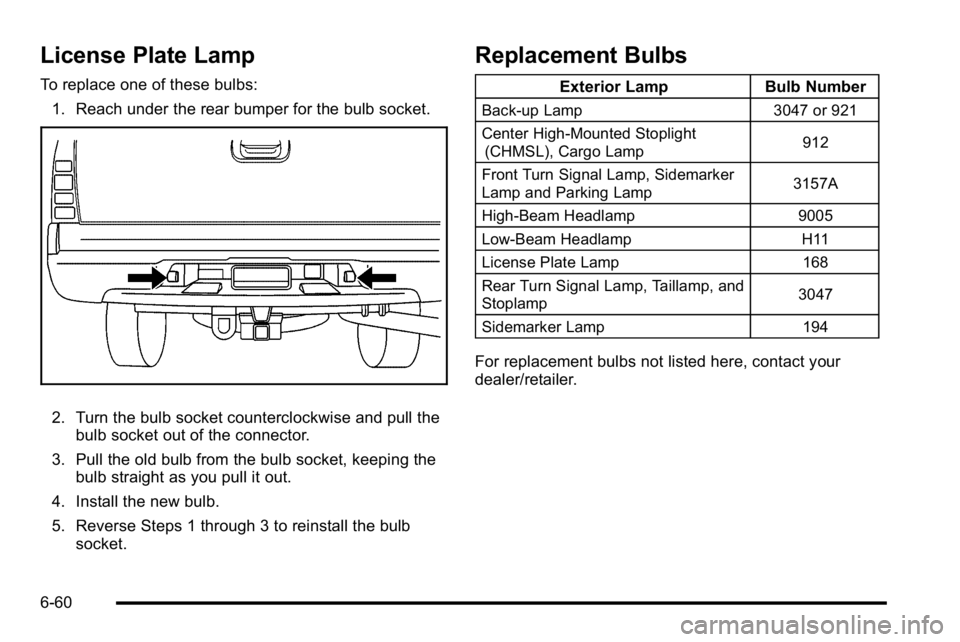
License Plate Lamp
To replace one of these bulbs:1. Reach under the rear bumper for the bulb socket.
2. Turn the bulb socket counterclockwise and pull the bulb socket out of the connector.
3. Pull the old bulb from the bulb socket, keeping the bulb straight as you pull it out.
4. Install the new bulb.
5. Reverse Steps 1 through 3 to reinstall the bulb socket.
Replacement Bulbs
Exterior Lamp Bulb Number
Back-up Lamp 3047 or 921
Center High-Mounted Stoplight (CHMSL), Cargo Lamp 912
Front Turn Signal Lamp, Sidemarker
Lamp and Parking Lamp 3157A
High-Beam Headlamp 9005
Low-Beam Headlamp H11
License Plate Lamp 168
Rear Turn Signal Lamp, Taillamp, and
Stoplamp 3047
Sidemarker Lamp 194
For replacement bulbs not listed here, contact your
dealer/retailer.
6-60
Page 435 of 550
Windshield Wiper Blade
Replacement
Windshield wiper blades should be inspected for wear
or cracking. SeeScheduled Maintenance on page 7‑3.
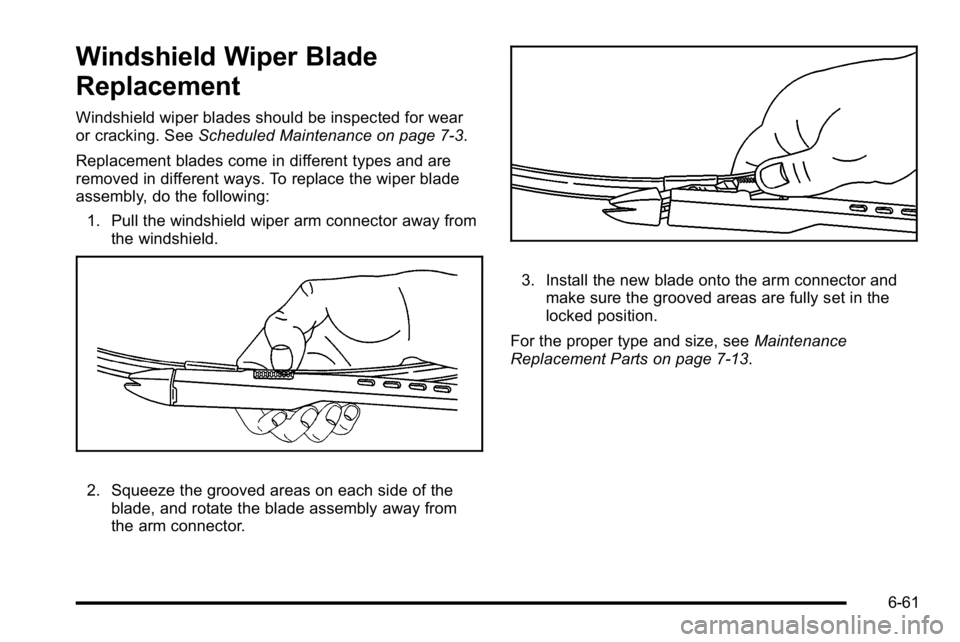
Replacement blades come in different types and are
removed in different ways. To replace the wiper blade
assembly, do the following: 1. Pull the windshield wiper arm connector away from the windshield.
2. Squeeze the grooved areas on each side of the
blade, and rotate the blade assembly away from
the arm connector.
3. Install the new blade onto the arm connector andmake sure the grooved areas are fully set in the
locked position.
For the proper type and size, see Maintenance
Replacement Parts on page 7‑13.
6-61
Page 451 of 550
TPMS Sensor Matching Process
Each TPMS sensor has a unique identification code.
Any time you rotate your vehicle's tires or replace one
or more of the TPMS sensors, the identification codes
will need to be matched to the new tire/wheel position.
The sensors are matched to the tire/wheel positions in
the following order: driver side front tire, passenger side
front tire, passenger side rear tire, and driver side
rear tire using a TPMS diagnostic tool. See your
dealer/retailer for service.
The TPMS sensors can also be matched to each
tire/wheel position by increasing or decreasing the tire's
air pressure. If increasing the tire's air pressure, do not
exceed the maximum inflation pressure indicated on the
tire's sidewall.
To decrease air-pressure out of a tire you can use the
pointed end of the valve cap, a pencil-style air pressure
gage, or a key.
You have two minutes to match the first tire/wheel
position, and five minutes overall to match all four tire/
wheel positions. If it takes longer than two minutes, to
match the first tire and wheel, or more than five minutes
to match all four tire and wheel positions the matching
process stops and you need to start over.The TPMS sensor matching process is outlined below:
1. Set the parking brake.
2. Turn the ignition switch to ON/RUN with the engine off.
3. Press the Remote Keyless Entry (RKE) transmitter's lock and unlock buttons at the same
time for approximately five seconds. The horn
sounds twice to signal the receiver is in relearn
mode and TIRE LEARNING ACTIVE message
displays on the DIC screen.
4. Start with the driver side front tire.
5. Remove the valve cap from the valve cap stem. Activate the TPMS sensor by increasing or
decreasing the tire's air pressure for five seconds,
or until a horn chirp sounds. The horn chirp, which
may take up to 30 seconds to sound, confirms that
the sensor identification code has been matched to
this tire and wheel position.
6. Proceed to the passenger side front tire, and repeat the procedure in Step 5.
7. Proceed to the passenger side rear tire, and repeat the procedure in Step 5.
6-77
Page 452 of 550
8. Proceed to the driver side rear tire, and repeat theprocedure in Step 5. The horn sounds two times to
indicate the sensor identification code has been
matched to the driver side rear tire, and the TPMS
sensor matching process is no longer active. The
TIRE LEARNING ACTIVE message on the DIC
display screen goes off.
9. Turn the ignition switch to LOCK/OFF.
10. Set all four tires to the recommended air pressure level as indicated on the Tire and Loading
Information label.
11. Put the valve caps back on the valve stems.
Tire Inspection and Rotation
We recommend that you regularly inspect your
vehicle's tires, including the spare tire, for signs of
wear or damage. See When It Is Time for New
Tires
on page 6‑79for more information.
Tires should be rotated every 5,000 to 8,000 miles
(8 000 to 13 000 km). See Scheduled Maintenance
on page 7‑3.
The purpose of a regular tire rotation is to achieve
a uniform wear for all tires on the vehicle. This will
ensure that your vehicle continues to perform
most like it did when the tires were new. Any time you notice unusual wear, rotate your
tires as soon as possible and check wheel
alignment. Also check for damaged tires or
wheels. See
When It Is Time for New Tires
on
page 6‑79
and Wheel Replacementon page 6‑84.
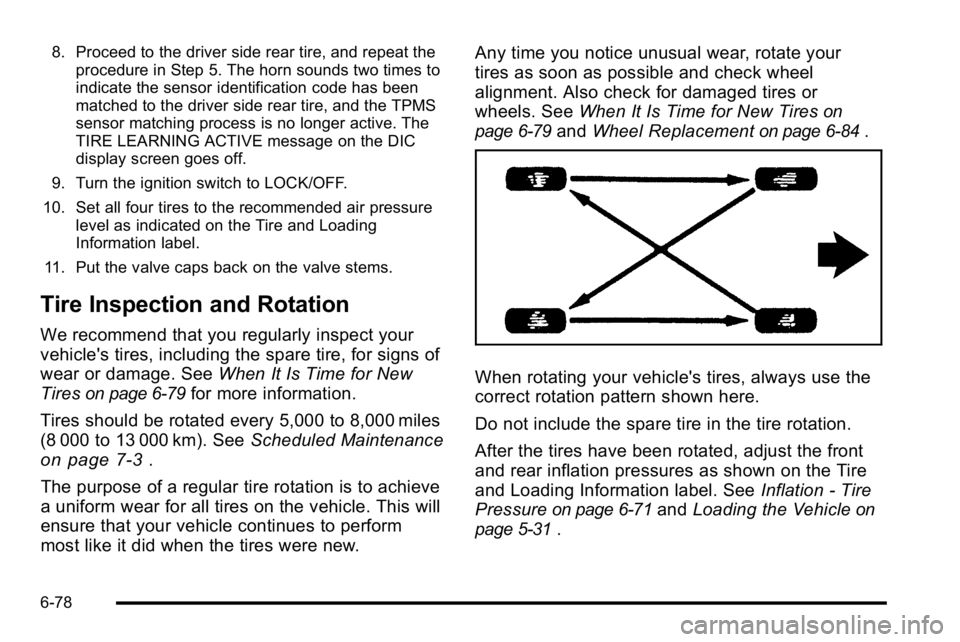
When rotating your vehicle's tires, always use the
correct rotation pattern shown here.
Do not include the spare tire in the tire rotation.
After the tires have been rotated, adjust the front
and rear inflation pressures as shown on the Tire
and Loading Information label. See Inflation - Tire
Pressure
on page 6‑71and Loading the Vehicleon
page 5‑31
.
6-78
Page 456 of 550
Different Size Tires and Wheels
If you add wheels or tires that are a different size than
your original equipment wheels and tires, this could
affect the way your vehicle performs, including its
braking, ride and handling characteristics, stability, and
resistance to rollover. Additionally, if your vehicle has
electronic systems such as anti‐lock brakes, rollover
airbags, traction control, and electronic stability control,
the performance of these systems can be affected.
{WARNING:
If you add different sized wheels, your vehicle
may not provide an acceptable level of
performance and safety if tires not recommended
for those wheels are selected. You may increase
the chance that you will crash and suffer serious
injury. Only use GM specific wheel and tire
systems developed for your vehicle, and have
them properly installed by a GM certified
technician.
See Buying New Tires
on page 6‑80andAccessories
and Modificationson page 6‑4for additional
information.
Uniform Tire Quality Grading
Quality grades can be found where applicable on
the tire sidewall between tread shoulder and
maximum section width. For example:
Treadwear 200 Traction AA
Temperature A
The following information relates to the system
developed by the United States National Highway
Traffic Safety Administration (NHTSA), which
grades tires by treadwear, traction, and
temperature performance. This applies only to
vehicles sold in the United States. The grades are
molded on the sidewalls of most passenger car
tires. The Uniform Tire Quality Grading (UTQG)
system does not apply to deep tread, winter-type
snow tires, space-saver, or temporary use spare
tires, tires with nominal rim diameters of
10 to 12 inches (25 to 30 cm), or to some
limited-production tires.
While the tires available on General Motors
passenger cars and light trucks may vary with
respect to these grades, they must also conform
to federal safety requirements and additional
General Motors Tire Performance Criteria (TPC)
standards.
6-82