four wheel drive GMC SIERRA DENALI 2017 User Guide
[x] Cancel search | Manufacturer: GMC, Model Year: 2017, Model line: SIERRA DENALI, Model: GMC SIERRA DENALI 2017Pages: 511, PDF Size: 6.88 MB
Page 169 of 511
GMC Sierra/Sierra Denali Owner Manual (GMNA-Localizing-U.S./Canada/
Mexico-9955992) - 2017 - crc - 4/18/17
168 Instruments and Controls Uplevel Radio Audio System
Controls
1. Press the desired feature to
display a list of available
options.
2. Press to select the desired
feature setting.
3. Press
o BACK on the
faceplate or the
0 screen
button to return to the previous
menu or exit.
Turn the vehicle to ON/RUN to
access the Settings menu, then
select SETTINGS from the Home
Page on the infotainment system
display.
Personalization Menus
The following list of menu items may
be available:
.
Time and Date
.
Language (Language)
.
Rear Seat Reminder
.
Teen Driver
.
Valet Mode
.
Radio .
Vehicle
.
Bluetooth
.
Apple CarPlay
.
Android Auto
.
USB Auto Launch
.
Voice
.
Display
.
Rear Camera
.
Return to Factory Settings
.
Software Information
Detailed information for each menu
follows.
Time and Date Manually set the time and date. See
Clock 0 127 .
Language (Language)
Select Language, then select from
the available language(s).
The selected language will display
on the system, and voice
recognition will reflect the selected
language. Rear Seat Reminder This allows for a chime and a
message ‘ Look in Rear Seat ’ when
the rear door has been opened
before or during operation of the
vehicle.
Select Off or On.
Teen Driver See “ Teen Driver ” under “ Settings ”
in the infotainment manual.
Valet Mode This will lock the infotainment
system and steering wheel controls.
It may also limit access to vehicle
storage locations (if equipped).
To enable valet mode:
1. Enter a four-digit code on the
keypad.
2. Select Enter to go to the
confirmation screen.
3. Re-enter the four-digit code.
Press LOCK or UNLOCK to lock or
unlock the system. Press Back to go
back to the previous menu.
Page 229 of 511

GMC Sierra/Sierra Denali Owner Manual (GMNA-Localizing-U.S./Canada/
Mexico-9955992) - 2017 - crc - 4/18/17
228 Infotainment System .
Press
i on the steering wheel
controls.
Dual Tone Multi-Frequency
(DTMF) Tones The in-vehicle Bluetooth system can
send numbers during a call. This is
used when calling a menu-driven
phone system.
1. When a call is active, press the
control just below KEYPAD.
2. Turn the MENU knob to
highlight the first digit and
press to select.
If not initially in the phone
application, from the Home Page,
turn the MENU knob, then press to
select the PHONE. From the
PHONE main menu, turn the MENU
knob to highlight Active Call and
press to select. Bluetooth (Voice
Recognition - Base
Radio) Using Voice Recognition To use voice recognition, press
gon the steering wheel. Use the
commands below for the various
voice features. For additional
information, say “ Help ” while you
are in a voice recognition menu.
Pairing Pairing a Phone
1. Press
g . The system responds
“ Ready, ” followed by a tone.
2. Say “ Bluetooth. ”
3. Say “ Pair. ” The system
responds with instructions and
a four-digit Personal
Identification Number (PIN).
The PIN is used in Step 5.
4. Start the pairing process on the
cell phone that you want to
pair. For help with this process,
see your cell phone
manufacturer's user guide. 5. Locate the device named “ Your
Vehicle ” in the list on the cell
phone. Follow the instructions
on the cell phone to enter the
PIN provided in Step 3. The
system may respond with a six
digit code to be confirmed on
the cell phone (instead of
entering a four digit code),
check that the same digits are
shown on the cell phone and
say "Yes" to confirm. Select
Confirm on the cell phone as
well. After the PIN is
successfully entered, the
system prompts you to provide
a name for the paired cell
phone. This name will be used
to indicate which phones are
paired and connected to the
vehicle. The system responds
with “
successfully paired ” after the
pairing process is complete.
6. Repeat Steps 1 − 5 to pair
additional phones.
Page 253 of 511
GMC Sierra/Sierra Denali Owner Manual (GMNA-Localizing-U.S./Canada/
Mexico-9955992) - 2017 - crc - 4/18/17
252 Driving and Operating
Driving and
Operating Driving Information Distracted Driving . . . . . . . . . . . . 253
Defensive Driving . . . . . . . . . . . . . 254
Drunk Driving . . . . . . . . . . . . . . . . . 254
Control of a Vehicle . . . . . . . . . . . 254
Braking . . . . . . . . . . . . . . . . . . . . . . . 254
Steering . . . . . . . . . . . . . . . . . . . . . . 255
Off-Road Recovery . . . . . . . . . . . 256
Loss of Control . . . . . . . . . . . . . . . 256
Off-Road Driving . . . . . . . . . . . . . 257
Driving on Wet Roads . . . . . . . . 261
Hill and Mountain Roads . . . . . 262
Winter Driving . . . . . . . . . . . . . . . . 263
If the Vehicle Is Stuck . . . . . . . . 264
Vehicle Load Limits . . . . . . . . . . . 265
Truck-Camper Loading
Information . . . . . . . . . . . . . . . . . . 271
Starting and Operating New Vehicle Break-In . . . . . . . . . 273
Adjustable Throttle and Brake
Pedal . . . . . . . . . . . . . . . . . . . . . . . 273
Ignition Positions . . . . . . . . . . . . . 274
Starting the Engine . . . . . . . . . . . 275
Fast Idle System . . . . . . . . . . . . . 276 Retained Accessory
Power (RAP) . . . . . . . . . . . . . . . . 277
Engine Coolant Heater . . . . . . . 278
Shifting Into Park . . . . . . . . . . . . . 279
Shifting out of Park . . . . . . . . . . . 280
Parking over Things
That Burn . . . . . . . . . . . . . . . . . . . 281
Active Fuel Management . . . . . 281
Engine Exhaust Engine Exhaust . . . . . . . . . . . . . . 282
Running the Vehicle While
Parked . . . . . . . . . . . . . . . . . . . . . . 282
Automatic Transmission Automatic Transmission . . . . . . 283
Manual Mode . . . . . . . . . . . . . . . . . 286
Tow/Haul Mode . . . . . . . . . . . . . . . 288
Drive Systems Four-Wheel Drive . . . . . . . . . . . . . 289
Brakes Antilock Brake
System (ABS) . . . . . . . . . . . . . . . 297
Parking Brake . . . . . . . . . . . . . . . . 297
Brake Assist . . . . . . . . . . . . . . . . . . 298
Hill Start Assist (HSA) . . . . . . . . 298
Ride Control Systems
Traction Control/Electronic
Stability Control . . . . . . . . . . . . . 299 Hill Descent Control (HDC) . . . 301
Locking Rear Axle . . . . . . . . . . . . 302
Cruise Control Cruise Control . . . . . . . . . . . . . . . . 302
Driver Assistance Systems Driver Assistance Systems . . . 305
Assistance Systems for
Parking or Backing . . . . . . . . . . 306
Assistance Systems for
Driving . . . . . . . . . . . . . . . . . . . . . . 308
Forward Collision Alert (FCA)
System . . . . . . . . . . . . . . . . . . . . . . 308
Forward Automatic
Braking (FAB) . . . . . . . . . . . . . . . 310
Lane Departure Warning
(LDW) (2500/3500
Series) . . . . . . . . . . . . . . . . . . . . . . 312
Lane Keep Assist (LKA) (1500
Series) . . . . . . . . . . . . . . . . . . . . . . 313
Fuel Fuel . . . . . . . . . . . . . . . . . . . . . . . . . . 315
California Fuel
Requirements . . . . . . . . . . . . . . . 316
Fuels in Foreign Countries . . . 316
Fuel Additives . . . . . . . . . . . . . . . . 316
E85 or FlexFuel . . . . . . . . . . . . . . 317
Filling the Tank . . . . . . . . . . . . . . . 317
Filling a Portable Fuel
Container . . . . . . . . . . . . . . . . . . . 319
Page 258 of 511
GMC Sierra/Sierra Denali Owner Manual (GMNA-Localizing-U.S./Canada/
Mexico-9955992) - 2017 - crc - 4/18/17
Driving and Operating 257The vehicle may straighten out.
Be ready for a second skid if it
occurs.
.
Slow down and adjust your
driving according to weather
conditions. Stopping distance
can be longer and vehicle
control can be affected when
traction is reduced by water,
snow, ice, gravel, or other
material on the road. Learn to
recognize warning clues — such
as enough water, ice, or packed
snow on the road to make a
mirrored surface — and slow
down when you have any doubt.
.
Try to avoid sudden steering,
acceleration, or braking,
including reducing vehicle speed
by shifting to a lower gear. Any
sudden changes could cause
the tires to slide.
Remember: Antilock brakes help
avoid only the braking skid.
Off-Road Driving Four-wheel-drive vehicles can be
used for off-road driving. Vehicles
without four-wheel drive and vehicles not equipped with All
Terrain (AT) or On-Off Road (OOR)
tires must not be driven off-road
except on a level, solid surface. For
contact information about the
original equipment tires, see the
warranty manual.
One of the best ways for successful
off-road driving is to control the
speed.
{ WarningWhen driving off-road, bouncing
and quick changes in direction
can easily throw you out of
position. This could cause you to
lose control and crash. You and
your passengers should always
wear safety belts.
Before Driving Off-Road
.
Have all necessary maintenance
and service work completed.
.
Fuel the vehicle, fill fluid levels,
and check inflation pressure in
all tires, including the spare,
if equipped. .
Read all the information about
four-wheel-drive vehicles in this
manual.
.
Remove any underbody air
deflector, if equipped. Re-attach
the air deflector after off-road
driving.
.
See Hill Descent Control (HDC)
0 301
.
Know the local laws that apply to
off-road driving.
To gain more ground clearance if
needed, it may be necessary to
remove the front fascia lower air
dam. However, driving without the
air dam reduces fuel economy.
Caution
Operating the vehicle for
extended periods without the front
fascia lower air dam installed can
cause improper airflow to the
engine. Reattach the front fascia
air dam after off-road driving.
Page 265 of 511
GMC Sierra/Sierra Denali Owner Manual (GMNA-Localizing-U.S./Canada/
Mexico-9955992) - 2017 - crc - 4/18/17
264 Driving and Operating Warning (Continued).
Clear snow from the base of
the vehicle, especially any
blocking the exhaust pipe.
.
Open a window about 5 cm
(2 in) on the vehicle side
that is away from the wind,
to bring in fresh air.
.
Fully open the air outlets on
or under the instrument
panel.
.
Adjust the climate control
system to circulate the air
inside the vehicle and set
the fan speed to the highest
setting. See “ Climate
Control Systems. ”
For more information about CO,
see Engine Exhaust 0 282 .
To save fuel, run the engine for
short periods to warm the vehicle
and then shut the engine off and
partially close the window. Moving
about to keep warm also helps. If it takes time for help to arrive,
when running the engine, push the
accelerator pedal slightly so the
engine runs faster than the idle
speed. This keeps the battery
charged to restart the vehicle and to
signal for help with the headlamps.
Do this as little as possible, to
save fuel.
If the Vehicle Is Stuck Slowly and cautiously spin the
wheels to free the vehicle when
stuck in sand, mud, ice, or snow.
See “ Rocking the Vehicle to Get It
Out ” later in this section.
The Traction Control System (TCS)
can often help to free a stuck
vehicle. See Traction Control/
Electronic Stability Control 0 299 .
If TCS cannot free the vehicle, see
“ Rocking the Vehicle to Get it Out ”
following. { WarningIf the vehicle's tires spin at high
speed, they can explode, and you
or others could be injured. The
vehicle can overheat, causing an
engine compartment fire or other
damage. Spin the wheels as little
as possible and avoid going
above 56 km/h (35 mph).
For information about using tire
chains on the vehicle, see Tire
Chains 0 422 .
Rocking the Vehicle to Get
It Out Turn the steering wheel left and
right to clear the area around the
front wheels. For four-wheel-drive
vehicles, shift into Four-Wheel Drive
High. Turn the TCS off. Shift back
and forth between R (Reverse) and
a forward gear, spinning the wheels
as little as possible. To prevent
transmission wear, wait until the
wheels stop spinning before shifting
gears. Slowly spinning the wheels in
the forward and reverse directions
Page 280 of 511
GMC Sierra/Sierra Denali Owner Manual (GMNA-Localizing-U.S./Canada/
Mexico-9955992) - 2017 - crc - 4/18/17
Driving and Operating 279Warning (Continued) it overheat and cause a fire,
property damage, electric
shock, and injury.
.
Do not operate the vehicle
with the heater cord
permanently attached to the
vehicle. Possible heater
cord and thermostat
damage could occur.
.
While in use, do not let the
heater cord touch vehicle
parts or sharp edges. Never
close the hood on the
heater cord.
.
Before starting the vehicle,
unplug the cord, reattach
the cover to the plug, and
securely fasten the cord.
Keep the cord away from
any moving parts. 4. Before starting the engine, be
sure to unplug and store the
cord as it was before to keep it
away from moving engine
parts. If you do not, it could be
damaged.
The length of time the heater should
remain plugged in depends on
several factors. Ask a dealer in the
area where you will be parking the
vehicle for the best advice on this.
Shifting Into Park
{ WarningIt can be dangerous to get out of
the vehicle if the shift lever is not
fully in P (Park) with the parking
brake firmly set. The vehicle can
roll. If you have left the engine
running, the vehicle can move
suddenly. You or others could be
injured. To be sure the vehicle will
not move, even when you are on
fairly level ground, use the steps
that follow. With four-wheel drive,
if the transfer case is in
(Continued) Warning (Continued) N (Neutral), the vehicle will be
free to roll, even if the shift lever
is in P (Park). Be sure the transfer
case is in a drive gear. If towing a
trailer, see Driving Characteristics
and Towing Tips 0 320 .
1. Hold the brake pedal down,
then set the parking brake.
See Parking Brake 0 297 .
2. Move the shift lever into the
P (Park) position by pulling the
shift lever toward you and
moving it up as far as it will go.
3. Be sure the transfer case (if
equipped) is in a drive
gear — not in N (Neutral).
4. Turn the ignition key to
LOCK/OFF.
5. Remove the key and take it
with you. If you can leave the
vehicle with the ignition key in
your hand, the vehicle is in
P (Park).
Page 281 of 511
GMC Sierra/Sierra Denali Owner Manual (GMNA-Localizing-U.S./Canada/
Mexico-9955992) - 2017 - crc - 4/18/17
280 Driving and Operating Leaving the Vehicle with the
Engine Running
{ WarningIt can be dangerous to leave the
vehicle with the engine running.
The vehicle could move suddenly
if the shift lever is not fully in
P (Park) with the parking brake
firmly set.
If you have four-wheel drive and
the transfer case is in N (Neutral),
the vehicle will be free to roll,
even if the shift lever is in
P (Park). So be sure the transfer
case is in a drive gear – not in
N (Neutral).
And, if you leave the vehicle with
the engine running, it could
overheat and even catch fire. You
or others could be injured. Do not
leave the vehicle with the engine
running unless you have to.
If you have to leave the vehicle with
the engine running, be sure the
vehicle is in P (Park) and the parking brake is firmly set before
you leave it. After you move the shift
lever into P (Park), hold the regular
brake pedal down. Then, see if you
can move the shift lever away from
P (Park) without first pulling it toward
you. If you can, it means that the
shift lever was not fully locked into
P (Park).
Torque Lock If you are parking on a hill and you
do not shift the transmission into
P (Park) properly, the weight of the
vehicle may put too much force on
the parking pawl in the
transmission. You may find it difficult
to pull the shift lever out of P (Park).
This is called torque lock. To
prevent torque lock, set the parking
brake and then shift into P (Park)
properly before you leave the driver
seat. To find out how, see Shifting
Into Park 0 279 .
When you are ready to drive, move
the shift lever out of P (Park) before
you release the parking brake.
If torque lock does occur, you may
need to have another vehicle push
yours a little uphill to take some of the pressure from the parking pawl
in the transmission. You will then be
able to pull the shift lever out of
P (Park).
Shifting out of Park This vehicle is equipped with an
electronic shift lock release system.
The shift lock release is
designed to:
.
Prevent ignition key removal
unless the shift lever is in
P (Park).
.
Prevent movement of the shift
lever out of P (Park), unless the
ignition is in ON/RUN and the
regular brake pedal is applied.
The shift lock release is always
functional except in the case of an
uncharged or low voltage (less than
9 volt) battery.
If the vehicle has an uncharged
battery or a battery with low voltage,
try charging or jump starting the
battery. See Jump Starting - North
America 0 435 .
Page 284 of 511
GMC Sierra/Sierra Denali Owner Manual (GMNA-Localizing-U.S./Canada/
Mexico-9955992) - 2017 - crc - 4/18/17
Driving and Operating 283
Automatic
Transmission If equipped, there is an electronic
shift lever position indicator within
the instrument cluster. This display
comes on when the ignition key is
turned to the ON/RUN position.
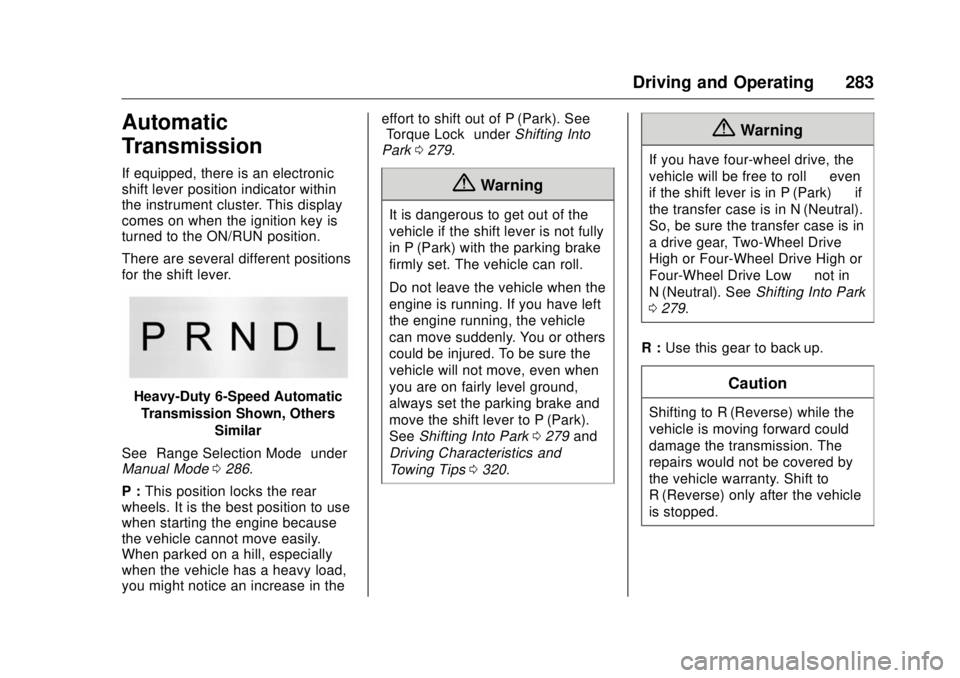
There are several different positions
for the shift lever.
Heavy-Duty 6-Speed Automatic
Transmission Shown, Others
Similar
See “ Range Selection Mode ” under
Manual Mode 0 286 .
P : This position locks the rear
wheels. It is the best position to use
when starting the engine because
the vehicle cannot move easily.
When parked on a hill, especially
when the vehicle has a heavy load,
you might notice an increase in the effort to shift out of P (Park). See
“ Torque Lock ” under Shifting Into
Park 0 279 .
{ WarningIt is dangerous to get out of the
vehicle if the shift lever is not fully
in P (Park) with the parking brake
firmly set. The vehicle can roll.
Do not leave the vehicle when the
engine is running. If you have left
the engine running, the vehicle
can move suddenly. You or others
could be injured. To be sure the
vehicle will not move, even when
you are on fairly level ground,
always set the parking brake and
move the shift lever to P (Park).
See Shifting Into Park 0 279 and
Driving Characteristics and
Towing Tips 0 320 .{ WarningIf you have four-wheel drive, the
vehicle will be free to roll — even
if the shift lever is in P (Park) — if
the transfer case is in N (Neutral).
So, be sure the transfer case is in
a drive gear, Two-Wheel Drive
High or Four-Wheel Drive High or
Four-Wheel Drive Low — not in
N (Neutral). See Shifting Into Park
0 279 .
R : Use this gear to back up.
CautionShifting to R (Reverse) while the
vehicle is moving forward could
damage the transmission. The
repairs would not be covered by
the vehicle warranty. Shift to
R (Reverse) only after the vehicle
is stopped.
Page 290 of 511
GMC Sierra/Sierra Denali Owner Manual (GMNA-Localizing-U.S./Canada/
Mexico-9955992) - 2017 - crc - 4/19/17
Driving and Operating 289
Drive Systems Four-Wheel Drive If equipped, four-wheel drive
engages the front axle for extra
traction. Read the appropriate
section for transfer case operation
before using.
CautionDo not drive on clean, dry
pavement in 4
m and 4
n (if
equipped) for an extended period
of time. These conditions may
cause premature wear on the
vehicle ’ s powertrain.
Driving on clean, dry pavement in
4
m or 4
n may:
.
Cause a vibration to be felt in
the steering system.
.
Cause tires to wear faster.
.
Make the transfer case harder to
shift, and cause it to run noisier. { WarningShifting the transfer case to
N (Neutral) can cause the vehicle
to roll even if the transmission is
in P (Park). You or someone else
could be seriously injured. Be
sure to set the parking brake
before placing the transfer case in
N (Neutral). See Parking Brake
0 297 .
CautionExtended high-speed operation in
4
n may damage or shorten the
life of the drivetrain.
Engagement noise and bump when
shifting between 4
n and 4
m or from
N (Neutral), with the engine running,
is normal.
Shifting into 4
n will turn Traction
Control and StabiliTrak ®
off. See
Traction Control/Electronic Stability
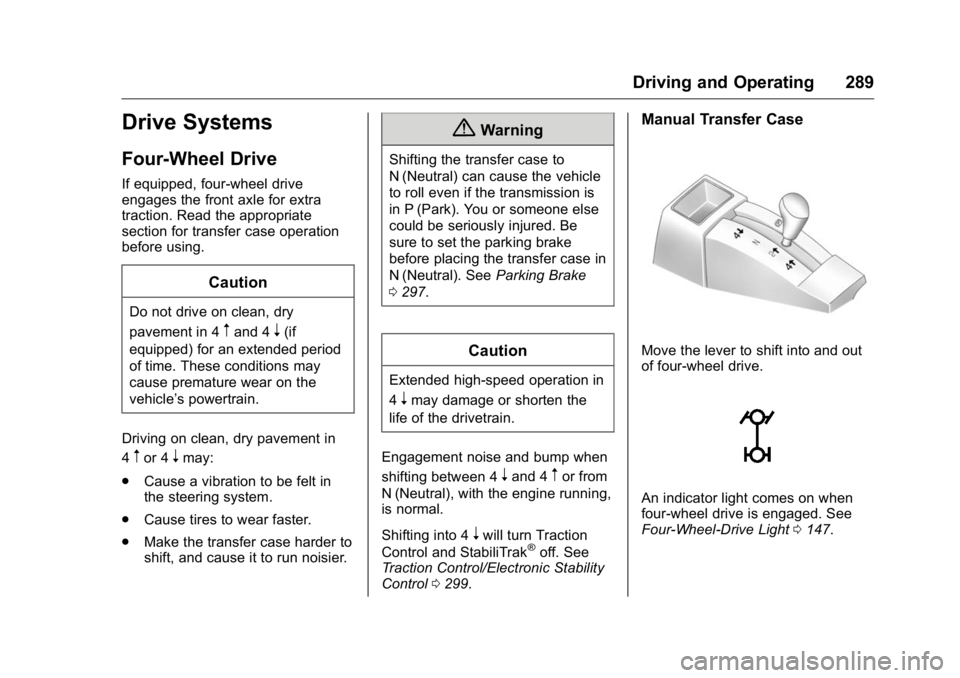
Control 0 299 . Manual Transfer Case
Move the lever to shift into and out
of four-wheel drive.
An indicator light comes on when
four-wheel drive is engaged. See
Four-Wheel-Drive Light 0 147 .
Page 291 of 511
GMC Sierra/Sierra Denali Owner Manual (GMNA-Localizing-U.S./Canada/
Mexico-9955992) - 2017 - crc - 4/18/17
290 Driving and Operating N (Neutral) : Use only when the
vehicle needs to be towed.
See Recreational Vehicle Towing
0 440 or Towing the Vehicle 0 439 .
2
m (Two-Wheel Drive High) : Use
this setting for driving on most
streets and highways. The front axle
is not engaged. This setting
provides the best fuel economy.
4
n (Four-Wheel Drive Low) : This
setting also engages the front axle
and delivers extra torque. Choose
4
n if driving off-road in deep sand,
deep mud, or deep snow, and while
climbing or descending steep hills.
When engaged, keep vehicle speed
below 72 km/h (45 mph).
4
m (Four-Wheel Drive High) : Use
this setting when extra traction is
needed. The front axle engages and
helps when driving on snowy or icy
roads, when off-roading, or when
plowing snow. The vehicle can be shifted between
2
m and 4
m while the vehicle is
moving. In extremely cold weather,
it may be necessary to stop or slow
the vehicle to shift into 4
m .
Using the Manual Transfer Case
.
Use quick motions to shift into or
out of 4
n or N (Neutral).
.
Shifting may be harder when the
vehicle is cold, but will return to
normal once warmed up.
.
Four-wheel drive reduces fuel
economy.
Shifting from 2
m to 4
m.
Shifts can be made at any
vehicle speed.
.
Shift in one continuous motion.
.
Shifting while the vehicle is in
motion may require that
moderate force be applied to the
shift lever before 4
m can be
engaged, especially in cold
weather. .
In extremely cold weather, it may
be necessary to slow or stop the
vehicle to shift.
.
While in 4
m , the vehicle can be
driven at any posted legal speed
limit.
Shifting In or Out of 4
n CautionShifting the transfer case into 4
n while moving at speeds faster
than 5 km/h (3 mph) may cause
premature wear to the transfer
case, and may cause the gears to
grind.
1. If possible, shift with the
vehicle moving 5 km/h (3 mph)
or less.
2. Shift the transmission into
N (Neutral).
3. Shift the transfer case shift
lever in one continuous motion.