battery GMC SIERRA DENALI 2017 Owners Manual
[x] Cancel search | Manufacturer: GMC, Model Year: 2017, Model line: SIERRA DENALI, Model: GMC SIERRA DENALI 2017Pages: 511, PDF Size: 6.88 MB
Page 37 of 511
GMC Sierra/Sierra Denali Owner Manual (GMNA-Localizing-U.S./Canada/
Mexico-9955992) - 2017 - crc - 4/18/17
36 Keys, Doors, and Windows and all previously known keys
will no longer work with the
vehicle.
6. To learn a second key, turn to
OFF, insert the second key to
be learned, and rotate to
ON/RUN.
After two keys are learned, the
remaining keys can be learned by
following the procedure in
“ Programming with Two
Recognized Keys. ”
The key has a bar-coded key tag
that the dealer or qualified locksmith
can use to make new keys. Store
this information in a safe place, not
in the vehicle.
See your dealer if a replacement
key or additional key is needed.
If it becomes difficult to turn a key,
inspect the key blade for debris.
Periodically clean with a brush
or pick.
With an active OnStar subscription,
an OnStar Advisor may remotely
unlock the vehicle. See OnStar
Overview 0 488 . Remote Keyless Entry
(RKE) System See Radio Frequency Statement
0 484 .
If there is a decrease in the Remote
Keyless Entry (RKE) operating
range:
.
Check the distance. The
transmitter may be too far from
the vehicle.
.
Check the location. Other
vehicles or objects may be
blocking the signal.
.
Check the transmitter's battery.
See “ Battery Replacement ” later
in this section.
.
If the transmitter is still not
working correctly, see your
dealer or a qualified technician
for service.
Remote Keyless Entry
(RKE) System Operation The RKE transmitter functions may
work up to 60 m (197 ft) away from
the vehicle. Other conditions can affect the
performance of the transmitter. See
Remote Keyless Entry (RKE)
System 0 36 .
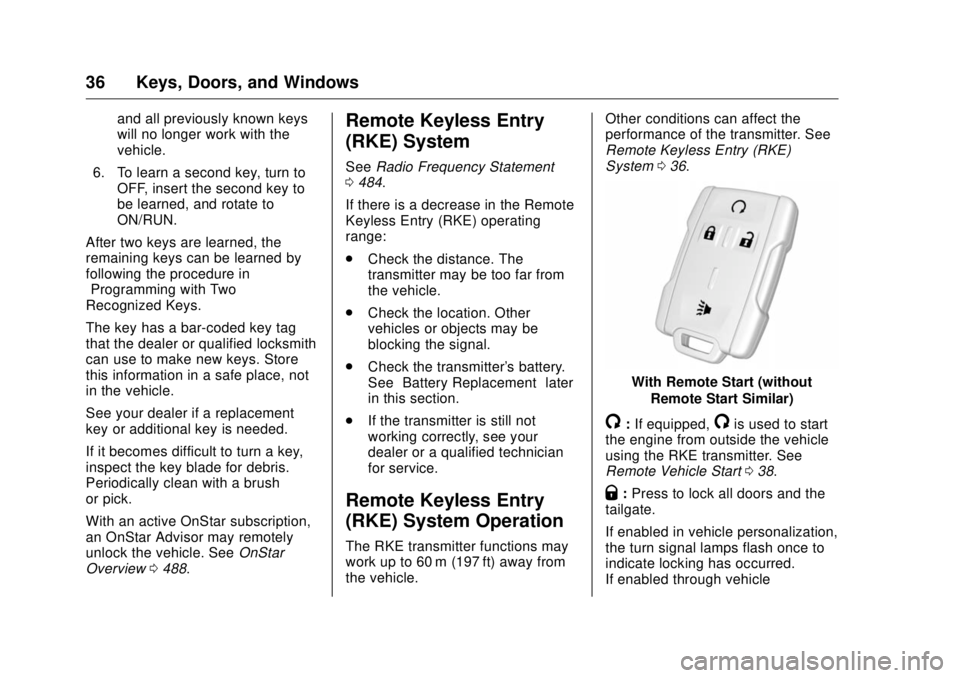
With Remote Start (without
Remote Start Similar)
/ : If equipped,
/ is used to start
the engine from outside the vehicle
using the RKE transmitter. See
Remote Vehicle Start 0 38 .
Q : Press to lock all doors and the
tailgate.
If enabled in vehicle personalization,
the turn signal lamps flash once to
indicate locking has occurred.
If enabled through vehicle
Page 38 of 511
GMC Sierra/Sierra Denali Owner Manual (GMNA-Localizing-U.S./Canada/
Mexico-9955992) - 2017 - crc - 4/18/17
Keys, Doors, and Windows 37personalization, the horn chirps
when
Q is pressed again within
three seconds. See Vehicle
Personalization 0 167 .
Pressing
Q arms the alarm system.
See Vehicle Alarm System 0 43 .
If equipped with auto mirror folding,
pressing and holding
Q for
one second will fold the mirrors. The
auto mirror folding feature will not
operate unless it is enabled.
See Folding Mirrors 0 48 and
Vehicle Personalization 0 167 .
K : Press once to unlock only the
driver door. If
K is pressed again
within three seconds, all remaining
doors and the tailgate unlock. The
interior lamps may come on and
stay on for 20 seconds or until the
ignition is turned on.
If enabled in Vehicle
Personalization, the turn signal
lamps flash twice to indicate
unlocking has occurred. See Vehicle
Personalization 0 167 . If enabled
through vehicle personalization, the
exterior lamps may turn on. See
Vehicle Personalization 0 167 . Pressing
K on the RKE transmitter
disarms the alarm system. See
Vehicle Alarm System 0 43 .
If equipped with auto mirror folding,
pressing and holding
K for
one second will unfold the mirrors.
The auto mirror folding feature will
not operate unless it is enabled.
See Folding Mirrors 0 48 and
Vehicle Personalization 0 167 .
On some models, press, release
and then press and hold
K to open
all of the windows. Pressing the
button again will stop the windows.
See Vehicle Personalization 0 167 .
7 : Press and release one time to
initiate vehicle locator. The turn
signal lamps flash and the horn
sounds three times.
Press and hold
7 for at least
three seconds to sound the panic
alarm. The turn signal lamps flash
and the horn sounds repeatedly for
30 seconds. The alarm turns off
when the ignition is moved to ON/ RUN or
7 is pressed again. The
ignition must be in LOCK/OFF for
the panic alarm to work.
Programming Transmitters to
the Vehicle Only RKE transmitters programmed
to this vehicle will work. If a
transmitter is lost or stolen, a
replacement can be purchased and
programmed through your dealer.
Each vehicle can have up to
eight transmitters programmed to it.
See your dealer for transmitter
programming.
Battery Replacement Replace the battery in the
transmitter soon if the REPLACE
BATTERY IN REMOTE KEY
message displays in the DIC.
Caution
When replacing the battery, do
not touch any of the circuitry on
the transmitter. Static from your
body could damage the
transmitter.
Page 39 of 511
GMC Sierra/Sierra Denali Owner Manual (GMNA-Localizing-U.S./Canada/
Mexico-9955992) - 2017 - crc - 4/18/17
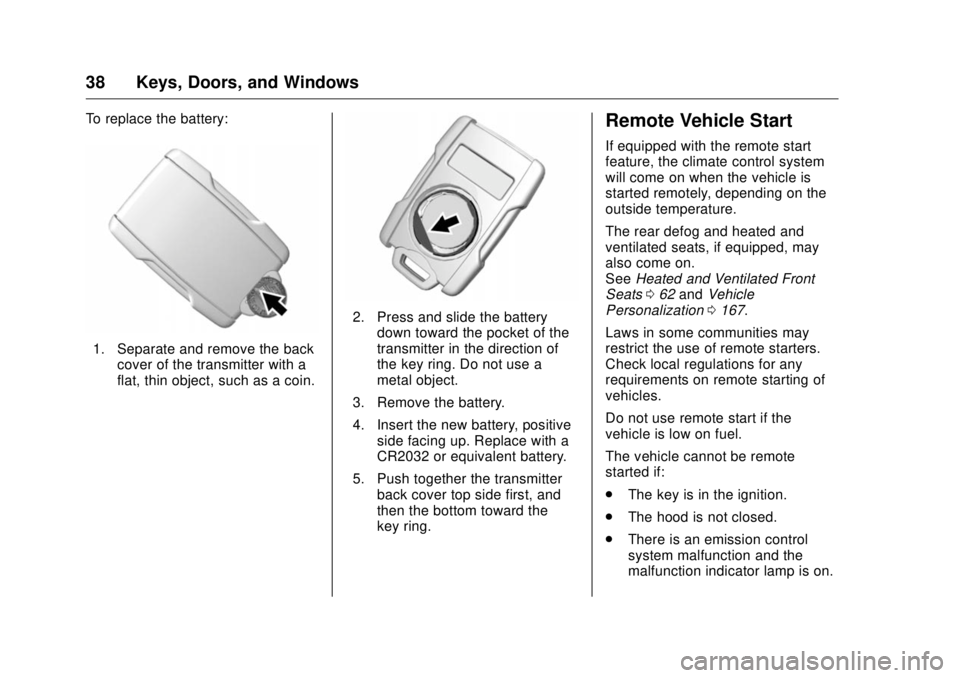
38 Keys, Doors, and Windows To replace the battery:
1. Separate and remove the back
cover of the transmitter with a
flat, thin object, such as a coin. 2. Press and slide the battery
down toward the pocket of the
transmitter in the direction of
the key ring. Do not use a
metal object.
3. Remove the battery.
4. Insert the new battery, positive
side facing up. Replace with a
CR2032 or equivalent battery.
5. Push together the transmitter
back cover top side first, and
then the bottom toward the
key ring. Remote Vehicle Start If equipped with the remote start
feature, the climate control system
will come on when the vehicle is
started remotely, depending on the
outside temperature.
The rear defog and heated and
ventilated seats, if equipped, may
also come on.
See Heated and Ventilated Front
Seats 0 62 and Vehicle
Personalization 0 167 .
Laws in some communities may
restrict the use of remote starters.
Check local regulations for any
requirements on remote starting of
vehicles.
Do not use remote start if the
vehicle is low on fuel.
The vehicle cannot be remote
started if:
.
The key is in the ignition.
.
The hood is not closed.
.
There is an emission control
system malfunction and the
malfunction indicator lamp is on.
Page 53 of 511
GMC Sierra/Sierra Denali Owner Manual (GMNA-Localizing-U.S./Canada/
Mexico-9955992) - 2017 - crc - 4/18/17
52 Keys, Doors, and Windows Window Lockout
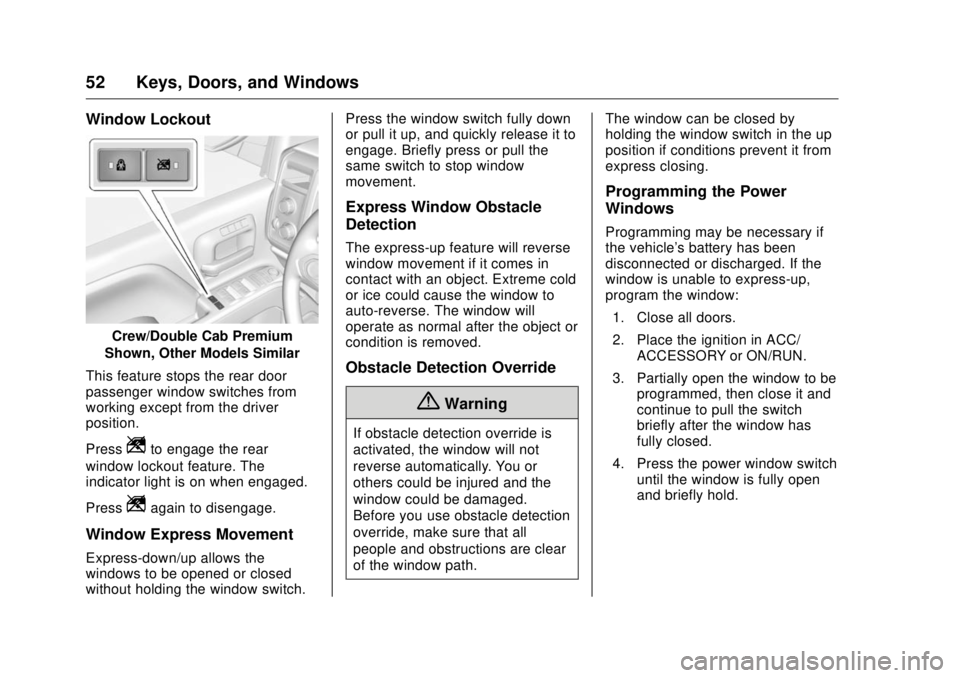
Crew/Double Cab Premium
Shown, Other Models Similar
This feature stops the rear door
passenger window switches from
working except from the driver
position.
Press
Z to engage the rear
window lockout feature. The
indicator light is on when engaged.
Press
Z again to disengage.
Window Express Movement
Express-down/up allows the
windows to be opened or closed
without holding the window switch. Press the window switch fully down
or pull it up, and quickly release it to
engage. Briefly press or pull the
same switch to stop window
movement.
Express Window Obstacle
Detection The express-up feature will reverse
window movement if it comes in
contact with an object. Extreme cold
or ice could cause the window to
auto-reverse. The window will
operate as normal after the object or
condition is removed.
Obstacle Detection Override
{ Warning
If obstacle detection override is
activated, the window will not
reverse automatically. You or
others could be injured and the
window could be damaged.
Before you use obstacle detection
override, make sure that all
people and obstructions are clear
of the window path. The window can be closed by
holding the window switch in the up
position if conditions prevent it from
express closing.
Programming the Power
Windows Programming may be necessary if
the vehicle's battery has been
disconnected or discharged. If the
window is unable to express-up,
program the window:
1. Close all doors.
2. Place the ignition in ACC/
ACCESSORY or ON/RUN.
3. Partially open the window to be
programmed, then close it and
continue to pull the switch
briefly after the window has
fully closed.
4. Press the power window switch
until the window is fully open
and briefly hold.
Page 86 of 511
GMC Sierra/Sierra Denali Owner Manual (GMNA-Localizing-U.S./Canada/
Mexico-9955992) - 2017 - crc - 4/18/17
Seats and Restraints 85
{ WarningIf the front outboard passenger
airbag is turned off for an
adult-sized occupant, the airbag
will not be able to inflate and help
protect that person in a crash,
resulting in an increased risk of
serious injury or even death. An
adult-sized occupant should not
ride in the front outboard
passenger seat, if the passenger
airbag off indicator is lit.
Additional Factors Affecting
System Operation Safety belts help keep the
passenger in position on the seat
during vehicle maneuvers and
braking, which helps the passenger
sensing system maintain the
passenger airbag status. See
“ Safety Belts ” and “ Child Restraints ”
in the Index for additional
information about the importance of
proper restraint use. A thick layer of additional material,
such as a blanket or cushion,
or aftermarket equipment such as
seat covers, seat heaters, and seat
massagers can affect how well the
passenger sensing system
operates. We recommend that you
not use seat covers or other
aftermarket equipment except when
approved by GM for your specific
vehicle. See Adding Equipment to
the Airbag-Equipped Vehicle 0 86
for more information about
modifications that can affect how
the system operates.
The on indicator may be lit if an
object, such as a briefcase,
handbag, grocery bag, laptop,
or other electronic device, is put on
an unoccupied seat. If this is not
desired, remove the object from
the seat.
{ Warning
Stowing of articles under the
passenger seat or between the
passenger seat cushion and
(Continued) Warning (Continued) seatback may interfere with the
proper operation of the passenger
sensing system.
Servicing the
Airbag-Equipped Vehicle Airbags affect how the vehicle
should be serviced. There are parts
of the airbag system in several
places around the vehicle. Your
dealer and the service manual have
information about servicing the
vehicle and the airbag system. To
purchase a service manual, see
Service Publications Ordering
Information 0 483 .
{ Warning
For up to 10 seconds after the
vehicle is turned off and the
battery is disconnected, an airbag
can still inflate during improper
service. You can be injured if you
(Continued)
Page 124 of 511
GMC Sierra/Sierra Denali Owner Manual (GMNA-Localizing-U.S./Canada/
Mexico-9955992) - 2017 - crc - 4/18/17
Instruments and Controls 123
Instruments and
Controls Controls Steering Wheel Adjustment . . . 124
Steering Wheel Controls . . . . . . 125
Heated Steering Wheel . . . . . . . 125
Horn . . . . . . . . . . . . . . . . . . . . . . . . . . 125
Windshield Wiper/Washer . . . . 126
Compass . . . . . . . . . . . . . . . . . . . . . 126
Clock . . . . . . . . . . . . . . . . . . . . . . . . . 127
Power Outlets . . . . . . . . . . . . . . . . 128
Wireless Charging . . . . . . . . . . . . 130
Warning Lights, Gauges, and
Indicators Warning Lights, Gauges, and
Indicators . . . . . . . . . . . . . . . . . . . 131
Instrument Cluster . . . . . . . . . . . . 132
Speedometer . . . . . . . . . . . . . . . . . 136
Odometer . . . . . . . . . . . . . . . . . . . . . 136
Trip Odometer . . . . . . . . . . . . . . . . 136
Tachometer . . . . . . . . . . . . . . . . . . . 136
Fuel Gauge . . . . . . . . . . . . . . . . . . . 136
Engine Oil Pressure
Gauge . . . . . . . . . . . . . . . . . . . . . . 137
Engine Coolant Temperature
Gauge . . . . . . . . . . . . . . . . . . . . . . 138 Transmission Temperature
Gauge . . . . . . . . . . . . . . . . . . . . . . 139
Voltmeter Gauge . . . . . . . . . . . . . 139
Safety Belt Reminders . . . . . . . . 140
Airbag Readiness Light . . . . . . . 141
Airbag On-Off Light . . . . . . . . . . . 141
Passenger Airbag Status
Indicator . . . . . . . . . . . . . . . . . . . . 143
Charging System Light . . . . . . . 143
Malfunction Indicator Lamp
(Check Engine Light) . . . . . . . . 144
Brake System Warning
Light . . . . . . . . . . . . . . . . . . . . . . . . 145
Antilock Brake System (ABS)
Warning Light . . . . . . . . . . . . . . . 146
Four-Wheel-Drive Light . . . . . . . 147
Tow/Haul Mode Light . . . . . . . . . 147
Hill Descent Control Light . . . . 147
Lane Departure Warning
(LDW) Light (2500/3500) . . . . 147
Lane Keep Assist (LKA) Light
(1500 Series) . . . . . . . . . . . . . . . 148
Vehicle Ahead Indicator . . . . . . 148
Traction Off Light . . . . . . . . . . . . . 148
StabiliTrak OFF Light . . . . . . . . . 148
Traction Control System (TCS)/
StabiliTrak Light . . . . . . . . . . . . . 149
Engine Coolant Temperature
Warning Light . . . . . . . . . . . . . . . 149
Tire Pressure Light . . . . . . . . . . . 150
Engine Oil Pressure Light . . . . 150 Low Fuel Warning Light . . . . . . 150
Security Light . . . . . . . . . . . . . . . . . 151
High-Beam On Light . . . . . . . . . . 151
Front Fog Lamp Light . . . . . . . . . 151
Lamps On Reminder . . . . . . . . . 151
Cruise Control Light . . . . . . . . . . 152
Door Ajar Light . . . . . . . . . . . . . . . 152
Information Displays Driver Information Center (DIC)
(Base Level Cluster) . . . . . . . . 152
Driver Information Center (DIC)
(Uplevel and Denali
Cluster) . . . . . . . . . . . . . . . . . . . . . 154
Vehicle Messages Vehicle Messages . . . . . . . . . . . . 157
Battery Voltage and Charging
Messages . . . . . . . . . . . . . . . . . . . 157
Brake System Messages . . . . . 158
Compass Messages . . . . . . . . . . 158
Door Ajar Messages . . . . . . . . . . 158
Engine Cooling System
Messages . . . . . . . . . . . . . . . . . . . 159
Engine Oil Messages . . . . . . . . . 159
Engine Power Messages . . . . . 160
Fuel System Messages . . . . . . . 160
Key and Lock Messages . . . . . 160
Lamp Messages . . . . . . . . . . . . . . 160
Object Detection System
Messages . . . . . . . . . . . . . . . . . . . 161
Page 129 of 511
GMC Sierra/Sierra Denali Owner Manual (GMNA-Localizing-U.S./Canada/
Mexico-9955992) - 2017 - crc - 4/18/17
128 Instruments and Controls To set the date:
1. Touch SETTINGS from the
Home Page, then touch Time
and Date.
2. Touch Set Date and touch
«or
ª to increase or decrease
month, day, or year.
3. Touch the
} or
0 screen
button to go back to the
previous menu.
To set the clock display:
1. Touch SETTINGS and touch
Time and Date.
2. Touch Clock Display and touch
OFF or ON to turn the clock
display off or on.
3. Touch the
} or
0 screen
button to go back to the
previous menu. Power Outlets Power Outlets 12 Volt Direct
Current
Accessory power outlets can be
used to plug in electrical equipment,
such as a cell phone, MP3
player, etc.
The vehicle may have up to four
accessory power outlets.
Vehicles with a Center Console
.
One or two in front of the
cupholders on the center
console.
.
One inside the center console.
.
One on the rear of the center
console.
Vehicles with Bench Seats
.
One on the center stack below
the climate control system.
.
One or two in the storage area
on the bench seat.
Lift the cover to access and replace
when not in use. The power outlets on the center
stack and in front of the cupholders
are powered at all times. The power
outlets inside the storage area and
on the rear of the console are
powered when the ignition is in ON/
RUN or ACC/ACCESSORY,
or when RAP is active.
{ WarningPower is always supplied to the
outlets. Do not leave electrical
equipment plugged in when the
vehicle is not in use because the
vehicle could catch fire and cause
injury or death.
Caution
Leaving electrical equipment
plugged in for an extended period
of time while the vehicle is off will
drain the battery. Always unplug
electrical equipment when not in
use and do not plug in equipment
that exceeds the maximum
15 amp rating.
Page 140 of 511
GMC Sierra/Sierra Denali Owner Manual (GMNA-Localizing-U.S./Canada/
Mexico-9955992) - 2017 - crc - 4/18/17
Instruments and Controls 139
Transmission
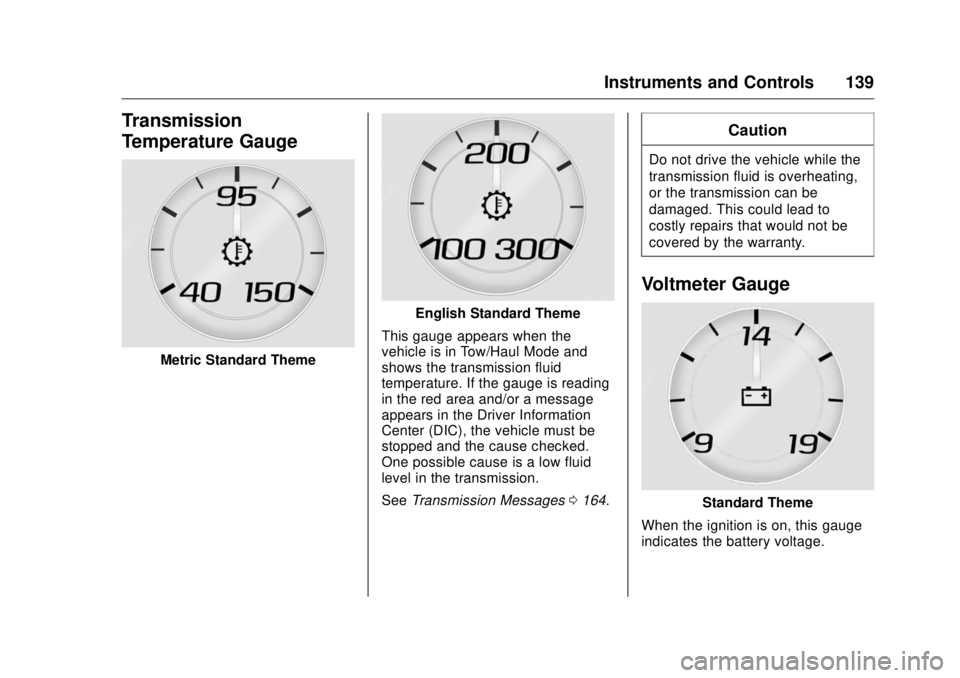
Temperature Gauge
Metric Standard Theme English Standard Theme
This gauge appears when the
vehicle is in Tow/Haul Mode and
shows the transmission fluid
temperature. If the gauge is reading
in the red area and/or a message
appears in the Driver Information
Center (DIC), the vehicle must be
stopped and the cause checked.
One possible cause is a low fluid
level in the transmission.
See Transmission Messages 0 164 . CautionDo not drive the vehicle while the
transmission fluid is overheating,
or the transmission can be
damaged. This could lead to
costly repairs that would not be
covered by the warranty.
Voltmeter Gauge
Standard Theme
When the ignition is on, this gauge
indicates the battery voltage.
Page 145 of 511
GMC Sierra/Sierra Denali Owner Manual (GMNA-Localizing-U.S./Canada/
Mexico-9955992) - 2017 - crc - 4/18/17
144 Instruments and Controls system. Have it checked by your
dealer. Driving while this light is on
could drain the battery.
When this light comes on, or is
flashing, the Driver Information
Center (DIC) also displays a
message.
See Battery Voltage and Charging
Messages 0 157 .
If a short distance must be driven
with the light on, be sure to turn off
all accessories, such as the radio
and air conditioner.
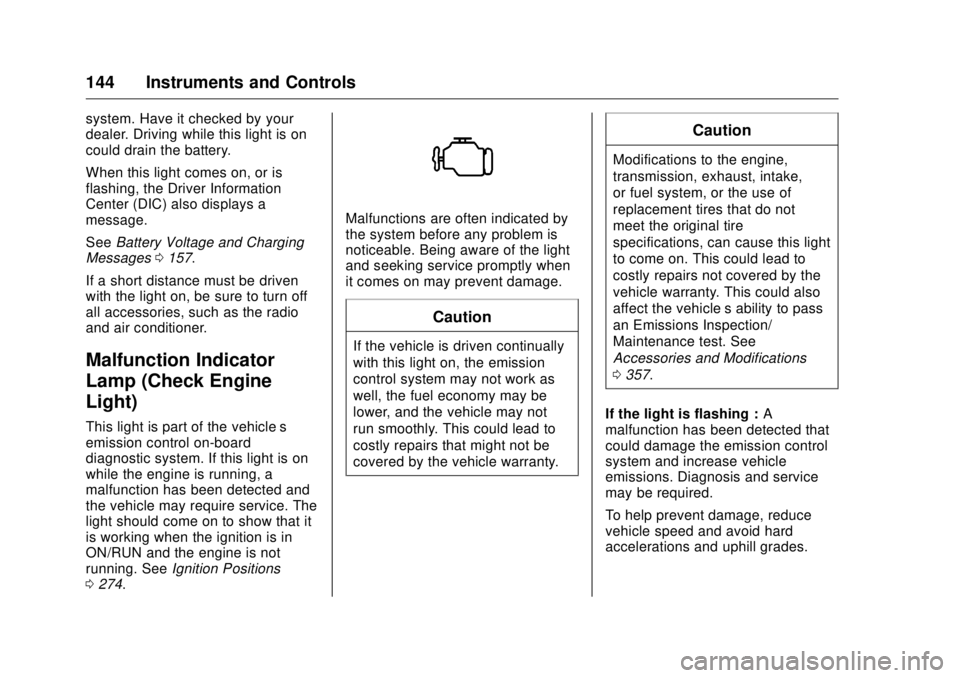
Malfunction Indicator
Lamp (Check Engine
Light) This light is part of the vehicle ’ s
emission control on-board
diagnostic system. If this light is on
while the engine is running, a
malfunction has been detected and
the vehicle may require service. The
light should come on to show that it
is working when the ignition is in
ON/RUN and the engine is not
running. See Ignition Positions
0 274 . Malfunctions are often indicated by
the system before any problem is
noticeable. Being aware of the light
and seeking service promptly when
it comes on may prevent damage.
CautionIf the vehicle is driven continually
with this light on, the emission
control system may not work as
well, the fuel economy may be
lower, and the vehicle may not
run smoothly. This could lead to
costly repairs that might not be
covered by the vehicle warranty. CautionModifications to the engine,
transmission, exhaust, intake,
or fuel system, or the use of
replacement tires that do not
meet the original tire
specifications, can cause this light
to come on. This could lead to
costly repairs not covered by the
vehicle warranty. This could also
affect the vehicle ’ s ability to pass
an Emissions Inspection/
Maintenance test. See
Accessories and Modifications
0 357 .
If the light is flashing : A
malfunction has been detected that
could damage the emission control
system and increase vehicle
emissions. Diagnosis and service
may be required.
To help prevent damage, reduce
vehicle speed and avoid hard
accelerations and uphill grades.
Page 146 of 511
GMC Sierra/Sierra Denali Owner Manual (GMNA-Localizing-U.S./Canada/
Mexico-9955992) - 2017 - crc - 4/18/17
Instruments and Controls 145If towing a trailer, reduce the
amount of cargo being hauled as
soon as possible.
If the light continues to flash, find a
safe place to park. Turn the vehicle
off and wait at least 10 seconds
before restarting the engine. If the
light is still flashing, follow the
previous guidelines and see your
dealer for service as soon as
possible.
If the light is on steady : A
malfunction has been detected.
Diagnosis and service may be
required.
Check the following:
.
A loose or missing fuel cap may
cause the light to come on. See
Filling the Tank 0 317 . A few
driving trips with the cap
properly installed may turn the
light off.
.
Poor fuel quality can cause
inefficient engine operation and
poor driveability, which may go
away once the engine is warmed
up. If this occurs, change the
fuel brand. It may require at least one full tank of the proper
fuel to turn the light off. See Fuel
0 315 .
If the light remains on, see your
dealer.
Emissions Inspection and
Maintenance Programs If the vehicle requires an Emissions
Inspection/Maintenance test, the
test equipment will likely connect to
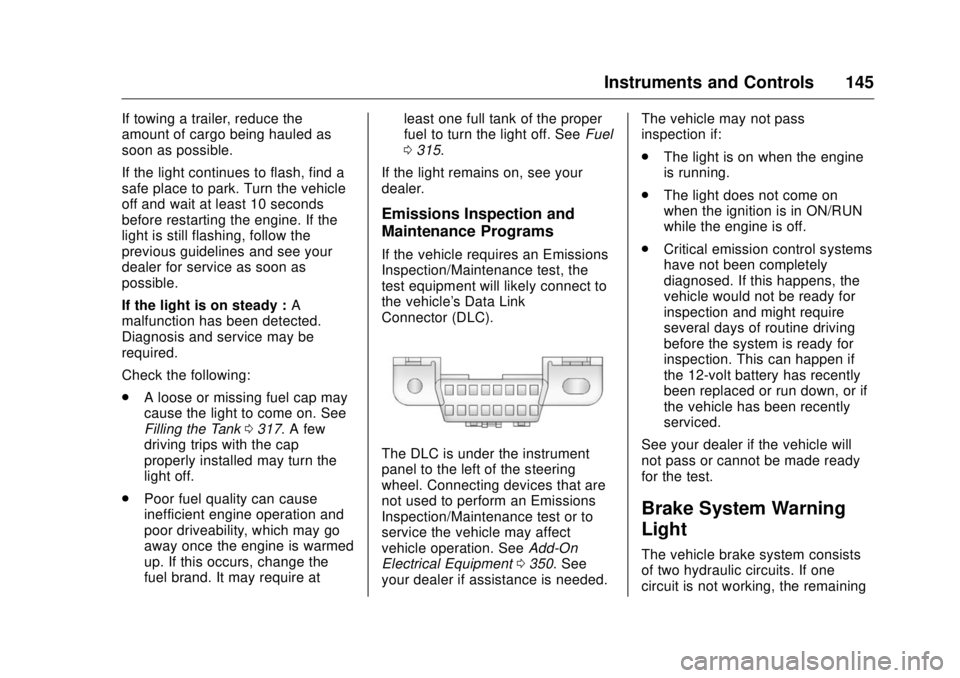
the vehicle's Data Link
Connector (DLC).
The DLC is under the instrument
panel to the left of the steering
wheel. Connecting devices that are
not used to perform an Emissions
Inspection/Maintenance test or to
service the vehicle may affect
vehicle operation. See Add-On
Electrical Equipment 0 350 . See
your dealer if assistance is needed. The vehicle may not pass
inspection if:
.
The light is on when the engine
is running.
.
The light does not come on
when the ignition is in ON/RUN
while the engine is off.
.
Critical emission control systems
have not been completely
diagnosed. If this happens, the
vehicle would not be ready for
inspection and might require
several days of routine driving
before the system is ready for
inspection. This can happen if
the 12-volt battery has recently
been replaced or run down, or if
the vehicle has been recently
serviced.
See your dealer if the vehicle will
not pass or cannot be made ready
for the test.
Brake System Warning
Light The vehicle brake system consists
of two hydraulic circuits. If one
circuit is not working, the remaining