tow GMC SIERRA DENALI 2017 Owners Manual
[x] Cancel search | Manufacturer: GMC, Model Year: 2017, Model line: SIERRA DENALI, Model: GMC SIERRA DENALI 2017Pages: 511, PDF Size: 6.88 MB
Page 5 of 511
GMC Sierra/Sierra Denali Owner Manual (GMNA-Localizing-U.S./Canada/
Mexico-9955992) - 2017 - crc - 4/18/17
4 Introduction
3 : Headlamp High/Low-Beam
Changer
( : Heated Steering Wheel
j : LATCH System Child Restraints
* : Malfunction Indicator Lamp
: : Oil Pressure
g : Outside Power Foldaway
Mirrors
O : Power
/ : Remote Vehicle Start
> : Safety Belt Reminders
7 : Tire Pressure Monitor
_ : Tow/Haul Mode
d : Traction Control/StabiliTrak ®
a : Under Pressure
M : Windshield Washer Fluid
Page 8 of 511

GMC Sierra/Sierra Denali Owner Manual (GMNA-Localizing-U.S./Canada/
Mexico-9955992) - 2017 - crc - 4/18/17
In Brief 71. Instrument Panel Illumination
Control 0 184 .
2. Integrated Trailer Brake Control
(ITBC) System (If Equipped).
See Towing Equipment 0 340 .
3. Exterior Lamp Controls 0 178 .
Fog Lamps 0 183 (If
Equipped).
4. Air Vents 0 250 .
5. Turn Signal Lever. See Turn
and Lane-Change Signals
0 182 .
Windshield Wiper/Washer
0 126 .
6. Favorite Switches (Out of
View). See Steering Wheel
Controls 0 125 .
Volume Switches (Out of View).
See Steering Wheel Controls
0 125 .
7. Instrument Cluster 0 132 .
8. Hazard Warning Flashers
0 182 .
9. Shift Lever. See Automatic
Transmission 0 283 . Tow/Haul Selector Button (If
Equipped). See Tow/Haul
Mode 0 288 .
Range Selection Mode (If
Equipped). See Manual Mode
0 286 .
10. Light Sensor. See Automatic
Headlamp System 0 181 .
11. Infotainment 0 188 .
12. Passenger Airbag On-Off
Switch (If Equipped) (Out of
View). See Airbag On-Off
Switch 0 79 .
13. Heated and Ventilated Front
Seats 0 62 (If Equipped).
14. Power Outlet 110/120V
Alternating Current (If
Equipped). See Power Outlets
0 128 .
15. Power Outlets 0 128 (If
Equipped).
16. USB Port (Base Radio) 0 206
or USB Port (Base Radio with
Touchscreen) 0 208 (If
Equipped). 17.
g Traction Control/Electronic
Stability Control 0 299 .
0 Pedal Adjust Switch (If
Equipped). See Adjustable
Throttle and Brake Pedal
0 273 .
{ Cargo Lamp 0 184 .
X Parking Assist Button (If
Equipped). See Assistance
Systems for Parking or Backing
0 306 .
A Lane Keep Assist (LKA)
(1500 Series) 0 313 (If
Equipped).
5 Hill Descent Control Switch
(If Equipped). See Hill Descent
Control (HDC) 0 301 .
q Exhaust Brake Switch (If
Equipped). See “ Exhaust
Brake ” in the Duramax diesel
supplement.
g Power Take Off (PTO)
Switch (If Equipped). See the
Duramax diesel supplement.
Page 17 of 511
GMC Sierra/Sierra Denali Owner Manual (GMNA-Localizing-U.S./Canada/
Mexico-9955992) - 2017 - crc - 4/18/17
16 In Brief
Steering Wheel
Adjustment
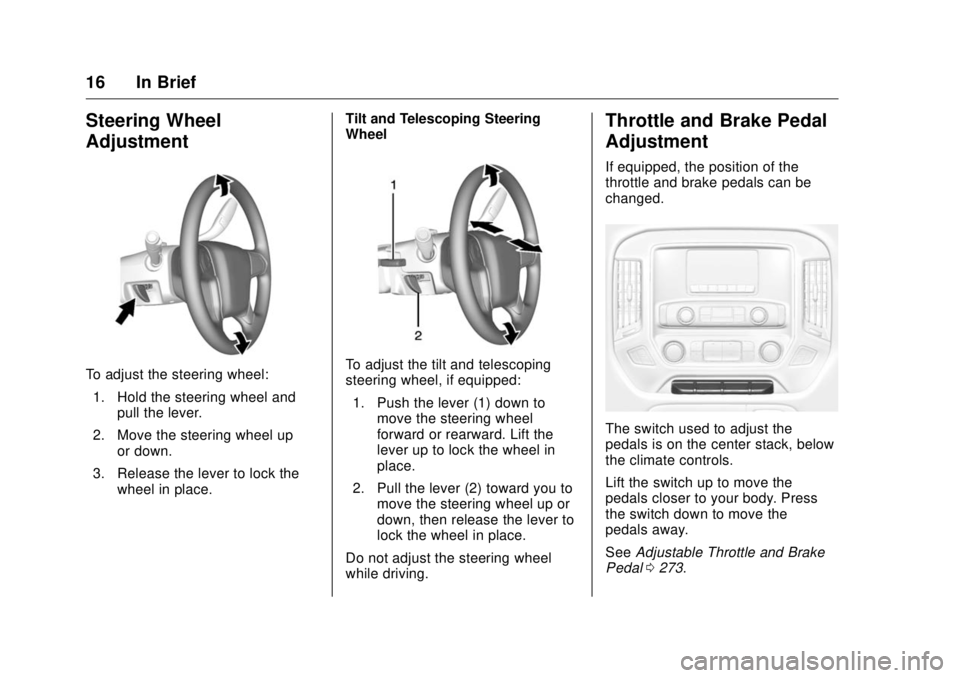
To adjust the steering wheel:
1. Hold the steering wheel and
pull the lever.
2. Move the steering wheel up
or down.
3. Release the lever to lock the
wheel in place. Tilt and Telescoping Steering
Wheel
To adjust the tilt and telescoping
steering wheel, if equipped:
1. Push the lever (1) down to
move the steering wheel
forward or rearward. Lift the
lever up to lock the wheel in
place.
2. Pull the lever (2) toward you to
move the steering wheel up or
down, then release the lever to
lock the wheel in place.
Do not adjust the steering wheel
while driving. Throttle and Brake Pedal
Adjustment If equipped, the position of the
throttle and brake pedals can be
changed.
The switch used to adjust the
pedals is on the center stack, below
the climate controls.
Lift the switch up to move the
pedals closer to your body. Press
the switch down to move the
pedals away.
See Adjustable Throttle and Brake
Pedal 0 273 .
Page 23 of 511
GMC Sierra/Sierra Denali Owner Manual (GMNA-Localizing-U.S./Canada/
Mexico-9955992) - 2017 - crc - 4/18/17
22 In Brief While using Range Selection Mode,
cruise control and the Tow/Haul
Mode can be used.
Grade Braking is not available when
Range Selection Mode is active.
See Tow/Haul Mode 0 288 .
Four-Wheel Drive If the vehicle has Four-Wheel Drive,
the engine's driving power can be
sent to all four wheels for extra
traction.
Transfer Case Controls The vehicle will have one of these
three styles of transfer case
controls. Use these controls to shift
into and out of the different
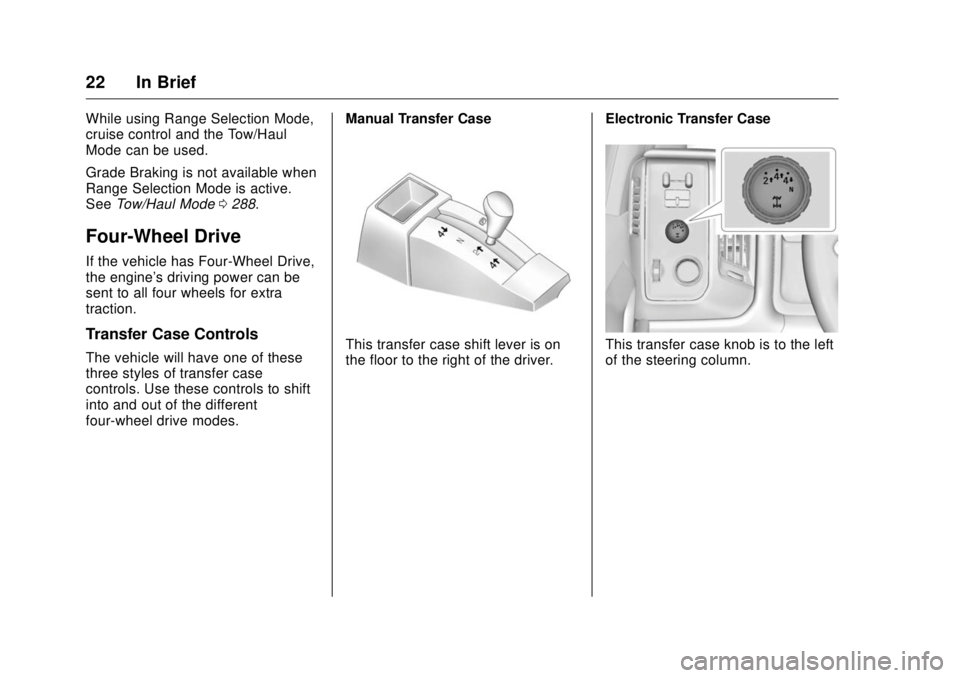
four-wheel drive modes. Manual Transfer Case
This transfer case shift lever is on
the floor to the right of the driver. Electronic Transfer Case
This transfer case knob is to the left
of the steering column.
Page 24 of 511
GMC Sierra/Sierra Denali Owner Manual (GMNA-Localizing-U.S./Canada/
Mexico-9955992) - 2017 - crc - 4/18/17
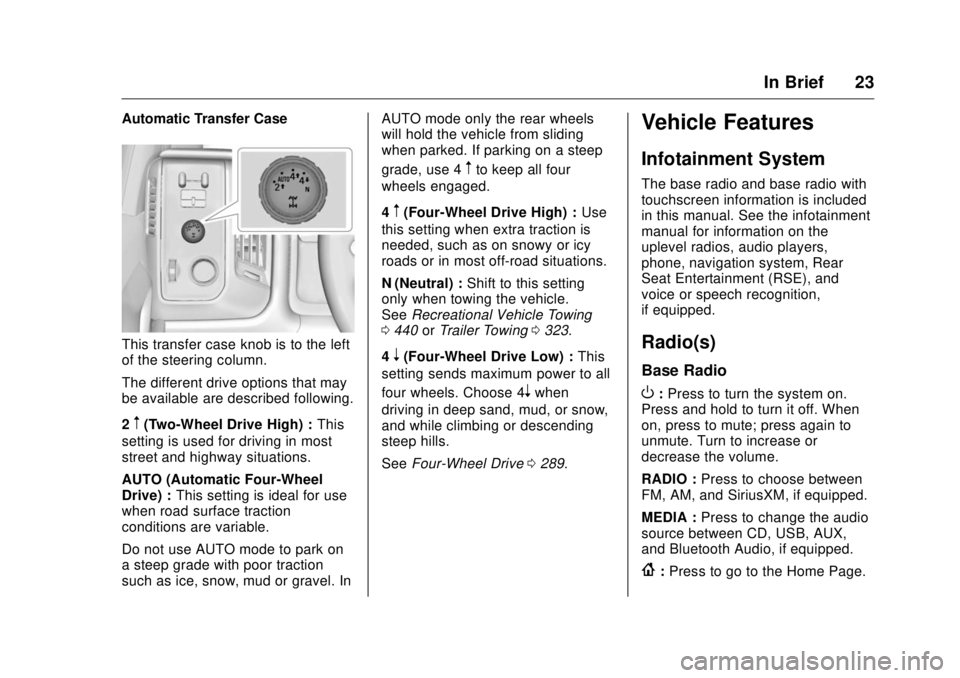
In Brief 23Automatic Transfer Case
This transfer case knob is to the left
of the steering column.
The different drive options that may
be available are described following.
2
m (Two-Wheel Drive High) : This
setting is used for driving in most
street and highway situations.
AUTO (Automatic Four-Wheel
Drive) : This setting is ideal for use
when road surface traction
conditions are variable.
Do not use AUTO mode to park on
a steep grade with poor traction
such as ice, snow, mud or gravel. In AUTO mode only the rear wheels
will hold the vehicle from sliding
when parked. If parking on a steep
grade, use 4
m to keep all four
wheels engaged.
4
m (Four-Wheel Drive High) : Use
this setting when extra traction is
needed, such as on snowy or icy
roads or in most off-road situations.
N (Neutral) : Shift to this setting
only when towing the vehicle.
See Recreational Vehicle Towing
0 440 or Trailer Towing 0 323 .
4
n (Four-Wheel Drive Low) : This
setting sends maximum power to all
four wheels. Choose 4
n when
driving in deep sand, mud, or snow,
and while climbing or descending
steep hills.
See Four-Wheel Drive 0 289 .Vehicle Features Infotainment System The base radio and base radio with
touchscreen information is included
in this manual. See the infotainment
manual for information on the
uplevel radios, audio players,
phone, navigation system, Rear
Seat Entertainment (RSE), and
voice or speech recognition,
if equipped.
Radio(s) Base Radio
O : Press to turn the system on.
Press and hold to turn it off. When
on, press to mute; press again to
unmute. Turn to increase or
decrease the volume.
RADIO : Press to choose between
FM, AM, and SiriusXM, if equipped.
MEDIA : Press to change the audio
source between CD, USB, AUX,
and Bluetooth Audio, if equipped.
{ : Press to go to the Home Page.
Page 34 of 511
GMC Sierra/Sierra Denali Owner Manual (GMNA-Localizing-U.S./Canada/
Mexico-9955992) - 2017 - crc - 4/18/17
Keys, Doors, and Windows 33
Keys, Doors, and
Windows Keys and Locks Keys . . . . . . . . . . . . . . . . . . . . . . . . . . . 33
Remote Keyless Entry (RKE)
System . . . . . . . . . . . . . . . . . . . . . . . 36
Remote Keyless Entry (RKE)
System Operation . . . . . . . . . . . . 36
Remote Vehicle Start . . . . . . . . . . 38
Door Locks . . . . . . . . . . . . . . . . . . . . 39
Power Door Locks . . . . . . . . . . . . . 40
Delayed Locking . . . . . . . . . . . . . . . 40
Automatic Door Locks . . . . . . . . . 40
Lockout Protection . . . . . . . . . . . . . 41
Safety Locks . . . . . . . . . . . . . . . . . . . 41
Doors Tailgate . . . . . . . . . . . . . . . . . . . . . . . . 41
Power Assist Steps . . . . . . . . . . . . 42
Vehicle Security Vehicle Security . . . . . . . . . . . . . . . . 43
Vehicle Alarm System . . . . . . . . . 43
Immobilizer . . . . . . . . . . . . . . . . . . . . 45
Immobilizer Operation . . . . . . . . . 45
Exterior Mirrors
Convex Mirrors . . . . . . . . . . . . . . . . 46 Manual Mirrors . . . . . . . . . . . . . . . . . 46
Trailer-Tow Mirrors . . . . . . . . . . . . . 46
Power Mirrors . . . . . . . . . . . . . . . . . . 47
Folding Mirrors . . . . . . . . . . . . . . . . . 48
Heated Mirrors . . . . . . . . . . . . . . . . . 48
Automatic Dimming Mirror . . . . . 49
Blind Spot Mirrors . . . . . . . . . . . . . . 49
Reverse Tilt Mirrors . . . . . . . . . . . . 50
Interior Mirrors Interior Rearview Mirrors . . . . . . . 50
Manual Rearview Mirror . . . . . . . . 50
Automatic Dimming Rearview
Mirror . . . . . . . . . . . . . . . . . . . . . . . . . 50
Windows Windows . . . . . . . . . . . . . . . . . . . . . . . 51
Manual Windows . . . . . . . . . . . . . . 51
Power Windows . . . . . . . . . . . . . . . 51
Rear Windows . . . . . . . . . . . . . . . . . 53
Sun Visors . . . . . . . . . . . . . . . . . . . . . 53
Roof Sunroof . . . . . . . . . . . . . . . . . . . . . . . . 53 Keys and Locks Keys
{ WarningLeaving children in a vehicle with
the ignition key is dangerous and
children or others could be
seriously injured or killed. They
could operate the power windows
or other controls or make the
vehicle move. The windows will
function with the keys in the
ignition, and children or others
could be caught in the path of a
closing window. Do not leave
children in a vehicle with the
ignition key.
Page 39 of 511
GMC Sierra/Sierra Denali Owner Manual (GMNA-Localizing-U.S./Canada/
Mexico-9955992) - 2017 - crc - 4/18/17
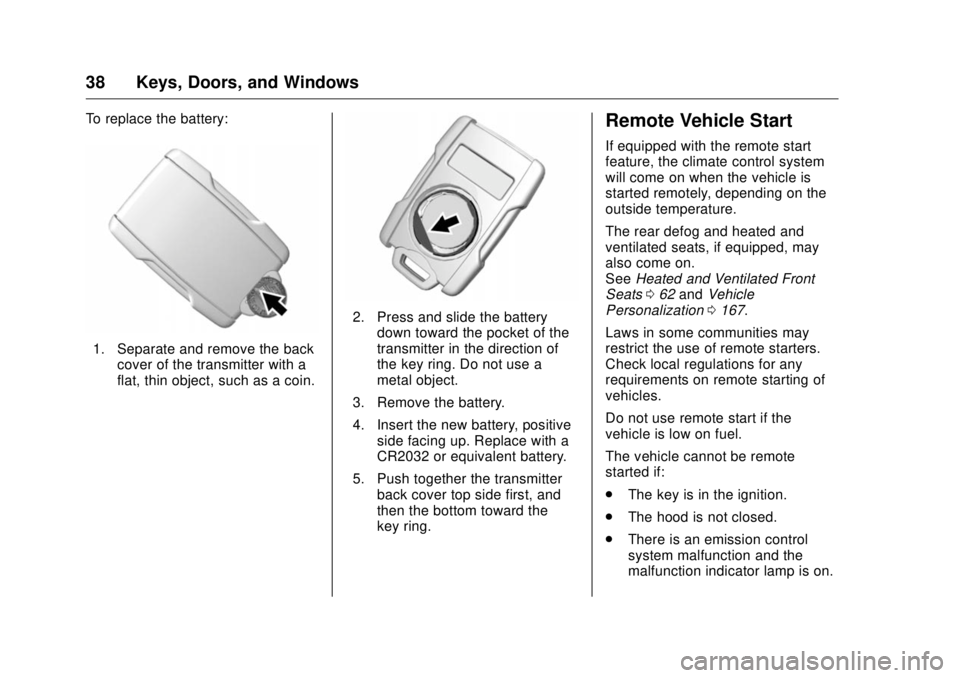
38 Keys, Doors, and Windows To replace the battery:
1. Separate and remove the back
cover of the transmitter with a
flat, thin object, such as a coin. 2. Press and slide the battery
down toward the pocket of the
transmitter in the direction of
the key ring. Do not use a
metal object.
3. Remove the battery.
4. Insert the new battery, positive
side facing up. Replace with a
CR2032 or equivalent battery.
5. Push together the transmitter
back cover top side first, and
then the bottom toward the
key ring. Remote Vehicle Start If equipped with the remote start
feature, the climate control system
will come on when the vehicle is
started remotely, depending on the
outside temperature.
The rear defog and heated and
ventilated seats, if equipped, may
also come on.
See Heated and Ventilated Front
Seats 0 62 and Vehicle
Personalization 0 167 .
Laws in some communities may
restrict the use of remote starters.
Check local regulations for any
requirements on remote starting of
vehicles.
Do not use remote start if the
vehicle is low on fuel.
The vehicle cannot be remote
started if:
.
The key is in the ignition.
.
The hood is not closed.
.
There is an emission control
system malfunction and the
malfunction indicator lamp is on.
Page 44 of 511
GMC Sierra/Sierra Denali Owner Manual (GMNA-Localizing-U.S./Canada/
Mexico-9955992) - 2017 - crc - 4/18/17
Keys, Doors, and Windows 43Enable/Disable
To enable or disable the power
assist steps, press and hold
j for
four seconds. A DIC message
displays.
Cleaning
Clean the power assist steps
regularly. For an automatic car
wash, extend the steps while in
N (Neutral) using the center stack
switch. The steps will stow when
shifting into D (Drive).
Vehicle Security This vehicle has theft-deterrent
features; however, they do not make
the vehicle impossible to steal.
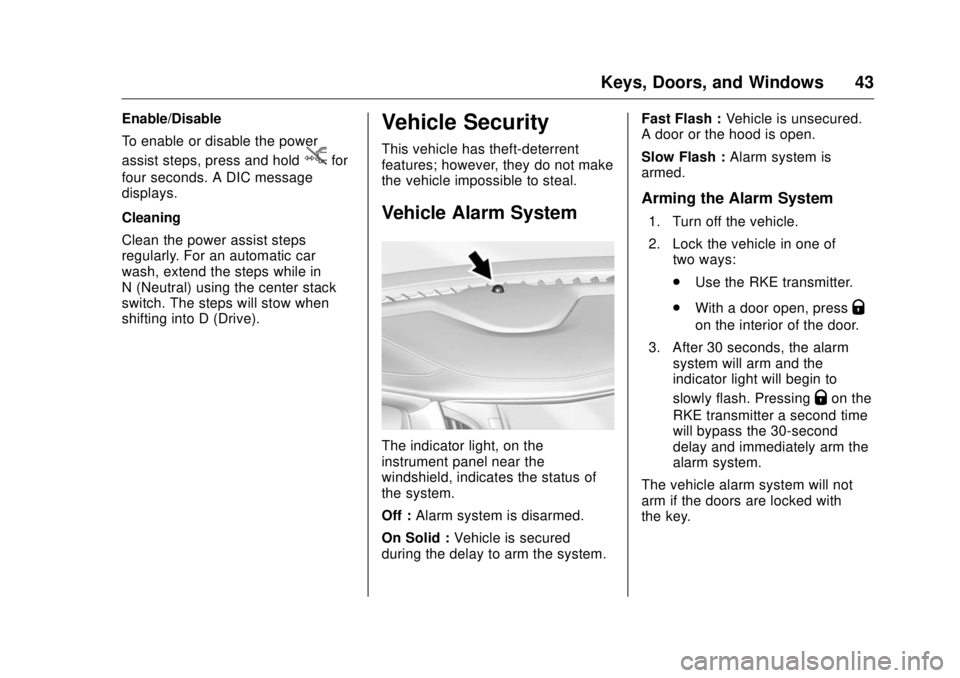
Vehicle Alarm System
The indicator light, on the
instrument panel near the
windshield, indicates the status of
the system.
Off : Alarm system is disarmed.
On Solid : Vehicle is secured
during the delay to arm the system. Fast Flash : Vehicle is unsecured.
A door or the hood is open.
Slow Flash : Alarm system is
armed.
Arming the Alarm System 1. Turn off the vehicle.
2. Lock the vehicle in one of
two ways:
.
Use the RKE transmitter.
.
With a door open, press
Q on the interior of the door.
3. After 30 seconds, the alarm
system will arm and the
indicator light will begin to
slowly flash. Pressing
Q on the
RKE transmitter a second time
will bypass the 30-second
delay and immediately arm the
alarm system.
The vehicle alarm system will not
arm if the doors are locked with
the key.
Page 47 of 511
GMC Sierra/Sierra Denali Owner Manual (GMNA-Localizing-U.S./Canada/
Mexico-9955992) - 2017 - crc - 4/18/17
46 Keys, Doors, and Windows Do not leave the key or device that
disarms or deactivates the vehicle
theft system in the vehicle.
See your dealer to get a new key
blank cut exactly as the ignition key
that operates the system.
Exterior Mirrors Convex Mirrors
{ WarningA convex mirror can make things,
like other vehicles, look farther
away than they really are. If you
cut too sharply into the right lane,
you could hit a vehicle on the
right. Check the inside mirror or
glance over your shoulder before
changing lanes.
The passenger side mirror is convex
shaped. A convex mirror's surface is
curved so more can be seen from
the driver seat.
Manual Mirrors If equipped, adjust manual mirrors
by moving the mirror up and down
or left to right to see a little of the
side of the vehicle and to have a
clear view behind the vehicle. Using hood-mounted air deflectors
and add-on convex mirror
attachments could decrease mirror
performance.
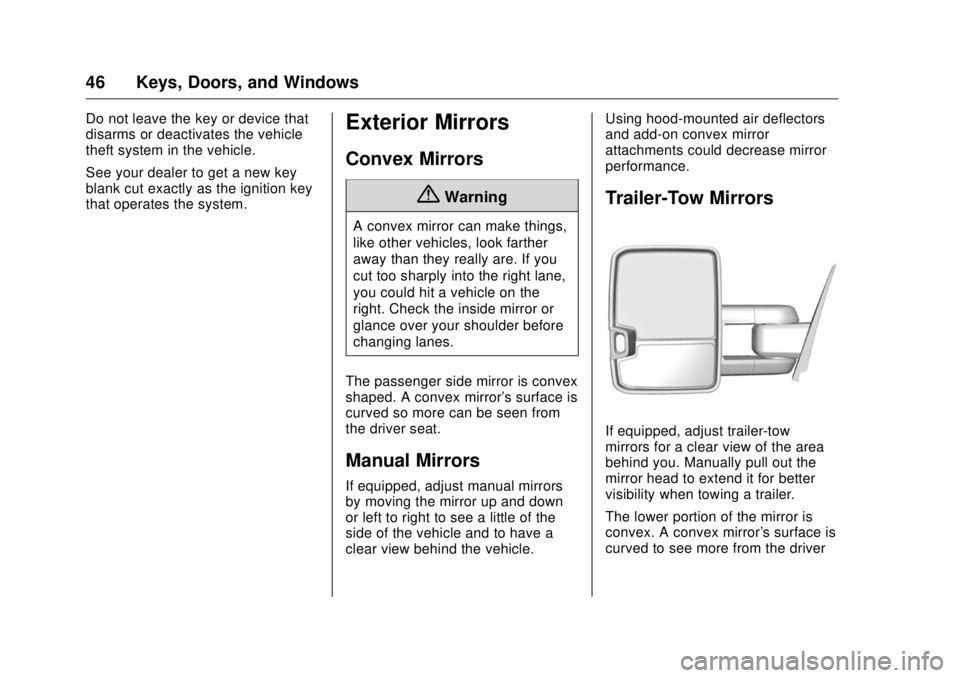
Trailer-Tow Mirrors
If equipped, adjust trailer-tow
mirrors for a clear view of the area
behind you. Manually pull out the
mirror head to extend it for better
visibility when towing a trailer.
The lower portion of the mirror is
convex. A convex mirror's surface is
curved to see more from the driver
Page 49 of 511
GMC Sierra/Sierra Denali Owner Manual (GMNA-Localizing-U.S./Canada/
Mexico-9955992) - 2017 - crc - 4/18/17
48 Keys, Doors, and Windows
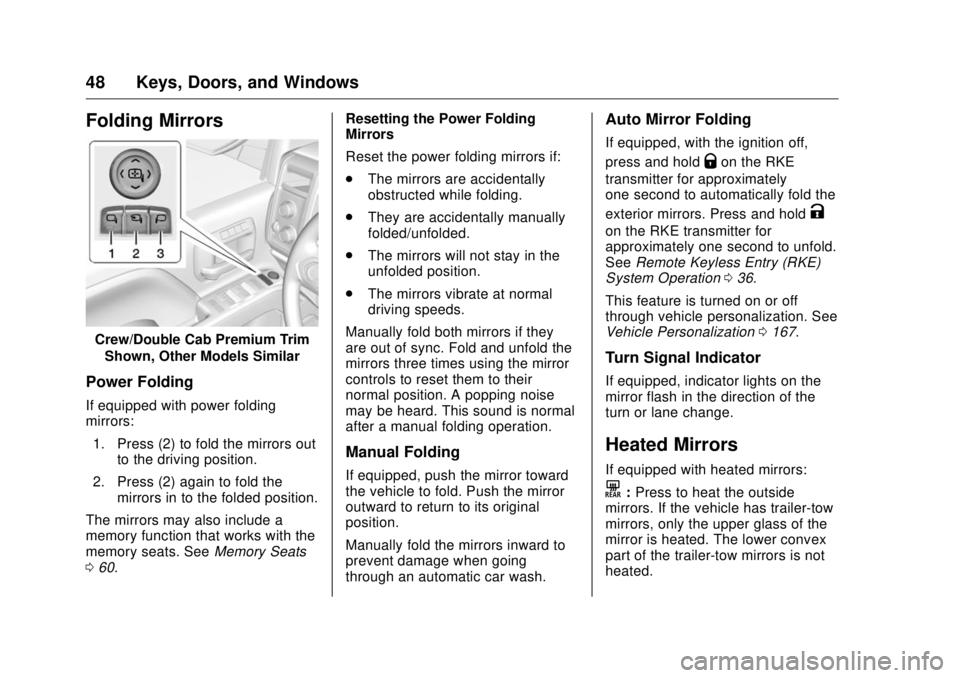
Folding Mirrors
Crew/Double Cab Premium Trim
Shown, Other Models Similar
Power Folding If equipped with power folding
mirrors:
1. Press (2) to fold the mirrors out
to the driving position.
2. Press (2) again to fold the
mirrors in to the folded position.
The mirrors may also include a
memory function that works with the
memory seats. See Memory Seats
0 60 . Resetting the Power Folding
Mirrors
Reset the power folding mirrors if:
.
The mirrors are accidentally
obstructed while folding.
.
They are accidentally manually
folded/unfolded.
.
The mirrors will not stay in the
unfolded position.
.
The mirrors vibrate at normal
driving speeds.
Manually fold both mirrors if they
are out of sync. Fold and unfold the
mirrors three times using the mirror
controls to reset them to their
normal position. A popping noise
may be heard. This sound is normal
after a manual folding operation.
Manual Folding
If equipped, push the mirror toward
the vehicle to fold. Push the mirror
outward to return to its original
position.
Manually fold the mirrors inward to
prevent damage when going
through an automatic car wash. Auto Mirror Folding If equipped, with the ignition off,
press and hold
Q on the RKE
transmitter for approximately
one second to automatically fold the
exterior mirrors. Press and hold
Kon the RKE transmitter for
approximately one second to unfold.
See Remote Keyless Entry (RKE)
System Operation 0 36 .
This feature is turned on or off
through vehicle personalization. See
Vehicle Personalization 0 167 .
Turn Signal Indicator If equipped, indicator lights on the
mirror flash in the direction of the
turn or lane change.
Heated Mirrors If equipped with heated mirrors:
K : Press to heat the outside
mirrors. If the vehicle has trailer-tow
mirrors, only the upper glass of the
mirror is heated. The lower convex
part of the trailer-tow mirrors is not
heated.