ignition GMC SIERRA DENALI 2018 Workshop Manual
[x] Cancel search | Manufacturer: GMC, Model Year: 2018, Model line: SIERRA DENALI, Model: GMC SIERRA DENALI 2018Pages: 505, PDF Size: 8.27 MB
Page 206 of 505
GMC Sierra/Sierra Denali Owner Manual (GMNA-Localizing-U.S./Canada/
Mexico-11349177) - 2018 - CRC - 10/17/17
Infotainment System 205
Voice Recognition If equipped, voice recognition allows
for hands-free operation within the
audio and phone applications. This
feature can be started by pressing
either the
g button on the steering
wheel or by selecting the
g on the
screen display.
However, not all features within
these areas are supported by voice
commands. Generally, only complex
tasks that require multiple manual
interactions to complete are
supported by voice commands.
For example, tasks that take more
than one or two button presses such
as selecting a song or artist to play
from a media device would be
supported by voice commands.
Other tasks, like adjusting the
volume or seeking up or down are
audio features that are easily
performed by pressing one or two
buttons, and are not supported by
voice commands. In general there are flexible ways to
speak commands for completing the
tasks. Most of them, except
destination entry and voice keypad,
can be completed in a single
command. If the task takes more
than one command to complete, the
first command would be to indicate
the kind of task that is to be
performed. The system replies with
prompts that lead through a dialog
to enter the necessary information.
Voice recognition can be used when
the ignition is on or when Retained
Accessory Power (RAP) is active.
See Retained Accessory Power
(RAP) 0 260 .
Using Voice Recognition Voice recognition becomes available
once the system has been
initialized. This begins when the
ignition is turned on. Initialization
may take a few moments. 1. Press
g on the steering wheel
control to activate voice
recognition, or select
g on the
infotainment screen on the
center stack.
.
If voice recognition is
started from the steering
wheel control, the
instrument cluster displays
the selections and visual
dialog content.
.
If voice recognition is
started from the
infotainment screen, the
selections and visual dialog
content are displayed on
both the center stack
display and the instrument
cluster display.
2. The audio system mutes and
the system plays a prompt
followed by a beep.
3. Wait until after the beep
completes, then clearly speak
one of the commands
described in this section.
Page 213 of 505
GMC Sierra/Sierra Denali Owner Manual (GMNA-Localizing-U.S./Canada/
Mexico-11349177) - 2018 - CRC - 10/17/17
212 Infotainment System Vehicles with a Bluetooth system
can use a Bluetooth-capable cell
phone with a Hands-Free Profile to
make and receive phone calls. The
infotainment system and voice
recognition are used to control the
system. The system can be used
with the ignition on or in ACC/
ACCESSORY. The range of the
Bluetooth system can be up to 9.1 m
(30 ft). Not all phones support all
functions and not all phones work
with the Bluetooth system. For U.S.
and Canada only, see www.gm.com/
bluetooth for more information about
compatible phones.
Bluetooth Controls Use the buttons on the center stack,
infotainment display, and the
steering wheel to operate the
Bluetooth system.
Steering Wheel Controls
g : Press to answer incoming calls,
confirm system information, and
start voice recognition. i : Press to end a call, reject a
call, or cancel an operation. Press
to mute or unmute the infotainment
system.
Infotainment System Controls
For information about how to
navigate the menu system using the
infotainment controls, see Overview
0 188 .
MENU : Turn to scroll through a list.
Press to select the highlighted list
option.
{ : Press to go to the Home Page.
See Home Page 0 189 .
PHONE or
# : Select to enter the
phone main menu. See Bluetooth
(Overview) 0 211 or Bluetooth
(Infotainment Controls) 0 213 .
Voice Recognition
If equipped, the voice recognition
system uses commands to control
the system and dial phone numbers. Noise : The system may not
recognize voice commands if there
is too much background noise, such
as noise from open windows or loud
talking inside the vehicle.
When to Speak : A tone sounds to
indicate that the system is ready for
a voice command. Wait for the tone
and then speak.
How to Speak : Speak clearly in a
calm and natural voice.
Audio System When using the Bluetooth system,
sound comes through the vehicle's
front audio system speakers and
overrides the audio system. Use the
O knob during a call to change the
volume level. The system maintains
a minimum volume level.
Bluetooth Audio Quality
Turn off the Echo and Noise
cancellation feature on your phone,
if supported, for the best hands-free
performance.
See www.gm.com/bluetooth for U.S.
and Canada only.
Page 228 of 505
GMC Sierra/Sierra Denali Owner Manual (GMNA-Localizing-U.S./Canada/
Mexico-11349177) - 2018 - CRC - 10/17/17
Climate Controls 227
- : This mode clears the windows
of fog or moisture. Air is directed to
the windshield, floor outlets, and
side window vents.
0 : Press to clear the windshield
of fog or frost more quickly. Air is
directed to the windshield and the
side window vents. The system
automatically forces outside air into
the vehicle and the air conditioning
compressor will run, unless the
outside temperature is close to
freezing.
Do not drive the vehicle until all the
windows are clear.
See Air Vents 0 231 .
@ : Press to turn on recirculation.
An indicator light comes on. Air is
recirculated to quickly cool the
inside of the vehicle. It can also be
used to help reduce outside air and
odors that enter the vehicle. 8 : If equipped, press to turn the
outside air mode on. An indicator
light on the button comes on to
show that outside air is on. When
selected, air from outside the
vehicle circulates throughout the
vehicle. The recirculation mode
cannot be used with the outside
air mode.
A/C : Press to turn the air
conditioning system on or off. An
indicator light comes on to show
that the air conditioning is enabled.
If the fan is turned off, the air
conditioner will not run. The A/C
light will stay on even if the outside
temperatures are below freezing.
Rear Window Defogger
K : If equipped, press to turn the
rear window defogger on or off. An
indicator light on the button comes
on to show that the rear window
defogger is on. The rear window defogger only
works when the ignition is on. The
defogger turns off if the ignition is
turned to ACC/ACCESSORY or off.
If equipped with heated outside
mirrors, they turn on when the rear
window defogger button is on. They
help to clear fog or frost from the
surface of the mirrors.
CautionUsing a razor blade or sharp
object to clear the inside rear
window can damage the rear
window defogger. Repairs would
not be covered by the vehicle
warranty. Do not clear the inside
rear window with sharp objects.
Page 231 of 505
GMC Sierra/Sierra Denali Owner Manual (GMNA-Localizing-U.S./Canada/
Mexico-11349177) - 2018 - CRC - 10/17/17
230 Climate Controls conditioning compressor also comes
on, unless the outside temperature
is below freezing.
Do not drive the vehicle until all
windows are clear.
See Air Vents 0 231 .
A/C : Press to turn the air
conditioning system on or off. An
indicator light comes on to show
that the air conditioning is enabled.
If the fan is turned off, the air
conditioner will not run. The A/C
light will stay on even if the outside
temperatures are below freezing.
@ : Press to turn on recirculation.
An indicator light comes on. Air is
recirculated to quickly cool the
inside of the vehicle. It can also be
used to help reduce outside air and
odors that enter the vehicle. The air
conditioning compressor also comes
on when this mode is activated.
Rear Window Defogger
The rear window defogger uses a
warming grid to remove fog from the
rear window. K : Press to turn the rear window
defogger on or off. An indicator light
on the button comes on to show that
the rear window defogger is on.
The rear window defogger only
works when the ignition is in ON/
RUN. The defogger turns off if the
ignition is turned to ACC/
ACCESSORY or LOCK/OFF.
CautionUsing a razor blade or sharp
object to clear the inside rear
window can damage the rear
window defogger. Repairs would
not be covered by the vehicle
warranty. Do not clear the inside
rear window with sharp objects.
Heated Mirror : If equipped with
heated outside rearview mirrors,
press
K to heat the mirrors. See
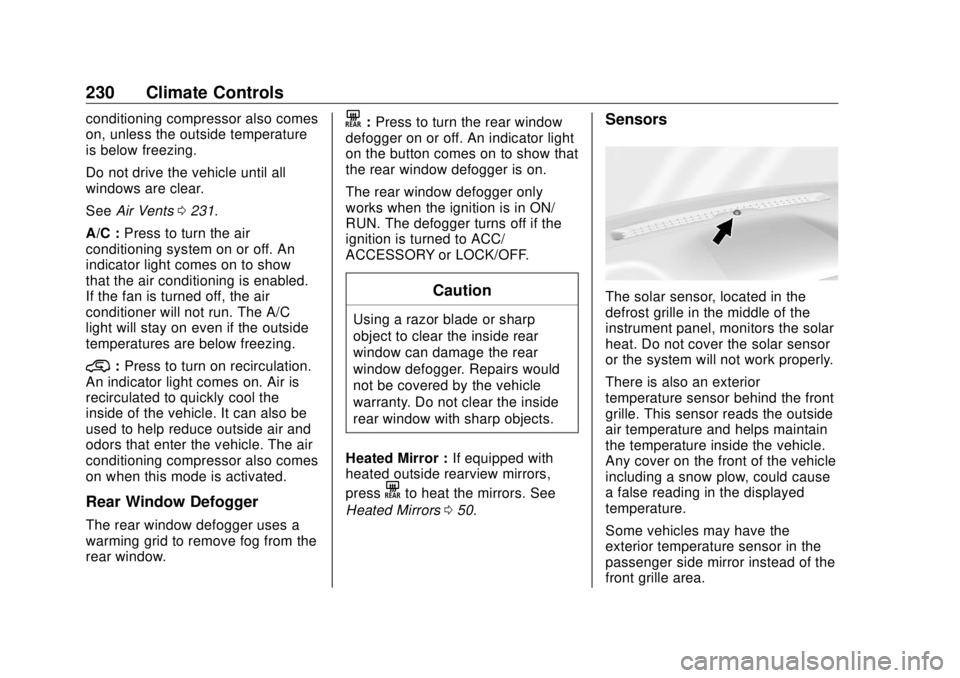
Heated Mirrors 0 50 . Sensors
The solar sensor, located in the
defrost grille in the middle of the
instrument panel, monitors the solar
heat. Do not cover the solar sensor
or the system will not work properly.
There is also an exterior
temperature sensor behind the front
grille. This sensor reads the outside
air temperature and helps maintain
the temperature inside the vehicle.
Any cover on the front of the vehicle
including a snow plow, could cause
a false reading in the displayed
temperature.
Some vehicles may have the
exterior temperature sensor in the
passenger side mirror instead of the
front grille area.
Page 235 of 505
GMC Sierra/Sierra Denali Owner Manual (GMNA-Localizing-U.S./Canada/
Mexico-11349177) - 2018 - CRC - 10/17/17
234 Driving and Operating
Driving and
Operating Driving Information Distracted Driving . . . . . . . . . . . . 235
Defensive Driving . . . . . . . . . . . . . 236
Drunk Driving . . . . . . . . . . . . . . . . . 236
Control of a Vehicle . . . . . . . . . . . 236
Braking . . . . . . . . . . . . . . . . . . . . . . . 236
Steering . . . . . . . . . . . . . . . . . . . . . . 237
Off-Road Recovery . . . . . . . . . . . 238
Loss of Control . . . . . . . . . . . . . . . 238
Off-Road Driving . . . . . . . . . . . . . 239
Driving on Wet Roads . . . . . . . . 244
Hill and Mountain Roads . . . . . 245
Winter Driving . . . . . . . . . . . . . . . . 245
If the Vehicle Is Stuck . . . . . . . . 247
Vehicle Load Limits . . . . . . . . . . . 248
Truck-Camper Loading
Information . . . . . . . . . . . . . . . . . . 253
Starting and Operating New Vehicle Break-In . . . . . . . . . 255
Adjustable Throttle and Brake
Pedal . . . . . . . . . . . . . . . . . . . . . . . 256
Ignition Positions . . . . . . . . . . . . . 256
Starting the Engine . . . . . . . . . . . 258
Fast Idle System . . . . . . . . . . . . . 259 Retained Accessory
Power (RAP) . . . . . . . . . . . . . . . . 260
Engine Coolant Heater . . . . . . . 260
Shifting Into Park . . . . . . . . . . . . . 262
Shifting out of Park . . . . . . . . . . . 263
Parking over Things
That Burn . . . . . . . . . . . . . . . . . . . 264
Active Fuel Management . . . . . 264
Engine Exhaust Engine Exhaust . . . . . . . . . . . . . . 264
Running the Vehicle While
Parked . . . . . . . . . . . . . . . . . . . . . . 265
Automatic Transmission Automatic Transmission . . . . . . 265
Manual Mode . . . . . . . . . . . . . . . . . 268
Tow/Haul Mode . . . . . . . . . . . . . . . 271
Drive Systems Four-Wheel Drive . . . . . . . . . . . . . 272
Brakes Antilock Brake
System (ABS) . . . . . . . . . . . . . . . 280
Parking Brake . . . . . . . . . . . . . . . . 281
Brake Assist . . . . . . . . . . . . . . . . . . 281
Hill Start Assist (HSA) . . . . . . . . 282
Ride Control Systems
Traction Control/Electronic
Stability Control . . . . . . . . . . . . . 282 Hill Descent Control (HDC) . . . 284
Locking Rear Axle . . . . . . . . . . . . 285
Cruise Control Cruise Control . . . . . . . . . . . . . . . . 285
Driver Assistance Systems Driver Assistance Systems . . . 288
Assistance Systems for
Parking or Backing . . . . . . . . . . 289
Assistance Systems for
Driving . . . . . . . . . . . . . . . . . . . . . . 292
Forward Collision Alert (FCA)
System . . . . . . . . . . . . . . . . . . . . . . 292
Forward Automatic
Braking (FAB) . . . . . . . . . . . . . . . 294
Lane Departure Warning
(LDW) (2500/3500
Series) . . . . . . . . . . . . . . . . . . . . . . 295
Lane Keep Assist (LKA) (1500
Series) . . . . . . . . . . . . . . . . . . . . . . 297
Fuel Fuel . . . . . . . . . . . . . . . . . . . . . . . . . . 299
California Fuel
Requirements . . . . . . . . . . . . . . . 300
Fuels in Foreign Countries . . . 300
Fuel Additives . . . . . . . . . . . . . . . . 300
E85 or FlexFuel . . . . . . . . . . . . . . 300
Filling the Tank . . . . . . . . . . . . . . . 301
Page 244 of 505
GMC Sierra/Sierra Denali Owner Manual (GMNA-Localizing-U.S./Canada/
Mexico-11349177) - 2018 - CRC - 10/17/17
Driving and Operating 243
{ WarningGetting out of the vehicle on the
downhill side when stopped
across an incline is dangerous.
If the vehicle rolls over, you could
be crushed or killed. Always get
out on the uphill side of the
vehicle and stay well clear of the
rollover path.
Driving in Mud, Sand, Snow,
or Ice Use a low gear when driving in mud
— the deeper the mud, the lower
the gear. Keep the vehicle moving
to avoid getting stuck.
Traction changes when driving on
sand. On loose sand, such as on
beaches or sand dunes, the tires
tend to sink into the sand. This
affects steering, accelerating, and
braking. Drive at a reduced speed
and avoid sharp turns or abrupt
maneuvers. Traction is reduced on hard packed
snow and ice and it is easy to lose
control. Reduce vehicle speed when
driving on hard packed snow
and ice.
{ WarningDriving on frozen lakes, ponds,
or rivers can be dangerous. Ice
conditions vary greatly and the
vehicle could fall through the ice;
you and your passengers could
drown. Drive your vehicle on safe
surfaces only.
Driving in Water
{ Warning
Driving through rushing water can
be dangerous. Deep water can
sweep your vehicle downstream
and you and your passengers
could drown. If it is only shallow
water, it can still wash away the
ground from under your tires.
(Continued) Warning (Continued) Traction could be lost, and the
vehicle could roll over. Do not
drive through rushing water.
CautionDo not drive through standing
water if it is deep enough to cover
the wheel hubs, axles, or exhaust
pipe. Deep water can damage the
axle and other vehicle parts.
If the standing water is not too deep,
drive through it slowly. At faster
speeds, water can get into the
engine and cause it to stall. Stalling
can occur if the exhaust pipe is
under water. Do not turn off the
ignition when driving through water.
If the exhaust pipe is under water,
the engine will not start. When going
through water, the brakes get wet
and it may take longer to stop. See
“ Driving on Wet Roads ” later in this
section.
Page 246 of 505
GMC Sierra/Sierra Denali Owner Manual (GMNA-Localizing-U.S./Canada/
Mexico-11349177) - 2018 - CRC - 10/17/17
Driving and Operating 245
Hill and Mountain Roads Driving on steep hills or through
mountains is different than driving
on flat or rolling terrain. Tips include:
.
Keep the vehicle serviced and in
good shape.
.
Check all fluid levels and brakes,
tires, cooling system, and
transmission.
.
Shift to a lower gear when going
down steep or long hills.
{ WarningUsing the brakes to slow the
vehicle on a long downhill slope
can cause brake overheating, can
reduce brake performance, and
could result in a loss of braking.
Shift the transmission to a lower
gear to let the engine assist the
brakes on a steep downhill slope. { WarningCoasting downhill in N (Neutral)
or with the ignition off is
dangerous. This can cause
overheating of the brakes and
loss of steering assist. Always
have the engine running and the
vehicle in gear.
.
Drive at speeds that keep the
vehicle in its own lane. Do not
swing wide or cross the
center line.
.
Be alert on top of hills;
something could be in your lane
(e.g., stalled car, accident).
.
Pay attention to special road
signs (e.g., falling rocks area,
winding roads, long grades,
passing or no-passing zones)
and take appropriate action. Winter Driving Driving on Snow or Ice Snow or ice between the tires and
the road creates less traction or
grip, so drive carefully. Wet ice can
occur at about 0 °C (32 °F) when
freezing rain begins to fall. Avoid
driving on wet ice or in freezing rain
until roads can be treated.
For Slippery Road Driving:
.
Accelerate gently. Accelerating
too quickly causes the wheels to
spin and makes the surface
under the tires slick.
.
Turn on Traction Control. See
Traction Control/Electronic
Stability Control 0 282 .
.
The Antilock Brake System
(ABS) improves vehicle stability
during hard stops, but the
brakes should be applied sooner
than when on dry pavement.
See Antilock Brake System
(ABS) 0 280 .
Page 257 of 505
GMC Sierra/Sierra Denali Owner Manual (GMNA-Localizing-U.S./Canada/
Mexico-11349177) - 2018 - CRC - 10/17/17
256 Driving and Operating Caution (Continued) premature wear and earlier
replacement. Follow this
breaking-in guideline every
time you get new brake
linings.
.
Do not tow a trailer during
break-in. See Trailer Towing
0 307 for the trailer towing
capabilities of the vehicle
and more information.
Following break-in, engine speed
and load can be gradually
increased.
Adjustable Throttle and
Brake Pedal If equipped, the position of the
throttle and brake pedals can be
changed.
The pedals can only be adjusted
when the vehicle is in P (Park). The switch used to adjust the
pedals is on the center stack, below
the climate controls.
Lift the switch up to move the
pedals closer to your body. Press
the switch down to move the
pedals away.
Before you start driving, fully press
the brake pedal to confirm the
adjustment is right for you.
The vehicle may have a memory
function, which lets pedal settings
be saved and recalled. See Memory
Seats 0 62 . Ignition Positions
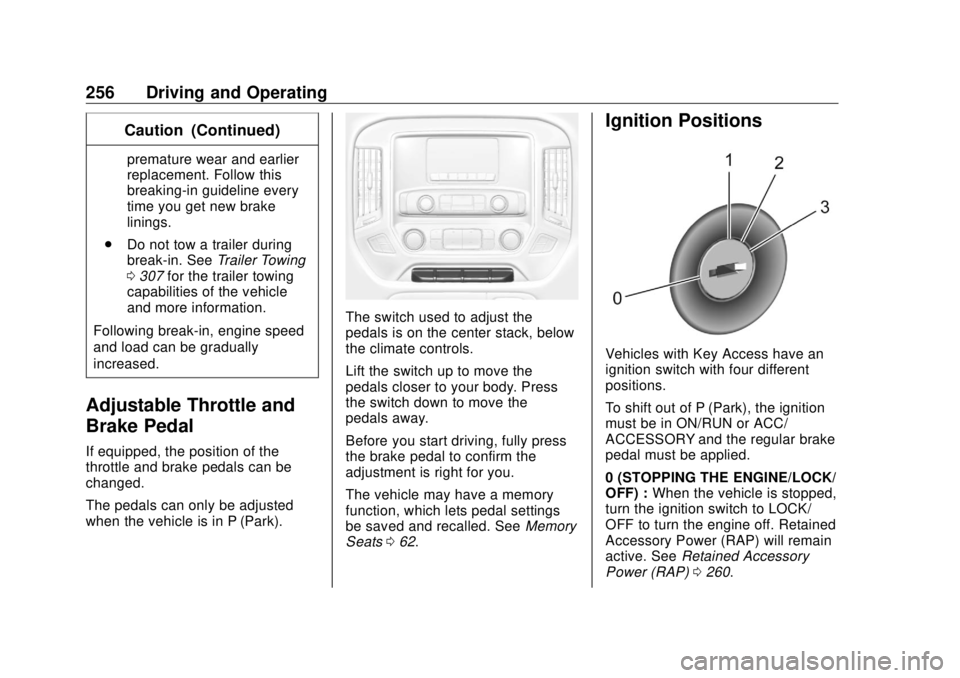
Vehicles with Key Access have an
ignition switch with four different
positions.
To shift out of P (Park), the ignition
must be in ON/RUN or ACC/
ACCESSORY and the regular brake
pedal must be applied.
0 (STOPPING THE ENGINE/LOCK/
OFF) : When the vehicle is stopped,
turn the ignition switch to LOCK/
OFF to turn the engine off. Retained
Accessory Power (RAP) will remain
active. See Retained Accessory
Power (RAP) 0 260 .
Page 258 of 505
GMC Sierra/Sierra Denali Owner Manual (GMNA-Localizing-U.S./Canada/
Mexico-11349177) - 2018 - CRC - 10/17/17
Driving and Operating 257This position locks the ignition and
steering wheel. It also locks the
transmission. The key can be
removed in LOCK/OFF.
The steering can bind with the
wheels turned off center. If this
happens, move the steering wheel
from right to left while turning the
key to ACC/ACCESSORY. If this
does not work, then the vehicle
needs service.
Do not turn the engine off when the
vehicle is moving. This may cause a
loss of power assist in the brake
and steering systems and disable
the airbags.
If the vehicle must be shut off in an
emergency:
1. Brake using a firm and steady
pressure. Do not pump the
brakes repeatedly. This may
deplete power assist, requiring
increased brake pedal force.
2. Shift the vehicle to N (Neutral).
This can be done while the
vehicle is moving. After shifting to N (Neutral), firmly apply the
brakes and steer the vehicle to
a safe location.
3. Come to a complete stop. Shift
to P (Park). Turn the ignition to
LOCK/OFF.
4. Set the parking brake. See
Parking Brake 0 281 .
The shift lever must be in P (Park)
to turn the ignition switch to
LOCK/OFF.
{ WarningTurning off the vehicle while
moving may cause loss of power
assist in the brake and steering
systems and disable the airbags.
While driving, only shut the
vehicle off in an emergency.
If the vehicle cannot be pulled over,
and must be shut off while driving,
turn the ignition to ACC/
ACCESSORY. CautionUsing a tool to force the key to
turn in the ignition could cause
damage to the switch or break the
key. Use the correct key, make
sure it is all the way in, and turn it
only with your hand. If the key
cannot be turned by hand, see
your dealer.
1 (ACC/ACCESSORY) : This
position lets things like the radio
and the windshield wipers operate
while the engine is off. It also
unlocks the steering wheel. Use this
position if the vehicle must be
pushed or towed.
2 (ON/RUN) : This position can be
used to operate the electrical
accessories and to display some
instrument cluster warning and
indicator lights. This position can
also be used for service and
diagnostics, and to verify the proper
operation of the malfunction
indicator lamp as may be required
for emission inspection purposes.
Page 259 of 505
GMC Sierra/Sierra Denali Owner Manual (GMNA-Localizing-U.S./Canada/
Mexico-11349177) - 2018 - CRC - 10/17/17
258 Driving and Operating The switch stays in this position
when the engine is running. The
transmission is also unlocked in this
position.
If the key is left in the ACC/
ACCESSORY or ON/RUN position
with the engine off, the battery could
be drained. The vehicle may not
start if the battery is allowed to drain
for an extended period of time.
3 (START) : This is the position that
starts the engine. When the engine
starts, release the key. The ignition
switch returns to ON/RUN for
driving.
A warning tone will sound when the
driver door is opened and the
ignition is in ACC/ACCESSORY or
LOCK/OFF, and the key is in the
ignition.
Starting the Engine If the vehicle has a diesel engine,
see the Duramax diesel
supplement.
For an eAssist vehicle, see the
Silverado/Sierra eAssist
supplement. CautionIf you add electrical parts or
accessories, you could change
the way the engine operates. Any
resulting damage would not be
covered by the vehicle warranty.
See Add-On Electrical Equipment
0 336 .
CautionIf the steering wheel is turned
until it reaches the end of its
travel, and is held in that position
while starting the vehicle, damage
may occur to the power steering
system and there may be loss of
power steering assist.
Move the shift lever to P (Park) or
N (Neutral). To restart the engine
when the vehicle is already moving,
use N (Neutral) only. CautionDo not try to shift to P (Park) if the
vehicle is moving. If you do, you
could damage the transmission.
Shift to P (Park) only when the
vehicle is stopped.
Starting Procedure 1. Turn the ignition key to START.
When the engine starts, let go
of the key. The idle speed will
go down as the engine gets
warm. Do not race the engine
immediately after starting it.
Operate the engine and
transmission gently to allow the
oil to warm up and lubricate all
moving parts.
When the low fuel warning light
is on and the FUEL LEVEL
LOW message is displayed in
the Driver Information Center
(DIC), hold the ignition switch
in the START position to
continue engine cranking.