keyless GMC SIERRA DENALI 2019 Owner's Manual
[x] Cancel search | Manufacturer: GMC, Model Year: 2019, Model line: SIERRA DENALI, Model: GMC SIERRA DENALI 2019Pages: 472, PDF Size: 8.98 MB
Page 170 of 472
GMC Sierra/Sierra Denali Owner Manual (GMNA-Localizing-U.S./Canada/
Mexico-1500-11698638) - 2019 - crc - 5/15/18
Instruments and Controls 169Park Assist
This allows the feature to be turned
on or off. See Assistance Systems
for Parking or Backing 0 254 .
Select Off, On, or On with Towbar.
Rear Camera Park Assist Symbols
This setting enables the Rear
Camera Park Assist Symbols. See
Assistance Systems for Parking or
Backing 0 254 .
Touch Off or On.
Rear Cross Traffic Alert
This allows the Rear Cross Traffic
Alert feature to be turned on or off.
See Assistance Systems for Parking
or Backing 0 254 .
Touch Off or On.
Comfort and Convenience
Touch and the following may
display:
.
Chime Volume
.
Reverse Tilt Mirror
.
Remote Mirror Folding Chime Volume
This determines the chime volume
level.
Touch the controls on the
infotainment display to adjust the
volume.
Reverse Tilt Mirror
This allows the feature to be turned
on or off. See Reverse Tilt Mirrors
0 59 .
Touch Off, On - Driver and
Passenger, On - Driver, or On -
Passenger.
Remote Mirror Folding
When on, the outside mirrors will
remotely fold or unfold when the
Remote Keyless Entry (RKE)
transmitter
Q or
K button is
pressed and held. See Folding
Mirrors 0 57 .
Touch Off or On. Lighting Touch and the following may
display:
.
Vehicle Locator Lights
.
Exit Lighting
Vehicle Locator Lights
This setting flashes the vehicle ’ s
headlamps when
K is pressed on
the Remote Keyless Entry (RKE)
transmitter.
Touch Off or On.
Exit Lighting
This setting specifies how long the
headlamps stay on after the vehicle
is turned off and exited.
Touch Off, 30 Seconds, 60 Seconds,
or 120 Seconds.
Power Door Locks
Touch and the following may
display:
.
Open Door Anti Lock Out
.
Auto Door Unlock
.
Delayed Door Lock
Page 172 of 472
GMC Sierra/Sierra Denali Owner Manual (GMNA-Localizing-U.S./Canada/
Mexico-1500-11698638) - 2019 - crc - 5/15/18
Instruments and Controls 171Remote Window Operation
If equipped, this feature enables
remote operation of the windows
with the RKE transmitter.
See Remote Keyless Entry (RKE)
System Operation (Keyless Access)
0 33 or Remote Keyless Entry
(RKE) System Operation (Key
Access) 0 41 .
Touch Off or On.
Passive Door Unlock
This allows the selection of what
doors will unlock when using the
button on the driver door to unlock
the vehicle.
Touch All Doors or Driver Door Only.
Passive Door Lock
This allows passive locking to be
turned on or off and selects
feedback.
See Remote Keyless Entry (RKE)
System Operation (Keyless Access)
0 33 or Remote Keyless Entry
(RKE) System Operation (Key
Access) 0 41 . Touch Off, On with Horn
Chirp, or On.
Remote Left in Vehicle Alert
This feature sounds an alert when
the RKE transmitter is left in the
vehicle. This menu also enables
Remote No Longer In Vehicle Alert.
Touch Off or On.
Seating Position Touch and the following may
display:
.
Seat Entry Memory
.
Seat Exit Memory
Seat Entry Memory
This feature automatically recalls
the previously stored 1 or 2 button
positions when the ignition is
changed from off to on or ACC/
ACCESSORY. See Memory Seats
0 73 .
Touch Off or On. Seat Exit Memory
This feature automatically recalls
the previously stored exit button
position when the ignition is
changed from on or ACC/
ACCESSORY to off and the driver
door is open. See Memory Seats
0 73 .
Touch Off or On.
Teen Driver See “ Teen Driver ” under “ Settings ”
in the infotainment manual.
Valet Mode This will lock the infotainment
system and steering wheel controls.
It may also limit access to vehicle
storage locations, if equipped.
To enable valet mode:
1. Enter a four-digit code on the
keypad.
2. Select Enter to go to the
confirmation screen.
3. Re-enter the four-digit code.
Page 185 of 472
GMC Sierra/Sierra Denali Owner Manual (GMNA-Localizing-U.S./Canada/
Mexico-1500-11698638) - 2019 - crc - 5/15/18
184 Lighting + ON/OFF : Press to turn the dome
lamps on manually. Press again to
turn the dome lamps off.
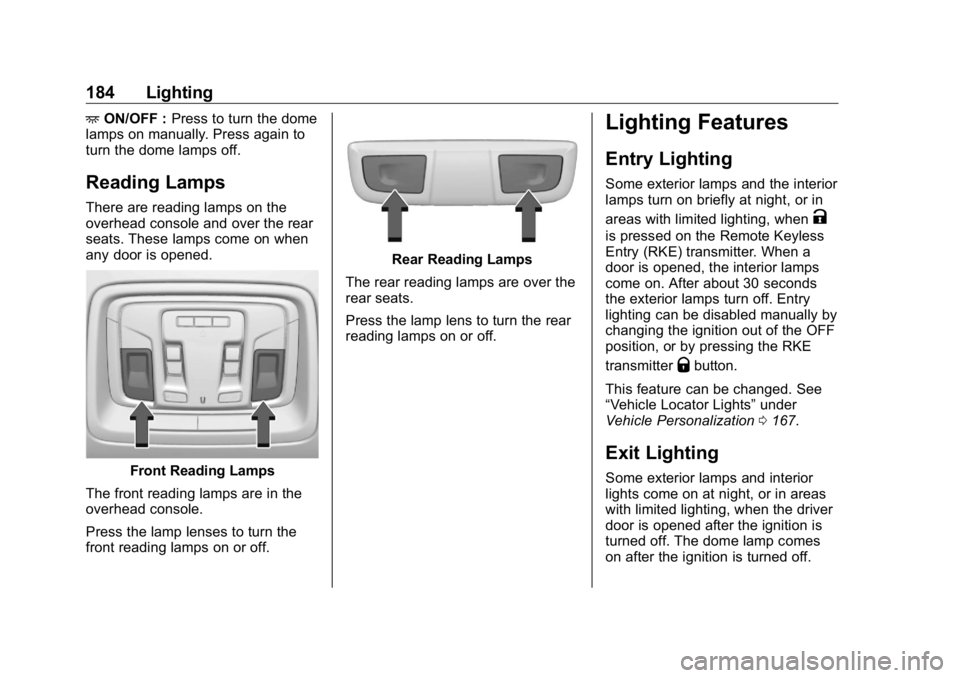
Reading Lamps There are reading lamps on the
overhead console and over the rear
seats. These lamps come on when
any door is opened.
Front Reading Lamps
The front reading lamps are in the
overhead console.
Press the lamp lenses to turn the
front reading lamps on or off. Rear Reading Lamps
The rear reading lamps are over the
rear seats.
Press the lamp lens to turn the rear
reading lamps on or off. Lighting Features Entry Lighting Some exterior lamps and the interior
lamps turn on briefly at night, or in
areas with limited lighting, when
Kis pressed on the Remote Keyless
Entry (RKE) transmitter. When a
door is opened, the interior lamps
come on. After about 30 seconds
the exterior lamps turn off. Entry
lighting can be disabled manually by
changing the ignition out of the OFF
position, or by pressing the RKE
transmitter
Q button.
This feature can be changed. See
“ Vehicle Locator Lights ” under
Vehicle Personalization 0 167 .
Exit Lighting Some exterior lamps and interior
lights come on at night, or in areas
with limited lighting, when the driver
door is opened after the ignition is
turned off. The dome lamp comes
on after the ignition is turned off.
Page 197 of 472
GMC Sierra/Sierra Denali Owner Manual (GMNA-Localizing-U.S./Canada/
Mexico-1500-11698638) - 2019 - crc - 5/16/18
196 Driving and Operating
Driving and
Operating Driving Information Distracted Driving . . . . . . . . . . . . 197
Defensive Driving . . . . . . . . . . . . . 198
Drunk Driving . . . . . . . . . . . . . . . . . 198
Control of a Vehicle . . . . . . . . . . . 198
Braking . . . . . . . . . . . . . . . . . . . . . . . 198
Steering . . . . . . . . . . . . . . . . . . . . . . 199
Off-Road Recovery . . . . . . . . . . . 199
Loss of Control . . . . . . . . . . . . . . . 200
Off-Road Driving . . . . . . . . . . . . . 200
Driving on Wet Roads . . . . . . . . 205
Hill and Mountain Roads . . . . . 206
Winter Driving . . . . . . . . . . . . . . . . 206
If the Vehicle Is Stuck . . . . . . . . 208
Vehicle Load Limits . . . . . . . . . . . 209
Truck-Camper Loading
Information . . . . . . . . . . . . . . . . . . 214
Starting and Operating New Vehicle Break-In . . . . . . . . . 216
Ignition Positions (Key
Access) . . . . . . . . . . . . . . . . . . . . . 217
Ignition Positions (Keyless
Access) . . . . . . . . . . . . . . . . . . . . . 219
Starting the Engine . . . . . . . . . . . 221 Stop/Start System . . . . . . . . . . . . 222
Engine Heater . . . . . . . . . . . . . . . . 223
Retained Accessory
Power (RAP) . . . . . . . . . . . . . . . . 225
Shifting Into Park . . . . . . . . . . . . . 225
Shifting out of Park . . . . . . . . . . . 227
Parking over Things
That Burn . . . . . . . . . . . . . . . . . . . 227
Active Fuel Management . . . . . 227
Extended Parking . . . . . . . . . . . . 228
Engine Exhaust Engine Exhaust . . . . . . . . . . . . . . 228
Running the Vehicle While
Parked . . . . . . . . . . . . . . . . . . . . . . 229
Automatic Transmission Automatic Transmission . . . . . . 229
Manual Mode . . . . . . . . . . . . . . . . . 232
Tow/Haul Mode . . . . . . . . . . . . . . . 234
Drive Systems Four-Wheel Drive . . . . . . . . . . . . . 235
Brakes Antilock Brake
System (ABS) . . . . . . . . . . . . . . . 240
Electric Parking Brake . . . . . . . . 241
Brake Assist . . . . . . . . . . . . . . . . . . 242
Hill Start Assist (HSA) . . . . . . . . 242 Ride Control Systems Traction Control/Electronic
Stability Control . . . . . . . . . . . . . 243
Hill Descent Control (HDC) . . . 245
Driver Mode Control . . . . . . . . . . 246
Limited-Slip Differential . . . . . . . 250
Locking Rear Axle . . . . . . . . . . . . 250
Cruise Control Cruise Control . . . . . . . . . . . . . . . . 250
Driver Assistance Systems Driver Assistance Systems . . . 253
Assistance Systems for
Parking or Backing . . . . . . . . . . 254
Assistance Systems for
Driving . . . . . . . . . . . . . . . . . . . . . . 260
Forward Collision Alert (FCA)
System . . . . . . . . . . . . . . . . . . . . . . 260
Forward Automatic
Braking (FAB) . . . . . . . . . . . . . . . 263
Front Pedestrian Braking
(FPB) System . . . . . . . . . . . . . . . 264
Side Blind Zone
Alert (SBZA) . . . . . . . . . . . . . . . . 267
Lane Change Alert (LCA) . . . . . 267
Lane Departure
Warning (LDW) . . . . . . . . . . . . . 269
Lane Keep Assist (LKA) . . . . . . 269
Page 220 of 472
GMC Sierra/Sierra Denali Owner Manual (GMNA-Localizing-U.S./Canada/
Mexico-1500-11698638) - 2019 - crc - 5/16/18
Driving and Operating 219while the vehicle is off. It also
unlocks the steering column,
if equipped with a locking steering
column. Use this position if the
vehicle must be pushed or towed.
See Retained Accessory Power
(RAP) 0 225 .
From ON/RUN, push the key all the
way in toward the steering column,
then turn the key to ACC/
ACCESSORY.
If the key is left in ACC/
ACCESSORY with the engine off,
the battery could drain and the
vehicle may not start.
A warning chime will sound when
the driver door is opened and the
key is in the ignition.
2 (ON/RUN) : This position can be
used to operate the electrical
accessories and to display some
instrument cluster warning and
indicator lights. This position can
also be used for service and
diagnostics, and to verify the proper
operation of the malfunction
indicator lamp as may be required
for emission inspection purposes. The switch stays in this position
when the engine is running. The
transmission is also unlocked in this
position on automatic transmission
vehicles.
If the key is left in ON/RUN with the
engine off, the battery could drain
and the vehicle may not start.
3 (START) : This is the position that
starts the engine. When the engine
starts, release the key. The ignition
returns to ON/RUN for driving.
Ignition Positions
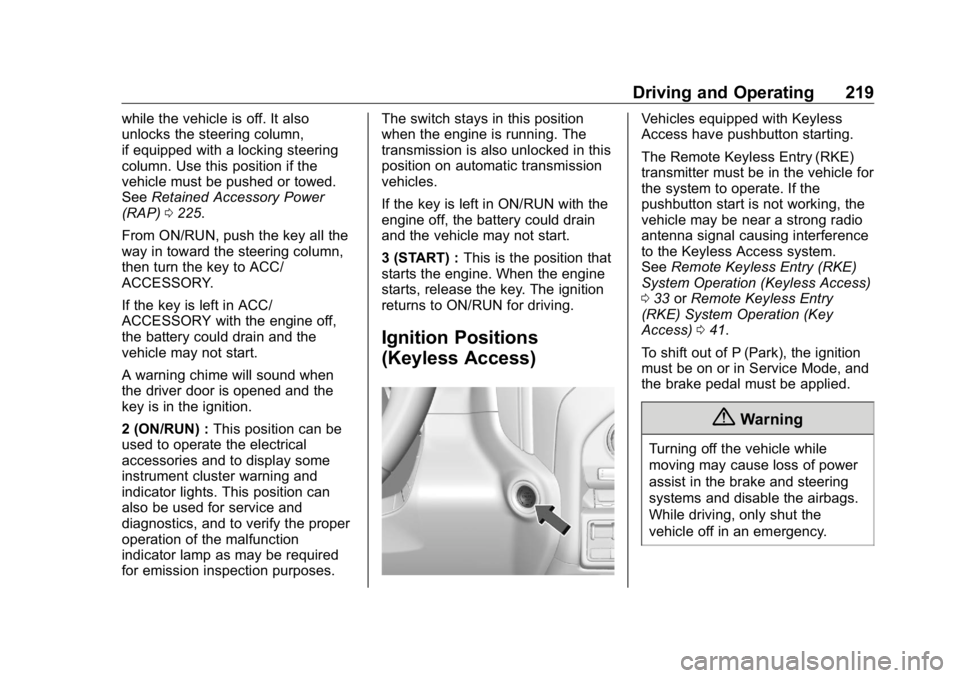
(Keyless Access) Vehicles equipped with Keyless
Access have pushbutton starting.
The Remote Keyless Entry (RKE)
transmitter must be in the vehicle for
the system to operate. If the
pushbutton start is not working, the
vehicle may be near a strong radio
antenna signal causing interference
to the Keyless Access system.
See Remote Keyless Entry (RKE)
System Operation (Keyless Access)
0 33 or Remote Keyless Entry
(RKE) System Operation (Key
Access) 0 41 .
To shift out of P (Park), the ignition
must be on or in Service Mode, and
the brake pedal must be applied.
{ Warning
Turning off the vehicle while
moving may cause loss of power
assist in the brake and steering
systems and disable the airbags.
While driving, only shut the
vehicle off in an emergency.
Page 222 of 472
GMC Sierra/Sierra Denali Owner Manual (GMNA-Localizing-U.S./Canada/
Mexico-1500-11698638) - 2019 - crc - 5/16/18
Driving and Operating 221release the button. Engine cranking
will continue until the engine starts.
See Starting the Engine 0 221 .
Service Mode
This power mode is available for
service and diagnostics, and to
verify the proper operation of the
malfunction indicator lamp as may
be required for emission inspection
purposes. With the vehicle off, and
the brake pedal not applied,
pressing and holding the button for
more than five seconds will place
the vehicle in Service Mode. The
instruments and audio systems will
operate as they do when the ignition
is on, but the vehicle will not be able
to be driven. The engine will not
start in Service Mode. Press the
button again to turn the ignition off.
Starting the Engine If the vehicle has a diesel engine,
see the Duramax diesel
supplement. CautionIf you add electrical parts or
accessories, you could change
the way the engine operates. Any
resulting damage would not be
covered by the vehicle warranty.
See Add-On Electrical Equipment
0 306 .
Move the shift lever to P (Park) or
N (Neutral). To restart the engine
when the vehicle is already moving,
use N (Neutral) only.
CautionDo not try to shift to P (Park) if the
vehicle is moving. If you do, you
could damage the transmission.
Shift to P (Park) only when the
vehicle is stopped. Starting Procedure 1. For Key Access vehicles, turn
the ignition key to START.
When the engine starts, let go
of the key.
For Keyless Access vehicles,
the RKE transmitter must be in
the vehicle. Press ENGINE
START/STOP with the brake
pedal applied. When the
engine begins cranking, let go
of the button.
The idle speed will go down as
the engine gets warm. Do not
race the engine immediately
after starting it. Operate the
engine and transmission gently
to allow the oil to warm up and
lubricate all moving parts.
When the low fuel warning light
is on and the FUEL LEVEL
LOW message is displayed in
the Driver Information Center
(DIC), hold the ignition switch
in the START position to
continue engine cranking.
Page 227 of 472
GMC Sierra/Sierra Denali Owner Manual (GMNA-Localizing-U.S./Canada/
Mexico-1500-11698638) - 2019 - crc - 5/16/18
226 Driving and Operating 2. Move the shift lever into the
P (Park) position by pulling the
shift lever toward you and
moving it up as far as it will go.
3. Be sure the transfer case (if
equipped) is in a drive
gear – not in N (Neutral).
4. Turn the ignition off. For Key
Access, push the ignition key
in, towards the steering column
and then turn the ignition off.
5. For Key Access, remove the
key and take it with you. If you
can leave the vehicle with the
ignition key in your hand, the
vehicle is in P (Park).
For Keyless Access, take the
Remote Keyless Entry (RKE)
transmitter with you. Leaving the Vehicle with the
Engine Running
{ WarningIt can be dangerous to leave the
vehicle with the engine running.
The vehicle could move suddenly
if the shift lever is not fully in
P (Park) with the parking brake
firmly set.
If you have four-wheel drive and
the transfer case is in N (Neutral),
the vehicle will be free to roll,
even if the shift lever is in
P (Park). So be sure the transfer
case is in a drive gear – not in
N (Neutral).
And, if you leave the vehicle with
the engine running, it could
overheat and even catch fire. You
or others could be injured. Do not
leave the vehicle with the engine
running unless you have to. If you have to leave the vehicle with
the engine running, be sure the
vehicle is in P (Park) and the
parking brake is firmly set before
you leave it. After moving the shift
lever into P (Park), hold the regular
brake pedal down. Then, see if you
can move the shift lever away from
P (Park) without first pulling it toward
you. If you can, it means that the
shift lever was not fully locked into
P (Park).
Torque Lock If you are parking on a hill and you
do not shift the transmission into
P (Park) properly, the weight of the
vehicle may put too much force on
the parking pawl in the
transmission. You may find it difficult
to pull the shift lever out of P (Park).
This is called torque lock. To
prevent torque lock, set the parking
brake and then shift into P (Park)
properly before you leave the
driver seat.
When you are ready to drive, move
the shift lever out of P (Park) before
you release the parking brake.
Page 240 of 472
GMC Sierra/Sierra Denali Owner Manual (GMNA-Localizing-U.S./Canada/
Mexico-1500-11698638) - 2019 - crc - 5/16/18
Driving and Operating 239Shifting Out of N (Neutral)
To shift out of N (Neutral):
1. Turn the ignition on with engine
off.
See Ignition Positions (Key
Access) 0 217 or Ignition
Positions (Keyless Access)
0 219 .
2. Set the Parking Brake. See
Electric Parking Brake 0 241 .
3. Shift the transmission to
N (Neutral)
4. Shift the transfer case to 2
m .
Transfer case shifts out of
N (Neutral) can only be made
when the transfer case is in 2
m . When the shift to 2
m is
complete, the graphic in the
instrument cluster will stop
flashing. If the transfer case
cannot complete a shift, the
graphic will return to the
previously selected setting. Single Speed Transfer Case
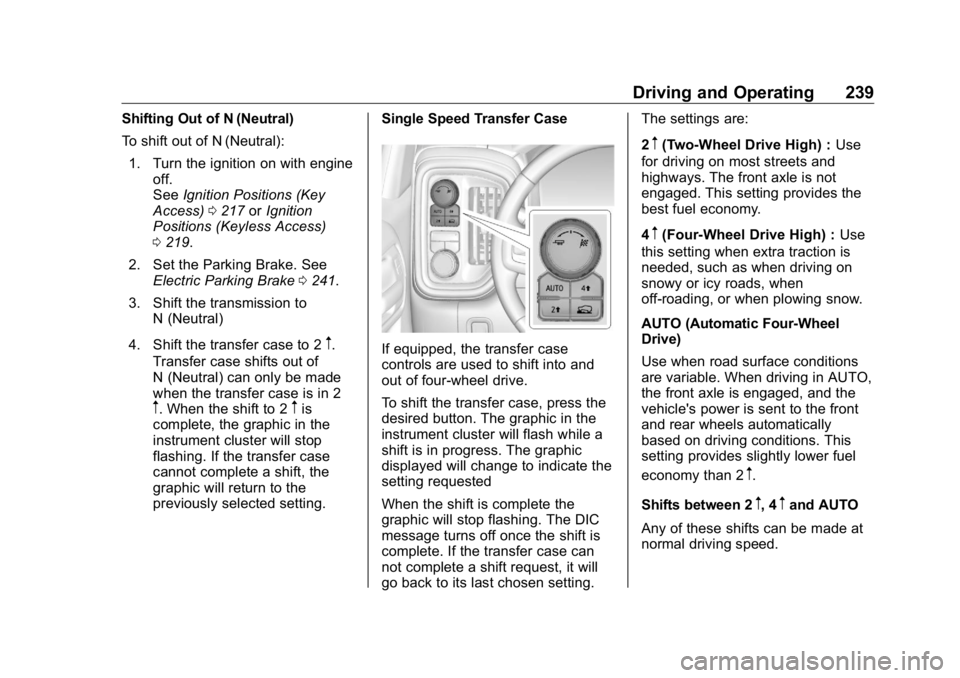
If equipped, the transfer case
controls are used to shift into and
out of four-wheel drive.
To shift the transfer case, press the
desired button. The graphic in the
instrument cluster will flash while a
shift is in progress. The graphic
displayed will change to indicate the
setting requested
When the shift is complete the
graphic will stop flashing. The DIC
message turns off once the shift is
complete. If the transfer case can
not complete a shift request, it will
go back to its last chosen setting. The settings are:
2
m (Two-Wheel Drive High) : Use
for driving on most streets and
highways. The front axle is not
engaged. This setting provides the
best fuel economy.
4
m (Four-Wheel Drive High) : Use
this setting when extra traction is
needed, such as when driving on
snowy or icy roads, when
off-roading, or when plowing snow.
AUTO (Automatic Four-Wheel
Drive)
Use when road surface conditions
are variable. When driving in AUTO,
the front axle is engaged, and the
vehicle's power is sent to the front
and rear wheels automatically
based on driving conditions. This
setting provides slightly lower fuel
economy than 2
m .
Shifts between 2
m , 4
m and AUTO
Any of these shifts can be made at
normal driving speed.
Page 314 of 472
GMC Sierra/Sierra Denali Owner Manual (GMNA-Localizing-U.S./Canada/
Mexico-1500-11698638) - 2019 - crc - 5/15/18
Vehicle Care 313
California Proposition
65 Warning
{ WarningMost motor vehicles, including
this one, as well as many of its
service parts and fluids, contain
and/or emit chemicals known to
the State of California to cause
cancer and birth defects or other
reproductive harm. Engine
exhaust, many parts and
systems, many fluids, and some
component wear by-products
contain and/or emit these
chemicals. For more information
go to www.P65Warnings.ca.gov/
passenger-vehicle.
See Battery - North America 0 337
and Jump Starting - North America
0 395 and the back cover. California Perchlorate
Materials Requirements Certain types of automotive
applications, such as airbag
initiators, seat belt pretensioners,
and lithium batteries contained in
Remote Keyless Entry transmitters,
may contain perchlorate materials.
Special handling may be necessary.
For additional information, see
www.dtsc.ca.gov/hazardouswaste/
perchlorate.
Accessories and
Modifications Adding non-dealer accessories or
making modifications to the vehicle
can affect vehicle performance and
safety, including such things as
airbags, braking, stability, ride and
handling, emissions systems,
aerodynamics, durability, and
electronic systems like antilock
brakes, traction control, and stability
control. These accessories or
modifications could even cause
malfunction or damage not covered
by the vehicle warranty. Damage to suspension components
caused by modifying vehicle height
outside of factory settings will not be
covered by the vehicle warranty.
Damage to vehicle components
resulting from modifications or the
installation or use of non-GM
certified parts, including control
module or software modifications, is
not covered under the terms of the
vehicle warranty and may affect
remaining warranty coverage for
affected parts.
GM Accessories are designed to
complement and function with other
systems on the vehicle. See your
dealer to accessorize the vehicle
using genuine GM Accessories
installed by a dealer technician.
Also, see Adding Equipment to the
Airbag-Equipped Vehicle 0 97 .
Page 331 of 472
GMC Sierra/Sierra Denali Owner Manual (GMNA-Localizing-U.S./Canada/
Mexico-1500-11698638) - 2019 - crc - 5/15/18
330 Vehicle Care 3. Connect the vehicle to a
battery charger.
4. Turn the ignition on for Key
Access vehicles or to Service
Only for Keyless Access
vehicles.
See Ignition Positions (Key
Access) 0 217 or Ignition
Positions (Keyless Access)
0 219 .
5. Turn off the air conditioning.
6. Set the parking brake.
7. At the same time, press the
accelerator and the brake for
automatic transmission
vehicles for two seconds, then
release.
At the end of the cycle, check the
coolant level in the surge tank and
add coolant if it is low. Turn off the
vehicle, allow the Electronic Control
Module (ECM) to go to sleep, about
2 minutes, and repeat Steps 3-7.
Listen for pump activation and
movement of the control valves
while watching the level of the
coolant in the surge tank. If the tank empties, turn the ignition off,
carefully remove the surge tank cap,
refill to the COLD FILL mark, and
repeat Steps 3-6. The fill and air
removal process will run for
approximately 10 minutes.
How to Add Coolant to the
Coolant Surge Tank for
Gasoline Engines Except L3B If the vehicle has a diesel engine,
see “ Cooling System ” in the
Duramax diesel supplement for the
proper coolant fill procedure.
{ WarningSpilling coolant on hot engine
parts can burn you. Coolant
contains ethylene glycol and it will
burn if the engine parts are hot
enough. { WarningPlain water, or other liquids such
as alcohol, can boil before the
proper coolant mixture will. With
plain water or the wrong mixture,
the engine could get too hot but
there would not be an overheat
warning. The engine could catch
fire and you or others could be
burned.
{ WarningSteam and scalding liquids from a
hot cooling system are under
pressure. Turning the pressure
cap, even a little, can cause them
to come out at high speed and
you could be burned. Never turn
the cap when the cooling system,
including the pressure cap, is hot.
Wait for the cooling system and
pressure cap to cool.