ECU GMC SONOMA 2004 Owner's Guide
[x] Cancel search | Manufacturer: GMC, Model Year: 2004, Model line: SONOMA, Model: GMC SONOMA 2004Pages: 412, PDF Size: 4.16 MB
Page 74 of 412
Sliding Rear Window
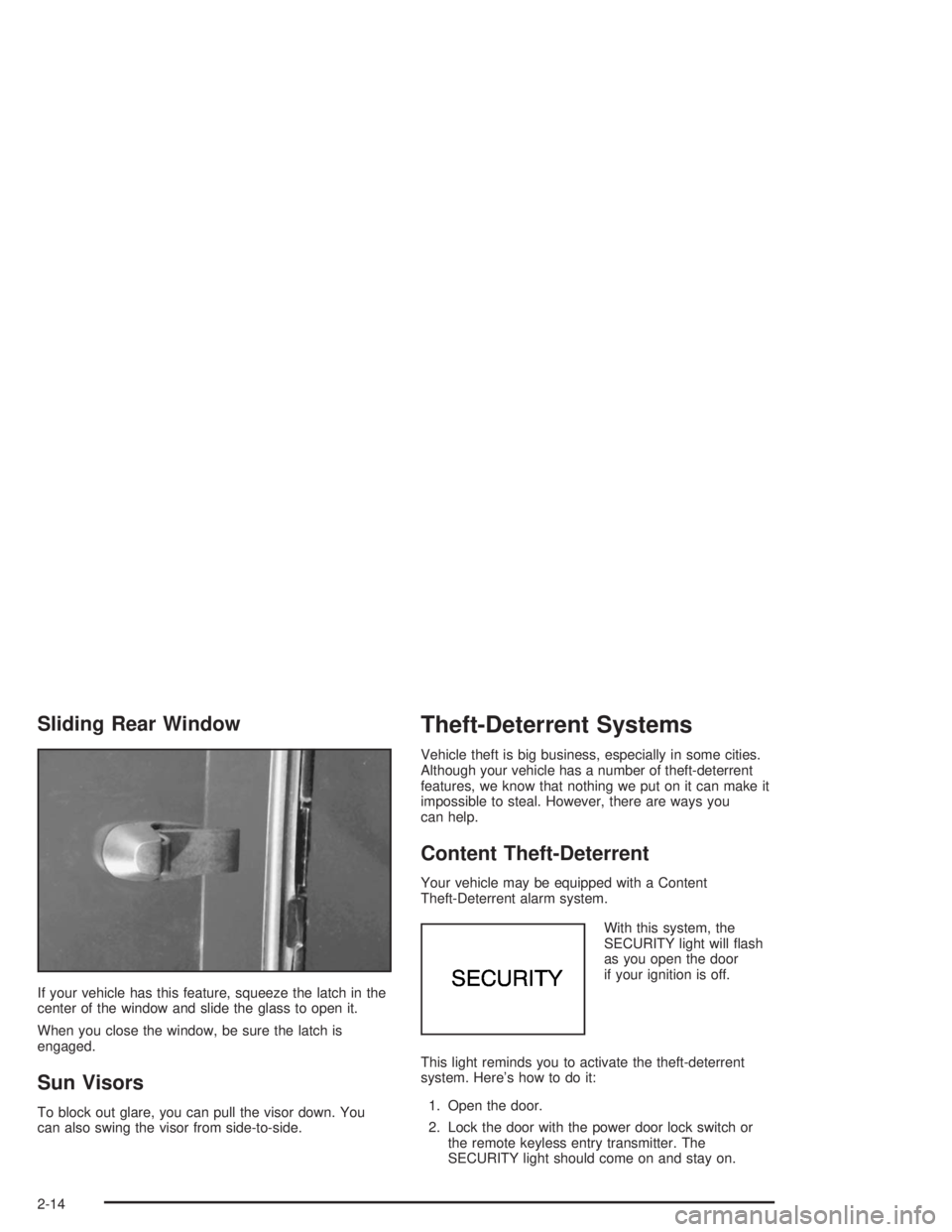
If your vehicle has this feature, squeeze the latch in the
center of the window and slide the glass to open it.
When you close the window, be sure the latch is
engaged.
Sun Visors
To block out glare, you can pull the visor down. You
can also swing the visor from side-to-side.
Theft-Deterrent Systems
Vehicle theft is big business, especially in some cities.
Although your vehicle has a number of theft-deterrent
features, we know that nothing we put on it can make it
impossible to steal. However, there are ways you
can help.
Content Theft-Deterrent
Your vehicle may be equipped with a Content
Theft-Deterrent alarm system.
With this system, the
SECURITY light will flash
as you open the door
if your ignition is off.
This light reminds you to activate the theft-deterrent
system. Here’s how to do it:
1. Open the door.
2. Lock the door with the power door lock switch or
the remote keyless entry transmitter. The
SECURITY light should come on and stay on.
2-14
Page 75 of 412
3. Close all doors. The SECURITY light should go off
after approximately 30 seconds. The alarm is not
armed until the SECURITY light goes off.
If a door is opened without the key or the remote
keyless entry transmitter, the alarm will go off. Your
vehicle’s headlamps will flash and the horn will sound for
110 seconds, then will turn off to save the battery
power.
Remember, the theft-deterrent system won’t activate if
you lock the doors with a key or use the manual
door lock. It activates only if you use a power door lock
switch with the door open, or with the remote keyless
entry transmitter. You should also remember that
you can start your vehicle with the correct ignition key if
the alarm has been set off.
Here’s how to avoid setting off the alarm by accident:
•If you don’t want to activate the theft-deterrent
system, the vehicle should be locked with the door
keyafterthe doors are closed.
•Always unlock a door with a key, or use the remote
keyless entry transmitter. Unlocking a door any
other way will set off the alarm.
If you set off the alarm by accident, unlock any door
with the key. You can also turn off the alarm by pressing
UNLOCK on the remote keyless entry transmitter.
The alarm won’t stop if you try to unlock a door any
other way.
Testing the Alarm
The alarm can be tested by following these steps:
1. From inside the vehicle, lower the driver’s window
and open the driver’s door.
2. Activate the system by locking the doors with the
power door lock switch while the door is open, or
with the remote keyless entry transmitter.
3. Get out of the vehicle, close the door and wait for
the SECURITY light to go out.
4. Then reach in through the window, unlock the door
with the manual door lock and open the door. This
should set off the alarm.
If the alarm does not sound when it should but the
vehicle’s headlamps flash, check to see if the horn
works. The horn fuse may be blown. To replace
the fuse, seeFuses and Circuit Breakers on page 5-95.
If the alarm does not sound or the vehicle’s headlamps
do not flash, the vehicle should be serviced by an
authorized service center.
2-15
Page 76 of 412
Passlock®
Your vehicle is equipped with the
Passlock®theft-deterrent system.
Passlock
®is a passive theft-deterrent system.
Passlock®enables fuel if the ignition lock cylinder is
turned with a valid key. If a correct key is not used or the
ignition lock cylinder is tampered with, fuel is disabled.
During normal operation, the SECURITY light will
go off approximately five seconds after the key is turned
to RUN.
If the engine stalls and the SECURITY light flashes,
wait about 10 minutes until the light stops flashing before
trying to restart the engine. Remember to release the
key from START as soon as the engine starts.
If the engine does not start after three tries, the vehicle
needs service.
If the engine is running and the SECURITY message
comes on, you will be able to restart the engine if
you turn the engine off. However, your
Passlock
®system is not working properly and must be
serviced by your dealer. Your vehicle is not protected
by Passlock
®at this time. You may also want to check
the fuse. SeeFuses and Circuit Breakers on page 5-95.
See your dealer for service.
In an emergency, call the GM Roadside Assistance
Center. SeeRoadside Assistance Program on page 7-6.
Starting and Operating Your
Vehicle
New Vehicle Break-In
Notice:Your vehicle does not need an elaborate
“break-in.” But it will perform better in the long run
if you follow these guidelines:
Keep your speed at 55 mph (88 km/h) or less for
the rst 500 miles (805 km).
Do not drive at any one speed — fast or
slow — for the rst 500 miles (805 km). Do not
make full-throttle starts.
Avoid making hard stops for the rst 200 miles
(322 km) or so. During this time your new
brake linings are not yet broken in. Hard stops
with new linings can mean premature wear
and earlier replacement. Follow this breaking-in
guideline every time you get new brake
linings.
Do not tow a trailer during break-in. SeeTowing
a Trailer on page 4-55for more information.
2-16
Page 100 of 412
To reset the trip computer, press the MODE and
US/MET buttons simultaneously for at least two
seconds. All functions will be displayed briefly once the
system is reset. Reset can only be performed in the
AVG ECON, FUEL USED and AVG SPEED modes. All
three modes are reset at the same time.
Front Storage Area
If your vehicle has a console compartment, squeeze the
front lever while lifting the top to open it. You can
store cassettes and compact discs in the slots in front of
the compartment. It is located on the floor in the front
of your vehicle.
Assist Handles
Use the assist handle above each passenger door
when getting out of your vehicle.
Garment Hooks
Your vehicle is equipped with garment hooks. They are
located on the headliner in front of the assist handles.
Luggage Carrier
{CAUTION:
If you try to carry something on top of your
vehicle that is longer or wider than the luggage
carrier — like paneling, plywood, a mattress
and so forth — the wind can catch it as you
drive along. This can cause you to lose
control. What you are carrying could be
violently torn off, and this could cause you or
other drivers to have a collision, and of course
damage your vehicle. You may be able to carry
something like this inside. But, never carry
something longer or wider than the luggage
carrier on top of your vehicle.
If your vehicle is equipped with a luggage carrier, it may
have side rails and crossrails attached to the roof to
secure cargo. The adjustable tie downs, at both ends of
the crossrails, should be used to secure loads to the
luggage carrier. Use GM accessory racks that are
compatible with your luggage carrier for transporting
sports equipment. These are available through
your dealer.
2-40
Page 101 of 412
You can adjust the crossrails to handle loads of various
sizes. Just loosen the slider knobs at each end of
the crossrail and move them to where you want them.
Make sure both sides of the crossrails are even,
then tighten the slider knobs.
Be sure the cargo is properly loaded. Follow these
guidelines:
•Carrying small, heavy loads on the roof is not
recommended.
•Secure the load using the tie downs at both ends of
the crossrails. When loading cargo directly on the
roof panel, use the crossrails to keep the load from
shifting.
•If you need to carry long items, move the crossrails
as far apart as possible. Tie the load to the tie
downs provided. Also tie the load to the bumpers.
Do not tie the load so tightly that the crossrails
or side rails are damaged.
Notice:Loading cargo on the luggage carrier that
weighs more than 100 lbs. (45 kg) or hangs over the
rear or sides of the vehicle may damage your
vehicle. Load cargo so that it rests on the slats as
far forward as possible and against the side
rails, making sure to fasten it securely.Don’t exceed the maximum vehicle capacity when
loading your vehicle. For more information on vehicle
capacity and loading seeLoading Your Vehicle on
page 4-45.
To prevent damage or loss of cargo as you’re driving,
check now and then to make sure the luggage
carrier and cargo are still securely fastened.
Bed Rails
{CAUTION:
If your vehicle has bed rails, they are there for
appearance only. If you try to tie down a load
with them, or to secure things in your truck,
not only can it damage the bed rails, but the
load can loosen. This could cause injury to
you or others. Secure loads by using the cargo
tie-down loops, inside the truck bed area.
2-41
Page 105 of 412
Instrument Panel Overview...............................3-2
Hazard Warning Flashers................................3-4
Other Warning Devices...................................3-5
Horn.............................................................3-5
Tilt Wheel.....................................................3-5
Turn Signal/Multifunction Lever.........................3-6
Exterior Lamps.............................................3-11
Interior Lamps..............................................3-15
Accessory Power Outlets...............................3-16
Ashtrays and Cigarette Lighter........................3-17
Climate Controls............................................3-18
Climate Control System.................................3-18
Outlet Adjustment.........................................3-20
Warning Lights, Gages and Indicators.............3-21
Instrument Panel Cluster................................3-22
Speedometer and Odometer...........................3-24
Trip Odometer..............................................3-24
Tachometer.................................................3-24
Safety Belt Reminder Light.............................3-24
Air Bag Readiness Light................................3-25
Charging System Light..................................3-26
Voltmeter Gage............................................3-26
Brake System Warning Light..........................3-27
Anti-Lock Brake System Warning Light.............3-28
Engine Coolant Temperature Gage..................3-28Malfunction Indicator Lamp.............................3-29
Oil Pressure Gage........................................3-32
Security Light...............................................3-33
Service Four-Wheel Drive Warning Light..........3-33
Check Gages Warning Light...........................3-34
Fuel Gage...................................................3-34
Low Fuel Warning Light.................................3-35
Audio System(s).............................................3-35
Setting the Time for Radios without Radio
Data Systems (RDS)..................................3-35
Setting the Time for Radios with Radio
Data Systems (RDS)..................................3-36
AM-FM Radio...............................................3-36
Radio with CD..............................................3-39
Radio with Cassette and CD..........................3-49
Radio with Six-Disc CD.................................3-59
Theft-Deterrent Feature (Non-RDS Radios).......3-73
Theft-Deterrent Feature (RDS Radios).............3-73
Understanding Radio Reception......................3-74
Care of Your Cassette Tape Player.................3-74
Care of Your CDs.........................................3-75
Care of Your CD Player................................3-76
Fixed Mast Antenna......................................3-76
XM™ Satellite Radio Antenna System
(48 Contiguous US States).........................3-76
Section 3 Instrument Panel
3-1
Page 137 of 412
Security Light
This light will come on
briefly when you turn the
key toward START.
The light will stay on until
the engine starts.
If the light flashes, the Passlock
®system has entered a
tamper mode. If the vehicle fails to start, seePasslock®
on page 2-16.
If the light comes on continuously while driving and
stays on, there may be a problem with the Passlock
®
system. Your vehicle will not be protected by Passlock®,
and you should see your dealer.
Also, seeContent Theft-Deterrent on page 2-14for
additional information regarding the SECURITY light.
Service Four-Wheel Drive
Warning Light
If you have this light, it
should come on briefly
when you turn on the
ignition, as a check
to show you it is working.
The SERVICE 4WD light comes on to indicate that
there may be a problem with the four-wheel drive system
and service is required. Malfunctions can be indicated
by the system before any problem is apparent,
which may prevent serious damage to the vehicle. This
system is also designed to assist your service
technician in correctly diagnosing a malfunction.
3-33
Page 150 of 412
XM™ Radio Messages (cont’d)
Radio Display
MessageCondition Action Required
No Info Song/Program Title not
availableNo song title information is available at this time on this
channel. Your system is working properly.
No Info Category Name not
availableNo category information is available at this time on this
channel. Your system is working properly.
No Info No Text/Informational
message availableNo text or informational messages are available at this time
on this channel. Your system is working properly.
Not Found No channel available for
the chosen categoryThere are no channels available for the category you
selected. Your system is working properly.
XM Lock Theft lock active The XM receiver in your vehicle may have previously been
in another vehicle. For security purposes, XM receivers
cannot be swapped between vehicles. If you receive this
message after having your vehicle serviced, check with the
servicing facility.
Radio ID Radio ID label
(channel 0)If you tune to channel 0, you will see this message
alternating with your XM Radio 8 digit radio ID label. This
label is needed to activate your service.
Unknown Radio ID not known
(should only be if
hardware failure)If you receive this message when you tune to channel 0,
you may have a receiver fault. Consult with your dealer.
Check XM Hardware failure If this message does not clear within a short period of time,
your receiver may have a fault. Consult with your retail
location.
3-46
Page 171 of 412
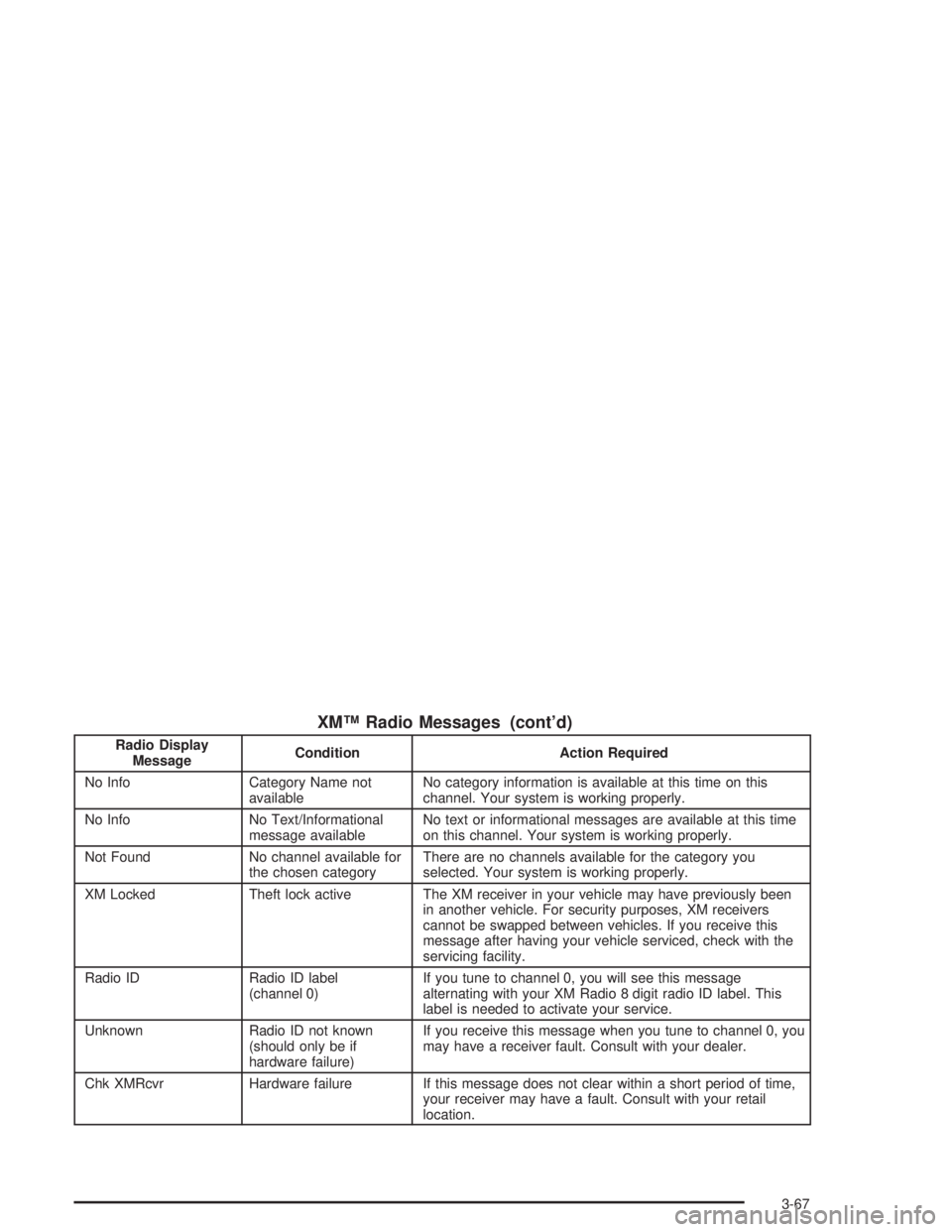
XM™ Radio Messages (cont’d)
Radio Display
MessageCondition Action Required
No Info Category Name not
availableNo category information is available at this time on this
channel. Your system is working properly.
No Info No Text/Informational
message availableNo text or informational messages are available at this time
on this channel. Your system is working properly.
Not Found No channel available for
the chosen categoryThere are no channels available for the category you
selected. Your system is working properly.
XM Locked Theft lock active The XM receiver in your vehicle may have previously been
in another vehicle. For security purposes, XM receivers
cannot be swapped between vehicles. If you receive this
message after having your vehicle serviced, check with the
servicing facility.
Radio ID Radio ID label
(channel 0)If you tune to channel 0, you will see this message
alternating with your XM Radio 8 digit radio ID label. This
label is needed to activate your service.
Unknown Radio ID not known
(should only be if
hardware failure)If you receive this message when you tune to channel 0, you
may have a receiver fault. Consult with your dealer.
Chk XMRcvr Hardware failure If this message does not clear within a short period of time,
your receiver may have a fault. Consult with your retail
location.
3-67
Page 194 of 412
Off-Road Driving with Your
Four-Wheel-Drive Vehicle
This off-road guide is for vehicles that have four-wheel
drive.
Also, seeAnti-Lock BrakesunderBraking on page 4-6.
Off-road driving can be great fun. But it does have
some definite hazards. The greatest of these is
the terrain itself.
“Off-roading” means you have left the great North
American road system behind. Traffic lanes are not
marked. Curves are not banked. There are no
road signs. Surfaces can be slippery, rough, uphill or
downhill. In short, you have gone right back to nature.
Off-road driving involves some new skills. And that
is why it is very important that you read this guide.
You will find many driving tips and suggestions.
These will help make your off-road driving safer and
more enjoyable.
Before You Go Off-Roading
There are some things to do before you go out. For
example, be sure to have all necessary maintenance
and service work done. Check to make sure all
underbody shields (if so equipped) are properly
attached. Be sure you read all the information about
your four-wheel-drive vehicle in this manual. Is there
enough fuel? Is the spare tire fully inflated? Are the fluid
levels up where they should be? What are the local
laws that apply to off-roading where you will be driving?
If you do not know, you should check with law
enforcement people in the area. Will you be on
someone’s private land? If so, be sure to get the
necessary permission.
Loading Your Vehicle for Off-Road
Driving
There are some important things to remember about
how to load your vehicle.
•The heaviest things should be on the load floor and
forward of your rear axle. Put heavier items as far
forward as you can.
•Be sure the load is secured properly, so driving on
the off-road terrain does not toss things around.
4-14