infotainment GMC TERRAIN 2010 Repair Manual
[x] Cancel search | Manufacturer: GMC, Model Year: 2010, Model line: TERRAIN, Model: GMC TERRAIN 2010Pages: 410, PDF Size: 2.55 MB
Page 195 of 410
Infotainment System 6-57
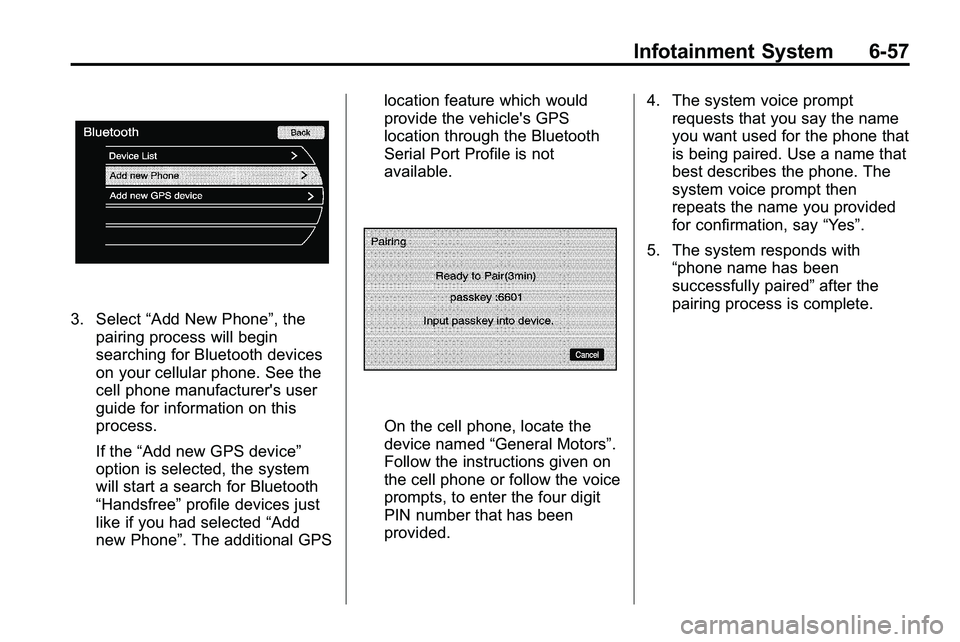
3. Select“Add New Phone”, the
pairing process will begin
searching for Bluetooth devices
on your cellular phone. See the
cell phone manufacturer's user
guide for information on this
process.
If the “Add new GPS device”
option is selected, the system
will start a search for Bluetooth
“Handsfree” profile devices just
like if you had selected “Add
new Phone”. The additional GPS location feature which would
provide the vehicle's GPS
location through the Bluetooth
Serial Port Profile is not
available.
On the cell phone, locate the
device named
“General Motors”.
Follow the instructions given on
the cell phone or follow the voice
prompts, to enter the four digit
PIN number that has been
provided. 4. The system voice prompt
requests that you say the name
you want used for the phone that
is being paired. Use a name that
best describes the phone. The
system voice prompt then
repeats the name you provided
for confirmation, say “Yes”.
5. The system responds with “phone name has been
successfully paired” after the
pairing process is complete.
Page 196 of 410
6-58 Infotainment System
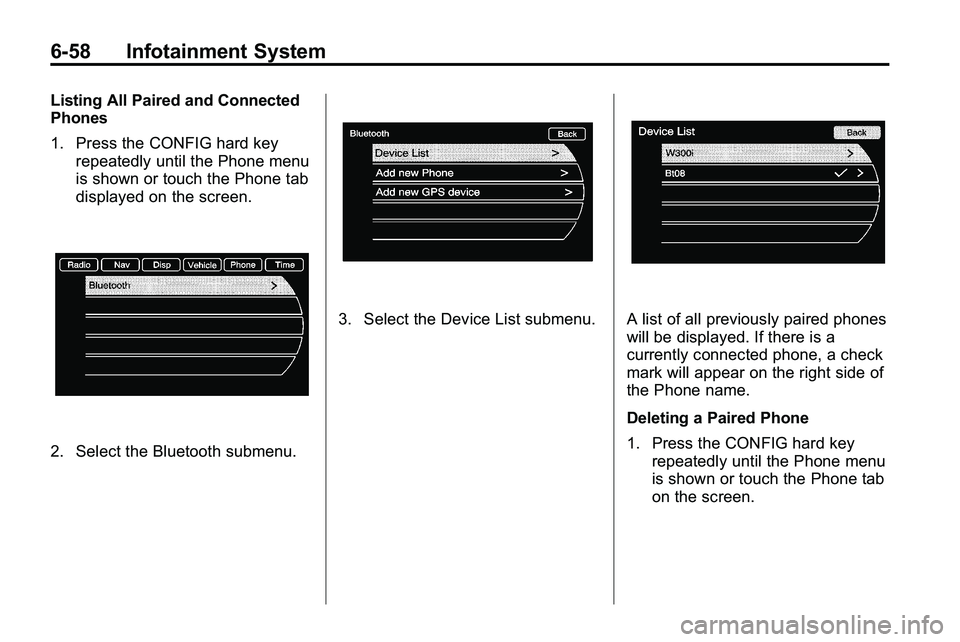
Listing All Paired and Connected
Phones
1. Press the CONFIG hard keyrepeatedly until the Phone menu
is shown or touch the Phone tab
displayed on the screen.
2. Select the Bluetooth submenu.
3. Select the Device List submenu.A list of all previously paired phones
will be displayed. If there is a
currently connected phone, a check
mark will appear on the right side of
the Phone name.
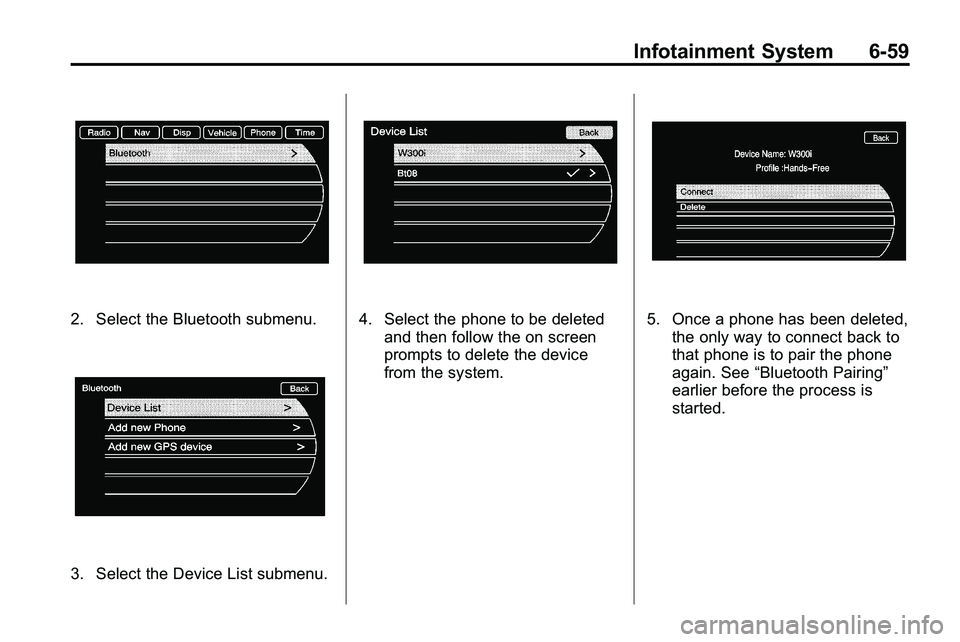
Deleting a Paired Phone
1. Press the CONFIG hard keyrepeatedly until the Phone menu
is shown or touch the Phone tab
on the screen.
Page 197 of 410
Infotainment System 6-59
2. Select the Bluetooth submenu.
3. Select the Device List submenu.
4. Select the phone to be deletedand then follow the on screen
prompts to delete the device
from the system.5. Once a phone has been deleted,the only way to connect back to
that phone is to pair the phone
again. See “Bluetooth Pairing”
earlier before the process is
started.
Page 198 of 410
6-60 Infotainment System
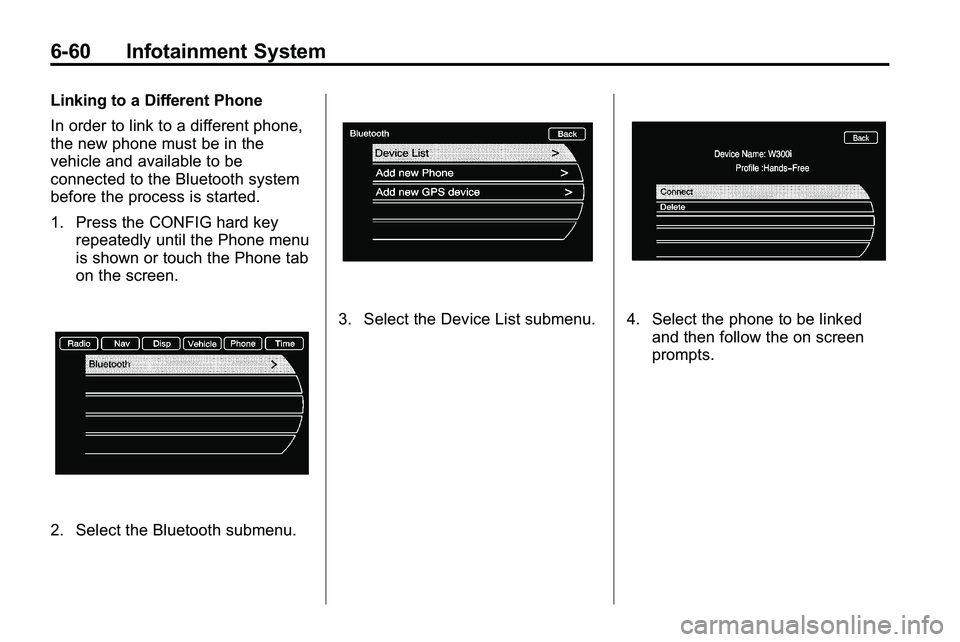
Linking to a Different Phone
In order to link to a different phone,
the new phone must be in the
vehicle and available to be
connected to the Bluetooth system
before the process is started.
1. Press the CONFIG hard keyrepeatedly until the Phone menu
is shown or touch the Phone tab
on the screen.
2. Select the Bluetooth submenu.
3. Select the Device List submenu.4. Select the phone to be linked
and then follow the on screen
prompts.
Page 199 of 410
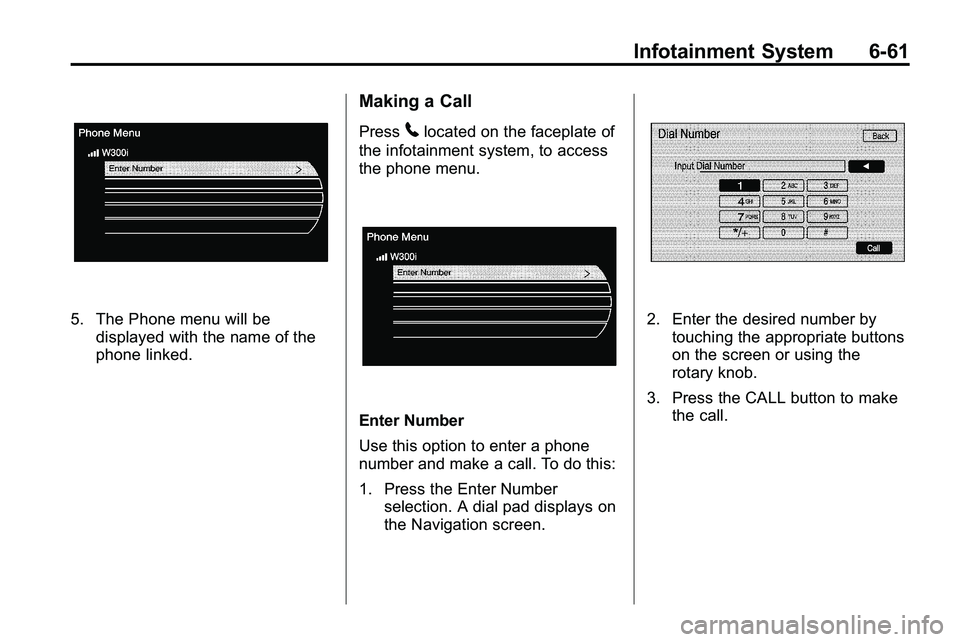
Infotainment System 6-61
5. The Phone menu will bedisplayed with the name of the
phone linked.
Making a Call
Press5located on the faceplate of
the infotainment system, to access
the phone menu.
Enter Number
Use this option to enter a phone
number and make a call. To do this:
1. Press the Enter Number selection. A dial pad displays on
the Navigation screen.
2. Enter the desired number bytouching the appropriate buttons
on the screen or using the
rotary knob.
3. Press the CALL button to make the call.
Page 200 of 410
6-62 Infotainment System
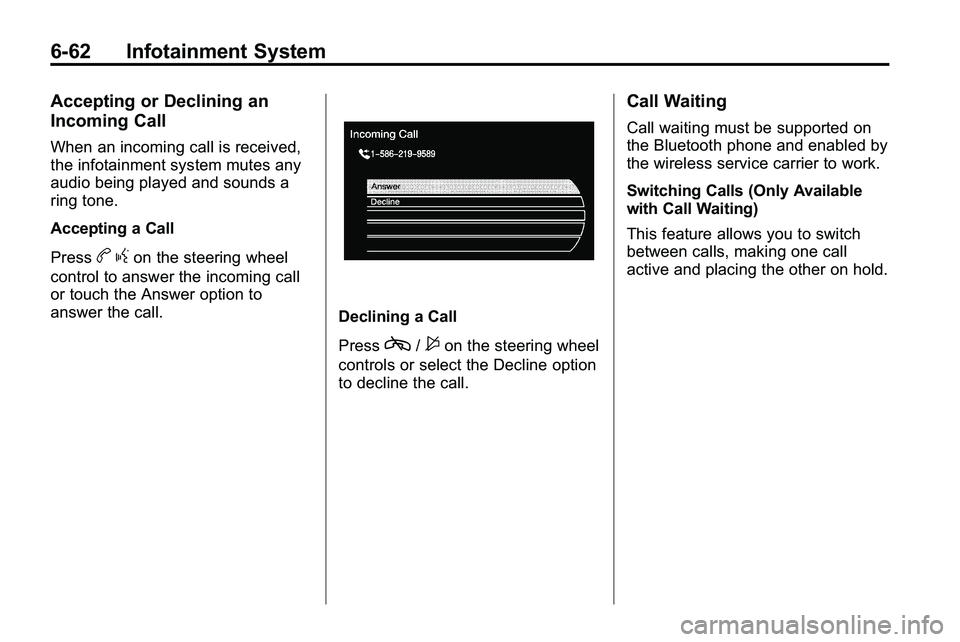
Accepting or Declining an
Incoming Call
When an incoming call is received,
the infotainment system mutes any
audio being played and sounds a
ring tone.
Accepting a Call
Press
bgon the steering wheel
control to answer the incoming call
or touch the Answer option to
answer the call.
Declining a Call
Press
c/$on the steering wheel
controls or select the Decline option
to decline the call.
Call Waiting
Call waiting must be supported on
the Bluetooth phone and enabled by
the wireless service carrier to work.
Switching Calls (Only Available
with Call Waiting)
This feature allows you to switch
between calls, making one call
active and placing the other on hold.
Page 201 of 410

Infotainment System 6-63
Switch Call:Turn or press the
menu select knob to “Switch Call”
and press Enter or touch the
“Switch Call” option.
Conference Calling
Conference and three-way calling
must be supported on the Bluetooth
phone and enabled by the wireless
service carrier to work. To start a conference while in a
current call:
1. Press the
5hard key on the
faceplate until the Phone main
screen is shown with the current
active call.
2. Select the “Enter Number”
option.
3. Make another call. The first call will be placed on hold while the
second call is dialing and
connected.
4. To make a conference call, select the “Merge Calls” option
which will merge both calls into
one conference call.
5. To add more callers to the conference call, repeat Steps 2
through 4. The amount of callers
that can be added are limited by
your wireless service carrier.
Page 202 of 410

6-64 Infotainment System
Ending a Call
1. Press the5hard key.
2. Select Hang Up.
Mute or UnMute a Call
1. Press the5hard key.
2. Select the Mute call option to mute the call.
3. Select the Mute call option again to unmute the call.
Dual Tone Multi-Frequency
(DTMF) Tones
The in-vehicle Bluetooth system can
send numbers during a call, this is
used when calling a menu driven
phone system.
1. Press the5hard key.
2. Select “Enter Number” option
and enter the number sequence.
The DTMF Tones will be generated
on the network as you enter each
number.
Page 317 of 410

Vehicle Care 9-43
Instrument Panel Fuse Block
Mini Fuses Usage 1 Steering Wheel DM
2 Spare
3 Spare
4 Body Control
Module 1 Mini Fuses Usage
5 Infotainment
6 Body Control
Module 7
7 Noise Control
Module Mini Fuses Usage
8 Body Control
Module 4
9 Radio
10 SEO Battery
11 Ultrasonic Rear
Parking Aid Module
12 Heater, Ventilation
and Air Conditioning
Battery
13 Auxiliary Power
Front
14 Heater, Ventilation
and Air Conditioning
Ignition
15 Display
16 Body Control
Module 5
17 Auxiliary
Power Rear
18 Instrument Panel
Cluster Ignition
Page 406 of 410
i-8 INDEX
N
Navigation SystemVehicle Data Recordingand Privacy . . . . . . . . . . . . . . . 12-16
Net, Convenience . . . . . . . . . . . . . . 3-2
New Vehicle Break-In . . . . . . . . . . 8-27
O
Object Detection System Messages . . . . . . . . . . . . . . . . . . . . 4-33
Odometer . . . . . . . . . . . . . . . . . . . . . . 4-13
Off-Road . . . . . . . . . . . . . . . . . . . . . . . 8-7 Driving . . . . . . . . . . . . . . . . . . . . . . . . . 8-7
Recovery . . . . . . . . . . . . . . . . . . . . . . 8-6
Oil Engine . . . . . . . . . . . . . . . . . . . . . . . . 9-10
Engine Oil Life System . . . . . . . 9-12
Messages . . . . . . . . . . . . . . . . . . . . 4-31
Pressure Light . . . . . . . . . . . . . . . . 4-23
Older Children, Restraints . . . . . 2-41
Online Owner Center . . . . . . . . . . 12-4
OnStar
®System . . . . . . . . . . . . . . . 4-41 Operation, Infotainment
System . . . . . . . . . . . . . . . . . . . . . . . . 6-7
Outlets Power . . . . . . . . . . . . . . . . . . . . . . . . 4-10
Overheating, Engine . . . . . . . . . . . 9-20
Overview Instrument Panel . . . . . . . . . . . . . . 4-4
Overview, Infotainment System . . . . . . . . . . . . . . . . . . . . 6-3, 6-5
P
ParkShifting Into . . . . . . . . . . . . . . . . . . . 8-32
Shifting Out of . . . . . . . . . . . . . . . . 8-33
Park Tilt Mirrors . . . . . . . . . . . . . . . . 1-15
Parking Assist, Ultrasonic . . . . . . . . . . . . . 8-47
Brake . . . . . . . . . . . . . . . . . . . . . . . . . 8-40
Brake and P (Park)Mechanism Check . . . . . . . . . . 9-28
Over Things That Burn . . . . . . . 8-33
Passenger Airbag Status Indicator . . . . . . . . . . . . . . . . . . . . . 4-15 Passenger Sensing System . . . 2-33
Perchlorate Materials
Requirements, California . . . . . . 9-3
Phone Bluetooth . . . . . . . 6-41, 6-42, 6-45, 6-56
Power
Door Locks . . . . . . . . . . . . . . . . . . . . 1-7
Mirrors . . . . . . . . . . . . . . . . . . . . . . . . 1-15
Outlets . . . . . . . . . . . . . . . . . . . . . . . 4-10
Retained Accessory (RAP) . . . 8-29
Seat Adjustment . . . . . . . . . . . . . . . 2-3
Steering Fluid . . . . . . . . . . . . . . . . . 9-21
Windows . . . . . . . . . . . . . . . . . . . . . 1-17
Pregnancy, Using Safety Belts . . . . . . . . . . . . . . . . . . . . . . . . . 2-23
Privacy Radio Frequency
Identification (RFID) . . . . . . . 12-16
Program Courtesy Transportation . . . . . . 12-8
Proposition 65 Warning, California . . . . . . . . . . . . . . . . . . . . . . 9-3