light GMC TERRAIN 2010 Repair Manual
[x] Cancel search | Manufacturer: GMC, Model Year: 2010, Model line: TERRAIN, Model: GMC TERRAIN 2010Pages: 410, PDF Size: 2.55 MB
Page 175 of 410
Infotainment System 6-37
If a CD, DVD, or MP3 disc is in the
Radio DVD slot, the remote control
Obutton can be used to turn on the
video screen display and start the
disc. The infotainment system can
also turn on the video screen
display. See CD/DVD Player
on
page 6‑21or the separate
navigation system manual for more
information.
Notice: Storing the remote
control in a hot area or in direct
sunlight can damage it, and the
repairs will not be covered by the
warranty. Storage in extreme cold
can weaken the batteries. Keep
the remote control stored in a
cool, dry place.
Remote Control Buttons
O(Power): Press to turn the
video screens on and off.
P(Illumination): Press to turn the
remote control backlight on. The
backlight times out after several
seconds if no other button is
pressed.
v(Title): Press to return to the
main menu of the DVD. This
function could vary for each disc.
y(Main Menu): Press to access
the DVD menu. The DVD menu is
different on every DVD. Use the
navigation arrows to move the
cursor. After making a selection
press the enter button. This button
only operates when using a DVD.
n,q,p,o(Menu Navigation
Arrows): Use the arrow buttons to
navigate through a menu.
r(Enter): Press to select the
highlighted choice in any menu.
z(Display Menu): Press to
adjust the brightness, screen
display mode, and display the
language menu.
q(Return): Press to exit the
current active menu and return to
the previous menu. This button
operates only when the display
menu or a DVD menu is active.
c(Stop): Press to stop playing,
rewinding, or fast forwarding a
DVD. Press twice to return to the
beginning of the DVD.
s(Play/Pause): Press to start
playing a DVD. Press to pause a
DVD while it is playing. Press again
to continue playing.
Depending on the infotainment
system in the vehicle, DVD
playback may be slowed down by
pressing
sthen[. Reverse slow
play by pressing
sthenr.
Press
sagain to cancel slow play.
t(Previous Track/Chapter):
Press to go to the start of the
current track or chapter. Press again
to go to the previous track or
chapter. This button may not work
when the DVD is playing the
copyright information or the
previews.
Page 181 of 410
Infotainment System 6-43
4. Select Pair Device (Phone).A four digit PIN number appears
on the display.
If the “Add new GPS device”
option is selected, the system
will start a search for Bluetooth
“Handsfree” profile devices just
like if “Add new Phone” was
selected . The additional GPS
location feature which would
provide the vehicle's GPS
location through the Bluetooth
Serial Port Profile is not
available.
5. Start the pairing process on the cell phone that will be paired to
the vehicle. Reference the cell
phone manufacturers user guide
for information on this process.
Locate the device named
“General Motors” in the list on
the cell phone and follow the
instructions on the cell phone to
enter the four digit PIN number
provided by the system. 6. The system prompts for a name
for the phone and confirms the
name provided. This name is
used to indicate which phone is
connected.
7. The system responds with “
successfully paired” after the
pairing process is complete.
8. Repeat Steps 1 through 7 to pair additional phones.
Listing All Paired and Connected
Phones
1. Press the CONFIG button.
2. Select Phone Settings.
3. Select Bluetooth.
4. Select Device List.
Deleting a Paired Phone
1. Press the CONFIG button.
2. Select Phone Settings.
3. Select Bluetooth. 4. Select Device List.
5. Select the phone to delete and
follow the on screen prompts.
Linking to a Different Phone
To link to a different phone, the new
phone must be in the vehicle and
available to be connected to the
bluetooth system before the process
is started.
1. Press the CONFIG button.
2. Select Phone Settings.
3. Select Bluetooth.
4. Select Device List.
5. Select the new phone to link to and follow the on screen
prompts.
If delete is selected, the
highlighted phone will be
deleted.
Page 204 of 410
7-2 Climate Controls
Air Delivery Mode Control:To
change the current mode, select
one of the following:
F (Vent): Air is directed to the
instrument panel outlets.
* (Bi-Level): Air is directed to the
instrument panel outlets and the
floor outlets.
7 (Floor): Air is directed to the
floor outlets.
W(Defog): Clears the windows of
fog or moisture. Air is directed to the
windshield and floor outlets.
0(Defrost): Clears the
windshield of fog or frost more
quickly. Air is directed to the
windshield and side window outlets.
For best results, clear all snow and
ice from the windshield before
defrosting.
Do not drive the vehicle until all the
windows are clear.
Air Conditioning
#(Air Conditioning): Press to
turn the air conditioning on or off.
If the fan is turned off or the outside
temperature falls below freezing, the
air conditioning will not work.
h(Recirculation): Press to turn
on the recirculation. An indicator
light comes on. Air is recirculated
inside the vehicle. It helps to quickly
cool the air inside the vehicle or
prevent outside air and odors from
entering.
%(Outside Air): Press to turn
on the outside air. An indicator light
comes on. Outside air is circulated
throughout the vehicle.
Rear Window Defogger
<(Rear Defogger): Press to turn
the rear window defogger on or off.
The rear window defogger turns off
after about 10 minutes. It can also
be turned off by turning the ignition
to ACC/ACCESSORY or LOCK/
OFF. If turned on again, it runs for
about five minutes before
turning off.
Do not drive the vehicle until all the
windows are clear.
Notice: Do not use a razor blade
or sharp object to clear the inside
rear window. Do not adhere
anything to the defogger grid
lines in the rear glass. These
actions may damage the rear
defogger. Repairs would not be
covered by your warranty.
Page 206 of 410
7-4 Climate Controls
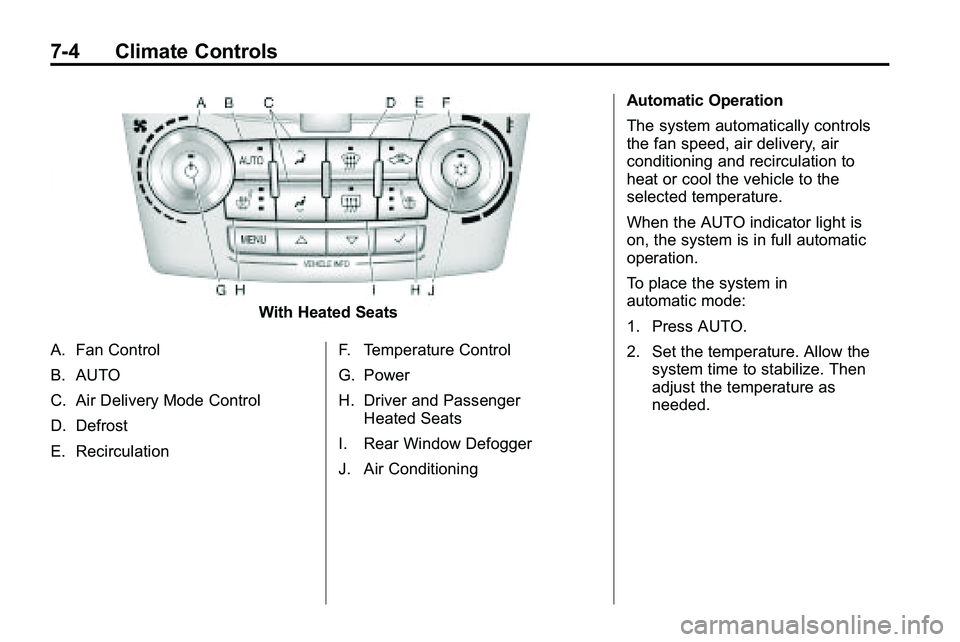
With Heated Seats
A. Fan Control
B. AUTO
C. Air Delivery Mode Control
D. Defrost
E. Recirculation F. Temperature Control
G. Power
H. Driver and Passenger
Heated Seats
I. Rear Window Defogger
J. Air Conditioning Automatic Operation
The system automatically controls
the fan speed, air delivery, air
conditioning and recirculation to
heat or cool the vehicle to the
selected temperature.
When the AUTO indicator light is
on, the system is in full automatic
operation.
To place the system in
automatic mode:
1. Press AUTO.
2. Set the temperature. Allow the
system time to stabilize. Then
adjust the temperature as
needed.
Page 207 of 410
Climate Controls 7-5
Manual Operation
O(Power):Press to turn the
climate control system on or off.
9(Fan Control): Turn to increase
or decrease the fan speed.
Adjusting the fan speed while in
automatic mode places the fan
under manual control. The AUTO
indicator light turns off. The air
delivery mode remains in automatic
control.
Temperature Control: Turn to
increase or decrease the
temperature inside the vehicle.
H/G(Air Delivery Mode
Control): Press mode up or mode
down to cycle through the different
air delivery modes. The current
mode is shown on the display. Select from the following:
F
(Vent): Air is directed to the
instrument panel outlets.
* (Bi-Level): Air is directed to the
instrument panel outlets and the
floor outlets.
7 (Floor): Air is directed to the
floor outlets.
W(Defog): Clears the windows of
fog or moisture. Air is directed to the
windshield and floor outlets.
0(Defrost): Clears the
windshield of fog or frost more
quickly. Air is directed to the
windshield and side window outlets.
Selecting defrost disables the
automatic mode.
For best results, clear all snow and
ice from the windshield before
defrosting.
Do not drive the vehicle until all the
windows are clear.
Air Conditioning
#(Air Conditioning): Press to
turn the air conditioning on or off.
If the fan is turned off or the outside
temperature falls below freezing, the
air conditioning will not work. When
in AUTO, the air conditioning will
come on automatically as needed.
h(Recirculation): Press to
turn on the recirculation. Press to
alternate between recirculation and
outside air, if the vehicle does not
have a separate outside air button.
The indicator light turns on when
recirculation is selected. Air is
recirculated inside the vehicle.
It helps quickly cool the air inside
the vehicle or prevent outside air
and odors from entering.
%(Outside Air, If Equipped):
Press to turn on the outside air. An
indicator light comes on. Outside air
is circulated throughout the vehicle.
Page 212 of 410
8-4 Driving and Operating
Medical research shows that
alcohol in a person's system
can make crash injuries worse,
especially injuries to the brain,
spinal cord, or heart. This means
that when anyone who has been
drinking—driver or passenger —is
in a crash, that person's chance of
being killed or permanently disabled
is higher than if the person had not
been drinking.
Control of a Vehicle
The following three systems
help to control the vehicle while
driving —brakes, steering, and
accelerator. At times, as when
driving on snow or ice, it is easy to
ask more of those control systems
than the tires and road can provide.
Meaning, you can lose control of the
vehicle. See StabiliTrak System
on
page 8‑42.
Adding non‐dealer/non‐retailer
accessories can affect vehicle
performance. See Accessories
and Modifications on page 9‑3.
Braking
See Brake System Warning Lighton page 4‑19.
Braking action involves perception
time and reaction time. Deciding
to push the brake pedal is
perception time. Actually doing
it is reaction time.
Average reaction time is about
three‐fourths of a second. But that is
only an average. It might be less
with one driver and as long as two
or three seconds or more with
another. Age, physical condition,
alertness, coordination, and
eyesight all play a part. So do
alcohol, drugs, and frustration. But
even in three‐fourths of a second,
a vehicle moving at 100 km/h
(60 mph) travels 20 m (66 ft). That
could be a lot of distance in an
emergency, so keeping enough
space between the vehicle and
others is important. And, of course, actual stopping
distances vary greatly with the
surface of the road, whether it is
pavement or gravel; the condition of
the road, whether it is wet, dry,
or icy; tire tread; the condition of the
brakes; the weight of the vehicle;
and the amount of brake force
applied.
Avoid needless heavy
braking. Some people drive
in spurts
—heavy acceleration
followed by heavy braking —rather
than keeping pace with traffic. This
is a mistake. The brakes might not
have time to cool between hard
stops. The brakes will wear out
much faster with a lot of heavy
braking. Keeping pace with the
traffic and allowing realistic following
distances eliminates a lot of
unnecessary braking. That means
better braking and longer brake life.
Page 214 of 410
8-6 Driving and Operating
Steering in Emergencies
There are times when steering can
be more effective than braking. For
example, you come over a hill and
find a truck stopped in your lane,
or a car suddenly pulls out from
nowhere, or a child darts out from
between parked cars and stops right
in front of you. These problems can
be avoided by braking—if you can
stop in time. But sometimes you
cannot stop in time because there is
no room. That is the time for
evasive action —steering around
the problem.
The vehicle can perform very well in
emergencies like these. First apply
the brakes. See Braking
on
page 8‑4. It is better to remove
as much speed as possible from a
collision. Then steer around the
problem, to the left or right
depending on the space available.
An emergency like this requires
close attention and a quick decision.
If holding the steering wheel at the
recommended 9 and 3 o'clock
positions, it can be turned a full
180 degrees very quickly without
removing either hand. But you have
to act fast, steer quickly, and just as
quickly straighten the wheel once
you have avoided the object.
The fact that such emergency
situations are always possible is a
good reason to practice defensive
driving at all times and wear safety
belts properly.
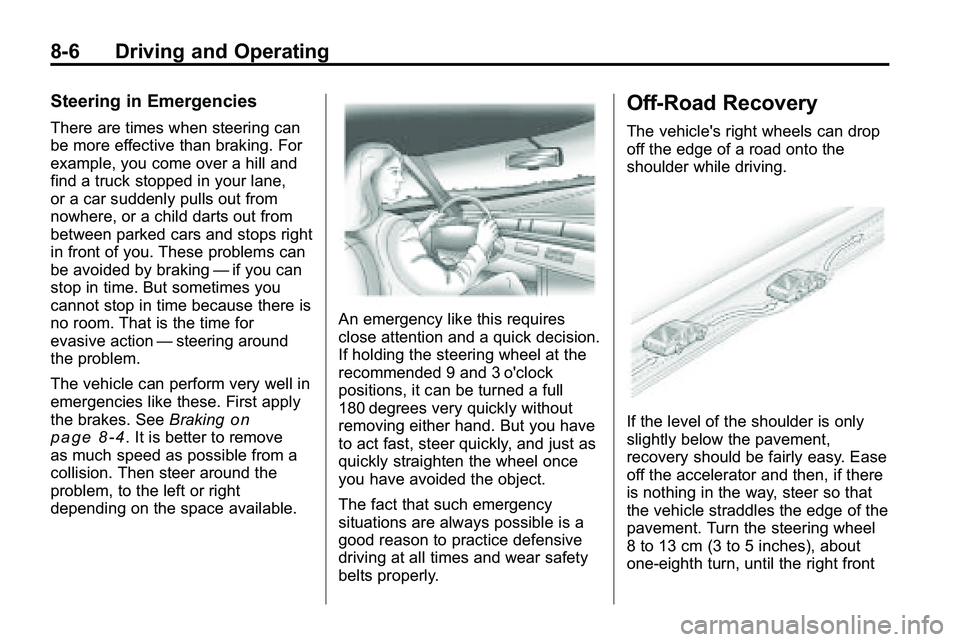
Off-Road Recovery
The vehicle's right wheels can drop
off the edge of a road onto the
shoulder while driving.
If the level of the shoulder is only
slightly below the pavement,
recovery should be fairly easy. Ease
off the accelerator and then, if there
is nothing in the way, steer so that
the vehicle straddles the edge of the
pavement. Turn the steering wheel
8 to 13 cm (3 to 5 inches), about
one-eighth turn, until the right front
Page 220 of 410
8-12 Driving and Operating
Off-roading requires a different kind
of alertness from driving on paved
roads and highways. There are no
road signs, posted speed limits,
or signal lights. Use good judgment
about what is safe and what is not.
Driving on Hills
Off-road driving often takes you up,
down, or across a hill. Driving safely
on hills requires good judgment and
an understanding of what the
vehicle can and cannot do. There
are some hills that simply cannot be
driven, no matter how well built the
vehicle.
{WARNING
Many hills are simply too steep
for any vehicle. If you drive up
them, you will stall. If you drive
down them, you cannot control
your speed. If you drive across(Continued)
WARNING (Continued)
them, you will roll over. You could
be seriously injured or killed.
If you have any doubt about the
steepness, do not drive the hill.
Approaching a Hill
When you approach a hill, decide if
it is too steep to climb, descend,
or cross. Steepness can be hard to
judge. On a very small hill, for
example, there may be a smooth,
constant incline with only a small
change in elevation where you can
easily see all the way to the top. On
a large hill, the incline may get
steeper as you near the top, but you
might not see this because the crest
of the hill is hidden by bushes,
grass, or shrubs. Consider this as you approach a hill:
.Is there a constant incline,
or does the hill get sharply
steeper in places?
.Is there good traction on the
hillside, or will the surface cause
tire slipping?
.Is there a straight path up or
down the hill so you will not
have to make turning
maneuvers?
.Are there obstructions on the hill
that can block your path, such
as boulders, trees, logs, or ruts?
.What is beyond the hill? Is there
a cliff, an embankment, a
drop-off, a fence? Get out and
walk the hill if you do not know.
It is the smart way to find out.
.Is the hill simply too rough?
Steep hills often have ruts,
gullies, troughs, and exposed
rocks because they are more
susceptible to the effects of
erosion.
Page 222 of 410
8-14 Driving and Operating
.While backing down the hill, put
your left hand on the steering
wheel at the 12 o'clock position
so you can tell if the wheels are
straight and can maneuver as
you back down. It is best to back
down the hill with the wheels
straight rather than in the left or
right direction. Turning the wheel
too far to the left or right will
increase the possibility of a
rollover.
Things not to do if the vehicle stalls,
or is about to stall, when going up
a hill:
.Never attempt to prevent a stall
by shifting into N (Neutral) to
rev-up the engine and regain
forward momentum. This will not
work. The vehicle can roll
backward very quickly and could
go out of control.
.Never try to turn around if about
to stall when going up a hill.
If the hill is steep enough to stall
the vehicle, it is steep enough to
cause it to roll over. If you
cannot make it up the hill, back
straight down the hill.
If, after stalling, you try to back
down the hill and decide you just
cannot do it, set the parking brake,
put your transmission in P (Park),
and turn off the engine. Leave the
vehicle and go get some help. Exit
on the uphill side and stay clear of
the path the vehicle would take if it
rolled downhill.
Driving Downhill
When off-roading takes you
downhill, consider:
.How steep is the downhill? Will I
be able to maintain vehicle
control?
.What is the surface like?
Smooth? Rough? Slippery?
Hard-packed dirt? Gravel?
.Are there hidden surface
obstacles? Ruts? Logs?
Boulders?
.What is at the bottom of the hill?
Is there a hidden creek bank or
even a river bottom with large
rocks?
If you decide you can go down a hill
safely, try to keep the vehicle
headed straight down. Use a low
gear so engine drag can help the
brakes so they do not have to do all
the work. Descend slowly, keeping
the vehicle under control at all
times.
{WARNING
Heavy braking when going down
a hill can cause your brakes to
overheat and fade. This could
cause loss of control and a
serious accident. Apply the
brakes lightly when descending a
hill and use a low gear to keep
vehicle speed under control.
Page 226 of 410
8-18 Driving and Operating
Driving on Wet Roads
Rain and wet roads can reduce
vehicle traction and affect your
ability to stop and accelerate.
Always drive slower in these types
of driving conditions and avoid
driving through large puddles and
deep‐standing or flowing water.
{WARNING
Wet brakes can cause crashes.
They might not work as well in a
quick stop and could cause
pulling to one side. You could
lose control of the vehicle.
After driving through a large
puddle of water or a car/vehicle
wash, lightly apply the brake
pedal until the brakes work
normally.(Continued)
WARNING (Continued)
Flowing or rushing water creates
strong forces. Driving through
flowing water could cause your
vehicle to be carried away. If this
happens, you and other vehicle
occupants could drown. Do not
ignore police warnings and be
very cautious about trying to drive
through flowing water.
Hydroplaning
Hydroplaning is dangerous. Water
can build up under your vehicle's
tires so they actually ride on the
water. This can happen if the road is
wet enough and you are going fast
enough. When your vehicle is
hydroplaning, it has little or no
contact with the road.
There is no hard and fast rule about
hydroplaning. The best advice is to
slow down when the road is wet.
Other Rainy Weather Tips
Besides slowing down, other wet
weather driving tips include:
.Allow extra following distance.
.Pass with caution.
.Keep windshield wiping
equipment in good shape.
.Keep the windshield washer fluid
reservoir filled.
.Have good tires with proper
tread depth. SeeTireson
page 9‑45.
.Turn off cruise control.
Highway Hypnosis
Always be alert and pay attention to
your surroundings while driving.
If you become tired or sleepy, find a
safe place to park your vehicle
and rest.
Other driving tips include:
.Keep the vehicle well ventilated.
.Keep interior temperature cool.