power steering GMC TERRAIN 2010 Owner's Manual
[x] Cancel search | Manufacturer: GMC, Model Year: 2010, Model line: TERRAIN, Model: GMC TERRAIN 2010Pages: 410, PDF Size: 2.55 MB
Page 5 of 410
Introduction v
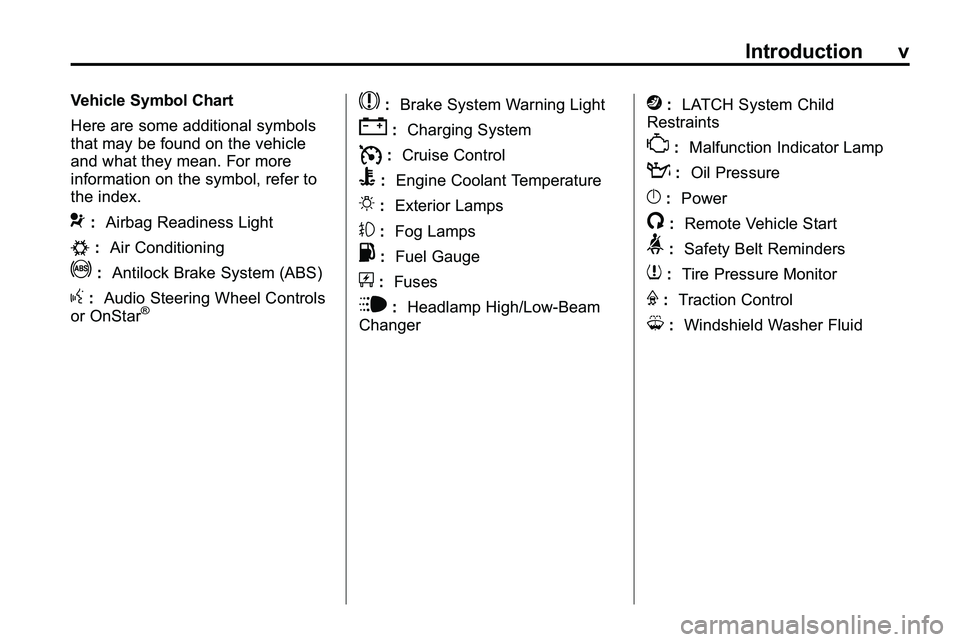
Vehicle Symbol Chart
Here are some additional symbols
that may be found on the vehicle
and what they mean. For more
information on the symbol, refer to
the index.
9:Airbag Readiness Light
#:Air Conditioning
!:Antilock Brake System (ABS)
g:Audio Steering Wheel Controls
or OnStar®
$: Brake System Warning Light
":Charging System
I:Cruise Control
B: Engine Coolant Temperature
O:Exterior Lamps
#:Fog Lamps
.: Fuel Gauge
+:Fuses
i: Headlamp High/Low-Beam
Changer
j: LATCH System Child
Restraints
*: Malfunction Indicator Lamp
::Oil Pressure
}:Power
/:Remote Vehicle Start
>:Safety Belt Reminders
7:Tire Pressure Monitor
F:Traction Control
M:Windshield Washer Fluid
Page 93 of 410
Instruments and Controls 4-1
Instruments and
Controls
Instrument Panel Overview
Instrument Panel Overview . . . . 4-4
Controls
Steering Wheel Adjustment . . . 4-6
Steering Wheel Controls . . . . . . 4-6
Horn . . . . . . . . . . . . . . . . . . . . . . . . . . 4-7
Windshield Wiper/Washer . . . . . 4-7
Rear Window Wiper/Washer . . . . . . . . . . . . . . . . . . . . . . 4-8
Compass . . . . . . . . . . . . . . . . . . . . . 4-9
Clock (With Date Display) . . . . . 4-9
Clock (Without Date Display) . . . . . . . . . . . . . . . . . . . . 4-10
Power Outlets . . . . . . . . . . . . . . . 4-10
Warning Lights, Gauges, and
Indicators
Warning Lights, Gauges, and Indicators . . . . . . . . . . . . . . . . . . . 4-11
Instrument Cluster . . . . . . . . . . . 4-12
Speedometer . . . . . . . . . . . . . . . . 4-13
Odometer . . . . . . . . . . . . . . . . . . . . 4-13
Tachometer . . . . . . . . . . . . . . . . . . 4-13
Fuel Gauge . . . . . . . . . . . . . . . . . . 4-13
Engine Coolant Temperature Gauge . . . . . . . . 4-14
Safety Belt Reminders . . . . . . . 4-14
Airbag Readiness Light . . . . . . 4-15
Passenger Airbag Status Indicator . . . . . . . . . . . . . . . . . . . . 4-15
Charging System Light . . . . . . 4-16
Malfunction Indicator Lamp . . . . . . . . . . . . . 4-17
Brake System Warning Light . . . . . . . . . . . . . . . . . . . . . . . 4-19 Antilock Brake System (ABS)
Warning Light . . . . . . . . . . . . . . 4-20
Traction Off Light . . . . . . . . . . . . 4-21
StabiliTrak®OFF Light . . . . . . . 4-21
Traction Control System
(TCS)/StabiliTrak
®Light . . . . 4-21
Tire Pressure Light . . . . . . . . . . 4-22
Engine Oil Pressure Light . . . . 4-23
Fuel Economy Light . . . . . . . . . 4-23
Low Fuel Warning Light . . . . . . 4-24
Security Light . . . . . . . . . . . . . . . . 4-24
High-Beam on Light . . . . . . . . . 4-24
Fog Lamp Light . . . . . . . . . . . . . . 4-25
Lamps on Reminder . . . . . . . . . 4-25
Cruise Control Light . . . . . . . . . 4-25
Information Displays
Driver Information Center (DIC) . . . . . . . . . . . . . . . 4-25
Page 97 of 410

Instruments and Controls 4-5
A.Air Vents on page 7‑6.
B. Turn and Lane-Change Signals
on page 5‑3.Exterior Lamp
Controlson page 5‑1. Fog
Lamps on page 5‑3.
C. Horn on page 4‑7.
D. Instrument Cluster
on
page 4‑12.
E. Windshield Wiper/Washer
on
page 4‑7. Rear Window
Wiper/Washer on page 4‑8.
F. Power Door Locks
on
page 1‑7.
G. Instrument Panel Storage
on
page 3‑1. H.
Safety Locks on page 1‑8.
I. AM-FM Radio on page 6‑11.
J. Cruise Control
on page 8‑44.
K. Instrument Panel Illumination
Control
on page 5‑4.
L. Steering Wheel Adjustment
on
page 4‑6.
M. Steering Wheel Controls
on
page 4‑6.
N. Ignition Positions on page 8‑28.
O. Climate Control Systems
on
page 7‑1or Automatic Climate
Control System on page 7‑3.
P. Shift Lever. See Automatic
Transmission on page 8‑35. Q.
StabiliTrak System
on
page 8‑42.
R. Cupholders on page 3‑1.
S. Power Outlets on page 4‑10.
T. CD/DVD Player Slot. See CD
Player
on page 6‑18or
CD/DVD Player on page 6‑21.
U. Driver Information Center (DIC) Buttons. See Driver Information
Center (DIC) on page 4‑25.
V. Hazard Warning Flashers
on
page 5‑3.
W. Glove Box on page 3‑1.
Page 126 of 410
4-34 Instruments and Controls
Service Stabilitrak
This message displays if there is a
problem with the StabiliTrak®
system. If this message appears, try
to reset the system. Stop; turn off
the engine for at least 15 seconds;
then start the engine again. If this
message still comes on, it means
there is a problem. See your dealer/
retailer for service. The vehicle is
safe to drive, however, you do not
have the benefit of StabiliTrak, so
reduce your speed and drive
accordingly.
Stabilitrak Off
This message displays when the
StabiliTrak system is turned off. See
StabiliTrak System
on page 8‑42for more information.
Traction Control Off
This message displays when the
Traction Control System (TCS) is
turned off. Adjust your driving
accordingly.
Traction Control On
This message displays when the
Traction Control System (TCS) is
first turned on. SeeTraction Control
System (TCS)
on page 8‑41for
more information.
Airbag System Messages
Service Airbag
This message is displayed if there is
a problem with the airbag system.
Take the vehicle to your dealer/
retailer for service.
Safety Belt Messages
Buckle Seatbelt
This message displays as a
reminder when the safety belt is
not buckled.
Anti-Theft Alarm System
Messages
Theft Attempted
This message displays if the vehicle
detects a tamper condition.
Service Vehicle Messages
Service AC System
This message is displayed if there is
a problem with the air conditioning
system. Take the vehicle to your
dealer/retailer for service.
Service Power Steering
This message is displayed if there is
a problem with the power steering
system. Take the vehicle to your
dealer/retailer for service.
Service Vehicle Soon
This message is displayed if there is
a problem with the vehicle. Take the
vehicle to your dealer/retailer for
service.
Page 134 of 410
![GMC TERRAIN 2010 Owners Manual 4-42 Instruments and Controls
The OnStar system can record and
transmit vehicle information. This
information is automatically sent to
an OnStar call center when
Qis
pressed,
]is pressed, or if the
ai](/img/44/35523/w960_35523-133.png "GMC TERRAIN 2010 Owners Manual 4-42 Instruments and Controls
The OnStar system can record and
transmit vehicle information. This
information is automatically sent to
an OnStar call center when
Qis
pressed,
]is pressed, or if the
ai")
4-42 Instruments and Controls
The OnStar system can record and
transmit vehicle information. This
information is automatically sent to
an OnStar call center when
Qis
pressed,
]is pressed, or if the
airbags or ACR system deploy. This
information usually includes the
vehicle's GPS location and, in the
event of a crash, additional
information regarding the crash that
the vehicle was involved in (e.g. the
direction from which the vehicle was
hit). When the virtual advisor feature
of OnStar hands-free calling is
used, the vehicle also sends OnStar
the vehicle's GPS location so they
can provide services where it is
located.
Location information about the
vehicle is only available if the GPS
satellite signals are unobstructed
and available. The vehicle must have a working
electrical system, including
adequate battery power, for the
OnStar equipment to operate. There
are other problems OnStar cannot
control that may prevent OnStar
from providing OnStar service at
any particular time or place. Some
examples are damage to important
parts of the vehicle in a crash, hills,
tall buildings, tunnels, weather or
wireless phone network congestion.
OnStar Steering Wheel
Controls
This vehicle may have a Talk/Mute
button that can be used to interact
with OnStar hands-free calling. See
Steering Wheel Controls
on
page 4‑6for more information. On some vehicles, the mute button
can be used to dial numbers into
voice mail systems, or to dial phone
extensions. See the OnStar Owner's
Guide for more information.
Your Responsibility
Increase the volume of the radio if
the OnStar advisor cannot be heard.
If the light next to the OnStar
buttons is red, the system may
not be functioning properly.
Press
Qand request a vehicle
diagnostic. If the light appears clear
(no light is appearing), your OnStar
subscription has expired and all
services have been deactivated.
Press
Qto confirm that the OnStar
equipment is active.
Page 145 of 410
Infotainment System 6-7
P.5/0(Phone/Mute)
.Opens the phone
main menu.
.Mutes the audio system.
Q. DEL
.MEM: Deletes the current
track from MEM.
R.
0BACK
.Menu: Moves one
level back.
.Character Input: Deletes
the last character.
Operation
Controls
The infotainment system is operated
by using the pushbuttons,
multifunction knobs, menus that are
shown on the display, and steering
wheel controls, if equipped.
Turning the System On or Off
VOL/O(Volume/Power): Press
to turn the system on and off.
Automatic Switch‐Off
If the infotainment system has been
turned on after the ignition is turned
off, the system will turn off
automatically after ten minutes.
Volume Control
VOL/O(Volume/Power): Turn to
adjust the volume.
5/0(Mute): For vehicles with
OnStar®, press and hold5/0to
mute the infotainment system. Press
and hold
5/0again, or turn the
VOL/
Oknob to cancel mute.
For vehicles without OnStar
®, press5/0to mute the infotainment
system. Press
5/0again, or turn
the VOL/
Oknob to cancel mute.
Menu System
Controls
The MENU/SEL knob and the
0BACK button are used to
navigate the menu system.
MENU/SEL (Menu/Select):
Press to:
.Enter the menu system.
.Select or activate the highlighted
menu option.
.Confirm a set value.
.Turn a system setting on or off.
Page 171 of 410
Infotainment System 6-33
Rear Seat
Infotainment
Rear Seat Entertainment
(RSE) System
The vehicle may have a DVD Rear
Seat Entertainment (RSE) system.
The RSE system works with the
vehicle's infotainment system. The
DVD player is part of the front radio.
The RSE system includes a radio
with a DVD player, two rear seat
video display screens, audio/video
jacks, two wireless headphones,
and a remote control. SeeCD/DVD
Player
on page 6‑21or the
separate navigation system manual
for more information on the vehicle's
DVD system.
Before Driving
The RSE is for rear seat
passengers only. The driver cannot
safely view the video screen while
driving. In severe or extreme weather
conditions, the RSE system may not
work until the temperature is within
the operating range. The operating
range is above
−20°C (−4°F) and
below 60°C (140°F). If the
temperature is outside of this range,
heat or cool the vehicle until it is
within the operating range.
Global Off
Depending on the infotainment
system, the RSE system may have
a Global Off feature. The Global Off
feature disables all RSE system
features. Press and hold the radio
power button for more than
three seconds for Global Off to
disable the RSE features. On some
infotainment systems, the Global Off
feature can be turned off by
performing one of the following:
.Press and hold the radio power
button for more than
three seconds.
.Insert or eject any disc.
.Insert a DVD video disc.
.Press the Remote Control power
button.
.Press the MEM/DVD/AUX button
or the
kbutton when a DVD
video disc is in the player.
.Press the SRC button on the
steering wheel when a DVD
video disc is in the player.
.Cycle the ignition.
Headphones
RSE includes two 2-channel
wireless headphones. Channel 1
is dedicated to the DVD player, and
Channel 2 is dedicated to any
external auxiliary device connected
to the A/V jacks. The headphones
are used to listen to various
multi‐media. The wireless
headphones have an On/Off
button, channel 1/2 switch, and
a volume control. Turn the
headphones off when not in use.
Page 209 of 410

Driving and Operating 8-1
Driving and
Operating
Driving Information
Driving for Better FuelEconomy . . . . . . . . . . . . . . . . . . . . 8-2
Defensive Driving . . . . . . . . . . . . . 8-3
Drunk Driving . . . . . . . . . . . . . . . . . 8-3
Control of a Vehicle . . . . . . . . . . . 8-4
Braking . . . . . . . . . . . . . . . . . . . . . . . 8-4
Steering . . . . . . . . . . . . . . . . . . . . . . . 8-5
Off-Road Recovery . . . . . . . . . . . . 8-6
Loss of Control . . . . . . . . . . . . . . . . 8-7
Off-Road Driving . . . . . . . . . . . . . . 8-7
Driving on Wet Roads . . . . . . . 8-18
Highway Hypnosis . . . . . . . . . . . 8-18
Hill and Mountain Roads . . . . . 8-19
Winter Driving . . . . . . . . . . . . . . . 8-20
If the Vehicle is Stuck . . . . . . . . 8-22
Vehicle Load Limits . . . . . . . . . . 8-22
Starting and Operating
New Vehicle Break-In . . . . . . . . 8-27
Ignition Positions . . . . . . . . . . . . 8-28
Retained Accessory Power (RAP) . . . . . . . . . . . . . . . 8-29
Starting the Engine . . . . . . . . . . 8-29
Engine Coolant Heater . . . . . . . 8-31
Shifting Into Park . . . . . . . . . . . . 8-32
Shifting Out of Park . . . . . . . . . . 8-33
Parking Over Things
That Burn . . . . . . . . . . . . . . . . . . 8-33
Engine Exhaust
Engine Exhaust . . . . . . . . . . . . . . 8-34
Running the Vehicle WhileParked . . . . . . . . . . . . . . . . . . . . . 8-34
Automatic Transmission
Automatic Transmission . . . . . 8-35
Manual Mode . . . . . . . . . . . . . . . . 8-37
Fuel Economy Mode . . . . . . . . . 8-38
Drive Systems
All-Wheel Drive . . . . . . . . . . . . . . 8-38
Brakes
Antilock BrakeSystem (ABS) . . . . . . . . . . . . . . 8-39
Parking Brake . . . . . . . . . . . . . . . 8-40
Brake Assist . . . . . . . . . . . . . . . . . 8-40
Hill Start Assist (HSA) . . . . . . . 8-41
Ride Control Systems
Traction Control System (TCS) . . . . . . . . . . . . . . 8-41
StabiliTrak System . . . . . . . . . . . 8-42
Cruise Control
Cruise Control . . . . . . . . . . . . . . . 8-44
Object Detection Systems
Ultrasonic Parking Assist . . . . 8-47
Rear Vision Camera (RVC) . . . . . . . . . . . . . 8-50
Fuel
Fuel . . . . . . . . . . . . . . . . . . . . . . . . . 8-54
Recommended Fuel . . . . . . . . . 8-54
Gasoline Specifications . . . . . . 8-54
Page 213 of 410
Driving and Operating 8-5
If the engine ever stops while the
vehicle is being driven, brake
normally but do not pump the
brakes. If the brakes are pumped,
the pedal could get harder to push
down. If the engine stops, there will
still be some power brake assist but
it will be used when the brake is
applied. Once the power assist is
used up, it can take longer to stop
and the brake pedal will be harder
to push.
Adding non‐dealer/non‐retailer
accessories can affect vehicle
performance. SeeAccessories
and Modifications on page 9‑3.
Steering
Electric Power Steering
(2.4L L4 Engine)
If the engine stalls while driving, the
power steering assist system will
continue to operate until you are
able to stop the vehicle. If power steering assist is lost because the
electric power steering system is not
functioning, the vehicle can be
steered but it will take more effort.
If you turn the steering wheel in
either direction several times until
it stops, or hold the steering wheel
in the stopped position for an
extended amount of time, you may
notice a reduced amount of power
steering assist. The normal amount
of power steering assist should
return shortly after a few normal
steering movements.
The electric power steering
system does not require regular
maintenance. If you suspect
steering system problems, such as
abnormally high steering effort for a
prolonged period of time, contact
your dealer/retailer for service
repairs.
Hydraulic Power Steering
(3.0L V6 Engine)
If power steering assist is lost
because the engine stops or the
power steering system is not
functioning, the vehicle can be
steered but it will take more effort.
Steering Tips
It is important to take curves at a
reasonable speed.
Traction in a curve depends on the
condition of the tires and the road
surface, the angle at which the
curve is banked, and vehicle speed.
While in a curve, speed is the one
factor that can be controlled.
If there is a need to reduce speed,
do it before entering the curve, while
the front wheels are straight.
Try to adjust the speed so you can
drive through the curve. Maintain a
reasonable, steady speed. Wait to
accelerate until out of the curve, and
then accelerate gently into the
straightaway.
Page 221 of 410

Driving and Operating 8-13
Driving Uphill
Once you decide it is safe to drive
up the hill:
.Use a low gear and get a firm
grip on the steering wheel.
.Get a smooth start up the hill
and try to maintain speed. Not
using more power than needed
can avoid spinning the wheels or
sliding.
{WARNING
Turning or driving across steep
hills can be dangerous. You could
lose traction, slide sideways, and
possibly roll over. You could be
seriously injured or killed. When
driving up hills, always try to go
straight up.
.Try to drive straight up the hill if
at all possible. If the path twists
and turns, you might want to find
another route.
.Ease up on the speed as you
approach the top of the hill.
.Attach a flag to the vehicle to be
more visible to approaching
traffic on trails or hills.
.Sound the horn as you approach
the top of the hill to let opposing
traffic know you are there.
.Use headlamps even during the
day to make the vehicle more
visible to oncoming traffic.
{WARNING
Driving to the top (crest) of a
hill at full speed can cause an
accident. There could be a
drop-off, embankment, cliff,
or even another vehicle. You
could be seriously injured or
killed. As you near the top of a
hill, slow down and stay alert.If the vehicle stalls, or is about to
stall, and you cannot make it up
the hill:
.Push the brake pedal to stop the
vehicle and keep it from rolling
backwards and apply the
parking brake.
.If the engine is still running, shift
the transmission to R (Reverse),
release the parking brake, and
slowly back down the hill in
R (Reverse).
.If the engine has stopped
running, you need to restart it.
With the brake pedal pressed
and the parking brake still
applied, shift the transmission to
P (Park) and restart the engine.
Then, shift to R (Reverse),
release the parking brake, and
slowly back down the hill as
straight as possible in
R (Reverse).