air condition GMC TERRAIN 2018 Owner's Guide
[x] Cancel search | Manufacturer: GMC, Model Year: 2018, Model line: TERRAIN, Model: GMC TERRAIN 2018Pages: 408, PDF Size: 5.95 MB
Page 205 of 408
GMC Terrain/Terrain Denali Owner Manual (GMNA-Localizing-U.S./Canada/
Mexico-10664916) - 2018 - crc - 9/15/17
204 Driving and Operating
Automatic
Transmission
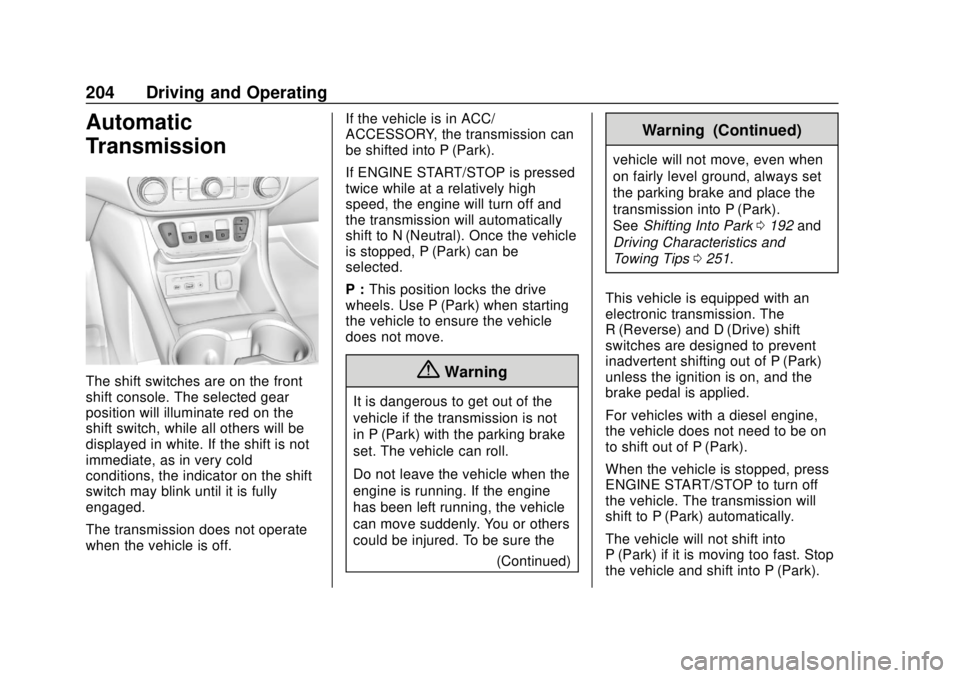
The shift switches are on the front
shift console. The selected gear
position will illuminate red on the
shift switch, while all others will be
displayed in white. If the shift is not
immediate, as in very cold
conditions, the indicator on the shift
switch may blink until it is fully
engaged.
The transmission does not operate
when the vehicle is off.If the vehicle is in ACC/
ACCESSORY, the transmission can
be shifted into P (Park).
If ENGINE START/STOP is pressed
twice while at a relatively high
speed, the engine will turn off and
the transmission will automatically
shift to N (Neutral). Once the vehicle
is stopped, P (Park) can be
selected.
P :
This position locks the drive
wheels. Use P (Park) when starting
the vehicle to ensure the vehicle
does not move.{Warning
It is dangerous to get out of the
vehicle if the transmission is not
in P (Park) with the parking brake
set. The vehicle can roll.
Do not leave the vehicle when the
engine is running. If the engine
has been left running, the vehicle
can move suddenly. You or others
could be injured. To be sure the
(Continued)
Warning (Continued)
vehicle will not move, even when
on fairly level ground, always set
the parking brake and place the
transmission into P (Park).
SeeShifting Into Park 0192 and
Driving Characteristics and
Towing Tips 0251.
This vehicle is equipped with an
electronic transmission. The
R (Reverse) and D (Drive) shift
switches are designed to prevent
inadvertent shifting out of P (Park)
unless the ignition is on, and the
brake pedal is applied.
For vehicles with a diesel engine,
the vehicle does not need to be on
to shift out of P (Park).
When the vehicle is stopped, press
ENGINE START/STOP to turn off
the vehicle. The transmission will
shift to P (Park) automatically.
The vehicle will not shift into
P (Park) if it is moving too fast. Stop
the vehicle and shift into P (Park).
Page 209 of 408
GMC Terrain/Terrain Denali Owner Manual (GMNA-Localizing-U.S./Canada/
Mexico-10664916) - 2018 - crc - 9/15/17
208 Driving and Operating
To shift into D (Drive):1. Bring the vehicle to a complete stop.
2. Pull the D (Drive) switch on the front shift console.
To shift out of D (Drive):
1. Bring the vehicle to a complete stop.
2. Shift to the desired gear.
Downshifting the transmission in
slippery road conditions could result
in skidding. See “Skidding”under
Loss of Control 0173.
Caution
Spinning the tires or holding the
vehicle in one place on a hill
using only the accelerator pedal
may damage the transmission.
The repair will not be covered by
the vehicle warranty. If the vehicle
is stuck, do not spin the tires.
When stopping on a hill, use the
brakes to hold the vehicle in
place.
Manual Mode
Electronic Range Select
(ERS) Mode
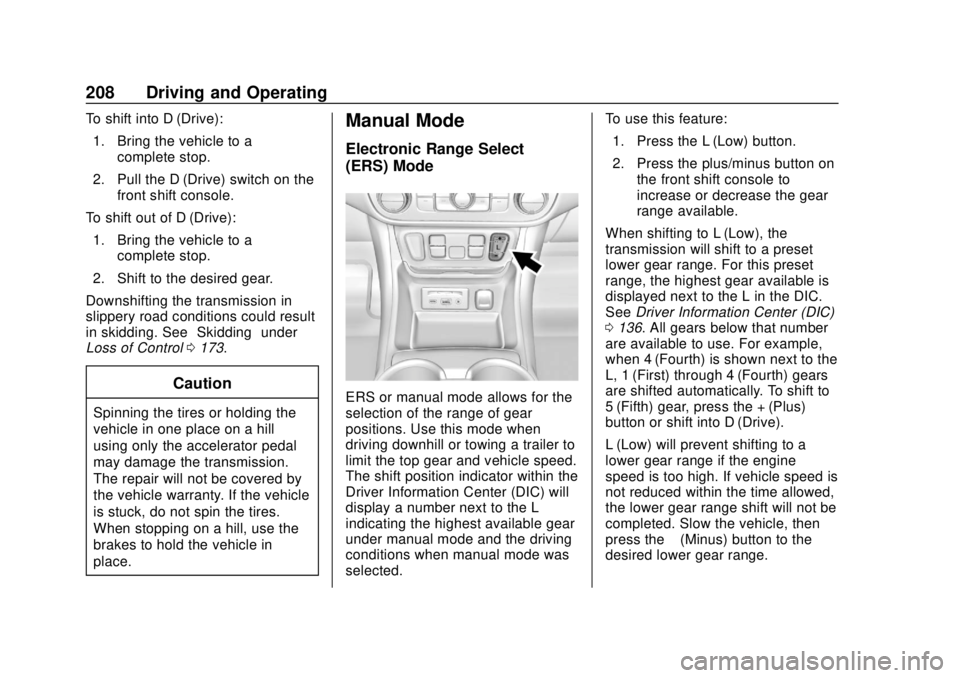
ERS or manual mode allows for the
selection of the range of gear
positions. Use this mode when
driving downhill or towing a trailer to
limit the top gear and vehicle speed.
The shift position indicator within the
Driver Information Center (DIC) will
display a number next to the L
indicating the highest available gear
under manual mode and the driving
conditions when manual mode was
selected. To use this feature:
1. Press the L (Low) button.
2. Press the plus/minus button on the front shift console to
increase or decrease the gear
range available.
When shifting to L (Low), the
transmission will shift to a preset
lower gear range. For this preset
range, the highest gear available is
displayed next to the L in the DIC.
See Driver Information Center (DIC)
0 136. All gears below that number
are available to use. For example,
when 4 (Fourth) is shown next to the
L, 1 (First) through 4 (Fourth) gears
are shifted automatically. To shift to
5 (Fifth) gear, press the + (Plus)
button or shift into D (Drive).
L (Low) will prevent shifting to a
lower gear range if the engine
speed is too high. If vehicle speed is
not reduced within the time allowed,
the lower gear range shift will not be
completed. Slow the vehicle, then
press the −(Minus) button to the
desired lower gear range.
Page 224 of 408

GMC Terrain/Terrain Denali Owner Manual (GMNA-Localizing-U.S./Canada/
Mexico-10664916) - 2018 - crc - 9/15/17
Driving and Operating 223
Warning (Continued)
Under many conditions, these
systems will not:. Detect children,
pedestrians, bicyclists,
or animals.
. Detect vehicles or objects
outside the area monitored
by the system.
. Work at all driving speeds.
. Warn you or provide you
with enough time to avoid a
crash.
. Work under poor visibility or
bad weather conditions.
. Work if the detection sensor
is not cleaned or is covered
by ice, snow, mud, or dirt.
(Continued)
Warning (Continued)
.Work if the detection sensor
is covered up, such as with
a sticker, magnet, or metal
plate.
. Work if the area surrounding
the detection sensor is
damaged or not properly
repaired.
Complete attention is always
required while driving, and you
should be ready to take action
and apply the brakes and/or steer
the vehicle to avoid crashes.
Audible or Safety Alert Seat
Some driver assistance features
alert the driver of obstacles by
beeping. To change the volume of
the warning chime, see “Comfort
and Convenience” underVehicle
Personalization 0142.
If equipped with the Safety Alert
Seat, the driver seat cushion may
provide a vibrating pulse alert instead of beeping. To change this,
see
“Collision/Detection Systems”
under Vehicle Personalization
0 142.
Assistance Systems for
Parking or Backing
If equipped, the Rear Vision Camera
(RVC), Rear Parking Assist (RPA),
Front Parking Assist (FPA),
Surround Vision, Front Vision
Camera, Rear Cross Traffic Alert
(RCTA), and Automatic Parking
Assist (APA) may help the driver
park or avoid objects. Always check
around the vehicle when parking or
backing.
Rear Vision Camera (RVC)
When the vehicle is shifted into
R (Reverse), the RVC displays an
image of the area behind the vehicle
in the infotainment display. The
previous screen displays when the
vehicle is shifted out of R (Reverse)
after a short delay. To return to the
previous screen sooner, press any
button on the infotainment display,
shift into P (Park), or reach a vehicle
Page 230 of 408

GMC Terrain/Terrain Denali Owner Manual (GMNA-Localizing-U.S./Canada/
Mexico-10664916) - 2018 - crc - 9/15/17
Driving and Operating 229
FCA also lights an amber visual
alert if following another vehicle
much too closely.
FCA detects vehicles within a
distance of approximately 60 m
(197 ft) and operates at speeds
above 8 km/h (5 mph).
{Warning
FCA is a warning system and
does not apply the brakes. When
approaching a slower-moving or
stopped vehicle ahead too rapidly,
or when following a vehicle too
closely, FCA may not provide a
warning with enough time to help
avoid a crash. It also may not
provide any warning at all. FCA
does not warn of pedestrians,
animals, signs, guardrails,
bridges, construction barrels,
or other objects. Be ready to take
action and apply the brakes. See
Defensive Driving0171. FCA can be disabled with the FCA
steering wheel control, or if
equipped, through vehicle
personalization. See
“Collision/
Detection Systems” underVehicle
Personalization 0142.
Detecting the Vehicle Ahead
FCA warnings will not occur unless
the FCA system detects a vehicle
ahead. When a vehicle is detected,
the vehicle ahead indicator will
display green. Vehicles may not be
detected on curves, highway exit
ramps, or hills, due to poor visibility;
or if a vehicle ahead is partially
blocked by pedestrians or other
objects. FCA will not detect another
vehicle ahead until it is completely
in the driving lane.
{Warning
FCA does not provide a warning
to help avoid a crash, unless it
detects a vehicle. FCA may not
detect a vehicle ahead if the FCA
sensor is blocked by dirt, snow,
or ice, or if the windshield is
damaged. It may also not detect a
vehicle on winding or hilly roads,
or in conditions that can limit
visibility such as fog, rain,
or snow, or if the headlamps or
windshield are not cleaned or in
proper condition. Keep the
windshield, headlamps, and FCA
sensors clean and in good repair.
Collision Alert
Page 236 of 408

GMC Terrain/Terrain Denali Owner Manual (GMNA-Localizing-U.S./Canada/
Mexico-10664916) - 2018 - crc - 9/15/17
Driving and Operating 235
assist or provide an LDW alert if it
detects that you are actively
steering. Override LKA by turning
the steering wheel. LKA uses a
camera to detect lane markings
between 60 km/h (37 mph) and
180 km/h (112 mph).
{Warning
The LKA system does not
continuously steer the vehicle.
It may not keep the vehicle in the
lane or give a Lane Departure
Warning (LDW) alert, even if a
lane marking is detected.
The LKA and LDW systems
may not:. Provide an alert or enough
steering assist to avoid a
lane departure or crash.
. Detect lane markings under
poor weather or visibility
conditions. This can occur if
the windshield or
headlamps are blocked by
dirt, snow, or ice, if they are
(Continued)
Warning (Continued)
not in proper condition, or if
the sun shines directly into
the camera.
. Detect road edges.
. Detect lanes on winding or
hilly roads.
If LKA only detects lane markings
on one side of the road, it will
only assist or provide an LDW
alert when approaching the lane
on the side where it has detected
a lane marking. Even with LKA
and LDW, you must steer the
vehicle. Always keep your
attention on the road and
maintain proper vehicle position
within the lane, or vehicle
damage, injury, or death could
occur. Always keep the
windshield, headlamps, and
camera sensors clean and in
good repair. Do not use LKA in
bad weather conditions.
{Warning
Using LKA while towing a trailer
or on slippery roads could cause
loss of control of the vehicle and
a crash. Turn the system off.
How the System Works
The LKA camera sensor is on the
windshield ahead of the rearview
mirror.
To turn LKA on and off, press
A
on the center console.
When on,
Ais green if LKA is
available to assist and provide LDW
alerts. It may assist by gently
turning the steering wheel and
display
Aas amber if the vehicle
approaches a detected lane marking
without using a turn signal in that
direction. It may also provide an
LDW alert by flashing
Aamber
as the lane marking is crossed.
Additionally, there may be three
beeps, or the driver seat may pulse
Page 239 of 408
GMC Terrain/Terrain Denali Owner Manual (GMNA-Localizing-U.S./Canada/
Mexico-10664916) - 2018 - crc - 9/15/17
238 Driving and Operating
occurs, return to your authorized
dealer for diagnosis. If it is
determined that the condition is
caused by the type of fuel used,
repairs may not be covered by the
vehicle warranty.
Fuels in Foreign
Countries (Gasoline)
The U.S., Canada, and Mexico post
fuel octane ratings in anti-knock
index (AKI). For fuel not to use in a
foreign country, see“Prohibited
Fuels” inFuel (Gasoline) 0236.
Fuel Additives
To keep fuel systems clean, TOP
TIER detergent gasoline is
recommended. See Fuel (Gasoline)
0 236.
If TOP TIER detergent gasoline is
not available, one bottle of GM Fuel
System Treatment Cleaner added to
the fuel tank at every engine oil
change, can help. GM Fuel System
Treatment Cleaner is the only gasoline additive recommended by
General Motors. It is available at
your dealer.
Fuel for Diesel Engines
The selection of a high quality fuel
is important for maintaining optimum
performance. Do not use diesel fuel
with more than 15 ppm sulfur
content. Do not use a diesel blend
containing more than 20% biodiesel
by volume. Both diesel and
biodiesel blends must meet all the
requirements as defined in the most
current versions of the local fuel
standards. See the recommended
fuels under
What Fuel to Use in the
U.S. (Diesel) 0239 andWhat Fuel
to Use in Canada and Mexico
(Diesel) 0240.
Caution
Engine damage may occur if
recommended fuels are not used,
which may void the vehicle
warranty. Some improper
fuels are:
. Diesel fuel with the addition
of gasoline.
. Diesel fuel mixed with
engine oil or automatic
transmission fluid.
. Triglyceride fuels, such as
raw vegetable oil or animal
fat, in any form, including
with blends of diesel or
biodiesel.
. Marine diesel fuel and
fuel oils.
. Diesel-water emulsions,
such as Aquazole.
(Continued)
Page 282 of 408
GMC Terrain/Terrain Denali Owner Manual (GMNA-Localizing-U.S./Canada/
Mexico-10664916) - 2018 - crc - 9/15/17
Vehicle Care 281
Caution
Do not run the engine if there is a
leak in the engine cooling system.
This can cause a loss of all
coolant and can damage the
system and vehicle. Have any
leaks fixed right away.
If Steam Is Coming from the
Engine Compartment
{Warning
Steam and scalding liquids from a
hot cooling system are under
pressure. Turning the pressure
cap, even a little, can cause them
to come out at high speed and
you could be burned. Never turn
the cap when the cooling system,
including the pressure cap, is hot.
Wait for the cooling system and
pressure cap to cool.
If No Steam Is Coming from
the Engine Compartment
If the engine coolant temperature
gauge is in the overheat zone or an
engine overheat DIC message is
displayed but no steam can be seen
or heard, the problem may not be
too serious. Sometimes the engine
can get a little too hot when the
vehicle:
.Climbs a long hill on a hot day
. Stops after high-speed driving
. Idles for long periods in traffic
. Tows a trailer
If the engine coolant temperature
gauge is in the overheat zone and
an overheat DIC message is
displayed with no sign of steam: 1. Turn the air conditioning off.
2. Turn the heater on to the highest temperature and to the
highest fan speed. Open the
windows as necessary. 3. When it is safe to do so, pull off
the road, shift to P (Park) or
N (Neutral), and let the
engine idle.
If the engine coolant temperature
gauge is no longer in the overheat
zone or an overheat DIC message
no longer displays, the vehicle can
be driven. Continue to drive the
vehicle slowly for about 10 minutes.
Keep a safe distance from the
vehicle in front. If the engine coolant
temperature gauge does not go
back to the overheat zone or an
overheat DIC message does not
display, continue to drive normally
and have the cooling system
checked for proper fill and function.
If the engine coolant temperature
gauge is still in the overheat zone or
an overheat DIC message still
displays, pull over, stop, and park
the vehicle right away. If overheat
messages appear repeatedly, see
your dealer.
If there is no sign of steam, idle the
engine for three minutes while
parked. If the engine coolant
temperature gauge is still in the
Page 284 of 408
GMC Terrain/Terrain Denali Owner Manual (GMNA-Localizing-U.S./Canada/
Mexico-10664916) - 2018 - crc - 9/15/17
Vehicle Care 283
Caution
Continuing to drive with worn-out
brake pads could result in costly
brake repair.
Some driving conditions or climates
can cause a brake squeal when the
brakes are first applied or lightly
applied. This does not mean
something is wrong with the brakes.
Properly torqued wheel nuts are
necessary to help prevent brake
pulsation. When tires are rotated,
inspect brake pads for wear and
evenly tighten wheel nuts in the
proper sequence to torque
specifications. See Capacities and
Specifications 0366.
Brake pads should be replaced as
complete sets.
Brake Pedal Travel
See your dealer if the brake pedal
does not return to normal height,
or if there is a rapid increase in
pedal travel. This could be a sign
that brake service may be required.
Replacing Brake System Parts
Always replace brake system parts
with new, approved replacement
parts. If this is not done, the brakes
may not work properly. The braking
performance expected can change
in many other ways if the wrong
replacement brake parts are
installed or if parts are improperly
installed.
Brake Fluid
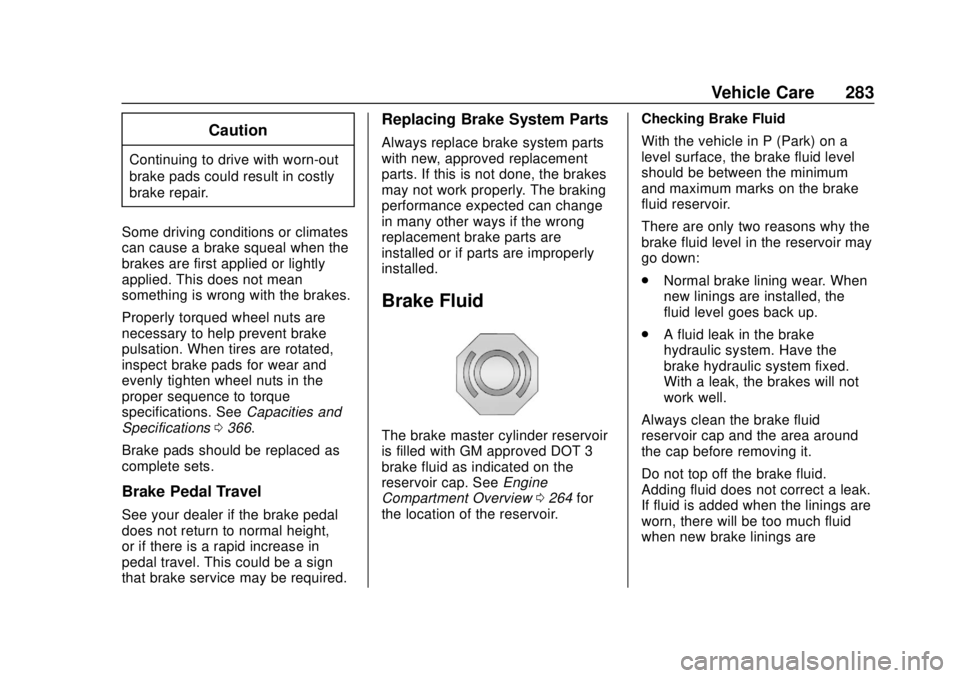
The brake master cylinder reservoir
is filled with GM approved DOT 3
brake fluid as indicated on the
reservoir cap. See Engine
Compartment Overview 0264 for
the location of the reservoir. Checking Brake Fluid
With the vehicle in P (Park) on a
level surface, the brake fluid level
should be between the minimum
and maximum marks on the brake
fluid reservoir.
There are only two reasons why the
brake fluid level in the reservoir may
go down:
.
Normal brake lining wear. When
new linings are installed, the
fluid level goes back up.
. A fluid leak in the brake
hydraulic system. Have the
brake hydraulic system fixed.
With a leak, the brakes will not
work well.
Always clean the brake fluid
reservoir cap and the area around
the cap before removing it.
Do not top off the brake fluid.
Adding fluid does not correct a leak.
If fluid is added when the linings are
worn, there will be too much fluid
when new brake linings are
Page 295 of 408
GMC Terrain/Terrain Denali Owner Manual (GMNA-Localizing-U.S./Canada/
Mexico-10664916) - 2018 - crc - 9/15/17
294 Vehicle Care
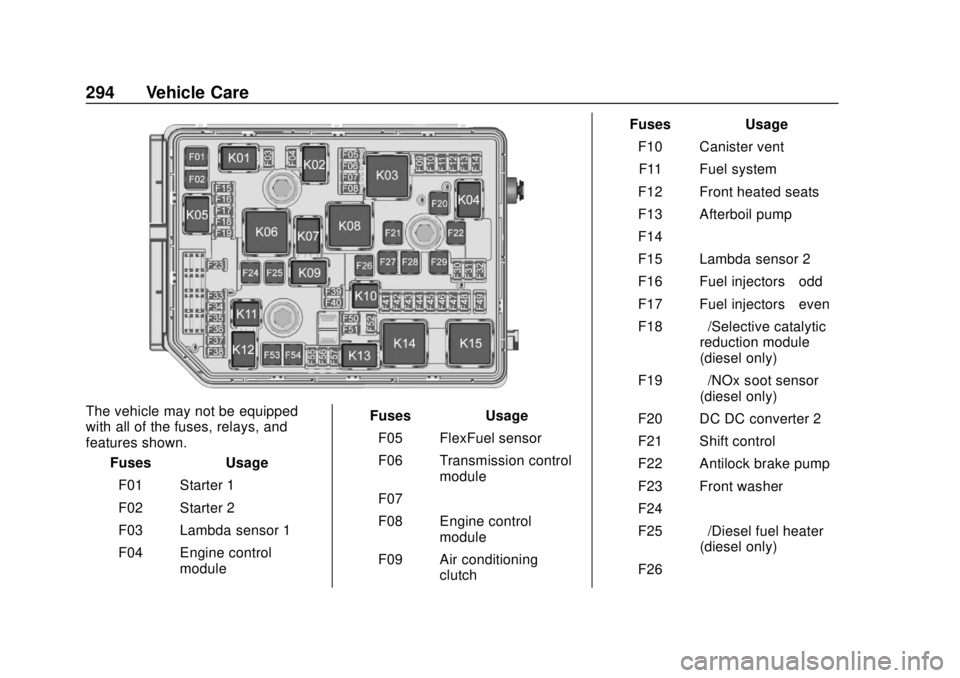
The vehicle may not be equipped
with all of the fuses, relays, and
features shown.Fuses Usage
F01 Starter 1
F02 Starter 2
F03 Lambda sensor 1
F04 Engine control module Fuses Usage
F05 FlexFuel sensor
F06 Transmission control module
F07 –
F08 Engine control module
F09 Air conditioning clutch Fuses Usage
F10 Canister ventF11 Fuel system
F12 Front heated seats
F13 Afterboil pump
F14 –
F15 Lambda sensor 2
F16 Fuel injectors –odd
F17 Fuel injectors –even
F18 –/Selective catalytic
reduction module
(diesel only)
F19 –/NOx soot sensor
(diesel only)
F20 DC DC converter 2
F21 Shift control
F22 Antilock brake pump
F23 Front washer
F24 –
F25 –/Diesel fuel heater
(diesel only)
F26 –
Page 296 of 408

GMC Terrain/Terrain Denali Owner Manual (GMNA-Localizing-U.S./Canada/
Mexico-10664916) - 2018 - crc - 9/15/17
Vehicle Care 295
FusesUsage
F27 Antilock brake VAL
F28 LD trailer
F29 Rear window defogger
F30 Mirror defroster
F31 –
F32 Variable functions
F33 –
F34 Horn
F35 Vacuum pump
F36 Right high-beam headlamp
F37 Left high-beam headlamp
F38 Automatic headlamp leveling
F39 Fog lamps
F40 –
F41 Transmission range control module
F42 Motorized headlamp Fuses
Usage
F43 Fuel pump
F44 Interior rearview mirror
F45 Canister vent solenoid
F46 Driver side Ventilated Seat
F47 Steering column lock assembly
F48 Rear wiper
F49 –
F50 Heated steering wheel
F51 Right headlamp
F52 Engine control module/
Transmission control
F53 –
F54 Front wiper
F55 Front wiper speed/ Control
F56 – Fuses
Usage
F57 Left headlamp
Relays Usage
K01 Starter solenoid
K02 Air conditioning control
K03 –
K04 Wiper control
K05 Starter Solenoid
K06 –/Fuel
heater (diesel only)
K07 –
K08 –
K09 Wiper speed
K10 –
K11 –
K12 High-beam headlamps
K13 Headlamps/Daytime running lamps
K14 Run/Crank