automatic GMC TERRAIN 2019 Workshop Manual
[x] Cancel search | Manufacturer: GMC, Model Year: 2019, Model line: TERRAIN, Model: GMC TERRAIN 2019Pages: 434, PDF Size: 6.38 MB
Page 210 of 434
GMC Terrain/Terrain Denali Owner Manual (GMNA-Localizing-U.S./Canada/
Mexico-12146071) - 2019 - crc - 7/27/18
Driving and Operating 209
Caution
Do not mix fuel with DEF, and do
not put DEF in the fuel tank. This
could lead to costly repairs that
might not be covered by the
vehicle warranty.
It is recommended to fill the DEF
tank on level ground and when the
vehicle is not running. When adding
fluid, it is recommended to fill the
DEF tank.
Caution
Do not overfill the DEF tank and
do not allow DEF to contact the
finished surfaces of the vehicle,
as it could damage the vehicle
finish. If DEF is spilled during
filling, wipe any affected surface
with a damp cloth.
Do not top off the DEF tank. If using
a bottle or jug to refill DEF, follow
the instructions on the container
label and use a dedicated fill aid. In certain cold conditions, it is
possible to find some frozen DEF in
the DEF fill pipe opening. If this
condition prevents the filling of a
DEF tank, place the vehicle in a
warm garage overnight.
For information on how to fill the
DEF tank, see
Filling the Tank
(Gasoline) 0268 orFilling the Tank
(Diesel) 0270.
Exhaust Fluid Low
A full DEF tank will last for several
thousand kilometers (miles),
depending on vehicle usage. As the
exhaust fluid level drops, warnings
will automatically be displayed in the
DIC. Exhaust fluid level status is
available in the DIC. See “Diesel
Exhaust Fluid (DEF) Level (Diesel
Engine Only)” inDriver Information
Center (DIC) (Base and Midlevel)
0 142 orDriver Information Center
(DIC) (Uplevel) 0147.
To avoid vehicle speed limitations,
the DEF tank should be refilled at
the first opportunity after a low
warning indication. If DEF is added
before the EXHAUST FLUID EMPTY REFILL NOW message
appears, it may take several km/mi
for the DIC message to update.
If the vehicle speed has been
limited and DEF has been added, it
may take up to 30 seconds after
engine start with the vehicle
stopped for the EXHAUST FLUID
EMPTY REFILL NOW message to
clear. If the vehicle is driven prior to
the DIC message clearing, the
vehicle speed will still be limited.
If the DIC message clears while
driving, the speed limitation will be
removed gradually.
If DEF is added under freezing
conditions, additional time may be
required to remove speed limitations
and it may require less fluid to fill
the DEF tank.
The DIC message EXHAUST
FLUID RANGE: XXXX km (mi)
displays at approximately 1 600 km
(1,000 mi) of fluid range remaining.
This message appears again at
approximately 500 km (300 mi) of
remaining range before the exhaust
fluid tank becomes empty.
Page 214 of 434
GMC Terrain/Terrain Denali Owner Manual (GMNA-Localizing-U.S./Canada/
Mexico-12146071) - 2019 - crc - 7/27/18
Driving and Operating 213
A chime also comes on. Vehicle
speed will be reduced to a
maximum speed limit of 104 km/h
(65 mph).
After the transition to 104 km/h
(65 mph) is complete, the DIC
message SERVICE EMISSION
SYSTEM - SEE OWNERS
MANUAL NOW - SPEED LIMITED
TO 104 KM/H (65 MPH)–120 KM
(75 MI) UNTIL 88 KM/H (55 MPH)
MAX SPEED displays. The
displayed mileage will decrease as
driving continues. A chime also
comes on.
When the mileage countdown is
zero, the DIC message SERVICE
EMISSION SYSTEM - SEE
OWNERS MANUAL NOW -
TRANSITIONING TO 88 KM/H
(55 MPH) MAX SPEED displays.
A chime also comes on. Vehicle
speed will be reduced to a
maximum speed limit of 88 km/h
(55 mph). After the transition to 88 km/h
(55 mph) is complete, the DIC
message SERVICE EMISSION
SYSTEM - SEE OWNERS
MANUAL NOW - SPEED LIMITED
TO 88 KM/H (55 MPH) displays.
A chime also comes on.Automatic
Transmission
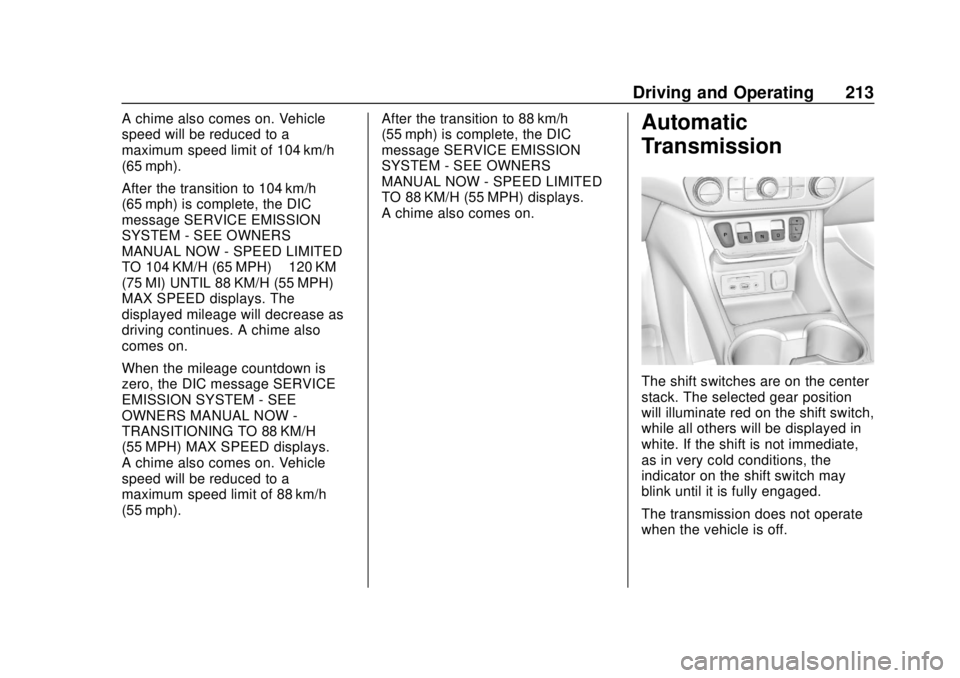
The shift switches are on the center
stack. The selected gear position
will illuminate red on the shift switch,
while all others will be displayed in
white. If the shift is not immediate,
as in very cold conditions, the
indicator on the shift switch may
blink until it is fully engaged.
The transmission does not operate
when the vehicle is off.
Page 215 of 434
GMC Terrain/Terrain Denali Owner Manual (GMNA-Localizing-U.S./Canada/
Mexico-12146071) - 2019 - crc - 7/27/18
214 Driving and Operating
If the vehicle is in ACC/
ACCESSORY, the transmission can
be shifted into P (Park).
If ENGINE START/STOP is pressed
twice while at a relatively high
speed, the engine will turn off and
the transmission will automatically
shift to N (Neutral). Once the vehicle
is stopped, P (Park) can be
selected.
P :This position locks the drive
wheels. Use P (Park) when starting
the vehicle to ensure the vehicle
does not move.
{Warning
It is dangerous to get out of the
vehicle if the transmission is not
in P (Park) with the parking brake
set. The vehicle can roll.
Do not leave the vehicle when the
engine is running. If the engine
has been left running, the vehicle
can move suddenly. You or others
could be injured. To be sure the
(Continued)
Warning (Continued)
vehicle will not move, even when
on fairly level ground, always set
the parking brake and place the
transmission into P (Park).
SeeShifting Into Park 0202 and
Driving Characteristics and
Towing Tips 0274.
This vehicle is equipped with an
electronic transmission. The
R (Reverse) and D (Drive) shift
switches are designed to prevent
inadvertent shifting out of P (Park)
unless the ignition is on, and the
brake pedal is applied.
For vehicles with a diesel engine,
the vehicle does not need to be on
to shift out of P (Park).
When the vehicle is stopped, press
ENGINE START/STOP to turn off
the vehicle. The transmission will
shift to P (Park) automatically.
The vehicle will not shift into
P (Park) if it is moving too fast. Stop
the vehicle and shift into P (Park). To shift in and out of P (Park), see
Shifting Into Park
0202 andShifting
out of Park 0203.
R : Use this gear to back up.
If the vehicle is shifted from either
R (Reverse) to D (Drive),
or D (Drive) to R (Reverse) while the
speed is too high, the vehicle will
shift to N (Neutral). Reduce the
vehicle speed and try the shift
again.
To shift into R (Reverse): 1. Bring the vehicle to a complete stop.
2. Pull the R (Reverse) switch on the center stack.
To shift out of R (Reverse):
1. Bring the vehicle to a complete stop.
2. Shift to the desired gear.
At low vehicle speeds, R (Reverse)
can be used to rock the vehicle
back and forth to get out of snow,
ice, or sand without damaging the
transmission. See If the Vehicle Is
Stuck 0190.
Page 216 of 434
GMC Terrain/Terrain Denali Owner Manual (GMNA-Localizing-U.S./Canada/
Mexico-12146071) - 2019 - crc - 7/27/18
Driving and Operating 215
N :In this position, the engine does
not connect with the wheels. To
restart the engine when the vehicle
is already moving, use
N (Neutral) only.
{Warning
Shifting into a drive gear while the
engine is running at high speed is
dangerous. Unless your foot is
firmly on the brake pedal, the
vehicle could move very rapidly.
You could lose control and hit
people or objects. Do not shift
into a drive gear while the engine
is running at high speed.
Caution
Shifting out of P (Park) or
N (Neutral) with the engine
running at high speed may
damage the transmission. The
repairs would not be covered by
(Continued)
Caution (Continued)
the vehicle warranty. Be sure the
engine is not running at high
speed when shifting the vehicle.
Caution
The vehicle is not designed to
stay in N (Neutral) for extended
periods of time. It will
automatically shift into P (Park).
To shift into N (Neutral), press the
N (Neutral) switch until the N
indicator displays.
To shift out of N (Neutral): 1. Bring the vehicle to a complete stop.
2. Shift to the desired gear.
Car Wash Mode
This vehicle includes a Car Wash
Mode that allows the vehicle to
remain in N (Neutral) for use in
automatic car washes. Car Wash Mode is not to be used
for vehicle towing. If the vehicle
needs to be towed, see
Towing the
Vehicle 0363
Caution
The vehicle is not designed to
stay in N (Neutral) for extended
periods of time. It will
automatically shift into P (Park) if
left in Car Wash Mode.
Car Wash Mode (Engine Off –
Driver in Vehicle)
To place the vehicle in N (Neutral)
with the engine off and the vehicle
occupied:
1. Drive to the entrance of the car wash.
2. Apply the brake pedal.
3. Shift to N (Neutral).
4. Turn off the engine and release the brake pedal.
Page 217 of 434
GMC Terrain/Terrain Denali Owner Manual (GMNA-Localizing-U.S./Canada/
Mexico-12146071) - 2019 - crc - 7/27/18
216 Driving and Operating
5. The indicator should continueto show N. If it does not, start
the engine and repeat
Steps 2–4.
6. The vehicle is now ready for the car wash.
Car Wash Mode (Engine Off –
Driver out of Vehicle)
To place the vehicle in N (Neutral)
with the engine off and the vehicle
unoccupied:
1. Drive to the entrance of the car wash.
2. Apply the brake pedal.
3. Open the door.
4. Shift to N (Neutral).
5. Turn off the engine and release the brake pedal.
6. The indicator should continue to show N. If it does not, start
the engine and repeat
Steps 2–5.
7. Exit the vehicle and close the door. The vehicle is now ready
for the car wash. 8. The vehicle may automatically
shift to P (Park) upon re-entry.
Car Wash Mode (Engine On –
Driver in Vehicle)
To place the vehicle in N (Neutral)
with the engine on and the vehicle
occupied:
1. Drive to the entrance of the car wash.
2. Apply the brake pedal.
3. Shift to N (Neutral).
4. Release the brake pedal. The vehicle is now ready for the
car wash.
Car Wash Mode (Engine On –
Driver out of Vehicle)
To place the vehicle in N (Neutral)
with the engine on and the vehicle
unoccupied:
1. Drive to the entrance of the car wash.
2. Apply the brake pedal.
3. Open the door. 4. Shift to N (Neutral), then
release the brake pedal.
5. The indicator should continue to show N. If it does not, repeat
Steps 2–4.
6. Exit the vehicle and close the door. The vehicle is now ready
for the car wash.
7. The vehicle may automatically shift to P (Park) upon re-entry.
Caution
A transmission hot message may
display if the automatic
transmission fluid is too hot.
Driving under this condition can
damage the vehicle. Stop and idle
the engine to cool the automatic
transmission fluid. This message
clears when the transmission fluid
has cooled sufficiently.
D : This position is for normal
driving. If more power is needed for
passing, press the accelerator
pedal down.
Page 218 of 434
GMC Terrain/Terrain Denali Owner Manual (GMNA-Localizing-U.S./Canada/
Mexico-12146071) - 2019 - crc - 7/27/18
Driving and Operating 217
To shift into D (Drive):1. Bring the vehicle to a complete stop.
2. Pull the D (Drive) switch on the center stack.
To shift out of D (Drive):
1. Bring the vehicle to a complete stop.
2. Shift to the desired gear.
Downshifting the transmission in
slippery road conditions could result
in skidding. See “Skidding”under
Loss of Control 0183.
Caution
Spinning the tires or holding the
vehicle in one place on a hill
using only the accelerator pedal
may damage the transmission.
The repair will not be covered by
the vehicle warranty. If the vehicle
is stuck, do not spin the tires.
When stopping on a hill, use the
brakes to hold the vehicle in
place.
Manual Mode
Electronic Range Select
(ERS) Mode
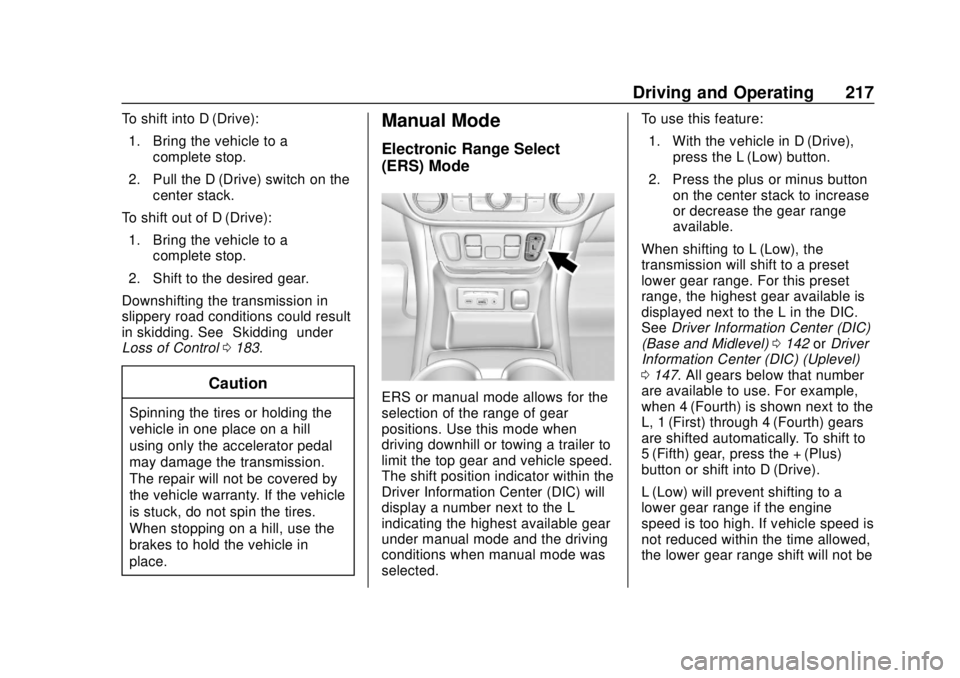
ERS or manual mode allows for the
selection of the range of gear
positions. Use this mode when
driving downhill or towing a trailer to
limit the top gear and vehicle speed.
The shift position indicator within the
Driver Information Center (DIC) will
display a number next to the L
indicating the highest available gear
under manual mode and the driving
conditions when manual mode was
selected. To use this feature:
1. With the vehicle in D (Drive), press the L (Low) button.
2. Press the plus or minus button on the center stack to increase
or decrease the gear range
available.
When shifting to L (Low), the
transmission will shift to a preset
lower gear range. For this preset
range, the highest gear available is
displayed next to the L in the DIC.
See Driver Information Center (DIC)
(Base and Midlevel) 0142 orDriver
Information Center (DIC) (Uplevel)
0 147. All gears below that number
are available to use. For example,
when 4 (Fourth) is shown next to the
L, 1 (First) through 4 (Fourth) gears
are shifted automatically. To shift to
5 (Fifth) gear, press the + (Plus)
button or shift into D (Drive).
L (Low) will prevent shifting to a
lower gear range if the engine
speed is too high. If vehicle speed is
not reduced within the time allowed,
the lower gear range shift will not be
Page 219 of 434
GMC Terrain/Terrain Denali Owner Manual (GMNA-Localizing-U.S./Canada/
Mexico-12146071) - 2019 - crc - 7/27/18
218 Driving and Operating
completed. Slow the vehicle, then
press the−(Minus) button to the
desired lower gear range.
While using ERS, cruise control can
be used.
Tow/Haul Mode
For information on the Tow/Haul
Mode, see Driver Mode Control
0 226.
Automatic Engine Grade
Braking
Automatic Engine Grade Braking
assists when driving downhill.
It maintains vehicle speed by
automatically implementing a shift
pattern that uses the engine and the
transmission to slow the vehicle. The system will automatically
command downshifts to reduce
vehicle speed. The normal shift
pattern will return once the vehicle
is on a low grade or when the
accelerator pedal is pressed.
While in the Electronic Range
Select (ERS) mode, grade braking
is deactivated, allowing the driver to
select a range and limiting the
highest gear available. Grade
braking is available for normal
driving and in Tow/Haul Mode.
See
Automatic Transmission 0213.
Drive Systems
All-Wheel Drive
For information on All-Wheel
Drive (AWD), see Driver Mode
Control 0226.
Page 221 of 434
GMC Terrain/Terrain Denali Owner Manual (GMNA-Localizing-U.S./Canada/
Mexico-12146071) - 2019 - crc - 7/27/18
220 Driving and Operating
The vehicle has an Electric Parking
Brake (EPB). The EPB can always
be activated, even if the ignition is
off. To prevent draining the battery,
avoid repeated cycles of the EPB
system when the engine is not
running.
The system has a
Yor PARK
Electric Parking Brake light, and a
8
Service Parking Brake light or
Service Parking Brake message.
See Electric Parking Brake Light
0 136 andService Electric Parking
Brake Light 0136.
Before leaving the vehicle, check for
the
Yor PARK light to ensure that
the parking brake is applied.
EPB Apply
To apply the EPB:
1. Be sure the vehicle is at a complete stop.
2. Press the EPB switch momentarily. The
Yor PARK light will flash and
then stay on once the EPB is fully
applied. If the
Yor PARK light
flashes continuously, then the EPB
is only partially applied or there is a
problem with the EPB. A Driver
Information Center (DIC) message
will display. Release the EPB and
try to apply it again. If the light does
not come on, or keeps flashing,
have the vehicle serviced. Do not
drive the vehicle if the
Yor PARK
light is flashing. See your dealer.
See Electric Parking Brake Light
0 136.
If the
8light or Service Parking
Brake message is on, press the
EPB switch and hold it. Continue to
hold the switch until the
Yor
PARK light remains on. If the
8light
or Service Parking Brake message
remains on, see your dealer.
If the EPB is applied while the
vehicle is moving, the vehicle will
decelerate as long as the switch is pressed. If the switch is pressed
until the vehicle comes to a stop,
the EPB will remain applied.
The vehicle may automatically apply
the EPB in some situations when
the vehicle is not moving. This is
normal, and is done to periodically
check the correct operation of the
EPB system.
If the EPB fails to apply, block the
rear wheels to prevent vehicle
movement.
EPB Release
To release the EPB:
1. Turn the ignition on or to ACC/ ACCESSORY.
2. Apply and hold the brake pedal.
3. Press the EPB switch momentarily.
The EPB is released when the
Y
or PARK light is off.
Page 222 of 434
GMC Terrain/Terrain Denali Owner Manual (GMNA-Localizing-U.S./Canada/
Mexico-12146071) - 2019 - crc - 7/27/18
Driving and Operating 221
If the8light or Service Parking
Brake message is on, release the
EPB by pressing and holding the
EPB switch. Continue to hold the
switch until the
Yor PARK light is
off. If either light stays on after
release is attempted, see your
dealer.
Caution
Driving with the parking brake on
can overheat the brake system
and cause premature wear or
damage to brake system parts.
Make sure that the parking brake
is fully released and the brake
warning light is off before driving.
Automatic EPB Release
The EPB will automatically release if
the vehicle is running, placed into
gear, and an attempt is made to
drive away. Avoid rapid acceleration
when the EPB is applied, to
preserve parking brake lining life.
Brake Assist
The Brake Assist feature is
designed to assist the driver in
stopping or decreasing vehicle
speed in emergency driving
conditions. This feature uses the
stability system hydraulic brake
control module to supplement the
power brake system under
conditions where the driver has
quickly and forcefully applied the
brake pedal in an attempt to quickly
stop or slow down the vehicle. The
stability system hydraulic brake
control module increases brake
pressure at each corner of the
vehicle until the ABS activates.
Minor brake pedal pulsation or
pedal movement during this time is
normal and the driver should
continue to apply the brake pedal as
the driving situation dictates. The
Brake Assist feature will
automatically disengage when the
brake pedal is released or brake
pedal pressure is quickly
decreased.
Hill Start Assist (HSA)
This vehicle has a Hill Start Assist
(HSA) feature, which may be useful
when the vehicle is stopped on a
grade sufficient enough to activate
HSA. This feature is designed to
prevent the vehicle from rolling,
either forward or rearward, during
vehicle drive off. After the driver
completely stops and holds the
vehicle in a complete standstill on a
grade, HSA will be automatically
activated. During the transition
period between when the driver
releases the brake pedal and starts
to accelerate to drive off on a grade,
HSA holds the braking pressure for
a maximum of two seconds to
ensure that there is no rolling. The
brakes will automatically release
when the accelerator pedal is
applied within the two-second
window. It will not activate if the
vehicle is in a drive gear and facing
downhill, or if the vehicle is facing
uphill and in R (Reverse). To
change the duration, see “Extended
Hill Start Assist” inVehicle
Personalization 0152.
Page 223 of 434
GMC Terrain/Terrain Denali Owner Manual (GMNA-Localizing-U.S./Canada/
Mexico-12146071) - 2019 - crc - 7/27/18
222 Driving and Operating
Ride Control Systems
Traction Control/
Electronic Stability
Control
System Operation
The vehicle has a Traction Control
System (TCS) and StabiliTrak/
Electronic Stability Control (ESC),
an electronic stability control
system. These systems help limit
wheel slip and assist the driver in
maintaining control, especially on
slippery road conditions.
TCS activates if it senses that any
of the drive wheels are spinning or
beginning to lose traction. When this
happens, TCS applies the brakes to
the spinning wheels and reduces
engine power to limit wheel spin.
StabiliTrak/ESC activates when the
vehicle senses a difference between
the intended path and the direction
the vehicle is actually traveling.
StabiliTrak/ESC selectively applies
braking pressure to any one of thevehicle wheel brakes to assist the
driver in keeping the vehicle on the
intended path.
If cruise control is being used and
TCS or StabiliTrak/ESC begins to
limit wheel spin, cruise control will
disengage. Cruise control may be
turned back on when road
conditions allow.
Both systems come on
automatically when the vehicle is
started and begins to move. The
systems may be heard or felt while
they are operating or while
performing diagnostic checks. This
is normal and does not mean there
is a problem with the vehicle.
It is recommended to leave both
systems on for normal driving
conditions, but it may be necessary
to turn TCS off if the vehicle gets
stuck in sand, mud, ice, or snow.
See
If the Vehicle Is Stuck 0190
and “Turning the Systems Off and
On” later in this section.
The indicator light for both systems
is in the instrument cluster. This
light will:
.
Flash when TCS is limiting
wheel spin
. Flash when StabiliTrak/ESC is
activated
. Turn on and stay on when either
system is not working
If either system fails to turn on or to
activate, a message displays in the
Driver Information Center (DIC), and
dcomes on and stays on to
indicate that the system is inactive
and is not assisting the driver in
maintaining control. The vehicle is
safe to drive, but driving should be
adjusted accordingly.