ACC GMC TERRAIN 2019 Owner's Manual
[x] Cancel search | Manufacturer: GMC, Model Year: 2019, Model line: TERRAIN, Model: GMC TERRAIN 2019Pages: 434, PDF Size: 6.38 MB
Page 9 of 434
GMC Terrain/Terrain Denali Owner Manual (GMNA-Localizing-U.S./Canada/
Mexico-12146071) - 2019 - crc - 7/27/18
8 In Brief
Initial Drive
Information
This section provides a brief
overview about some of the
important features that may or may
not be on your specific vehicle.
For more detailed information, refer
to each of the features which can be
found later in this owner’s manual.
Stop/Start System
If equipped, the Stop/Start system
will shut off the engine to help
conserve fuel. It has components
designed for the increased number
of starts.
When the brakes are applied and
the vehicle is at a complete stop,
the engine may turn off. When
stopped, the tachometer displays
AUTO STOP. SeeTachometer
0 128. When the brake pedal is
released or the accelerator pedal is
pressed, the engine will restart. See
Stop/Start System 0199.
Remote Keyless Entry
(RKE) System
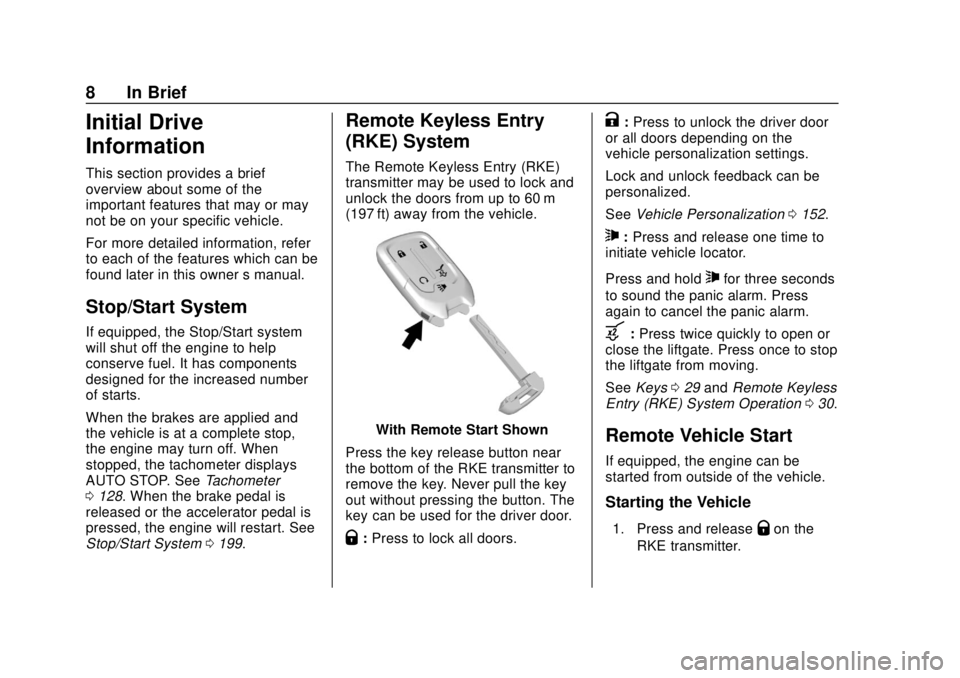
The Remote Keyless Entry (RKE)
transmitter may be used to lock and
unlock the doors from up to 60 m
(197 ft) away from the vehicle.
With Remote Start Shown
Press the key release button near
the bottom of the RKE transmitter to
remove the key. Never pull the key
out without pressing the button. The
key can be used for the driver door.
Q: Press to lock all doors.
K:Press to unlock the driver door
or all doors depending on the
vehicle personalization settings.
Lock and unlock feedback can be
personalized.
See Vehicle Personalization 0152.
7:Press and release one time to
initiate vehicle locator.
Press and hold
7for three seconds
to sound the panic alarm. Press
again to cancel the panic alarm.
b: Press twice quickly to open or
close the liftgate. Press once to stop
the liftgate from moving.
See Keys 029 and Remote Keyless
Entry (RKE) System Operation 030.
Remote Vehicle Start
If equipped, the engine can be
started from outside of the vehicle.
Starting the Vehicle
1. Press and releaseQon the
RKE transmitter.
Page 10 of 434
GMC Terrain/Terrain Denali Owner Manual (GMNA-Localizing-U.S./Canada/
Mexico-12146071) - 2019 - crc - 7/27/18
In Brief 9
2. Immediately press and hold/
for at least four seconds or until
the turn signal lamps flash.
When the vehicle starts, the parking
lamps will turn on.
Remote start can be extended.
Start the vehicle normally after
entering.
Canceling a Remote Start
To cancel a remote start, do one of
the following:
. Press and hold
/until the
parking lamps turn off.
. Turn on the hazard warning
flashers.
. Turn the vehicle on and then off.
See Remote Vehicle Start 036.
Door Locks
To lock or unlock the vehicle from
the outside, press
QorKon the
Remote Keyless Entry (RKE)
transmitter.
Q: Press to lock the doors.
K:Press to unlock the doors.
See Door Locks 038.
To manually unlock a door from
inside the vehicle, pull once on the
door handle to unlock it, and a
second time to open it.
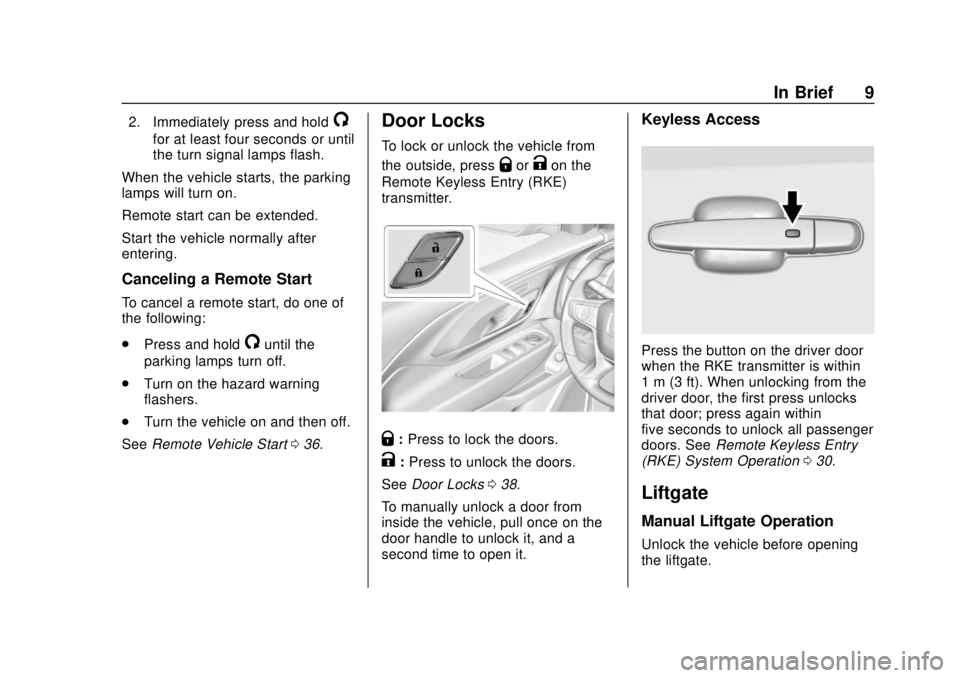
Keyless Access
Press the button on the driver door
when the RKE transmitter is within
1 m (3 ft). When unlocking from the
driver door, the first press unlocks
that door; press again within
five seconds to unlock all passenger
doors. See Remote Keyless Entry
(RKE) System Operation 030.
Liftgate
Manual Liftgate Operation
Unlock the vehicle before opening
the liftgate.
Page 11 of 434
GMC Terrain/Terrain Denali Owner Manual (GMNA-Localizing-U.S./Canada/
Mexico-12146071) - 2019 - crc - 7/27/18
10 In Brief
To open the liftgate, press the touch
pad on the bottom of the liftgate and
lift up.
Do not press the touch pad while
closing the liftgate. This may cause
the liftgate to be unlatched.
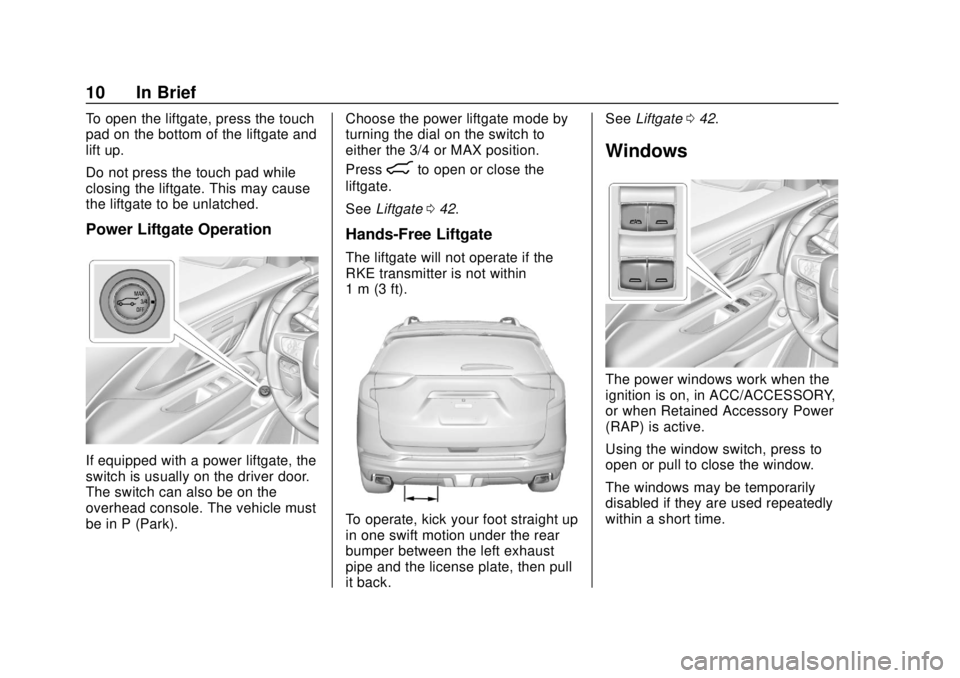
Power Liftgate Operation
If equipped with a power liftgate, the
switch is usually on the driver door.
The switch can also be on the
overhead console. The vehicle must
be in P (Park).Choose the power liftgate mode by
turning the dial on the switch to
either the 3/4 or MAX position.
Press
8to open or close the
liftgate.
See Liftgate 042.
Hands-Free Liftgate
The liftgate will not operate if the
RKE transmitter is not within
1 m (3 ft).
To operate, kick your foot straight up
in one swift motion under the rear
bumper between the left exhaust
pipe and the license plate, then pull
it back. See
Liftgate 042.
Windows
The power windows work when the
ignition is on, in ACC/ACCESSORY,
or when Retained Accessory Power
(RAP) is active.
Using the window switch, press to
open or pull to close the window.
The windows may be temporarily
disabled if they are used repeatedly
within a short time.
Page 14 of 434
GMC Terrain/Terrain Denali Owner Manual (GMNA-Localizing-U.S./Canada/
Mexico-12146071) - 2019 - crc - 7/27/18
In Brief 13
Then immediately press and hold 1,
2, or
B(Exit) until two beeps
sound. To manually recall these
positions, press and hold 1, 2, or
B
until the saved position is reached.
When Seat Entry Memory is
enabled in vehicle personalization,
positions previously saved to
memory buttons 1 and 2 are
recalled when the ignition is
changed from off to on or ACC/
ACCESSORY.
When Seat Exit Memory is enabled
in vehicle personalization, the
feature automatically recalls the
previously saved exit position when
exiting the vehicle.
Memory adjustments may not be
available upon delivery or after
service until steps in “Saving
Memory Positions” section are
performed. See Memory Seats062.
Heated and Ventilated
Seats
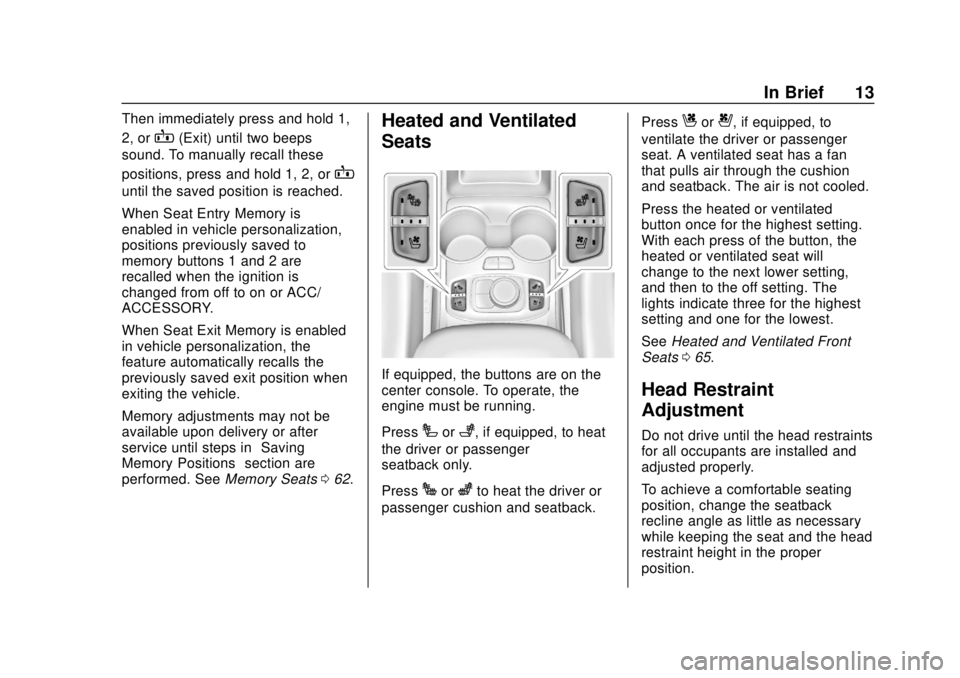
If equipped, the buttons are on the
center console. To operate, the
engine must be running.
Press
Ior+, if equipped, to heat
the driver or passenger
seatback only.
Press
Jorzto heat the driver or
passenger cushion and seatback. Press
Cor{, if equipped, to
ventilate the driver or passenger
seat. A ventilated seat has a fan
that pulls air through the cushion
and seatback. The air is not cooled.
Press the heated or ventilated
button once for the highest setting.
With each press of the button, the
heated or ventilated seat will
change to the next lower setting,
and then to the off setting. The
lights indicate three for the highest
setting and one for the lowest.
See Heated and Ventilated Front
Seats 065.
Head Restraint
Adjustment
Do not drive until the head restraints
for all occupants are installed and
adjusted properly.
To achieve a comfortable seating
position, change the seatback
recline angle as little as necessary
while keeping the seat and the head
restraint height in the proper
position.
Page 18 of 434
GMC Terrain/Terrain Denali Owner Manual (GMNA-Localizing-U.S./Canada/
Mexico-12146071) - 2019 - crc - 7/27/18
In Brief 17
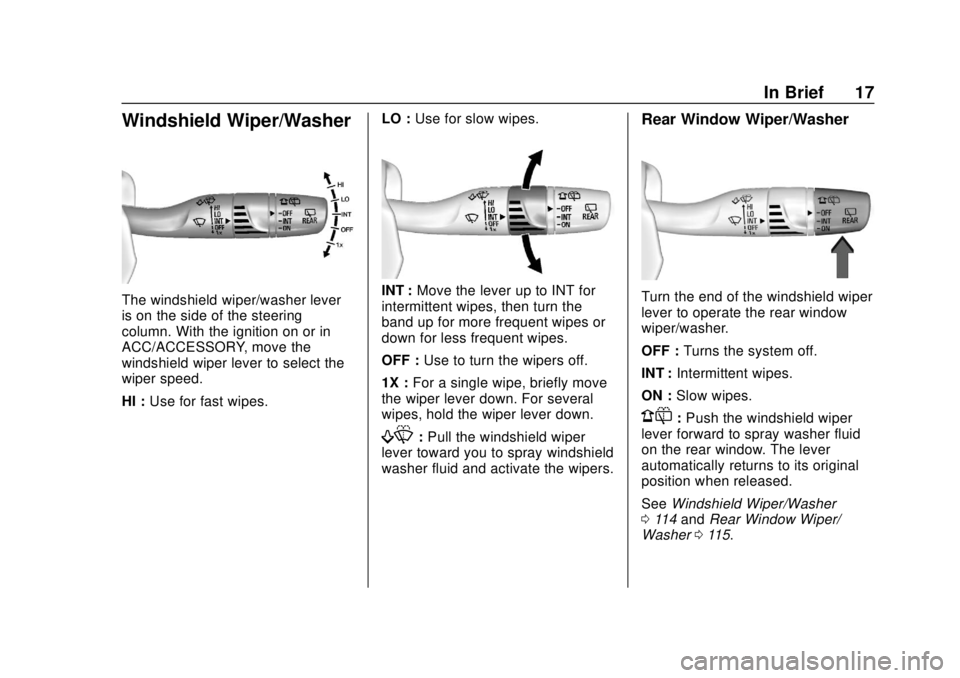
Windshield Wiper/Washer
The windshield wiper/washer lever
is on the side of the steering
column. With the ignition on or in
ACC/ACCESSORY, move the
windshield wiper lever to select the
wiper speed.
HI :Use for fast wipes. LO :
Use for slow wipes.INT : Move the lever up to INT for
intermittent wipes, then turn the
band up for more frequent wipes or
down for less frequent wipes.
OFF : Use to turn the wipers off.
1X : For a single wipe, briefly move
the wiper lever down. For several
wipes, hold the wiper lever down.
f: Pull the windshield wiper
lever toward you to spray windshield
washer fluid and activate the wipers.
Rear Window Wiper/Washer
Turn the end of the windshield wiper
lever to operate the rear window
wiper/washer.
OFF : Turns the system off.
INT : Intermittent wipes.
ON : Slow wipes.
1:Push the windshield wiper
lever forward to spray washer fluid
on the rear window. The lever
automatically returns to its original
position when released.
See Windshield Wiper/Washer
0 114 and Rear Window Wiper/
Washer 0115.
Page 21 of 434
GMC Terrain/Terrain Denali Owner Manual (GMNA-Localizing-U.S./Canada/
Mexico-12146071) - 2019 - crc - 7/27/18
20 In Brief
Vehicle Features
Infotainment System
See the infotainment manual for
information on the radio, audio
players, phone, navigation system,
and voice or speech recognition.
It also includes information on
settings.
Steering Wheel Controls
The infotainment system can be
operated by using the steering
wheel controls. See“Steering Wheel
Controls” in the infotainment
manual.
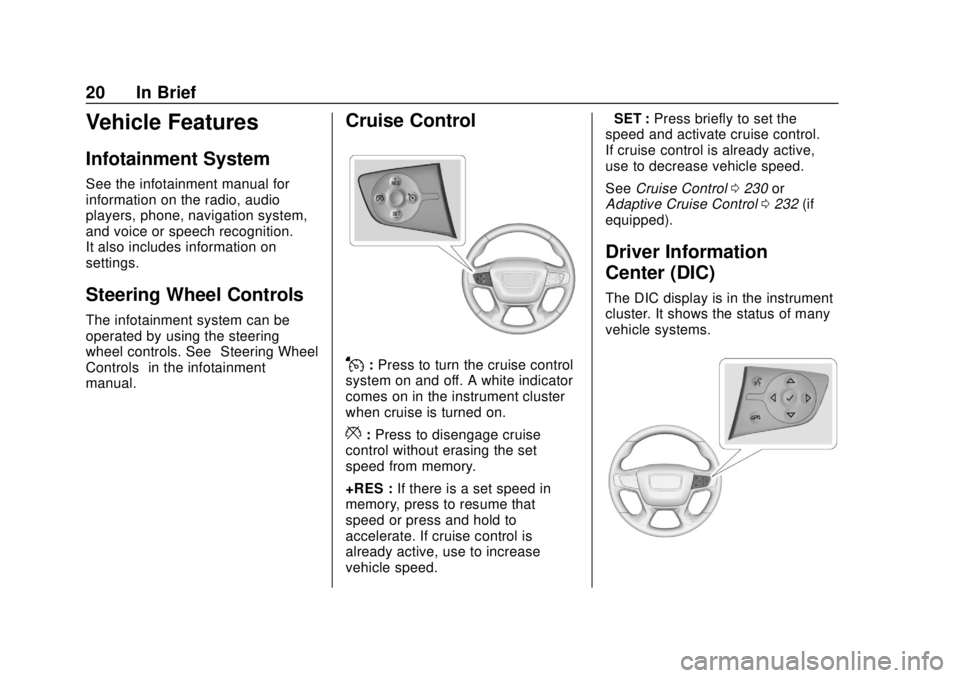
Cruise Control
J: Press to turn the cruise control
system on and off. A white indicator
comes on in the instrument cluster
when cruise is turned on.
*: Press to disengage cruise
control without erasing the set
speed from memory.
+RES : If there is a set speed in
memory, press to resume that
speed or press and hold to
accelerate. If cruise control is
already active, use to increase
vehicle speed. −SET :
Press briefly to set the
speed and activate cruise control.
If cruise control is already active,
use to decrease vehicle speed.
See Cruise Control 0230 or
Adaptive Cruise Control 0232 (if
equipped).
Driver Information
Center (DIC)
The DIC display is in the instrument
cluster. It shows the status of many
vehicle systems.
Page 24 of 434
GMC Terrain/Terrain Denali Owner Manual (GMNA-Localizing-U.S./Canada/
Mexico-12146071) - 2019 - crc - 7/27/18
In Brief 23
SeeAssistance Systems for Parking
or Backing 0243.
Automatic Parking
Assist (APA)
If equipped, the APA system helps
to search for and maneuver the
vehicle into parallel or perpendicular
parking spots using automatic
steering, DIC displays, and beeps.
When the vehicle speed is below
30 km/h (18 mph), press
Oto
enable the system.
See “Automatic Parking Assist
(APA)” underAssistance Systems
for Parking or Backing 0243.
Power Outlets
The vehicle has two 12-volt
accessory power outlets, which can
be used to plug in electrical
equipment, such as a cell phone or
MP3 player.
There are power outlets:
.
On the center stack below the
climate control system. .
In the rear cargo area.
To use the outlet, remove the cover.
See Power Outlets 0117.
Universal Remote System
If equipped, the Universal Remote
System allows for garage door
openers, security systems, and
home automation devices to be
programmed to work with these
buttons in the vehicle.
See Universal Remote System
0 157.
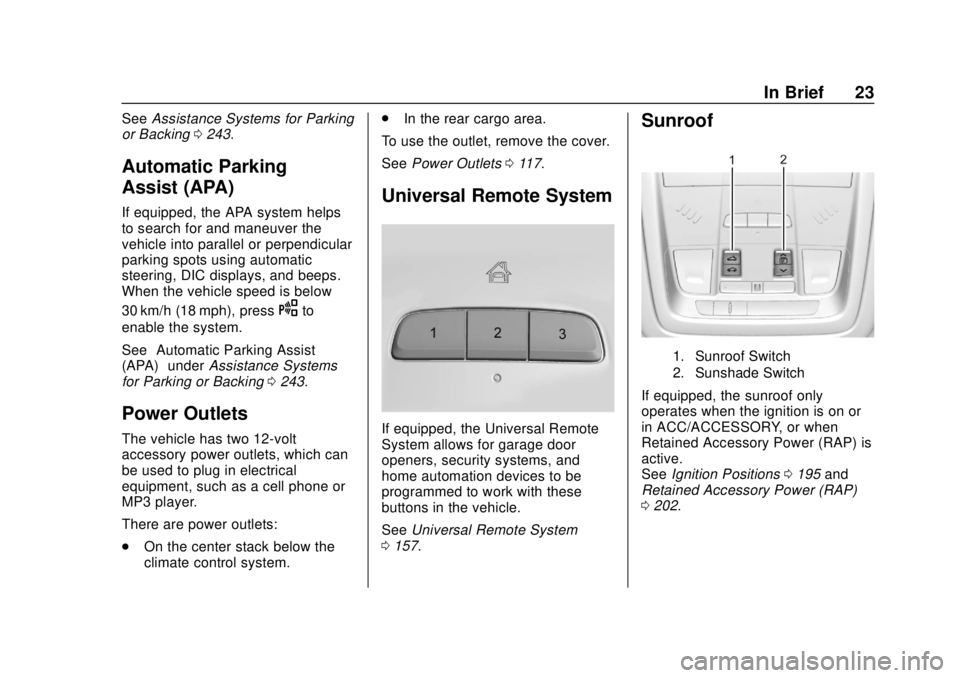
Sunroof
1. Sunroof Switch
2. Sunshade Switch
If equipped, the sunroof only
operates when the ignition is on or
in ACC/ACCESSORY, or when
Retained Accessory Power (RAP) is
active.
See Ignition Positions 0195 and
Retained Accessory Power (RAP)
0 202.
Page 28 of 434
GMC Terrain/Terrain Denali Owner Manual (GMNA-Localizing-U.S./Canada/
Mexico-12146071) - 2019 - crc - 7/27/18
In Brief 27
2. Display REMAINING OIL LIFEon the DIC menu.
See Driver Information Center
(DIC) (Base and Midlevel)
0 142 orDriver Information
Center (DIC) (Uplevel) 0147.
3. Fully press and release the accelerator pedal three times
within five seconds.
4. If the display changes to 100%, the system is reset.
See Engine Oil Life System 0298.
Driving for Better Fuel
Economy
Driving habits can affect fuel
mileage. Here are some driving tips
to get the best fuel economy
possible:
.
Set the climate controls to the
desired temperature after the
engine is started, or turn them
off when not required.
. Avoid fast starts and accelerate
smoothly. .
Brake gradually and avoid
abrupt stops.
. Avoid idling the engine for long
periods of time.
. When road and weather
conditions are appropriate, use
cruise control.
. Always follow posted speed
limits or drive more slowly when
conditions require.
. Keep vehicle tires properly
inflated.
. Combine several trips into a
single trip.
. Replace the vehicle's tires with
the same TPC Spec number
molded into the tire's sidewall
near the size.
. Follow recommended scheduled
maintenance.
Diesel Particulate Filter
The engine is equipped with a
Diesel Particulate Filter (DPF) that
will filter or trap particulates. The
DPF is under the vehicle in the
exhaust system.
Depending on a number of factors
monitored by the engine computer,
the DPF will need to be cleaned of
accumulated solids. When a
cleaning is needed, the engine
computer will initiate a cleaning
action by warming the exhaust gas
temperature. This feature has been
designed to operate automatically,
with limited operator involvement or
awareness.
Cleaning the DPF (Exhaust
Filter)
While the DPF cleaning is
automatically controlled by the
engine computer, the vehicle will
need to operate continuously for
approximately 25 minutes
and at speeds greater than
50 km/h (30 mph) to clean the DPF
effectively.
Page 31 of 434
GMC Terrain/Terrain Denali Owner Manual (GMNA-Localizing-U.S./Canada/
Mexico-12146071) - 2019 - crc - 7/27/18
30 Keys, Doors, and Windows
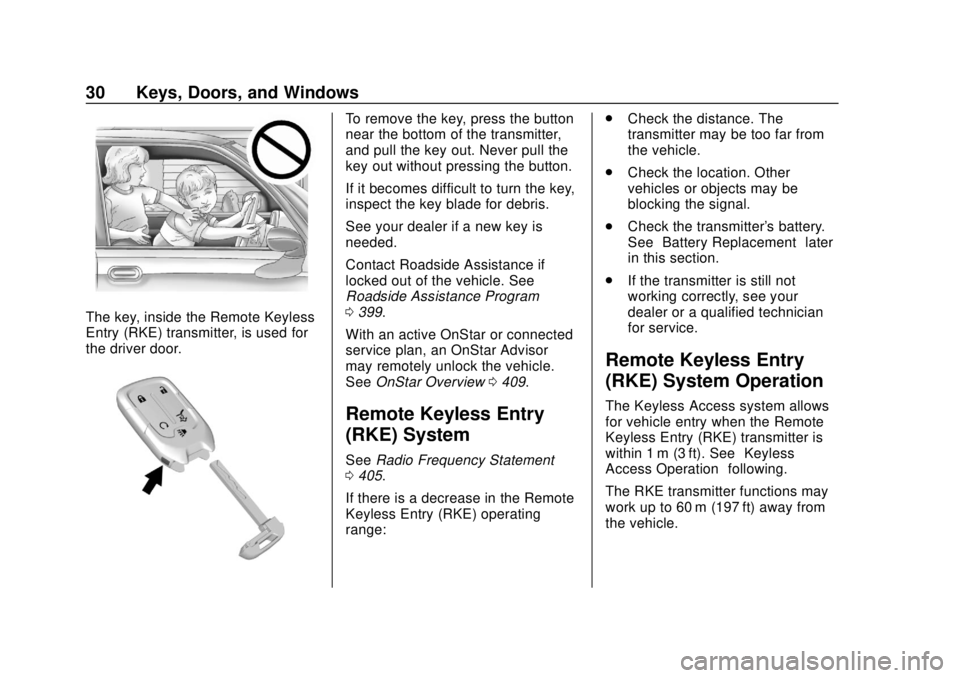
The key, inside the Remote Keyless
Entry (RKE) transmitter, is used for
the driver door.
To remove the key, press the button
near the bottom of the transmitter,
and pull the key out. Never pull the
key out without pressing the button.
If it becomes difficult to turn the key,
inspect the key blade for debris.
See your dealer if a new key is
needed.
Contact Roadside Assistance if
locked out of the vehicle. See
Roadside Assistance Program
0399.
With an active OnStar or connected
service plan, an OnStar Advisor
may remotely unlock the vehicle.
See OnStar Overview 0409.
Remote Keyless Entry
(RKE) System
See Radio Frequency Statement
0 405.
If there is a decrease in the Remote
Keyless Entry (RKE) operating
range: .
Check the distance. The
transmitter may be too far from
the vehicle.
. Check the location. Other
vehicles or objects may be
blocking the signal.
. Check the transmitter's battery.
See “Battery Replacement” later
in this section.
. If the transmitter is still not
working correctly, see your
dealer or a qualified technician
for service.
Remote Keyless Entry
(RKE) System Operation
The Keyless Access system allows
for vehicle entry when the Remote
Keyless Entry (RKE) transmitter is
within 1 m (3 ft). See “Keyless
Access Operation” following.
The RKE transmitter functions may
work up to 60 m (197 ft) away from
the vehicle.
Page 33 of 434

GMC Terrain/Terrain Denali Owner Manual (GMNA-Localizing-U.S./Canada/
Mexico-12146071) - 2019 - crc - 7/27/18
32 Keys, Doors, and Windows
Keyless Access Operation
With the Keyless Access system,
you can lock and unlock the doors
and access the liftgate without
removing the RKE transmitter from
your pocket, purse, briefcase, etc.
The RKE transmitter should be
within 1 m (3 ft) of the liftgate or door
being opened.
Keyless Access can be
programmed to unlock all doors on
the first lock/unlock press from the
driver door. SeeVehicle
Personalization 0152.
If equipped with memory seats, RKE
transmitters 1 and 2 are linked to
the seating positions of memory 1 or
2. See Memory Seats 062.
Keyless Unlocking/Locking from
the Driver Door
When the doors are locked and the
RKE transmitter is within 1 m (3 ft) of
the driver door handle, pressing the
lock/unlock button on the driver door
handle will unlock the driver door.
If the lock/unlock button is pressed
again within five seconds, all
passenger doors will unlock.
Driver Shown, Passenger Similar
Pressing the lock/unlock button will
cause all doors to lock if any of the
following occur:
. It has been more than
five seconds since the first lock/
unlock button press.
. Two lock/unlock button presses
were used to unlock all doors.
. Any vehicle door has opened
and all doors are now closed. Keyless Unlocking/Locking from
Passenger Doors
When the doors are locked and the
RKE transmitter is within 1 m (3 ft) of
the door handle, pressing the lock/
unlock button on that door handle
will unlock all doors. Pressing the
lock/unlock button will cause all
doors to lock if any of the following
occur:
.
The lock/unlock button was used
to unlock all doors.
. Any vehicle door has opened
and all doors are now closed.
Passive Locking
If equipped with Keyless Access,
this vehicle will lock several
seconds after all doors are closed if
the vehicle is off and at least one
RKE transmitter has been removed
or none remain in the interior.
If other electronic devices interfere
with the RKE transmitter signal, the
vehicle may not detect the RKE
transmitter inside the vehicle.
If passive locking is enabled, the
doors may lock with the RKE