lock GMC YUKON 2007 Repair Manual
[x] Cancel search | Manufacturer: GMC, Model Year: 2007, Model line: YUKON, Model: GMC YUKON 2007Pages: 608, PDF Size: 3.06 MB
Page 180 of 608

Tie the load to the crossrails or the siderail
supports. Use the crossrails only to keep
the load from sliding. To move the crossrails,
pull out on the latch release handle at
each end. Slide the crossrail to the desired
position balancing the force side to side. Push
the release handle back into the latched
position and slide the crossrail back and forth
slightly to be sure the latch snaps securely
into place.
If you need to carry long items, move the
crossrails as far apart as they will go. Tie
the load to the crossrails and the siderails or
siderail supports. Also tie the load to the
bumpers. Do not tie the load so tightly that the
crossrails or siderails are damaged.
For the purpose of wind noise reduction,
locate the front crossrail approximately
18 to 24 inches (46 to 58 cm) rearward of the
front supports.
After moving a crossrail, be sure it is securely
locked into the siderail.
Your vehicle has a Center High-Mounted Stoplamp
(CHMSL) located above the rear glass. If items are
loaded on the roof of the vehicle, care should be
taken not to block or damage the CHMSL unit.
Rear Storage Area
Your vehicle may have a storage compartment
located in the rear cargo area of the vehicle in the
driver’s side trim panel.
To open the utility compartment, turn the knobs
and swing the compartment door open. The
compartment door can be removed.
Convenience Net
The convenience net (if equipped) in the rear of
your vehicle helps to keep small loads in place
during sharp turns or quick stops and starts.
The net is not designed for larger, heavier items.
To install the net, attach the hooks to the
raised cargo tie downs. Then, attach the cord
loops to the button retainers in the side trim.
You can unhook the net so that it will lie at when
you’re not using it.
180
Page 185 of 608
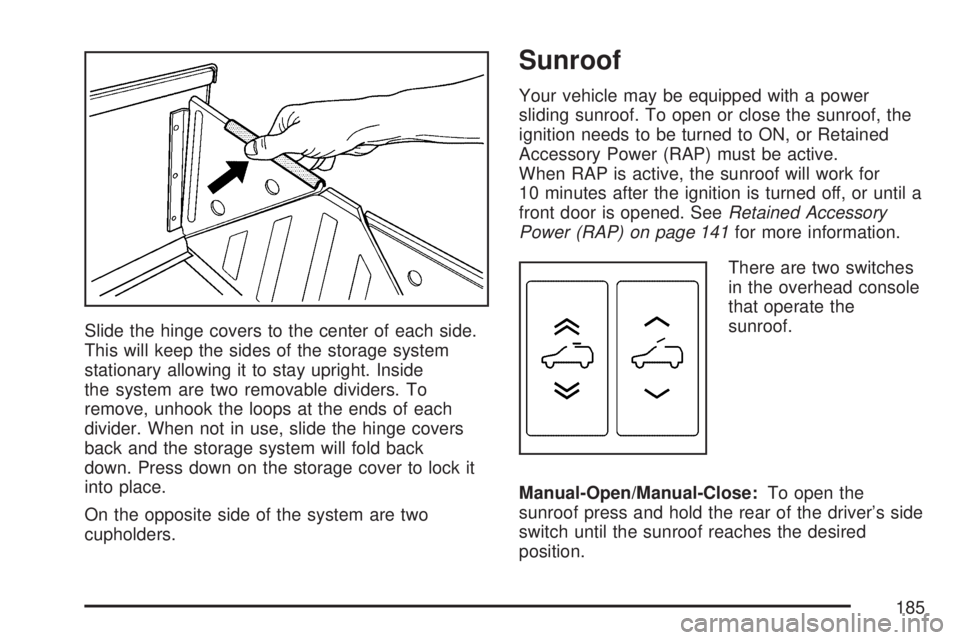
Slide the hinge covers to the center of each side.
This will keep the sides of the storage system
stationary allowing it to stay upright. Inside
the system are two removable dividers. To
remove, unhook the loops at the ends of each
divider. When not in use, slide the hinge covers
back and the storage system will fold back
down. Press down on the storage cover to lock it
into place.
On the opposite side of the system are two
cupholders.
Sunroof
Your vehicle may be equipped with a power
sliding sunroof. To open or close the sunroof, the
ignition needs to be turned to ON, or Retained
Accessory Power (RAP) must be active.
When RAP is active, the sunroof will work for
10 minutes after the ignition is turned off, or until a
front door is opened. SeeRetained Accessory
Power (RAP) on page 141for more information.
There are two switches
in the overhead console
that operate the
sunroof.
Manual-Open/Manual-Close:To open the
sunroof press and hold the rear of the driver’s side
switch until the sunroof reaches the desired
position.
185
Page 188 of 608
Anti-Lock Brake System Warning Light...... 234
StabiliTrak®Indicator Light......................... 235
Engine Coolant Temperature Gage............ 236
Tire Pressure Light.................................... 236
Malfunction Indicator Lamp........................ 237
Oil Pressure Gage..................................... 240
Oil Pressure Light..................................... 241
Security Light............................................ 241
Fog Lamp Light......................................... 242
Cruise Control Light.................................. 242
Highbeam On Light................................... 242
Tow/Haul Mode Light................................ 242
Fuel Gage................................................. 243
Low Fuel Warning Light............................ 244
Driver Information Center (DIC).................. 244
DIC Operation and Displays
(Using DIC Buttons)............................... 245
DIC Operation and Displays
(Using Trip Odometer Reset Stem)........ 250
DIC Warnings and Messages.................... 252
DIC Vehicle Customization
(With DIC Buttons)................................. 262Audio System(s)......................................... 272
Setting the Time (Radio with a
Six-Disc CD Player)............................... 274
Setting the Time (Radio with a
Single CD and DVD Player)................... 275
Radio with Six-Disc CD (MP3)................... 276
Radio with CD and DVD........................... 294
XM Radio Messages................................. 319
Navigation/Radio System........................... 321
Rear Seat Entertainment System............... 321
Rear Seat Audio (RSA)............................. 333
Theft-Deterrent Feature............................. 335
Audio Steering Wheel Controls.................. 335
Radio Reception........................................ 336
Care of Your CDs and DVDs.................... 338
Care of the CD and DVD Player............... 338
Rear Side Window Antenna....................... 338
XM™ Satellite Radio Antenna System....... 339
Section 3 Instrument Panel
188
Page 193 of 608

Tilt Wheel
Your vehicle has a tilt wheel, that lets you adjust
the steering wheel before driving. Raising it to
the highest level gives more room to exit and enter
your vehicle.
The tilt steering wheel lever is located on the
lower left side of the column.
To tilt the wheel, hold the steering wheel and pull
the lever. Then move the steering wheel to a
comfortable position and release the lever to lock
the wheel in place.
Turn Signal/Multifunction Lever
The lever on the left side of the steering column
includes the following:
G(Turn and Lane Change Signals):See
Turn and Lane-Change Signals on page 194.
53(Headlamp High/Low-Beam
Changer):SeeHeadlamp High/Low-Beam
Changer on page 195.
Flash-to-Pass. SeeFlash-to-Pass on page 195.
193
Page 198 of 608
Windshield Washer
{CAUTION:
In freezing weather, do not use your
washer until the windshield is warmed.
Otherwise the washer uid can form ice
on the windshield, blocking your vision.
L(Washer Fluid):There is a paddle marked
with the windshield washer symbol at the top of the
multifunction lever. To spray washer uid on the
windshield, push the paddle. The wipers will
clear the window and then either stop or return to
your preset speed.
Heated Windshield Washer
If your vehicle has the heated windshield washer
uid system it may be used to help clear ice,
snow, tree sap, or bugs from your windshield.
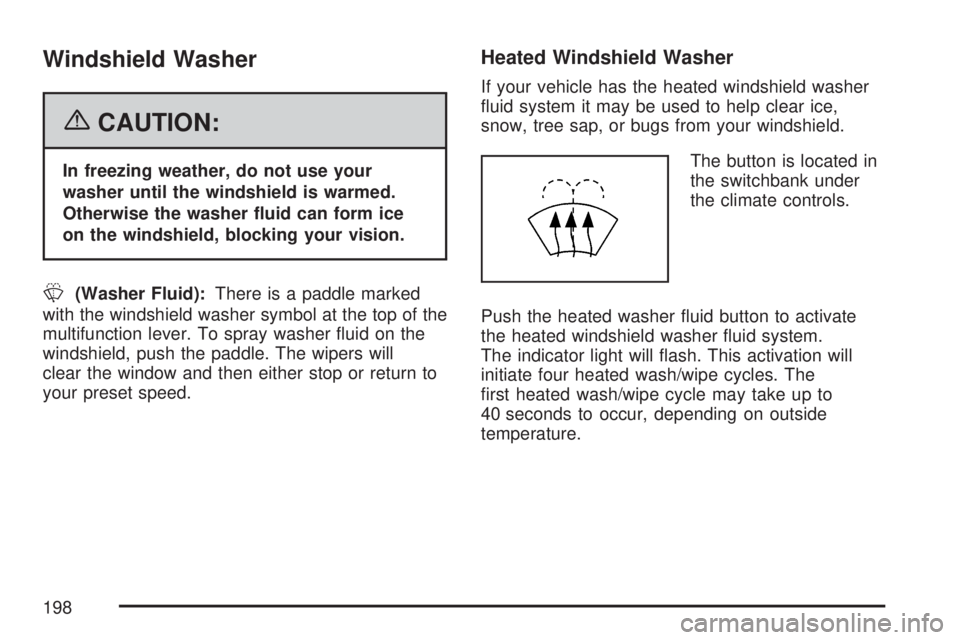
The button is located in
the switchbank under
the climate controls.
Push the heated washer uid button to activate
the heated windshield washer uid system.
The indicator light will ash. This activation will
initiate four heated wash/wipe cycles. The
rst heated wash/wipe cycle may take up to
40 seconds to occur, depending on outside
temperature.
198
Page 199 of 608
After the rst wash/wipe cycle, it may take up to
20 seconds for each of the remaining cycles
to begin. Press the button again to turn off the
heated windshield washer uid system or it
will automatically turn off after four wipe cycles
have been completed.
When the heated windshield washer uid system
is activated under certain outside temperature
conditions, steam may ow out of the washer
nozzles for a short period of time before washer
uid is sprayed. This is a normal condition.
Rear Window Wiper/Washer
{CAUTION:
In freezing weather, do not use your
washer until the windshield is warmed.
Otherwise the washer uid can form ice
on the windshield, blocking your vision.
The rear wiper control is located on the turn
signal/multifunction lever.To turn the rear wiper on, slide the lever to a
wiper position.
9(Off):To turn the wiper off, slide the lever to
this setting.
5(Rear Wiper Delay):To turn on the rear wiper
delay, slide the lever to this setting.
Z(Rear Wiper):To turn on the rear wiper, slide
the lever to this setting.
=(Rear Wiper Wash):To turn on the rear
wiper wash, push the button on the end of the turn
signal/multifunction lever to spray washer uid
on the rear window. The wipers will clear the rear
window and either stop or return to your preset
speed. For more washer cycles, press and
hold the button.
The rear window wiper/washer will not operate if
the liftgate or liftglass is open or ajar. If the liftgate
or liftglass is opened while the rear wiper is on,
the wiper will return to the parked position
and stop.
199
Page 207 of 608

Instrument Panel Brightness
D(Instrument Panel Brightness):This feature
controls the brightness of the instrument panel
lights.
The knob for this feature is located next to the
headlamp control.
Turn the knob clockwise or counterclockwise to
adjust the brightness of the instrument panel lights.
Turn the knob clockwise to return the instrument
panel cluster or radio display to full brightness
when the headlamps or parking lamps are on.
To turn on the dome lamps, turn the knob to the
farthest clockwise position.
Dome Lamps
The dome lamps come on when a door is opened.
The dome lamps can also be turned on by
turning the knob, located next to the exterior lamps
control, clockwise to the farthest position. In this
position, the dome lamps will remain on whether a
door is opened or closed.
Dome Lamp Override
E(Dome Lamp Override):Press the dome
override button, located next to the exterior lamps
control, to keep the dome lamps off when a
door is open. To set the lamps to the automatic
operation, press the button again so that it is
extended. With the button in this position,
the dome lamps will come on when a door is
opened.
Entry Lighting
Your vehicle has an illuminated entry feature.
When the doors are opened, the dome lamps will
come on if the dome override button is in the
extended position. If the dome override button is
pressed in, the lamps will not come on.
Exit Lighting
With exit lighting, the interior lamps will come on
when you remove the key from the ignition. They
will turn off automatically in 20 seconds. The lights
will not come on if the dome override button is
pressed in.
207
Page 234 of 608

This light should come on briey when you turn
the ignition key to RUN. If it does not come
on then, have it xed so it will be ready to warn
you if there’s a problem.
If the light comes on while you are driving, pull off
the road and stop carefully. You may notice
that the pedal is harder to push or may go closer
to the oor. It may take longer to stop. If the
light is still on, have the vehicle towed for service.
SeeTowing Your Vehicle on page 398.
{CAUTION:
Your brake system may not be working
properly if the brake system warning light
is on. Driving with the brake system
warning light on can lead to an accident.
If the light is still on after you have pulled
off the road and stopped carefully, have
the vehicle towed for service.
Anti-Lock Brake System Warning
Light
With the anti-lock brake
system, this light will
come on when you start
your engine and may
stay on for several
seconds.
United StatesCanada
234
Page 235 of 608

That’s normal. If the light does not come on then,
have it xed so it will be ready to warn you if
there is a problem.
If the light stays on, or comes on when you are
driving, your vehicle needs service. You will
also hear a chime sound when the light is on
steady. If the regular brake system warning light is
not on, you still have brakes, but you do not
have anti-lock brakes. If the regular brake system
warning light is also on you do not have anti-lock
brakes and there is a problem with your regular
brakes. In addition to both lights, you will also hear
a chime sound on the rst occurrence of a
problem and each time the vehicle is shut off and
then restarted. SeeBrake System Warning
Light on page 233.
The anti-lock brake system warning light should
come on briey when you turn the ignition
key to RUN. If the light does not come on then,
have it xed so it will be ready to warn you if there
is a problem.StabiliTrak®Indicator Light
For vehicles equipped
with the StabiliTrak®
system, this warning
light should come
on briey when the
engine is started.
If the warning light does not come on then, have it
xed so it will be ready to warn you if there is a
problem. If it stays on, or comes on when you are
driving, there may be a problem with your
StabiliTrak
®system and your vehicle may need
service. When this warning light is on, the system
will not limit wheel spin. Adjust your driving
accordingly.
If the StabiliTrak
®system warning light comes on
and stays on for an extended period of time
when the system is turned on, your vehicle needs
service. SeeStabiliTrak
®System on page 349
for more information.
235
Page 250 of 608

Relearn Remote Key
This display allows you to match remote keyless
entry transmitters to your vehicle. To match a
remote keyless entry transmitter to your vehicle,
do the following:
1. Press the vehicle information button until
PRESS
VTO RELEARN REMOTE KEY
displays.
2. Press the set/reset button until REMOTE KEY
LEARNING ACTIVE is displayed.
3. Press and hold the lock and unlock buttons
on the rst transmitter at the same time for
approximately 15 seconds.
A chime will sound indicating that the
transmitter is matched.
4. To match additional transmitters at this time,
repeat Step 3.
Each vehicle can have a maximum of
eight transmitters matched to it.
5. To exit the programming mode, you must
cycle the key to LOCK.
Blank Display
This display shows no information.
DIC Operation and Displays (Using
Trip Odometer Reset Stem)
The DIC has different displays which can be
accessed by pressing the trip odometer reset stem
located on the instrument panel cluster. Pressing
the trip odometer reset stem will also turn off,
or acknowledge, DIC messages.
You can use the trip odometer reset stem to view
the following displays: odometer, engine hours,
trip odometer, and display language.
Trip Odometer Reset Stem Menu Items
Odometer
Press the trip odometer reset stem until
ODOMETER displays. This display shows the
distance the vehicle has been driven in either
miles (mi) or kilometers (km).
Engine Hours
To display the ENGINE HOURS, place the ignition
in LOCK or ACCESSORY, then press and hold
the trip odometer reset stem for four seconds while
viewing the ODOMETER. This display shows
the total number of hours the engine has run.
250