seat memory GMC YUKON 2009 User Guide
[x] Cancel search | Manufacturer: GMC, Model Year: 2009, Model line: YUKON, Model: GMC YUKON 2009Pages: 576, PDF Size: 3.06 MB
Page 266 of 576
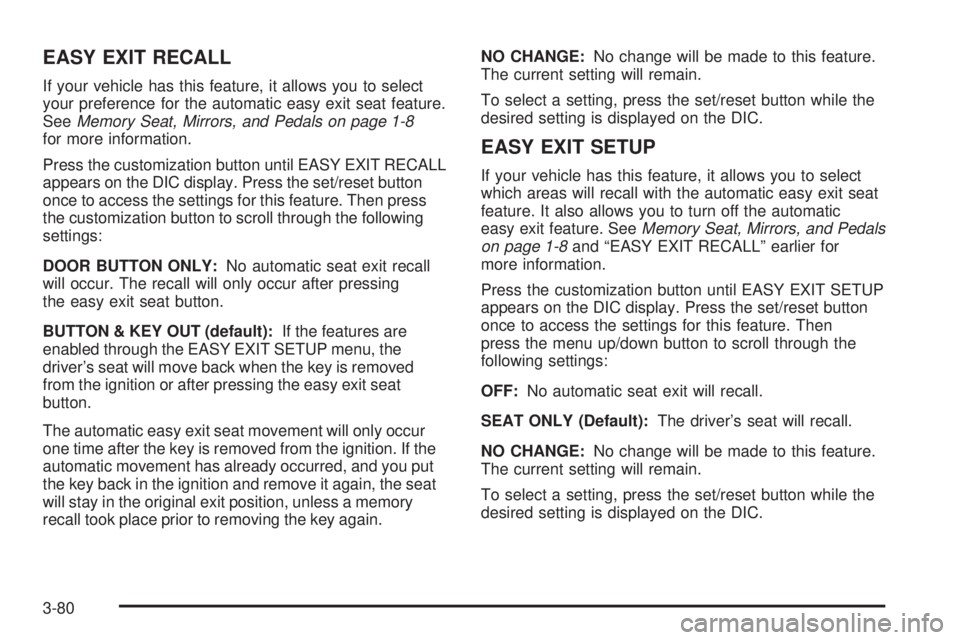
EASY EXIT RECALL
If your vehicle has this feature, it allows you to select
your preference for the automatic easy exit seat feature.
SeeMemory Seat, Mirrors, and Pedals on page 1-8
for more information.
Press the customization button until EASY EXIT RECALL
appears on the DIC display. Press the set/reset button
once to access the settings for this feature. Then press
the customization button to scroll through the following
settings:
DOOR BUTTON ONLY:No automatic seat exit recall
will occur. The recall will only occur after pressing
the easy exit seat button.
BUTTON & KEY OUT (default):If the features are
enabled through the EASY EXIT SETUP menu, the
driver’s seat will move back when the key is removed
from the ignition or after pressing the easy exit seat
button.
The automatic easy exit seat movement will only occur
one time after the key is removed from the ignition. If the
automatic movement has already occurred, and you put
the key back in the ignition and remove it again, the seat
will stay in the original exit position, unless a memory
recall took place prior to removing the key again.NO CHANGE:No change will be made to this feature.
The current setting will remain.
To select a setting, press the set/reset button while the
desired setting is displayed on the DIC.
EASY EXIT SETUP
If your vehicle has this feature, it allows you to select
which areas will recall with the automatic easy exit seat
feature. It also allows you to turn off the automatic
easy exit feature. SeeMemory Seat, Mirrors, and Pedals
on page 1-8and “EASY EXIT RECALL” earlier for
more information.
Press the customization button until EASY EXIT SETUP
appears on the DIC display. Press the set/reset button
once to access the settings for this feature. Then
press the menu up/down button to scroll through the
following settings:
OFF:No automatic seat exit will recall.
SEAT ONLY (Default):The driver’s seat will recall.
NO CHANGE:No change will be made to this feature.
The current setting will remain.
To select a setting, press the set/reset button while the
desired setting is displayed on the DIC.
3-80
Page 267 of 576
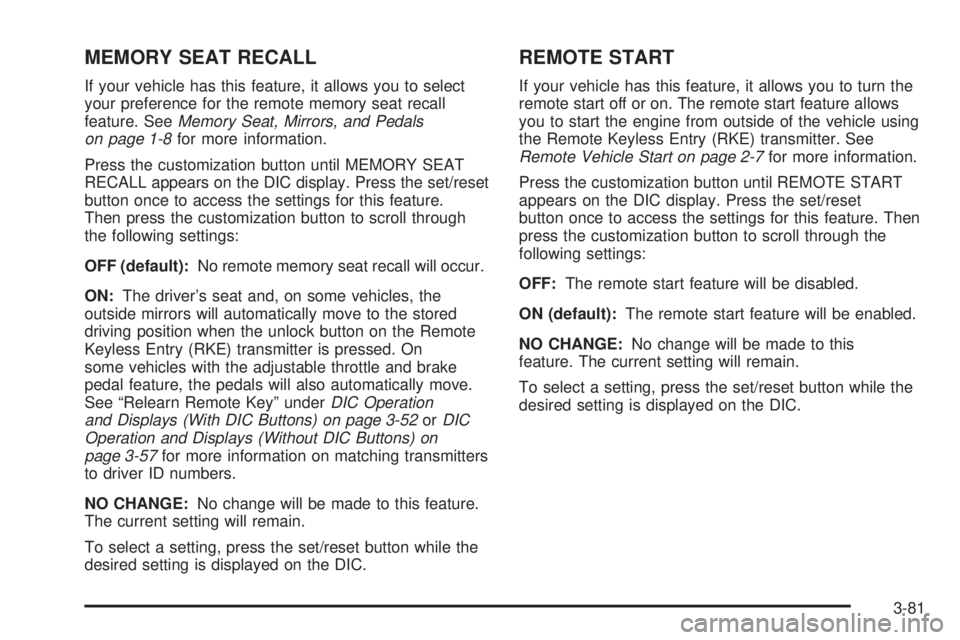
MEMORY SEAT RECALL
If your vehicle has this feature, it allows you to select
your preference for the remote memory seat recall
feature. SeeMemory Seat, Mirrors, and Pedals
on page 1-8for more information.
Press the customization button until MEMORY SEAT
RECALL appears on the DIC display. Press the set/reset
button once to access the settings for this feature.
Then press the customization button to scroll through
the following settings:
OFF (default):No remote memory seat recall will occur.
ON:The driver’s seat and, on some vehicles, the
outside mirrors will automatically move to the stored
driving position when the unlock button on the Remote
Keyless Entry (RKE) transmitter is pressed. On
some vehicles with the adjustable throttle and brake
pedal feature, the pedals will also automatically move.
See “Relearn Remote Key” underDIC Operation
and Displays (With DIC Buttons) on page 3-52orDIC
Operation and Displays (Without DIC Buttons) on
page 3-57for more information on matching transmitters
to driver ID numbers.
NO CHANGE:No change will be made to this feature.
The current setting will remain.
To select a setting, press the set/reset button while the
desired setting is displayed on the DIC.
REMOTE START
If your vehicle has this feature, it allows you to turn the
remote start off or on. The remote start feature allows
you to start the engine from outside of the vehicle using
the Remote Keyless Entry (RKE) transmitter. See
Remote Vehicle Start on page 2-7for more information.
Press the customization button until REMOTE START
appears on the DIC display. Press the set/reset
button once to access the settings for this feature. Then
press the customization button to scroll through the
following settings:
OFF:The remote start feature will be disabled.
ON (default):The remote start feature will be enabled.
NO CHANGE:No change will be made to this
feature. The current setting will remain.
To select a setting, press the set/reset button while the
desired setting is displayed on the DIC.
3-81
Page 570 of 576
Lights
Exterior Lamps............................................3-14
Flash-to-Pass............................................... 3-8
High/Low Beam Changer................................ 3-8
On Reminder..............................................3-16
Loading Your Vehicle.......................................4-33
Locking Rear Axle............................................ 4-9
Lockout Protection..........................................2-12
Locks
Delayed Locking..........................................2-10
Door ..........................................................2-10
Lockout Protection.......................................2-12
Power Door ................................................2-10
Programmable Automatic Door Locks.............2-11
Rear Door Security Locks.............................2-11
Loss of Control...............................................4-11
Low Fuel Warning Light...................................3-51
Lower Anchors and Tethers for Children.............1-66
Luggage Carrier..............................................2-75
Lumbar
Manual Controls............................................ 1-6
Power Controls............................................. 1-6
M
Maintenance Schedule
Additional Required Services........................... 6-6
At Each Fuel Fill.........................................6-10
At Least Once a Month................................6-10
At Least Once a Year..................................6-11Maintenance Schedule (cont.)
Introduction.................................................. 6-2
Maintenance Footnotes.................................. 6-8
Maintenance Record....................................6-17
Maintenance Replacement Parts....................6-15
Maintenance Requirements............................. 6-2
Owner Checks and Services.........................6-10
Recommended Fluids and Lubricants.............6-13
Scheduled Maintenance................................. 6-4
Using.......................................................... 6-2
Your Vehicle and the Environment................... 6-2
Malfunction Indicator Lamp...............................3-44
Manual Lumbar Controls.................................... 1-6
Manual Seats................................................... 1-4
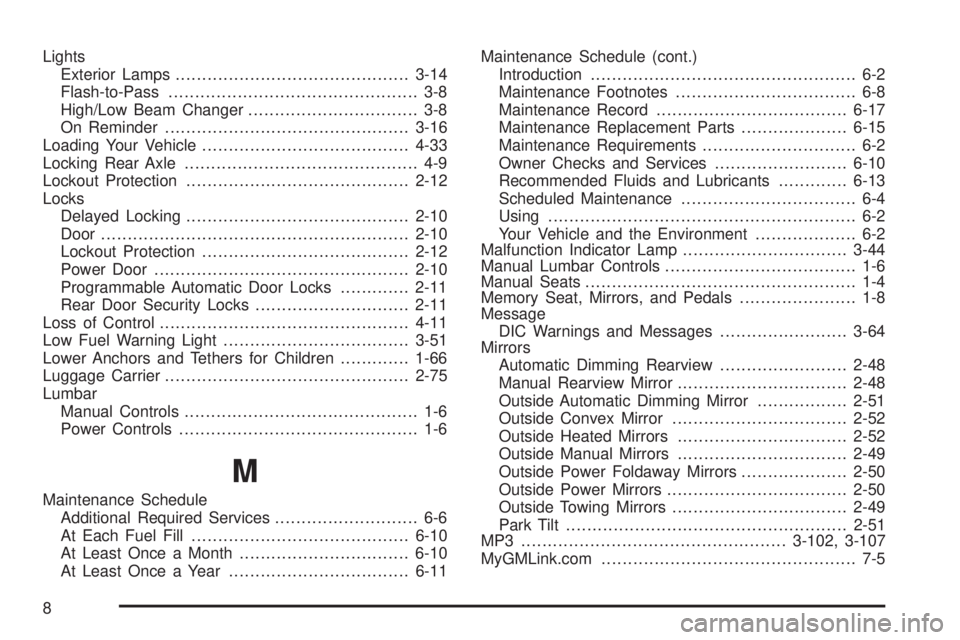
Memory Seat, Mirrors, and Pedals...................... 1-8
Message
DIC Warnings and Messages........................3-64
Mirrors
Automatic Dimming Rearview........................2-48
Manual Rearview Mirror................................2-48
Outside Automatic Dimming Mirror.................2-51
Outside Convex Mirror.................................2-52
Outside Heated Mirrors................................2-52
Outside Manual Mirrors................................2-49
Outside Power Foldaway Mirrors....................2-50
Outside Power Mirrors..................................2-50
Outside Towing Mirrors.................................2-49
Park Tilt.....................................................2-51
MP3 ..................................................3-102, 3-107
MyGMLink.com................................................ 7-5
8
Page 573 of 576
Removing the Flat Tire and Installing the
Spare Tire..................................................5-94
Removing the Spare Tire and Tools...................5-89
Replacement Bulbs.........................................5-60
Replacement Parts, Maintenance......................6-15
Reporting Safety Defects
Canadian Government..................................7-15
General Motors...........................................7-15
United States Government............................7-14
Restraint System Check
Checking the Restraint Systems....................1-98
Replacing Restraint System Parts
After a Crash..........................................1-99
Retained Accessory Power...............................2-26
Roadside
Assistance Program....................................... 7-7
Rocking Your Vehicle to Get it Out....................4-32
Routing, Engine Drive Belt...............................6-16
Running the Vehicle While Parked.....................2-47
S
Safety Belt Reminders.....................................3-36
Safety Belts
Care of ....................................................5-110
How to Wear Safety Belts Properly................1-37
Lap Belt.....................................................1-52
Lap-Shoulder Belt........................................1-45
Safety Belt Extender....................................1-53Safety Belts (cont.)
Safety Belt Use During Pregnancy.................1-52
Safety Belts Are for Everyone.......................1-32
Safety Warnings and Symbols.............................. iv
Scheduled Maintenance..................................... 6-4
Seats
60/40 Split Bench Seat.................................1-14
Bucket Seats, Rear......................................1-20
Center Seat................................................1-13
Heated and Cooled Seats.............................. 1-8
Heated Seats............................................... 1-7
Heated Seats - Rear....................................1-13
Manual Lumbar............................................. 1-6
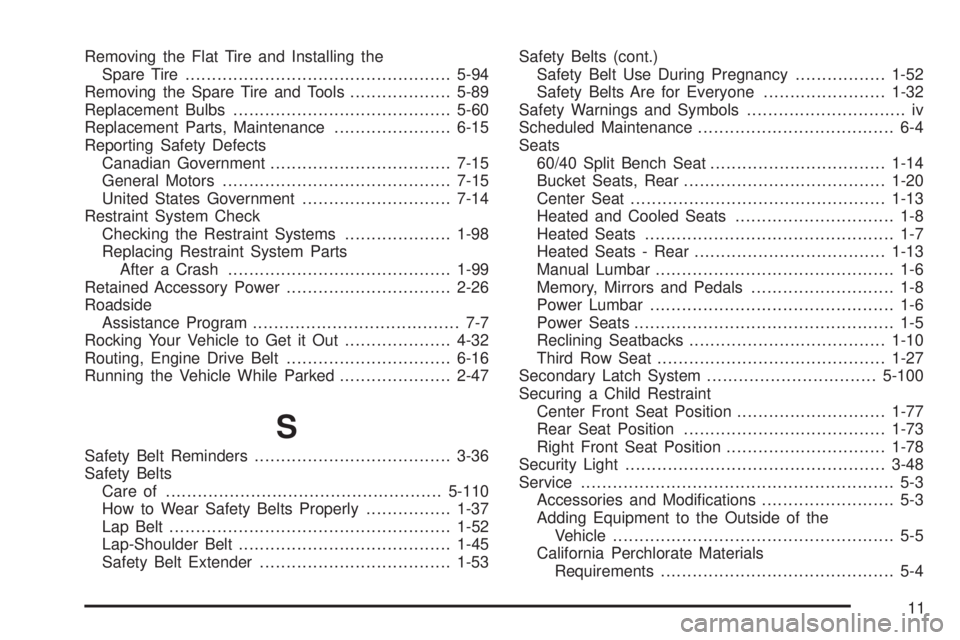
Memory, Mirrors and Pedals........................... 1-8
Power Lumbar .............................................. 1-6
Power Seats................................................. 1-5
Reclining Seatbacks.....................................1-10
Third Row Seat...........................................1-27
Secondary Latch System................................5-100
Securing a Child Restraint
Center Front Seat Position............................1-77
Rear Seat Position......................................1-73
Right Front Seat Position..............................1-78
Security Light.................................................3-48
Service........................................................... 5-3
Accessories and Modications......................... 5-3
Adding Equipment to the Outside of the
Vehicle..................................................... 5-5
California Perchlorate Materials
Requirements............................................ 5-4
11