instrument cluster GMC YUKON DENALI 2003 User Guide
[x] Cancel search | Manufacturer: GMC, Model Year: 2003, Model line: YUKON DENALI, Model: GMC YUKON DENALI 2003Pages: 447, PDF Size: 21.97 MB
Page 186 of 447
Driver Information Center (DIC)
The DIC display is located on the instrument panel
cluster above the steering wheel. The DIC can display
information such as the trip odometer, fuel economy and
personalization features.
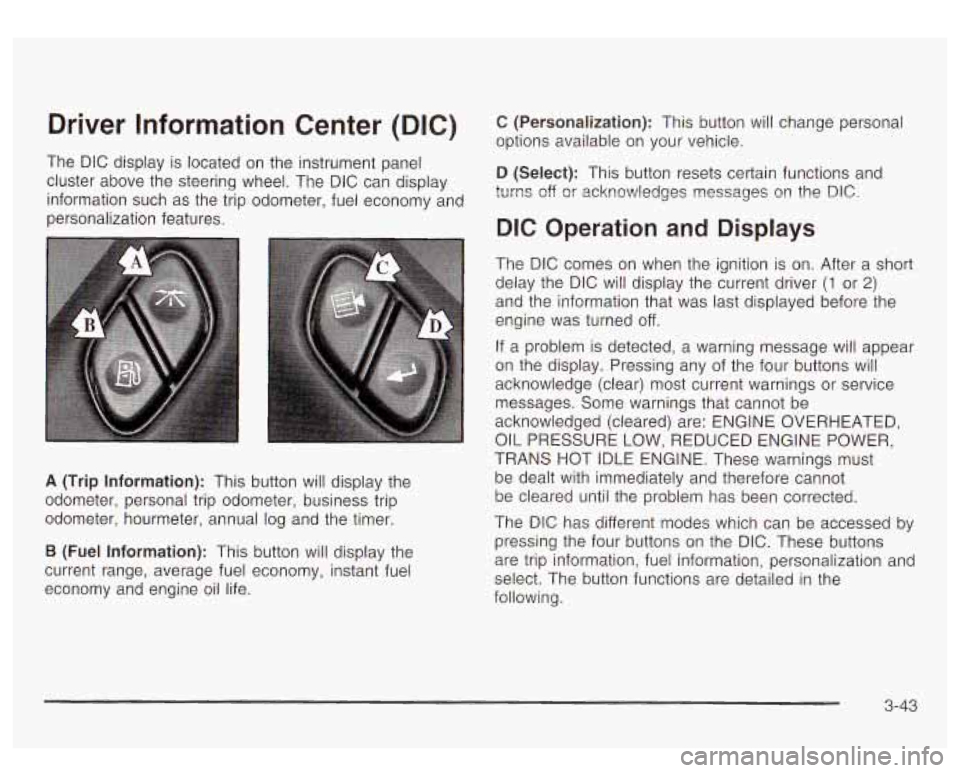
A (Trip Information): This button will display the
odometer, personal trip odometer, business trip
odometer, hourmeter, annual log and the timer.
B (Fuel Information): This button will display the
current range, average fuel economy, instant fuel
economy and engine oil life.
C (Personalization): This button will change personal
options available on your vehicle.
D (Select): This button resets certain functions and
turns off
or acknowledges nessages on the DIC.
DIC Operation and Displays
The DIC comes on when the ignition is on. After a short
delay the DIC will display the current driver
(1 or 2)
and the information that was last displayed before the
engine was turned off.
If a problem is detected, a warning message will appear
on the display. Pressing any of the four buttons will
acknowledge (clear) most current warnings or service
messages. Some warnings that cannot be
acknowledged (cleared) are: ENGINE OVERHEATED,
OIL PRESSURE LOW, REDUCED ENGINE POWER,
TRANS HOT IDLE ENGINE. These warnings must
be dealt with immediately and therefore cannot
be cleared until the problem has been corrected.
The DIC has different modes which can be accessed
by
pressing the four buttons on the DIC. These buttons
are trip information, fuel information, personalization and
select. The button functions are detailed in the
following.
3-43
Page 188 of 447
BUSINESS: AVG MPH - This shows the vehicle’s
average speed for the business trip.
BUSINESS: Yo ANNUAL - This shows the ratio GI
busifless trip miles to ar,nual miles as a percent.
To reset the personal or business trip information, do
the following: press and hold the select button for
two seconds while in one of the personal or business
trip modes. This will reset all of the information for
the personal or business trip.
You can also reset the BUSINESS:
XX MI while it is
displayed by pressing the reset stem on the cluster. If
you press and hold the reset stem or select button
for four seconds, the display will show the distance
traveled since the last ignition cycle for the business trip.
Season Odometer
Press the trip information button until SEASON
ODOMETER appears on the display. This shows the
total distance the vehicle has been driven in either miles
or kilometers. Pressing the reset stem located on the
instrument cluster with the vehicle
off will also display
the season odometer.
Hourmeter
Press the trip button to scroll to the hourmeter. The
hourmeter shows the total number of hours the engine
has run. Pressing the reset stem on the instrument
cluster will also display the hourmeter after the season
odometer is displayed.
Annual Log
Press the trip button to scroll to the annual log. The
annual log shows the mileage accumulated since it was
iasi reset. io reset the anntial log, press and hold
the select button for two seconds.
Timer
The DIC can be used as a stopwatch. Press the select
button while TIMER is displayed
to start the timer.
The display will show the amount of time that has
passed since the timer was last reset (not including time
the ignition is
off). Time will continue to be counted as
long as the ignition is on, even
if another display is being
shown on the DIC. The timer will record up
to 99 hours,
59 minutes and 59 seconds (99:59:59) after which
the display will roll back to zero.
To stop the counting of time, press the select button
briefly while TIMER is displayed.
To reset the timer to zero, press and hold the select
button while TIMER is displayed.
Fuel Information Button
Use the fuel information button to scroll through the
range, average fuel economy, instant fuel economy and
the
GM Oil Life System.
3-45
Page 275 of 447
Rocking Your Vehicle To Get It Out
First, turn your steering wheel left and right. That will
clear the area around your front wheels. If your vehicle
has the Stabilitrak@System, turn the system off by
pressing the Stabilitrak@button
so that the STABILITY
SYS DISABLED message and the traction off light
are illuminated on the instrument panel cluster. Then
shift back and forth between REVERSE (R) and
a
forward gear, spinning the wheels as little as possible.
Release the accelerator pedal while you shift, and press
lightly on the accelerator pedal when the transmission
is in gear. By slowly spinning your wheels in the forward
and reverse directions, you will cause a rocking
motion that may free your vehicle.
If that doesn’t get
you out after a few tries, you may need to be towed out.
Or, you can use your recovery hooks
if your vehicle
has them. If you do need to be towed out, see Towing
Your Vehicle on page 4-44.
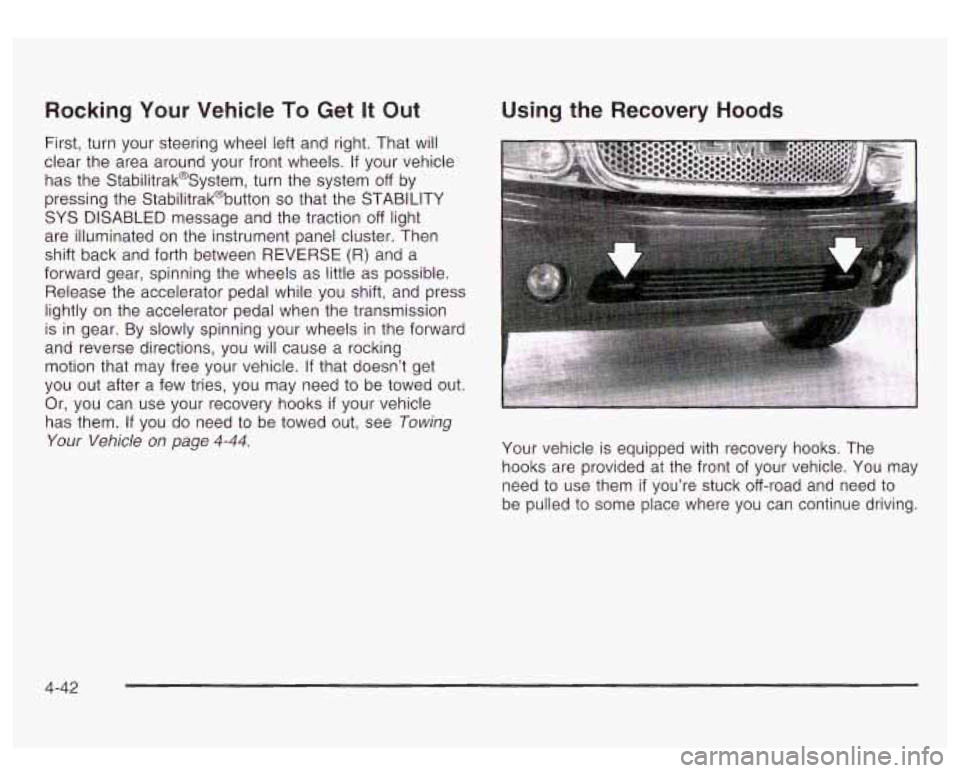
Using the Recovery Hoods
Your vehicle is equipped with recovery hooks. The
hooks are provided at the front
of your vehicle. You may
need to use them
if you’re stuck off-road and need to
be pulled to some place where you can continue driving.
4-42
Page 302 of 447
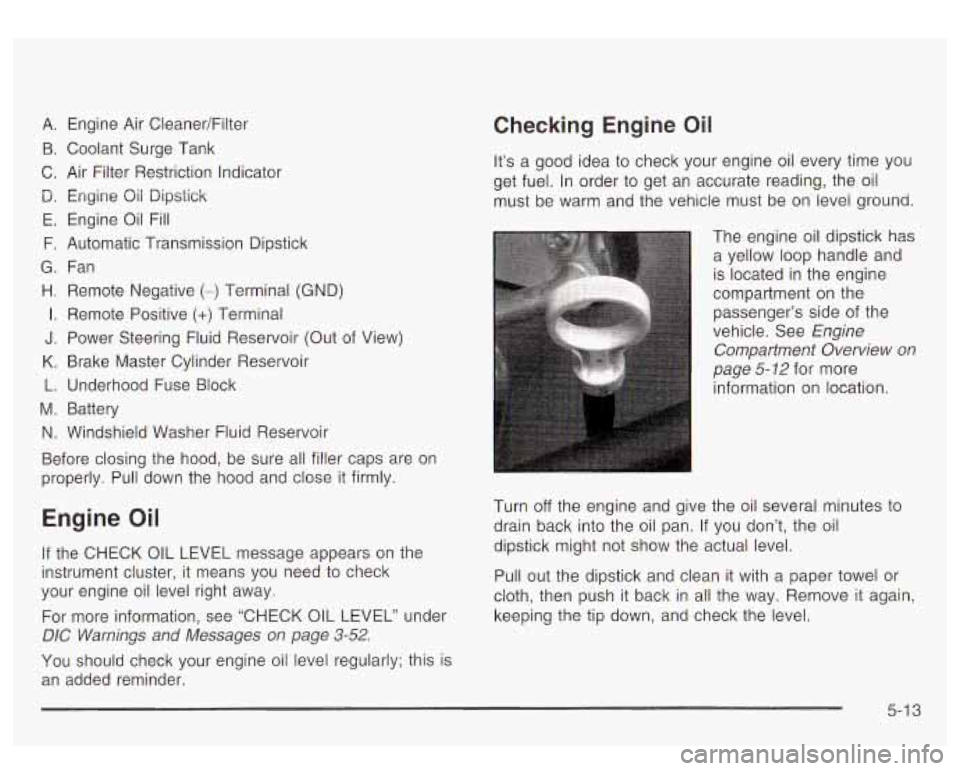
A. Engine Air CleanedFilter
B. Coolant Surge Tank
C. Air Filter Restriction Indicator
D. Engine Qii Dipstick
E. Engine Oil Fill
F. Automatic Transmission Dipstick
G. Fan
H. Remote Negative (-) Terminal (GND)
I. Remote Positive (+) Terminal
J. Power Steering Fluid Reservoir (Out of View)
K. Brake Master Cylinder Reservoir
L. Underhood Fuse Block
M. Battery
N. Windshield Washer Fluid Reservoir
Before closing the hood, be sure all filler caps are on
properly. Pull down the hood and close
it firmly.
Engine Oil
If the CHECK OIL LEVEL message appears on the
instrument cluster, it means you need to check
your engine oil level right away.
For more information, see “CHECK OIL LEVEL” under
DIC Warnings and Messages on page 3-52.
You should check your engine oil level regularly; this is
an added reminder.
Checking Engine Oil
It’s a good idea to check your engine oil every time you
get fuel. In order to get an accurate reading, the oil
must be warm and the vehicle must be on level ground.
The engine oil dipstick has a yellow loop handle and
is located in the engine
compartment on the
passenger’s side of the
vehicle. See Engine
Compartment Overview on
page
5- 12 for more
information on location.
Turn
off the engine and give the oil several minutes to
drain back into the oil pan. If you don’t, the oil
dipstick might not show the actual level.
Pull out the dipstick and clean it with a paper towel or
cloth, then push it back in all the way. Remove it again,
keeping the tip down, and check the level.
5-1 3
Page 383 of 447
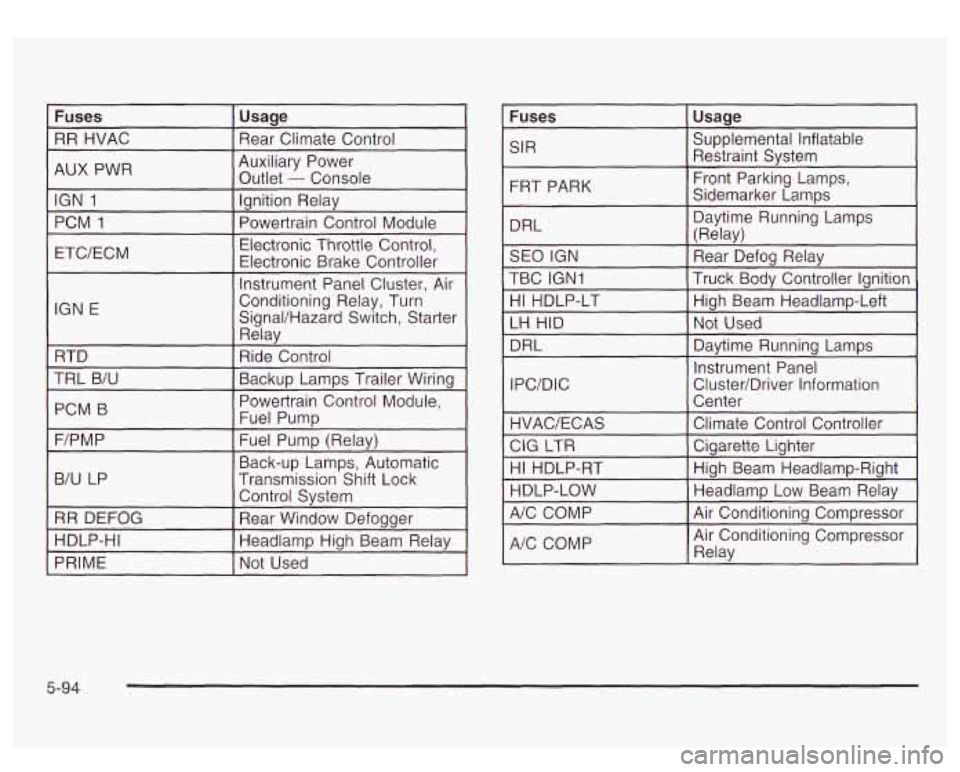
Fuses
RR HVAC
Usage
Rear Climate Control
AUX PWR I
Auxiliary Power
Outlet
- Console
IGN
1
PCM 1 Ignition Relay
Electronic Throttle Control,
ETC/ECM Powertrain Control Module
Electronic Brake Controller
IGN E Instrument Panel Cluster,
Air
Conditioning Relay, Turn
SignaVHazard Switch, Starter
Relav
RTD I Ride Control I
TRL B/U
~~
I Backup LampsTrailG Wiring 1
PCM B I
Powertrain Control Module,
Fuel Pumr,
I I
F/PMP I Fuel Pump (Relay)
B/U LP
I
Back-up Lamps, Automatic
Transmission Shift Lock
I
Control System
RR DEFOG
Rear Window Defoaaer
HDLP-HI
~~~ ____
HeadlampHighBeam Relay
PRIME Not Used
Fuses I Usage I
SIR Supplemental Inflatable
Restraint System
FRT PARK
DRL Front Parking Lamps,
Sidemarker Lamps
Daytime Running Lamps
(Relav)
SEO IGN
Truck Body Controller Ignition
TBC IGN1 Rear
Defog Relay
HI HDLP-LT High
Beam Headlamp-Left
LH HID Not
Used
DRL
I Davtime Runnina LamDs I
Instrument Panel
IPC/DIC Cluster/Driver Information
HI HDLP-RT
HDLP-LOW High
Beam Headlamp-Right
Headlamp Low Beam Relav
A/C COMP
I Air Conditionina Comm-essor I v
A/C COMP Air
Conditioning Compressor
Relav
5-94
Page 432 of 447
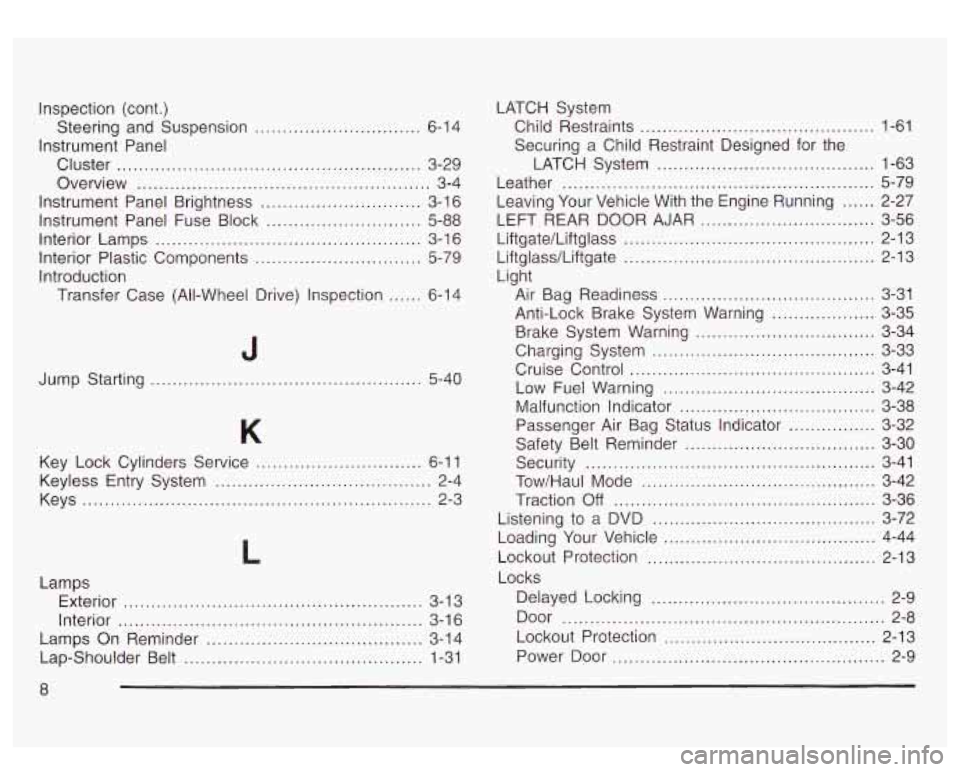
Inspection (cont.)
Instrument Panel
Steering
and Suspension
...............
Cluster ......................... .....................
Overview ..............................................
Instrument Panel Brightness ............................
Instrument Panel Fuse Block ...........................
Interior Lamps ...............................................
Interior Plastic Components .............................
Introduction
Transfer Case (All-Wheel Drive) Inspection
.....
. 6-14
. 3-29
... 3-4
. 3-16
. 5-88
. 3-16
. 5-79
. 6-14
Jump Starting
........................ 5-40
Key Lock Cylinders Service
........ ........... 6-1 1
Keys
........................................................... 2-3
Keyless
Entry System
....................................... 2-4
L
Lamps
Exterior
...................................................... 3-1 3
Interior
....................................................... 3-1 6
Lamps On Reminder
....................................... 3-14
Lap-Shoulder Belt
........................................... 1-31 LATCH
System
Child Restraints
........................................... 1-61
Securing a Child Restraint Designed for the
LATCH System
........................................ 1-63
Leather
......................................................... 5-79
LEFT REAR DOOR AJAR
................................ 3-56
Liftgate/LiftgIass
.............................. ........ 2-13
Liftglasdliftgate
.............................. .... 2-13
Light Leaving Your Vehicle With the Engine Running
...... 2-27
Air Bag Readiness
....................................... 3-31
Anti-Lock Brake System Warning
................... 3-35
Brake System Warning
................................. 3-34
Charging System
..................................... 3-33
Cruise Control
................. ................ 3-41
Low Fuel Warning
................................... 3-42
Malfunction Indicator
................................ 3-38
Passenger Air Bag Status Indicator
............ 3-32
Safety Belt Reminder
................................... 3-30
Security
..................................................... 3-41
Tow/Haul Mode
........................................... 3-42
Traction
Off ................................................ 3-36
Listening
to a DVD ..................................... 3-72
Loading Your Vehicle
................................... 4-44
Lockout Protection
.......................................... 2-13
Locks Delayed Locking
........................................... 2-9
Door
........................................................... 2-8
Lockout Protection
....................................... 2-13
Power Door
.................................................. 2-9
8