service GMC YUKON DENALI 2003 Owner's Manual
[x] Cancel search | Manufacturer: GMC, Model Year: 2003, Model line: YUKON DENALI, Model: GMC YUKON DENALI 2003Pages: 447, PDF Size: 21.97 MB
Page 186 of 447
Driver Information Center (DIC)
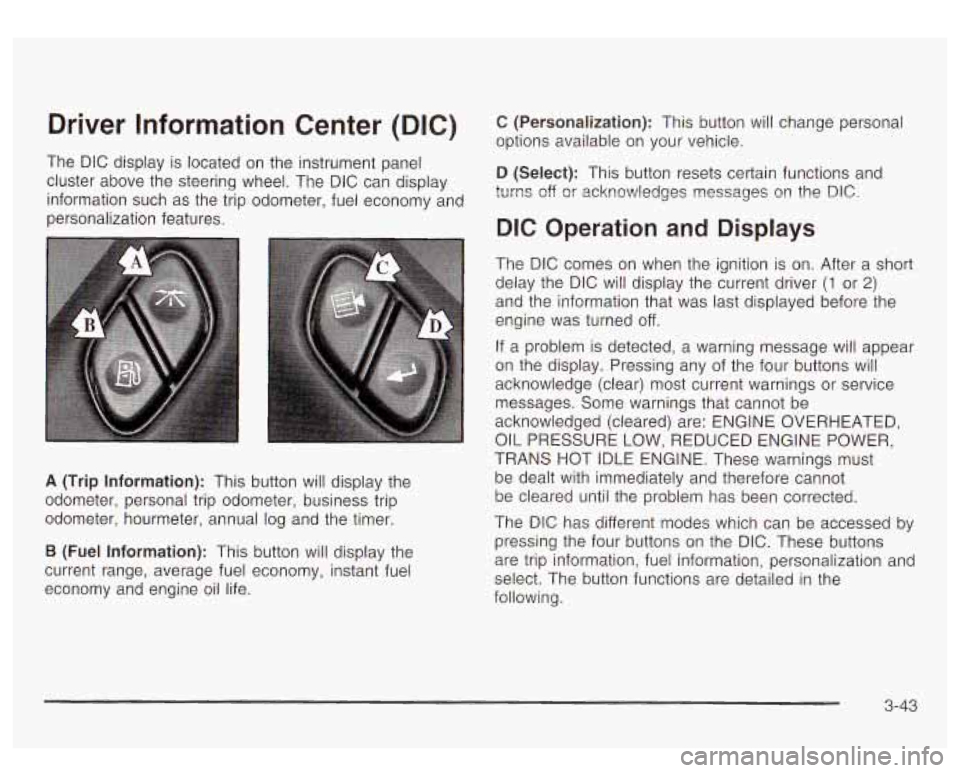
The DIC display is located on the instrument panel
cluster above the steering wheel. The DIC can display
information such as the trip odometer, fuel economy and
personalization features.
A (Trip Information): This button will display the
odometer, personal trip odometer, business trip
odometer, hourmeter, annual log and the timer.
B (Fuel Information): This button will display the
current range, average fuel economy, instant fuel
economy and engine oil life.
C (Personalization): This button will change personal
options available on your vehicle.
D (Select): This button resets certain functions and
turns off
or acknowledges nessages on the DIC.
DIC Operation and Displays
The DIC comes on when the ignition is on. After a short
delay the DIC will display the current driver
(1 or 2)
and the information that was last displayed before the
engine was turned off.
If a problem is detected, a warning message will appear
on the display. Pressing any of the four buttons will
acknowledge (clear) most current warnings or service
messages. Some warnings that cannot be
acknowledged (cleared) are: ENGINE OVERHEATED,
OIL PRESSURE LOW, REDUCED ENGINE POWER,
TRANS HOT IDLE ENGINE. These warnings must
be dealt with immediately and therefore cannot
be cleared until the problem has been corrected.
The DIC has different modes which can be accessed
by
pressing the four buttons on the DIC. These buttons
are trip information, fuel information, personalization and
select. The button functions are detailed in the
following.
3-43
Page 196 of 447

OIL LIFE RESET ENGINE COOLANT HOT
This message will appear on the display for about
10 seconds after resetting the change engine oil
message.
OIL PRESSURE LOW
If low oil pressure levels occur, this message will be
displayed on the DIC and a chime will sound. Stop the
vehicle as soon as safely possible and do not operate
it until the cause of the low oil pressure has been
corrected. Check your oil as soon as possible and have
your vehicle serviced.
CHECK OIL LEVEL
If the oil level in the vehicle is low, this message will
appear on the DIC. Check the oil level and correct it as
necessary. You may need
to let the vehicle cool or
warm up and cycle the ignition
to be sure this message
will clear. Once the problem is corrected, pressing
the select button will clear this message from the DIC
display. This message will clear itself after
10 seconds
until the next igntion cycle.
LOW COOLANT LEVEL
If the engine coolant level is low, this message will
appear on the DIC. Adding coolant will clear the
message. This message will clear itself after
10 seconds
until the next igntion cycle. If
the cooling system temperature gets hot, this message
will appear in the DIC. Stop the vehicle and
let the
engine idle in PARK
(P) to allow the coolant to reach a
safe temperature. This message will clear when the
coolant temperature drops
to a safe operating
temperature.
ENGINE OVERHEATED
If the engine cooling system reaches unsafe
temperatures for operation, this message will appear in
the DIC and you will hear a chime. Stop and turn
off
the vehicle as soon as it is safe to do so to avoid severe
damage. This message will clear when the engine
has cooled
to a safe operating temperature.
REDUCED ENGINE POWER
This message is displayed and you will hear a chime
when the cooling system temperature gets too hot
and the engine further enters the engine coolant
protection mode.
See
Engine Overheating on page 5-25 for further
information.
3-53
Page 197 of 447
BATTERY
If the battery is not charging during operation, this
message will appear
on the DIG. Driving with this
problem could drain your battery. Have the electrical
system checked as soon as possible. Pressing the
select button will acknowledge this message and clear
it
from the DIC display.
SERVlCE AIR
If there is a problem with the air bag system, this
message will be displayed on the DIC. Have a qualified
technician inspect the system for problems. Pressing
the select button will acknowledge this message
and clear
it from the DIC display.
SERVICE BRAKE SYSTE
If a problem occurs with the brake system, this message
will appear on the DIC. If this message appears, stop
as soon as possible and turn
off the vehicle. Restart the
vehicle and check for the message
on the DIC display.
If the message is still displayed, or appears again when
you begin driving, the brake system needs service.
SERVICE 4W
If a problem occurs with the all-wheel drive system? this
message will appear on the DIG.
If this message
appears, stop as
soon as possible and turn off the
vehicle. Restart the vehicle and check for the message
3-54
on the DIC display. If the message is still displayed, or
appears again when you begin driving, the four
wheel drive system needs service.
ONTROL
If a problem occurs with the suspension system, this
message will appear on the DIC.
If this message
appears, stop and turn
off the vehicle. Restart the
vehicle and check for the message on the
DIC display.
If the message is still displayed, or appears again
when you begin driving, the suspension system needs
service.
TURN SIGNAL ON
If a turn signal is left on for 3/4 of a mile (1.2 km), this
message will appear on the display and you will hear a
chime. Move the turn signal/multifunction lever
to the
off position. Pressing the select button will acknowledge
this message and clear
it from the DIC display.
If the liftgate is open while the ignition is in
RUN, this
message will appear on the DIC and you will hear
a chime. Turn
off the vehicle and check the liftgate.
Restart the vehicle and check for the message on the
DlC display. Pressing the select button will acknowledge
this message and clear it from the
DIC display.
Page 200 of 447
When the system activates, you may hear a noise or
feel a vibration in the brake pedal. This is normal. When
the STABILITY SYS ACTIVE message is on, you
should continue
to steer in the direction you want to go.
The system is designed
to help you in bad weather
or other difficult driving situations by making the most of
whatever road conditions will permit.
SERVICE STABILITY
If you ever see the SERVICE STABILITY message, it
means there may be a problem with your
StabiIitrak@system. If you see this message
try to reset
the system (stop; turn
off the engine; then start the
engine again). If the SERVICE STABILITY message still
comes on, it means there is a problem. You should
see your dealer for service. The vehicle is safe to drive,
however, you do not have the benefit of Stabilitrak@,
so reduce your speed and drive accordingly.
STABILITY SYS DISABLED
The STABILITY SYS DISABLED message will turn on
when you press the Stabilitrak@button, or when the
stability control has been automatically disabled. To limit
wheel spin and realize the full benefits of the stability
enhancement system, you should normally leave
Stabilitrak@on. However, you should turn Stabilitrak@off
if your vehicle gets stuck in sand, mud, ice or snow and you want to “rock”
your vehicle
to attempt to free it,
or if you are driving in extreme off-road conditions
and require more wheel spin. See If
You Are Stuck: In
Sand, Mud, Ice or
Snow on page 4-41. To turn the
Stabilitrak@system back on press the Stabilitrak@button
again. There are four conditions that can cause this
message
to appear. One condition is overheating, which
could occur
if Stabilitrak@activates continuously for an
extended period of time. The message will
also be
displayed
if the brake system warning light is on. See
Brake System Warning Light
on page 3-34. The
message could be displayed
if the stability system takes
longer than usual to complete its diagnostic checks
due to driving conditions. Also,
if an engine or vehicle
related problem has been detected, and the vehicle
needs service, the message will appear.
The message will turn off as soon as the conditions that
caused the message to be displayed are no longer
present.
TRACTION ACTIVE
When the traction control system has detected that any
of the vehicle’s wheels are slipping, the traction
control system will activate and this message will appear
on the DIC. See StabiIitrakO System
on page 4-9 for
more information.
3-57
Page 202 of 447
Radio with Cassette and C
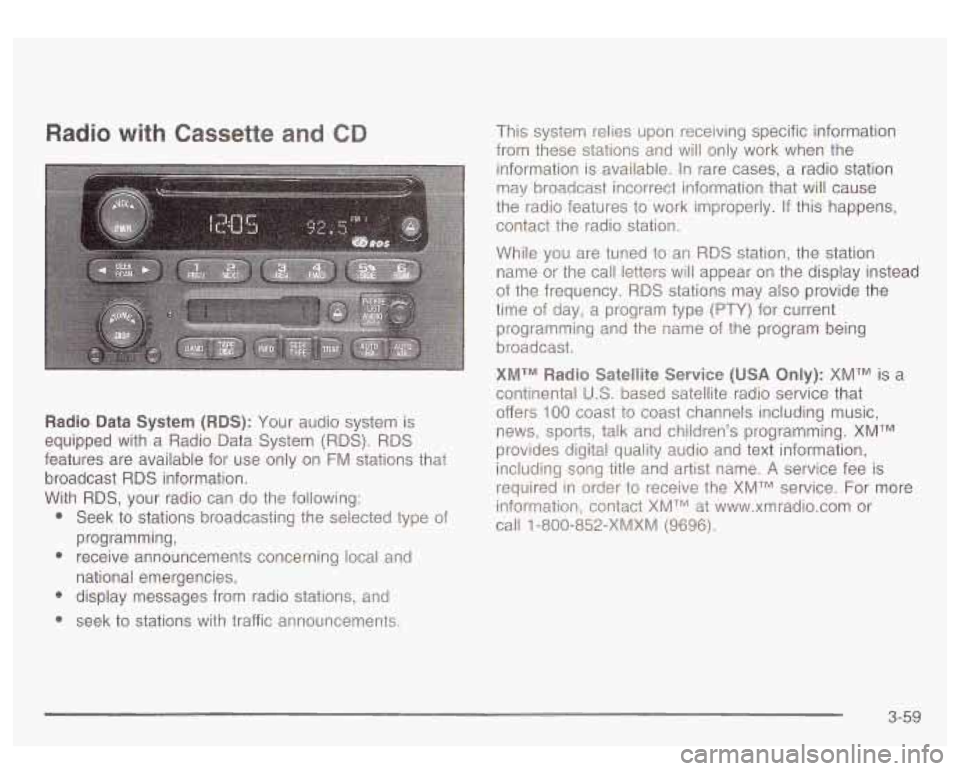
Radio Data System (RDS): Your audio system is
equipped with a Radio Data System (RDS).
RDS
features are available for use only on FM stations that
broadcast
RDS information.
With
RDS, your radio can do the following:
* Seek to stations broadcasting the selected type of
* receive announcements concerning local and
* display messages from radio stations, and
* seek to stations with traffic announcements.
programming,
national emergencies, This system relies upon receiving specific information
from these stations and will only work when the
information is available. In rare cases, a radio station
may broadcast incorrect information that will cause
the radio features to work improperly. If this happens,
contact the radio station.
While you are tuned to an RDS station, the station
name or the call letters will appear on the display instead
of the frequency.
RDS stations may also provide the
time of day, a program type
(PTY) for current
programming and the name
of the program being
broadcast.
XMTM Radio Satellite Service (USA Only): XMTM is a
continental
U.S. based satellite radio service that
offers
100 coast to coast channels including music,
news, sports, talk and children’s programming.
XMTM
provides digital quality audio and text information,
including song title and artist name.
A service fee is
required in order to receive the XMTM service. For more
information, contact XMTM at www.xmradio.com or
call
1 -800-852-XMXM (9696).
3-59
Page 203 of 447
Playing the Radio
PWR (Power): Press this knob to turn the system on
and
off.
VOL (Volume): Turn this knob to increase or to
decrease volume.
AUTO VOL (Automatic Volume): With automatic
volume, your audio system adjusts automatically
to make up for road and wind noise as you drive.
Set the volume at the desired level. Press this button
until AVOL ON appears on the display. Then as
you drive, automatic volume increases the volume as
necessary to overcome noise at any speed. The volume
level should always sound the same
to you as you
drive. To turn automatic volume
off, press this button
until AVOL OFF appears on the display.
DlSP (Display): Push this knob to switch the display
between radio station frequency and time. Time display
is available with the ignition turned
off.
For RDS, push this knob to change what appears on
the display while using
RDS. The display options
are station name,
RDS station frequency, PTY and the
name of the program
(if available).
For XMTM
(USA only, if your radio is equipped with
XMTM Satellite Radio Service), push this knob while in
XM mode to retrieve various pieces of information
related to the current song or channel. By pressing and
releasing this knob, you may retrieve four different
categories of information: Artist, Song Title, Category or
PTY, Channel Number/Channel Name.
To change the default on the display, push this knob
until you see the display you want, then hold the knob
for two seconds. The radio will produce one beep
and selected display will now be the default.
3-60
Page 204 of 447
Finding a Station
BAND: Press this button to switch between AM, FM,
FM2, or XMI, XM2 (USA only,
if your radio is equipped
with
XhATrJ Satellite Radio Service) The dispiay wiii
show your selection.
TUNE: Turn this knob to choose radio stations.
4 SEEK b : Press the right or the left arrow to seek
to the next or to the previous station and stay there.
The radio will seek only to stations that are in the
selected band and only to those with a strong signal.
4 SCAN b : Press and hold one of the arrows
for more than two seconds. The radio will produce one
beep. The radio will scan
to a station, play for a few
seconds, then go on to the next station. SCAN will be
displayed. Press one of the arrows again
to stop
scanning.
The radio will scan only
to stations that are in the
selected band and only to those with a strong signal.
To scan preset stations, press and hold one of the
arrows for more than four seconds. The radio will
produce two beeps. The radio will scan to the first preset station,
play for a few seconds, then go on to the next
preset station. PSCN will be displayed. Press one of the
arrows again or one of the pushbuttons
to stop scanning.
The radio will scan only
to preset stations that are in the
selected band and only to those with a strong signal.
Setting Preset Stations
The six numbered pushbuttons let you return to your
favorite stations. You can set up to
30 stations (six AM,
six FM1 and six FM2, or six XMI and six XM2 (USA
only,
if your radio is equipped with the XM Satellite
Radio Service) by performing the following steps:
1. Turn the radio on.
2. Press BAND to select AM, FM1 or FM2,
or XMI
, XM2.
3. Tune in the desired station.
4. Press AUTO
EQ to select the equalization that best
5. Press and hold one of the six numbered
suits
the type of station you are listening to.
pushbuttons. The radio will produce one beep.
Whenever you press that numbered pushbutton, the
station you set will return and the bass and treble
equalization that you selected
will also be
automatically selected for that pushbutton.
6. Repeat the steps for each pushbutton.
3-61
Page 208 of 447
TRAF (Traffic): Press this button to receive traffic
announcements. If the current tuned station does not
broadcast traffic announcements, the radio will seek
to a
station that does. When the radio finds a station that
broadcasts traffic announcements, it will stop. TRAF will
appear on the display and when a traffic announcement
comes on you will hear it.
If no station is found, NO
TRAF will appear on the display.
When a traffic announcement comes on the current
station or on a related network station, you will hear it,
even
if the volume is muted or a compact disc is
playing. The traffic symbol and TRAF will appear on the
display while the announcement plays.
If the cassette
tape or compact disc player was being used, play
will stop during the announcement.
This function does not apply to
XMTM Satellite Radio
Service.
Traffic Interrupt Feature: Your radio can interrupt the
play of a cassette, CD, or
XMTM. Press the TRAF
button. The radio will seek to a station that broadcasts
traffic announcements. When the radio finds a station
that broadcasts traffic announcements, it will stop. TRAF
will appear on the display. When a traffic announcement
comes on the station that was found, you
will hear it.
When the traffic announcement
is over, the radio
will resume play of the cassette, CD, or
XMTM. If no
station
is found, NO TRAF will appear on the display.
Radio Messages
CAL ERR (Calibration Error): This message is
displayed when the radio has not been calibrated
properly for the vehicle. You must return to the
dealership for service.
LOCKED: This message is displayed when the
THEFTLOCK@ system has locked up. You must return
to the dealership for service.
3-65
Page 209 of 447
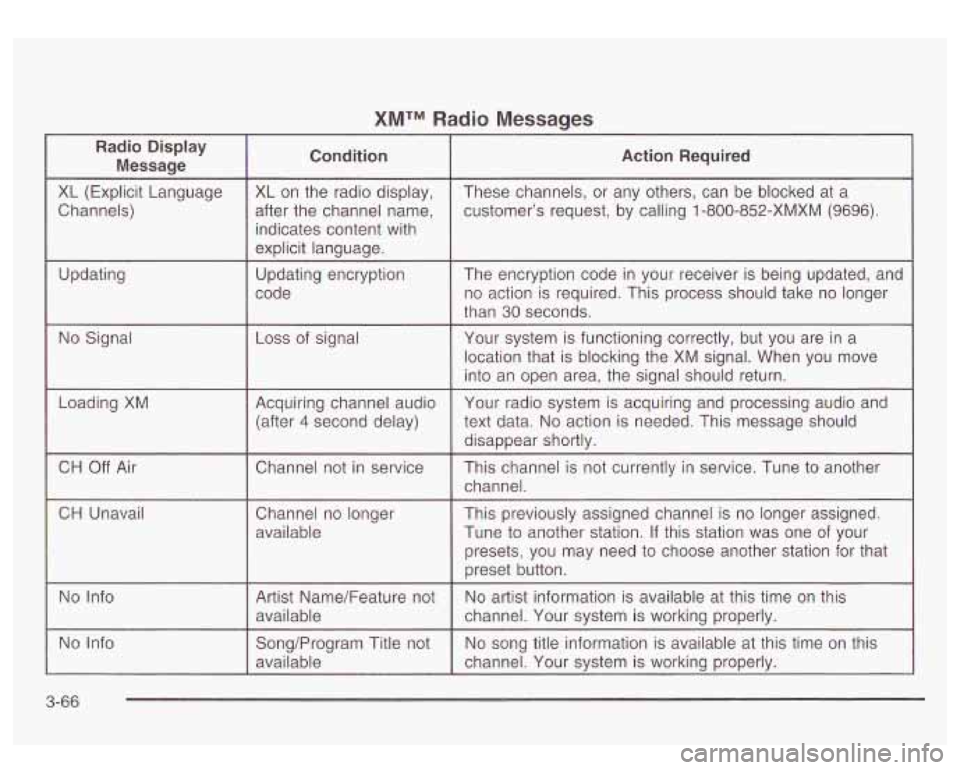
XMTM Radio Messages
Radio Display
Message Condition Action Required
XL
(Explicit Language
Channels)
Updating XL on the
radio display,
after the channel name, indicates content with
explicit language.
Updating encryption
code These channels,
or any others, can be blocked at a
customer’s request, by calling
1 -800-852-XMXM (9696).
The encryption code in your receiver is being updated, and
no action is required. This process should take no longer
than
30 seconds.
No Signal Loss of signal Your system is functioning correctly, but you are in a
location that is blocking the XM signal. When you move
into an open area, the signal should return.
Loading XM
Acquiring channel audio Your
radio system is acquiring and processing audio and
(after
4 second delay) text data. No action
is needed. This message should
disappear shortly.
CH Unavail
No Info Channel not
in service nnel is not currently in service. Tune
to another
available Tune
to another station. If this station was one of your
may need
to choose another station for that
available channel. Your system
is working properly.
No Info
3-66
Page 210 of 447
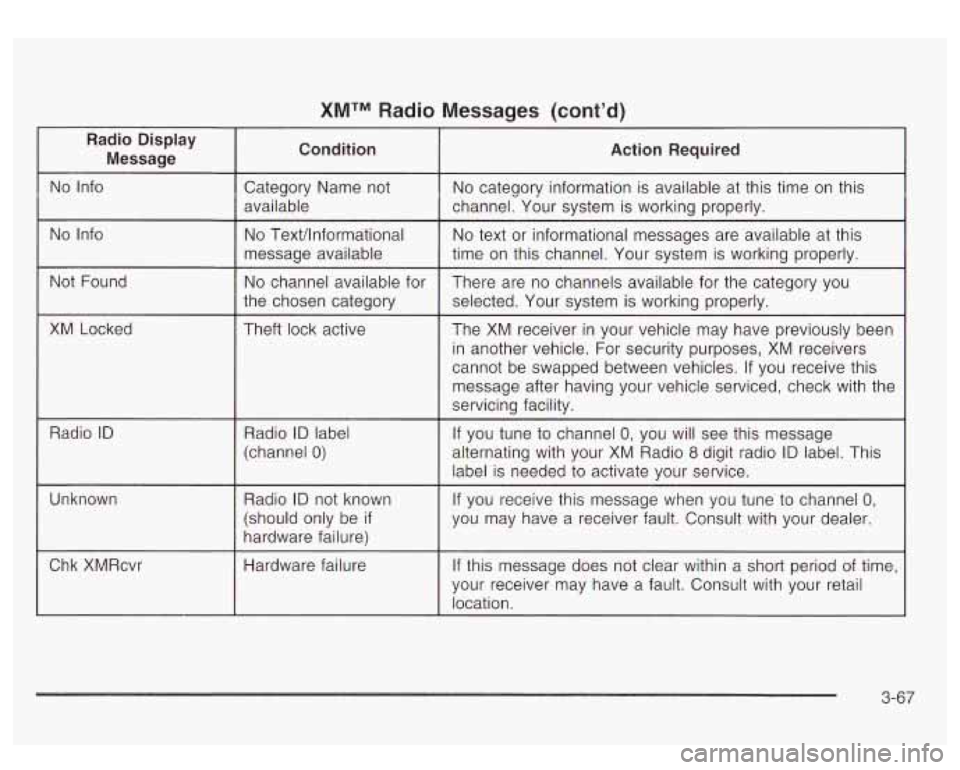
XMTM Radio Messages (cont’d)
Radio Display Message Condition Action Required
No
Info Category Name not No category information is available at this time on this
available channel. Your system is working properly.
No Info No TexVlnformational
message available
the chosen category
Not
Found
No channel available for
XM Locked Theft lock active
Radio
ID Radio ID label
~~
(channel 0)
No text or informational messages are available at this
time on this channel. Your system
is working properly.
There are no channels available for the category you
selected. Your system is working properly.
The XM receiver in your vehicle may have previously been
in another vehicle. For security purposes, XM receivers
cannot be swapped between vehicles.
If you receive this
message after having your vehicle serviced, check with the
servicing facility.
If you tune to channel
0, you will see this message
alternating with your XM Radio
8 digit radio ID label. This
label is needed to activate your service.
Unknown
If you receive this message when you tune to channel 0,
you may have a receiver fault. Consult with your dealer.
3-67