oil reset GMC YUKON DENALI 2003 Owners Manual
[x] Cancel search | Manufacturer: GMC, Model Year: 2003, Model line: YUKON DENALI, Model: GMC YUKON DENALI 2003Pages: 447, PDF Size: 21.97 MB
Page 186 of 447
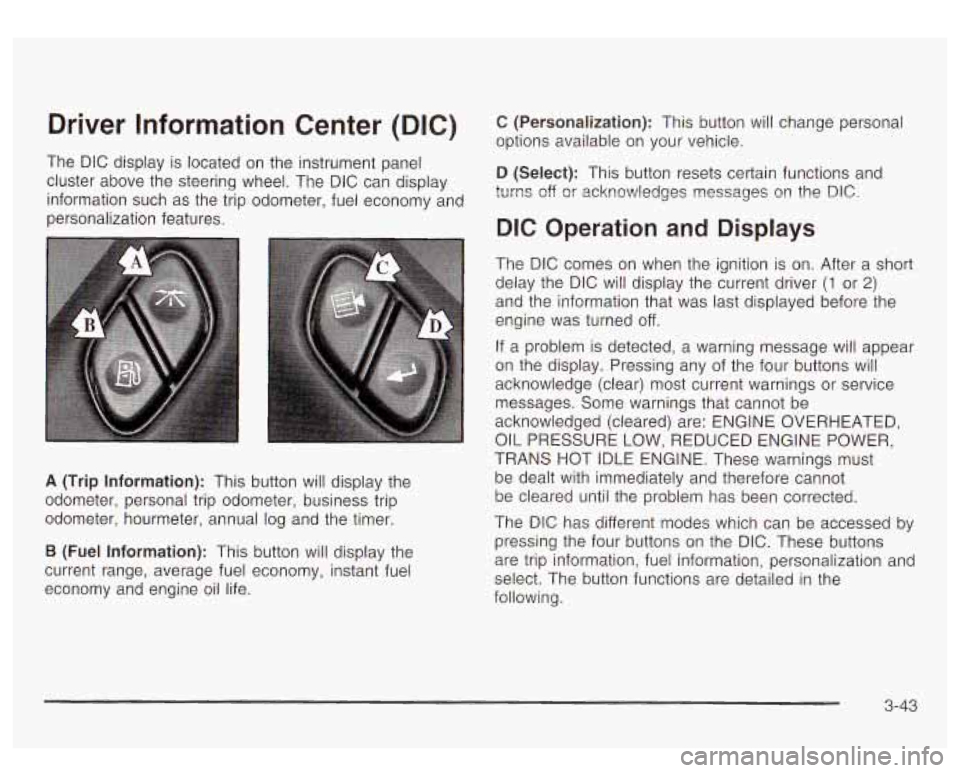
Driver Information Center (DIC)
The DIC display is located on the instrument panel
cluster above the steering wheel. The DIC can display
information such as the trip odometer, fuel economy and
personalization features.
A (Trip Information): This button will display the
odometer, personal trip odometer, business trip
odometer, hourmeter, annual log and the timer.
B (Fuel Information): This button will display the
current range, average fuel economy, instant fuel
economy and engine oil life.
C (Personalization): This button will change personal
options available on your vehicle.
D (Select): This button resets certain functions and
turns off
or acknowledges nessages on the DIC.
DIC Operation and Displays
The DIC comes on when the ignition is on. After a short
delay the DIC will display the current driver
(1 or 2)
and the information that was last displayed before the
engine was turned off.
If a problem is detected, a warning message will appear
on the display. Pressing any of the four buttons will
acknowledge (clear) most current warnings or service
messages. Some warnings that cannot be
acknowledged (cleared) are: ENGINE OVERHEATED,
OIL PRESSURE LOW, REDUCED ENGINE POWER,
TRANS HOT IDLE ENGINE. These warnings must
be dealt with immediately and therefore cannot
be cleared until the problem has been corrected.
The DIC has different modes which can be accessed
by
pressing the four buttons on the DIC. These buttons
are trip information, fuel information, personalization and
select. The button functions are detailed in the
following.
3-43
Page 188 of 447
BUSINESS: AVG MPH - This shows the vehicle’s
average speed for the business trip.
BUSINESS: Yo ANNUAL - This shows the ratio GI
busifless trip miles to ar,nual miles as a percent.
To reset the personal or business trip information, do
the following: press and hold the select button for
two seconds while in one of the personal or business
trip modes. This will reset all of the information for
the personal or business trip.
You can also reset the BUSINESS:
XX MI while it is
displayed by pressing the reset stem on the cluster. If
you press and hold the reset stem or select button
for four seconds, the display will show the distance
traveled since the last ignition cycle for the business trip.
Season Odometer
Press the trip information button until SEASON
ODOMETER appears on the display. This shows the
total distance the vehicle has been driven in either miles
or kilometers. Pressing the reset stem located on the
instrument cluster with the vehicle
off will also display
the season odometer.
Hourmeter
Press the trip button to scroll to the hourmeter. The
hourmeter shows the total number of hours the engine
has run. Pressing the reset stem on the instrument
cluster will also display the hourmeter after the season
odometer is displayed.
Annual Log
Press the trip button to scroll to the annual log. The
annual log shows the mileage accumulated since it was
iasi reset. io reset the anntial log, press and hold
the select button for two seconds.
Timer
The DIC can be used as a stopwatch. Press the select
button while TIMER is displayed
to start the timer.
The display will show the amount of time that has
passed since the timer was last reset (not including time
the ignition is
off). Time will continue to be counted as
long as the ignition is on, even
if another display is being
shown on the DIC. The timer will record up
to 99 hours,
59 minutes and 59 seconds (99:59:59) after which
the display will roll back to zero.
To stop the counting of time, press the select button
briefly while TIMER is displayed.
To reset the timer to zero, press and hold the select
button while TIMER is displayed.
Fuel Information Button
Use the fuel information button to scroll through the
range, average fuel economy, instant fuel economy and
the
GM Oil Life System.
3-45
Page 189 of 447
Fuel Range GM Oil Life System
Press the fuel information button until RANGE appears
to display the remaining distance you can drive
without refueling. It’s based on fuel economy and the
fuel remaining in the tank. The display will show LOW
if
the fuel level is low.
The fuel economy data used
to determine fuel range is
an average of recent driving conditions. As your
driving conditions change, this data is gradually updated. Fuel range cannot be reset.
Average Fuel Economy
Press the fuel information button until AVG ECON
appears in the display. Average fuel economy is how
many miles per gallon your vehicle is getting based on
current and past driving conditions.
Press and hold the select button for two seconds while
AVG ECON is displayed to reset the average fuel
economy. Average fuel economy will then be calculated
starting from that point. If the average fuel economy is not
reset, it will be continually updated each time you drive.
Instant Fuel Economy
Press the fuel information button until INST ECON
appears in the display. Instant fuel economy is how
many miles per gallon your vehicle is getting at
the particular moment in time. The instant fuel economy
cannot be reset. Press the fuel information button until
ENGINE OIL LIFE
appears in the display. The GM Oil Life System shows
an estimate of the oil’s remaining useful life.
It will show
100% when the system is reset after an oil change.
It will alert you to change your oil on a schedule
consistent with your driving conditions.
Always reset the engine oil life after an oil change.
To reset the Oil Life System press and hold the select
button for five seconds while ENGINE OIL LIFE is
displayed. OIL LIFE RESET will appear on the display
for
10 seconds to let you know the system is reset.
The DIC does not replace the need
to maintain
your vehicle as recommended in the Maintenance
Schedule in this manual.
Also, the oil change reminder
will not detect dusty conditions or engine malfunctions
that may affect the oil.
Also, the oil change reminder
does not measure how much oil you have in your
engine.
So, be sure to check your oil level often.
See
Engine Oil on page 5- 13.
3-46
Page 195 of 447
If you choose English, all information will be displayed
in English units. For example, distance in miles and fuel
economy in miles per gallon.
Choose one of the two options and press the
personalization button while it is displayed on the DIC
to
select it and move on to the next feature.
Display Language
To select your personalization for display language,
press the select button while DISPLAY LANGUAGE is
displayed on the DIC. Pressing the select button
will scroll through the following languages:
English
French
Spanish
Choose one of the three options and press the
personalization button while it is displayed on the DIC
to
select it.
If you accidentally choose a language that you don’t
want or understand, press and hold the personalization
button and the trip information button at the same
time. The DIC will begin scrolling through the languages
in their particular language. English will be in English,
French will be in French and
so on. When you see
the language that you would like, release both buttons.
The
DIC will then display the information in the
language you chose. You can also scroll
through the different languages by
pressing and holding the trip reset stem for four seconds,
as long as you are in the season odometer mode.
DIC Warnings and Messages
Warning messages are displayed on the DIC to notify
the driver that the status of the vehicle has changed and
that some action may be needed by the driver
to
correct the condition. If there is more than one message
that needs to be displayed they will appear one after
another. Some messages may not require immediate
action but you should press the select button to
acknowledge that you received the message and clear it
from the display. Some messages cannot be cleared
from the display because they are more urgent;
these messages require action before they can be
removed from the DIC display. The following are the
possible messages that can be displayed and some
information about them.
CHANGE ENGINE OIL
This message is displayed when the engine oil needs to
be changed. See GM Oil Life System previously in
this section for information on how
to reset the message.
This message will clear itself after
10 seconds until
the next igntion cycle.
3-52
Page 196 of 447

OIL LIFE RESET ENGINE COOLANT HOT
This message will appear on the display for about
10 seconds after resetting the change engine oil
message.
OIL PRESSURE LOW
If low oil pressure levels occur, this message will be
displayed on the DIC and a chime will sound. Stop the
vehicle as soon as safely possible and do not operate
it until the cause of the low oil pressure has been
corrected. Check your oil as soon as possible and have
your vehicle serviced.
CHECK OIL LEVEL
If the oil level in the vehicle is low, this message will
appear on the DIC. Check the oil level and correct it as
necessary. You may need
to let the vehicle cool or
warm up and cycle the ignition
to be sure this message
will clear. Once the problem is corrected, pressing
the select button will clear this message from the DIC
display. This message will clear itself after
10 seconds
until the next igntion cycle.
LOW COOLANT LEVEL
If the engine coolant level is low, this message will
appear on the DIC. Adding coolant will clear the
message. This message will clear itself after
10 seconds
until the next igntion cycle. If
the cooling system temperature gets hot, this message
will appear in the DIC. Stop the vehicle and
let the
engine idle in PARK
(P) to allow the coolant to reach a
safe temperature. This message will clear when the
coolant temperature drops
to a safe operating
temperature.
ENGINE OVERHEATED
If the engine cooling system reaches unsafe
temperatures for operation, this message will appear in
the DIC and you will hear a chime. Stop and turn
off
the vehicle as soon as it is safe to do so to avoid severe
damage. This message will clear when the engine
has cooled
to a safe operating temperature.
REDUCED ENGINE POWER
This message is displayed and you will hear a chime
when the cooling system temperature gets too hot
and the engine further enters the engine coolant
protection mode.
See
Engine Overheating on page 5-25 for further
information.
3-53
Page 231 of 447
For best results, use a scrubbing action, non-abrasive
cleaning cassette with pads which scrub the tape
head as the hubs of the cleaner cassette turn. The
recommended cleaning cassette is available through
your dealer
(GM Part No. 12344789).
The cut tape detection feature of your cassette tape
player may identify the cleaning cassette as a damaged
tape, in error. To prevent the cleaning cassette from
being ejected, use the following steps:
1.
2.
3.
4.
5.
Turn the ignition on.
Turn the radio
off.
Press and hold the CD TAPE button for five
seconds. The tape symbol on the display will flash
for two seconds.
Insert the scrubbing action cleaning cassette.
Eject the cleaning cassette after the manufacturer’s
recommended cleaning time.
After the cleaning cassette is ejected, the cut tape detection feature will be active again.
You may also choose a non-scrubbing action, wet-type
cleaner which uses a cassette with a fabric belt
to
clean the tape head. This type of cleaning cassette will
not eject on its own. A non-scrubbing action cleaner
may not clean as thoroughly as the scrubbing type
cleaner. The use of a non-scrubbing action, dry-type
cleaning cassette is not recommended. After
you clean the player, press and hold the EJECT
button for five seconds to reset the CLN indicator.
The radio will display
--- to show the indicator was reset.
Cassettes are subject
to wear and the sound quality
may degrade over time. Always make sure the cassette
tape is in good condition before you have your tape
player serviced.
Care of Your CDs and DVDs
Handle discs carefully. Store them in their original cases
or other protective cases and away from direct sunlight
and dust. If the surface of a disc is soiled, dampen
a clean, soft cloth in a mild, neutral detergent solution
and clean it, wiping from the center to the edge.
Be sure never
to touch the side without writing when
handling discs. Pick up discs by grasping the outer
edges or the edge of the hole and the outer edge.
Care of Your CD Changer
The use of CD lens cleaner discs is not advised, due to
the risk of contaminating the lens
of the CD optics
with lubricants internal
to the CD mechanism.
3-88
Page 305 of 447
As in the chart shown previously, SAE 5W-30 is the
only viscosity grade recommended for your vehicle. You
should look for and use only oils which have the API
Starburst symbol and which are also identified as
SAE 5W-30. If you cannot find such SAE 5W-30 oils,
you can use an SAE 1OW-30 oil which has the API
Starburst symbol,
if it's going to be 0°F (-18°C)
or above.
Do not use other viscosity grade oils, such as
SAE 1OW-40 or SAE 20W-50 under any conditions.
Notice: Use only engine oil with the American
Petroleum Institute Certified For Gasoline Engines
starburst symbol. Failure to use the recommended
oil can result in engine damage not covered by
your warranty.
GM Goodwrench@ oil meets all the requirements for
your vehicle.
If you are in an area of extreme cold, where the
temperature falls below
-20°F (-29"C), it is
recommended that you use either an SAE 5W-30
synthetic oil or an SAE OW-30 oil. Both will provide
easier cold starting and better protection for your engine
at extremely low temperatures.
Engine Oil Additives
Don't add anything to your oil. The recommended oils
with the starburst symbol are all you will need for
good performance and engine protection.
When to Change Engine Oil (GM Oil
Life System)
Your vehicle has a computer system that lets you know
when to change the engine oil and filter. This is
based on engine revolutions and engine temperature,
and not on mileage. Based on driving conditions,
the mileage at which an oil change will be indicated can
vary considerably. For the oil life system
to work
properly, you must reset the system every time the oil is
changed.
When the system has calculated that oil life has been
diminished, it will indicate that an oil change is
necessary.
A CHANGE ENGINE OIL message will
come on. Change your oil as soon as possible within
the next two times you stop for fuel. It is possible that,
if
you are driving under the best conditions, the oil life
system may not indicate that an oil change is necessarv
for over a year. However, your engine oil and filter
must be changed at least once a year and at this time
the system must be reset. It is also important
to
check your oil regularly and keep it at the proper level.
If the system is ever reset accidentally, you must
change your oil at
3,000 miles (5 000 km) since your
last oil change. Remember to reset the oil life system
whenever the oil is changed.
5-1
6
Page 306 of 447
How to Reset the CHANGE ENGINE OIL
Message
The GM Oil Life System calculates when to change
your engine oil and filter based on vehic!e
use. Anytime
your oil is changed, reset the system
so it can
calculate when the next oil change is required.
If a
situation occurs where you change your
oil prior to a
CHANGE ENGINE OIL message being turned on, reset
the system.
To reset the CHANGE ENGINE
OIL message, see “GM
Oil Life System” under DIC Operation and Displays
on page 3-43 for vehicles equipped with the DIC, or do
the following:
1. Turn the ignition key to RUN with the engine off.
2. Fully press and release the accelerator pedal three
If the OIL LIFE RESET message flashes for
10 seconds,
the system is reset.
If the system does not reset, try the procedure once
again. If it still does not reset, see your dealer for
service. times
within five seconds.
What to Do with Used Oil
Used engine oil contains certain elements that may be
unhealthy for your skin and could even cause cancer.
Don’t let used oil stay on your skin for very long. Clean
your skin and nails with soap and water, or a good hand cleaner. Wash
or properly dispose of clothing or
rags containing used engine oil. See the manufacturer’s
warnings about the use and disposal of oil products.
Used oil can be a threat
to the environment. If you
change your own oil, be sure
to drain all the oil from the
filter before disposal. Never dispose of oil by putting it
in the trash, pouring it on the ground, into sewers, or into
streams or bodies of water. Instead, recycle it by
taking it to a place that collects used oil. If you have a
problem properly disposing of your used oil, ask
your dealer, a service station or a local recycling center
for help.
Engine Air Cleaner/Filter
The engine air cleanedfilter assembly has an air filter
restriction indicator that lets you know when the engine
air cleaner/filter is dirty and needs to be serviced.
The air filter restriction indicator is located on the air
filter assembly cover. See Engine Compartment
Overview
on page 5-72 for more information on location.
See Part
B: Owner Checks and Services on page 6-10
to determine when to check the air filter restriction
indicator.
5-1 7
Page 314 of 447
Adding Coolant
If you need more coolant, add the proper DEX-COOL@
coolant mixture
at the surge tank, but only when the
engine
is cool.
1 “J can be burned if you sb... coolant on hot
engine parts. Coolant contains ethylene glycol, and
it will burn if the engine parts are hot
enough. Don’t spill coolant on a hot engine.
When replacing the pressure cap, make sure it is
hand-tight.
Coolant Surge Tank Pressure Cap
The coolant surge tank pressure cap must be fully
installed on the coolant surge tank. See Engine
Compartment Overview on page
5-12 for more
information on location.
Notice: Your pressure cap is a pressure-type cap
and must be tightly installed to prevent coolant
loss
and possible engine damage from overheating.
See “Capacities and Specifications” for more
information.
Engine Overheating
You will find a coolant temperature gage on your
vehicle’s instrument panel. See Engine Coolant
Temperature Gage
on page 3-36. in addition, yoti ill
find a LOW COOLANT, ENGINE COOLANT HOT,
ENGINE OVERHEATED and a REDUCED ENGINE
POWER message in the DIC on the instrument panel.
See DIC Warnings and Messages on page
3-52.
Overheated Engine Protection
Operating Mode
If an overheated engine condition exists and the
REDUCED ENGINE POWER message is displayed, an
overheat protection mode which alternates firing
groups of cylinders helps prevent engine damage.
In
this mode, you will notice a loss in power and engine
performance. This operating mode allows your vehicle to
be driven
to a safe place in an emergency. Driving
extended miles (km) and/or towing a trailer in the
overheat protection mode should be avoided.
Notice: After driving in the overheated engine
protection operating mode, to avoid engine damage,
allow the engine to cool before attempting any repair.
The engine oil will be severely degraded. Repair the cause of coolant
loss, change the oil and reset the oil
life system. See “Engine Oil” in the Index.
5-25
Page 392 of 447
Scheduled Maintenance
The services shown in this schedule up to 100,000 miles
(1 66 000 km) should be repeated after 100,000 miles
(166
000 km) at the same intervals for the life of
this vehicle. The services shown at
150,000 miles
(240 000 km) should be repeated at the same interval
after 150,000 miles
(240 000 km) for the life of this
vehicle.
See Part B: Owner Checks and Services
on page 6- 10
and Part C: Periodic Maintenance Inspections on
page 6- 14.
Footnotes
t The U.S. Environmental Protection Agency or the
California Air Resources Board has determined that the
failure to perform this maintenance item will not nullify
the emission warranty or limit recall liability prior to
the completion of the vehicle
s useful life. We, however,
urge that all recommended maintenance services be
performed at the indicated intervals and the
maintenance be recorded.
+ A good time to check your brakes is during tire
rotation. See Brake System Inspection
on page 6-14.
Engine Oil and Chassis Lubrication
Scheduled Maintenance
Change engine oil and filter as indicated by the GM
Oil Life System (or every 12 months, whichever
occurs first). Reset the system.
Your vehicle has a computer system that lets you know
when
to change the engine oil and filter. This is
based on engine revolutions and engine temperature,
and not on mileage. Based on driving conditions,
the mileage at which an oil change will be indicated can
vary considerably. For the oil life system
to work
properly, you must reset the system every time the oil is
changed.
When the system has calculated that oil life has been
diminished, it will indicate that an oil change is
necessary. A CHANGE ENGINE
OIL message will
come on. Change your oil as soon as possible within
the next two times you stop for fuel.
It is possible that, if
you are driving under the best conditions, the oil life
system may not indicate that an oil change is necessary
for over a year. However, your engine oil and filter
must be changed at least once a year and at this time
the system must be reset.
It is also important to
check your oil regularly and keep it at the proper level.
6-5