warning GMC YUKON DENALI 2003 Owners Manual
[x] Cancel search | Manufacturer: GMC, Model Year: 2003, Model line: YUKON DENALI, Model: GMC YUKON DENALI 2003Pages: 447, PDF Size: 21.97 MB
Page 2 of 447
The 2003 GMC Yukon DenaIiNukon XL Denali
Owner Manual
Seats and Restraint Systems ........................... 1-1
Front Seats
............................................... 1-3
Rear Seats
............................................... 1-7
Safety Belts
............................................. 1-25
Child Restraints
....................................... 1-48
Air Bag Systems
...................................... 1-72
Restraint System Check
............................ 1-86
Features and Controls ..................................... 2-1
Keys
........................................................ 2-3
Doors and Locks
....................................... 2-8
Windows
................................................. 2-14
Theft-Deterrent Systems
............................ 2-1 6
Starting and Operating Your Vehicle
....... 2-18
Mirrors
.................................................... 2-31
Onstar@
S stem ...................................... 2-36
HomeLink
J Transmitter ............................. 2-38
Storage Areas
......................................... 2-42
Sunroof
.................................................. 2-46
Vehicle Personalization
............................. 2-47
Instrument Panel ............................................. 3-1
Instrument Panel Overview
.......................... 3-4
Warning Lights, Gages and Indicators
......... 3-28
Driver Information Center (DIC)
.................. 3-43
Climate Controls
...................................... 3-1 9
Audio System(s)
....................................... 3-58
Driving Your Vehicle ....................................... 4-1
Your Driving, the Road, and Your Vehicle
..... 4-2
Towing
................................................... 4-44
Service
..................................................... 5-3
Fuel
......................................................... 5-5
Checking Things Under the Hood ............... 5-10
All-Wheel Drive
........................................ 5-46
Rear Axle ............................................... 5-48
Bulb Replacement
.................................... 5-49
Tires
...................................................... 5-55
Appearance Care ..................................... 5-78
Vehicle Identification
................................. 5-86
Electrical System
...................................... 5-87
Capacities and Specifications
..................... 5-96
Normal Maintenance Replacement Parts
...... 5-98
Maintenance Schedule
................................ 6-2
Customer Assistance Information .................... 7-1
Customer Assistance Information
.................. 7-2
Reporting Safety Defects
............................ 7-9
Index ................................................................ 1
Service and Appearance Care .......................... 5-1
Windshield Wiper Blade Replacement
......... 5-54
Maintenance Schedule ..................................... 6-1
Page 4 of 447
Safety Warnings and Symbols
You will find a number of safety cautions in this book.
We use a box and the word
CAUTION to tell you about
things that could hurt you
if you were to ignore the
warning.
These mean there is something that could hurt
you or other people.
I I
In the caution area, we tell you what the hazard is.
Then we tell you what
to do to help avoid or reduce the
hazard. Please read these cautions. If you don’t, you
or others could be hurt.
I I You will also find a circle ~~
with a slash through it in
this book. This safety symbol means “Don’t,”
“Don’t
do this” or “Don‘t let
this happen.”
... Ill
Page 5 of 447
Vehicle Damage Warnings
Also, in this book you will find these notices:
Notice: These mean there is something that could
damage
your vehicle.
A notice will tell you about something that can damage
your vehicle. Many times, this damage would not be covered by your warranty, and
it could be costly. But the
notice will tell you what
to do to help avoid the
damage.
When you read other manuals, you might see CAUTION
and NOTICE warnings in different colors or in different
words.
You’ll also see warning labels on your vehicle. They use
the same words, CAUTION or NOTICE.
Vehicle Symbols
Your vehicle has components and labels that use
symbols instead of text. Symbols, used on your vehicle,
are shown along with the text describing the operation
or information relating
to a specific component, control,
message, gage or indicator.
If you need help figuring out a specific name of a
component, gage or indicator reference the following
topics:
Seats and Restraint Systems in Section 1
0 Features and Controls in Section 2
Instrument Panel Overview in Section 3
Climate Controls in Section 3
Warning Lights, Gages and Indicators in Section 3
0 Audio System(s) in Section 3
Engine Compartment Overview in Section 5
iv
Page 120 of 447
Parking Brake
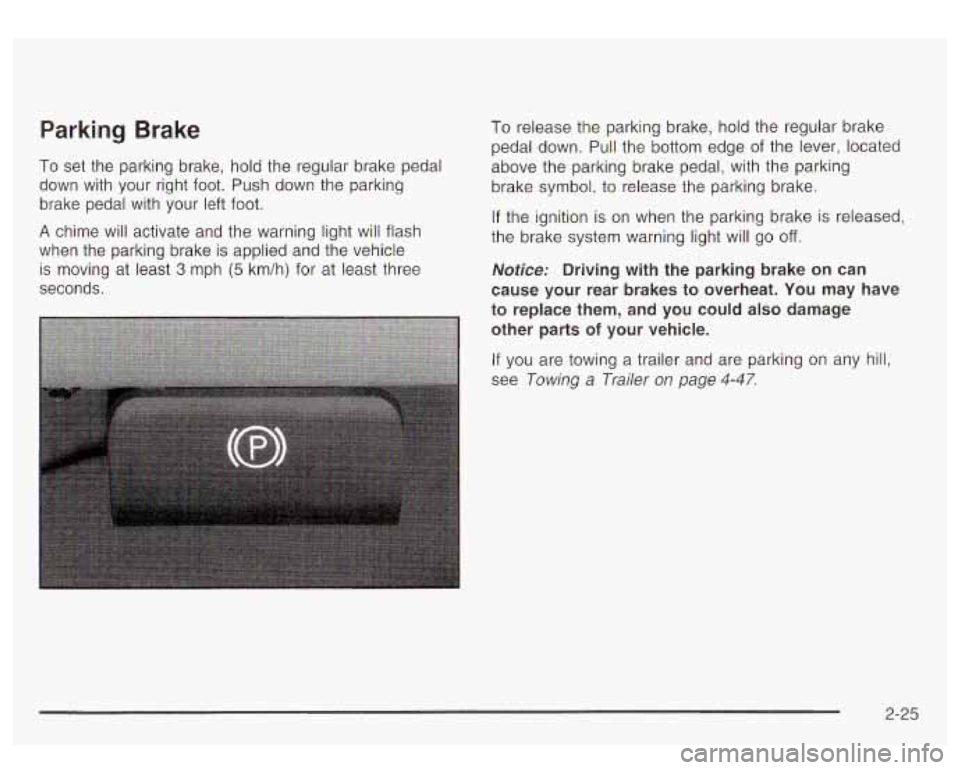
To set the parking brake, hold the regular brake pedal
down with your right foot. Push down the parking
brake pedal with your left foot.
A chime will activate and the warning light will flash
when the parking brake is applied and the vehicle
is moving at
least 3 mph (5 km/h) for at least three
seconds.
To release the parking brake, hold the regular brake
pedal down.
Pull the bottom edge of the lever, located
above the parking brake pedal, with the parking
brake symbol,
to release the parking brake.
If the ignition is on when the parking brake is releasea,
the brake system warning light will go
off.
Notice: Driving with the parking brake on can
cause your rear brakes to overheat. You may have
to replace them, and you could also damage
other parts
of your vehicle.
If you are towing a trailer and are parking on any hill,
see Towing a Trailer on page
4-47.
2-25
Page 144 of 447
Section 3 Instrument Panel
Instrument Panel Overview ............................... 3.4
Hazard Warning Flashers
................................ 3.5
Other Warning Devices ................................... 3.6
Horn
............................................................. 3.6
Tilt Wheel
..................................................... 3-6
Turn SignaVMultifunction Lever
......................... 3.7
Exterior Lamps
............................................. 3.13
Interior Lamps
.............................................. 3.16
Accessory Power Outlets
............................... 3.17
Ashtrays and Cigarette Lighter
........................ 3.18
Climate Controls ............................................ 3. 1 9
Electronic Climate Control System
................... 3.19
Outlet Adjustment
......................................... 3.25
Rear Climate Control System
......................... 3.25
Climate Controls Personalization
..................... 3.27
Warning Lights, Gages and Indicators ............. 3.28
Instrument Panel Cluster
................................ 3.29
Speedometer and Odometer
........................... 3.30
Tachometer
................................ ......... 3.30
~
Safety Belt Reminder Light ............................. 3.30
Air Bag Readiness Light
................................ 3.31
Passenger Air Bag Status Indicator ................ -3-32
Charging System Light
.................................. 3-33
Voltmeter Gage
............................................ 3-34
Brake System Warning Light
...................... 3-34
Anti-Lock Brake System Warning Light
........................................... 3-35
Traction
Off Light .......................................... 3-36
Transmission Temperature Gage
..................... 3-37
Malfunction Indicator Lamp
............................. 3-38
Oil Pressure Gage ........................................ 3-40
Security Light
............................................... 3-41
Tow/Haul Mode Light .................................... 3-42
Fuel Gage
................................................... 3-42
Low Fuel Warning Light
............................. 3-42
Engine Coolant Temperature Gage
.................. 3-36
Cruise Control
Light ...................................... 3-41
3- 1
Page 145 of 447
Section 3 Instrument Panel
Driver Information Center (DIC) ................... 3.43
DIC Operation and Displays
....................... 3.43
DIC Warnings and Messages
..................... 3.52
Audio
System(s) ............................................. 3.58
Setting the Time
........................................... 3.58
Radio with Cassette and CD
.......................... 3-59
Rear Seat Entertainment System
.................... 3-72
Rear Seat Audio (RSA)
................................. 3.81
CD Changer
................................................ 3.83
Theft-Deterrent Feature
.................................. 3-85
~ ~~ ~~~
Audio Steering Wheel Controls ........ ....... 3.86
DVD Distortion
............................................. 3.86
Understanding Radio Reception
...................... 3.87
Care
of Your CDs and DVDs ......................... 3-88
Care
of Your
Cassette Tape Player ................. 3-87
Care
of Your CD Changer ............................. 3-88
Care
of Your CD and DVD Player ................... 3-89
Cleaning the Video Screen
............................. 3-89
Fixed Mast Antenna
.................................. 3-89
XMTM Satellite Radio Antenna System ......... 3-89
3-2
Page 148 of 447
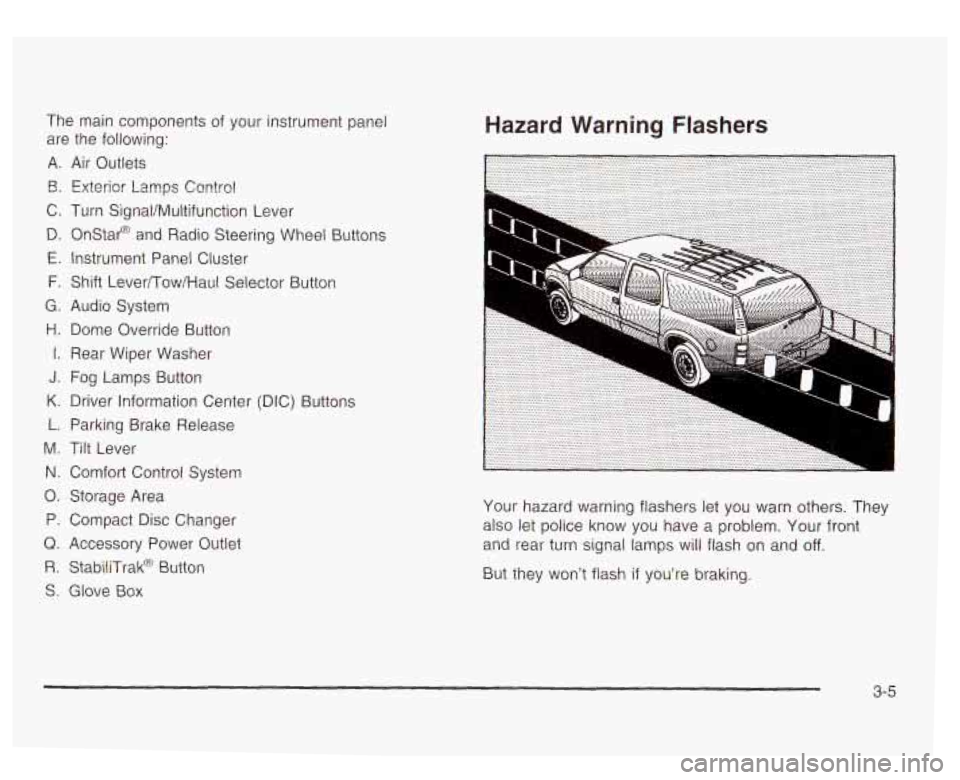
The main components of your instrument panel
are the following:
A. Air Outlets
€3. Exterior Lamps Contro!
C. Turn SignaVMultifunction Lever
D. Onstar@ and Radio Steering Wheel Buttons
E. Instrument Panel Cluster
F. Shift Lever/Tow/Haul Selector Button
G. Audio System
H. Dome Override Button
I. Rear Wiper Washer
J. Fog Lamps Button
K. Driver Information Center (DIC) Buttons
L. Parking Brake Release
M. Tilt Lever
N. Comfort Control System
0. Storage Area
P. Compact Disc Changer
Q. Accessory Power Outlet
R. StabiliTrak@ Button
S. Glove Box
Hazard Warning Flashers
Your hazard warning flashers let you warn others. They
also let police know you have a problem, Your front
and rear turn signal
lamps will flash on and off.
But they won’t flash if you’re braking.
3-5
Page 149 of 447
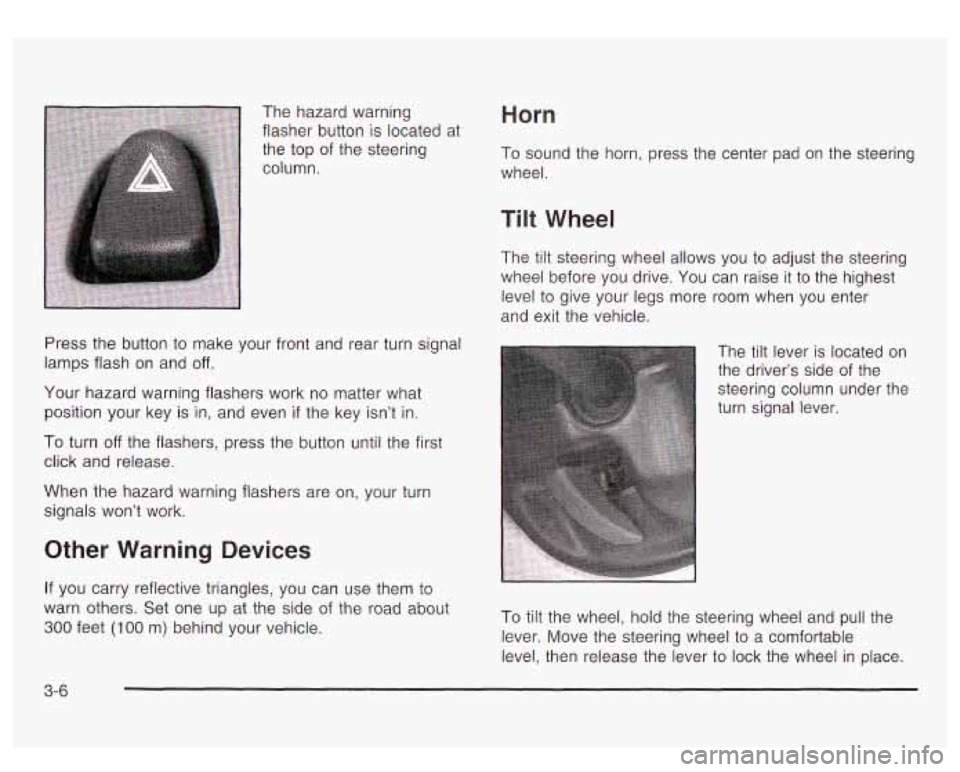
The hazard warning
flasher button
is located at
the top of the steering
column.
Press the button
to make your front and rear turn signal
lamps flash on and
off.
Your hazard warning flashers work no matter what
position your key is in, and even
if the key isn’t in.
To turn off the flashers, press the button until the first
click and release.
When the hazard warning flashers are on, your turn
signals won’t work.
Other Warning Devices
If you carry reflective triangles, you can use them to
warn others. Set one up at the side of the road about
300 feet (1 00 m) behind your vehicle.
Horn
To sound the horn, press the center pad on the steering
wheel.
Tilt Wheel
The tilt steering wheel allows you to adjust the steering
wheel before you drive. You can raise it
to the highest
level
to give your legs more room when you enter
and exit the vehicle.
The tilt lever is located on
the driver’s side of the
steering column under the
turn signal lever.
To tilt the wheel, hold the steering wheel and
pull the
lever. Move the steering wheel
to a comfortable
level, then release the lever to lock the wheel in place.
3-6
Page 171 of 447
Warning Lights, Gages and
Indicators
This part describes the warning lights and gages on
your vehicle. The pictures will help you locate them.
Warning lights and gages can signal that something is
wrong before it becomes serious enough
to cause
an expensive repair or replacement. Paying attention
to
your warning lights and gages could also save you
or others from injury.
Warning lights come on when there may be or is a
problem with one of your vehicle’s functions.
As you will
see in the details on the next few pages, some
warning lights come on briefly when you start the
engine
just to let you know they’re working. If you are
familiar with this section, you should not be alarmed
when this happens. Gages can indicate
when there may be or
is a problem
with one of your vehicle’s functions. Often gages
and warning lights work together
to let you know when
there’s a problem with your vehicle.
When one of the warning lights comes on and stays on
when you are driving, or when one of the gages
shows there may be a problem, check the section that
tells you what to do about it. Please follow this
manual’s advice. Waiting to do repairs can be
costly
- and even dangerous. So please get to know
your warning lights and gages. They’re
a big help.
Your vehicle also has a message center that works
along with warning lights and gages. See
DIC Warnings
and Messages on page
3-52.
3-28
Page 173 of 447
Speedometer and Odometer
Your speedometer lets you see your speed in both
miles per hour (mph) and kilometers per hour (km/h).
Your vehicle’s odometer works together with the driver information center. You can set
a personal trip
and business trip odometer. See “Trip Information” under
DIC Operation and Displays on page 3-43.
The odometer mileage can be checked without the
vehicle running. Simply press the trip stem
on the
instrument panel cluster.
If your vehicle ever needs a new odometer installed, the
new one will be set
to the correct mileage total of the
old odometer.
Tachometer
Your tachometer displays the engine speed in
revolutions per minute (rpm).
Safety Belt Reminder Light
When the key is turned to RUN or START, a chime will
come
on for several seconds to remind people to
fasten their safety belts, unless the driver’s safety belt is
already buckled.
The safety belt light will
also come on and stay on
for several seconds,
then it will flash for
several more.
If the driver’s belt is already buckled, neither the chime
nor the light will come
on.
Notice: Do not operate the engine with the
tachometer in the shaded warning area, or engine
damage may occur.
3-30