display GMC YUKON DENALI 2009 Owners Manual
[x] Cancel search | Manufacturer: GMC, Model Year: 2009, Model line: YUKON DENALI, Model: GMC YUKON DENALI 2009Pages: 100, PDF Size: 1.41 MB
Page 8 of 100
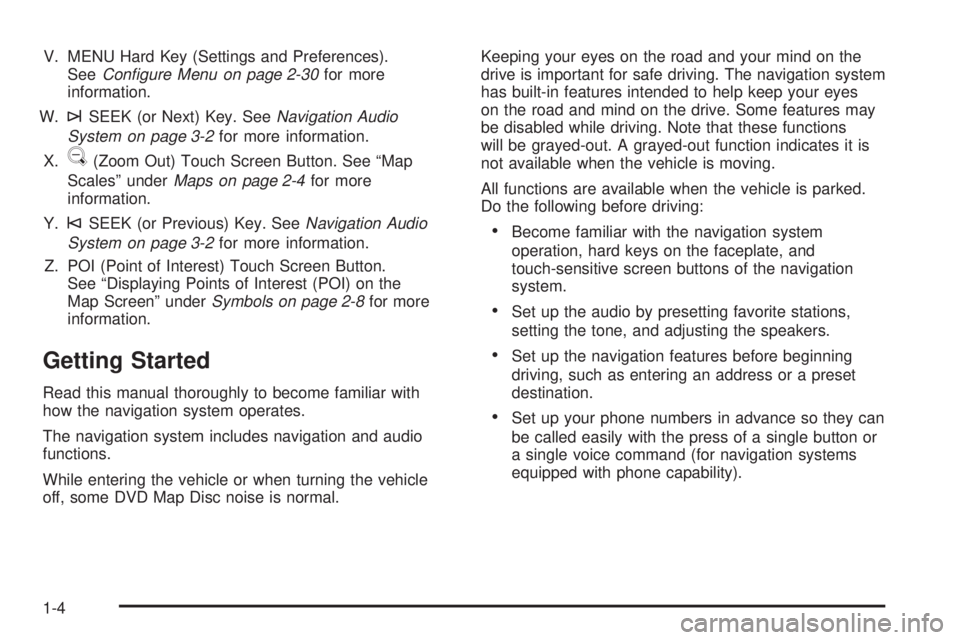
V. MENU Hard Key (Settings and Preferences).
SeeConfigure Menu on page 2-30for more
information.
W.
¨SEEK (or Next) Key. SeeNavigation Audio
System on page 3-2for more information.
X.
U(Zoom Out) Touch Screen Button. See “Map
Scales” underMaps on page 2-4for more
information.
Y.
©SEEK (or Previous) Key. SeeNavigation Audio
System on page 3-2for more information.
Z. POI (Point of Interest) Touch Screen Button.
See “Displaying Points of Interest (POI) on the
Map Screen” underSymbols on page 2-8for more
information.
Getting Started
Read this manual thoroughly to become familiar with
how the navigation system operates.
The navigation system includes navigation and audio
functions.
While entering the vehicle or when turning the vehicle
off, some DVD Map Disc noise is normal.Keeping your eyes on the road and your mind on the
drive is important for safe driving. The navigation system
has built-in features intended to help keep your eyes
on the road and mind on the drive. Some features may
be disabled while driving. Note that these functions
will be grayed-out. A grayed-out function indicates it is
not available when the vehicle is moving.
All functions are available when the vehicle is parked.
Do the following before driving:
Become familiar with the navigation system
operation, hard keys on the faceplate, and
touch-sensitive screen buttons of the navigation
system.
Set up the audio by presetting favorite stations,
setting the tone, and adjusting the speakers.
Set up the navigation features before beginning
driving, such as entering an address or a preset
destination.
Set up your phone numbers in advance so they can
be called easily with the press of a single button or
a single voice command (for navigation systems
equipped with phone capability).
1-4
Page 11 of 100
Language — English/Metric
To change the language of the navigation screens,
see “Driver Information Center (DIC)” in your vehicle’s
owner manual index for more information.
To change the navigation screens from English or
metric, see “DIC Operation and Displays” in your
vehicle’s owner manual index for more information.
Deleting Personal Information
This navigation system can record and store personal
information such as names and addresses. At times,
such as when you are disposing of your vehicle,
you may want to delete this information. See “Edit
Address Book — Edit/View” underConfigure Menu
on page 2-30for deleting information from the
address book.
Limit Features While Driving
The navigation system may have this feature.
Touch the Limit Features While Driving screen button
to turn on and off the ability to limit functions while
driving. When this screen button is highlighted,
the following functions are limited while driving:
Music Navigator Scrolling
Radio Category Scrolling
Navigation Menu Scrolling and some functions
See “Category” underNavigation Audio System on
page 3-2for more information. See “From Map” under
Destination on page 2-15for more information.
Some functions will remain limited regardless of the
setting.
1-7
Page 12 of 100
Storing Radio Station Presets
To set preset radio stations, do the following:
1. Press the
O(power) knob to turn the system on.
2. Press the AUDIO hard key and select the desired
band (AM, FM1, FM2, XM1, or XM2 (if equipped)).
3. Use the
f(tune) knob or the SEEK arrows to tune
to the desired station.
4. Press and hold one of the ve preset screen
buttons, at the bottom of the screen, until you hear a
beep or see the station displayed on the selected
preset button.
5. Repeat the steps for each preset.
See “Storing Radio Station Presets” underNavigation
Audio System on page 3-2for more information.
Setting the Clock
To set the time, do the following:
1. Press the clock touch screen button located in the
upper right corner of the screen.
2. Press the Set screen button.
3. Press the Hours and Minutes−(minus) and
+ (plus) signs to decrease and to increase the time.
See “Setting the Clock” underConfigure Menu
on page 2-30for more information.
Setting the Search Area, Entering an
Address and Point of Interest, and
Storing Preset Destinations
Before entering an Address, Point of Interest, Home, or
Preset Destination, select the appropriate region that
contains the nal destination. Your vehicle must
be in PARK (P) to perform this operation.
Setting the Search Area
To set the search area, do the following:
1. If the radio is already on with a map disc inserted,
skip to Step 5.
2. Press the
O(power) knob to turn the system on.
3. Insert the DVD map disc. See “Installing the
Map DVD” underMaps on page 2-4for more
information.
4. A caution may appear. Touch the OK screen button
to proceed.
5. Press the DEST hard key.
6. Press the Change Search Area screen button.
7. Select the appropriate region numbered screen
button that contains your nal destination.
8. Press the Back screen button to return to the
Destination Entry menu. SeeDestination on
page 2-15for more information.
1-8
Page 13 of 100
Entering an Address
If you are having trouble nding a city or a street name,
do the following:
Input the street name rst instead of the city name,
or vice versa.
Input more characters or reduce the amount of
characters to reduce or expand the available
options.
To set a destination by entering a city name, do the
following:
1. If the radio is already on with a map disc inserted,
skip to Step 5.
2. Press the
O(power) knob to turn the system on.
3. Insert the DVD map disc. See “Installing the
Map DVD” underMaps on page 2-4for more
information.
4. A caution may appear. Touch the OK screen button
to proceed.
5. Press the DEST hard key.
6. Press the
6Address Entry screen button.7. The City name category will automatically be
selected for entry. Start entering the city name.
If ve or less names are available for the entered
characters, a list will display. If more than ve are
available, there will be a screen button with a number
in it, it represents the number of available cities.
Select this button to view the list and select a city.
8. Once a city is selected the street name category
will automatically be selected for entry. Start
entering the street name.
Do not enter directional information or street type,
and use the space symbol screen button (
U)
between street or city names. For example, the street
name N. Royal Oak Rd. should be entered as royal
Uoak. Use the backspace (q) screen button if
an incorrect character has been entered.
If ve or less names are available, a list will display.
If more than ve are available, there will be a
screen button with a number in it, it represents the
number of available streets. Select this button
to view the list.
9. Select the street name with the correct prex from
the list (Dr., Ln., St., etc.).
10. Once a street has been selected, the numeric
keyboard will display, allowing you to enter the
house number. The system will display the house
number range that is available for the street.
1-9
Page 14 of 100
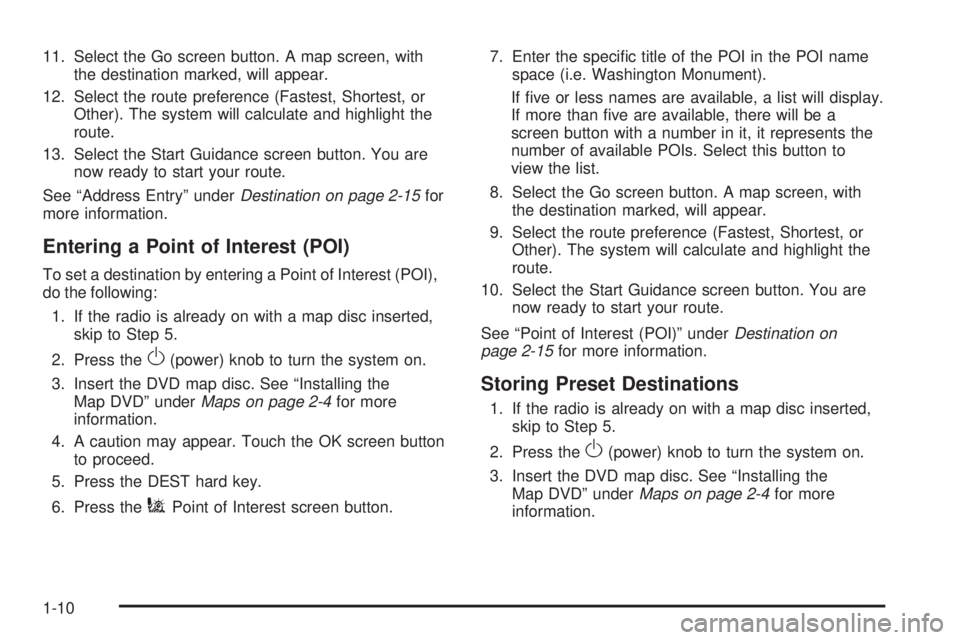
11. Select the Go screen button. A map screen, with
the destination marked, will appear.
12. Select the route preference (Fastest, Shortest, or
Other). The system will calculate and highlight the
route.
13. Select the Start Guidance screen button. You are
now ready to start your route.
See “Address Entry” underDestination on page 2-15for
more information.
Entering a Point of Interest (POI)
To set a destination by entering a Point of Interest (POI),
do the following:
1. If the radio is already on with a map disc inserted,
skip to Step 5.
2. Press the
O(power) knob to turn the system on.
3. Insert the DVD map disc. See “Installing the
Map DVD” underMaps on page 2-4for more
information.
4. A caution may appear. Touch the OK screen button
to proceed.
5. Press the DEST hard key.
6. Press the
iPoint of Interest screen button.7. Enter the specic title of the POI in the POI name
space (i.e. Washington Monument).
If ve or less names are available, a list will display.
If more than ve are available, there will be a
screen button with a number in it, it represents the
number of available POIs. Select this button to
view the list.
8. Select the Go screen button. A map screen, with
the destination marked, will appear.
9. Select the route preference (Fastest, Shortest, or
Other). The system will calculate and highlight the
route.
10. Select the Start Guidance screen button. You are
now ready to start your route.
See “Point of Interest (POI)” underDestination on
page 2-15for more information.
Storing Preset Destinations
1. If the radio is already on with a map disc inserted,
skip to Step 5.
2. Press the
O(power) knob to turn the system on.
3. Insert the DVD map disc. See “Installing the
Map DVD” underMaps on page 2-4for more
information.
1-10
Page 15 of 100
4. A caution may appear. Touch the OK screen button
to proceed.
5. Press the DEST hard key.
6. Enter a destination. SeeDestination on page 2-15
for information on how to enter a destination.
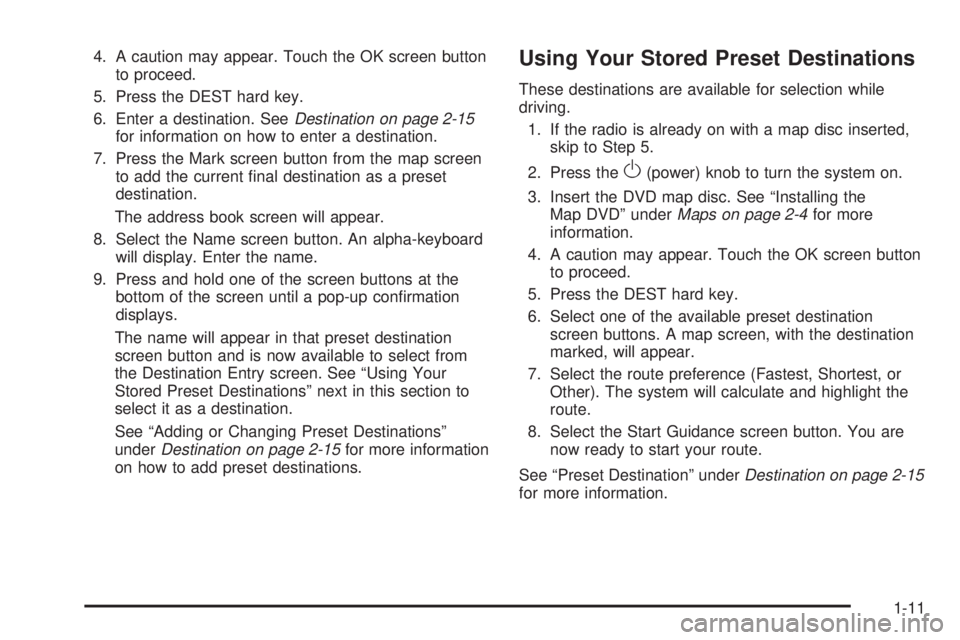
7. Press the Mark screen button from the map screen
to add the current nal destination as a preset
destination.
The address book screen will appear.
8. Select the Name screen button. An alpha-keyboard
will display. Enter the name.
9. Press and hold one of the screen buttons at the
bottom of the screen until a pop-up conrmation
displays.
The name will appear in that preset destination
screen button and is now available to select from
the Destination Entry screen. See “Using Your
Stored Preset Destinations” next in this section to
select it as a destination.
See “Adding or Changing Preset Destinations”
underDestination on page 2-15for more information
on how to add preset destinations.Using Your Stored Preset Destinations
These destinations are available for selection while
driving.
1. If the radio is already on with a map disc inserted,
skip to Step 5.
2. Press the
O(power) knob to turn the system on.
3. Insert the DVD map disc. See “Installing the
Map DVD” underMaps on page 2-4for more
information.
4. A caution may appear. Touch the OK screen button
to proceed.
5. Press the DEST hard key.
6. Select one of the available preset destination
screen buttons. A map screen, with the destination
marked, will appear.
7. Select the route preference (Fastest, Shortest, or
Other). The system will calculate and highlight the
route.
8. Select the Start Guidance screen button. You are
now ready to start your route.
See “Preset Destination” underDestination on page 2-15
for more information.
1-11
Page 18 of 100
Features and Controls
Using the Navigation System
This section presents basic information needed to
operate the navigation system.
Use the hard keys located on the navigation system
along with the available touch-sensitive screen buttons
on the navigation screen to operate the system.
SeeNavigation System Overview on page 1-2for more
information.
Once the vehicle is moving, various functions will be
disabled to reduce driver distractions.
Hard Keys
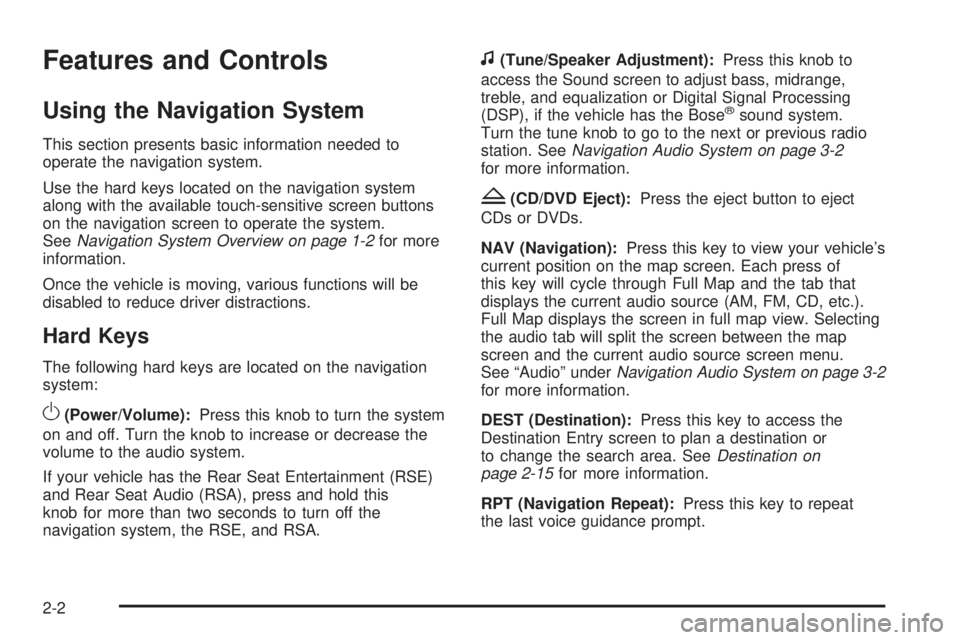
The following hard keys are located on the navigation
system:
O(Power/Volume):Press this knob to turn the system
on and off. Turn the knob to increase or decrease the
volume to the audio system.
If your vehicle has the Rear Seat Entertainment (RSE)
and Rear Seat Audio (RSA), press and hold this
knob for more than two seconds to turn off the
navigation system, the RSE, and RSA.
f(Tune/Speaker Adjustment):Press this knob to
access the Sound screen to adjust bass, midrange,
treble, and equalization or Digital Signal Processing
(DSP), if the vehicle has the Bose
®sound system.
Turn the tune knob to go to the next or previous radio
station. SeeNavigation Audio System on page 3-2
for more information.
Z(CD/DVD Eject):Press the eject button to eject
CDs or DVDs.
NAV (Navigation):Press this key to view your vehicle’s
current position on the map screen. Each press of
this key will cycle through Full Map and the tab that
displays the current audio source (AM, FM, CD, etc.).
Full Map displays the screen in full map view. Selecting
the audio tab will split the screen between the map
screen and the current audio source screen menu.
See “Audio” underNavigation Audio System on page 3-2
for more information.
DEST (Destination):Press this key to access the
Destination Entry screen to plan a destination or
to change the search area. SeeDestination on
page 2-15for more information.
RPT (Navigation Repeat):Press this key to repeat
the last voice guidance prompt.
2-2
Page 19 of 100
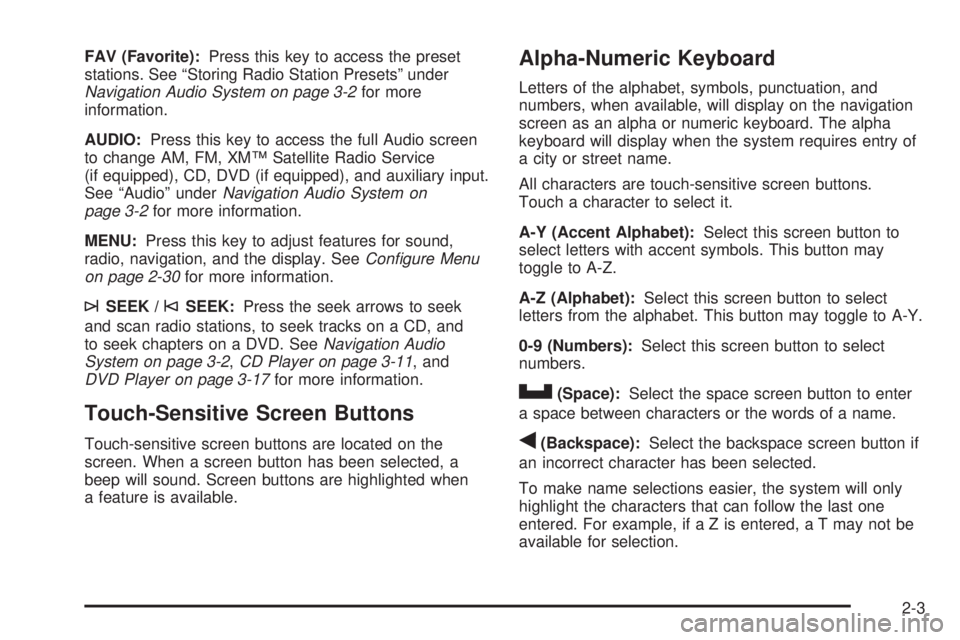
FAV (Favorite):Press this key to access the preset
stations. See “Storing Radio Station Presets” under
Navigation Audio System on page 3-2for more
information.
AUDIO:Press this key to access the full Audio screen
to change AM, FM, XM™ Satellite Radio Service
(if equipped), CD, DVD (if equipped), and auxiliary input.
See “Audio” underNavigation Audio System on
page 3-2for more information.
MENU:Press this key to adjust features for sound,
radio, navigation, and the display. SeeConfigure Menu
on page 2-30for more information.
¨SEEK /©SEEK:Press the seek arrows to seek
and scan radio stations, to seek tracks on a CD, and
to seek chapters on a DVD. SeeNavigation Audio
System on page 3-2,CD Player on page 3-11, and
DVD Player on page 3-17for more information.
Touch-Sensitive Screen Buttons
Touch-sensitive screen buttons are located on the
screen. When a screen button has been selected, a
beep will sound. Screen buttons are highlighted when
a feature is available.
Alpha-Numeric Keyboard
Letters of the alphabet, symbols, punctuation, and
numbers, when available, will display on the navigation
screen as an alpha or numeric keyboard. The alpha
keyboard will display when the system requires entry of
a city or street name.
All characters are touch-sensitive screen buttons.
Touch a character to select it.
A-Y (Accent Alphabet):Select this screen button to
select letters with accent symbols. This button may
toggle to A-Z.
A-Z (Alphabet):Select this screen button to select
letters from the alphabet. This button may toggle to A-Y.
0-9 (Numbers):Select this screen button to select
numbers.
U(Space):Select the space screen button to enter
a space between characters or the words of a name.
q(Backspace):Select the backspace screen button if
an incorrect character has been selected.
To make name selections easier, the system will only
highlight the characters that can follow the last one
entered. For example, if a Z is entered, a T may not be
available for selection.
2-3
Page 20 of 100
If a name does not display after entry, it may need to be
entered differently, the map DVD disc may not contain
that information, or the correct search area has not been
selected. SeeDatabase Coverage Explanations on
page 2-49for more information orDestination on
page 2-15to change the search area.
Maps
This section includes basic information needed to know
about the map database.
Map Coverage
The maps are stored on a DVD. The 48 contiguous
United States, along with Hawaii, Alaska, and portions
of Canada are contained on one disc.
Refer to the “Navigation System Map Disc” manual to
view a detailed explanation of map coverage and
detailed city lists in each region. This manual will be in
the map DVD case when the vehicle is delivered
from the factory.
Installing the DVD Map Disc
When a DVD Map Disc is installed, noise from the disc
may occur, this is normal system operation.
The navigation system in this vehicle uses a DVD to
store map information. When the system loads data from
the disc, you may hear a very slight buzz sound from
the navigation system. The sound is similar to that of a
CD player seeking through different tracks. This is
normal operation and may occur more frequently with
the use of XM NavTraffic.
Your dealer/retailer may have installed the map DVD.
If the map DVD was not installed, do the following
to load it:
1. Turn the ignition on.
2. Press the
O(power) knob to turn the navigation
system on or press the NAV, DEST, or MENU
hard keys. If the MENU hard key is selected, press
and hold until the NAV screen is active, or select
the NAV tab manually.
3. Touch the OK screen button to agree to the
Caution screen, if it appears. If the map is in
split screen mode, you must push the NAV tab
button to get the full map screen.
2-4
Page 22 of 100
Handling the DVD Map Disc
When handling the DVD map disc, be careful of the
following:
Handle the disc very carefully to avoid
contamination or aws. Signals may not read out
properly if the disc gets contaminated or awed.
If the disc gets soiled, use a soft cloth to gently wipe
it out from the center of the disc to the outside.
Do not use photographic record cleaner, solvents,
or other cleaners.
Do not use the disc to rest on while writing or
drawing using any writing utensil or attach a seal
to any of the sides or the disc.
Do not keep the disc in direct sunlight, high
temperatures, or humidity.
After using the disc, place it back into the
original case.
DVD Map Disc Messages
If Disc Read Error appears on the display and/or the
disc comes out, it could be for one of the following
reasons:
If the map DVD disc was installed into the
audio CD/video DVD slot. See “Installing DVD
Map Disc” earlier in this section.
It is very hot. When the temperature returns to
normal, the disc should work.
You are driving on a very rough road. When the
road becomes smoother, the disc should work.
The disc is dirty, scratched, wet, or upside down.
The air is very humid. If so, wait about an hour and
try again.
Map Adjustments
The system allows you to adjust the scale of view
on the map. Also, as you drive, the map will scroll
automatically based on the direction of travel.
2-6