clock GMC YUKON DENALI 2010 User Guide
[x] Cancel search | Manufacturer: GMC, Model Year: 2010, Model line: YUKON DENALI, Model: GMC YUKON DENALI 2010Pages: 560, PDF Size: 4.32 MB
Page 287 of 560
For optimal sound quality, increase the portable audio
device's volume to the loudest level.
It is always best to power the portable audio device
through its own battery while playing.
O(Power/Volume):Turn clockwise or
counterclockwise to increase or decrease the
volume of the portable player. Additional volume
adjustments might have to be made from the portable
device if the volume is not loud or soft enough.
BAND : Press to listen to the radio when a portable
audio device is playing. The portable audio device also
continues to play.
CD/AUX (CD/Auxiliary) : Press to play a CD when a
portable audio device is playing. Press again and the
system begins playing audio from the connected
portable audio player. If a portable audio player is not
connected, “No Input Device Found” displays.
DVD/CD AUX (CD/Auxiliary) : Press this button to
cycle through DVD, CD, or Auxiliary when listening to
the radio. The DVD/CD text label and a message
showing track or chapter number displays when a disc
is in either slot. Press this button again and the system automatically searches for an auxiliary input device,
such as a portable audio player. If a portable audio
player is not connected,
“No Aux Input Device”displays.
If a disc is in both the DVD slot and the CD slot the
DVD/CD AUX button cycles between the two sources
and does not indicate “No Aux Input Device”. If a front
auxiliary device is connected, the DVD/CD AUX button
cycles through all available options, such as: DVD slot,
CD slot, Front Auxiliary, and Rear Auxiliary (if available).
See “Using the Auxiliary Input Jack(s)” later in this
section, or “Audio/Video (A/V) Jacks” under,Rear Seat
Entertainment (RSE) System
on page 4‑120for more
information.
Using the USB Port
Radios with a USB port can control a USB storage
device or an iPod®using the radio buttons and knobs.
See Using an MP3 (Radios with CD)on page 4‑94orUsing an MP3 (Radios with CD and DVD)on
page 4‑101for information about how to connect and
control a USB storage device or an iPod.
4-93
Page 336 of 560
StabiliTrak®System
The vehicle has a vehicle stability enhancement system
called StabiliTrak. It is an advanced computer controlled
system that assists the driver with directional control of
the vehicle in difficult driving conditions.
StabiliTrak activates when the computer senses a
discrepancy between the intended path and the
direction the vehicle is actually traveling. StabiliTrak
selectively applies braking pressure at any one of the
vehicle's brakes to assist the driver with keeping the
vehicle on the intended path.
When the vehicle is started and begins to move, the
system performs several diagnostic checks to insure
there are no problems. The system may be heard or felt
while it is working. This is normal and does not mean
there is a problem with the vehicle. The system should
initialize before the vehicle reaches 20 mph (32 km/h).
In some cases, it may take approximately two miles of
driving before the system initializes.
If cruise control is being used when StabiliTrak
activates, the cruise control automatically disengages.
The cruise control can be re-engaged when road
conditions allow. SeeCruise Control on page 4‑8. If the system fails to turn on or activate, the StabiliTrak
light along with one of the following messages will be
displayed on the Driver Information Center (DIC):
TRACTION CONTROL OFF, SERVICE TRACTION
CONTROL, STABILITRAK OFF, SERVICE
STABILITRAK. If these DIC messages appear, make
sure the StabiliTrak system has not been turned off
using the StabiliTrak on/off button. Then turn the
steering wheel clockwise from the nine o'clock position
to the three o'clock position. If this clears the
message(s), the vehicle does not need servicing. If this
does not clear the message(s), then turn the vehicle off,
wait 15 seconds, and then turn it back on again to reset
the system. If any of these messages still appear on the
Driver Information Center (DIC), the vehicle should be
taken in for service. For more information on the DIC
messages, see
Driver Information Center (DIC)
on
page 4‑42.
5-6
Page 340 of 560
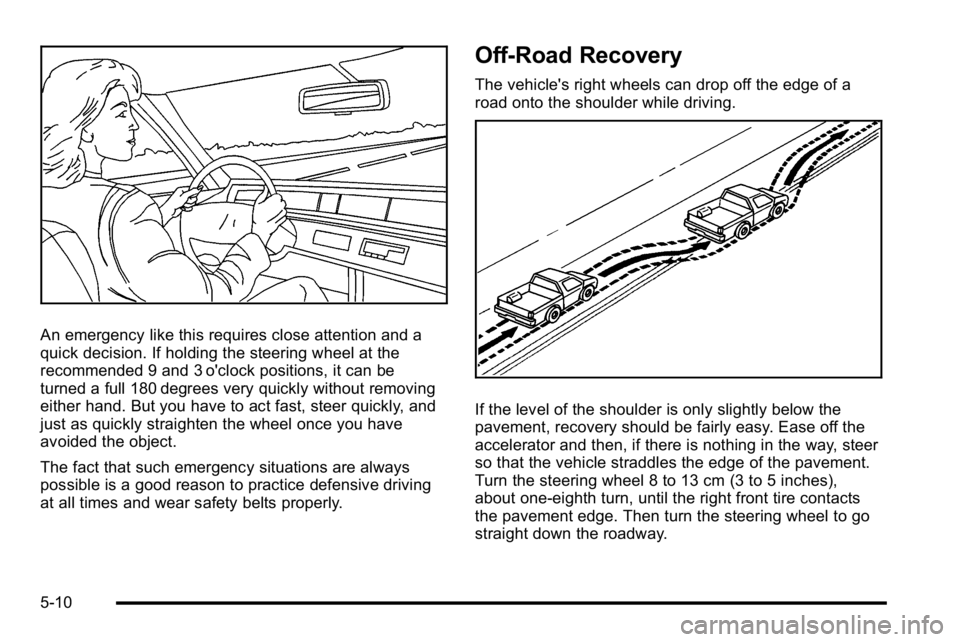
An emergency like this requires close attention and a
quick decision. If holding the steering wheel at the
recommended 9 and 3 o'clock positions, it can be
turned a full 180 degrees very quickly without removing
either hand. But you have to act fast, steer quickly, and
just as quickly straighten the wheel once you have
avoided the object.
The fact that such emergency situations are always
possible is a good reason to practice defensive driving
at all times and wear safety belts properly.
Off-Road Recovery
The vehicle's right wheels can drop off the edge of a
road onto the shoulder while driving.
If the level of the shoulder is only slightly below the
pavement, recovery should be fairly easy. Ease off the
accelerator and then, if there is nothing in the way, steer
so that the vehicle straddles the edge of the pavement.
Turn the steering wheel 8 to 13 cm (3 to 5 inches),
about one-eighth turn, until the right front tire contacts
the pavement edge. Then turn the steering wheel to go
straight down the roadway.
5-10
Page 349 of 560
.Sound the horn as you approach the top of the hill
to let opposing traffic know you are there.
.Use headlamps even during the day to make the
vehicle more visible to oncoming traffic.
{WARNING:
Driving to the top (crest) of a hill at full speed can
cause an accident. There could be a drop-off,
embankment, cliff, or even another vehicle. You
could be seriously injured or killed. As you near
the top of a hill, slow down and stay alert.
If the vehicle stalls, or is about to stall, and you cannot
make it up the hill:
.Push the brake pedal to stop the vehicle and keep
it from rolling backwards and apply the parking
brake.
.If the engine is still running, shift the transmission
to R (Reverse), release the parking brake, and
slowly back down the hill in R (Reverse).
.If the engine has stopped running, you need to
restart it. With the brake pedal pressed and the
parking brake still applied, shift the transmission to
P (Park) and restart the engine. Then, shift to R (Reverse), release the parking brake, and slowly
back down the hill as straight as possible in
R (Reverse).
.While backing down the hill, put your left hand on
the steering wheel at the 12 o'clock position so you
can tell if the wheels are straight and can
maneuver as you back down. It is best to back
down the hill with the wheels straight rather than in
the left or right direction. Turning the wheel too far
to the left or right will increase the possibility of a
rollover.
Things not to do if the vehicle stalls, or is about to stall,
when going up a hill:
.Never attempt to prevent a stall by shifting into
N (Neutral) to rev-up the engine and regain forward
momentum. This will not work. The vehicle can roll
backward very quickly and could go out of control.
.Never try to turn around if about to stall when
going up a hill. If the hill is steep enough to stall
the vehicle, it is steep enough to cause it to roll
over. If you cannot make it up the hill, back straight
down the hill.
If, after stalling, you try to back down the hill and decide
you just cannot do it, set the parking brake, put your
transmission in P (Park), and turn off the engine. Leave
the vehicle and go get some help. Exit on the uphill side
and stay clear of the path the vehicle would take if it
rolled downhill.
5-19
Page 400 of 560
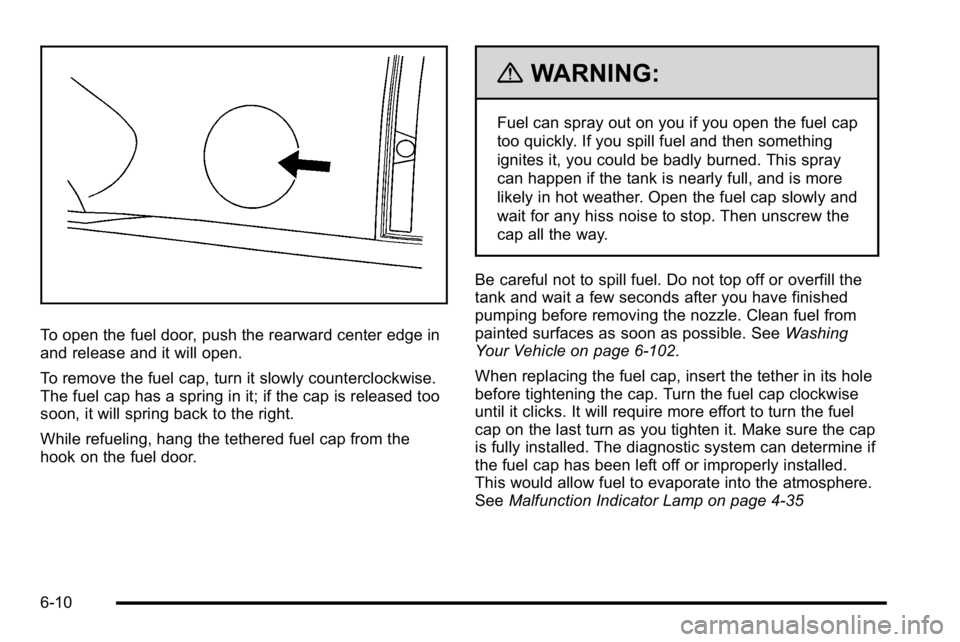
To open the fuel door, push the rearward center edge in
and release and it will open.
To remove the fuel cap, turn it slowly counterclockwise.
The fuel cap has a spring in it; if the cap is released too
soon, it will spring back to the right.
While refueling, hang the tethered fuel cap from the
hook on the fuel door.
{WARNING:
Fuel can spray out on you if you open the fuel cap
too quickly. If you spill fuel and then something
ignites it, you could be badly burned. This spray
can happen if the tank is nearly full, and is more
likely in hot weather. Open the fuel cap slowly and
wait for any hiss noise to stop. Then unscrew the
cap all the way.
Be careful not to spill fuel. Do not top off or overfill the
tank and wait a few seconds after you have finished
pumping before removing the nozzle. Clean fuel from
painted surfaces as soon as possible. See Washing
Your Vehicle on page 6‑102.
When replacing the fuel cap, insert the tether in its hole
before tightening the cap. Turn the fuel cap clockwise
until it clicks. It will require more effort to turn the fuel
cap on the last turn as you tighten it. Make sure the cap
is fully installed. The diagnostic system can determine if
the fuel cap has been left off or improperly installed.
This would allow fuel to evaporate into the atmosphere.
See Malfunction Indicator Lamp on page 4‑35
6-10
Page 421 of 560
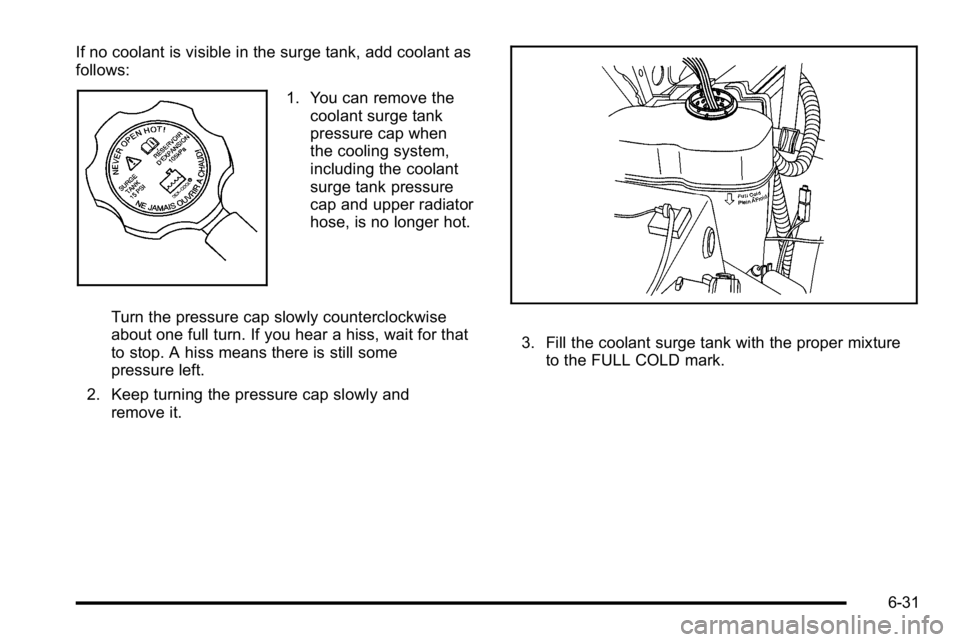
If no coolant is visible in the surge tank, add coolant as
follows:
1. You can remove thecoolant surge tank
pressure cap when
the cooling system,
including the coolant
surge tank pressure
cap and upper radiator
hose, is no longer hot.
Turn the pressure cap slowly counterclockwise
about one full turn. If you hear a hiss, wait for that
to stop. A hiss means there is still some
pressure left.
2. Keep turning the pressure cap slowly and remove it.
3. Fill the coolant surge tank with the proper mixtureto the FULL COLD mark.
6-31
Page 442 of 560
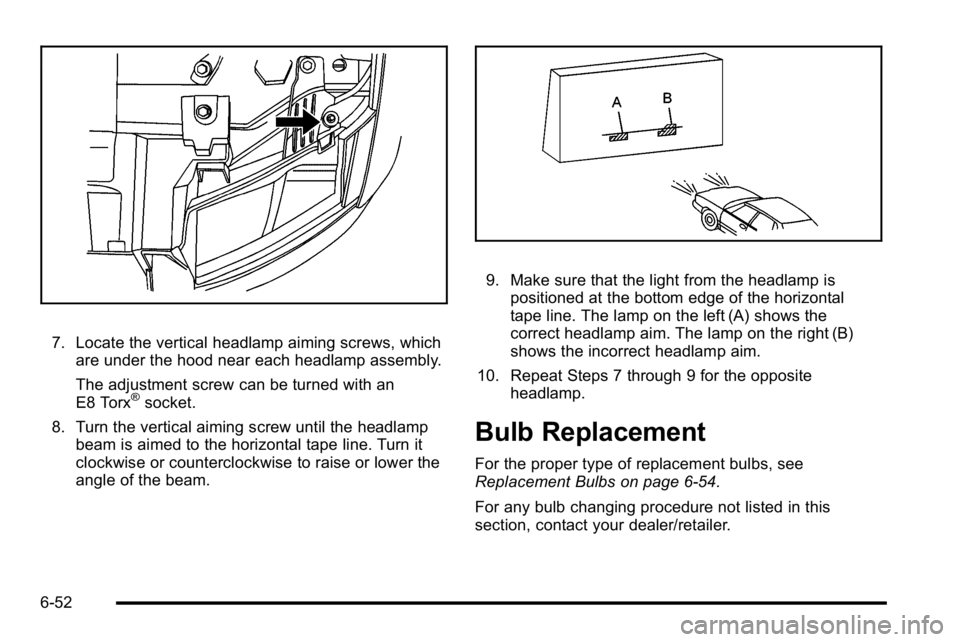
7. Locate the vertical headlamp aiming screws, whichare under the hood near each headlamp assembly.
The adjustment screw can be turned with an
E8 Torx
®socket.
8. Turn the vertical aiming screw until the headlamp beam is aimed to the horizontal tape line. Turn it
clockwise or counterclockwise to raise or lower the
angle of the beam.
9. Make sure that the light from the headlamp is
positioned at the bottom edge of the horizontal
tape line. The lamp on the left (A) shows the
correct headlamp aim. The lamp on the right (B)
shows the incorrect headlamp aim.
10. Repeat Steps 7 through 9 for the opposite headlamp.
Bulb Replacement
For the proper type of replacement bulbs, see
Replacement Bulbs on page 6‑54.
For any bulb changing procedure not listed in this
section, contact your dealer/retailer.
6-52
Page 443 of 560
Halogen Bulbs
{WARNING:
Halogen bulbs have pressurized gas inside and
can burst if you drop or scratch the bulb. You or
others could be injured. Be sure to read and
follow the instructions on the bulb package.
Taillamps, Turn Signal, Stoplamps
and Back-up Lamps
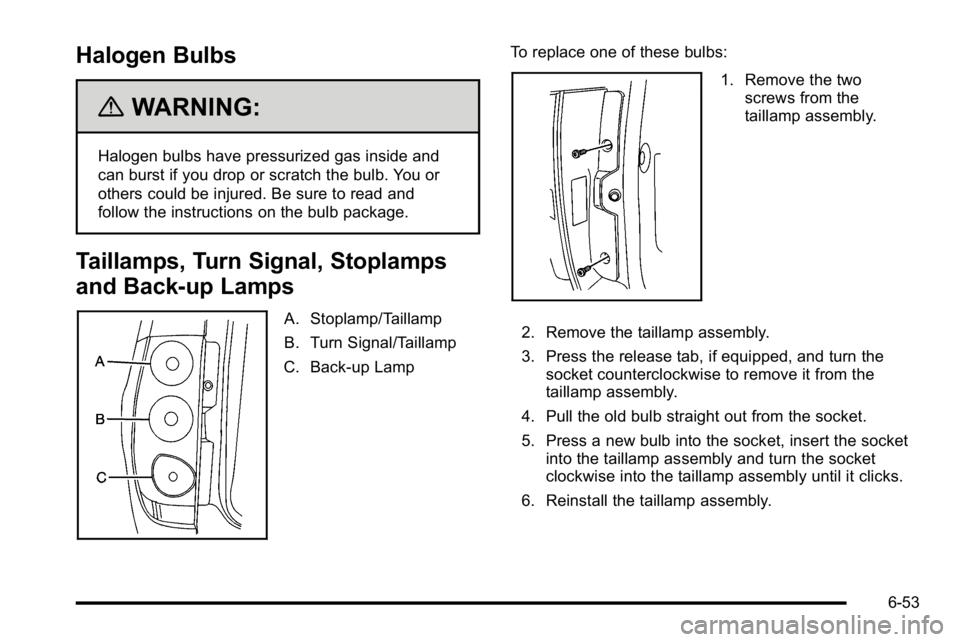
A. Stoplamp/Taillamp
B. Turn Signal/Taillamp
C. Back-up Lamp To replace one of these bulbs:
1. Remove the two
screws from the
taillamp assembly.
2. Remove the taillamp assembly.
3. Press the release tab, if equipped, and turn the socket counterclockwise to remove it from the
taillamp assembly.
4. Pull the old bulb straight out from the socket.
5. Press a new bulb into the socket, insert the socket into the taillamp assembly and turn the socket
clockwise into the taillamp assembly until it clicks.
6. Reinstall the taillamp assembly.
6-53
Page 444 of 560
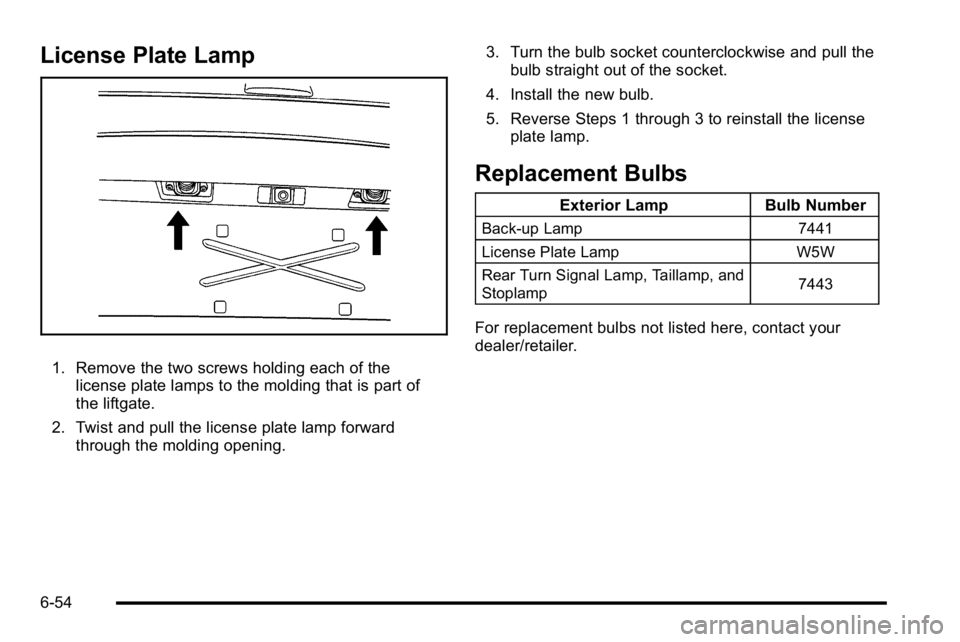
License Plate Lamp
1. Remove the two screws holding each of thelicense plate lamps to the molding that is part of
the liftgate.
2. Twist and pull the license plate lamp forward through the molding opening. 3. Turn the bulb socket counterclockwise and pull the
bulb straight out of the socket.
4. Install the new bulb.
5. Reverse Steps 1 through 3 to reinstall the license plate lamp.
Replacement Bulbs
Exterior Lamp Bulb Number
Back-up Lamp 7441
License Plate Lamp W5W
Rear Turn Signal Lamp, Taillamp, and
Stoplamp 7443
For replacement bulbs not listed here, contact your
dealer/retailer.
6-54
Page 472 of 560
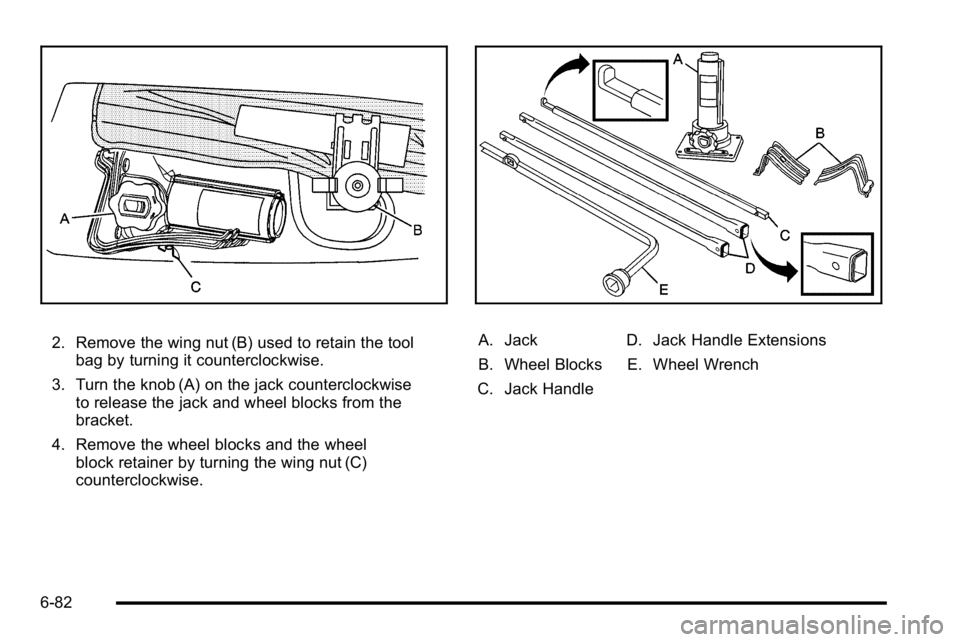
2. Remove the wing nut (B) used to retain the toolbag by turning it counterclockwise.
3. Turn the knob (A) on the jack counterclockwise to release the jack and wheel blocks from the
bracket.
4. Remove the wheel blocks and the wheel block retainer by turning the wing nut (C)
counterclockwise.A. Jack
B. Wheel Blocks
C. Jack Handle D. Jack Handle Extensions
E. Wheel Wrench
6-82