ignition GMC YUKON DENALI 2010 User Guide
[x] Cancel search | Manufacturer: GMC, Model Year: 2010, Model line: YUKON DENALI, Model: GMC YUKON DENALI 2010Pages: 560, PDF Size: 4.32 MB
Page 131 of 560

The following functions may be available if your vehicle
has the RKE system:
/(Remote Vehicle Start):For vehicles with this
feature, press to start the engine from outside the
vehicle using the RKE transmitter. See Remote Vehicle
Start
on page 3‑7for additional information.
Q(Lock): Press to lock all the doors.
If enabled through the Driver Information Center (DIC),
the turn signal lamps flash once to indicate locking
has occurred. If enabled through the DIC, the horn
chirps when the lock button is pressed again within
three seconds. See DIC Vehicle Customization (With
DIC Buttons)
on page 4‑66for additional information.
Pressing
Qarms the content theft‐deterrent system.
See Content Theft-Deterrent on page 3‑20.
K(Unlock): Press once to unlock only the driver door.
If
Kis pressed again within three seconds, all
remaining doors unlock. The interior lamps may come
on and stay on for 20 seconds or until the ignition is
turned on.
If enabled through the DIC, the turn signal lamps
flash twice to indicate unlocking has occurred.
See DIC Vehicle Customization (With DIC Buttons)
on
page 4‑66. If enabled through the DIC, the exterior lights turn on briefly if it is dark enough outside.
See
“APPROACH LIGHTING” underDIC Vehicle
Customization (With DIC Buttons)
on page 4‑66.
Pressing
Kon the RKE transmitter disarms the content
theft‐deterrent system. See Content Theft-Deterrent
on
page 3‑20.
m(Liftglass): For vehicles with a liftglass, press and
hold to unlock the liftglass.
&(Power Liftgate): For vehicles with a power
liftgate, press and hold to open and close the liftgate.
The taillamps flash and a chime sounds to indicate
when the liftgate is opening and closing.
L(Vehicle Locator/Panic Alarm): Press and release
to locate the vehicle. The turn signal lamps flash and
the horn sounds three times.
Press and hold
Lfor more than two seconds to
activate the panic alarm. The turn signal lamps flash
and the horn sounds repeatedly for 30 seconds.
The alarm turns off when the ignition is moved to
ON/RUN or
Lis pressed again. The ignition must be
in LOCK/OFF for the panic alarm to work.
3-5
Page 134 of 560
3. If it is the first remote start since the vehicle hasbeen driven, repeat these steps, while the engine
is still running, to extend the engine running time
by 10 minutes. Remote start can be extended
one time.
After entering the vehicle during a remote start, insert
and turn the key to RUN to drive the vehicle.
To manually shut off a remote start, do any of the
following:
.Aim the RKE transmitter at the vehicle and press
the remote start button until the parking lamps
turn off.
.Turn on the hazard warning flashers.
.Turn the ignition switch on and then off.
The vehicle can be remote started two separate times
between driving sequences. The engine will run for
10 minutes after each remote start.
Or, you can extend the engine run time by another
10 minutes within the first 10 minute remote start time
frame, and before the engine stops.
For example, if the lock button and then the remote start
buttons are pressed again after the vehicle has been
running for five minutes, 10 minutes are added, allowing
the engine to run for 15 minutes.
The additional ten minutes are considered a second
remote vehicle start. Once two remote starts, or a single remote start with
one time extension has been done, the vehicle must be
started with the key. After the key is removed from the
ignition, the vehicle can be remote started again.
The vehicle cannot be remote started if the key is in the
ignition, the hood is not closed, or if there is an
emission control system malfunction and the check
engine light comes on.
Also, the engine will turn off during a remote vehicle
start if the coolant temperature gets too high or if the oil
pressure gets low.
Vehicles that have the remote vehicle start feature are
shipped from the factory with the remote vehicle start
system enabled. The system may be enabled or
disabled through the DIC. See
“REMOTE START”
under DIC Vehicle Customization (With DIC Buttons)
on
page 4‑66for additional information. If your vehicle
does not have DIC buttons, see your dealer/retailer to
enable or disable the remote vehicle start system.
Remote Start Ready
If your vehicle does not have the remote vehicle start
feature, it may have the remote start ready feature.
This feature allows your dealer/retailer to add the
manufacturer's remote vehicle start feature.
See your dealer/retailer if you would like to add the
manufacturer's remote vehicle start feature to your
vehicle.
3-8
Page 136 of 560
Power Door Locks
With power door locks, the switches on the front doors
can be used to lock and unlock the vehicle.
"(Unlock):Press to unlock the doors.
Q(Lock):Remove the key from the ignition and press
to lock the doors.
Delayed Locking
When locking the doors with the power lock switch
and a door or the liftgate is open, the doors will lock
five seconds after the last door is closed. You will hear
three chimes to signal that the delayed locking feature
is in use.
Pressing the power lock switch twice will override the
delayed locking feature and immediately lock all the
doors.
This feature will not operate if the key is in the ignition.
You can program this feature using the Driver
Information Center (DIC). See DELAY DOOR LOCK
under DIC Vehicle Customization (With DIC Buttons)
on
page 4‑66.
Programmable Automatic
Door Locks
Vehicles with an automatic lock/unlock feature enable
you to program the vehicle's power door locks. You can
program this feature through the Driver Information
Center (DIC). See DIC Vehicle Customization (With DIC
Buttons)
on page 4‑66for more information on DIC
programming.
Rear Door Security Locks
Your vehicle has rear door security locks. These
prevent passengers from opening the rear doors from
the inside.
The rear door security
locks are located on the
inside edge of each
rear door.
3-10
Page 137 of 560
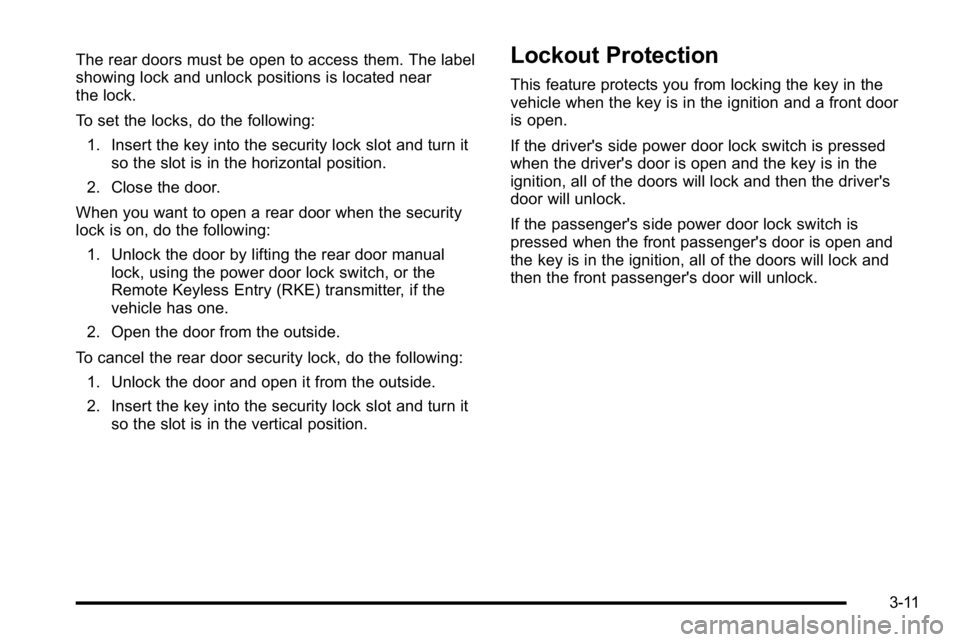
The rear doors must be open to access them. The label
showing lock and unlock positions is located near
the lock.
To set the locks, do the following:1. Insert the key into the security lock slot and turn it so the slot is in the horizontal position.
2. Close the door.
When you want to open a rear door when the security
lock is on, do the following: 1. Unlock the door by lifting the rear door manual lock, using the power door lock switch, or the
Remote Keyless Entry (RKE) transmitter, if the
vehicle has one.
2. Open the door from the outside.
To cancel the rear door security lock, do the following: 1. Unlock the door and open it from the outside.
2. Insert the key into the security lock slot and turn it so the slot is in the vertical position.Lockout Protection
This feature protects you from locking the key in the
vehicle when the key is in the ignition and a front door
is open.
If the driver's side power door lock switch is pressed
when the driver's door is open and the key is in the
ignition, all of the doors will lock and then the driver's
door will unlock.
If the passenger's side power door lock switch is
pressed when the front passenger's door is open and
the key is in the ignition, all of the doors will lock and
then the front passenger's door will unlock.
3-11
Page 145 of 560
Power Windows
{WARNING:
Leaving children in a vehicle with the keys is
dangerous for many reasons, children or others
could be badly injured or even killed. They could
operate the power windows or other controls or
even make the vehicle move. The windows will
function and they could be seriously injured or
killed if caught in the path of a closing window.
Do not leave keys in a vehicle with children.
When there are children in the rear seat use the
window lockout button to prevent unintentional
operation of the windows.
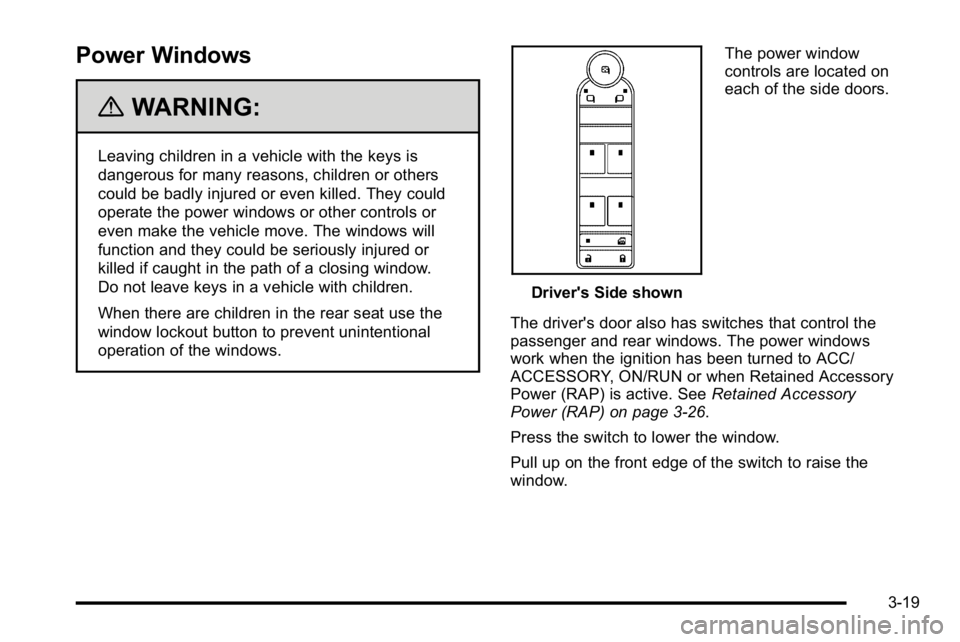
Driver's Side shownThe power window
controls are located on
each of the side doors.
The driver's door also has switches that control the
passenger and rear windows. The power windows
work when the ignition has been turned to ACC/
ACCESSORY, ON/RUN or when Retained Accessory
Power (RAP) is active. See Retained Accessory
Power (RAP) on page 3‑26.
Press the switch to lower the window.
Pull up on the front edge of the switch to raise the
window.
3-19
Page 147 of 560
To arm the theft-deterrent system:1. Open the door.
2. Lock the door with the Remote Keyless Entry (RKE) transmitter or the power door lock switch.
The security light will come on to inform the driver
the system is arming. If a door is open when the
doors are locked, the security light will flash.
If the delayed locking feature is turned on, the
theft‐deterrent system will not start the arming
process until the last door is closed and the delay
timer has expired. See Delayed Locking
on
page 3‑10.
3. Close all doors. The security light should go off after about 30 seconds. The alarm is not armed
until the security light goes off.
If a locked driver door is opened without using the RKE
transmitter, a ten second pre-alarm will occur. The horn
will chirp and the lights will flash. If the key is not placed
in the ignition and turned to START or the door is not
unlocked by pressing the unlock button on the RKE
transmitter during the ten second pre-alarm, the alarm
will go off. Your vehicle's headlamps will flash and the
horn will sound for about 30 seconds, then will turn off
to save the battery power. The theft-deterrent system will not activate if the doors
are locked with the vehicle's key or the manual door
lock. It activates only if you use the power door lock
switch with the door open or the RKE transmitter.
You should also remember that you can start your
vehicle with the correct ignition key if the alarm has
been set off.
To avoid setting off the alarm by accident:
.If you do not want to activate the theft-deterrent
system, the vehicle should be locked with the door
key after the doors are closed.
.Always unlock the doors with the RKE transmitter.
Unlocking a door any other way will set off the
alarm if it is armed.
If you set off the alarm by accident, press unlock on the
RKE transmitter or place the key in the ignition and turn
it to START to turn off the alarm. The alarm will not stop
if you try to unlock a door any other way.
3-21
Page 148 of 560
Testing the Alarm
To test the alarm:1. From inside the vehicle, lower the driver's window and open the driver's door.
2. Activate the system by locking the doors with the power door lock switch while the door is open,
or with the RKE transmitter.
3. Get out of the vehicle, close the door and wait for the security light to go out.
4. Then reach in through the window, unlock the door with the manual door lock and open the door.
This should set off the alarm.
While the alarm is set, the power door unlock switch
will not work.
If the alarm does not sound when it should but the
headlamps flash, check to see if the horn works.
The horn fuse may be blown. To replace the fuse,
see Fuses and Circuit Breakers on page 6‑107.
If the alarm does not sound or the headlamps
do not flash, the vehicle should be serviced by
your dealer/retailer.
PASS-Key®III+ Electronic
Immobilizer
See Radio Frequency Statementon page 8‑19for information regarding Part 15 of the Federal
Communications Commission (FCC) Rules and
RSS-210/211 of Industry and Science Canada.
PASS-Key®III+ Electronic
Immobilizer Operation
Your vehicle has PASS-Key®III+ (Personalized
Automotive Security System) theft-deterrent system.
PASS-Key
®III+ is a passive theft-deterrent system.
The system is automatically armed when the key is
removed from the ignition.
The system is automatically disarmed when the key is
turned to ON/RUN, ACC/ACCESSORY or START from
the LOCK/OFF position.
You do not have to manually arm or disarm the system.
The security light will come on if there is a problem with
arming or disarming the theft-deterrent system.
3-22
Page 149 of 560
When the PASS-Key®III+ system senses that someone
is using the wrong key, it prevents the vehicle from
starting. Anyone using a trial-and-error method to start
the vehicle will be discouraged because of the high
number of electrical key codes.
If the engine does not start and the security light on
the instrument panel cluster comes on when trying
to start the vehicle, there may be a problem with
your theft-deterrent system. Turn the ignition off and
try again.
If the engine still does not start, and the key appears to
be undamaged, try another ignition key. At this time,
you may also want to check the fuse, see Fuses and
Circuit Breakers
on page 6‑107. If the engine still does
not start with the other key, your vehicle needs service.
If your vehicle does start, the first key may be faulty.
See your dealer/retailer who can service the
PASS-Key
®III+ to have a new key made. In an
emergency, contact Roadside Assistance.
It is possible for the PASS-Key
®III+ decoder to learn
the transponder value of a new or replacement key.
Up to 10 keys may be programmed for the vehicle.
The following procedure is for programming additional
keys only. If all the currently programmed keys are lost
or do not operate, you must see your dealer/retailer or a
locksmith who can service PASS-Key
®III+ to have keys
made and programmed to the system. See your dealer/retailer or a locksmith who can service
PASS-Key
®III+ to get a new key blank that is cut
exactly as the ignition key that operates the system.
To program the new additional key:
1. Verify that the new key has a
1stamped on it.
2. Insert the original, already programmed, key in the ignition and start the engine. If the engine will not
start, see your dealer/retailer for service.
3. After the engine has started, turn the key to LOCK/OFF, and remove the key.
4. Insert the new key to be programmed and turn it to the ON/RUN position within five seconds of turning
the ignition to the LOCK/OFF position in Step 3.
The security light will turn off once the key has
been programmed.
5. Repeat Steps 1 through 4 if additional keys are to be programmed.
If you lose or damage your PASS-Key
®III+ key, see
your dealer/retailer or a locksmith who can service
PASS-Key
®III+ to have a new key made.
Do not leave the key or device that disarms or
deactivates the theft deterrent system in the vehicle.
3-23
Page 151 of 560
Ignition Positions
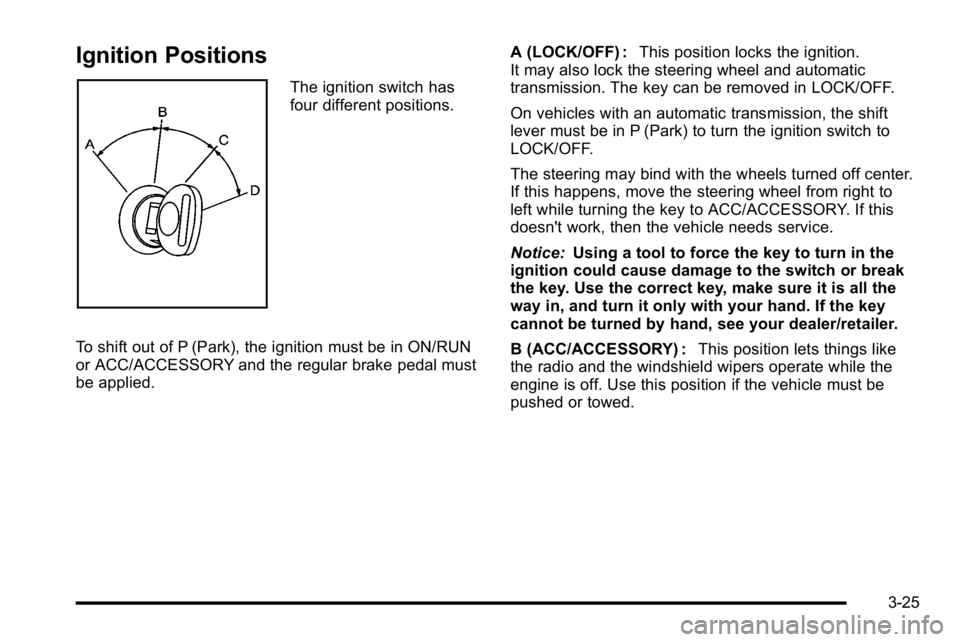
The ignition switch has
four different positions.
To shift out of P (Park), the ignition must be in ON/RUN
or ACC/ACCESSORY and the regular brake pedal must
be applied. A (LOCK/OFF) :
This position locks the ignition.
It may also lock the steering wheel and automatic
transmission. The key can be removed in LOCK/OFF.
On vehicles with an automatic transmission, the shift
lever must be in P (Park) to turn the ignition switch to
LOCK/OFF.
The steering may bind with the wheels turned off center.
If this happens, move the steering wheel from right to
left while turning the key to ACC/ACCESSORY. If this
doesn't work, then the vehicle needs service.
Notice: Using a tool to force the key to turn in the
ignition could cause damage to the switch or break
the key. Use the correct key, make sure it is all the
way in, and turn it only with your hand. If the key
cannot be turned by hand, see your dealer/retailer.
B (ACC/ACCESSORY) : This position lets things like
the radio and the windshield wipers operate while the
engine is off. Use this position if the vehicle must be
pushed or towed.
3-25
Page 152 of 560
C (ON/RUN) :This position can be used to operate the
electrical accessories and to display some instrument
panel cluster warning and indicator lights. The switch
stays in this position when the engine is running.
The transmission is also unlocked in this position on
automatic transmission vehicles.
If you leave the key in the ACC/ACCESSORY or
ON/RUN position with the engine off, the battery could
be drained. You may not be able to start the vehicle if
the battery is allowed to drain for an extended period
of time.
D (START) : This is the position that starts the engine.
When the engine starts, release the key. The ignition
switch returns to ON/RUN for driving.
A warning tone will sound when the driver door is
opened, the ignition is in ACC/ACCESSORY or
LOCK/OFF and the key is in the ignition.Retained Accessory Power (RAP)
The following vehicle accessories can be used for up to
10 minutes after the engine is turned off:
.Audio System
.Power Windows
.OnStar®System (if equipped)
.Sunroof (if equipped)
These features work when the key is in ON/RUN or
ACC/ACCESSORY. Once the key is turned from
ON/RUN to LOCK/OFF, the windows and sunroof
continue to work up to 10 minutes until any door is
opened. The radio continues to work for up to
10 minutes or until the driver door is opened.
Starting the Engine
Move the shift lever to P (Park) or N (Neutral).
The engine will not start in any other position.
To restart the engine when the vehicle is already
moving, use N (Neutral) only.
Notice: Do not try to shift to P (Park) if the vehicle
is moving. If you do, you could damage the
transmission. Shift to P (Park) only when the
vehicle is stopped.
3-26