center console GMC YUKON DENALI 2016 User Guide
[x] Cancel search | Manufacturer: GMC, Model Year: 2016, Model line: YUKON DENALI, Model: GMC YUKON DENALI 2016Pages: 396, PDF Size: 5.5 MB
Page 108 of 396
GMC Yukon Denali/Yukon XL Denali Owner Manual (GMNA-Localizing-U.S./
Canada/Mexico-9159308) - 2016 - crc - 6/2/15
Storage 107
To remove the cupholder for
cleaning, press together the front
top center of the cupholder and pull
out from the chrome ring.
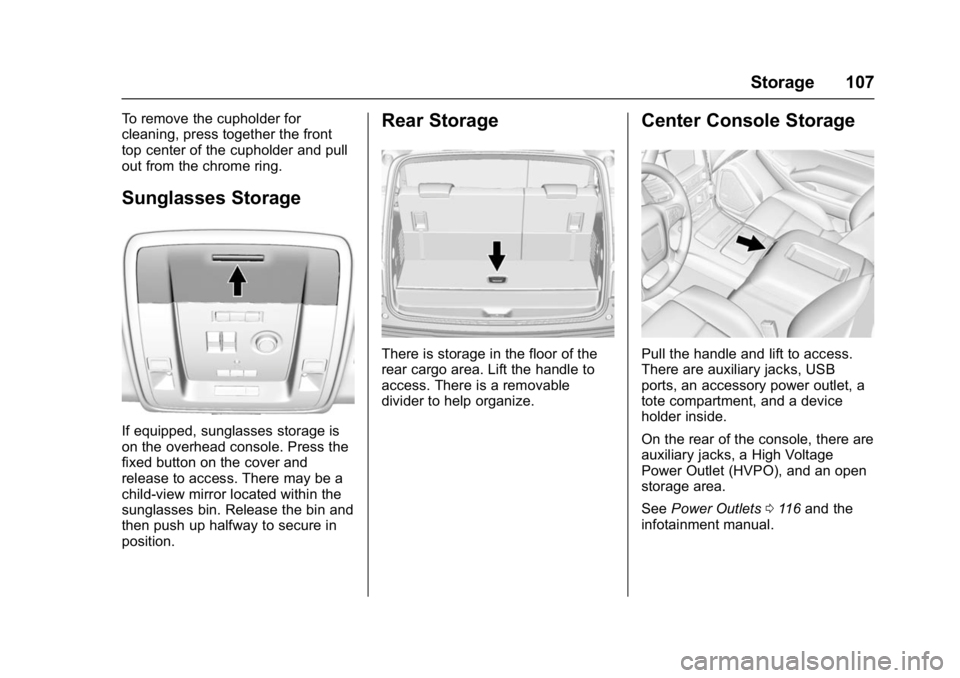
Sunglasses Storage
If equipped, sunglasses storage is
on the overhead console. Press the
fixed button on the cover and
release to access. There may be a
child-view mirror located within the
sunglasses bin. Release the bin and
then push up halfway to secure in
position.
Rear Storage
There is storage in the floor of the
rear cargo area. Lift the handle to
access. There is a removable
divider to help organize.
Center Console Storage
Pull the handle and lift to access.
There are auxiliary jacks, USB
ports, an accessory power outlet, a
tote compartment, and a device
holder inside.
On the rear of the console, there are
auxiliary jacks, a High Voltage
Power Outlet (HVPO), and an open
storage area.
SeePower Outlets 0116 and the
infotainment manual.
Page 117 of 396
GMC Yukon Denali/Yukon XL Denali Owner Manual (GMNA-Localizing-U.S./
Canada/Mexico-9159308) - 2016 - crc - 6/2/15
116 Instruments and Controls
To set the clock display:1. Touch SETTINGS on the Home Page, then touch Time
and Date.
2. Touch Clock Display, then touch OFF or ON to turn the
clock display off or on.
3. Touch
}to go back to the
previous menu.
Power Outlets
Power Outlets 12 Volt Direct
Current
Accessory power outlets can be
used to plug in electrical equipment,
such as a cell phone, MP3
player, etc.
The vehicle may have up to five
accessory power outlets:
Vehicles with a Center Console
. One in front of the cupholders on
the center console.
. One inside the center storage
console.
. One on the rear of the center
storage console. .
One in the third row seat on the
driver side.
. One in the rear cargo area on
the passenger side.
Vehicles with Bench Seats
. One on the center stack below
the climate control system.
. One in the storage area on the
bench seat.
. One on the rear of the center
armrest storage.
. One in the third row seat area on
the driver side.
. One in the rear cargo area on
the passenger side.
Lift the cover to access and replace
when not in use.
The accessory power outlets are
powered as follows:
. The power outlet near the
cupholders for vehicles with a
center console or on the center
stack for vehicles with bench
seats, can be configured to
operate using Retained
Accessory Power (RAP) or battery power modes. If these
power outlets are used while in
the battery power mode, this
could cause interference
between the Remote Keyless
Entry (RKE) transmitter and the
vehicle, and the vehicle may not
start. See
Ignition Positions
0 199.
. The power outlets in the third
row seat area or in the rear
cargo area are powered at all
times. The power outlets inside
the storage area, on the rear of
the console, or on the bench
seat are only powered when the
ignition is in ON/RUN or ACC/
ACCESSORY, or when RAP is
active.
{Warning
Power is always supplied to the
outlet, if configured accordingly.
Do not leave electrical equipment
plugged in when the vehicle is not
in use because the vehicle could
catch fire and cause injury or
death.
Page 118 of 396
GMC Yukon Denali/Yukon XL Denali Owner Manual (GMNA-Localizing-U.S./
Canada/Mexico-9159308) - 2016 - crc - 6/2/15
Instruments and Controls 117
Caution
Leaving electrical equipment
plugged in for an extended period
of time while the ignition is in
LOCK/OFF will drain the battery.
Always unplug electrical
equipment when not in use and
do not plug in equipment that
exceeds the maximum 15 ampere
rating.
Certain power accessory plugs may
not be compatible with the
accessory power outlet and could
overload vehicle or adapter fuses.
If a problem is experienced, see
your dealer.
When adding electrical equipment,
be sure to follow the proper
installation instructions included with
the equipment. See Add-On
Electrical Equipment 0259.
Caution
Hanging heavy equipment from
the power outlet can cause
damage not covered by the
vehicle warranty. The power
outlets are designed for
accessory power plugs only, such
as cell phone charge cords.
Power Outlet 110/120 Volt
Alternating Current
If equipped with this power outlet, it
can be used to plug in electrical
equipment that uses a maximum
limit of 150 watts.
For vehicles with a center console,
the 110/120 volt power outlet is on
the rear of the center console.
For vehicles with bench seats, the
110/120 volt power outlet is on the
center stack below the climate
controls. An indicator light on the outlet turns
on to show it is in use. The light
comes on when the ignition is in
ON/RUN, equipment requiring less
than 150 watts is plugged into the
outlet, and no system fault is
detected.
The indicator light does not come on
when the ignition is in LOCK/OFF or
if the equipment is not fully seated
into the outlet.
If equipment is connected using
more than 150 watts or a system
fault is detected, a protection circuit
shuts off the power supply and the
indicator light turns off. To reset the
circuit, unplug the item and plug it
back in or turn the ignition off and
then back to ON/RUN. The power
restarts when equipment using 150
watts or less is plugged into the
outlet and a system fault is not
detected.
Page 119 of 396

GMC Yukon Denali/Yukon XL Denali Owner Manual (GMNA-Localizing-U.S./
Canada/Mexico-9159308) - 2016 - crc - 6/2/15
118 Instruments and Controls
The power outlet is not designed for
the following, and may not work
properly if they are plugged in:
.Equipment with high initial peak
wattage, such as
compressor-driven refrigerators
and electric power tools.
. Other equipment requiring an
extremely stable power supply,
such as
microcomputer-controlled
electric blankets and touch
sensor lamps.
. Medical equipment.
Wireless Charging
The vehicle may have wireless
charging on top of the center
console. See Center Console
Storage 0107. The system
wirelessly charges one PMA or Qi
compatible mobile device. To check
for phone or other device
compatibility, see
www.gmtotalconnect.com.
{Warning
Wireless charging can affect the
operation of an implanted
pacemaker or other medical
devices. If you have one, it is
recommended to consult with
your doctor before using the
wireless charging system.
The vehicle must be in ON/RUN,
ACC/ACCESSORY, or Retained
Accessory Power (RAP). The
wireless charging feature may not
correctly indicate charging when the
vehicle is in RAP. See Retained
Accessory Power (RAP) 0203.
The operating temperature is −20 °C
(−4 °F) to 60 °C (140 °F) for the
charging system and 0 °C (32 °F) to
35 °C (95 °F) for the phone.
{Warning
Remove all metal objects from the
charging pad before charging
your mobile device. Metal objects,
(Continued)
Warning (Continued)
such as coins, keys, rings,
or paper clips, between the phone
and charging pad will become
very hot. On the rare occasion
that the charging system does not
detect a metal object, and the
object gets wedged between the
phone and charger, remove the
phone and allow the metallic
object to cool before removing it
from the charging pad, to prevent
burns.
Page 128 of 396

GMC Yukon Denali/Yukon XL Denali Owner Manual (GMNA-Localizing-U.S./
Canada/Mexico-9159308) - 2016 - crc - 6/2/15
Instruments and Controls 127
passenger remains or becomes
unbuckled while the vehicle is
moving.
If the passenger safety belt is
buckled, neither the chime nor the
light comes on.
The front passenger safety belt
reminder light and chime may turn
on if an object is put on the seat
such as a briefcase, handbag,
grocery bag, laptop, or other
electronic device. To turn off the
reminder light and/or chime, remove
the object from the seat or buckle
the safety belt.
Airbag Readiness Light
This light shows if there is an
electrical problem with the airbag
system. The system check includes
the airbag sensor(s), passenger
sensing system (if equipped), the
pretensioners, the airbag modules,
the wiring, and the crash sensing
and diagnostic module. For more
information on the airbag system,
seeAirbag System 073.
The airbag readiness light comes on
for several seconds when the
vehicle is started. If the light does
not come on then, have it fixed
immediately.
{Warning
If the airbag readiness light stays
on after the vehicle is started or
comes on while driving, it means
the airbag system might not be
working properly. The airbags in
the vehicle might not inflate in a
crash, or they could even inflate
without a crash. To help avoid
injury, have the vehicle serviced
right away. If there is a problem with the airbag
system, a Driver Information Center
(DIC) message may also come on.
See
Airbag System Messages
0 151.
Passenger Airbag Status
Indicator
The vehicle has a passenger
sensing system. See Passenger
Sensing System 080 for important
safety information. The passenger
airbag status indicator is in the
overhead console.
United States
Page 179 of 396
GMC Yukon Denali/Yukon XL Denali Owner Manual (GMNA-Localizing-U.S./
Canada/Mexico-9159308) - 2016 - crc - 6/2/15
178 Climate Controls
the side of the vehicle facing the
sun. The recirculation mode will also
be used as needed to maintain cool
outlet temperatures.
Rear Climate Control
System
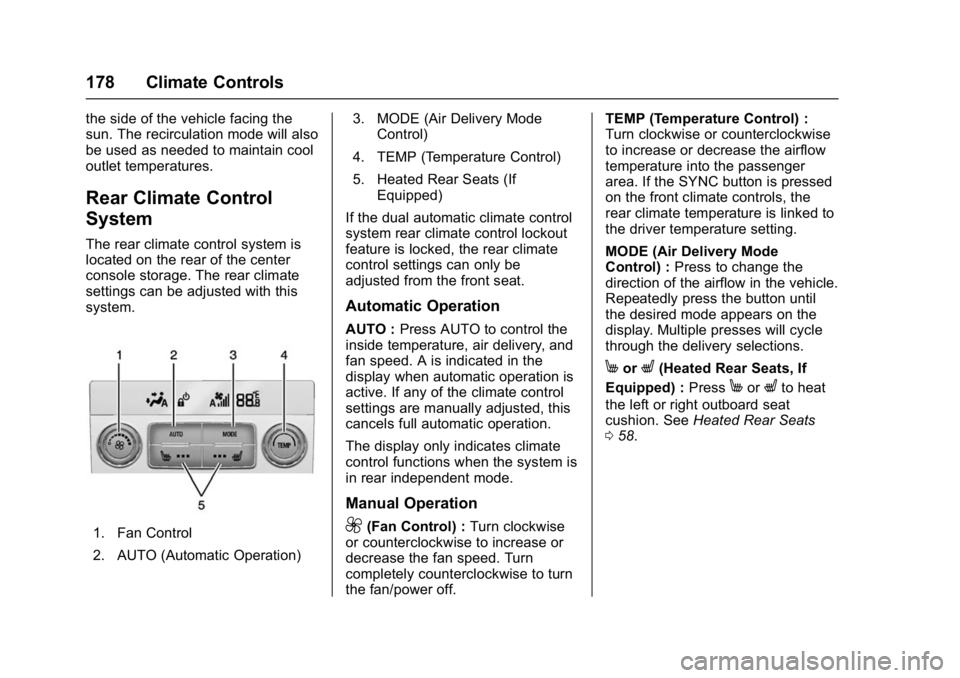
The rear climate control system is
located on the rear of the center
console storage. The rear climate
settings can be adjusted with this
system.
1. Fan Control
2. AUTO (Automatic Operation)3. MODE (Air Delivery Mode
Control)
4. TEMP (Temperature Control)
5. Heated Rear Seats (If Equipped)
If the dual automatic climate control
system rear climate control lockout
feature is locked, the rear climate
control settings can only be
adjusted from the front seat.
Automatic Operation
AUTO : Press AUTO to control the
inside temperature, air delivery, and
fan speed. A is indicated in the
display when automatic operation is
active. If any of the climate control
settings are manually adjusted, this
cancels full automatic operation.
The display only indicates climate
control functions when the system is
in rear independent mode.
Manual Operation
9(Fan Control) : Turn clockwise
or counterclockwise to increase or
decrease the fan speed. Turn
completely counterclockwise to turn
the fan/power off. TEMP (Temperature Control) :
Turn clockwise or counterclockwise
to increase or decrease the airflow
temperature into the passenger
area. If the SYNC button is pressed
on the front climate controls, the
rear climate temperature is linked to
the driver temperature setting.
MODE (Air Delivery Mode
Control) :
Press to change the
direction of the airflow in the vehicle.
Repeatedly press the button until
the desired mode appears on the
display. Multiple presses will cycle
through the delivery selections.
MorL(Heated Rear Seats, If
Equipped) : Press
MorLto heat
the left or right outboard seat
cushion. See Heated Rear Seats
0 58.
Page 204 of 396
GMC Yukon Denali/Yukon XL Denali Owner Manual (GMNA-Localizing-U.S./
Canada/Mexico-9159308) - 2016 - crc - 6/2/15
Driving and Operating 203
Warning (Continued)
vehicle. Possible heater
cord and thermostat
damage could occur.
. While in use, do not let the
heater cord touch vehicle
parts or sharp edges. Never
close the hood on the
heater cord.
. Before starting the vehicle,
unplug the cord, reattach
the cover to the plug, and
securely fasten the cord.
Keep the cord away from
any moving parts.
4. Before starting the engine, be sure to unplug and store the
cord as it was before to keep it
away from moving engine
parts. If you do not, it could be
damaged.
The length of time the heater should
remain plugged in depends on
several factors. Ask a dealer in the
area where you will be parking the
vehicle for the best advice on this.
Retained Accessory
Power (RAP)
The following vehicle accessories
can be used for up to 10 minutes
after the engine is turned off:
. Audio System
. Power Windows
. OnStar System (if equipped)
. Sunroof (if equipped)
. Accessory Power Outlets. The
console and center seat outlets
are RAP powered.
These features work when the key
is in ON/RUN or ACC/
ACCESSORY. Once the key is
turned from ON/RUN to LOCK/OFF,
the windows and sunroof continue
to work up to 10 minutes until any
door is opened. The radio continues
to work for up to 10 minutes or until
the driver door is opened.
Shifting Into Park
{Warning
It can be dangerous to get out of
the vehicle if the shift lever is not
fully in P (Park) with the parking
brake firmly set. The vehicle can
roll. If you have left the engine
running, the vehicle can move
suddenly. You or others could be
injured. To be sure the vehicle will
not move, even when you are on
fairly level ground, use the steps
that follow. If the vehicle has a
four-wheel drive transfer case
with a N (Neutral) position, and
the transfer case is in N (Neutral),
the vehicle will be free to roll,
even if the shift lever is in
P (Park). Be sure the transfer
case is in a drive gear. If towing a
trailer, see Driving Characteristics
and Towing Tips 0246.
1. Hold the brake pedal down, then set the parking brake.
See Parking Brake 0217.
Page 386 of 396

GMC Yukon Denali/Yukon XL Denali Owner Manual (GMNA-Localizing-U.S./
Canada/Mexico-9159308) - 2016 - crc - 6/2/15
Index 385
Assistance Systems forParking and Backing . . . . . . . . . . 231
Automatic Dimming Mirrors . . . . . . . . . . . . . . . . 45
Door Locks . . . . . . . . . . . . . . . . . . . . . 35
Headlamp System . . . . . . . . . . . . 167
Level Control . . . . . . . . . . . . . . . . . 221
Transmission . . . . . . . . . . . . . . . . . 207
Transmission Fluid . . . . . . . . . . . 268
Automatic Transmission Manual Mode . . . . . . . . . . . . . . . . . 209
Shift Lock Control Function
Check . . . . . . . . . . . . . . . . . . . . . . . 282
Axle, Front . . . . . . . . . . . . . . . . . . . . . . 279
Axle, Rear . . . . . . . . . . . . . . . . . . . . . . 280
B
Battery Load Management . . . . . . . . . . . . 171
Power Protection . . . . . . . . . . . . . 172
Voltage and ChargingMessages . . . . . . . . . . . . . . . . . . . 143
Battery - North America . . . . 278, 326
Blade Replacement, Wiper . . . . . 282
Blind Spot Mirrors . . . . . . . . . . . . . . . 45
Brake Pedal and AdjustableThrottle . . . . . . . . . . . . . . . . . . . . . . 198
System Warning Light . . . . . . . . 130 Brakes . . . . . . . . . . . . . . . . . . . . . . . . . . 276
Antilock . . . . . . . . . . . . . . . . . . . . . . . 216
Assist . . . . . . . . . . . . . . . . . . . . . . . . . 217
Fluid . . . . . . . . . . . . . . . . . . . . . . . . . . 277
Parking . . . . . . . . . . . . . . . . . . . . . . . 217
System Messages . . . . . . . . . . . . 144
Braking . . . . . . . . . . . . . . . . . . . . . . . . . 183
Break-In, New Vehicle . . . . . . . . . . 198
Bulb Replacement . . . . . . . . . . . . . . 287
Back-up Lamps . . . . . . . . . . . . . . . 285
Fog Lamps . . . . . . . . . . . . . . 169, 285
Headlamp Aiming . . . . . . . . . . . . . 284
Headlamps . . . . . . . . . . . . . . . . . . . 284
High Intensity Discharge(HID) Lighting . . . . . . . . . . . . . . . 284
License Plate Lamps . . . . . . . . . 286
Buying New Tires . . . . . . . . . . . . . . . 311
C
Calibration . . . . . . . . . . . . . . . . . . . . . . 114
California Fuel Requirements . . . . . . . . . . . 243
Perchlorate MaterialsRequirements . . . . . . . . . . . . . . . 261
California Proposition
65 Warning . . . . . . . . . .261, 278, 326
Canadian Vehicle Owners . . . . . . . . 2 Capacities and
Specifications . . . . . . . . . . . . . . . . . 358
Carbon Monoxide Engine Exhaust . . . . . . . . . . . . . . . 206
Liftgate . . . . . . . . . . . . . . . . . . . . . . . . . 36
Winter Driving . . . . . . . . . . . . . . . . 191
Cargo
Cover . . . . . . . . . . . . . . . . . . . . . . . . . 108
Tie-Downs . . . . . . . . . . . . . . . . . . . . 108
Caution, Danger, and Warning . . . . 3
Center Console Storage . . . . . . . . 107
Chains, Tire . . . . . . . . . . . . . . . . . . . . 316
Charging Wireless . . . . . . . . . . . . . . . . . . . . . . .118
Charging System Light . . . . . . . . . 128
Check Malfunction IndicatorEngine Light . . . . . . . . . . . . . . . . 129
Child Restraints Infants and Young Children . . . . . 87
Lower Anchors and Tethersfor Children . . . . . . . . . . . . . . . . . . . 92
Older Children . . . . . . . . . . . . . . . . . . 86
Securing . . . . . . . . . . . . . . . . . 100, 103
Systems . . . . . . . . . . . . . . . . . . . . . . . . 90
Child-View Mirror . . . . . . . . . . . . . . . . 47
Cleaning Exterior Care . . . . . . . . . . . . . . . . . 334
Page 394 of 396

GMC Yukon Denali/Yukon XL Denali Owner Manual (GMNA-Localizing-U.S./
Canada/Mexico-9159308) - 2016 - crc - 6/2/15
Index 393
ShiftingInto Park . . . . . . . . . . . . . . . . . . . . . . 203
Out of Park . . . . . . . . . . . . . . . . . . . 204
Side Blind Zone Alert (SBZA) . . . 238
Signals, Turn and Lane-Change . . . . . . . . . . . . . . . . . 168
Special Application Services . . . . 350
Specifications and
Capacities . . . . . . . . . . . . . . . . . . . . . 358
Speedometer . . . . . . . . . . . . . . . . . . . 122
StabiliTrak OFF Light . . . . . . . . . . . . . . . . . . . . . 133
Start Assist, Hills . . . . . . . . . . . . . . . 218
Start Vehicle, Remote . . . . . . . . . . . 33
Starter Switch Check . . . . . . . . . . . 281
Starting the Engine . . . . . . . . . . . . . 201
Starting the Vehicle Messages . . . . . . . . . . . . . . . . . . . . . 151
Steering . . . . . . . . . . . . . . . . . . . . . . . . 184 Heated Wheel . . . . . . . . . . . . . . . . . 111
Wheel Adjustment . . . . . . . . . . . . . 111
Wheel Controls . . . . . . . . . . . . . . . . 111
Steering System Messages . . . . . 151
Steps Power Assist . . . . . . . . . . . . . . . . . . . 40
Storage Rear . . . . . . . . . . . . . . . . . . . . . . . . . . 107 Storage Areas
Cargo Cover . . . . . . . . . . . . . . . . . . 108
Center Console . . . . . . . . . . . . . . . 107
Convenience Net . . . . . . . . . . . . . 108
Glove Box . . . . . . . . . . . . . . . . . . . . 106
Instrument Panel . . . . . . . . . . . . . 106
Roof Rack System . . . . . . . . . . . . 109
Sunglasses . . . . . . . . . . . . . . . . . . . 107
Storage Compartments . . . . . . . . . 106
Stuck Vehicle . . . . . . . . . . . . . . . . . . . 192
Sun Visors . . . . . . . . . . . . . . . . . . . . . . . 49
Sunglass Storage . . . . . . . . . . . . . . . 107
Sunroof . . . . . . . . . . . . . . . . . . . . . . . . . . 50
Symbols . . . . . . . . . . . . . . . . . . . . . . . . . . 3
System Forward Collision
Alert (FCA) . . . . . . . . . . . . . . . . . . 234
Infotainment . . . . . . . . . . . . . 173, 373
Noise Control . . . . . . . . . . . . . . . . . 280
Roof Rack . . . . . . . . . . . . . . . . . . . . 109
Systems
Driver Assistance . . . . . . . . . . . . . 231
T
Tachometer . . . . . . . . . . . . . . . . . . . . . 122
Text Telephone (TTY) Users . . . . 363
Theft-Deterrent Systems . . . . . . . . . 43Immobilizer . . . . . . . . . . . . . . . . . . . . . 43
Third-Row Seats . . . . . . . . . . . . . . . . . 63 Throttle, Adjustable . . . . . . . . . . . . . 198
Time . . . . . . . . . . . . . . . . . . . . . . . . . . . . 115
Tires . . . . . . . . . . . . . . . . . . . . . . . . . . . . 297
All-Season . . . . . . . . . . . . . . . . . . . . 298
All-Terrain . . . . . . . . . . . . . . . . . . . . 299
Buying New Tires . . . . . . . . . . . . . .311
Chains . . . . . . . . . . . . . . . . . . . . . . . . 316
Changing . . . . . . . . . . . . . . . . . . . . . 317
Designations . . . . . . . . . . . . . . . . . 300
Different Size . . . . . . . . . . . . . . . . . 313
Full-Size Spare . . . . . . . . . . . . . . . 325
If a Tire Goes Flat . . . . . . . . . . . . 316
Inspection . . . . . . . . . . . . . . . . . . . . 309
Low Profile . . . . . . . . . . . . . . . . . . . 299
Messages . . . . . . . . . . . . . . . . . . . . 152
Pressure . . . . . . . . . . . . . . . . . . . . . . 305
Pressure Light . . . . . . . . . . . . . . . . 134
Pressure Monitor Operation . . 306
Pressure Monitor System . . . . . 305
Rotation . . . . . . . . . . . . . . . . . . . . . . 309
Sidewall Labeling . . . . . . . . . . . . . 299
Terminology and Definitions . . 301
Uniform Tire QualityGrading . . . . . . . . . . . . . . . . . . . . . 313
Wheel Alignment and Tire
Balance . . . . . . . . . . . . . . . . . . . . . 315
Wheel Replacement . . . . . . . . . . 315